All companies are struggling with data analytics. High costs, fragmented solutions, and overly complex tools are creating a crowded data analytics landscape, which makes it hard for companies to piece together services. There are data engineering solutions, data warehousing solutions, and business intelligence solutions, which are all different services and create duplicate data. This, of course, adds to the governance headaches and the companies' cloud costs.
Microsoft Fabric changes all of that. Instead of implementing different solutions for different data services, companies can unify data engineering, data science, real-time analytics, and business intelligence as one platform with Microsoft Fabric.
As a data engineer, analyst, or business leader, you are probably trying to evaluate which Microsoft Modern Analytics platform to choose. In this article, I will break down what Microsoft Fabric is, how it works, what it costs, and whether it's the right fit for your company.
What Is Microsoft Fabric?
Microsoft Fabric is an analytics platform that has SaaS capabilities and provides a seamless experience by integrating multiple data workloads, i.e., Data Engineering, Data Factory, Data Science, Data Warehouse, Real-Time Intelligence, and Power BI, and Data Fabric.
It enables analytics to be done without the need for managing separate Azure services, which would require separate configurations of Azure Synapse Analytics, Azure Data Factory, and Power BI, which Microsoft Fabric integrates. Instead, Microsoft Fabric provides an integration of all of these services with OneLake data sharing.
Microsoft Fabric Architecture
Fabric's architecture is built on three foundational layers:
OneLake: The Unified Data Lake
OneLake is the core of Microsoft Fabric. Every tenant is automatically assigned one OneLake, a single logical data lake that keeps all the company's data in the Delta Parquet storage format.
Why it matters:
No data duplication: All Fabric workloads use the same OneLake storage. This allows for easy access to data across all workloads.
Centralized governance: Unified security, compliance, and access control apply to all data.
Open format support: Built on ADLS Gen2 and is entirely compatible with Azure tools like Databricks.
Shortcut functionality: Access your data in external storage such as S3, ADLS, or Dataverse without transferring it.
OneLake is like OneDrive for your data. It is automatically included, tenant-wide, and available across all Fabric experiences.
Fabric Workloads
Fabric comes with specialized workloads for different roles:
Data Factory: Use over 200 connectors along with Power Query to ingest and transform data.
Data Engineering: Create data pipelines that are based on Apache Spark using notebooks and Spark Job Definitions.
Data Warehouse: SQL-based data warehouses can be created and managed using the native OneLake storage.
Data Science: Built-in MLFlow allows for the training, deployment, and management of ML models.
Real-Time Intelligence: Streaming data from IoT devices, logs, and applications can be analyzed using the Kusto Query Language.
Power BI: Create interactive reports and dashboards using Direct Lake mode for quick and efficient zero-copy analytics.
Platform Services
Fabric is supported by a set of unified platform services:
Copilot: Get AI assistance for writing queries, generating codes, and exploring data.
OneLake Data Hub: Discover, manage, and govern data centrally, powered by Microsoft Purview.
Unified Capacity: Efficiency is enhanced by allowing a single shared pool of computing resources across all workloads.
Key Features of Microsoft Fabric
1. Lakehouse Architecture
Fabric's Lakehouse combines the flexibility of a data lake with the structure of a data warehouse. Data engineers can use one location, queryable via SQL or Spark, to access both lake (raw files, structured tables) and lake house (semi-structured data) data.
Maintenance overhead is reduced because separate lake and warehouse layers are no longer needed.
The same data can be used for both real-time and batch analytics.
For flexibility and consistency, schema-on-read and schema-on-write are supported, respectively.
2. OneLake Shortcuts
Shortcuts enable you to see data located in external storage systems (Azure Data Lake Storage, S3, Snowflake) without the need to copy it. The files and folders are visible locally in OneLake, so you can perform cross-cloud analytics without any issues.
You can use data federated across different business units without data duplication
You can analyze data located in different clouds (AWS, Azure, GCP) in one environment.
You can use data products in a domain of a data mesh architecture.
3. Real-Time Analytics
The Real-time Intelligence workload is one of the components in Microsoft Fabric, and it is responsible for the ingestion, processing, and analysis of streaming data from Azure Event Hubs, IoT Hub, and Kafka.
Fast time-series queries can be done using the KQL Database.
You can use event streams for data ingestion without coding.
Real-Time Hub for discovering and managing streaming data.
4. AI-Powered Copilot
Copilot is embedded in all Microsoft Fabric work to accelerate development.
You can have SQL queries generated in the natural language.
Write Python code for Spark notebooks.
Summarize data insights from Power BI reports.
Automate repetitive data transformation tasks.
5. Unified Governance
Microsoft's Purview is built into Fabric, providing:
Centralized data cataloging and discovery.
Sensitivity labels and access controls.
Data lineage tracking.
Compliance monitoring.
Microsoft Fabric Pricing Explained
Fabric uses a capacity-based pricing model where you purchase Fabric Capacity Units (CUs) that power all workloads.
Capacity Units (CUs)
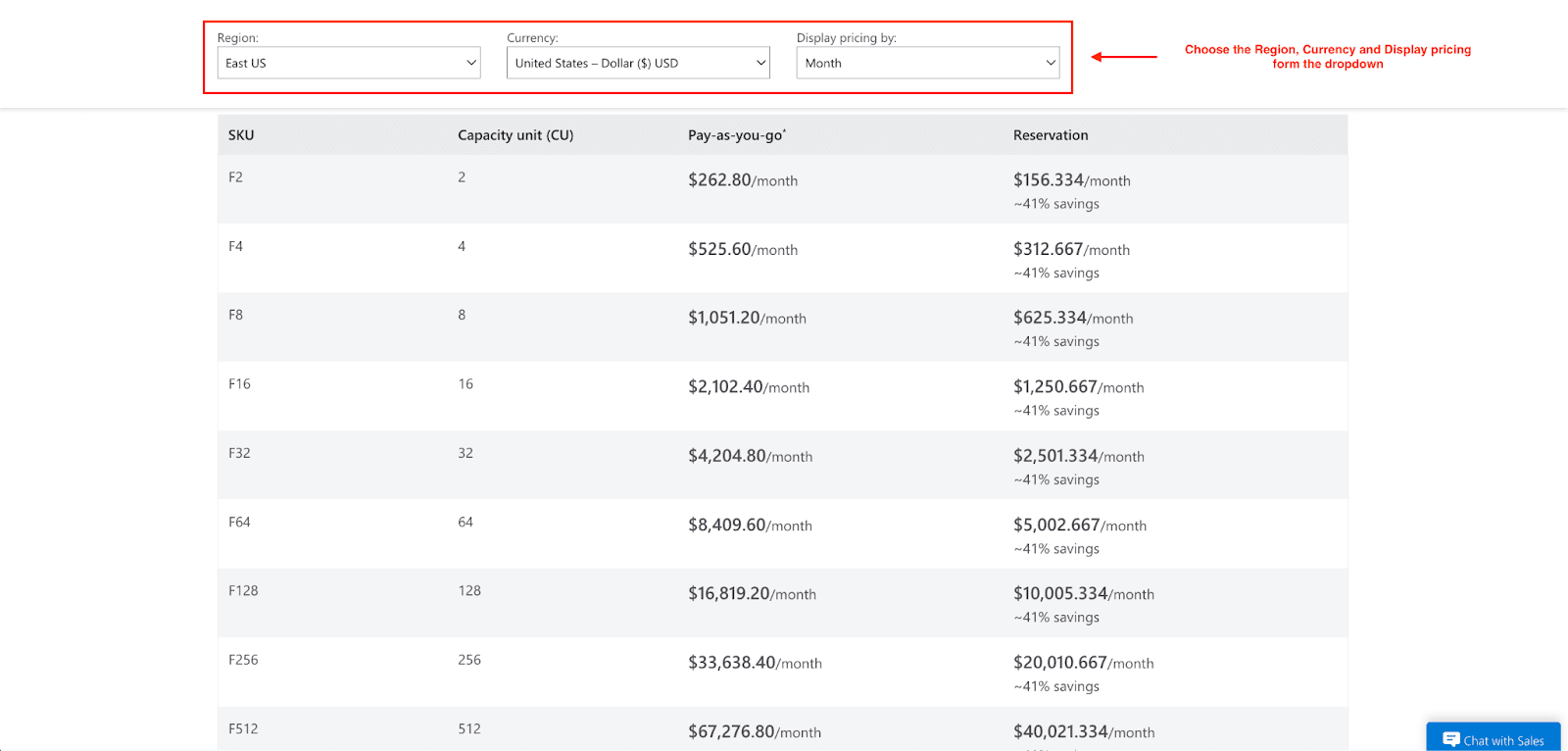
Rather than having to pay for each service, Fabric uses capacity units, which represent the overall compute power across all of your workloads, to provide a more simplified payment structure. These units can be purchased in preset SKUs ranging from F2 to F2048.
Here are a few examples:
F2: For small workloads, starts at $156.33/month (reserved) or $262.80/month (pay-as-you-go).
F64: For more standard enterprise use, starts at $5,002.67/month (reserved) or $8,409.60/month (pay-as-you-go).
F2048: For large-scale workloads, starts at $160,085.334/month (reserved) or $269,107.20/month (pay-as-you-go).
Each CU can be utilized across all workloads; you can be running Spark jobs and performing analytics queries all at the same time in your BI dashboards from the same pool of resources.
OneLake Storage Pricing
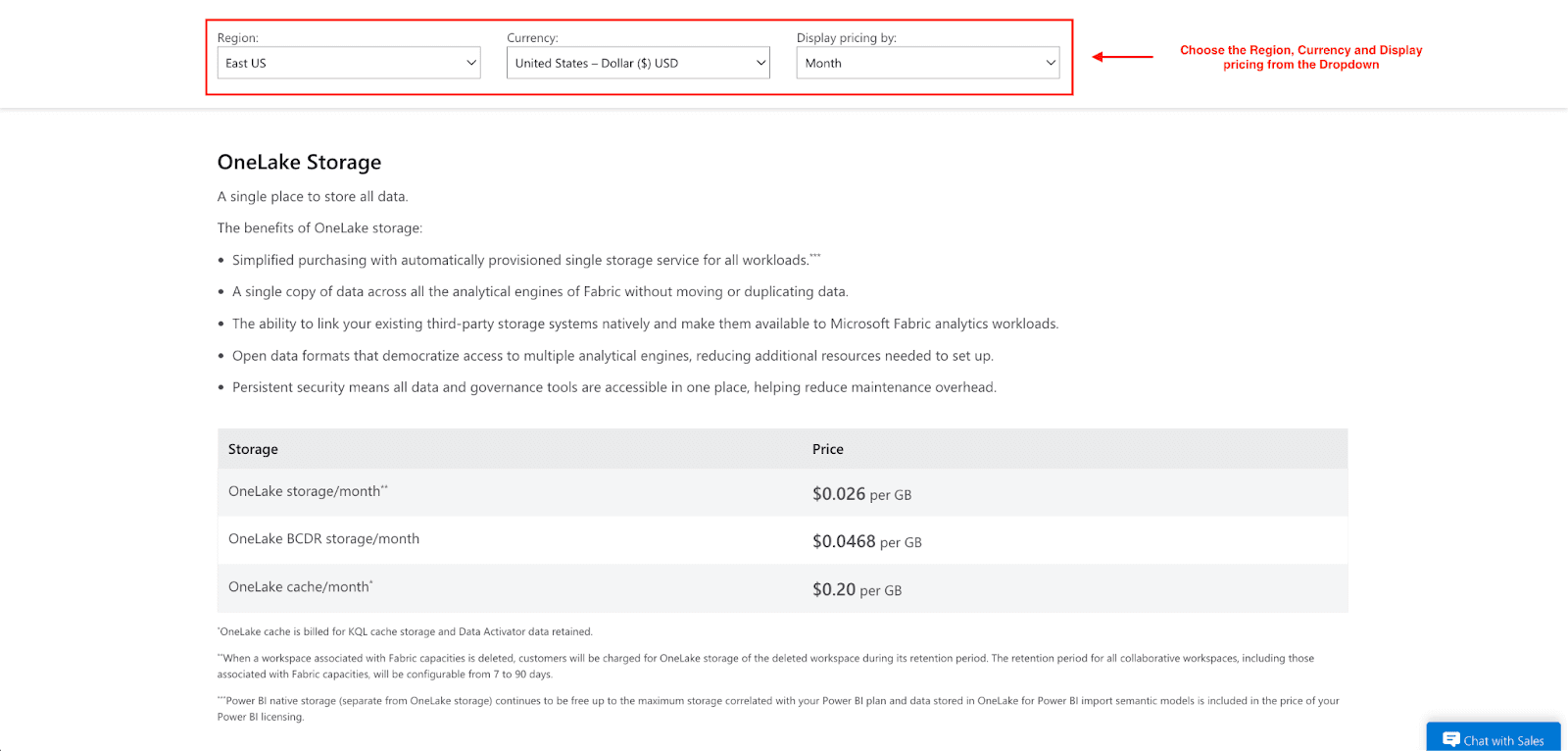
Fabric separates compute from storage, meaning they are billed independently. OneLake storage can be billed utilizing a pay-as-you-go model that is similar to that of the Azure Data Lake Storage at $0.023 per GB per month ($23 per TB per month), based on your location.
Note: the Power BI native storage remains free (within the limits of the plan), and data stored in OneLake for Power BI import models is covered by your Power BI license.
Mirroring Storage
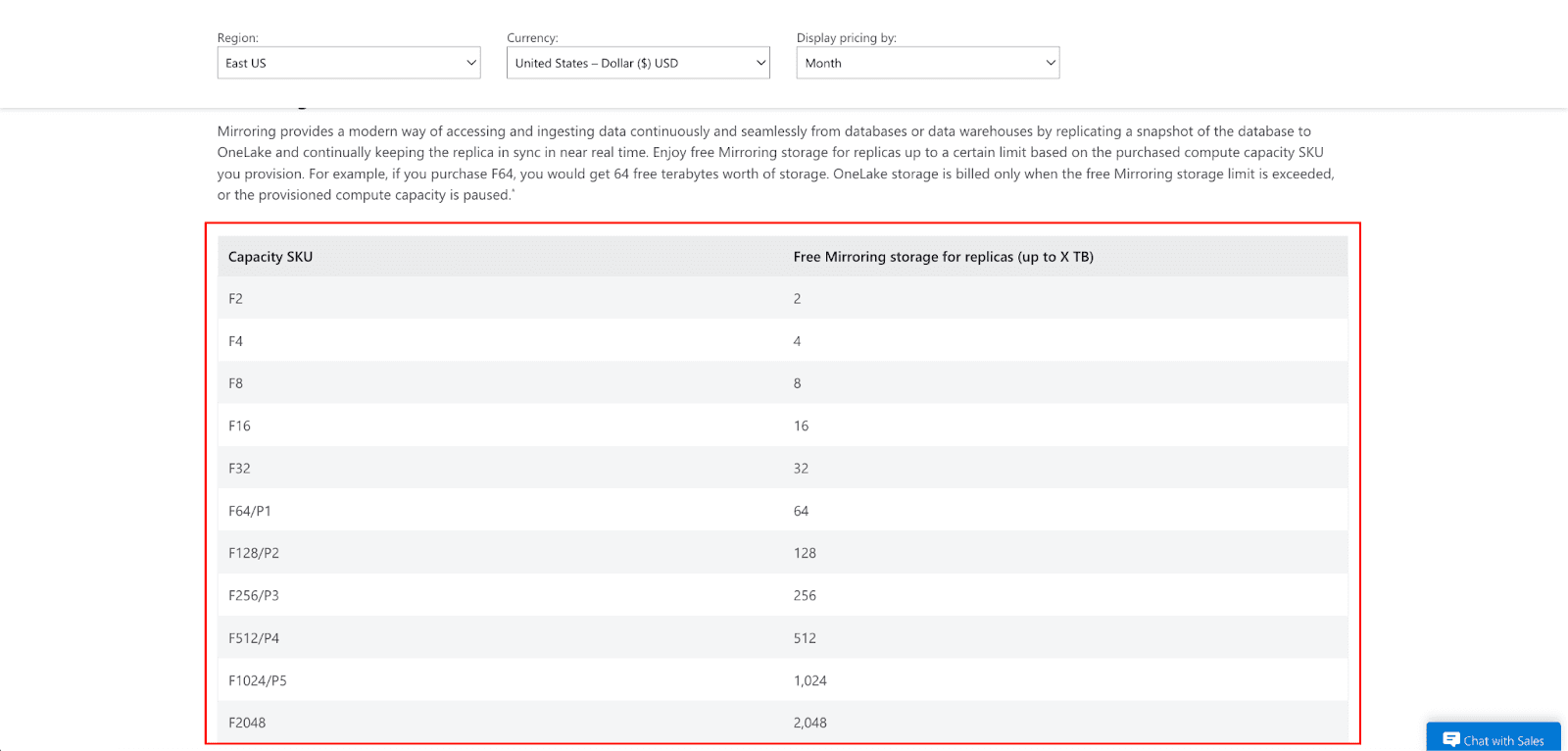
Mirroring Storage is available at zero cost up to a limit based on your capacity SKU. An example is the F64, which has 64 TB of free Mirroring storage for replicated databases (Azure SQL, Cosmos DB, Snowflake).
Cost Optimization Tips
Running Fabric in production? Here’s how to control your costs:
Use Reserved Capacity: Save up to 41% on compute costs by opting for a commitment of one year or three years.
Enable Fabric Capacity Overage: To avoid throttling when demand spikes, enable your capacity to scale automatically.
Monitor Usage: Use the Fabric Capacity Metrics app to monitor your spend.
Pause Capacities: Predictable workloads can be managed by pausing off-peak hours to avoid unnecessary costs.
Use Pump: Automatically optimize your Azure cloud costs and reduce your overall Azure bill (including Fabric capacity and storage) by up to 60% with no engineering effort.
Who Should Use Microsoft Fabric?
Ideal Use Cases
Enterprise data teams: Great for companies with complex analytical requirements, especially those with Azure.
Power BI-heavy companies: Great for teams needing close financial data integration and business intelligence.
Startups scaling fast: Great for companies needing analytics at an enterprise level without employing dedicated infrastructure.
Data mesh adopters: Companies developing a system of centralized, governed, decentralized data products.
When NOT to Use Fabric
Multi-cloud-first strategy: If you are committed to AWS or GCP, Fabric locks you into Azure.
Small, simple workloads: For simple reporting, standalone Power BI might be enough.
Budget constraints: Early-stage startups focused on a low analytics spend may find the capacity minimums too high.
Conclusion
Microsoft Fabric is a huge milestone in the history of analytics. Microsoft Fabric integrates data engineering, data warehousing, data sciences, and business intelligence to offer better data governance and faster time to insight.
Microsoft Fabric represents a strong integration and AI capabilities for Azure and Power BI users. Its capacity pricing model makes workloads and cost planning critical, especially in multi-cloud analytics.
For companies that prioritize ease of use, ecosystem integration, and AI analytics, it is likely that Fabric will be a top choice for 2026.
And remember: cloud cost management matters. Use Pump to AI optimization and group buying discounts to reduce spend. A $100/month workload, for example, could see 40% savings, bringing it down to around $60/month depending on usage. That means lower Azure and Fabric capacity costs without added engineering effort.
FAQs
Is Microsoft Fabric replacing Azure Synapse?
No, Microsoft is still supporting Synapse Analytics. Fabric is next-generation technology that is a unified platform, but Synapse is still a fit for companies that need more granular PaaS control.
Is Microsoft Fabric SaaS or PaaS?
Microsoft Fabric is SaaS because it includes the managed infrastructure, the updates, and the operational overheads. Synapse, on the other hand, is PaaS.
Does Microsoft Fabric include Power BI?
Yes, Power BI is included in Fabric as a core workload. This means that users who need to publish and share dashboards are required to have Power BI Pro licenses.