

As a cloud cost optimization expert, I’ve seen firsthand how data analytics costs can spiral out of control. Azure Synapse Analytics, Microsoft's powerful enterprise analytics service, offers incredible capabilities but comes with a pricing structure that many find confusing. My clients often come to me with unexpected bills and inefficient spending.
If you're struggling to understand your Azure Synapse costs or want to find ways to reduce your bill, I'm here to help. In this guide, I'll break down the entire Azure Synapse pricing model, expose the hidden costs I've encountered, and share the actionable strategies I use to help businesses optimize their spending and maximize their return on investment.
What is Azure Synapse Analytics?
Azure Synapse Analytics is an all-in-one cloud analytics solution designed to break down silos by uniting warehousing, big data processing, and real-time analytics into a seamless experience. Built using enterprise-grade SQL, scalable Apache Spark, and focused time-series technology from Data Explorer, it empowers users to explore data without compromise.
Key features include:
Dedicated SQL pools for consistent, high-performance workloads and serverless SQL pools for immediate, pay-as-you-go queries.
Apache Spark pools that serve data engineering, ETL, and machine learning projects, all managed and optimized within a single environment.
Built-in data integration workflows that parallel Azure Data Factory, enabling users to design sophisticated ETL and ELT pipelines through a straightforward visual interface.
Deep integration with Azure services, including Power BI for interactive reporting, Azure Data Lake for storage, and Azure Machine Learning for advanced analytics.
Azure Synapse Analytics gives companies the ability to effortlessly scale, obtain real-time, actionable insights, and stay agile in the face of shifting market conditions.
Why Synapse Pricing Matters
Managing your Azure Synapse budget hinges on understanding how its pricing really works. With a pay-as-you-go model and overlapping services, a single miscalculation can balloon your bill before you notice. Many customers face “bill shock” simply because their original estimate failed to account for how quickly workloads sometimes scale.
Cutting Synapse costs translates directly into a superior ROI. Suppose you're facing a planned $10,000 Synapse monthly charge. With diligent tuning, the same workload could settle for $8,700, unlocking a monthly saving of $1,300 and an annual bonus of $15,600. Those numbers compound at the pace your datasets and queries grow.
Complexity starts with distinct charging mechanisms. Dedicated SQL pools charge Data Warehouse Units; serverless queries deduct per terabyte scanned; and Apache Spark pools assess you by vCore utilization. Without a clear understanding, even small tweaks can lead to unintentional cost overruns.
Leverage transparency to prioritize the right workloads at the right times. By pinpointing which service tier and resource type drives the most expense, you can schedule serverless capabilities, rewrite a Spark job, and hunt for underutilized options, using budget firmly to guide the architecture you build.
How Azure Synapse Analytics Pricing Works
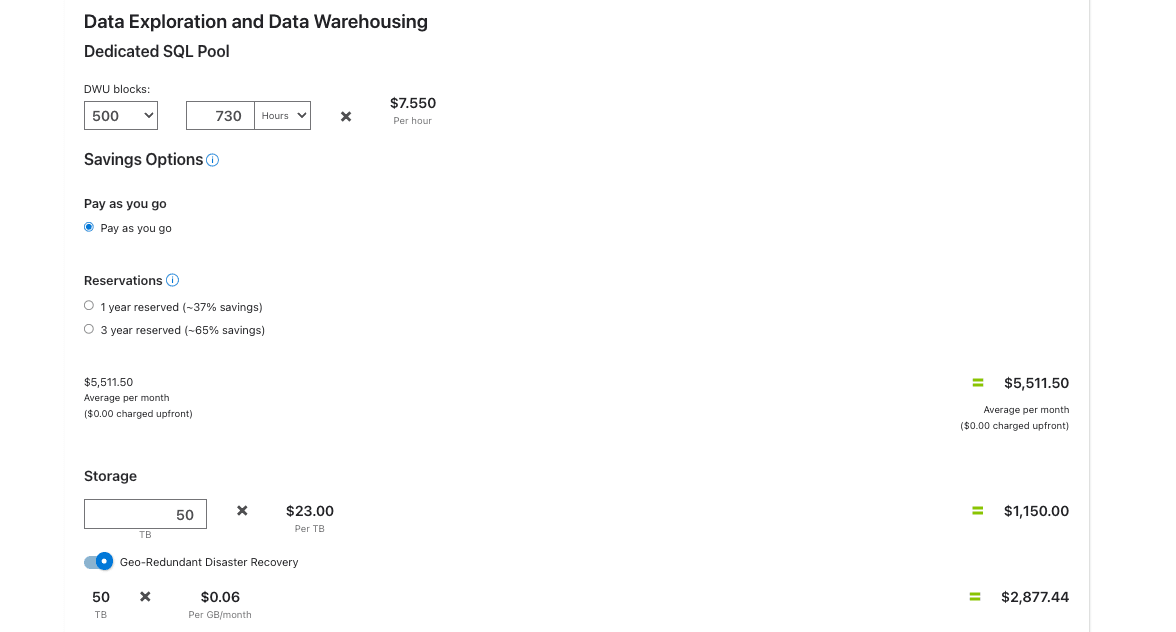
Azure Synapse Analytics uses a consumption-based pricing model, so you pay only for what you actually utilize, but your overall spend is tied to several interrelated pricing factors, each outlined below:
Compute Costs: This usually forms the bulk of the invoice. For dedicated SQL pools, you pay fixed monthly costs per provisioned Data Warehouse Unit, while serverless SQL pool costs accrue at a per-terabyte basis, dependent on the amount of data scanned. Any workloads running in Spark pools incur charges based on per-core hour aggregates.
Storage Costs: This applies to the amount of data you keep both in Azure Data Lake storage and directly inside the dedicated Synapse workspace.
Data Integration Costs: These costs cover pipeline management and Celts data transfer among SQL pools. Your costs come from activity run counts, Data Integration Unit usage for data copy tasks, and vCore consumption for data flow runs and debugging. Additionally, Spark pools, Data Explorer compute hours, and optional pay-per-use features like geo-redundant disaster recovery are billed at separate costs.
Azure Synapse Cost Breakdown
To effectively manage your Synapse costs, you need to understand how each component is priced. Let's look at the specifics.
Dedicated SQL Pool Pricing
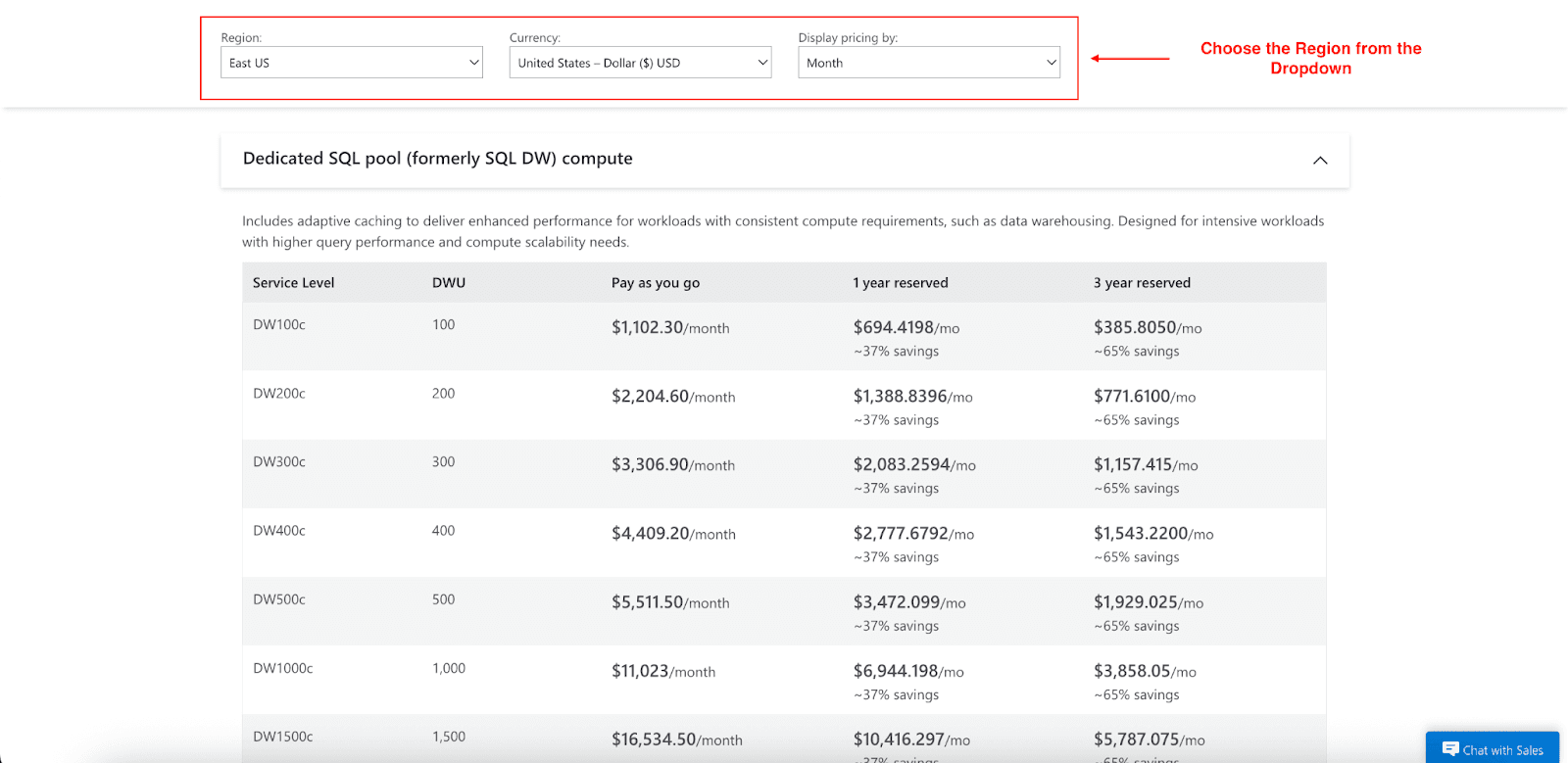
Dedicated SQL pools serve predictable, high-performance workloads. Charges are based on Data Warehouse Units, which bundle compute resources including CPU, memory, and I/O:
Pay-As-You-Go: An hourly fee applies for DWUs provisioned. A DW100c provisioned instance costs about $1,102.30 per month; DW1000c costs about $11,023 per month. The pay-as-you-go option offers flexibility, scale, or pause resources on demand.
Reserved Capacity: For predictable workloads, you can purchase reserved capacity. Commit for one year for about 37% savings relative to pay-as-you-go, or three years for about 65% savings. For example, DW100c capacity costs are $694.42 monthly on an annual reservation, compared to $1,102.30 monthly on the pay-as-you-go model. On a 3-year reservation, the same DW100c costs about $385.81 monthly.
Serverless SQL Pool Pricing
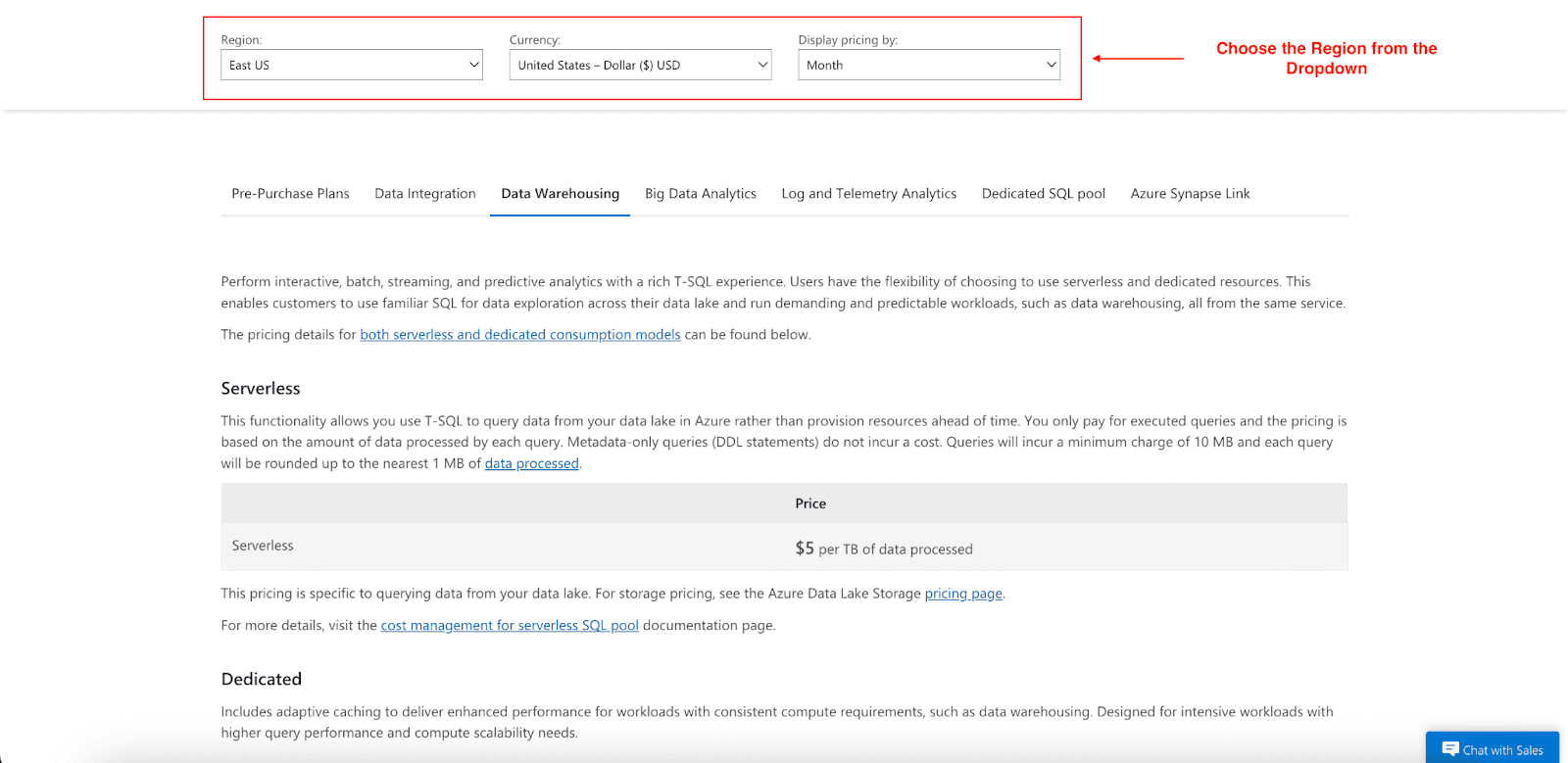
Serverless SQL pools handle sporadic ad-hoc queries, meaning no need to manage or provision compute in advance. Charges apply to the data processed in each query, measured in terabytes:
Each terabyte processed on a query costs you $5, so it’s an especially affordable choice for on-the-fly runs you plan to call only once in a while, or for datasets that don’t require ultra-fast turnaround. The pricing treats burst or relaxed workloads with a clear, fixed line.
A per-query minimum of 10 MB kicks in, so smaller scans still carry a base cost.
Data processed is rounded up to the nearest 1 MB.
Metadata-only queries (DDL statements) are free.
There are no additional storage costs beyond standard Azure Data Lake rates.
Data Integration Costs
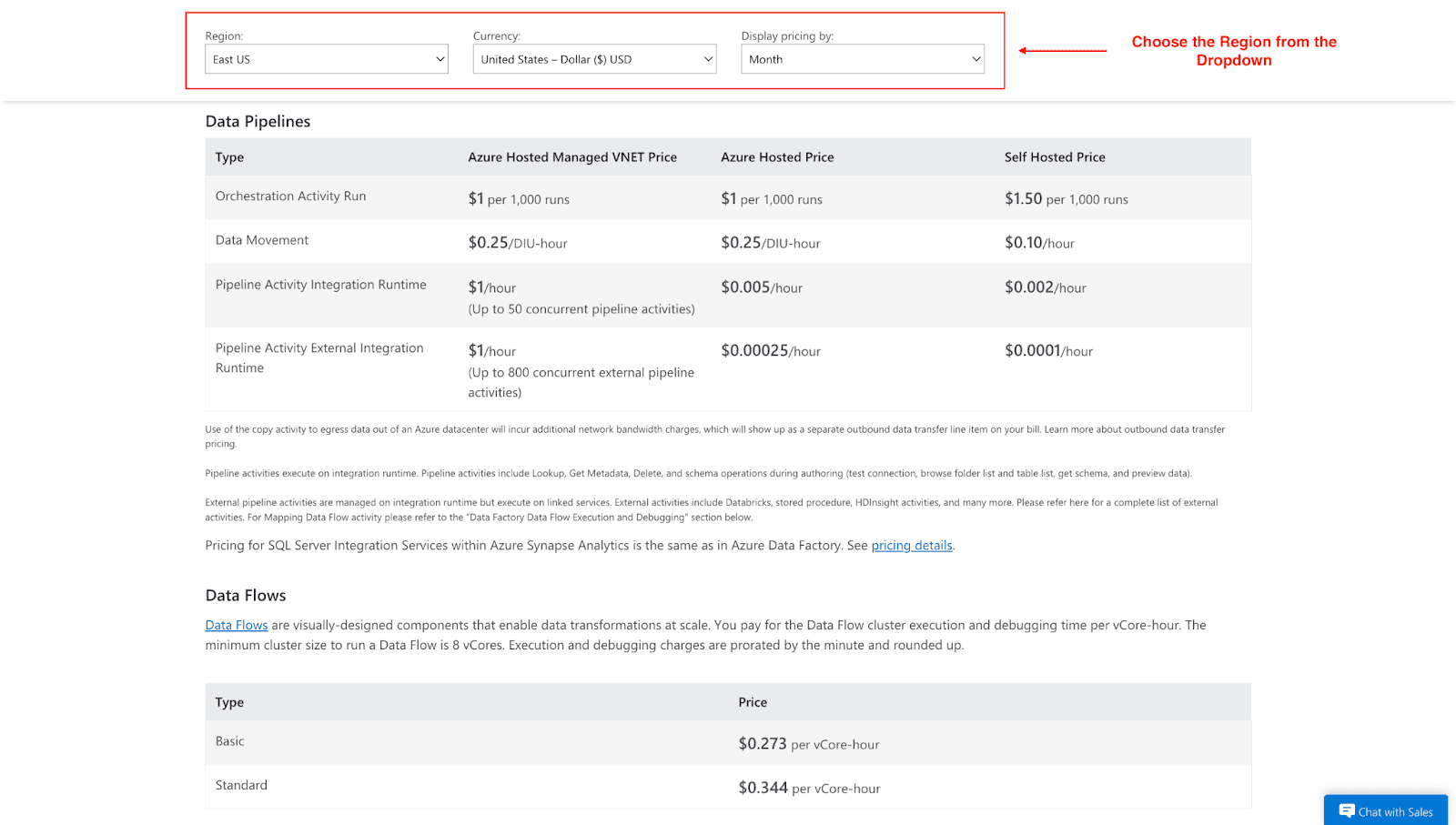
Data Integration pricing encompasses several linked activities performed by your pipelines:
Orchestration: Costs accrue from running activity jobs, executing notebooks, SQL scripts, and the like.
Data Movement: Cost is drawn from the total duration of Data Integration Units consumed during copy tasks.
Data Flows: Incur charges based on your choice of compute SKU, the number of assigned virtual cores, and the total duration spent on transformation workloads.
Comparison: Serverless vs. Dedicated SQL Pools
Feature | Serverless SQL Pool | Dedicated SQL Pool |
Best For | Ad-hoc queries, unpredictable workloads, data exploration. | Enterprise data warehousing, predictable workloads, high-performance analytics. |
Pricing Model | Pay-per-query ($ per TB processed). | Provisioned compute (Pay-per-hour for DWUs). |
Cost Control | Optimize queries to scan less data. | Pause when not in use, scale dynamically, use reserved capacity. |
Performance | Variable, depends on query complexity. | Consistent and predictable performance. |
Common Cost Pitfalls and Hidden Costs
Just because you’ve read the pricing guide doesn’t mean you won’t be surprised by your bill in the next month:
Overprovisioning Dedicated Pools: Companies often provision more resources than needed, picking the highest DWU tier out of caution. A DW1000c, for example, racks up $11,023 a month, whether it’s fully loaded or barely flickering. Always justify the tier you choose, or the empty resources will still empty your budget.
Forgetting to Pause: Dedicated SQL pools never go silent in terms of cost. Leaving a DW500c running, not an uncommon mistake, adds more than $4,000 to the monthly total. Set automatic pause and resume times, or you’ll soon wonder how an idle cluster became your top line item.
Inefficient Queries: In the serverless models, a hideously broad scan burns two resources: compute and your budget. If a poorly indexed scan moves 10 TB of data instead of just the needed 1 TB, you’ll pay for nine additional terabytes, often multiplying your bill by 3, 4, or more.
Cross-Region Data Movement: If you regularly push data to another Azure region or to an external endpoint, the little traffic cost can pile up. Frequent transfers of large partitions and constant region hopping can materialize hundreds, even thousands, in ingest, egress, and operations charges that weren't in your original budget worksheet.
Azure Synapse Pre-Purchase Plans
Azure now lets companies secure Synapse Commit Units by pre-purchasing plans that deliver deep rebates for teams with stable Synapse workloads. These plans work similarly to reserved instances but let you shuffle commitments among different Synapse services without costs.
Discounts for pre-purchase range between 6% and 28%, escalating with larger commitments:
Commitment Level | SCUs | Discount | Annual Cost |
Tier 1 | 5,000 | 6% | $4,700 |
Tier 2 | 10,000 | 8% | $9,200 |
Tier 3 | 24,000 | 11% | $21,360 |
Tier 4 | 60,000 | 16% | $50,400 |
Tier 5 | 150,000 | 22% | $117,000 |
Tier 6 | 360,000 | 28% | $259,200 |
SCUs immediately cover all eligible Synapse services: dedicated SQL pools, serverless SQL pools, Apache Spark pools, data pipelines, and data flows. By spanning all workloads, these plans suit companies with shifting Synapse usage patterns.
Commitments last one year with a one-time, upfront payment. Usage draws down automatically at the retail rate, so you do not have to manage the integration. Companies that spend at least $50,000 per year on Synapse typically unlock the highest savings, making the tiers especially cost-effective for larger teams.
How to Save on Azure Synapse Costs
When it comes to cutting that Azure Synapse cost, these steps deliver the best results:
Use Serverless for Ad-Hoc Workloads: When workloads are unpredictable or infrequent, rely on serverless SQL pools rather than leaving a dedicated pool humming. You’ll pay only for the time the queries are running.
Right-Size and Automate Dedicated Pools: Keep a close watch on dedicated SQL pool usage, scale down to the smallest required size, and then automate the pause of any pool that’s idle.
Leverage Reserved Capacity: If your SQL workloads are steady over the year or beyond, buy a 1- to 3-year commitment on reserved capacity, which reduces the price after a single commitment.
Use the Pre-Purchase Plan: Lock in a one-year pre-purchase of Synapse Commit Units and save up to 28% on core components (storage is excluded.) The discount grows with the size of the commitment.
Optimize Your Queries: Keep serverless queries focused only on necessary fields. Use partitioning and compression to Parquet so that the executed jobs sift through less data.
Monitor with Azure Cost Management: Use tools like Azure Cost Management and Azure Advisor to track spending, set budgets, and receive alerts for cost anomalies.
Cut Azure Synapse Analytics Costs with Pump
Want to cut Azure Synapse costs with zero headaches? We are here to help you save anywhere from 10% to 60% without lifting a finger. Its AI plugs into your cloud account, spots usage patterns, and grabs the best long-term discounts, buying reserved instances in your name. For example, a $100 Azure Synapse bill reduced by 37% means you pay just $63.
Best of all, Pump is free to use.
How Pump optimizes Azure:
AI-driven usage analysis and forecasting
Automated reserved instance discount purchases
Group buying for better volume discounts
Risk-free with a 30-day money-back guarantee
Conclusion
Azure Synapse Analytics is an impressive set of capabilities, yet the complicated pricing shouldn’t stop the full potential from being realized. Understand the various pricing parts, dodge frequent missteps, and apply targeted optimization practices, and you’ll govern the budget while guaranteeing your analytics platform provides its highest possible return.



