Azure Machine Learning is notable as one of the most advanced cloud-based services for the development, training, and deployment of Machine Learning models. It streamlines collaborative efforts of data scientists and engineers to oversee and govern the entire machine learning lifecycle. However, project costs may increase as ML endeavors expand. Learning how to navigate the Azure ML pricing model is fundamental to circumventing budgetary surprises and ascertaining that your investments are both valuable and efficient.
In this article, I will break down and present the various nuances of Azure Machine Learning pricing and costs in the most straightforward manner possible. We will discuss the various elements that increase your bill, clarify essential concepts of pricing, and present pragmatic methodologies to help you control and lessen your costs in Azure ML.
By the end, you will have clear knowledge of how to optimize ML capabilities, without incurring high costs.
What is Azure Machine Learning?
Think of Azure Machine Learning as a complete workshop for your ML projects. It is a cloud-based system that fully supports the complete lifecycle of a machine learning model, from data prep and model training to deployment and continual model management (MLOps). It is meant for businesses and ML teams that have to integrate models into production safely and in an efficient manner.
Cost management with Azure ML is critical because of the potential to have excessive spending. As users begin to scale, so do the costs of training ML models. Additionally, the deployment costs of trained ML models are high. Absent a reasonable strategy, what at first are just minor costs can quickly escalate to high costs.
How Azure Machine Learning Pricing Works
One of the first things to understand is that Azure Machine Learning itself doesn't have a direct service cost. Instead, you pay for the underlying Azure resources that your ML workflows consume. It’s like using a community kitchen; you don't pay to enter, but you do pay for the ingredients and the oven time you use.
Azure ML Pricing is based on a pay-as-you-go model, but there are also discounts available for things like Reserved Instances and Savings Plans, which are benefits available to users with predictable workloads.
Azure ML pricing is supported by several distinct components, which include:
Compute: This is the most substantial cost for users. This includes the virtual machines that are utilized during model training, as well as the VMs that are utilized during model inference.
Storage: You will be billed for the storage of datasets, the storage of the various versions of your models, as well as other project-related files. Azure Blob Storage is typically used for this.
Networking: Costs will also be incurred for the data transfer that occurs between the various Azure regions and for the data transfer involved with your deployed models.
Other Services: Your ML workspace depends on other services within Azure, such as Azure Key Vault (for secrets) and Azure Container Registry (for model images), which have their own distinct, but generally minor, costs.
Key Pricing Concepts Explained
To manage costs effectively, you need to understand the terminology Azure uses. Here’s a quick rundown of the essential concepts and how they impact your bill.
Term | What It Means | Impact on Cost |
Compute Instance | A single, dedicated VM used for development and testing. | A smaller, consistent cost. It's always running while active, so remember to shut it down. |
Compute Cluster | A scalable pool of VMs used for automated training jobs. | This can be your highest cost. Clusters can scale up to thousands of machines for large jobs. |
Spot VMs | Discounted VMs that can be "evicted" if Azure needs the capacity back. | The cheapest option for training, offering savings up to 80%. Ideal for jobs that can tolerate interruptions. |
Reserved Instances | A commitment to use specific VMs for a 1- or 3-year term for a significant discount. | Best for predictable, consistent workloads where you know you'll need the compute power. |
Batch vs. Online Endpoints | The method for deploying models. Batch is for processing data in bulk, while Online is for real-time predictions. | Batch is much cheaper as it runs only when needed. Online endpoints are always-on and incur continuous costs. |
Important update: Microsoft is retiring Low-Priority VMs by 31 March 2026. Spot VMs are now the primary way to get discounted, evictable compute for your training jobs.
A Deep Dive into Your Azure ML Pricing
Let's break down where the costs come from in more detail.
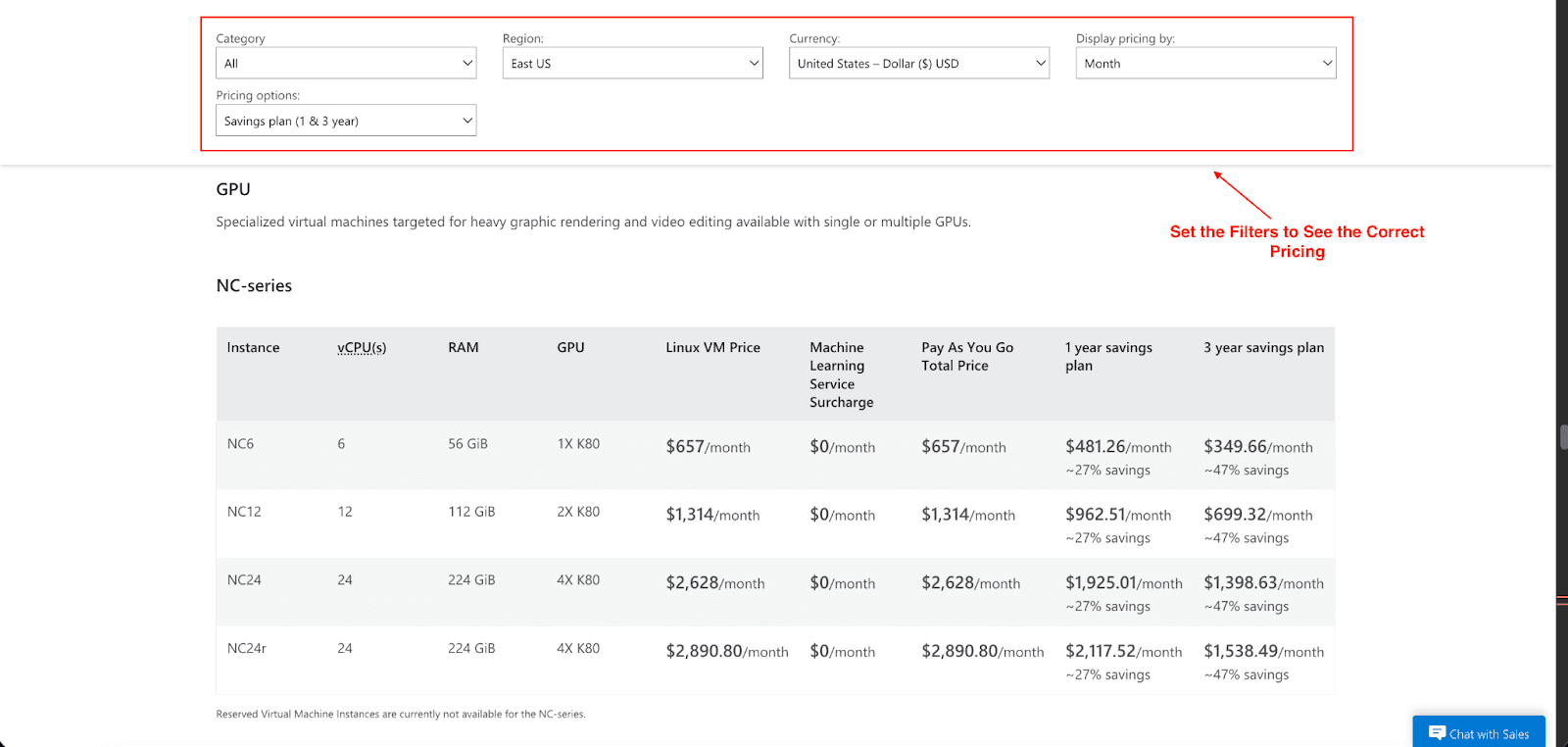
A. Compute Pricing (Training and Tuning)
Training models can often take a long time and amplify the vertical scaling of cloud compute spending, especially with complex models or large volumes of data.
GPU vs. CPU VMs: GPU virtual machines, NC, ND, and H-series, are essential for deep learning, but they are also the most pricey. A cost-saving and smart strategy is to start with cheaper CPU instances and only switch to the more expensive GPUs when absolutely necessary.
Hyperparameter Tuning: This is the process of running several training jobs to automatically identify optimal settings. The functionalities of this process are great, but be warned that the compute resource usage is multiplied, and costs can ramp up quickly.
Spot VMs: Using Spot VMs for training can reduce compute costs by up to 80%. The disadvantage is that the job can be interrupted, and will need to be restarted. For many training scenarios, however, the tradeoff is well worth the savings.
Cost Formula: Training Cost ≈ (VM Hourly Price × Job Duration × Number of Parallel Runs)
B. Inference Pricing (Model Deployment)
Once your model is trained, the next step is deployment for prediction. Over time, the inference cost may reach and even exceed the cost of training, especially for high-traffic use cases.
Deployment Type | How It's Priced |
Managed Online Endpoint | Always-on compute that can autoscale based on traffic. |
Batch Endpoint | Charges are based on the execution time of the job. |
Kubernetes Deployment | You manage the underlying Kubernetes cluster and billing. |
C. Storage and Networking Costs
Although these costs are less than cloud computing, they can still be substantial:
Storage: Azure Blob Storage will charge based on the total data size. You can select different access tiers, which are Hot for frequently accessed data, Cool for infrequently accessed data, and Archive for long-term data retention. An easy cost-saving technique is to transfer older model and dataset files to the Cool or Archive tiers.
Networking: Costs are also incurred when data is transmitted between different Azure regions. To minimize these costs, always try to run your training jobs in the same region where your data is stored.
Strategic Ways to Reduce Azure ML Costs
Now comes implementation. Here are actionable approaches to be able to control costs on Azure ML:
1. Optimize Your Compute Usage
Embrace Spot VMs: Spot VMs will become the default selection for all training and testing pipelines that are able to tolerate downtime.
Start with CPU: Don't go to the more costly GPUs right away. For initial development and data exploration, stick with the cheaper CPU instances
Right-Size Your VMs: Use model profiling to find the least powerful and therefore least expensive option for your use case and performance needs. Ensure that you do not over-provision.
2. Choose the Right Deployment Strategy
Batch Over Online: If your application does not require immediate predictions, consider utilizing batch endpoints rather than engaging online real-time endpoints.
Autoscale Intelligently: For online endpoints, set your autoscaling to scale down to zero (or very few instances) during periods of low traffic.
Compress Your Models: Techniques such as quantization and model pruning that can reduce your model to run on VMs that are smaller and therefore cheaper.
3. Leverage Azure's Pricing Mechanisms
Azure Savings Plan: If you have constant computer usage across different Azure services, your savings can go up to 65% with a 1 or 3-year commitment to a Savings Plan.
Reserved Instances: For workloads with very predictable demand for VMs, RIs provide the most cost savings. This is akin to renting a hotel room for a whole year at a time. You get a good deal for the price, worth the commitment to it.
Spot VMs: On the other hand, Spot VMs offer a great deal more flexibility and offer as much as an 80% discount, making them the perfect option for fault-tolerant training jobs.
4. Monitor, Alert, and Control
Set Budgets: Use Azure Cost Management to create budgets for your resource groups and subscriptions. Set up alerts to notify you when spending approaches your defined limits.
Eliminate Idle Time: Monitor GPU idle time and configure scripts to automated the shutdown of compute instances as well as clusters when there is a queue, and also when they are not actively in use.
Use Quotas: Avoid runaway costs in your subscription, and especially in development or academic environments, by setting quotas at the workspace or subscription level.
Conclusion
Mastering Azure Machine Learning pricing is more about strategy than it is about cutting down on your AI Initiatives. I hope you now have a clear understanding of how Azure ML pricing works and what to expect on your bill. When it comes down to it, the pricing is not in any way dictated by the service that you are provided, but rather from the compute, the storage, and how deployment works around the decisions that you make.
Spot VMs and Savings Plans and constant tracking of your consumption are all essential factors when trying to build great AI solutions that also provide great value without going over budget. Using the right resources and utilizing all the discount options will prove to be beneficial. Planning and scaling will always provide great results if you take your budget into consideration.
Join Pump for Free
If you are an early-stage startup that wants to save on cloud costs, use this opportunity. If you are a start-up business owner who wants to cut down the cost of using the cloud, then this is your chance. Pump helps you save up to 60% in cloud costs, and the best thing about it is that it is absolutely free!
Pump provides personalized solutions that allow you to effectively manage and optimize your Azure, GCP, and AWS spending. Take complete control over your cloud expenses and ensure that you get the most from what you have invested. Who would pay more when we can save better?
Are you ready to take control of your cloud expenses?