

Modern apps depend on real-time data to work. Companies need infrastructure that can handle huge event streams without breaking a sweat. For example, IoT sensors send telemetry to financial systems that process transactions.
Azure Event Hubs is exactly what you need: a fully managed, cloud-native platform that can handle millions of events per second with little delay. Event Hubs gives your business the scalability and reliability it needs for things like building real-time analytics dashboards, processing IoT data, or centralizing application logs.
In this article, I will walk you through everything you need to know about Azure Event Hubs, including how it works, when to use it, how much it costs, and the best ways to use it so you can make smart choices for your data infrastructure.
What Is Azure Event Hubs?
Azure Event Hubs is a fully managed, big data streaming platform and event ingestion service built for high-throughput scenarios. Imagine Azure Event Hubs as a data highway system, capable of simultaneously processing multiple data streams and sequences. An event hub can process thousands of events at the same time while preserving the overall system sequence and reliability.
As part of Microsoft Azure, Event Hubs sits at the beginning of the data funnel. It captures data streams from disparate sources such as websites, mobile applications, IoT devices, and enterprise applications. After ingestion, this data can either be processed immediately or stored for batch analytics.
Core Purpose
Event Hubs serves three main functions:
Event Ingestion: Collects large amounts of telemetry and event data regardless of source.
Event Storage: Holds events for user-defined storage retention periods (1-90 days depending on tier).
Event Distribution: Gives the ability of multiple consumers to independently process the same event stream.
Common Use Cases
Organizations across industries rely on Event Hubs for scenarios like:
IoT Telemetry: Collecting data from millions of connected sensors, vehicles, or industrial machinery.
Application Logging: Collecting logs from distributed microservices to ease the monitoring and troubleshooting process.
Real-Time Analytics: Stream data into analytics applications for real-time insights.
Fraud Detection: Analyzing financial transactions as they occur to detect patterns that appear to be fraudulent
Clickstream Analysis: Analyzing the behavior of users across web and mobile applications.
How Azure Event Hubs Works
Understanding Event Hubs architecture helps you design better solutions. Let's break down the key components and how they work together.
Namespace
A namespace is your management container; it is a logical grouping of one or more event hubs. A namespace gives you the location of your event. As soon as you create a namespace, you obtain a unique, fully qualified domain name that serves as your connection endpoint.
The namespace takes care of the allocation of the capacity, the security policies, and the networks. All event hubs in a namespace will mean better management at scale.
Event Hub (Topic)
An event hub is the actual data stream within your namespace. Think of it as a Kafka topic, which is an append-only log, meaning it stores events in chronological order. Every event hub has a minimum of one partition to allow for multiple streams of data to be processed in parallel.
Partitions
Partitions are the secret to Event Hubs’ scalability. Each partition is an ordered sequence of events, similar to lanes on a highway. More partitions mean higher throughput, as well as more parallel consumers.
Upon entering an event hub, events are assigned to specific partitions using either of the two methods:
Round-robin distribution: Events are equally spread across partitions.
Partition key: Related events, such as those generated by the same device, will be assigned to the same partition to maintain order.
When event hubs are created, the partition count is set and cannot be changed in the Standard tier. However, in Premium and Dedicated tiers, dynamic partition additions are possible. It is important to choose the partition count based on expected throughput and consumer parallelism requirements.
Publishers
Publishers are applications that send events to Event Hubs. Hubs connect through HTTPS or AMQP (for higher volumes and persistent connections). Events can be sent either singularly or in batches, with batching generally being more efficient as such.
Consumer Groups
Consumer groups enable the parallel processing of the same event stream by multiple apps. Each consumer group tracks its reading position (offset) for each partition. Different apps can process events independently, unaffected by each other.
For example, one consumer group can be used to process events for a dashboard in real time, while another consumer group can be used to store the events for processing at a later time. Each event hub automatically has a default consumer group created when the event hub is created, and more can be added as needed.
Capture Feature
With Event Hubs Capture, you can automatically archive your streaming data to either Azure Blob Storage or Azure Data Lake Storage. Because this occurs simultaneously during real-time processing, you can batch analyze data and work with older data without the hassle of managing separate archival logic.
The Standard tier charges an hourly fee for each throughput unit, while the Premium and Dedicated tiers also include Capture.
Key Features of Azure Event Hubs
Apache Kafka Compatibility
Event Hubs speaks Kafka natively. If you want to connect your Kafka producers and consumers to Event Hubs, you only need to change the connection string, and most Kafka applications can connect without changing any application logic, although some configuration changes are needed. This functionality can be used with the Standard, Premium, and Dedicated tiers.
Note: If you want to use the additional Kafka features like compression and transactions, you will need to use the Premium or Dedicated tier. Kafka workload issues are likely to impact the standard tier.
Flexible Scaling
Start small and scale as needed, as Event Hubs has a number of different options to customize your scaling, including:
Throughput Units (TUs): Each TU gives you a maximum of 1 MB/s ingress and 2 MB/s egress.
Auto-inflate: TUs will be automatically changed based on the demands of the traffic.
Processing Units (PUs): Available in the premium tier, PUs almost removes the need to manage TUs
Dedicated Clusters: High, predictable workloads will see improved performance with the use of dedicated clusters.
Schema Registry
Azure Schema Registry works in centralized schema management for event streaming applications. Event Hubs ensures data compatibility between consumers and producers and, to support evolving schemas, it integrates with Kafka apps using Avro and JSON schemas. The integration is seamless, as Kafka and Azure Event Hubs can work together.
Data Retention & Replay
Events are kept for the following periods:
Standard tier: Up to 7 days
Premium tier: Up to 90 days
Dedicated tier: Retention periods are configurable and extended.
This retention enables event replay, allowing consumers to view and reprocess previous events. This is useful for debugging, analytics backfilling, and recovering from processing errors.
Azure Event Hubs Pricing: How Are Costs Calculated?
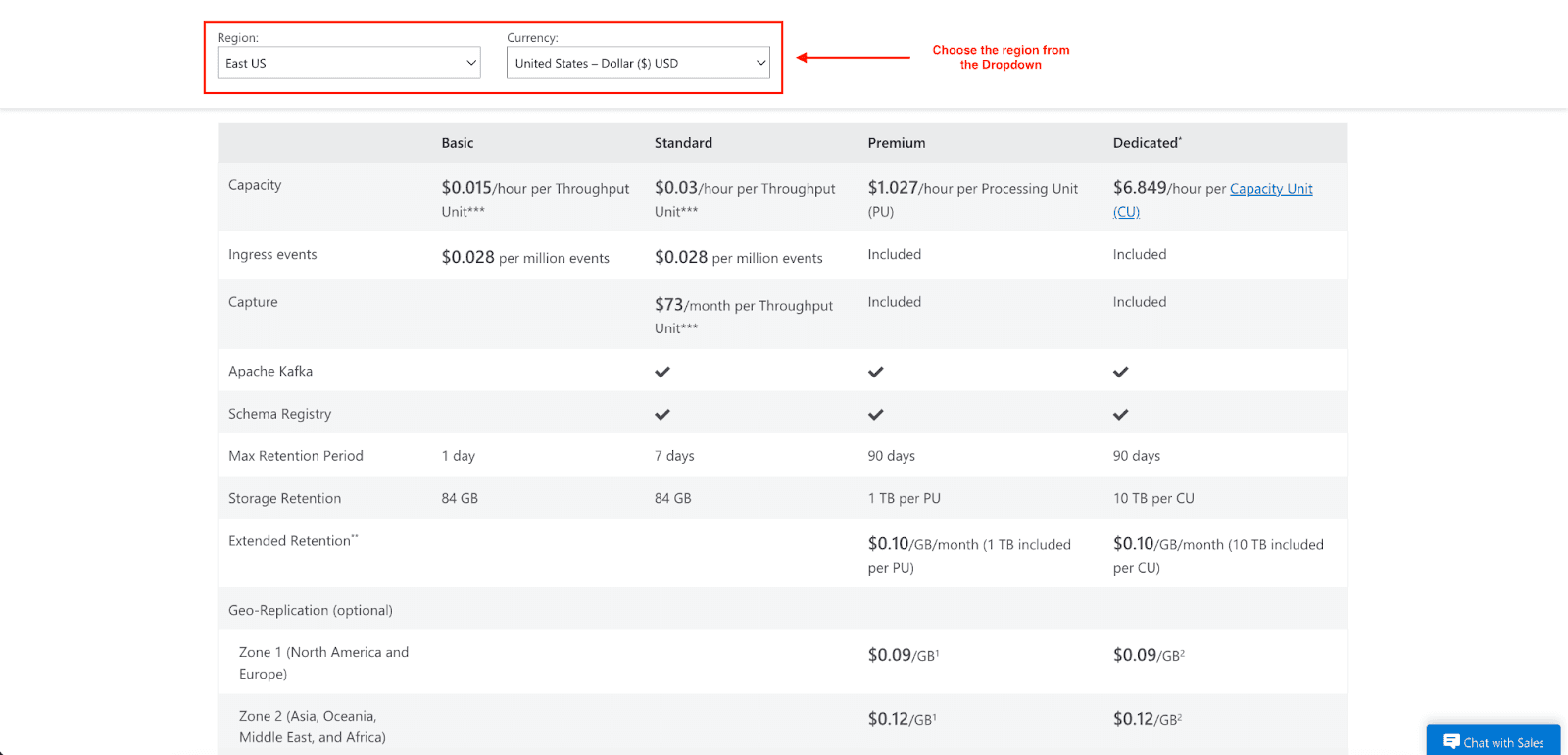
Event Hubs pricing is dependent on your chosen tier and is based on several criteria. Knowing the different components that make up your Event Hub's pricing will help you estimate your costs and manage them better.
Pricing Tiers
Basic Tier
$0.015/hour per throughput unit.
$0.028 per million ingress events.
1-day retention.
84 GB storage per TU at default retention levels.
The tier lacks a capture feature, does not support Kafka, and has fewer features compared to higher tiers.
Standard Tier
$0.03/hour per throughput unit.
$0.028 per million ingress events.
Up to 7-day retention.
84 GB storage per TU at default retention levels.
Capture: $73/month per TU (billed separately).
Kafka and Schema Registry are included.
Premium Tier
$1.027/hour per Processing Unit (PU).
Ingress events are included in the base PU pricing (no per-million event charge).
Up to 90-day retention.
1 TB storage per PU (additional storage: $0.12/GB/month).
Capture, Kafka, and Schema Registry are included.
Network isolation and customer-managed encryption.
Dedicated Tier
$6.849/hour per Capacity Unit (CU).
Ingress events were included (unmetered within CU capacity).
Up to 90-day retention.
10 TB storage per CU (additional storage: $0.12/GB/month).
All premium features plus single-tenant deployment.
Minimum 4-hour usage charge.
Cost Factors
Throughput Capacity: Your primary cost driver. In the Standard Tier, TUs are billed hourly based on the maximum units selected during that hour. In the Premium and Dedicated tiers, you'll be billed based on PUs and CUs, respectively.
Ingress Events: Measured by the millions in the Basic and Standard tiers (0.028 per million). Events that are 64 KB or smaller are counted as one billable event; events that are larger are charged in 64 KB increments.
Data Retention: If you exceed the included quota, you will incur overage charges (0.12/GB/month). Plan your retention periods based on the replay and analysis needs.
Capture Storage: Capture is included in the Premium and Dedicated Tiers, but you'll incur Azure Storage costs for the captured data in your Blob Storage or Data Lake account.
Tips for Optimizing Costs
Adjust throughput units: Adjust your throughput units depending on your actual usage to avoid over-provisioning and lessen costs.
Set auto-inflate limits: Set limits on auto-inflation to manage costs and avoid high unanticipated costs.
Optimize data retention: If event data is no longer needed, don’t keep it. If data needs to be kept longer, store it in long-term storage if needed.
Batch your events: Create a mechanism to send your events to help you to organize and reduce the costs associated with event sending.
Use the Premium tier for high volumes: If your volumes are high, the Premium tier will be cheaper than the other tiers because ingress and capture are included.
Security & Compliance
Event Hubs uses multiple protection layers for your data and compliance with standards.
Identity & Access Control
Azure Active Directory: Integrate with Azure Entra ID for centralized identity management
Role-Based Access Control (RBAC): Use Azure built-in roles or create your own for granular permission assignments.
Shared Access Signatures (SAS): Generate time-limited access tokens for specific operations.
Managed Identities: Applications that need to authenticate can do so without credential storage.
Encryption
At Rest: Data at rest is protected with encryption through Microsoft-managed or customer-managed keys (available in Premium and Dedicated tiers)
In Transit: All data transmitted to and from clients and Event Hubs is protected with TLS 1.2 encryption or later.
Network Security
Private Link: For stronger isolation, connect to Event Hubs through one private endpoint in your virtual network.
Virtual Network Service Endpoints: While providing less isolation than Private Link, you may secure access to specific subnets.
IP Firewall: Limit access to specific trusted ranges of IP addresses.
Compliance Alignment
Azure Event Hubs falls under Microsoft's compliance coverage and is part of the most comprehensive compliance program. Although compliance certifications are applicable to the Azure platform level more than to single services, customers can utilize Azure's compliance posture that satisfies the following standards:
SOC 1, 2, and 3
ISO 27001, 27017, 27018
HIPAA/HITECH
GDPR
Best Practices for Performance & Scaling
Partition Strategy
Choose a partition count based on expected peak throughput and consumer parallelism. Remember:
More partitions mean more throughput and more parallel processing.
You cannot modify partition counts after creating them in the Standard tier. In the Premium tier, you can increase partition count, but not decrease it.
Each partition has an approximately 1-2 MB/s throughput ceiling, but total throughput for a namespace is capped by (depending on the service tier) TUs, PUs, or CUs.
Use good partition keys to avoid hot partitions. A partition will become a bottleneck if it receives more traffic than it can handle.
Consumer Scaling
Create consumers that process the partitions in parallel. The number of partitions sets a limit on consumer parallelism because you can only have one active consumer instance (person, application, or group of consumers) per partition in a consumer group.
Using the Event Processor client library helps in partition processing balancing on multiple consumer instances. It takes care of checkpointing and failover.
Throughput Planning
Baseline your workload: Measure actual ingress and egress rates during typical and peak periods
Plan for spikes: Use auto-inflation to handle traffic bursts without manual intervention
Monitor throttling: You could set up alerts for throttling events to help you monitor your traffic and identify your capacity limits.
Monitoring & Observability
Integrating with Azure Monitor will help you keep track of:
Incoming/outgoing messages and throughput
Throttled requests
Server and user errors
Capture backlog
Set up alerts for:
Throttling events (approaching throughput limits)
Error rate increases
Capture lag (delay in archiving data)
Disaster Recovery
Configure geo-disaster recovery for business continuity:
Metadata replication: You must synchronize your namespace configuration to a secondary region.
Manual failover: You would switch to the secondary region that is active when the primary region goes inactive.
Note: Geo-DR recovery only replicates metadata. Therefore, events do not replicate between regions.
For your critical workloads, you can use higher SLAs with a tier-based configuration that assigns availability zones (which will result in higher SLA performance) up to 99.99% based upon the tier and the configuration you use.
When Should You Use Azure Event Hubs?
You can use Event Hubs if:
You need to ingest large amounts of event data (thousands to millions per second).
You're building real-time analytics or monitoring dashboards.
You need Event Hubs for Kafka compatibility and to avoid managing clusters.
You need multiple independent accesses to an event stream.
You need native integration since you operate within the Azure ecosystem.
You need durable event storage with a configurable retention.
You want automatic scaling based on traffic patterns.
Consider Alternatives If:
You need message queue semantics with guaranteed delivery (use Azure Service Bus)
You require transactional processing with rollback capabilities (use Service Bus)
You're building reactive, event-driven architectures with simple routing (use Azure Event Grid)
You have low-volume workloads with simple requirements.
You need long-term event storage beyond 90 days (use Capture with Azure Storage for archival)
Conclusion
Azure Event Hubs is an excellent example of a fully managed service that customers can use to easily solve the chronic complexity of managing infrastructure that is required to support the processing of extremely large streams of real-time data. It is an ideal solution for customers that require a rapidly scalable service. Because of native Kafka support, existing customer tools and workflows remain compatible with Azure.
From startups that process megabytes per second to enterprises that process terabytes of daily telemetry, our service scales with our customers. With flexible pricing tiers, strong security, and simple integration with Azure, Event Hubs is built to grow with you.
I hope you have now learned everything you need to know about Azure Event Hubs and how it will change your real-time data processing. Start your Azure free trial and see Event Hubs in action.
Join Pump for Free
If you are an early-stage startup that wants to save on cloud costs, use this opportunity. If you are a start-up business owner who wants to cut down the cost of using the cloud, then this is your chance. Pump helps you save up to 60% in cloud costs, and the best thing about it is that it is absolutely free!
Pump provides personalized solutions that allow you to effectively manage and optimize your Azure, GCP, and AWS spending. Take complete control over your cloud expenses and ensure that you get the most from what you have invested. Who would pay more when we can save better?
Are you ready to take control of your cloud expenses?