

Every day, companies generate thousands of data files from user activity logs, telemetry from applications, and IoT devices in the cloud computing market. Data storage is the simple part of the process. Real-time data analysis, immediate insight-gathering, and actionable decision-making are the real data challenges this industry faces. At this point in the digital ecosystem, tools such as Azure Data Explorer become indispensable.
Real-time data generated in bulk streams is the primary focus of this fast, completely managed service. Imagine a machine that can scan terabytes of data in mere seconds. If your company processes live data from external sources, you need to know about Azure Data Explorer.
In this article, we will explore everything you would need to know about this powerful Azure data service. We'll cover its core features, common use cases, and the details of Azure Data Explorer pricing. In addition, we will provide you with a walkthrough on how to get started and tips on refining your Azure cost. This will ensure that you derive maximum benefit from this platform.
What Is Azure Data Explorer?
One of the services provided by Microsoft is Azure Data Explorer, a data analytics platform capable of ingesting and processing vast amounts of data, regardless of its format, and executing queries at high speeds. Built with high-performance processing capabilities, Azure Data Explorer is particularly tailored for time-series and log analytics. Unlike conventional databases, ADX is optimized for a continuous stream of data being written, or "append-only" data, making it well-suited for cases with a continuous flux of new data.
Among the services provided by Azure, ADX has a unique position and responsibility:
Azure Synapse Analytics is an industry-wide analytics platform that integrates data warehousing and Big Data analytics and is more suitable for longer, more complex queries against large and well-curated datasets.
Azure Data Lake Storage is a large and secure storage solution for big data analytics workloads. However, it does not come with a querying engine like ADX.
Azure Data Explorer is the leading service for raw data that requires near real-time analysis and is often used in industries where real-time analysis of telemetry and user behavior for anomaly detection is critical, such as IoT, Cybersecurity, and SaaS.
Key Features of Azure Data Explorer
Azure Data Explorer is an exemplary platform for the analysis of real-time data as well as big data Azure workloads.
Data Ingestion Capabilities
One of the many strong suits of Microsoft is the ability to explore the data factory, heavily focused on ingestion. ADX recognizes two primary channels of data ingestion:
Batching Ingestion: This method is ideal for uploading large, archival data sets from sources such as Azure Blob Storage.
Streaming Ingestion: This method allows for data ingestion in near real-time from apps such as Azure IoT Hub and Event Hubs, although the data latency can increase.
Kusto Query Language
Kusto Query Language is the ADX proprietary language that is coherent and strongest when the language is used to explore data. When used to query, KQL operates similarly to SQL; however, unlike SQL, in KQL, the data is structured according to relational databases. Users of KQL report satisfaction due to the language being seen as easier than SQL, due to the availability of advanced operators in KQL used for analyzing time series data, as well as recognizing patterns.
Real-Time Analytics and Scalability
ADX has been optimized for performance. It can run high-concurrency queries on huge datasets and return results in a matter of seconds. This service offers elastic scaling: your ADX cluster can automatically scale up or down based on usage. This means that you have sufficient compute power during high-demand periods and do not overspend during low-demand periods.
Integration with Other Azure Services
ADX has a particularly strong integration with the other services in the Azure ecosystem. For example, ADX can be connected with:
Power BI: Use DirectQuery to visualize real-time data from ADX in interactive dashboards and reports.
Azure Machine Learning: Build and train Machine Learning models on the data that you have stored in ADX.
Azure Data Lake Storage: Without needing to move the data, you can directly query the data you have stored in your data lake.
Azure Data Explorer Pricing
When considering costs for Azure Data Explorer, it is important to understand the variables that will impact cloud costs. Pricing is comprised of multiple components, so let's break it down.
An Azure Data Explorer cluster is made up of the following compute VMs and storage resources. For each VM in your cluster, you are charged on a per-minute basis plus an Azure Data Explorer Markup, which is based on the number of vCores. This Markup is to cover the ingestion, caching, and querying capabilities of the system.
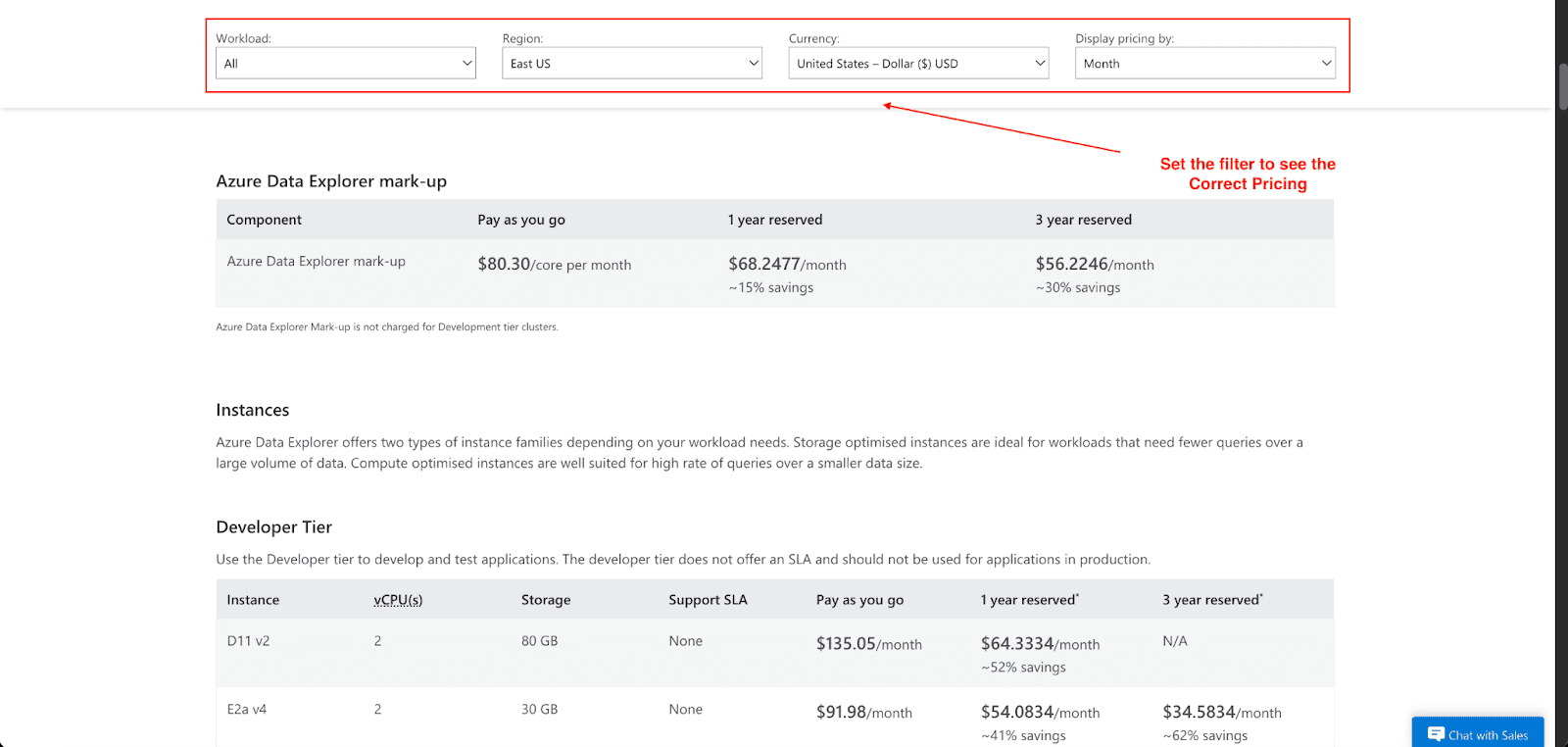
The main cost components are:
Compute Instances: Based on the specific workloads you are processing, you select between the various instance families. For lower rates of queries on large amounts of data, use the storage optimized instances, and for high rates of queries on smaller data sizes, use the compute optimized instances.
Azure Data Explorer Mark-up: This is charged per vCore per month. For pay-as-you-go, this is $80.30 per core per month, charged, though it is waived for the Developer tier.
Storage: Your expenses largely depend on the amount of data held within your cluster, including the costs of Azure storage for data kept for the long term. An Lsv3 Series (L8as v3) instance with 8 vCPUs costs around $1,097.92 monthly, while an Lsv3 Series (L8sv3) instance with 8vCPUs and 1.8TB of storage costs around $1,150.48 each month. Prices differ from one region to another, so kindly refer to the official Azure pricing page for the best and most current prices of the various instance types and prices of storage.
Networking: You may incur additional costs for data transfers.
For example, an Lsv3 Series (Storage Optimized) instance under the pay-as-you-go model with 8 vCPUs and 1.8 TB of SSD storage costs around $1,097.92 monthly. This amount includes the price of the Linux VM and the ADX markup.
If you are likely to use Azure for a longer period, then prepaying for one to three years of reserved instances will lead to considerable savings on your Azure cost of up to 42%.
How to Get Started with Azure Data Explorer
Ready to try it out? You can start with the Azure Data Explorer free tier to explore its functionality. Here’s a simple guide to creating your first cluster:
Go to the Azure portal, search for Azure Data Explorer, and click Create. You'll need to provide basic details like your subscription, resource group, and a name for your cluster.
Set Up Data Ingestion: Once your cluster is ready, you can start loading data. ADX supports data ingestion from various sources, including Event Hub, IoT Hub, Kafka, Blob Storage, Data Lake, REST APIs, and SDKs (Python, .NET, Java). You can use ingestion wizards to connect these sources and define ingestion mappings to specify the data schema and structure.
Run Your First Query: With data flowing in, you can start exploring it using KQL. The Azure portal provides a user-friendly query editor with IntelliSense to help you write your first queries.
Visualize the Results: Use the render operator in KQL to create simple charts directly in the query editor, or build a more comprehensive dashboard using ADX dashboards. For more advanced BI needs, you can connect your cluster to Power BI.
How to Optimize Your Azure Data Explorer Costs
While the service ADX provides in the realm of real-time analytics is invaluable, careless use of the service can drive costs through the roof. Here are some suggestions to keep costs manageable:
Right-Size Your Cluster: This is adjustable depending on the performance of the clusters, so make sure to monitor it. Also, make sure to shut down development clusters when they are not in use.
Optimize Your Queries: Poorly written KQL queries are a big problem as they waste resources and time. Make sure to utilize outlines to optimize how your KQL queries are written.
Manage Data Retention Policies: ADX allows for retention policies to be set at the table level. Move data from hot cache (SSD) to cold storage (Azure Blob Storage) to reduce storage costs for data that is not frequently queried.
Even with these practices, manual cost optimization can be a full-time job. This is where a solution like Pump can make a significant difference. We help companies save 10-60% on their cloud bills by using an AI-powered platform to automatically manage reserved instances and savings plans.
With Pump, you gain access to volume discounts typically reserved for large enterprises. Its AI model analyzes your cloud usage and buys the right commitments on your behalf, guaranteeing you maximum savings without the risk.
The best part? You can freely use it without worrying about a subscription.
Conclusion
Azure Data Explorer is a transformative Azure analytics service that any company wanting to leverage continuous data should consider. I hope this article has given you an understanding of its rapid ingestion, its powerful KQL query engine, and its seamless ability to scale, making it critical to deriving immediate value from extremely large data streams.
Leveraging its attributes and associated costs, you can create a cutting-edge analytics service that yields business benefits. Plus, with efficient cost management methods and systems, you can ensure that your big data Azure investment yields maximum benefits.
Would you like to manage your Azure costs? Try Pump today and see how much you can save on Azure Data Explorer.



