

Azure Monitor is an excellent utility for observability across your cloud applications and infrastructure. However, translating the impressive breadth of its functionality into predictable pricing can quickly cause confusion and buyer’s remorse. I’ve personally parsed the line items on every monthly bill and muttered, “What am I really paying for?” This guide is designed to demystify the pricing model, itemize the variables most relevant to your budget, and deliver pragmatic strategies for lowering your monthly outlay.
Cost is primarily driven by four vectors: data ingestion, log retention, alert management, and telemetry metrics. In my enterprise deployments, log ingestion consistently emerged as the principal contributor to excessive monthly charges, dwarfing the other line items when scales are large.
In this article, I will explain the pricing constructs, compare the available tiers, and highlight the configuration choices that maximize cost efficiency. I will also describe how using cost-management tooling, such as Pump, delivered an approximately 60% reduction to my Azure resources footprint, insights I wish I’d had a year earlier.
What Impacts Your Azure Monitor Bill?
To manage costs in Azure Monitor, you need to identify the principal drivers of your charges. Below are the main components influencing your cost:
Data Ingestion Costs
Data ingestion generally comprises the bulk of your Azure Monitor expenditure. Each log entry, whether generated by your applications, compute instances, or platform services, contributes to the cumulative data volume for which you are billed.
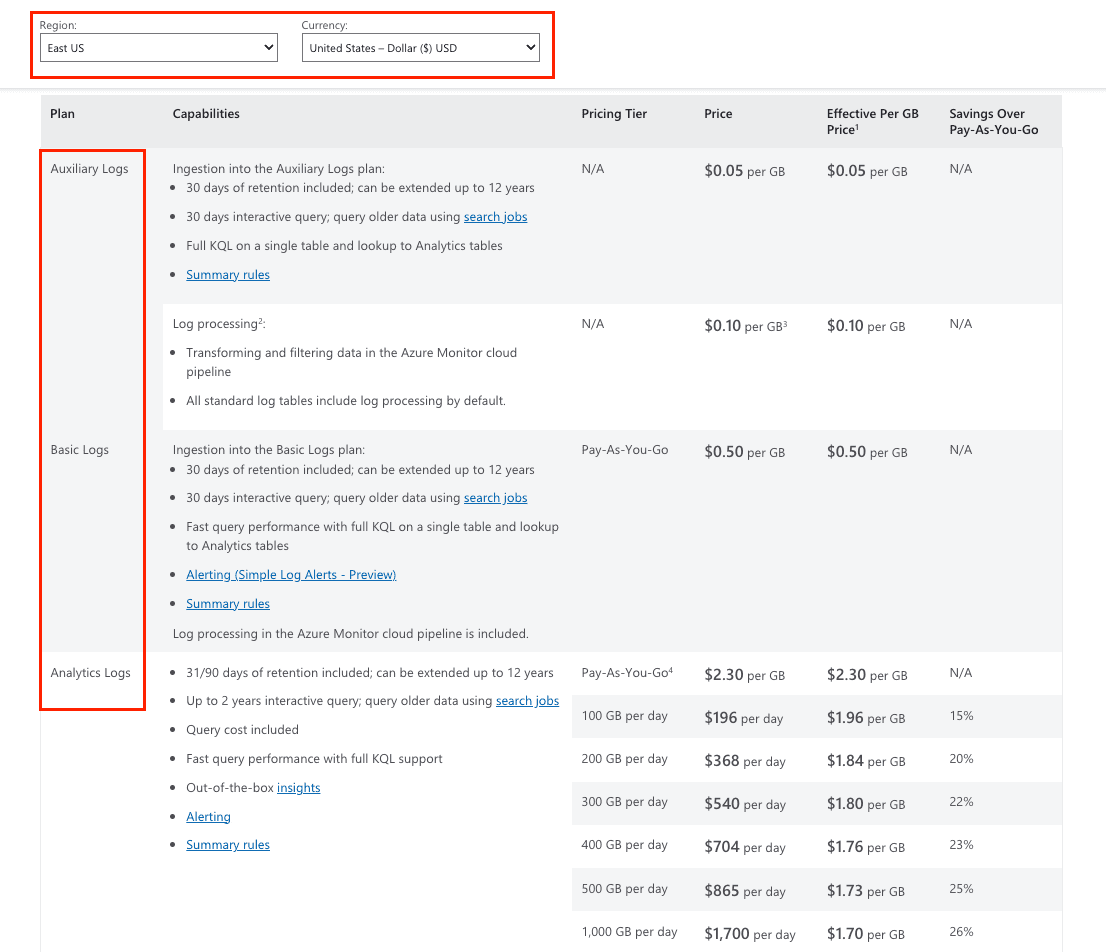
Azure Monitor classifies log data into three pricing tiers:
Analytics Logs: $2.30/GB, applying after an initial 5 GB of ingestion, which is provided free each month.
Basic Logs: $0.50/GB; this tier is less expensive but omits certain advanced query and retention capabilities.
Auxiliary Logs: $0.05/GB; suited for infrequent access, this tier is optimized for archiving.
Log Retention Charges
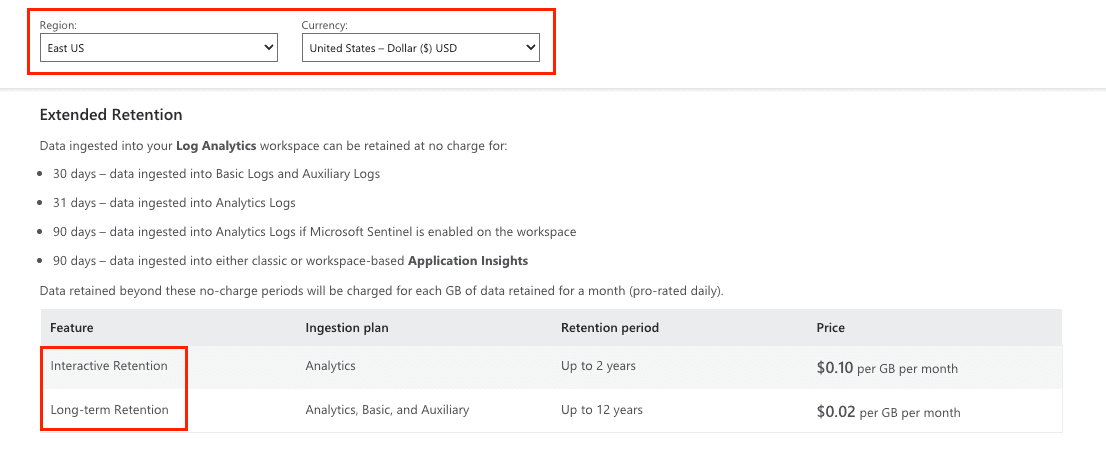
Retention of log data incurs additional costs once the 31-day grace period lapses. Charges for extended retention are organized by access tier:
Interactive Retention (for Analytics Logs): approximately $0.10/GB per month for retention periods extending to 2 years.
Long-term Retention: approximately $0.02/GB per month for durations of up to 12 years, designed principally for compliance or archival mandates where infrequent access is expected.
Alert Pricing
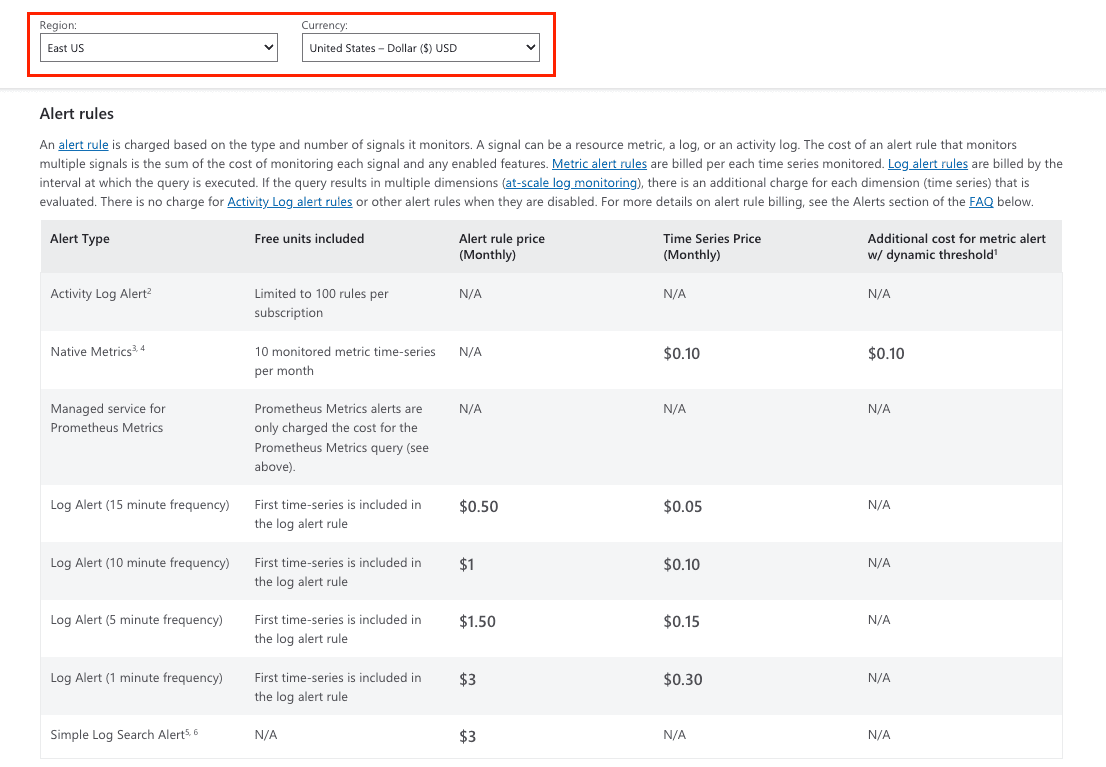
Azure Monitor alerts enable proactive issue detection prior to user impact. Pricing is tiered by alert type:
Native metric alerts: $0.10 monthly per active time series; includes an allowance of 10 free time series.
Log alerts: $0.50 for the initial time series, with $0.05 for each subsequent time series monthly.
Simple log search alerts: Charged at $3 for each alert created.
Platform Logs and Metrics
Platform metrics collection: Metrics for Azure resources are collected by default at no charge.
Platform logs to storage/Event Hub: Streaming diagnostic logs to an Azure storage account or Event Hub incurs a charge of approximately $0.25 per GB.
Custom metrics ingestion: Loading custom metric samples is priced at $0.16 per 10 million samples ingested.
Azure Monitor Pricing Models and Tiers
Azure Monitor employs a pay-as-you-go pricing structure as the fundamental model, allowing organizations to incur charges exclusively for consumed resources, with neither initial capital outlay nor baseline subscription thresholds.
Pay-as-You-Go Pricing
The pay-as-you-go format suits enterprises that face fluctuating telemetry acquisition patterns. Monthly invoices reflect the precise quantity of telemetry ingested, and the model comprises:
No minimum daily data volume.
Charges apply only to the data that is ingested into the platform.
Comprehensive functionality of Analytics Logs.
Inclusion of standard retention timelines.
Commitment Tier Savings
Companies that consistently exceed certain data ingestion thresholds, committed pricing tiers yield meaningful savings. Engagement in this structure obligates the purchase of a daily data minimum, in exchange for a lowered per-GB charge:
100 GB daily commitment: $1.96 per GB (15% discount)
200 GB daily commitment: $1.84 per GB (20% discount)
500 GB daily commitment: $1.61 per GB (30% discount)
Basic Logs vs Analytics Logs
The choice between Basic Logs and Analytics Logs has both cost implications and functional ramifications.
Analytics Logs grant full query, alert, and visualization capabilities, making them suitable for active monitoring and troubleshooting workflows.
Basic Logs, priced at 20% of Analytics log rates, possess only a subset of query functions and are therefore appropriate for compliance, auditing, and archival scenarios where deep analytical capabilities are unnecessary.
Azure Monitor Pricing Calculator
Microsoft offers an Azure pricing calculator designed to assist you in estimating associated costs. You can enter anticipated data ingestions, desired retention policies, and alert configurations to receive tailored pricing projections.
Strategies for Cost Optimization and Savings
Achieving sustainable cost efficiency for Azure Monitor mandates methodical planning and execution. The following practices are corroborated by field experience and empirical data analysis:
Optimize Data Collection
Initiate the optimization process by constraining the breadth of data ingress. Conduct an inventory of monitored data sources and deactivate ingestion for telemetry not subjected to rigorous analysis:
Employ data collection rules to excise non-core log entries.
Scale back performance counter polling intervals when diagnostic precision tolerates longer intervals.
Eliminate distinct data sources that replicate telemetry streams.
Use the Azure Monitor agent, which delivers refined sampling and transport efficiencies.
Configure Smart Log Retention
Different types of data require different retention periods. Adjust retention based on actual business needs:
Retain operational telemetry for immediate execution windows, then shift to archival.
Use prolonged retention exclusively for datasets bound by compliance dictates.
Transmit expired logs to lower-cost storage tiers.
Use the Azure Policy to automate lifecycle transitions.
Use Basic Logs for Appropriate Data
When detailed analytics are extraneous for debugging, troubleshooting, or audit logs, designate these signals as Basic Logs. This classification can achieve cost savings of up to 80% for data types that do not require more complex querying or retention semantics.
Optimize Alert Configuration
An effective alert layout minimizes spend without sacrificing observability:
Deploy activity log, service health, and resource health alerts, as these generate no charges.
Reduce log search alert cadence; incremental deletions of granular sub-queries accrue additional costs.
Consolidate multiple conditions into a single alert rule wherever feasible to streamline the alerting logic.
Use action groups carefully to suppress redundant notifications across multiple alert triggers.
Implement Daily Caps
Configure daily spending caps to serve as a safeguard against unanticipated spikes in billing. Trigger an alert to the operations team when bills reach 80% of the configured limit to maintain situational awareness while still containing costs.
Regular Cost Analysis
Plan a monthly review to assess Azure Monitor costs:
Track changes in data ingestion volume to surface emerging cost drivers.
Review alert and log search configurations for orphaned or overlapping settings.
Identify resources that contribute disproportionate amounts of log data and determine the appropriate retention and filtering strategy.
Use Azure Advisor for tailored cost-reduction guidance specific to your operational patterns.
Take Control of Your Azure Costs with Pump
Monitoring costs via Azure Monitor provides baseline visibility; however, sustained cost reduction on Azure requires Differential, which Pump delivers. Leveraging artificial intelligence, Pump surfaces cost reduction venues ranging from 10% to 60% through a single, frictionless activation interface. The solution is architected to abstract the complexity of savings, redirecting organizational bandwidth to core growth initiatives. The operational value is conveyed through:
How Pump Saves You Money
Group Buying Power: Pool spending with thousands of customers to unlock big discounts, like the deals large companies negotiate.
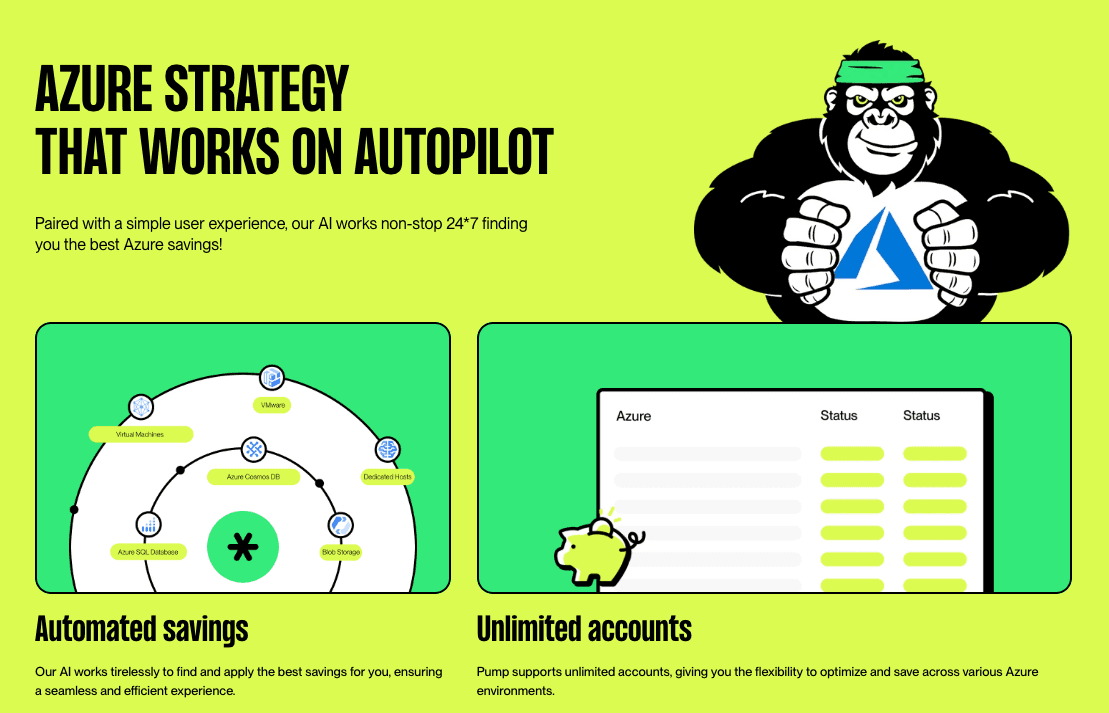
AI Optimization: Pump’s AI analyzes your Azure usage and automates savings with Reserved Instances and Savings Plans tailored to you.
Smart Resource Sharing: Unused capacity is shared across customers, maximizing efficiency and reducing waste.
Risk-Free Guarantees: If predictions don’t match your usage, Pump adjusts or refunds with Azure credits.
Flexible Operation Modes
Autopilot Mode: Pump handles everything for instant savings.
Manual Mode: Get AI recommendations and approve optimizations yourself.
You’re missing out if you haven’t tried Pump! It’s completely free - no subscriptions, no hidden fees. Join now and see what everyone’s raving about!
Conclusion
Controlling Azure Monitor costs requires a structured approach centered on usage visibility and informed optimizations.
Actionable steps include:
Review ingestion trends using Log Analytics insights to identify cost drivers.
Evaluate all commitment tiers and select the one aligned with projected usage.
Choose between Basic and Analytics log types to match data retention and analysis requirements.
Enable cost alerts and leverage the Azure Pricing Calculator to estimate expenditures accurately.
For additional leverage, explore platforms such as Pump, which offer AI-assisted cost optimization and pooled purchasing power. Proactively manage Azure Monitor costs to extract maximum value from your cloud investment.



