
Understanding cloud service pricing can sometimes feel like trying to read a restaurant menu in a foreign language. You know what you want, but the costs aren't always straightforward. Azure Key Vault, a critical service for securing secrets, keys, and certificates, is no exception. Its pricing can seem complex, with various tiers, transaction costs, and regional differences.
In this article, I will break down Azure Key Vault pricing and how costs are calculated and provide practical, actionable steps to help you manage and optimize your spending. By the end, you'll be able to confidently estimate your costs and make informed decisions for your company's security needs.
What Is Azure Key Vault?

Azure Key Vault is Microsoft’s managed cloud service for securely storing and managing your most sensitive information. Think of it as a digital safe for things like API keys, passwords, connection strings, certificates, and cryptographic keys.
Companies rely on Key Vault for several key reasons:
Centralized Management: It provides a single, secure location to manage all your secrets, keys, and certificates.
Enhanced Security: It uses industry-standard encryption and Hardware Security Modules (HSMs) to protect your data.
Access Control: It integrates with Microsoft Entra ID to give you granular control over who can access what.
Compliance: It helps organizations meet compliance requirements by providing robust auditing and logging capabilities.
Cost Drivers That Influence Your Azure Key Vault Bill
Your final bill will take into account some of these factors. Being aware of these drivers is the first step toward cost optimization.
Number of Operations: Any involved activity per API call is considered an operation, whether it's creating, reading, or listing a secret. Applications that run at high frequencies can be very costly.
Cryptographic Operations: Actions such as signing, verifying, encrypting, and decrypting with keys all count as billable operations.
Object Type: Although the secret and software-key operations have the same price, using HSM-backed keys in the Premium tier incurs a monthly fee per key.
Certificate Renewals: Automated certificate renewals have an individual cost on a per-request basis, and the cost is higher.
Retention Policies: No direct costs are incurred for enabling soft-delete and purge protection. However, how your applications interact with the deleted secrets during the retention period can have an effect on the number of operations that are incurred.
Region Choice: Operation costs and key expenses differ by the Azure regions.
Compliance Needs: These strict standards may push one to the Premium or Managed HSM tier with the corresponding higher costs.
Deep Dive into Azure Key Vault Pricing Structure
Azure Key Vault pricing is entirely based on usage, with no upfront fees or cancellation fees, and you incur charges based on the types of objects (secrets/keys/certificates) and how many of each operation are performed on the objects you store.
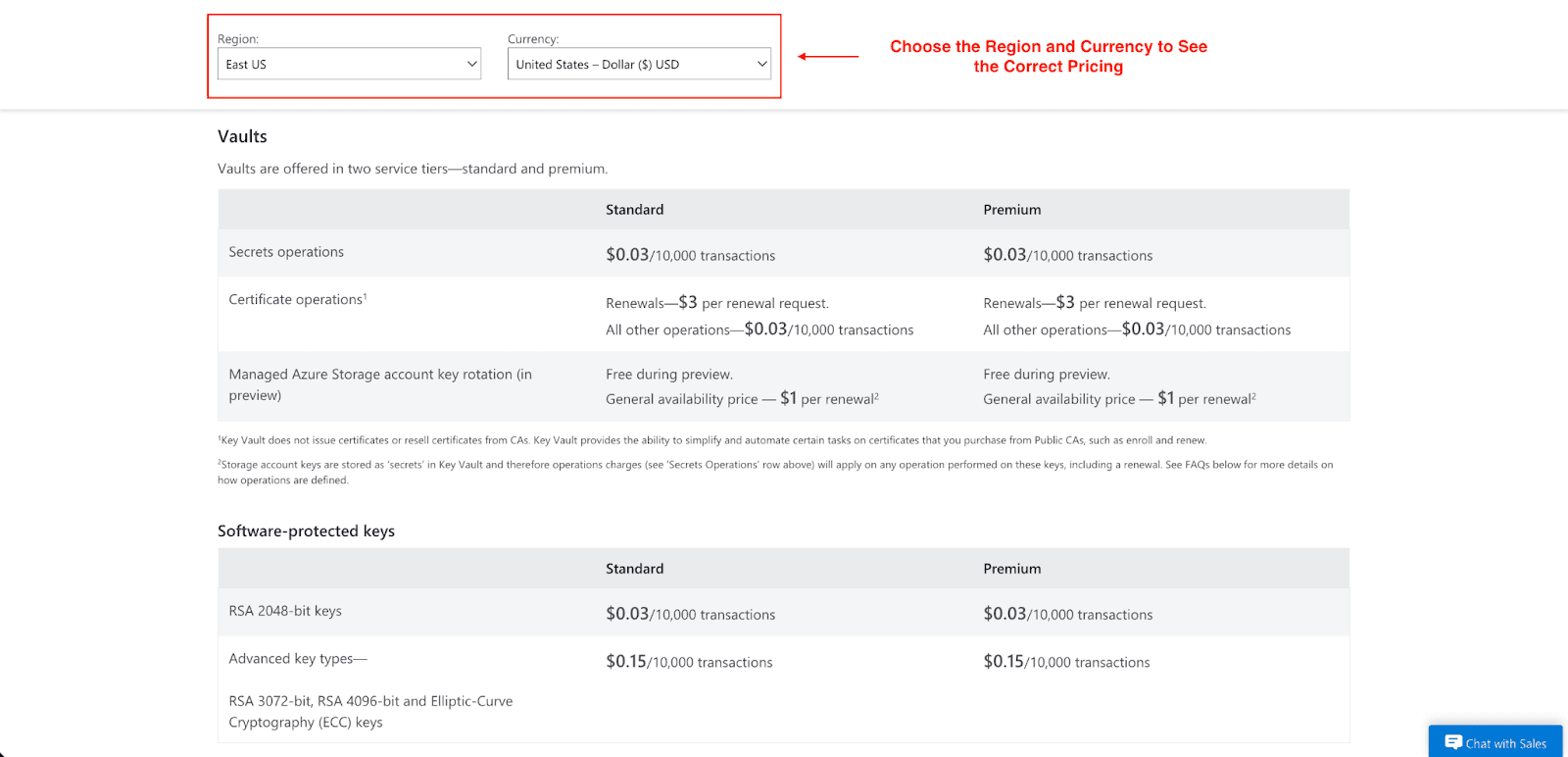
Below is an explanation of how this type of pricing works in each of the service tiers:
Standard Tier Pricing
Standard is the most popular tier for most applications. Software-based encryption is used, and charges are based on the operations.
Secret and Key Operations: Billed at $0.03 per 10,000 transactions (This is for standard RSA 2048-bit keys).
Certificate Operations: Renewals are billed at $3 per renewal request. All other operations are billed at $0.03 per 10,000 transactions.
This tier is ideal if:
Your application has moderate usage (infrequent secret retrievals or key operations).
You prefer not to use HSM-backed keys (which is typical for development/testing scenarios or workloads that are not highly regulated).
You prefer a predictable low-cost tier that increases with usage.
Premium Tier Pricing
Premium tier offers additional protection by storing keys in HSMs that are validated to meet FIPS 140-2 Level 2 security requirements.
HSM-Protected Keys: In addition to standard operation costs, a monthly fee is charged for each HSM-protected key.
RSA 2048-bit keys: $1 per key per month, plus $0.03 per 10,000 transactions.
Advanced key types (RSA 3072/4096-bit, ECC): Charged at a tiered rate per key per month, plus $0.15 per 10,000 transactions.
- First 250 keys: $5
- 251–1,500 keys: $2.50
- 1,501–4,000 keys: $0.90
- 4,001+ keys: $0.40
This tier is ideal if:
Your workload requires HSM-protected keys (e.g., compliance regime, encryption-at-rest, or regulatory requirements).
You anticipate regular usage of HSM keys and moderate HSM operational activity.
Cost is not a concern, as security is more important.
Note: The Premium tier has a mix of fixed and variable costs per key and per transaction, so do estimate carefully.
Managed HSM Pricing
Managed HSM provides a fully managed, single-tenant HSM cluster. This tier is for companies that require dedicated hardware because they need to meet the highest standards of security an HSM can provide, as well as the highest compliance certifications (FIPS 140-2 Level 3).
Hourly Billing: Instead of per-operation billing, you pay a fixed hourly rate of $3.20 per HSM pool (Standard B1).
This tier is ideal if:
Your company has high-throughput cryptographic workloads. This can be high-volume encryption/decryption or high-volume key management.
You have stringent compliance or regulatory requirements (e.g., data residency, isolation, audit).
Your company has predictable usage, making a flat hourly rate the more economical option.
Note: If usage is sporadic or patterned, Managed HSM can be very costly. However, it can be the most economical option for sustained operations.
Pro tip: Estimate your potential costs by using the Azure Pricing Calculator. This practice enables you to forecast your Azure Key Vault billing and helps to mitigate the risk of incurring unexpected costs.
12 Ways to Reduce Your Azure Key Vault Spend
With a clear understanding of the pricing model, you can now focus on cost optimization. Below are 12 practical ways to be able to spend less on Azure Key Vault.
Cache Secrets Locally: If secrets are accessed frequently but change infrequently, consider keeping them cached in your application’s memory for some time in order to decrease the number of read operations.
Avoid Unnecessary Reads: Structure your application so that secrets are only retrieved when necessary. For example, during application startup. Take care not to retrieve it on every transaction.
Consolidate Vaults Responsibly: It is a security best practice to have a separate application vault and environment vault; however, for small related microservices, consolidating vaults can reduce the overhead of vault management.
Audit Unused Secrets and Keys: Cleaning up vaults by removal of unused secrets and keys will bring improved vault definition by avoiding unintentional usage, cleaning up vaults, and preventing accidental usage.
Remove Stale Certificates: Delete expired or unused certificates to avoid unnecessary management costs.
Switch to Standard Tier When Possible: When an application no longer needs HSM-backed keys, change its keys from the Premium to the Standard tier in order to drop the monthly per-key fee.
Use Managed HSM for Heavy Workloads: For applications with high transactional volume and cryptographic operations, Managed HSMs are generally more advantageous than the Premium tier with per-transaction cost.
Clean Dev/Test Vaults: Regularly clean up development and testing vaults from old or unnecessary secrets and keys.
Automate Lifecycle Policies: Use automated rotation policies for keys and certificates to have more seamless management.
Monitor Operation Metrics: Use Azure Monitor to track transaction metrics for your Key Vault. This is useful to determine which applications make excessive calls so you can investigate and optimize.
Use RBAC Effectively: Apply Role-Based Access Control with the least privilege principle to mitigate the risk of unnecessary or unintentional API calls, which can increase costs.
Set Budgets and Alerts: Use Azure Cost Management to set budgets for your Key Vault resources and configure alerts when the cost goes beyond the limit.
Conclusion
When it comes to protecting your cloud applications, starting with something like Azure Key Vault is a must; even with the complexity of the pricing model, it will scale to your needs.
It is like a utilities bill; the more you use, the more you pay. Knowing the key cost drivers like transactions, number of keys, types of keys, and efficient optimization actions will enable you to continue to improve your overall security without a major cost to your budget.
Analyzing your usage with the actions we suggest will put you in a position to more effectively manage the cost of your Azure Key Vault and strengthen your overall security posture.
Frequently Asked Questions
1. Is Azure Key Vault free?
No, Azure Key Vault is not free of charge. It is a pay-as-you-go model, and you will be charged operational, key, and certificate fees. There is no free tier, yet there are no initial costs to use the service.
2. How is Azure Key Vault priced?
Your charge will be based on a transactional model. Every 10,000 operations (API calls) will incur a charge. For the Premium tier, there is an additional monthly charge for each HSM-backed key. The Managed HSM tier is a fixed hourly charge for a dedicated cluster.
3. What counts as a transaction in Azure Key Vault?
Any authenticated API call to the service is a transaction. As such, this includes any time a user creates, reads, lists, or deletes a secret, key, or certificate. It also includes any time a user performs the cryptographic operations of signing, encrypting, or decrypting.
4. What is the difference between Standard and Premium Key Vault?
The main difference is how the keys are secured. In the Standard tier, the keys are software protected. In the Premium tier, the keys are secured with an HSM at an additional monthly cost per key.
5. When should I use Managed HSM instead of Key Vault?
Use of Managed HSM is preferable when you need a single-tenant HSM that is dedicated to you and that is required for extremely high cryptographic throughput or very high compliance requirements, e.g., FIPS 140-2 Level 3 validated.
Join Pump for Free
If you are an early-stage startup that wants to save on cloud costs, use this opportunity. If you are a start-up business owner who wants to cut down the cost of using the cloud, then this is your chance. Pump helps you save up to 60% in cloud costs, and the best thing about it is that it is absolutely free!
Pump provides personalized solutions that allow you to effectively manage and optimize your Azure, GCP, and AWS spending. Take complete control over your cloud expenses and ensure that you get the most from what you have invested. Who would pay more when we can save better?
Are you ready to take control of your cloud expenses?
Similar Blog Posts
Azure Data Explorer: What It Is, Features & Pricing



