

Mastering the cost of cross-domain cloud management has become indispensable for enterprises managing hybrid and poly-cloud architectures. Through direct experience, I have determined that the pricing model for Azure Arc delivers distinct levers for optimizing expenditure across heterogeneous infrastructures.
In this guide, I’ll break down Azure Arc costs and share strategies that have worked for me to help you get the most out of your investment.
What is Azure Arc?
Azure Arc represents Microsoft's consolidated control plane for managing resources that reside beyond Azure itself, spanning on-premises data centers, edge nodes, and rival public clouds. It effectively serves as an extensible conduit, transporting Azure’s management capabilities beyond its original geographical borders.
The platform delivers the following capabilities:
Aligns policy and management across differing workload domains.
Centralize security controls to eliminate out-of-band configurations.
Reduces operational complexity by consolidating management into a single interface.
Enables adoption of Azure platform services regardless of resource domicile.
Support extends across an expanding range of workloads, including virtual machines, Kubernetes clusters, SQL Server instances, and modern application services, making Azure Arc a flexible solution for intricate, distributed environments.
How Does Azure Arc Work?
Azure Arc connects distributed resources to Azure’s management plane via a layered architectural model that orchestrates three fundamental capabilities:
Resource Projection: Arc ingests metadata from on-premises, multicloud, and edge resources and ingests it into Azure Resource Manager. This registration process translates non-Azure assets into first-class Azure resources, enabling unified visibility via the Azure portal and programmatic access via Azure APIs.
Policy and Governance: The system propagates Azure Resource Policy definitions and control mechanisms to every registered resource. Compliance assertions are evaluated continuously, ensuring that security, regulatory, and operational baselines are enforced irrespective of where the workloads reside.
Service Extension: Arc delivers Azure control plane services, such as Azure Monitor, Security Center, and Update Management, directly onto hybrid infrastructure. Through lightweight agents and runtime bridges, these services assimilate operational telemetry and security posture, thereby providing centralized management without requiring a full Azure regional presence.
Currently, Arc supports the onboarding of Azure-enabled servers, managed SQL instance nodes, distributed Kubernetes clusters, VMware vSphere environments, and attached application services. Licensing is consumption-oriented, tiered by the specific capabilities activated and the volume of resources being managed.
Deep Dive into Azure Arc Pricing Structure
Pricing for Azure Arc operates on a multi-tiered construct that provides both free and paid options, facilitating the optimisation of expenditure alongside the provisioning of extensive capabilities. The architecture is segmented into six principal domains: Azure Arc family, Azure Arc-enabled security and monitoring services, Azure Arc-enabled Kubernetes, Azure Arc-enabled data services, Azure Arc-enabled app services, and Azure Arc-enabled infrastructure, articulated herein as Azure Stack HCI. The discussion that follows treats the Azure Arc family at a high level; for exhaustive examination of the remaining domains, visit the Azure Arc pricing page.
Core Control Plane (Free Features)
Azure Arc delivers a suite of core capabilities without incremental charges, thereby fostering streamlined governance of geographically distributed resources:
Resource Inventory and Organization: Use Azure management groups and tagging hierarchies to maintain a structured visibility and categorization of assets.
Basic Management Operations: Use tools such as Azure Arc SSH, the Azure Run Command, and the Custom Script Extension to conduct customary tasks without the imposition of per-operation fees..
Virtual Machine Lifecycle Management: Orchestrate the full lifecycle of virtual machines residing on validated host environments from a unified control plane.
Search and Indexing: Use Azure Resource Graph to execute ad-hoc, high-performance queries against the complete resource surface.
Access Control: Regulate operational privileges in a fine-grained manner through Azure role-based access control, whose security assessments incur no supplementary costs.
Paid Management Services
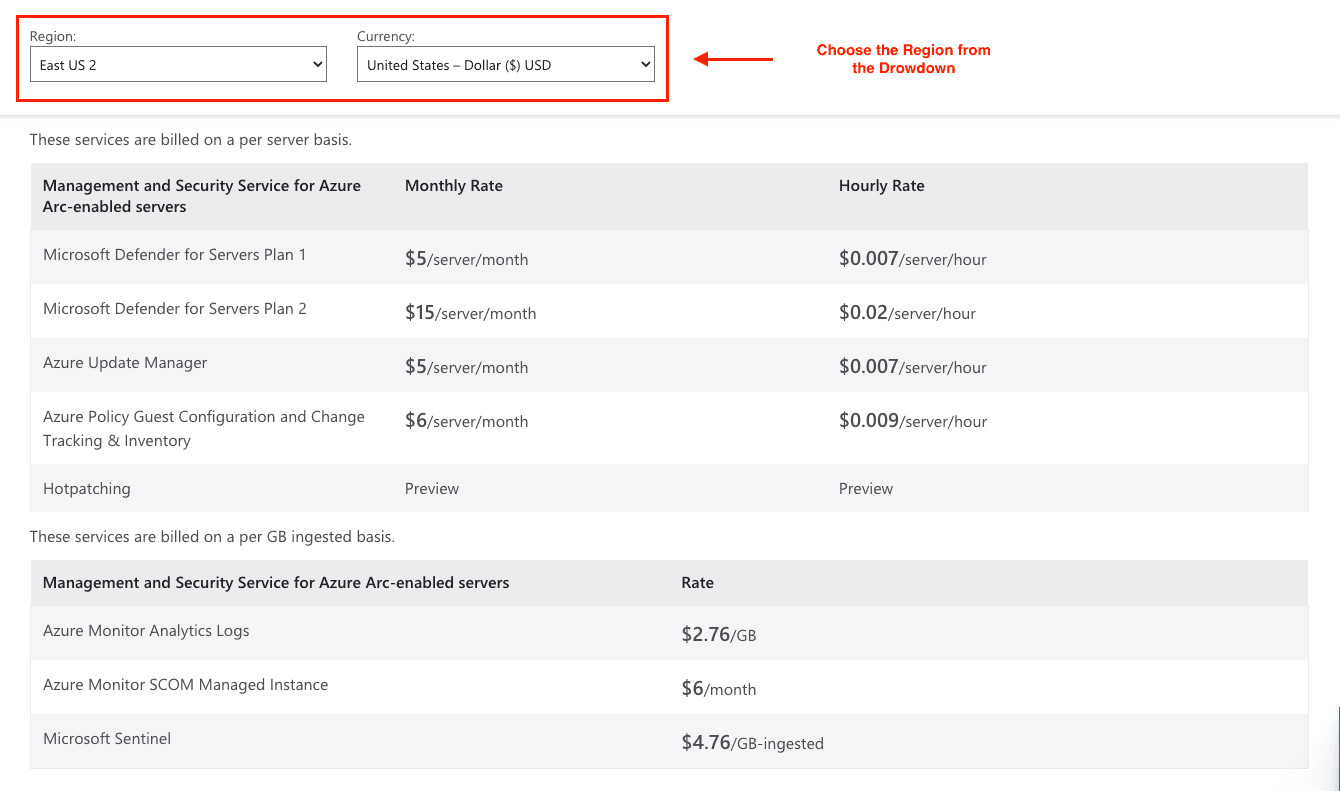
The following services incur charges on a per-server basis:
Microsoft Defender for Servers
Plan 1: $5/server/month ($0.007/server/hour)
Plan 2: $15/server/month ($0.02/server/hour)
Azure Update Manager
$5/server/month ($0.007/server/hour)
Free for Azure VMs and Arc-enabled Azure Stack HCI VMs
Azure Policy Guest Configuration
$6/server/month ($0.009/server/hour)
Includes Change Tracking & Inventory functionality
Data Services Pricing
Azure Monitor Analytics Logs
$2.76 per GB ingested
5 GB per billing account is included monthly
Microsoft Sentinel
$4.76 per GB ingested
Billed based on data volume sent to the Log Analytics workspace
SQL Server Licensing Options
Pay-as-you-go SQL Server Licensing
Standard Edition: $73/month ($0.10/hour)
Enterprise Edition: $273.75/month ($0.375/hour)
Windows Server Pay-as-you-go
$33.58 per core per month ($0.046/core/hour)
Azure Arc Pricing Benefits and Optimization Strategies
Azure Hybrid Benefit Savings
Companies leveraging active Software Assurance or Cloud subscriptions may enable specific Azure Arc capabilities without incremental outlay:
Change Tracking & Inventory
Azure Machine Configuration
Windows Admin Center integration
Azure Site Recovery configuration
Utilization of these services may translate to a cost abatement of $11-17 per server per month relative to standard pay-as-you-go pricing models.
Bundle Advantages
Microsoft Defender for Servers Plan 2 encompasses Azure Policy Guest Configuration at no supplementary fee. Acquiring these components in concert rather than separately may yield per-server savings of roughly $11 monthly.
Reserved Instance Opportunities
Though Azure Arc refrains from conventional reserved instances, cost minimization may still occur via:
Forward-looking Azure Hybrid Benefit utilisation.
Intentional service aggregation.
Comprehensive tagging and governance of cloud assets.
Case Study: Manufacturing Giant Cuts Deployment Time by 90%
Procter & Gamble’s recent adoption of Azure Arc illustrates pronounced advantages in cost control and operational streamlining. The enterprise contended with the need to harmonize procedures across manufacturing sites in 35+ countries, each site exhibiting unique machinery and configuration profiles.
The Challenge: P&G required uniform data governance and accelerated dissemination of artificial intelligence models across heterogeneous production zones, all while safeguarding production throughput.
The Solution: Azure Arc, augmented with IoT Operations, provided P&G a cohesive control surface that:
Formalised data acquisition protocols across varying sites.
Executed centralised AI model distribution 90% more swiftly.
Increased asset utilisation via advanced, consolidated analytics.
Impact: The accelerated rollout cycle curtailed infrastructure expenditure and integrated workflows, affirming Azure Arc's substantial return on investment by marrying enhanced throughput with reduced operational expenditure.
Tools and Tips for Cutting Azure Arc Costs
Use the Azure Pricing Calculator
Microsoft hosts an Azure Arc cost estimation on the Azure calculator page. Access the calculator directly, select Azure Arc from the service tier drop-down, and input variables such as the number of managed servers, region, and desired service level. The tool estimates a monthly cost, helping to form a baseline for budgeting.
Pro tip: Enter conservative assumptions, track deviations, and increment estimates as real usage data is ingested.
Implement Smart Resource Management
Right-sizing Strategy: Periodically audit hybrid servers to ascertain the minimum management tier that meets security and visibility requirements. A server currently bound to Defender Plan 2, for example, may perform adequately on a lighter SKU.
Policy-based Automation: Deploy Azure Policy definitions that automatically restrict services like security auditing or monitoring to the configured level, thus pre-emptively blocking over-allocation.
Resource Tagging: Mandate tags at the time of resource creation to funnel costs to governance buckets such as business unit or project code. Tag-level visibility enhances granular steering of the governance.
Monitor and Optimize Regularly
Set up Cost Alerts: Use Azure Cost Management to set up tiered notifications, e.g., 75% of the forecasted amount, integrating alerts with enterprise ticketing to instigate remedial action.
Review Billing Reports: Review the monthly Azure Arc invoice, focusing on sections where usage diverges markedly from estimates, and host a bi-monthly governance review to consider remediation.
Leverage Free Features First: Take advantage of the free Azure Arc preview services that provide monitoring, inventory, or security insights, often with broader learning and documentation, before engaging paid functionality.
Best Practices for Long-term Savings
Hybrid Benefit Optimization: Use your current Software Assurance entitlements fully prior to exploring incremental consumption or pay-as-you-go model expenditures.
Service Bundle Planning: For environments requiring multiple security and governance operations, evaluate Defender for Cloud Plan 2 bundles. Bundled purchases can drive superior cost efficiencies calculated on a per-server basis.
Conclusion
Azure Arc’s pricing model is architected to facilitate hybrid cloud governance through an equilibrium of fundamental free-tier functionalities and modulated chargeable augmentations. Value realization mandates an initial assessment of operational prerequisites, testing free offering baselines, and incrementally provisioning premium features where evidence of return on investment is demonstrable.
Ready to optimize your hybrid cloud costs? Request a pricing quote or initiate a free trial of Azure Arc’s capabilities. For precision in discount alignment and to appropriately allocate Software Assurance entitlements, schedule a personalized billing consultation with Azure.
Join Pump for Free
If you are an early-stage startup that wants to save on cloud costs, use this opportunity. If you are a start-up business owner who wants to cut down the cost of using the cloud, then this is your chance. Pump helps you save up to 60% in cloud costs, and the best thing about it is that it is absolutely free!
Pump provides personalized solutions that allow you to effectively manage and optimize your Azure, GCP and AWS spending. Take complete control over your cloud expenses and ensure that you get the most from what you have invested. Who would pay more when we can save better?
Are you ready to take control of your cloud expenses?



