

Running applications in containers is highly streamlined and flexible, and if you don't monitor them, cloud costs can soar. Azure Container Instances easily lets you run containers, but there is no infrastructure for you to utilize, so understanding how billing works is important to avoid going over budget.
In this article, I will break down everything you need to know about Azure Container Instances pricing: how billing works, what factors drive costs, real pricing examples straight from Microsoft's official documentation, and 7 practical tips on how to minimize your costs.
What Is Azure Container Instances?
Azure Container Instances (ACI) is Microsoft's serverless container service. You can run a container with one command, and Azure does the rest for you. You will not have to set up a VM or control a Kubernetes cluster; just open the app, and the cloud will do the rest.
Each container group has a hypervisor, which provides isolation. That means that they can run without sharing a kernel. ACI naturally integrates with other Azure services, and this includes Azure Logic App, AKS, and Azure Blob Storage, making it a powerful building block for event-driven workflows and burst workloads.
When Should You Use ACI?
ACI is purpose-built for specific scenarios. It excels at:
Short-lived workloads, batch processing jobs, and data transformation tasks.
Event-driven containers react to events using Azure Logic Apps or queues.
CI/CD pipelines create isolated build and test environments in the cloud.
Elastic bursting scales out additional pods from an AKS cluster to manage high traffic.
Development and testing in cloud environments that are lightweight and cost-effective.
Overall, ACI is great for simple tasks. ACI is less suited for complicated microservice architectures, production services that need to run for a long time, or workloads that require autoscaling and load balancing. Use Azure Kubernetes Service or Azure Container Apps instead.
How Azure Container Instances Pricing Works
The billing model is consumption-based, which means you only pay for what you use for your container instances, measured by the second. Because of this model, there are no upfront payments or termination fees.
The billing is done at the container group level. A container group is defined as a set of co-located containers that are sharing the same network and node lifecycle. Pricing is primarily driven by two key factors:
vCPU usage is charged per vCPU per second.
Memory usage is charged per GB per second.
According to Microsoft’s pricing documentation: You are charged based on the vCPU request for your container group rounded up to the nearest whole number for the duration (measured in seconds) your instance is running. You are also charged for the GB request for your container group, rounded up to the nearest tenth for the duration (measured in seconds) that your container group is running.
The billing clock starts when ACI starts pulling your first container image (for new deployments) or when the container group is restarted. The clock stops only when the entire container group is stopped, not when individual containers within it are stopped.
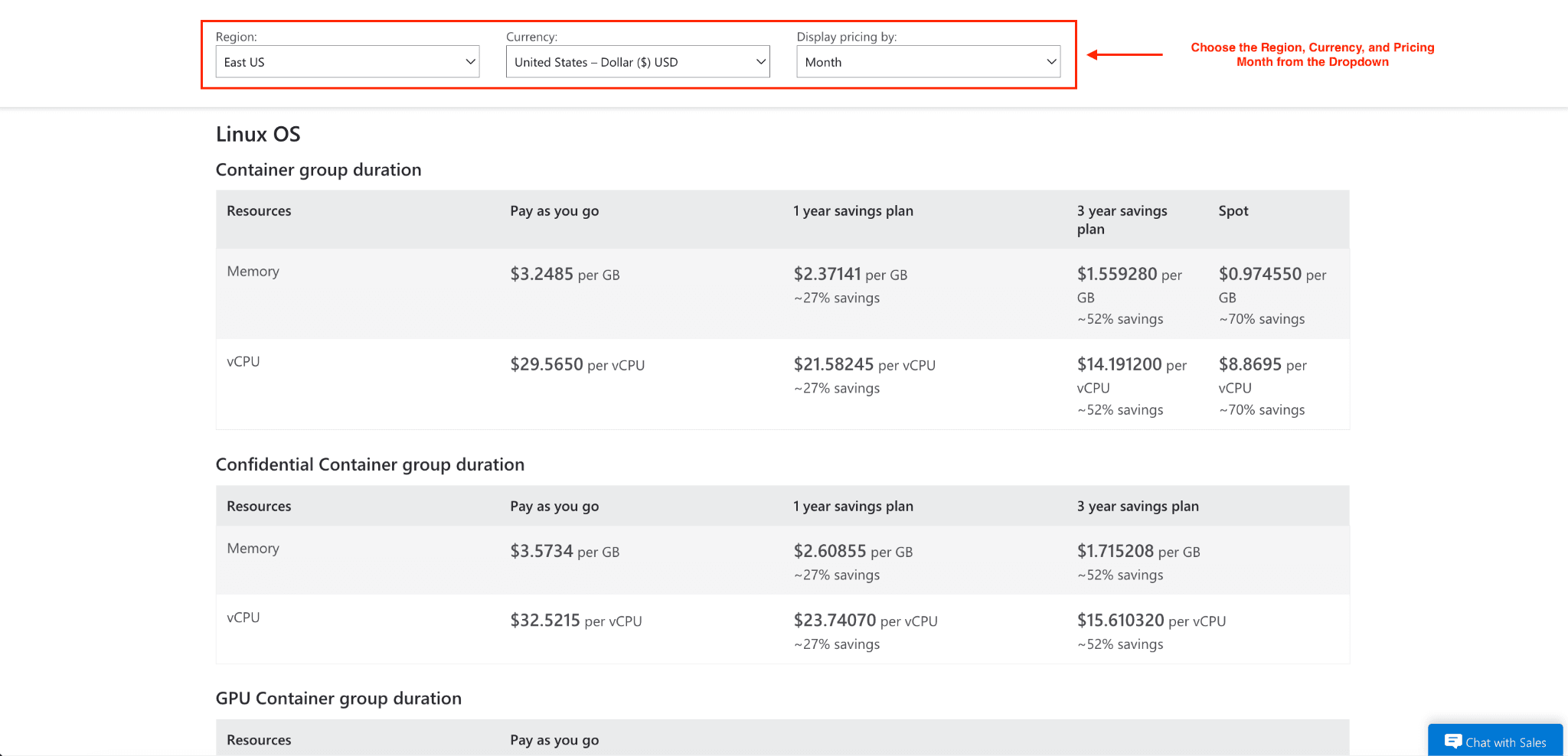
ACI Pricing Rates (Linux, Pay-As-You-Go)
Resource | Pay-As-You-Go (per month) | 1-Year Savings Plan | 3-Year Savings Plan | Spot |
Memory | $3.2485 per GB | ~27% savings | ~52% savings | ~70% savings |
vCPU | $29.5650 per vCPU | ~27% savings | ~52% savings | ~70% savings |
For Windows containers, there is an extra charge of $0.000012 per vCPU second due to Windows software duration. In standard container groups, resource limits are 1 vCPU and 1 GB of memory, scaling to 4 vCPU and 7 GB per vCPU. Extended big container options support 32 vCPU and 256 GB, while "big container" options are also supported.
Additional Cost Factors
Beyond compute, keep these in mind:
Outbound network traffic: Data sent from Azure to the internet gets charged for Azure bandwidth. There are no charges for data sent to Azure.
Azure Files volumes: If you mount persistent storage to your containers, Azure Files will charge you additionally based on your billing model, media tier, and redundancy options.
Region: Pricing on Azure varies based on the region, so for workloads that are not sensitive to latency, deploying in a cheaper region can save costs.
Real Pricing Examples
Example 1: Simple daily job
A 1 vCPU, 1 GB Linux container runs once daily for 5 minutes (300 seconds) over 30 days.
Memory: 1 group × 300s × 1 GB × $0.0000015/GB-s × 30 days = $0.014
vCPU: 1 group × 300s × 1 vCPU × $0.0000135/vCPU-s × 30 days = $0.122
Total: $0.135/month
Example 2: High-frequency batch workload
A 1.3 vCPU (rounded up to 2), 2.15 GB (rounded up to 2.2 GB) container run 50 times daily for 150 seconds over 30 days.
Memory: 50 × 150s × 2.2 GB × $0.00000149/GB-s × 30 days = $0.733
vCPU: 50 × 150s × 2 vCPU × $0.00001350/vCPU-s × 30 days = $6.075
Total: $6.808/month
These examples clearly show how rounding rules and frequency of execution can significantly affect your bill.
7 Ways to Reduce Azure Container Instances Costs
1. Right-Size CPU and Memory
Allocating too many resources to Azure Container Instances could easily result in high spending. With that being said, start small and get the minimum resources that are required. After each performance assessment, use Azure Monitor to scale the performance up if and when required. Also, remember that for the billing, requests are rounded up to the next whole number. For example: 1.1 vCPU = billed as 2 vCPU; 1.9 vCPU = billed as 2 vCPU. Therefore, if resources are allocated carefully, it could result in lower compute charges.
2. Stop Containers When Jobs Complete
Billing with ACI continues until the entire container group is stopped, not just your container. To avoid being charged for a container that runs in the background, it is important to stop workloads as soon as the job is done. Also, as a tip, use Azure Cost Management to keep track of your workaround and monitor any unexpected helper containers.
3. Use Event-Driven Triggers
Instead of running containers based on a fixed schedule, consider using event-based triggers that only start them when they are actually necessary. You can use services like Azure Logic Apps, Event Grid, and Azure Functions to start your containers when you actually need them and avoid being billed for running idle containers.
4. Commit to an Azure Savings Plan
If your company runs consistent container workloads regularly, Azure Savings Plans can result in a large reduction in your computing costs. By committing to a steady hourly expenditure for either one or three years, your company can receive considerable savings compared to a pay-as-you-go pricing.
5. Use Spot Containers for Fault-Tolerant Workloads
ACI Spot containers are currently in public preview and offer up to a 70% discount compared to regular-priority pricing. Azure can preempt these containers when it needs the capacity. Because of this, Spot containers are created to handle workloads like batch processing, Monte Carlo simulations, and offline tasks that have the potential to be interrupted.
6. Optimize Your Container Images
Since the billing clock starts later, faster pulling images result in cost savings. You should use minimal base images like Alpine for Linux and Nano Server for Windows and try to use fewer layers. To help reduce time spent on cold starts, Microsoft offers a list of pre-cached images that are available in the Azure Container Registry.
7. Monitor with Azure Cost Management
You can set budgets, spending limits, and alerts for Azure Monitor, and you can also analyze the behavior of containers during runtime. It's also important to track the cost of your workload over time to understand the potential inefficiencies in your system.
Avoid These Common ACI Cost Mistakes
Letting containers run idle: This is the most costly mistake. Always have automatic shutdowns in place.
Over-allocating memory: Memory is billed by rounding up to the next tenth of a gigabyte. This is why precise allocation is so important.
Using ACI for long-running services: Sustained workloads are almost always cheaper on AKS or Azure Container Apps.
Ignoring egress costs: Outbound data transfer costs add up fast, especially when the application is data intensive.
Defaulting to expensive regions: Always check regional pricing before you deploy.
Is Azure Container Instances Cost-Effective?
Azure Container Instances is very positive for short, bursty, or event-driven workloads. Because the billing is per second, the only thing a company pays for is the compute resources when the containers are running; therefore, the idle infrastructure or pre-provisioned clusters do not need to be maintained.
If containers are running for long periods of time, or if the application is orchestrated in an advanced way, the costs will not work in your favor. For services that run for long periods of time, large microservice architectures, or workloads that are required to be auto-scaled to many containers, Azure Container Apps or AKS is usually more cost-effective and gives more operational flexibility.
Conclusion
Azure Container Instances is a flexible and powerful service; however, as a pay-as-you-go service, its costs directly reflect how you, as a customer, utilize it. By learning the billing model, applying the right optimizations, and learning the rounding rules, you take control of your costs in the cloud.
Use the Azure Pricing Calculator to model your workloads before you deploy. If your usage is predictable, commit to a savings plan. And finally, do not allow your containers to run longer than necessary. Small decisions can lead to big savings in the long run.
Join Pump for Free
If you are an early-stage startup that wants to save on cloud costs, use this opportunity. If you are a start-up business owner who wants to cut down the cost of using the cloud, then this is your chance. Pump helps you save up to 60% in cloud costs, and the best thing about it is that it is absolutely free!
Pump provides personalized solutions that allow you to effectively manage and optimize your Azure, GCP, and AWS spending. Take complete control over your cloud expenses and ensure that you get the most from what you have invested. Who would pay more when we can save better?
Are you ready to take control of your cloud expenses?



