

As more companies adopt containerized development, the ability to control where you store your container images becomes a pivotal part of your workflow. Companies using Microsoft's cloud can take advantage of a fully managed private Azure Container Registry to store and manage their container images.
As is the case with most cloud services, the pricing model for ACR is complex. Pricing varies based on your usage, how much you store, and the network traffic. If you are unsure about how the pricing works, you may be surprised by the amount of your monthly bill.
In this article, I will explain everything about Azure Container Registry pricing tiers and the main cost elements, and I will provide you with practical advice on how to manage your costs and avoid unnecessary expenses.
What Is Azure Container Registry?
Azure Container Registry is a private, fully managed registry for storing and managing your container images and other related artifacts (e.g., Helm charts). ACR is your secure and private library for the essential components of your applications.
ACR plays a central role in the DevOps lifecycle. Applications deployed to the Azure Kubernetes Service pull newly versioned images from the Azure Container Registry, which is automatically updated by developers and CI/CD pipelines. ACR is the link between the code and its deployment. ACR is primarily used by developers, DevOps teams, and enterprises needing a secure and scalable solution to manage their container images in the Azure cloud.
Why Understanding ACR Pricing Matters
Understanding the costs associated with the services provided by the cloud is integral, and this also extends to the services provided by your container registry. In the long term, ACR costs can become a high operational cost for workloads executing on AKS or any other container services.
The major cost contributors to the Azure Container Registry costs include the storage and tier of the service, as well as the cost associated with transferring data, or rather, the network egress. A common mistake is assuming that old images do not consume storage, which can lead to costs that accrue from storage. Another is not saving network traffic from the CI/CD, which can lead to unexpected costs from network egress. These items comprise the more integral components of the calculations for ACR cost optimization.
Azure Container Registry Pricing Tiers Explained
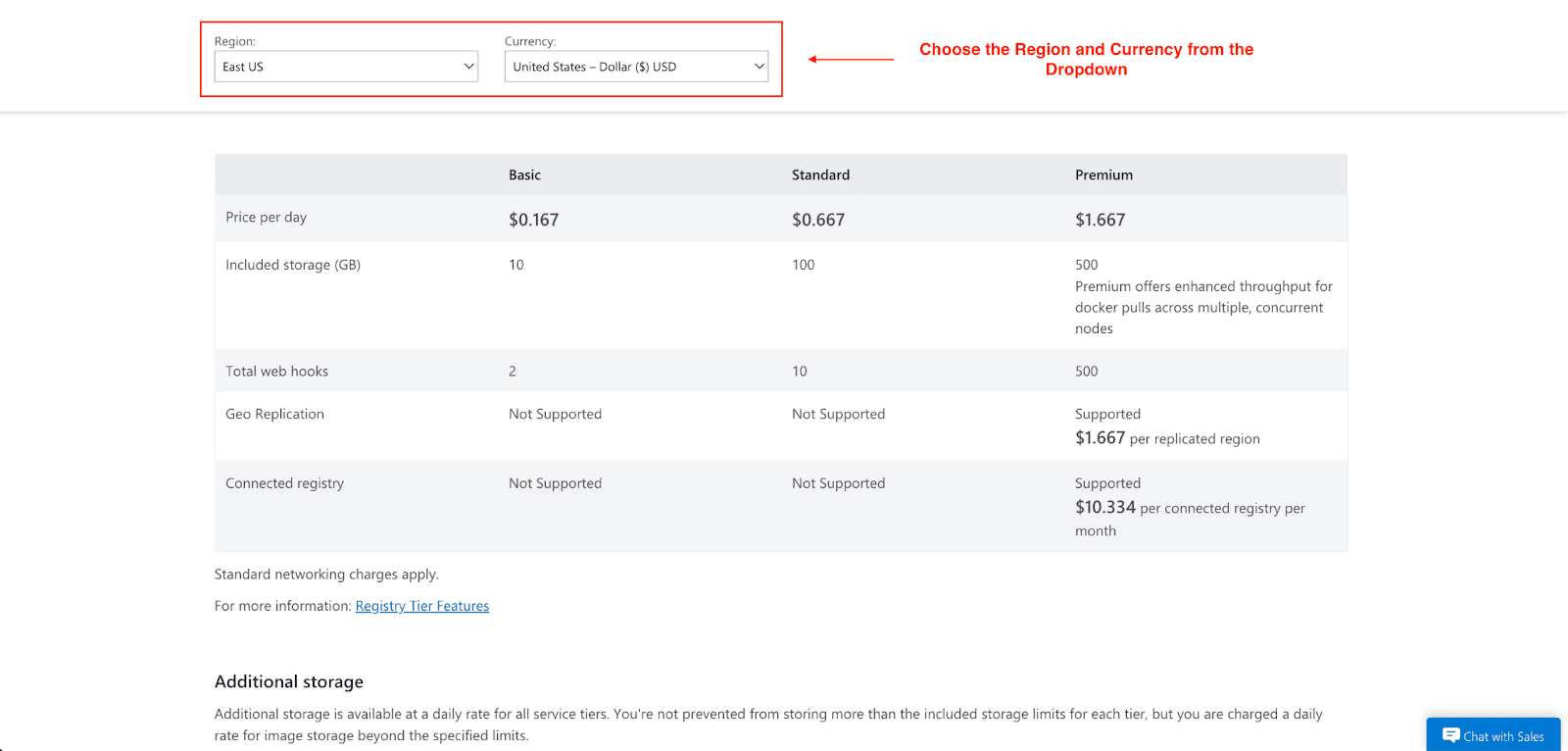
Three main tiers can be selected for ACR service: Basic, Standard, and Premium. Each is appropriate for different use cases, and each includes a different set of features, as well as different pricing:
Basic: This is the most economical of the tiers and is most appropriate for a small project, a quick developer, or a learning project. It includes most primary functions, though it has a lower threshold for storage and throughput.
Standard: At the previous basic level, the standard service tier is a notch above the basic level and comes with advanced features such as additional storage and better system performance. This service level is appropriate for the large majority of business activities that are production-oriented, and that want a feature/cost balance in the offerings of the level of service.
Premium: The highest level of service offering is Premium, which is targeted for the enterprise, major volume use case scenarios. Premium tier exhibits the highest storage, highest throughput, and, additionally, advanced features such as geo replication (for global performance and disaster recovery), and Private Link for networking.
Below is a quick comparison of the Azure ACR pricing tiers:
Feature | Basic | Standard | Premium |
Price per day | $0.167 | $0.667 | $1.667 |
Included Storage | 10 GB | 100 GB | 500 GB |
Webhooks | 2 | 10 | 500 |
Geo-replication | Not Supported | Not Supported | $1.667 per replicated region |
Private Link | Not Supported | Not Supported | $10.344 per connected registry per month |
This pricing is based on the US East region and may vary. You can check out the official Azure pricing page for the most current rates.
Cost Components That Influence Your ACR Bill
Your monthly Azure Container Registry charges are determined by several factors:
Storage Cost: Every day, you are charged per GB of data stored, exceeding the limit of your tier, in the form of images, manifests, and layers of data.
Network Costs: You will incur charges every time you use data from an Azure data center (egress). For instance, when images are pulled from the Azure data center to on-premise servers, developer PCs, or other Azure regions which the data center connection is not configured optimally.
Geo-replication Pricing: You incur costs when you use Premium and enable geo-replication on every additional region where the charges are applicable, and it offers more affordable, faster local pulls to the distributed teams.
Image Operations and Builds: ACR Tasks that create image containers incur costs from CPU time per second. You will have monthly charges for building images, as there are no costs to increase the pull or push of an image.
How Azure Container Registry Pricing Is Calculated
Your total bill is essentially a sum of the components mentioned above: Storage + Networking + Operations.
Let's break down how these costs add up with a practical example.
Let's say your team is running a CI/CD pipeline that builds and pushes a 500MB container image 10 times a day.
Daily Data: 500 MB/image × 10 builds = 5 GB of new data per day.
Monthly Data: 5 GB/day × 30 days = 150 GB of new image data each month.
Now, let’s see how this affects the Standard tier, which has 100 GB of storage.
Base Cost: The Standard tier has a daily fee (e.g., $0.667/day), which comes out to about $20 per month.
Storage Overage: Your 150 GB of usage exceeds the included 100 GB by 50 GB. You will be billed for this extra 50 GB at a "per GB/day" overage rate.
If there is no image retention policy in place, your continuous monthly storage usage and associated costs will exceed the base monthly charge.
A hidden cost trap that often goes unnoticed is network egress. Accessing images outside the region of your registry, to a developer’s workstation, an on-premises server, or a CI/CD pipeline in a different cloud region, incurs network egress costs.
Data egress costs surmount your storage costs over time due to excessive image pulls. Image storage costs optimization does not influence your expenditure due to unregulated image pulls. Understanding your team’s egress costs is paramount to effective ACR egress cost optimization.
When to Upgrade Your ACR Tier
Knowing when to move up from Basic to Standard, or from Standard to Premium, is key to balancing cost and performance. Here are a few indicators suggesting it is time to upgrade:
Scaling AKS Clusters: As you increase the number of nodes in your Kubernetes clusters, the number of simultaneous image pulls also increases. If you notice deployments are delayed, or image pulls are being throttled, it is time to upgrade to Standard or Premium tiers to obtain the performance levels you need.
High CI/CD Volume: A busy CI/CD pipeline that is constantly building and pushing images can also put a low-tier registry under stress. Upgrading to a higher-tier registry allows the pipeline to execute without a performance hindrance.
Advanced Security and Networking: If you need to restrict access to your registry using Azure private endpoints, you have to use the Premium tier.
Global Development Teams: Premium tier’s geo-replication feature is a must for teams that are distributed around the world. It allows them to pull images from a nearby replica, which substantially reduces latency and accelerates the development and deployment cycles.
How to Choose the Right ACR Tier
Choosing the correct tier is based on your particular set of requirements. Below are some general recommendations:
Startups and Small Teams: The Basic or Standard tier should usually suffice. For development, start with Basic and then, as you transition into production, consider Standard.
Small to Medium-Sized Businesses: The Standard tier tends to be the perfect middle ground as it offers enough performance for production workloads without having the additional costs that come with the Premium.
Enterprises: The Premium tier is the best choice. The additional functionality that it offers, such as geo-replication and a private link with higher throughput, is essential for big, secure, and globally dispersed applications.
ACR Cost Optimization Strategies
After choosing a tier, there is still work to be done. Managing your Azure Container Registry Cost is an ongoing responsibility. Below are some of the most effective strategies.
Implement Image Retention Policies: Regularly clean up old and untagged images. You can automate this process using ACR Tasks to remove manifests that haven't been pulled in a certain number of days.
Clean Unused Tags and Manifests: Avoid your registry from becoming a digital graveyard. Deletion of images that are untagged and untethered to any active deployment should be performed regularly using a script.
Optimize Container Images: Smaller images mean less storage and faster pulls. Use multi-stage builds, minimal base images (like Alpine), and combine RUN instructions in your Dockerfile to reduce image size.
Limit Geo-replication: Geo-replication should only be enabled in regions where your teams or deployments are currently active. Each replica adds to your Azure ACR premium pricing.
Monitor Costs with Azure Tools: Use Azure Cost Management and set up budget alerts to track your spending. This helps you spot unexpected increases in your Azure Container Registry billing before they become a major problem.
Conclusion
I hope this article has given you a clear understanding of Azure Container Registry pricing and how to manage costs effectively. Knowing prices should help you manage your cloud costs better. Choosing the appropriate tier and using strategies to optimize costs, you will be able to eliminate unexpected costs and keep your DevOps pipeline efficient and cost-effective.
Most users will treat cost management as a one-time exercise. Azure users need to proactively look at demand metrics to tier their service and keep their usage in demand. These practices will yield the most value from your Azure cloud services.
Join Pump for Free
If you are an early-stage startup that wants to save on cloud costs, use this opportunity. If you are a start-up business owner who wants to cut down the cost of using the cloud, then this is your chance. Pump helps you save up to 60% in cloud costs, and the best thing about it is that it is absolutely free!
Pump provides personalized solutions that allow you to effectively manage and optimize your Azure, GCP, and AWS spending. Take complete control over your cloud expenses and ensure that you get the most from what you have invested. Who would pay more when we can save better?
Are you ready to take control of your cloud expenses?



