

Building a modern application can be a time-consuming and difficult process. Your code is excellent and ready for your intended audience, but you must complete several steps before launching the application. You have to set up and configure clusters and networking, perform load balancer management, and build the required deployment pipelines. Because of the complexity, many developers find the tasks necessary to launch applications to be far more frustrating than the joy of coding.
The great thing about serverless container platforms is that they take care of most of the infrastructure. Generally, the more control you have with cloud platforms, the more experience you will need, and thus, the more difficult it will be to work with the platform; this is not always the case.
You may think of Kubernetes as building a high-performance race car from scratch. On the other hand, you don’t have to construct anything for AWS App Runner; you just provide the code, and AWS App Runner takes care of all of the other things, such as infrastructure, scaling, maintenance, and deployment.
In this article, I will break down what AWS App Runner is, how it works, its pricing model, and the key use cases where it makes the most sense.
What is AWS App Runner?
AWS App Runner is a managed service created to simplify deploying web apps and APIs. You no longer need to provision servers or set up orchestration tools. You simply provide your code or a container image, and AWS does the rest.
At its most basic, AWS App Runner takes your app and creates a web service for you. You just have to point the service to your repository. App Runner then takes care of your compute resources, security, and everything else.
Here are the main things that App Runner can do:
Fully managed infrastructure: No operating system patches or server updates are your responsibility.
Auto scaling: Resources are adjusted based on web traffic.
Built-in load balancing: Incoming requests are automatically distributed to your running containers to ensure smooth performance.
HTTPS by default: Every app created is given a secured URL with managed TLS encryption.
App Runner supports two main sources for your application. You can use App Runner with Amazon Elastic Container Registry for a container image or GitHub with the source code directly.
How AWS App Runner Works
(Image Source: AWS)
The strength of AWS App Runner is in its simplicity. It eliminates the delay in the process of going from code to being live on the web.
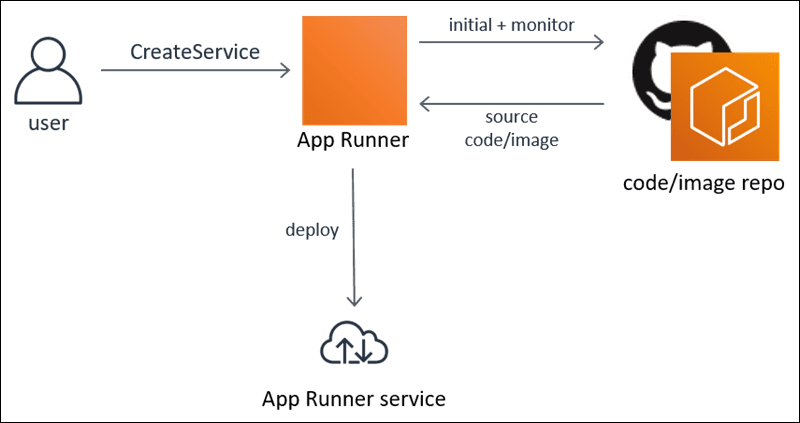
Here’s how it works, step by step:
Connect your source: You connect App Runner to your source code repository or to a container image in your Amazon ECR.
Build and deploy automatically: If you connect a source code repository, App Runner will automatically build your container image and deploy it to the AWS environment.
Traffic routing via managed endpoint: App Runner gives your application a secure, load-balanced URL, and all traffic is routed to your active containers.
Continuous deployment (optional): You can configure your service to watch your repository. App Runner will automatically deploy your updated version whenever you push a new commit or image.
How Scaling Works in AWS App Runner
When traffic goes to your application for the first time, AWS App Runner will adjust scaling to improve traffic performance. They do not use thresholds for CPU and memory usage but rather thresholds for the number of concurrent requests. This technique is better for web applications and APIs, as those applications are driven by requests.
You control this feature by setting a maximum number of concurrent requests for one instance. In App Runner, this means adding more instances. Then, once traffic decreases, this feature will automatically decrease the number of instances to the default setting, meaning no interaction is required for this feature.
Here is how App Runner scaling works:
Concurrency-based scaling: Scales up and down based on the actual number of concurrent requests.
Automatic scale-out: Adds instances when the set limit on concurrent requests is reached.
Automatic scale-in: If the number of requests goes down, the number of instances will decrease.
Minimum instance: You will always have at least one instance to prevent cold starts.
Reduced cost when idle: If instances that are not serving traffic are charged at a lower rate.
Unlike AWS Lambda, which can go down to zero instances, App Runner is guaranteed to always have one instance. This means they will still respond quickly to requests, and they will adjust their traffic.
AWS App Runner Pricing Explained
As your app grows, you will want to understand the cost of the cloud. App Runner uses a pay-as-you-go pricing model, so you'll only pay for the resources your app uses. You will be billed per second, and the service will keep your bill adjusted to your actual usage.
Here’s a simple breakdown of pricing:
Active compute: When your app is receiving and processing requests, you will be charged for your CPU and also your memory.
- $0.064 per vCPU-hour
- $0.007 per GB-hour of memory
Idle (provisioned) compute: When your app does not have any traffic, App Runner will keep a minimum of one instance always running.
- You only pay for memory ($0.007 per GB-hour)
- You are not charged for CPU during idle time
If you deploy the source code, AWS App Runner will build your container image and bill you for the build time. You may find this cost minimal, but it will vary based on how long your builds are and how frequently you have them.
Let's make this more concrete. Suppose you have a simple web app that is active for about 2 hours every day, has 1 vCPU and 2 GB of memory, and is idle for the remaining 22 hours. Such a scenario would typically cost you between $4 and $8 per month, depending on the region and your usage patterns. This would be more cost-effective than always-on infrastructure like ECS on Fargate and can also be more cost-effective than your app using an active/idle pricing model.
Key Use Cases of AWS App Runner
App Runner simplifies a particular set of tasks because of its streamlined features.
1. Web Applications
App Runner offers an environment for building customer-facing SaaS backends, REST APIs, or dynamic websites. It handles the constant stream of web traffic and keeps your endpoints protected.
2. Microservices
Most modern apps are made to be modular, which means they can be broken up into smaller parts. You can quickly and easily deploy microservices without having to worry about managing a complicated Kubernetes cluster.
3. Internal Tools
Any companies will have admin panels, data dashboards, and QA cockpit environments. Internal tools such as those are where App Runner really shines. You can deploy them quickly, and during off-hours, your team can leave them idle for very little cost.
4. Prototypes & MVPs
Operational speed is everything, and AWS App Runner helps us achieve that. Focus on developing features of the product, not managing cloud infrastructure. App Runner enables quick launch of a minimum viable product, helping startups.
When Should You Use AWS App Runner?
Choosing the right service depends on your application needs and the operational skills of your team. AWS App Runner is designed for teams that need to go to market and scale applications quickly, with no need to worry about the underlying technology.
Use AWS App Runner when you:
Have small- to medium-scale web applications or APIs.
Need to restrict the DevOps resources to a minimum or want to reduce the operational workload.
Need rapid cycles with a high frequency of deployments.
Want a simple deployment that is fully managed over customizable deployment options.
App Runner can be deployed productively in environments where it helps developers manage the environments and reduces the need for extensive configuration in AWS.
On the other hand, do not use App Runner if your application requires significant customization of the infrastructure, complex networking, or a high level of container orchestration. If you need a lot of control over the placement of tasks, or your scaling needs to be controlled by specific custom metrics, something like AWS EKS or AWS ECS will be a much better choice for you.
Pros and Cons
To make an informed decision, it helps to weigh the clear advantages against the limitations.
Pros
No infrastructure or server management required.
Deployment from source code or container images is incredibly quick.
Automatic scaling makes it simple to deal with sudden increases in traffic.
Built-in security features like fully managed TLS and load balancing.
Cons
Limited customization compared to full orchestration tools.
Gives you less control over the underlying networking than Kubernetes or ECS.
Pricing can scale quickly if your application experiences high, continuous concurrency without optimization.
Best Practices for Using AWS App Runner
To get the most out of your deployments, apply these strategic practices to keep your application highly performant and cost-effective.
Optimize container size: Start with the lowest configuration of vCPU and memory levels to meet your requirements. App Runner manages to scale instances using concurrency; this means that even a little over-provisioning will be multiplied as the traffic grows, so be smart with your container value
Use environment variables securely: Store sensitive information, such as API keys and database passwords, in a secure location such as AWS Secrets Manager or Systems Manager Parameter Store, and only reference these in your App Runner as secure environment variables.
Monitor: Keep a close watch on your auto-scaling metrics with AWS CloudWatch to track the number of active instances, the amount of memory used, and the number of HTTP 4xx and 5xx errors to stay updated on the health of your service.
Set scaling limits: Protect your budget by setting a reasonable cap on your auto-scaling configuration to prevent sudden spikes in traffic or denial of service attacks from runaway costs.
Leverage CI/CD integrations: Set automatic deployments to connect your GitHub or ECR to App Runner to keep your development team in a continuous flow from push to deployment.
Conclusion
AWS App Runner takes care of all of the things that go into successfully launching applications (cluster management, load balancing, and scaling policies); it is incredibly beneficial to developers and allows them to spend their time on more valuable things.
Although not every cloud architecture utilizes their services, their mix of speed, simplicity, and scalability makes them ideal for web apps, APIs, and agile development. With cloud infrastructure constantly evolving and incorporating more intelligent, serverless technology, App Runner is a sign of what is to come. Developers will be able to focus on their product while the cloud takes care of everything else.
I hope this article has given you an understanding of how AWS App Runner works, the pricing, the scaling model, and the scenarios when it most likely makes sense to use it.
Join Pump for Free
If you are an early-stage startup that wants to save on cloud costs, use this opportunity. If you are a start-up business owner who wants to cut down the cost of using the cloud, then this is your chance. Pump helps you save up to 60% in cloud costs, and the best thing about it is that it is absolutely free!
Pump provides personalized solutions that allow you to effectively manage and optimize your Azure, GCP, and AWS spending. Take complete control over your cloud expenses and ensure that you get the most from what you have invested. Who would pay more when we can save better?
Are you ready to take control of your cloud expenses?