You shouldn't be slowing down when it comes to managing container images. Containerized apps have become the norm in deploying modern software, and teams need to have a safe and dependable resource to secure, manage, and distribute their Docker images when containerized end-user applications become the norm in deploying modern software. Self-hosted alternatives require a lot of manual overhead, and public clouds come with security and rate-limiting issues for registered users.
Amazon ECR gives you an alternative. Regardless of whether you are deploying microservices on Amazon ECS, managing EKS Kubernetes clusters, or running microservices with Lambda, ECR is there for you.
In this article, I will break down what Amazon ECR is, its core features, pricing structure, and how it fits into modern AWS architectures.
What Is Amazon Elastic Container Registry?
Amazon Elastic Container Registry is the fully managed container image registry service that AWS offers. It provides built-in security, high availability, and provides customers with native AWS integrations to manage and deploy Docker and OCI-compatible images.
ECR removes the operational overhead of running your own registry. AWS provides complimentary infrastructure scaling, patching, and multi-AZ redundancy. Using standard Docker commands, you push images, and ECR manages the encryption, access management, and distribution to your images.
Private vs. Public Repositories
ECR supports both private and public repositories:
Private repositories use IAM policies to have fine-grained access control. This is most useful for internal applications or sensitive workloads.
Public repositories allow anyone to anonymously pull images from a public repo. This is great for open-source projects or for container images that need to be widely distributed.
You get access to the same AWS services and the same security practices regardless of the type of repositories you use. This way, you have control and flexibility.
How Amazon ECR Works
ECR follows a straightforward workflow that fits naturally into modern CI/CD pipelines:
Authenticate: Using the CLI, you can create an authentication token to log into Docker.
Build: You can build a container image of your application either on your personal device or on the build pipeline.
Tag: Add a tag to your image that includes the URL of your ECR repository. Make sure to include a tag for your image version.
Push: Upload your image to your ECR repository. Docker commands can be used to run this step.
Deploy: You can deploy your images by pulling them directly from ECR into Amazon ECS, Amazon EKS, AWS Lambda, or any other platform that is Docker compatible.
ECR automatically creates immutable image digests to ensure your deployment images are always the same. You don’t have to worry about using the wrong tag for your deployment to ensure an accurate audit trail required by the ISOs (like ISO 27001) or SOC 2 compliance frameworks.
Seamless AWS Integration: ECR offers seamless integration with core AWS services, enabling Amazon ECS and EKS to pull container images with no extra configuration and allowing container deployments with AWS Lambda and automated image build deployments with AWS CodePipeline. ECR also integrates with Amazon Inspector to scan for vulnerabilities in images. ECR integration across the AWS ecosystem simplifies configuration and accelerates deployments.
Key Features of Amazon ECR
Image Scanning for Vulnerability Detection
Amazon ECR is integrated with Amazon Inspector to scan container images automatically to detect vulnerabilities that are related to the operating system or the programming language packages. ECR allows you to configure scan-on-push to automate the checking process for new images. ECR also enables continuous scanning to monitor images for vulnerabilities during their life cycle.
The results of the scan are shown in the ECR console and via APIs, so they are easily identifiable in order to take action before they reach production.
Lifecycle Policies for Automatic Cleanup
ECR's lifecycle policies will automatically delete images that are old and that otherwise would take up extra storage because of the policies that you set in terms of the number of versions or the age of images.
These policies help you save and manage storage costs with no action out of you.
Cross-Region and Cross-Account Replication
With ECR, you can put in place automated copies of images to be replicated across various AWS accounts and Regions. This is useful in the following scenarios:
You have a disaster recovery plan, and you want to keep copies of the images in various regions.
You want to reduce the time it takes to retrieve the images and want to keep the copies of the images in regions that are closer to the other AWS accounts.
You have a multiple-account system, and you want to keep copies of the images for development, staging, or production purposes.
There are rules set in place about how the images are replicated. This means that the images will be available in the areas you need to run the application, as it is automated.
IAM-Based Access Control
When using AWS ECR, you can define roles using AWS IAM to specify who can push, pull, or control images. Access can be controlled by defining policies at the repository, tag, or image version level.
This level of control allows you to protect your container images by making sure only authorized users and services can interact with your images. You can do all this without the need for complicated authentication methods.
Pull-Through Cache Rules
AWS ECR can pull and store images from other repositories, including Docker Hub, ECR Public, and other registries compliant with OCI. When images are requested by your applications, ECR pulls the image from the upstream repository and caches a copy to your ECR.
This feature improves pull performance, reduces external dependency, and provides an effective solution for avoiding rate limits set by public registries.
Encryption and Security
All images that are stored in AWS ECR are automatically encrypted at rest. This is done using the service-side encryption of AWS S3 or AWS KMS. Data in transit is encrypted using HTTPS.
For companies that have stringent compliance standards, ECR offers support for VPC endpoints, which allows image traffic to remain inside your private network, bypassing the public internet entirely.
Amazon ECR Pricing Explained
ECR uses a pay-as-you-go pricing model with no long-term commitments or upfront costs. Pricing consists of two components: storage and data transfer.
Storage Costs
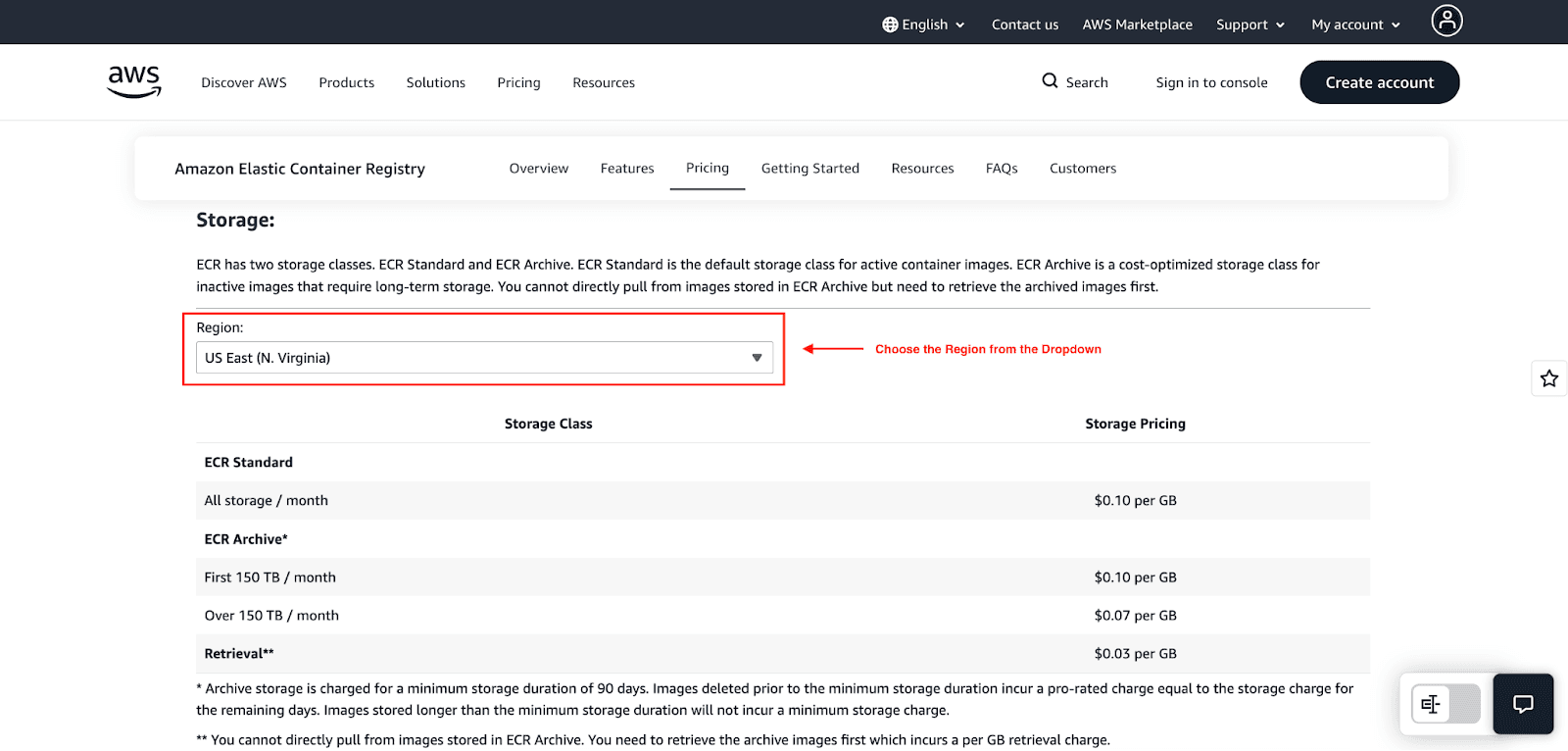
AWS ECR charges for image storage in private and public repositories at $0.10 per GB per month. This also includes the extra costs for other layers, manifests, and metadata associated with your images.
ECR has an Archive storage class for long-term storage of inactive images. This class has the same pricing structure but has a minimum of 90 days for storage and a retrieval fee of $0.03 per GB for accessing your archived images.
Data Transfer Charges
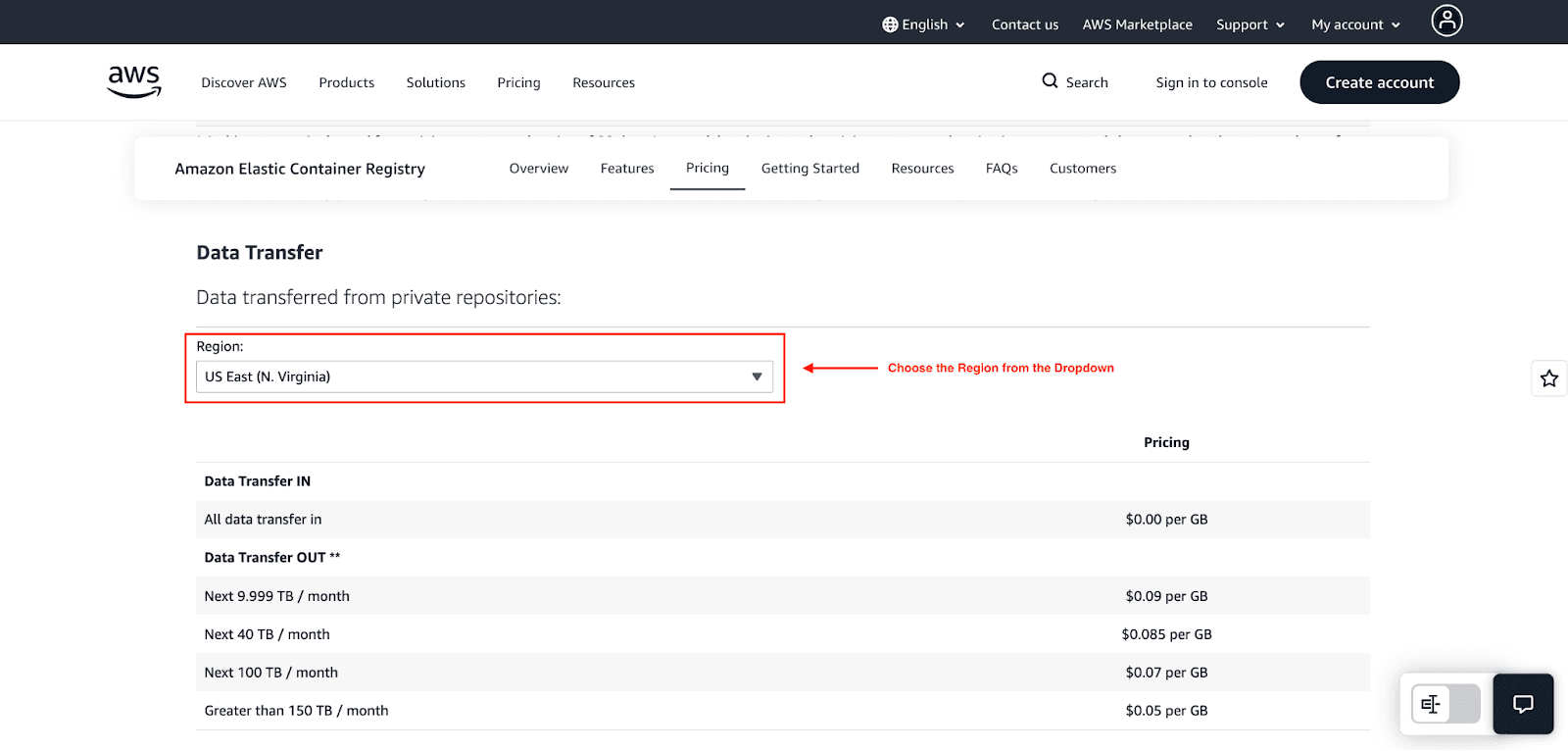
Private repositories:
No charge for data transfer into ECR.
No charge for transfer to AWS services in the same region (ECS, EKS, Lambda, Fargate).
Data transfer out to the internet is charged at $0.09 per GB for the first 9.999 TB per month, with volume discounts for higher usage.
Public repositories:
For anonymous pulls, 500 GB per month is free.
For authenticated pulls from AWS accounts, 5 TB is free, after which there are charges for data transfer out to non-AWS regions at $0.09 per GB.
Transfers to AWS services in any region are free.
Additional Costs
Managed signing: When pushed, ECR can automatically sign images using the identity of the entity pushing the image. The charge for this service is $0.02 per signature.
Enhanced scanning: ECR does not charge for enabling enhanced scanning. However, Amazon Inspector does charge for vulnerability scans (separately). Basic scanning is included at no additional charge
Free Tier Benefits
New AWS ECR customers are offered 500 MB of private storage free per month for 12 months as part of the AWS Free Tier. All customers are offered 50 GB of public repository storage free per month.
Cost Examples
Startup scenario: A small team uses 20 GB of storage to retain images across various microservices. They retrieve images of 100 GB per month within the same AWS region.
Storage: 20 GB × $0.10 = $2.00
Data transfer: $0.00 (same-region retrievals are free)
Total: $2.00 per month
Enterprise scenario: A company pulls 2 TB per month to services in the same region, along with 500 GB cross-region, and stores 500 GB of images.
Storage: 500 GB × $0.10 = $50.00
Same-region transfer: $0.00
Cross-region transfer: 500 GB × $0.09 = $45.00
Total: $95.00 per month
When to Use Amazon ECR
It makes sense to use Amazon ECR when:
You want seamless integration with ECS, EKS, or Lambda and want to run workloads on AWS.
You need IAM-based access control and automatic encryption for security and compliance.
You want to reduce operational overhead by allowing AWS to handle registry infrastructure.
Your team requires reliable and low-latency image pulls in AWS regions.
You should look for other options in cases where:
You need a cloud-agnostic registry solution while using multiple cloud providers.
You have a tight workflow integration with GitHub, and GitHub Container Registry offers better alignment.
You don’t require private storage capabilities and mostly use open-source images.
Conclusion
Amazon ECR simplifies container image management while maintaining high-level AWS ECR security. ECR frees your team from maintaining registries and allows you to focus on application development by automating infrastructure management and providing tiered pricing.
FAQs
Is Amazon ECR free?
Amazon ECR is not free, but it has a free tier and a pay-as-you-go pricing model. In the free tier, you get 500 MB of private storage for 12 months.
Difference between Amazon ECR and ECS?
Amazon ECR and ECS are very different services. ECR is a managed service that stores and manages your container images, and ECS is a managed service that runs and scales your containerized applications. So, ECR provides the images, and ECS runs the images.
Can ECR be used outside AWS?
Yes, but it is mostly designed to be used with AWS. External systems that are configured with Docker authentication and IAM credentials can pull images from ECR.
Join Pump for Free
If you are an early-stage startup that wants to save on cloud costs, use this opportunity. If you are a start-up business owner who wants to cut down the cost of using the cloud, then this is your chance. Pump helps you save up to 60% in cloud costs, and the best thing about it is that it is absolutely free!
Pump provides personalized solutions that allow you to effectively manage and optimize your Azure, GCP, and AWS spending. Take complete control over your cloud expenses and ensure that you get the most from what you have invested. Who would pay more when we can save better?
Are you ready to take control of your cloud expenses?