

You know that containers have become a bedrock of agile software development, letting teams build once and run anywhere without hassles. AWS stands out as the preeminent cloud partner, packing a robust toolbox of container orchestration services. Your decision this quarter, however, is which hammer to grab: Amazon ECS, Amazon EKS, or the AWS Fargate compute engine beneath both.
What criteria will seal your decision and eliminate guesswork? Your engineering, finance, and compliance teams need a structured comparison pivoting on operational control, team readiness, and cost-minimizing designs. This article dismantles the mystery in five digestible sections, cataloging ECS workloads, EKS Kubernetes-cluster facts, and Fargate as the serverless substrate that can transform either. By piling these facts beside unit pricing and regulatory fit, you will not only understand the nitty-gritty but also select the AWS container orchestration solution that delivers the strongest operational and financial fit.
AWS Container Services Overview
Before comparing services, it’s useful to understand what’s unique to each offering.
What is Amazon ECS?
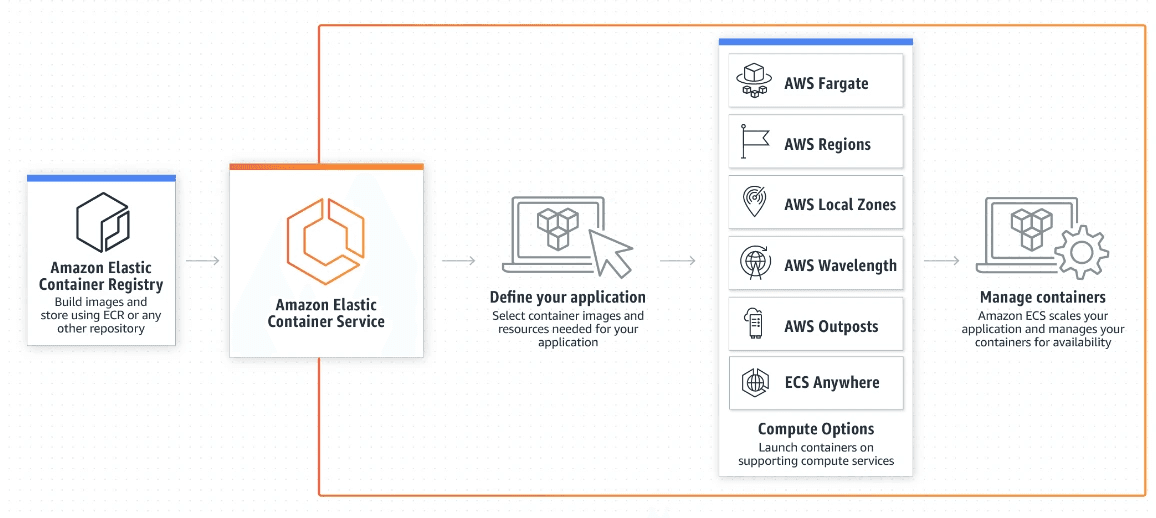
(Image Source: AWS ECS)
Amazon Elastic Container Service delivers a fully managed container orchestration experience unique to AWS. Built with Docker in mind, it allows users to deploy, manage, and scale containerized applications with minimal friction. Deep AWS service integration is a defining trait: APIs for IAM, VPC, Elastic Load Balancing, and several others work together, minimizing lift and shifting overhead.
Key Features:
Fully managed container orchestration.
Deep integration with other AWS services.
Runs on traditional EC2 instances or on serverless AWS Fargate.
Service discovery and load balancing are simplified by native constructs.
Ideal for: AWS-centric teams needing a simplified, opinionated container technology without the overhead of managing a Kubernetes instance.
What is Amazon EKS?
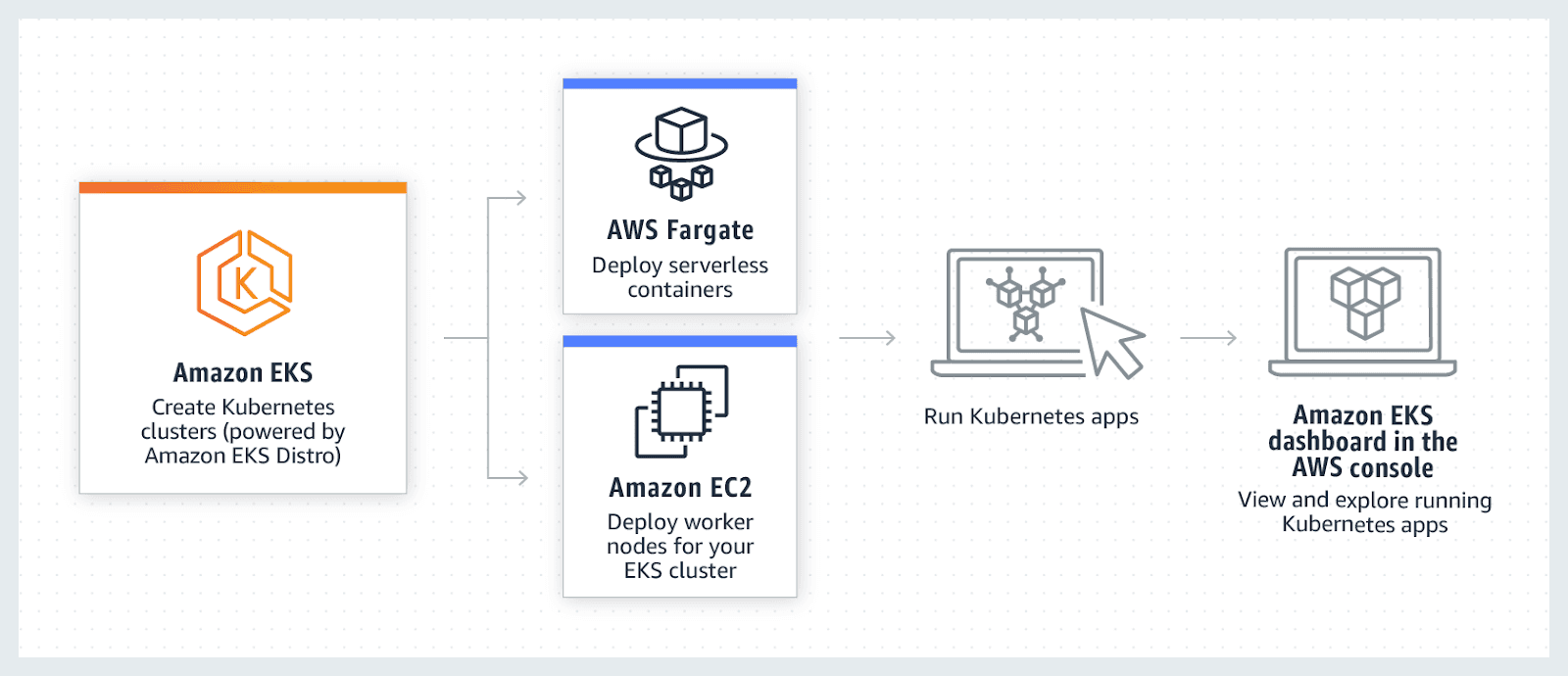
(Image Source: AWS EKS)
Amazon Elastic Kubernetes Service is a fully managed platform that runs Kubernetes without the operational burden of maintaining the control plane. EKS is certified Kubernetes-conformant, ensuring compatibility with the upstream ecosystem and preserving access to the entire range of Kubernetes APIs, tooling, and community-enabled extensions. By submitting and responding to control plane requests, AWS offers Kubernetes reliability with AWS backing.
Key Features:
Fully managed Kubernetes control plane, with automatic scaling and updates.
High portability for multi-cloud and hybrid cloud strategies.
Seamless access to the complete Kubernetes ecosystem, along with community-tested resources.
Hassle-free automated control-plane updates and security patching.
Ideal for: Enterprises with existing cloud-native skills, or those adopting a multi-cloud roadmap, that value the depth and flexibility the Kubernetes agility and marketplace continue to offer.
What is AWS Fargate?
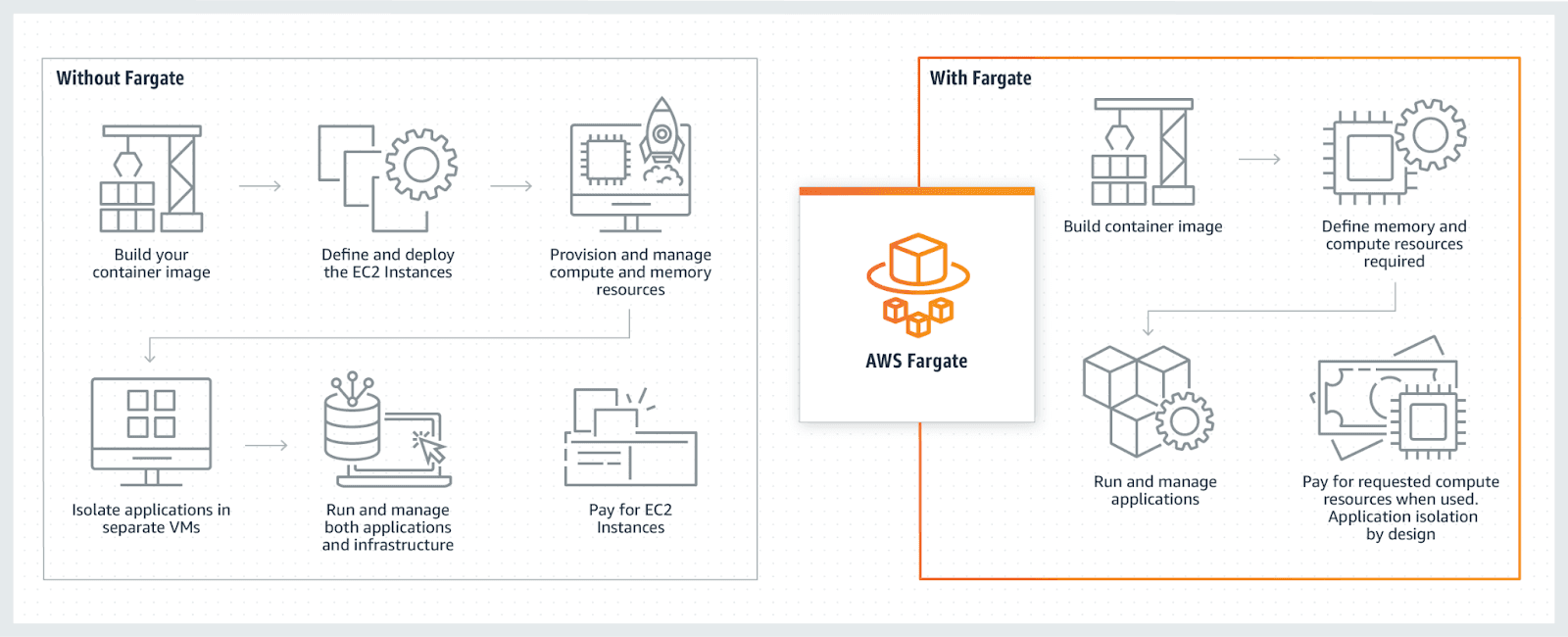
(Image Source: AWS Fargate)
AWS Fargate is the serverless execution layer for containers, closely integrated with Amazon ECS and Amazon EKS. It liberates you from the chore of managing any underlying infrastructure; there are no EC2 instances to provision, patch, or monitor. Package your application as one or more containers, define the required CPU and memory for each, and let Fargate take care of provisioning, scaling, and securing the virtualization layer that hosts your containers.
Key Features:
Pure serverless operation, so server intricacies disappear.
Pay-per-use model based on vCPU and memory resources.
Robust security: Each workload is isolated at the hypervisor layer by default.
Automatic scaling to meet application demands.
Ideal for: Startups and small engineering teams juggling rapid pivots, as well as developers keen to sideline operational chores; excellent for workloads with rapid, uncontrollable spikes that overshadow peak steady workloads.
ECS vs EKS vs Fargate: A Detailed Comparison
Comparing these services reveals their unique benefits and compromises across several fundamental criteria.
Ease of Use
ECS: Easier than EKS but still opinionated. Because Amazon tightly combines it with the broader suite of cloud-native tools, you make fewer architectural calls and stick with configurations that AWS recommends.
EKS: Arguably the most challenging service. While the control plane is fully managed, the sheer variability within Kubernetes and the responsibility for worker node configurations demand Kubernetes know-how and diligence on the operational details.
Fargate: Clearly the most straightforward option. You define the desired container specs and the service handles provisioning, scaling, and infrastructure upkeep, letting you launch production work with minimal input.
Scalability & Performance
ECS: Scales remarkably well, especially within AWS. By coupling the service with Auto Scaling groups, ECS adapts resource supply intelligently, and it's validated by production workloads for companies such as Duolingo.
EKS: Preferred by Kubernetes veterans for large workloads. It integrates into Kubernetes-native scaling constructs, such as Horizontal Pod Autoscaling, allowing you to define efficient and sophisticated policies for how workloads grow.
Fargate: Scales automatically and seamlessly. However, this convenience can come at a higher cost for large, predictable workloads compared to managing your own EC2 instances.
Pricing
ECS: When you run ECS using the EC2 launch type, you only incur charges for the underlying AWS resources you consume, namely EC2 instances and volume storage. ECS itself is provided at no additional cost, providing you with a compelling price point if you manage EC2 efficiently. To drive costs even lower, consider paired usage of Savings Plans or Spot Instances. If you use the "ECS Anywhere" feature for on-premises workloads, a nominal fee of $0.01025 per hour per managed instance applies.
EKS: EKS has a predictable pricing structure with a flat $0.10 hourly fee for the control plane, which translates to roughly $72 monthly for each active cluster. This fee accumulates in addition to the charges for all worker nodes, whether they are EC2 instances or handled by AWS Fargate. Therefore, your EKS invoice summarizes both the cluster control plane charges and the direct costs of compute, storage, and networking. This control plane fee also applies when you use Fargate with the EKS service.
Fargate: Billing is per second with a one-minute minimum, so you pay exactly for the vCPU and memory you specify. This model suits workloads with moment-to-moment spikes since there are no idle servers you’re paying for. On the flip side, consistently high request levels may make you think twice: under some traffic levels, a dedicated EC2 instance may become a cheaper enough option that the per-second ease of Fargate ceases to matter. For example, in the US East region, one task with 4 vCPU and 16GB memory could cost over $160 monthly, depending on peak demand periods and how tightly you walk the minimum-vCPU margin.
Security & Compliance
ECS: Works with AWS control and security tools such as IAM for precise access management, VPC for strict separation of networks, and Secrets Manager to keep sensitive variables under lock and control.
EKS: Integrates AWS IAM, but the layered design of Kubernetes means you must layer on the security best practices that Kubernetes itself recommends. This generally means more policies and more vigilance.
Fargate: Tightly isolated security means that any task or pod launches in its own execution boundary, cutting down the surface area for intrusion and letting you scope risks more stringently.
Use Cases: When to Choose What
Selecting the right service means zooming in on your team’s workflows and long-term goals:
Choose ECS if: You’re invested in AWS and want orchestration tight with the rest of the platform. It’s the friendly choice for microservices, data pipelines, and anything else that thrives on AWS-native coupling without adding the overhead of managing Kubernetes yourself.
Choose EKS if: Kubernetes is your team’s second language, or you’re building for multiple clouds without committing fully to any. It’s the foundation for sprawling, enterprise-critical workloads that move or scale without being locked in.
Choose Fargate if: Quick delivery and minimal ops are your north stars. It’s suited for startups in scratchpad mode, for developers allergic to servers, or for workloads with florid traffic patterns that benefit from the elasticity of a pay-per-slot, serverless model.
Real Scenarios
Startups: They typically pick Fargate to roll out an MVP in days rather than months. With serverless containers, the team writes code, tests, deploys, and sweeps away the infrastructure talk. Spin, learn, and push the next version is their mantra.
Mid-Sized Companies: They land on ECS when the finance team pushes budget targets, and the operations crew wants a say, too. They pack workloads onto a handful of EC2 instances, optimize Reserved Instances, and relish native AWS integrations without a heavy refactor in the codebase.
Enterprises: Large companies like Snap and Intuit fortify their mission-critical workloads in EKS. The Kubernetes ecosystem gives them unparalleled flex: one cluster can slice workloads across on-prem gear, multiple AWS regions, and even third-party clouds, like an evolutionary safety rope
Decision Framework: ECS vs EKS vs Fargate
Use this simple checklist to guide your decision:
Do you have a team that already knows Kubernetes?
Yes: EKS is likely your best choice.
No: Consider ECS or Fargate.
Is your priority to minimize operational overhead and avoid server management?
Yes: Fargate is the ideal solution.
No: EC2-backed ECS or EKS will offer more control and potentially lower costs.
Is everything you plan to run going to remain on AWS?
Yes: ECS provides powerful, native integration.
No, or you want to keep the door open for other clouds: EKS can move with you.
Cut Cloud Costs with Pump
Choosing the right container platform is just the start. Containing AWS costs is the next hurdle. Yes, Fargate is easy, while EC2-backed ECS and EKS offer deeper controls, but careless oversight on either can bleed money quickly.
This is where Pump can make a significant difference. Pump is a free platform that can save you 10-60% on cloud costs. Here’s how:
Group Buying Power: We combine the spending of hundreds of companies under our main billing umbrella, unlocking volume discounts that are typically only available to large enterprises.
AI-Powered Optimization: Our AI analyzes your cloud usage and automatically secures long-term commitments (Reserved Instances and Savings Plans) for maximum savings, all hands-free.
Risk-Free Guarantee: With Autopilot mode, we manage all optimizations. If your usage changes, we reallocate or sell commitments, so you never lose money.
Conclusion
When you choose between ECS, EKS, and Fargate, the deciding factors are your team’s skill set, the specific demands of your workloads, and your overarching cloud approach. ECS excels in offering full AWS-native management alongside EC2 control. EKS is the option for teams already fluent in Kubernetes that want portability across clouds, though the overhead can be significant. Fargate’s serverless deployment gives you clear price and management visibility when workloads are variable, but costs may spike if traffic is sustained. Since no architecture fits everyone, look for the best equilibrium among governance, pricing, and operational complexity.
New to containers? Start with Fargate for ease, and transition to ECS or EKS as your needs grow.



