
Today’s workplace is no longer limited to just a single office building. Data is stored in on-premises data centers, in the cloud, and on the laptops of remote users, who are located all over the world. It is no longer just an issue of storing this data; the challenge is securely accessing it.
Consider a scenario involving two distant islands. One can transport data back and forth via a public boat, but this is risky since the data is unprotected and can be seized. Alternatively, one can build a secure and complete tunnel, and every time data is transferred, it is safe.
Azure VPN Gateway is a secure tunnel for your network.
Understanding secure connectivity is a requirement, whether an IT administrator is looking to protect their hybrid infrastructure or a cloud architect is considering the costs of migration.
In this article, I'll break down exactly what Azure VPN Gateway is, the different types available, and how the pricing models impact your bottom line.
What is Azure VPN Gateway?
Azure VPN Gateway is a kind of virtual network gateway that sends encrypted traffic between an Azure VNet and an on-premises location through the public internet. It can also exchange encrypted traffic between Azure VNets over the Microsoft network.
Consider the possibilities for the entry point of all of the resources you have on the cloud. Instead of utilizing a standard internet connection where your data travels unprotected, a VPN gateway encrypts your data in transit using IPsec and IKE protocols. As a result, your data may be traveling over the public internet, but it will be safely encrypted to avoid phishing by data thieves.
How It Fits Into Your Architecture
In a common hybrid scenario, you have your on-premises network (your office or data center) and your Azure VNet (your cloud resources). The Azure VPN Gateway sits on the edge of your VNet, located in a specific subnet called the Gateway Subnet. It serves as an anchor point that secures the tunnel of connection from your on-premises VPN device.
VPN Gateway vs. Traditional VPN
You may have an idea of what it entails to utilize a VPN on your computer to stream content that has been restricted to select regions or to browse the internet privately. Although the basic principles of encryption are the same, Azure VPN Gateway is a VPN designed to operate at the level of infrastructure for enterprises. It does not simply safeguard one user's browsing activities. It concurrently links multiple networks (Site-to-Site) or thousands of remote users (Point-to-Site) to essential business services.
How Azure VPN Gateway Works
To understand how this service works, we need to examine the service’s architecture, which is premised on some essential components working together:
Virtual Network (VNet): This is your private space in Azure where your VMs and apps live.
Gateway Subnet: This is a normal subnet in your VNet that contains the IP addresses used by the virtual network gateway resources and services. You cannot deploy your own VMs. It is for the gateway only.
On-Premises VPN Device: On your physical site, you need either a hardware device or a software appliance that is capable of establishing an encrypted VPN tunnel.
Protocols: For the connection, there is the use of standard security protocols, like Internet Protocol Security and Internet Key Exchange, to authenticate and encrypt the packets of data.
Sending a file from the office server to an Azure VM involves a specific data-traveling encryption process. In this case, the data is first encrypted by the specific office on-premises device before it is sent to Azure VPN Gateway, and it is decrypted before reaching the target VM.
Why Use Azure VPN Gateway?
Why do many companies continue to use VPN Gateway despite having access to ultra-high-speed, dedicated, private connections, like ExpressRoute?
Secure Hybrid Access: It is still the industry standard for creating a secure ‘bridge’ for legacy on-premises infrastructure and new cloud resources.
Remote Workforce Enablement: It is common now to provide remote employees with secure access to internal applications through point-to-site VPNs.
Cost-Effectiveness: It is significantly less expensive and easier to implement than dedicated leased lines like ExpressRoute, which is why it has become a deployment standard for small to medium businesses and/or backup connections.
Built-in Security: VPN Gateways use automatic encryption and decryption, allowing companies to use the value of Microsoft's large security investments without the need to create encryption solutions.
Types of Azure VPN Gateway Explained
Not all connections are the same. Azure provides different configurations based on who or what needs to connect.
Site-to-Site VPN

Image Source: Azure VPN
This is the traditional “office-to-cloud” connection. It links your on-premises VPN device to the Azure VPN Gateway.
Best For: Connecting an entire branch office or data center to Azure.
Key Feature: It creates a permanent and instantaneous link. Employees don’t need to log in to a VPN client; they access cloud resources as if they are on the in-house network.
Point-to-Site (P2S) VPN
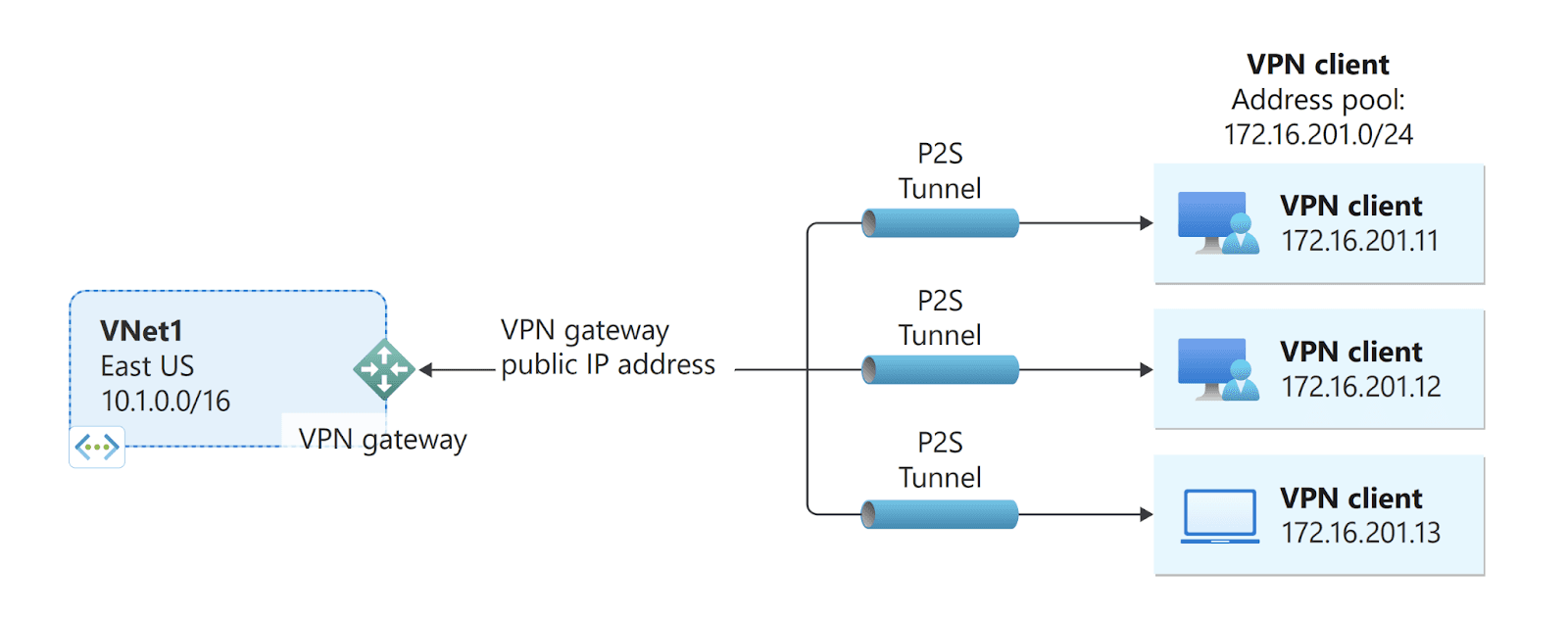
Image Source: Azure VPN
This connects to Azure VNet and to one or more individual client computers.
Best For: Remote employees, telecommuters, or developers who need connectivity from a coffee shop or home office.
Key Feature: Each user is responsible for starting the connection from their computer. It supports Microsoft Entra ID and also certificates or RADIUS for authentication.
VNet-to-VNet VPN

Image Source: Azure VPN
Sometimes you need to connect one Azure VNet to another, e.g., connecting a VNet in East US to one in West Europe.
Best For: Multi-region architectures when you need to maintain secure communications between distributed cloud workloads.
Key Feature: It is similar to a site-to-site VPN because it is configured in the same way, but it uses the Microsoft backbone network, meaning that traffic is very secure and extremely fast.
Azure VPN Gateway SKUs & Performance Tiers
Microsoft refers to VPN Gateways as SKUs. Selecting the correct SKU is the most important choice since it is going to affect your bandwidth (speed) and how many tunnels you can accommodate.
Basic: This is the lowest level, and it is meant for developers/testers only. It is not recommended for production since it does not support the IKEv2 protocol, which is critical for many newer connections.
VpnGw1 - VpnGw5: These are the standard production tiers.
VpnGw1: Offers approximately 650 Mbps throughput and is recommended for smaller offices.
VpnGw2 - VpnGw3: Offers 1 Gbps to 1.25 Gbps and is appropriate for small to medium enterprises.
VpnGw4 - VpnGw5: High-performance tiers offering 5 Gbps to 10 Gbps. These are meant for heavy data workloads.
Zone Redundant SKUs (AZ): These are distributed across Azure Availability Zones, which provide greater redundancy against data center outages.
Deep Dive Azure VPN Gateway Pricing
Although Azure VPN Gateway pricing may appear complicated, if we divide it into 3 types of costs, it becomes easier:
1. Hourly Compute Costs
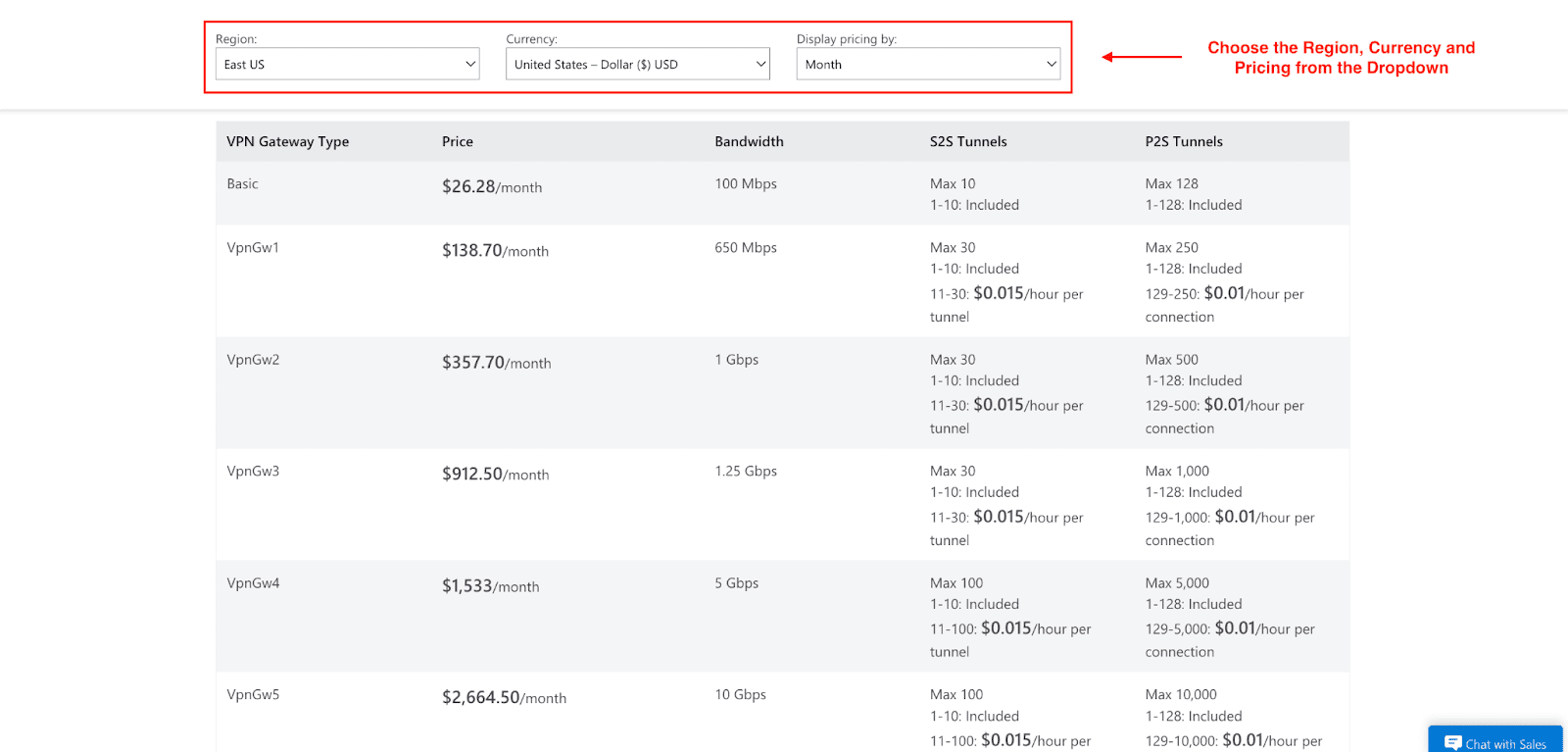
You will be charged hourly for each active VPN gateway, regardless of whether or not there is traffic. Factors affecting pricing include:
The SKU (performance tier) you select.
Whether or not to choose an Availability Zone Redundant (AZ) Gateway for increased availability.
Estimated Monthly Compute Costs (730 Hours/Month)
SKU | Cost |
Basic | $26/month |
VpnGw2 | $357.70/month |
VpnGw3 | $715/month |
VpnGw5 | $2,500+/month |
Note: Prices are estimates and may be different by region. Always check the Azure Pricing Calculator for an estimate.
2. Data Transfer Costs
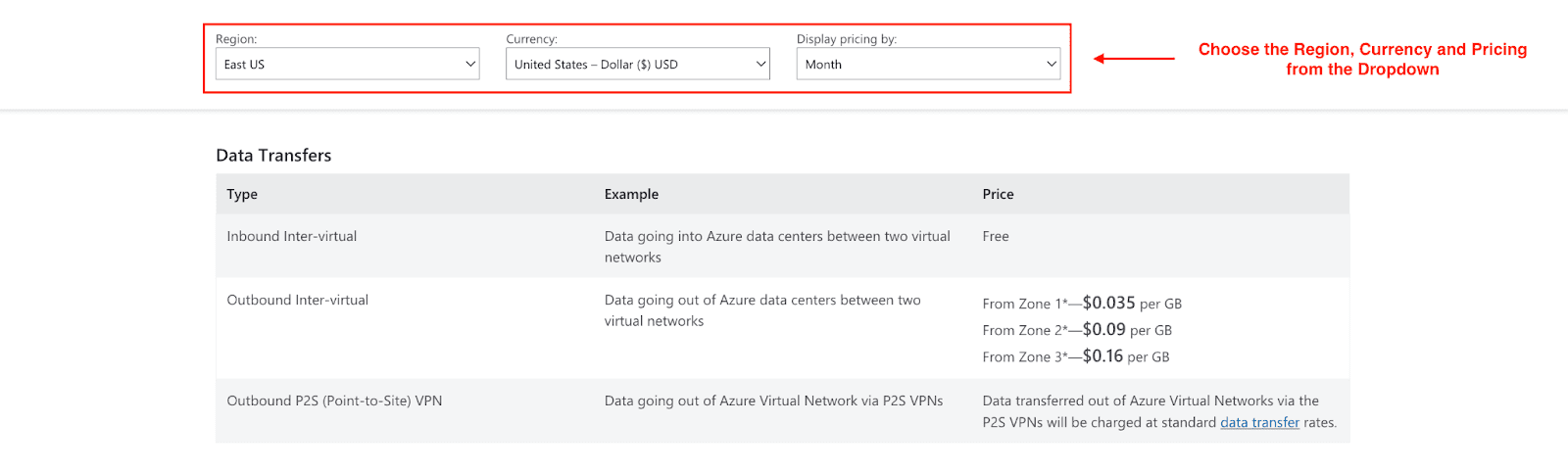
Azure charges for data leaving its platform, but not for data entering it:
Inbound data transfer: Free
Outbound data transfer: Charged per GB based on Azure bandwidth pricing
- From Zone 1 - $0.035 per GB
- From Zone 2 - $0.09 per GB
- From Zone 3 - $0.16 per GB
Applies to:
Site-to-Site VPN traffic
Point-to-Site VPN user traffic
VNet-to-VNet VPN traffic
Pro tip: Outbound data transfer charges, especially for data-heavy workloads, can accumulate significantly. Planning beforehand is advisable.
3. Additional Costs to Consider
Other charges related to the configuration of your VPN Gateway may include the following.
Public IP Address: The gateway requires a minimal monthly payment.
VPN Client Connections (Point-to-Site): There is no per-user license cost, but there are outbound data transfer costs.
Monitoring & Logging:
- Azure Monitor
- Log Analytics workspace
- Network Watcher (minimal cost)
High Availability: Active-active gateways and zone-redundant SKUs (AZ) increase compute cost but improve reliability. This is starting at $153.300 monthly.
What’s Free?
Inbound VPN traffic
Number of Site-to-Site tunnels (within SKU limits)
Point-to-Site user count (no per-user licensing)
How to Choose the Right Azure VPN Gateway
Throughput Needs: How much data are you moving? Under 650 Mbps and VPN Gw1 is sufficient, but if you are doing nightly terabyte backups, look at VPN Gw3 or higher.
Redundancy: Can you afford downtime? If your company stops when the connection drops, you absolutely need an AZ Availability Zone SKU.
Connection Count: How many site-to-site tunnels do you need? VpnGw1 supports up to 30, while VpnGw5 supports up to 100.
Budget: Don't over-provision. You can usually resize a gateway SKU later with some downtime, so start with what you need today.
Best Practices for Deployment
Don't Skimp on Subnets: When creating your Gateway Subnet, use a 27 or larger (e.g., 26) mask. This ensures you have enough IP addresses for future changes.
Monitor Actively: Use Azure Monitor to set up alerts for tunnel disconnections or reduced throughput.
Use Active-Active Mode: For high availability, configure your gateway in Active-Active mode. This will assign your gateway two public IP addresses to provide redundancy should one go into maintenance.
Common Azure VPN Gateway Mistakes to Avoid
Choosing the Basic SKU for Production: This cannot be stressed enough. The Basic SKU has legacy issues and no SLA. You should avoid it for anything critical.
Overlapping Address Spaces: Make sure the IP range of your on-premises system does not overlap with your Azure VNet IP range. If they are the same, the routing is broken.
Ignoring Data Egress Costs: The gateway costs are fixed on an hourly basis, and costs for transferring large amounts of data out of the cloud can be surprisingly costly.
Conclusion
Protecting your hybrid infrastructure does not need to be a gamble. Azure VPN Gateway is an excellent, flexible, and cost-efficient means for connecting your world to the public cloud. There is a gateway SKU suitable for your needs, whether you are enabling a remote workforce or interconnecting data centers.
Don’t let your cloud journey become a bottleneck at the stage of connectivity. Evaluate your throughput requirements, consult the pricing calculator, and commence your journey towards Azure by building your bridge.
FAQ
Is Azure VPN Gateway free?
No, Azure VPN Gateway is not free. You pay an hourly charge for the gateway compute time and for data moved out of Azure (outbound data), for example, at the egress ports. It is worth noting, however, that setting up the Virtual Network is free of charge.
Which VPN Gateway SKU is best?
While there are several options available, for the standard production workload, the best option at a reasonable price point for balanced performance is generation 2: VpnGw2 or VpnGw2AZ ($138-$153/month at 650 Mbps). However, for workloads that are mission-critical or have high bandwidth needs, you should consider VpnGw2AZ or above.
Join Pump for Free
If you are an early-stage startup that wants to save on cloud costs, use this opportunity. If you are a start-up business owner who wants to cut down the cost of using the cloud, then this is your chance. Pump helps you save up to 60% in cloud costs, and the best thing about it is that it is absolutely free!
Pump provides personalized solutions that allow you to effectively manage and optimize your Azure, GCP, and AWS spending. Take complete control over your cloud expenses and ensure that you get the most from what you have invested. Who would pay more when we can save better?
Are you ready to take control of your cloud expenses?



