

It could be straightforward to manage your cloud backups on Azure, but how much you spend on them could be an essay on complexity.
Wondering, “Wait, why is my backup cost so high?”, you are not the only one. What remains untold are the complexities of pricing with backups and long retention periods when you start scaling storage, adding replication, or increasing redundancy.
In this article, I will break down everything you need to know about Azure Backup pricing, the hidden costs you might be missing, and how to reduce your cloud backup expenses by up to 60% using cost optimization platforms like Pump AI Cost Optimization.
What Is Azure Backup?
Azure Backup is Microsoft's cloud-based backup service and is as centralized as the cloud can permit. Their unmatched and unparalleled vaults protect your data with enterprise-grade security and Backup virtual machines, databases, file shares, and even on-premise servers with as much data as you could gather, including server databases.
It brings several important benefits that appeal to many companies. First, it ensures off-site data protection by backing up your data into Azure data centers, which are distant from each other, guaranteeing that your information is protected even during regional disasters. Second, it is scalable, which means you are able to start out by being small and growing big without having to worry about infrastructure constraints. Third, it automates the scheduling, retention and policies, and off-the-shelf intervention life cycle management.
Multiple workloads are supported by Azure Backup, including:
Azure Virtual Machines: Complete backups of VMs contained in an Azure Data Center, including application-consistent snapshots.
SQL Server databases: Both on Azure VMs and on-premises installations.
SAP HANA databases: Enterprise-grade protection of SAP HANA databases for mission-critical workloads.
Azure Files: File shares backups with snapshots to the protected file share.
Azure Blobs and Data Lake Storage: Backups for object storage.
On-premises servers: Hybrid backup services of classical infrastructure.
Unlike traditional on-premises backup solutions, Azure Backup does not require a physical backup infrastructure, tape management, or even dedicated backup servers. This results in a significant reduction in capital expenditure and operational systems and greatly improves the complexity of disaster recovery.
Understanding Azure Backup Pricing Structure
Azure backup services are billed monthly on a pay-as-you-go policy, depending on how each server’s available resources are spread across primary and secondary regions. A breakdown of each region’s storage in a month is provided below.
Backup Storage Type and Redundancy Options
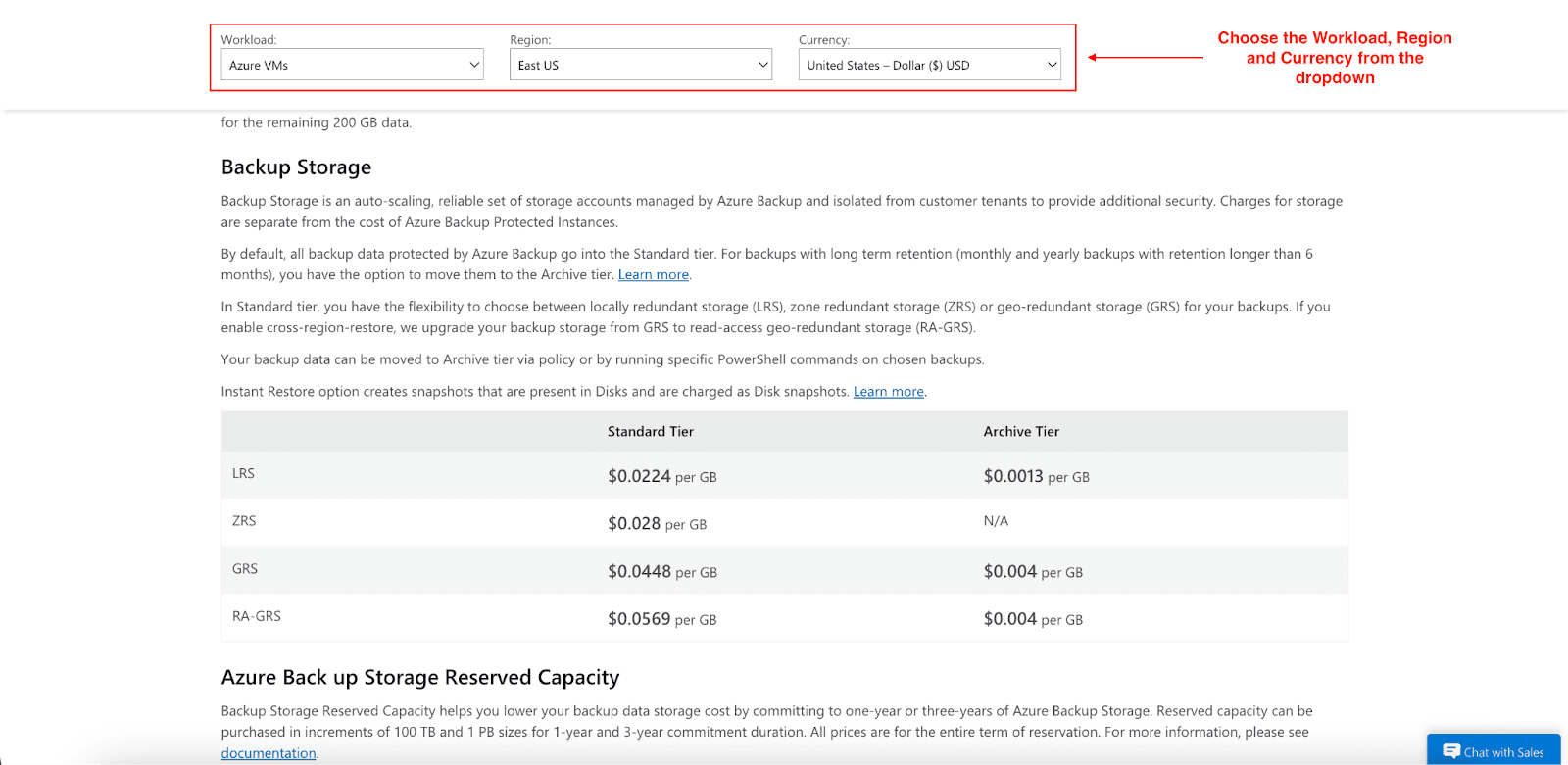
Your choice in storage redundancy will determine costs:
Locally Redundant Storage (LRS): $0.0224 per GB per month. Keeps three copies in a single region.
Zone Redundant Storage (ZRS): $0.028 per GB per month. Replicates in availability zones.
Geo-Redundant Storage (GRS): $0.0448 per GB per month. Maintains copies in paired regions.
Read-Access Geo-Redundant Storage (RA-GRS): $0.0569 per GB per month. GRS with read access to the secondary region.
Instance Size Pricing
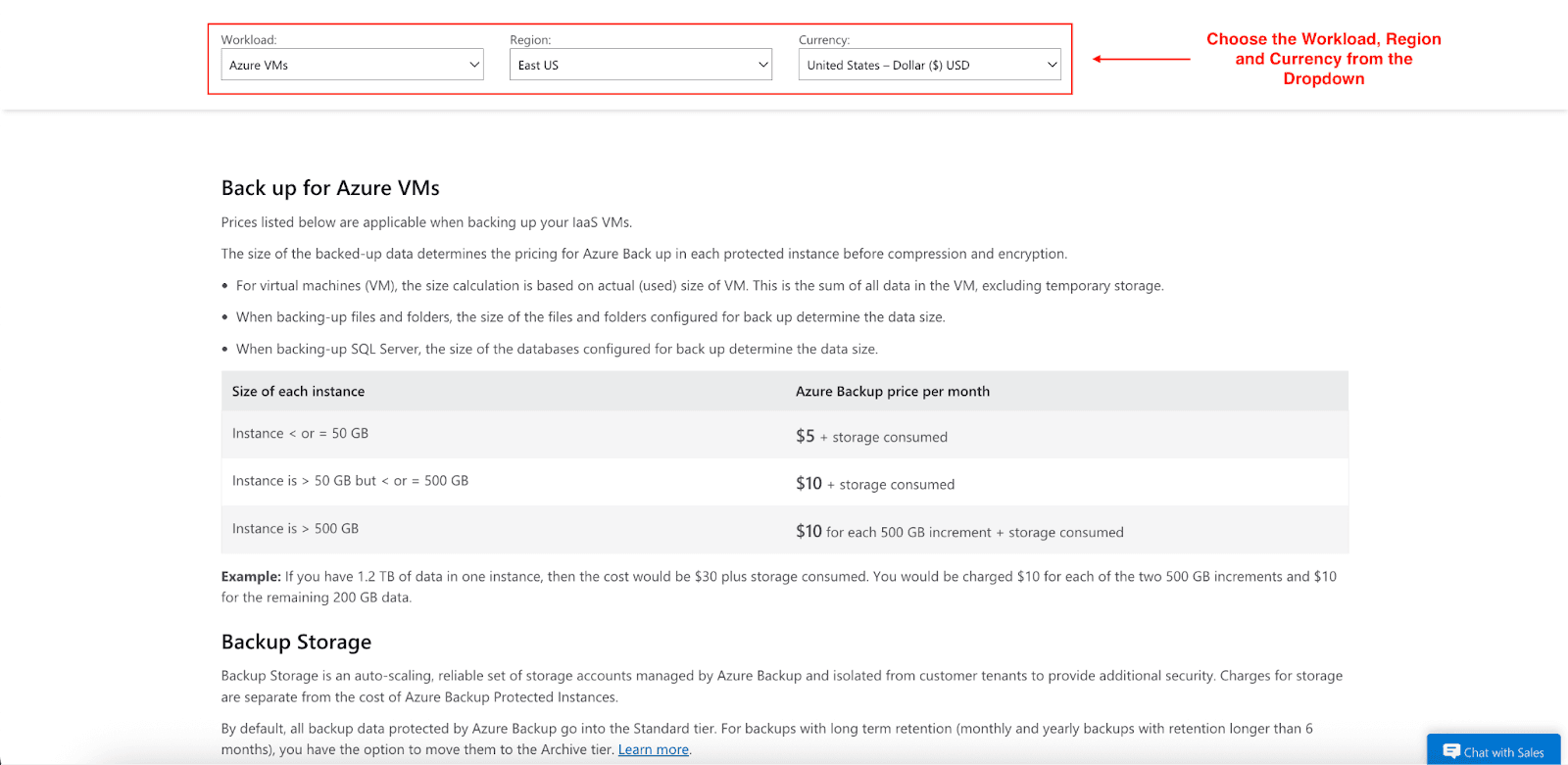
Azure charges based on the size and type of instances you're protecting:
Azure Virtual Machines and On-Premises Servers:
Instances ≤ 50 GB: $5 per month plus storage consumed
Instances 50-500 GB: $10 per month plus storage consumed
Instances > 500 GB: $10 for each 500 GB increment plus storage consumed
SQL Server on Azure VMs:
Instances ≤ 500 GB: $25 per month plus storage consumed
Instances > 500 GB: $25 for each 500 GB increment plus storage consumed
SAP HANA on Azure VMs:
Per instance (Backint): $80 flat fee plus storage consumed
Snapshot-based ≤ 5 TB: $80 plus storage consumed
Snapshot-based > 5 TB: $80 for each 5 TB increment plus storage consumed
Archive Tier Benefits
For long-term retention beyond six months, Azure offers Archive tier pricing:
LRS Archive: $0.0013 per GB per month (94% cheaper than Standard)
GRS/RA-GRS Archive: $0.004 per GB per month (98% cheaper than Standard)
Keep in mind that the Archive tier has a 180-day minimum retention period and charges for early deletion.
Example Cost Calculation
Consider a company backing up a 1 TB SQL Server database with GRS storage:
Instance cost: $50 per month (2 × $25 for 500 GB increments)
Storage cost: 1,024 GB × $0.0448 = $45.88 per month
Total monthly cost: $95.88
Hidden Costs You Might Miss
Even the most experienced teams overlook some of the “quiet” expenses of Azure Backup. Let’s uncover them:
Retention Overload: Retaining backups for too long, such as keeping all versions for three years, increases the amount of storage needed.
Geo-Redundant Overkill: Applying GRS to workloads that do not need it.
Frequent Backups: Performing hourly backups even though daily backups are adequate.
Data Egress: Paying to restore large volumes of data or move data between regions.
Unmonitored Growth: Backup data increases every month without being monitored.
Each of these hidden costs, while not major on their own, can add up to increase costs by 30 to 40% on the bill.
How to Optimize Azure Backup Costs
Effective Azure Backup cost optimization can be achieved through a focus on the most important, selective protective measures that are financially reasonable. Use the most effective approaches to capture both immediate and enduring savings.
Choose the Right Storage Type
It’s vital that the importance and recoverability of your workload align with the level of storage redundancy. This one adjustment can decrease backup storage costs by as much as 50% for applicable workloads.
Use LRS for development environments, test data, and other non-critical applications.
Mission-critical production systems that need cross-region protection should use GRS.
Consider ZRS is a middle ground for regional high availability that does not come with geo-replication costs.
Implement Lifecycle Management Policies
Set backup data to automatically move to the Archive tier six months or older:
Move yearly retention backups to Archive storage.
Apply lifecycle policies to shift data automatically based on diminishing access.
Ensure Archive tier usage aligns with the retention period needs beyond 180 days.
Automate Retention Policies
Define retention rules intelligently to slash costs and automate transitions:
Daily backups: retain for 7 to 14 days
Weekly backups: retain for 1 to 2 months
Monthly backups: retain for 6 to 12 months
Yearly backups: retain for 1 to 3 years, with a 6-month transition to Archive storage.
Pro tip: Shorter retention means lower costs.
Optimize Backup Frequency
In the case where the data does not change very regularly, plan the backup in intervals in order to lower resource and storage costs.
Development environments: Consider weekly backups with shorter retention periods.
Static data: Consider monthly backups if data updates are infrequent.
Monitor and Clean Up Resources
With Power BI and Azure Cost Management, define and automate regular processes:
Monitor the metrics with the dashboards to identify unexpected behaviors and inefficiencies in the backup chain.
Set alerts for sudden increases in backup size, which may signal configuration errors or unnecessary data retention.
Remove backups for deleted or obsolete resources.
Over time, unnecessary snapshots need to be removed.
Backup policies should be streamlined to get rid of redundant policies.
Cut Cloud Costs with Pump AI Optimization
While manual steps are of value, Pump automates backup cost for Azure with next-level AI intelligence and group buying power.
We utilize advanced AI to examine your backup patterns in order to optimize your costs with no engineering adjustments needed. Here is what is done:
AI-powered usage analysis and forecasting.
Automated reserved instances discount purchases.
Group buying benefits for volume discounts.
Risk-free 30-day money-back guarantee.
For example, if your Azure backup bill is $1,000 monthly, Pump is able to reduce it to $840 immediately (16% savings) through volume discounts. Over time, AI-driven optimizations can increase savings to 25-30% or more.
Conclusion
Azure Backup is critical for data protection, and with the large volumes of data being lost, it is critical. In terms of resources, the costs associated can be quite minor. Backup policy audits, expensive resource control, obsolete resource lifecycle management, Pump, and other tools all work towards balanced preservation.
With the right tools, savings can be made effective, along with data protection working in tandem. Use the Azure pricing calculator to get the detailed cost estimator for comprehensive budgeting.
Start optimizing your Azure backup spending today with Pump - no risk, no engineering effort, and instant savings.



