
Understanding the costs associated with cloud services can be complicated, especially with powerful database services. Azure Database for PostgreSQL offers great performance and scalability. However, pricing understanding is needed for cloud cost management for startups and large enterprises. Knowing the pricing can help you find the perfect cost and performance sweet spot for Azure Database for PostgreSQL.
In this article, I’ll explain the pricing model for PostgreSQL on Azure, resource estimating, and suggest several cost-saving measures. You'll get valuable insights to help get the most out of your budget, be it's your first time planning your cloud budget or you are trying to refine it.
What is Azure Database for PostgreSQL?
Azure Database for PostgreSQL is a Microsoft fully managed relational database service built on the community edition PostgreSQL engine. It is a database as a service for mission-critical workloads with predictable performance and dynamic scalability. This allows teams to concentrate on application development with no distractions from database management activities such as patching, backups, and monitoring.
Understanding the Azure Database for PostgreSQL Pricing Model
Before looking into the actual numbers, understanding the pricing implications of the different deployment options is critical. Azure PostgreSQL is offered under three main deployment models:
Single Server (Legacy): This is the old offering. It is still available but has mostly been phased out for the Flexible Server.
Flexible Server (Recommended): This model allows maximum control, offers a simplified developer experience, and includes cost optimization features such as stop/start. It is the preferred option for most new deployments.
Hyperscale (Citus): Built for applications with extreme scale and performance requirements. It horizontally scales queries across many machines using the Citus extension.
With regards to these services, pricing is mainly determined by a few factors:
Compute Tier & vCores: You provision processing power (CPU and memory).
Storage: Amount of disk space for your data and backups.
Backup & IOPS: How often backups occur and the speed of your storage (Input/Output Operations Per Second).
Region: The geographical location of your data center, as costs vary by region.
Here’s a quick comparison of the deployment options:
Feature | Single Server (Legacy) | Flexible Server (Recommended) | Hyperscale (Citus) |
Best For | Existing applications | New developments, cost-sensitive workloads | Large-scale, high-throughput applications |
Cost Control | Limited | Stop/Start, Burstable SKUs | Billed per node |
High Availability | Standard HA | Zone-redundant HA | High availability across nodes |
Pricing Impact | Less flexible, pay-as-you-go | More granular control over costs | Higher baseline cost for the distributed architecture |
Detailed Cost Breakdown
We can start the cost breakdown by understanding the components involved in Azure PostgreSQL flexible server pricing to help you work out your estimated monthly costs:
1. Compute Pricing
The compute service is essentially the engine of your database. Azure classifies databases into three service tiers depending on the workload.
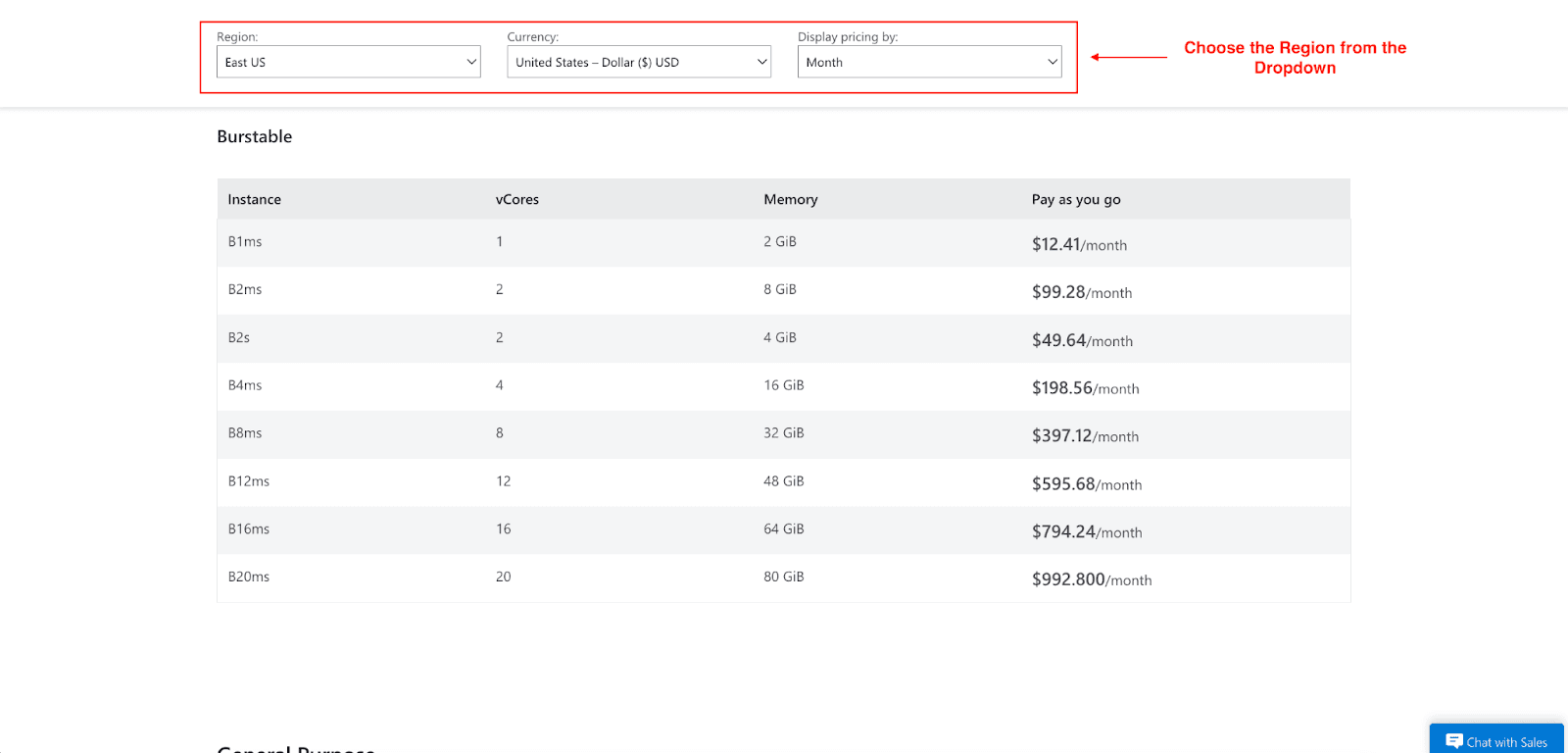
- Burstable: Best for development, testing, and workloads that don’t need sustained full CPU performance. It’s a credit system that lets your CPU “burst” when necessary. It’s a cheap option for non-production environments.
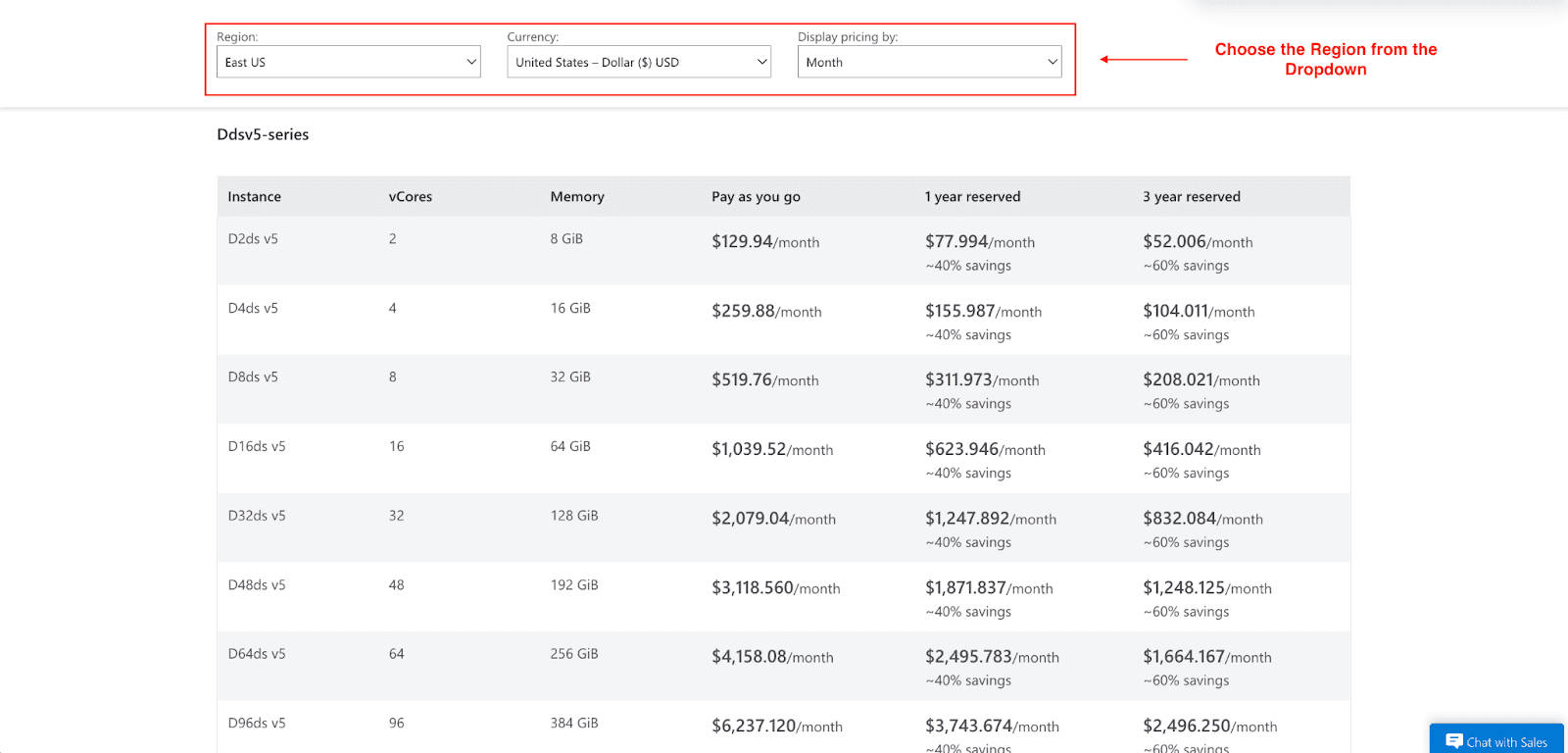
- General Purpose: Provides a balanced mix of CPU and memory. Considered best for most production workloads, e.g, web and mobile apps.
- Memory Optimized: Best for demanding high-performance workloads that require extra memory for transaction processing, concurrency, and real-time data processing.
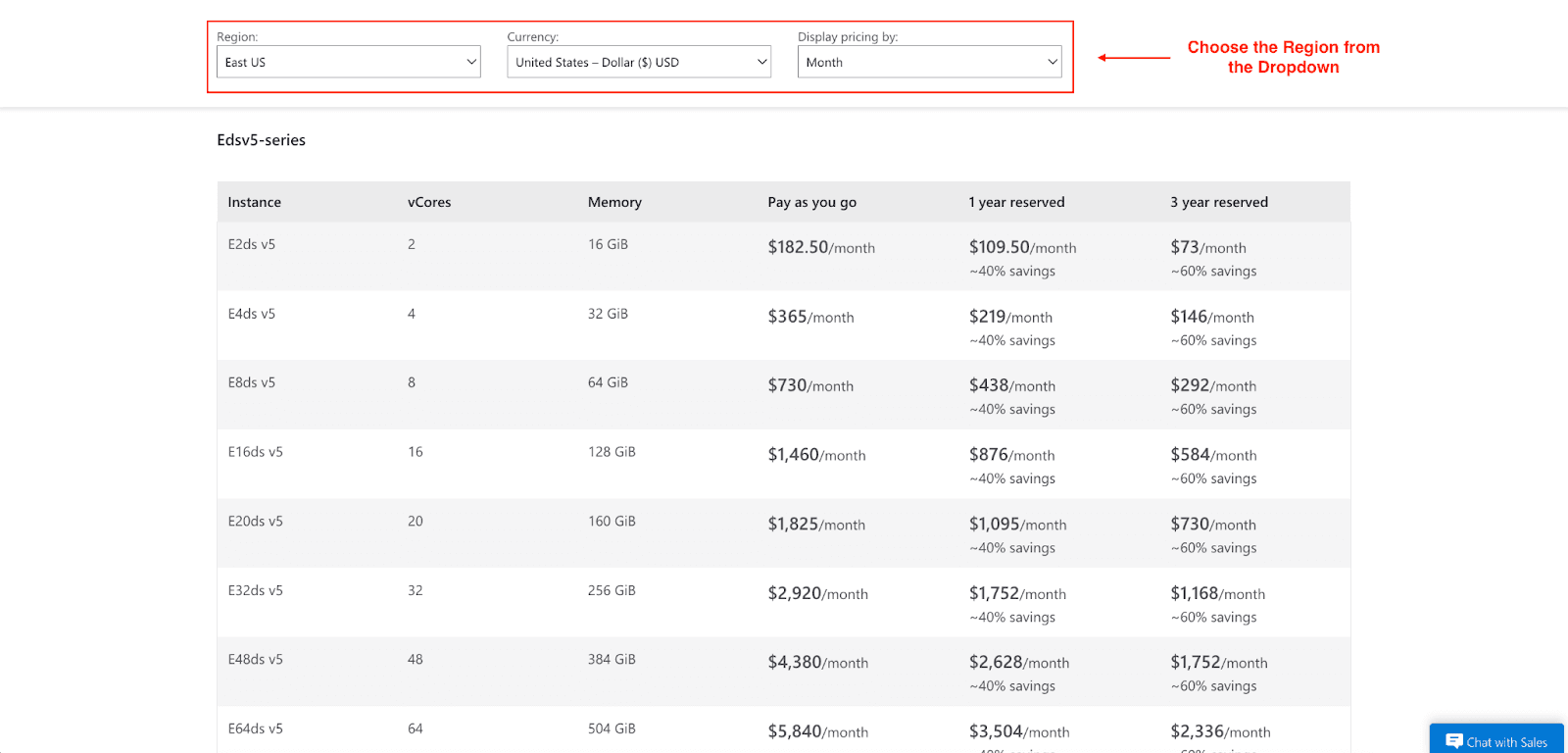
As you shift from Burstable to General Purpose and Memory Optimized, the Azure PostgreSQL pricing per vCore also increases. For example, a 2 vCore General Purpose instance will cost more and provide more consistent performance than a 2 vCore Burstable instance.
2. Storage Pricing
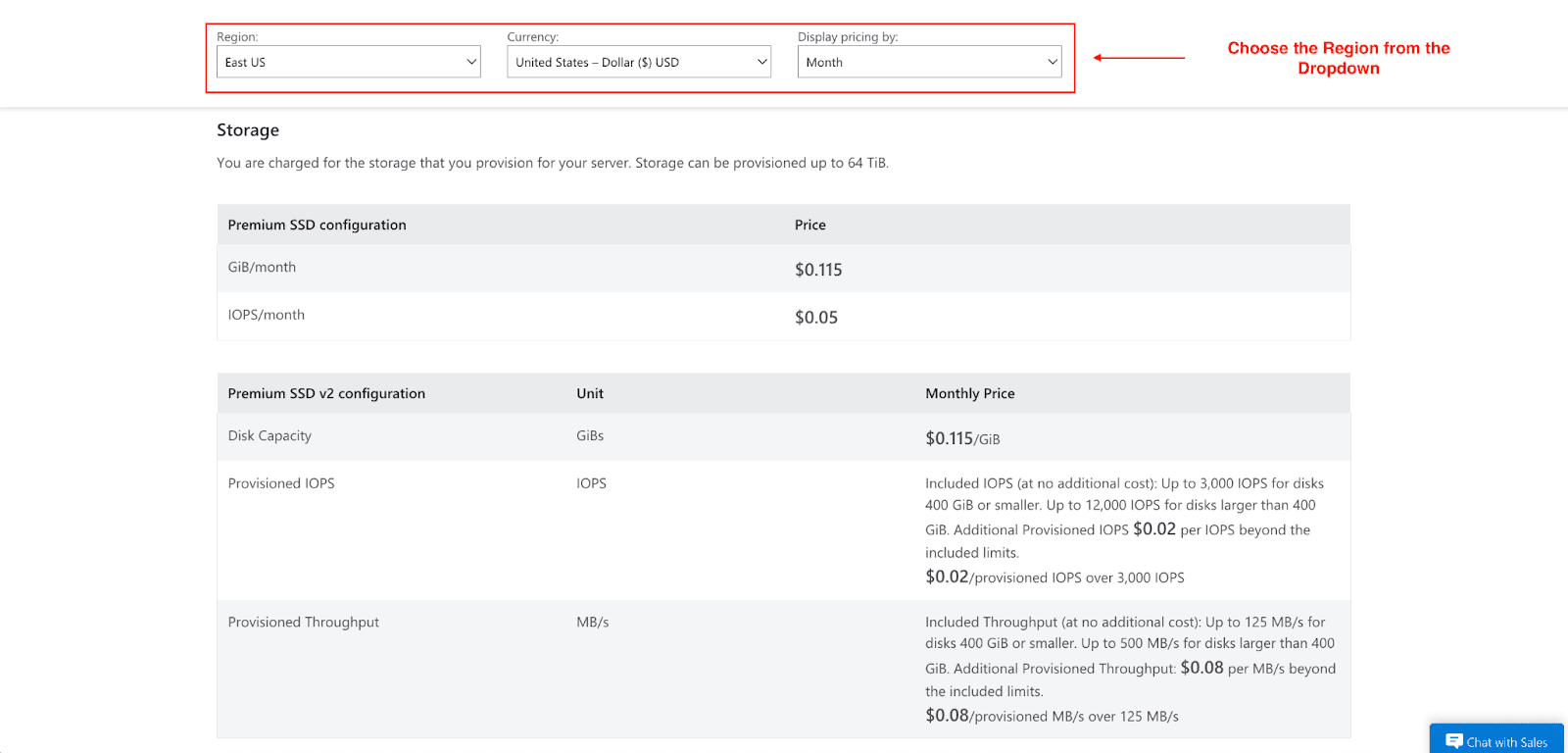
Each month, the Azure system records the amount of GB used on databases and backups and charges accordingly. Keep these pricing features in mind:
- Provisioned IOPS: When using Premium SSD storage, you are able to provision an amount of IOPS to achieve a designated I/O performance. You are charged for the IOPS you provision and not for the IOPS one use.
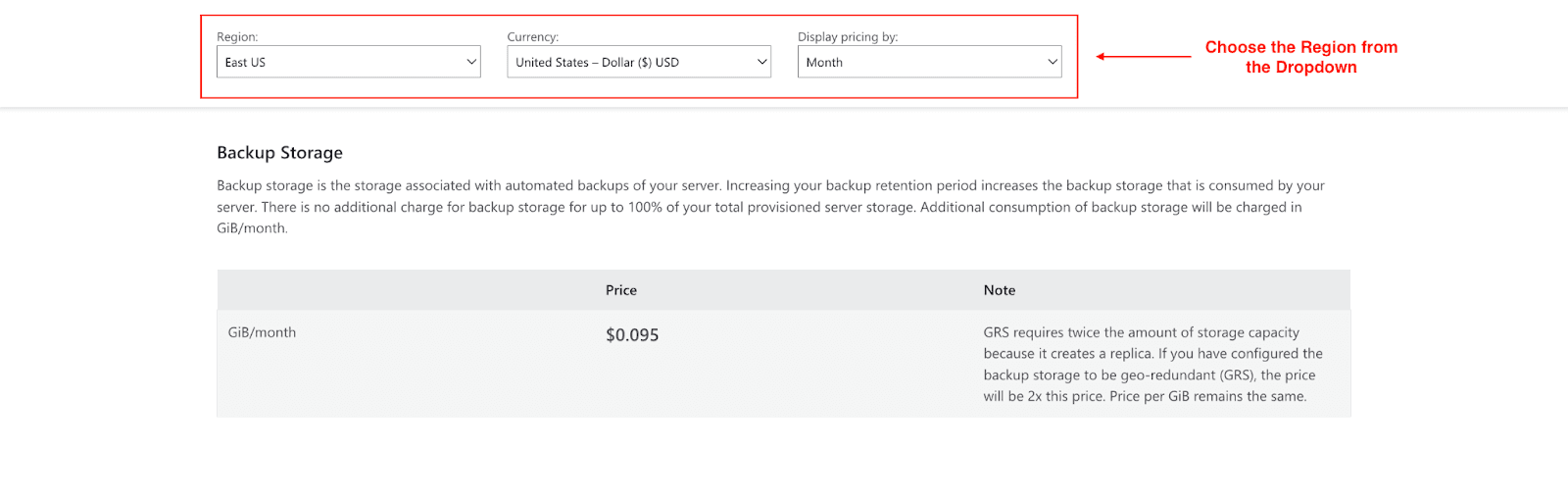
- Backup Retention: Azure servers back up automatically. You retain free storage for backups up to the size of your provisioned server. After that, it is charged based on your retention policy (7 days, 30 days, etc.) for backup storage, which is $0.095 per GiB/month for blocks charged.
3. Networking & I/O Charges
Networking costs are often neglected and are a large part of your overall costs. Standard data transfer costs are applicable to any data that is leaving the Azure data center (egress). Data transfer is free within the same Azure region; however, data transfer costs are applicable when moving data across regions. Costs can also be associated with private endpoints for secure connections.
How to Estimate Your Costs
To calculate your PostgreSQL costs on Azure, use the Azure Pricing Calculator.
Select Azure Database for PostgreSQL, pick your adequate location, tier, and compute configurations, and then adjust vCores, storage, and backups to obtain an estimated monthly price. Additional costs may come from data egress, triggered scaling, and high availability, so keep them in mind.
Cost Optimization Strategies
Saving on Azure PostgreSQL costs is one of the many exciting things to do. Here are some strategies to optimize spending on Azure PostgreSQL.
1. Choose the Right Tier for Your Workloads
Avoid paying for excess capacity. Use the Burstable tier for your development and test setups. For production, start with General Purpose and switch to Memory Optimized only if your application is constrained by memory and needs top-end performance.
2. Autoscaling and Right-Sizing
Use Azure Monitor rules to watch specific CPU and memory metrics. If you consistently observe the metrics within the bounds, you’re likely paying for excess capacity. Reducing your vCores is likely to save you money. On the other hand, if the server is constantly working to the limits, you need to scale up to prevent performance issues.
3. Use Reservations Instances & Savings Plans
Planning ahead can reduce your Azure database costs significantly. Committing to a one- or three-year contract for compute capacity makes it possible to save up to a 60% discount compared to the pay-as-you-go option. This is ideal for steady workloads that are predictable and don’t vary in intensity.
4. Use Spot VMs for Non-Critical Workloads
Fault-tolerant workloads, such as batch processing or testing, qualify for more cost-effective Spot Virtual Machines. These virtual machines are offered at a significant discount as they allow the usage of preemptible Azure compute capacity.
5. Optimize Storage and Backup Frequency
Are you overestimating your backup retention policy? Does it really have to be 35 days instead of 7? Backups, mostly the old or infrequently accessed ones, coupled with old data, are a significant cost. Archiving to a lower-cost tier, such as Azure Archive Storage, can substantially improve overall cost.
These manual steps for optimizing your Azure spend can be invaluable, but the need for active input is constant. For those who want to save on Azure costs with no engineering work, there are platforms like Pump. We analyze AI-driven FinOps on your Azure usage and apply the most effective savings methods automatically, allowing you to save up to 60% on your Azure costs without any work on your part.
Imagine your Azure Database for PostgreSQL bill is $100. With Pump's group discounts, we can get that cost down to $60, saving you 40% instantly. If you're not using Pump, you're leaving money on the table.
How Pump Optimizes Your Azure Costs:
AI-Powered Analysis: Your usage patterns are analyzed to inform optimal purchasing strategies.
Automated Discount Management: We automatically buy and sell the reservations so you achieve the best discounts and instant flexibility without long-term commitments.
Group Buying Power: By pooling purchases with other customers, Pump unlocks volume discounts that individual businesses can't access on their own.
Zero Risk: With our risk-free guarantee, you are assured of savings without any financial downside.
Comparing Azure PostgreSQL Pricing with AWS & GCP
How does the PostgreSQL database price on Azure stack up against its competitors?
Cloud Provider | Service | Compute Pricing Model | Storage Pricing | Key Differentiator |
Azure | Azure DB for PostgreSQL | vCore-based (Burstable, General, Memory Optimized) | Per GB/month + Provisioned IOPS | Strong integration with the Azure ecosystem; the Flexible Server offers stop/start. |
AWS | Amazon RDS for PostgreSQL | vCPU-based (Burstable, General, Memory Optimized) | Per GB/month + Provisioned IOPS | Mature offering with a wide range of instance types; Graviton processors. |
GCP | Cloud SQL for PostgreSQL | vCPU-based | Per GB/month + SSD/HDD options | Strong performance and networking; per-minute billing. |
While pricing structures are similar, key differences exist in reserved plan discounts, networking costs, and specific instance offerings. Azure's Flexible Server with its stop/start capability is a standout feature for cost-conscious development teams.
Conclusion
We hope this guide has helped you understand the pricing for Azure Database for PostgreSQL. Having this knowledge is the first step in developing a cost-efficient and high-performing cloud architecture. This is done by balancing your resources with the workloads your workloads actually require. For optimal cost management, this means right-sizing your instances, constantly monitoring and managing your compute scale and vCores, taking advantage of reserved capacity for long-term workloads, and automating cost management and monitoring systems, such as Azure Advisor or Pump, to identify areas to save.
Do you want to reduce your Azure PostgreSQL costs while maintaining the same performance levels? Start with a free trial and see how these strategies will help your needs.



