Tackling the complexity of network security scattered across multiple Azure subscriptions and regions is one of the many challenges modern companies face. Azure Firewall Manager provides centralized policy management and route control, but its architectural complexity means its pricing model must be understood and optimized along with the rest of your security infrastructure.
In this article, I'll guide you through examining the pricing of Azure Firewall Manager, present practical cost scenarios, and outline best practices for expense optimization without compromising security. Whether you’re looking at Azure Firewall Manager for the very first time and wondering about its cost, or you are looking at it for the umpteenth time, trying to find avenues, you will always be provided with actionable advice.
What is Azure Firewall Manager?
Azure Firewall Manager is the platform offered by Microsoft for the management of security in the cloud and for routing policies in the protection zones of Azure Firewall as a single entity. Whereas an administrator has to deal with moving firewalls in different subscriptions and regions as single entities, Azure enables an administrator to control multiple Azure Firewalls from a single console.
Key Features:
Centralized Policy Management: Configure and deploy multiple Azure Firewall instances through child-to-parent hierarchical policies, to different regions and subscriptions.
Global Scale Operations: Ensure and manage consistent security protection standards in the Azure regions.
Security Partner Integration: Provide additional network security through third-party SECaaS providers, especially for secured virtual hub deployments.
Automated Route Management: Configure and eliminate Redundant User Routes on spoke virtual networks and reduce admin overhead.
For complete centralized control with consistent policies, multiple region security management, and complex environments, companies opt for Azure Firewall Manager as opposed to single firewall systems.
Azure Firewall Manager Pricing Overview
Azure Firewall Manager operates on a pay-as-you-go model. You are charged only for the policies and the deployments you created. Knowing the parts of the cost aids in predicting and managing the monthly cost.
Core Pricing Components
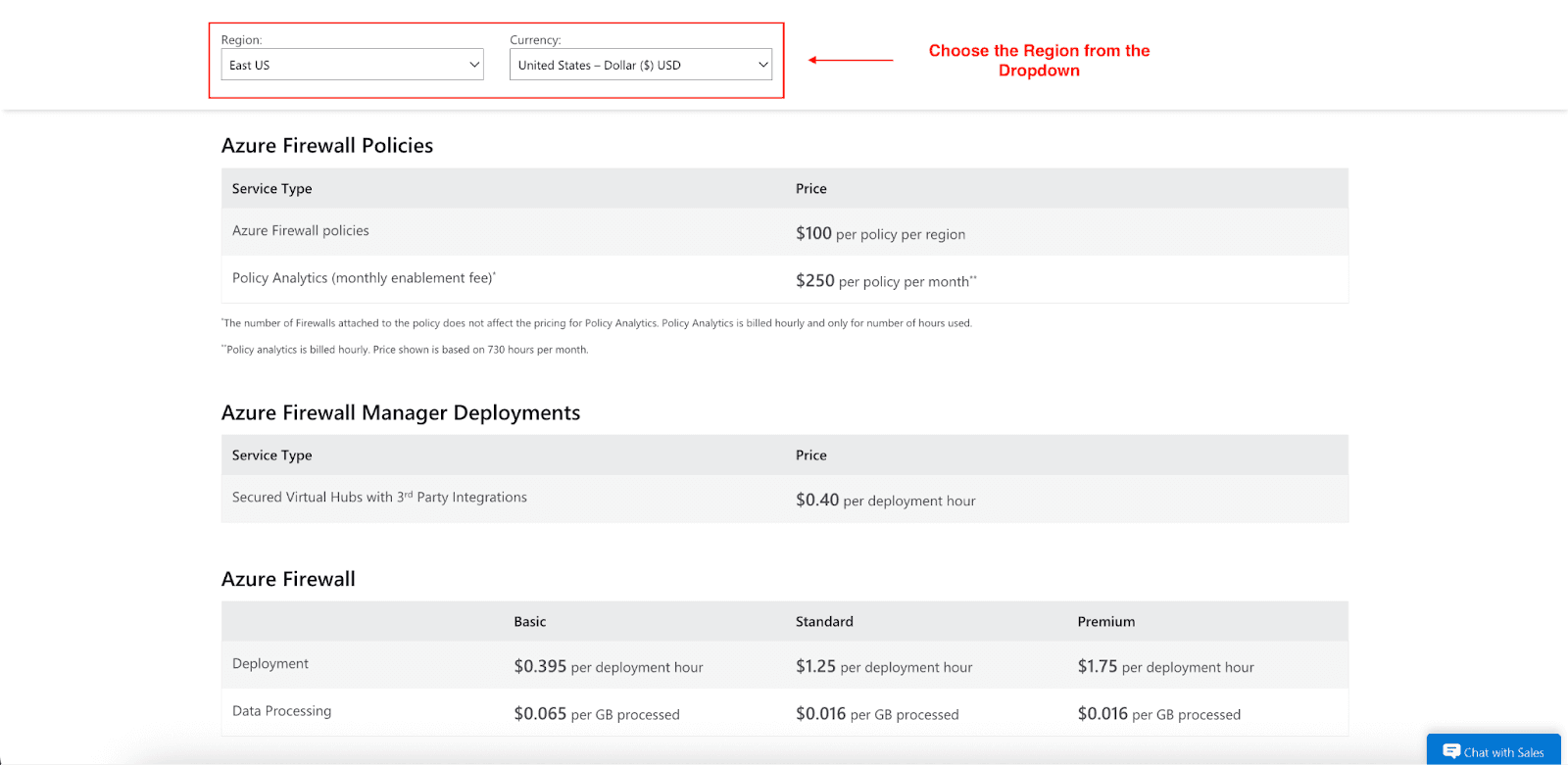
Policy Charges: $100 per policy per region will be the starting base of cost for Azure Firewall Manager policies. This charge is applicable to every region in which your policy is deployed, not the aggregate number of firewalls.
Firewall Instance Costs:
Azure Firewall Basic: $0.395 per deployment hour + $0.065 per GB processed
Azure Firewall Standard: $1.25 per deployment hour + $0.016 per GB processed
Azure Firewall Premium: $1.75 per deployment hour + $0.016 per GB processed
Additional Service Charges:
Secured Virtual Hubs: $0.395 per deployment hour and $0.065 per GB processed, based on your chosen tier.
Policy Analytics: $250 per policy per month.
Charges for DDoS Protection and Web Application Firewall are incurred when deployed via Firewall Manager.
Regional Variations: Price may vary per Azure region, and certain areas may have higher prices due to excess infrastructure and market condition costs.
Important Billing Logic
(Image Source: Azure Pricing)
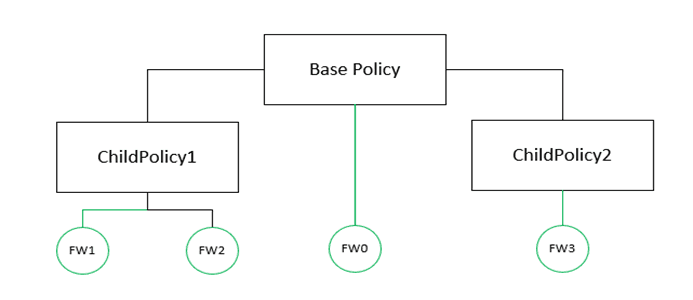
An important part to help reduce costs in Azure Firewall Manager is knowing how policy charges are set. Particularly, a policy is only charged $100 for each region if it is associated with 2 or more firewalls in that region.
If a policy has:
Zero firewall associations: No charge.
One firewall association: No charge.
This billing model further encourages consolidation of firewall policies while optimizing their configurations. Using a single policy in many firewalls means that only one of the firewalls is subjected to the $100 regional charge, unlike paying for many policies that do the same thing in many individual firewalls. This is favorable due to increasing efficiency in how policies and their configurations are managed.
Azure Firewall Manager Cost Breakdown
Now let’s consider some actual scenarios and how these costs are aggregated for different deployment sizes:
Small Startup
Configuration: 2 Azure Firewall Standard instances in East US region, single policy, processing 500 GB monthly
Monthly Costs:
Policy charges: $0 (single region, multiple firewalls = $100, but let's assume optimized setup)
Firewall deployment: 2 × $1.25 × 24 × 30 = $1,800
Data processing: 500 GB × $0.016 = $8
Total: $1,808/month
Mid-Size Enterprise
Configuration: 6 Azure Firewall Standard instances across 3 regions (East US, West Europe, Southeast Asia), hierarchical policies, processing 2 TB monthly.
Monthly Costs:
Policy charges: $100 × 3 regions = $300
Firewall deployment: 6 × $1.25 × 24 × 30 = $5,400
Data processing: 2,000 GB × $0.016 = $32
Total: $5,732/month
Large Enterprise
Configuration: 20 Azure Firewall Premium instances across 5 regions, complex policy hierarchy, secured virtual hubs, processing 10 TB monthly
Monthly Costs:
Policy charges: $100 × 5 regions = $500
Firewall deployment: 20 × $1.75 × 24 × 30 = $25,200
Secured hub integration: Varies by third-party services
Data processing: 10,000 GB × $0.016 = $160
Total: $25,860/month (excluding third-party integration costs)
Cost Optimization & Savings Strategies
Cost management, even at this stage, can cut down costs for Azure Firewall Manager while maintaining the same level of protection:
Hierarchical Policy Design: Set parent policies for shared rules and child policies for details. This helps with less duplication, which lowers the cost of deployment.
Rule Collection Optimization: Fewer collections of rules are better. Parent policy network rules are marked, and rules are consistently enforced, keeping the rules from being contradictory.
Performance Monitoring: Use the Azure Monitor and identify firewall instances that are over-provisioned, and aim to downsize. Look for ones that are consistently under 50% used.
Regional Load Balancing: Shift the traffic in the region to avoid the use of premium instances in the underutilized areas in the region.
Scheduled Scaling: For deployment cost reduction, the automation of the scheduled shutdown days for the non-production conditions can help greatly.
Azure Cost Management: Use budget alerts and overspending watch features to detect spending trends and abnormal trends in a lot of areas in order to analyze the spending in the Microsoft Azure Cost Management.
Policy Analytics ROI: Justify the Policy Analytics within $250 a month to evaluate if its intelligence satisfies your security needs.
Who Should Use Azure Firewall Manager?
Knowing the ideal scenarios can help you determine if Azure Firewall Manager's pricing model gives you the value you need.
Ideal Candidates
Multi-Subscription Enterprises: Centralized policy control saves a company significant administrative effort while managing policy overhead for security across multiple subscriptions.
Global Operations: Companies with various Azure regions often find the extra regional policy pricing an enhancement rather than a burden.
Hybrid Network Architectures: The complex routing and policy functions from Firewall Manager help blend on-premises and Azure Cloud.
Compliance-Heavy Industries: Companies that require consistent security policies across all deployments find that centralized control becomes crucial for compliance and audit functions.
Poor Fit Scenarios
Single-Region Workloads: Smaller deployments confined to a single region may find Azure Firewall policies simpler and thus, cheaper than standalone Firewall instances.
Budget-Constrained Environments: Startups and small businesses often find it hard to justify base policy charges, especially during early stages of growth.
Simple Security Requirements: The seamless advanced policy functions driving up Firewall Manager costs may not be needed by companies with basic firewall requirements.
Trial and Cost Management
Azure free trial credits can cover some of the initial costs of using the Firewall Manager during trial periods. Use the cost calculator tool to estimate cost and set budget alerts.
Conclusion
Although Azure Firewall Manager provides strong, consolidated security, the costs can spiral out of control if appropriate measures are not taken. The right combination of diversified strategic policy development, appropriate deployment sizing, and ongoing cost oversight can lead to a strong positive outcome.
According to some research, “companies with the ad-hoc deployment of decentralized policy architecture and use of inheritance savings typically achieved 20 to 30% savings.” These savings, combined with policy-optimized instance sizing and regional deployment, deliver strong value, security to cost.
Thinking about Azure Firewall Manager? Start with the Azure Pricing Calculator, then do a pilot before scaling globally to check your calculations.
Join Pump for Free
If you are an early-stage startup that wants to save on cloud costs, use this opportunity. If you are a start-up business owner who wants to cut down the cost of using the cloud, then this is your chance. Pump helps you save up to 60% in cloud costs, and the best thing about it is that it is absolutely free!
Pump provides personalized solutions that allow you to effectively manage and optimize your Azure, GCP and AWS spending. Take complete control over your cloud expenses and ensure that you get the most from what you have invested. Who would pay more when we can save better?
Are you ready to take control of your cloud expenses?