

Microsoft Azure Firewall is the one-stop, cloud-native security service that today’s businesses have come to depend on. As cyber threats grow bolder and more workloads keep shifting to the cloud, mastering Azure Firewall to defend your systems while keeping costs in sight. It is crucial for CIOs, network admins, and security leaders alike.
This guide lays out the pricing, main advantages, and proven best practices for deploying Azure Firewall. Whether you’re conducting a comparative analysis, rolling out the service for the first time, or modernising an existing implementation, you’ll find ready-to-action insights that stretch your security budget further without sacrificing coverage. Ready? Let’s walk through the steps to secure your network intelligently.
What is Azure Firewall?
Azure Firewall is a fully managed, cloud-based network defense service embedded in the Azure cloud that safeguards all resources within your Azure Virtual Network. Built as a stateful, zone-aware firewall as a service, it snaps in high availability and scales without limit, giving enterprises a security perimeter that keeps pace with cloud workloads.
Unlike a hardware firewall you host on-prem, Azure Firewall monitors all traffic flows: it keeps a watchful eye on internal east-west traffic. sessions as well as north-south sessions moving to or from the public cloud. This dual-layer inspection allows your applications and compute instances to receive advanced threat detection against all communication, even the traffic that never leaves the Azure backbone.
The managed firewall service in Azure removes the burden of running your own firewall gear while still delivering security that rivals the biggest enterprise offerings. Microsoft takes care of everything that sits beneath the surface, from patching to scaling the nodes, so your security operations staff can spend their time tuning and enforcing policy instead of babysitting hardware or scheduling software upgrades.
Why Businesses Need Cloud-Native Network Firewalls
Classic network security methods seldom keep pace within cloud-native ecosystems. Cloud-ready, AI-powered firewalls on Microsoft Azure confront the major vulnerabilities that modern companies must overcome to secure their cloud infrastructure:
Proactive Threat Detection: Azure cloud firewalls draw on live global threat feeds, allowing them to spot and neutralize brand-new attacks within milliseconds. Built-in signature engines combine over 67,000 threat signatures with real-time behavior analysis, automatically adapting policies to quarantine rogue traffic before any damage occurs.
Automatic Scalability: Traditional firewalls max out at their physical capacity, forcing time-consuming upgrades. Azure network security services dynamically expand during traffic surges, seamlessly accommodating peak volumes without dropped packets, overlooked alerts, or the overhead of physical appliances.
Simplified Management: Cloud-native centralized control consolidates rule and policy assignment. With Azure Firewall Manager, security teams craft one set of orchestration policies that propagate instantly across regional borders, multiple subscriptions, and hybrid architectures, while intuitive dashboards deliver unified security posture snapshots at a glance.
Azure Firewall Features: Basic vs Standard vs Premium
Azure Firewall offers three distinct tiers, each of which meets different companies' needs and security requirements.
Azure Basic Firewall
Engineered for small and medium-sized companies, Basic Firewall balances core security necessities and budget sensitivity with a ceiling throughput of 250 Mbps. Stateful inspection and straightforward Network Address Translation form the core protection, allowing minimal administrative overhead.
Restrictions include Threat Intelligence limited to alert functions. Basic deployments are fixed to two backend VMs, calling for consistent, predictable traffic patterns. As a consequence, the tier best aligns with enterprises handling low-volume traffic workloads that require minimal but reliable security coverage.
Azure Standard Firewall
Standard Firewall scales protection from Layer 3 to Layer 7 with a reach of 30 Gbps and automatic throughput adaptation. Alongside core filtering, its pricing integrates proactive threat intelligence, DNS proxy features, and web filtering anchored to dozens of established categories.
Full integration with Security Information and Event Management enables behaviour analysis while custom DNS setups widen visibility across outbound traffic. Threat intelligence, fed by anonymized Azure telemetry, blocks or alerts in milliseconds against newly identified geolocation-based botnets or command-and-control infrastructures, thus keeping infrastructure light and security posture current.
Azure Premium Firewall
Azure Firewall Premium delivers next-level security, featuring outbound TLS termination that enables deep packet inspection, plus an entirely managed intrusion detection and prevention system. The service is designed to scale with workloads, offering throughput of up to 100 Gbps and supporting up to 10 Gbps for fat flows.
Within Premium, URL filtering analyzes the entire path of requests, malware detection inspects every file, and advanced threat protection addresses targeted threats such as phishing, coin mining, and Trojans. Together, these comprehensive controls equip mission-critical applications with the highest protection tier for sensitive data.
Azure Firewall Pricing Models Explained
When planning security budgets around Azure Firewall, grasping the pricing model is essential. It blends fixed hourly surcharges with variable data fees, keeping the pricing aligned with usage patterns across all firewall tiers.
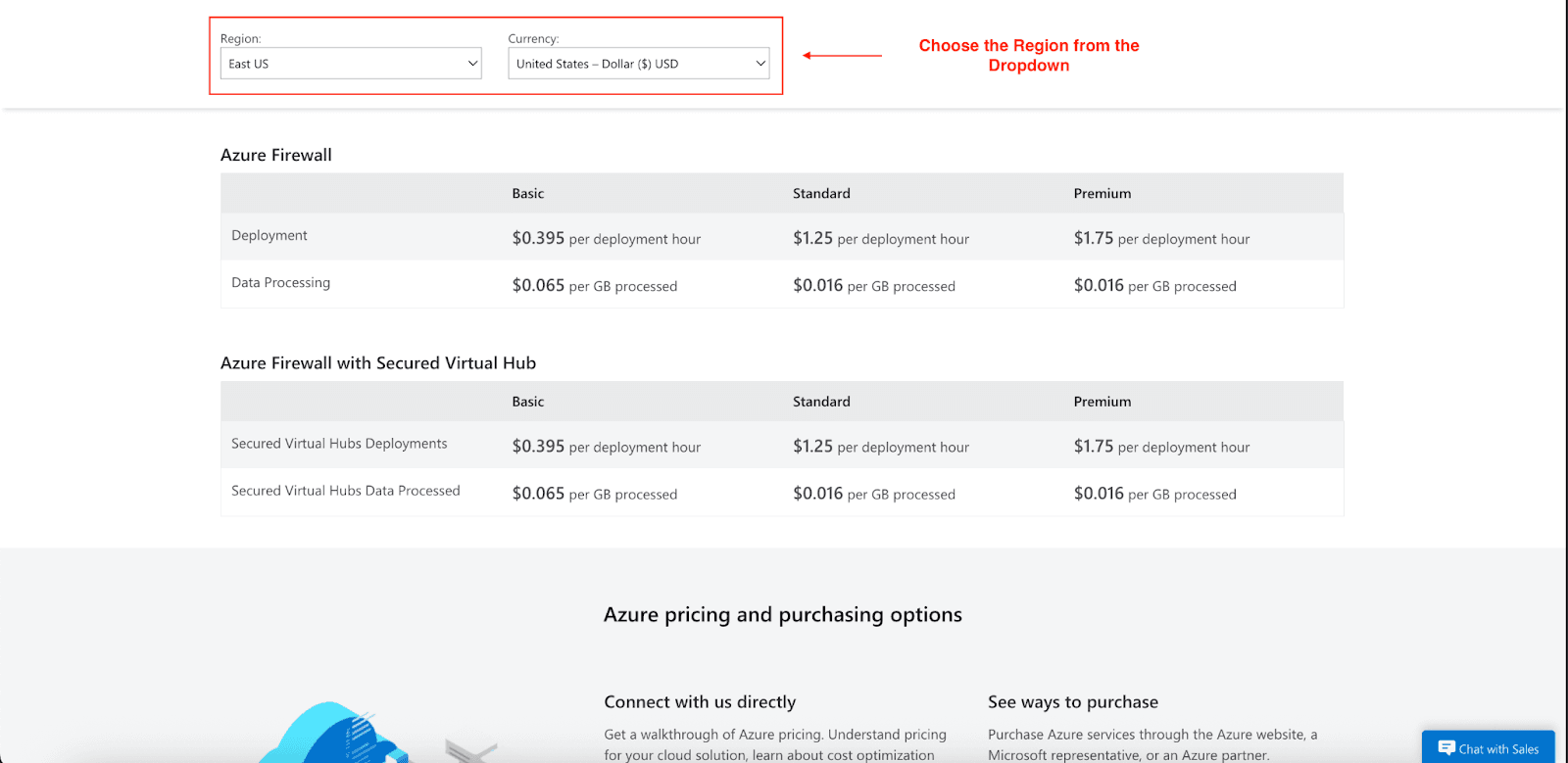
Deployment Hour Charges
Azure Firewall pricing includes a fixed hourly deployment fee regardless of traffic volume:
Basic: $0.395 per deployment hour
Standard: $1.25 per deployment hour
Premium: $1.75 per deployment hour
These charges apply for each hour the firewall is deployed, with partial hours billed as full hours. This fixed cost provides predictable baseline pricing for budgeting purposes.
Data Processing Fees
Variable costs depend on the amount of data processed through the firewall:
Basic: $0.065 per GB processed
Standard: $0.016 per GB processed
Premium: $0.016 per GB processed
The significantly lower per-GB rate for Standard and Premium tiers makes them more cost-effective for high-traffic environments. Organizations processing large data volumes will find better value in these higher tiers.
Azure Firewall Pricing Calculator Considerations
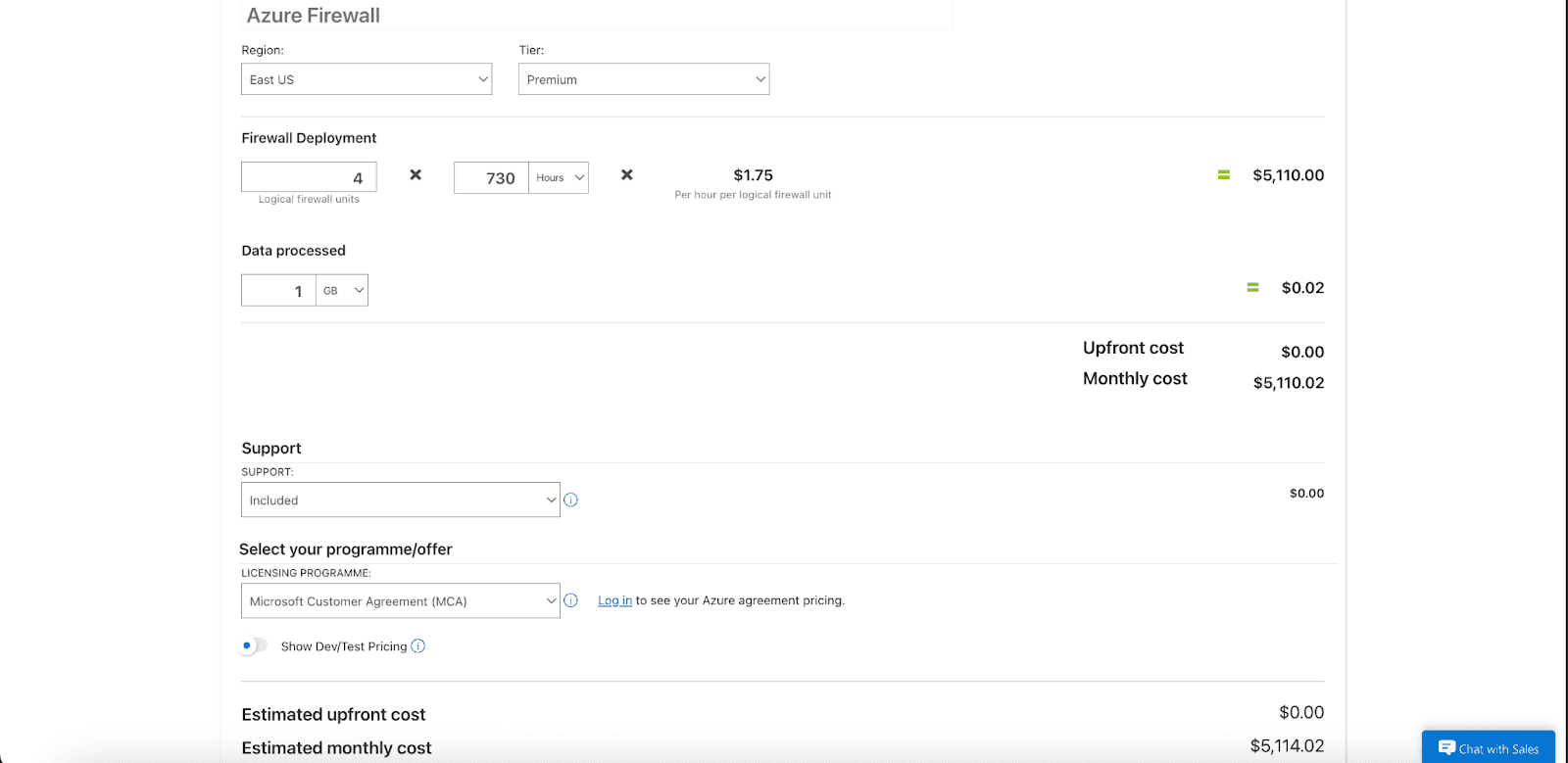
When you use the Azure Firewall pricing calculator, keep the following points in mind:
Traffic patterns: Review the average hourly and daily traffic rates; spikes can affect the final cost.
Growth projections: Include projected traffic growth over the planning horizon to avoid unexpected charges.
Feature requirements: Confirm that the chosen SKU provides the security capabilities you need, such as threat intelligence or intrusion detection.
Regional variations: Be aware that pricing can differ across Azure regions, so select the correct region in the calculator.
Benefits of Deploying Azure Firewall
Azure Firewall goes well beyond default perimeter shielding, delivering advantages that ripple through cloud architecture.
Comprehensive Cloud Workload Protection
Azure Firewall creates a comprehensive protective envelope for your entire cloud architecture. It observes and regulates traffic across several network layers, offering in-depth insight into communication patterns and revealing latent security risks.
Integration with Azure security instruments forges a single, cohesive security viewpoint. This capability lets Azure Firewall logs and telemetry feed directly into Microsoft Sentinel and other SIEM systems, delivering unified security analytics and expedited incident resolution.
Cost Optimization Advantages
Although an upfront budget outlay is required, Azure Firewall gradually generates substantial fiscal advantage:
Eliminated Infrastructure Loading: With no physical appliances to acquire, upgrade, or service, the risks and costs of depreciated hardware evaporate. Microsoft pursues the underlying infrastructure, which steadily maximizes your assets.
Streamlined Operations: Unified, cloud-based controls minimize the hours engineering groups devote to firewall upkeep. Policies self-adjust in milliseconds to traffic shifts, discarding the tedious capacity-modifying and nighttime-hardware-reboot routines of the past.
Avoided Security Incidents: The cost of responding to a single breach substantially overshadows the firewall’s annual licensing fee. By applying evergreen, cloud-native defenses with integrated threats, you stop threats at the perimeter, save incident recovery expenditures, reputation, and confidence.
Advanced Use Cases & Conversion Actions
Premium Features for Deep Protection
Azure Firewall Premium equips enterprises with layered defenses tailored for complex environments:
TLS Inspection: Secure outbound TLS traffic by terminating sessions for layered inspection, detecting threats embedded in encrypted payloads while preserving compliance with privacy regulations.
IDPS: Use an intrusion detection and prevention service backed by over 67,000 constantly refreshed signatures covering 50 threat families, updated in real time to counter rapidly evolving attack methodologies.
Geo-IP and Web Categories Filtering: Apply geo-IP restrictions alongside dynamic, category-based URL filtering for granular governance across outbound and inbound traffic.
Centralized Management
Drive configuration alignment at scale using Azure Firewall Manager. Define and propagate consistent security policies across hybrid regions and virtual networks, cutting manual errors and accelerating compliance audits with centralized visibility and control.
Purchase and Migration Considerations
When considering Azure Firewall, assess both today’s workloads and projected future demands to choose the appropriate tier.
Standard vs. Premium Comparison
Choose the tier based on the specific security needs of your company. Azure Firewall Standard may meet general requirements, but Premium’s advanced features, such as deep packet inspection and threat intelligence-based filtering, deliver essential protections for sensitive data managed by companies in dynamic threat landscapes. The investment may also be justified by the need to satisfy regulatory audits that mandate higher visibility and control.
Migration and Scaling Strategies
Keep disruption to a minimum by mapping out transition paths from legacy firewalls well in advance. Azure’s migration toolkit and instructional resources translate legacy, rule-based policies into a modern, single policy that simplifies alignment of firewall rules and overall security posture.
Build scaling blueprints that reflect future bandwidth and security adaptations in the same deployment. Standard-to-Premium upgrade paths will accommodate accelerating traffic or developing defenses in an orderly, straightforward manner.
Cut Azure Cloud Costs with Pump
You are in the right place! While Azure's own tools provide a decent overview of cloud spend, third-party services often reveal deeper, actionable savings. Pump automatically cuts Azure costs by tapping advanced AI and pooled buying, shaving between 10% and 60% off cloud spend.
How Pump optimizes GCP storage:
AI-driven usage analysis and forecasting.
Automated committed use discount purchases.
Group buying for volume discounts.
Risk-free 30-day money-back guarantee.
Conclusion
To build a strong Azure security posture, deploying Azure Firewall, Basic, Standard, or Premium, is essential. All tiers offer tough protection paired with easy network security management that scales.
You receive transparent, predictable pricing, built-in advanced threat protections, and a no-code Azure dashboard. Start with a complimentary trial, then layer in Pump to continuously optimize the budgets that safeguard your enterprise.
Secure your Azure data and apps with firewall protection built for the cloud and the agility to evolve with the threat landscape. Get your free trial, and check Pump for ongoing savings.



