

For any business, choosing a database is one of the most important decisions one has to make. The database, in this case, is the foundation of a house. A weak foundation, no matter how well the house has been designed, will always compromise the rest of the house. Businesses for many years, have been able to manage their own MySQL Bench databases, which involved complexities of management, setup, maintenance, backups, and scaling. This is akin to constructing a foundation and having to constantly repair it.
There are a lot of companies that are now opting for managed database services, which do all the heavy lifting. One of the most powerful fully managed MySQL databases is Azure Database for MySQL, which is part of Microsoft. You do not have to worry about database administration and can focus on building great applications.
In this article, I will provide a complete overview along with features, pricing, benefits, and saving tips for Azure Database for MySQL to help you decide if it is the right choice for your company.
What is Azure Database for MySQL?
Azure Database for MySQL offers a fully managed and cloud-based relational database service that is built on the MySQL Community Edition and is available as a Platform-as-a-Service. Microsoft takes care of the database management, which includes the hardware, patching, backups, and security, while your team can work on the application. Your applications will stay available and properly functioning with around-the-clock support.
Azure provides the three main deployment options:
Single Server: The preset, default deployment model, designed for lower-tier workloads that are predictable and bare minimum of traffic.
Flexible Server: Azure's recommended, modern deployment option that offers the best performance alongside optimal cost management.
Hyperscale (Citus for PostgreSQL): For applications that require sudden scaling due to data and rapid growth.
Why Businesses Choose Managed Databases
Operating a self-managed MySQL server can be a resource-heavy operation! It comes with significant issues, such as:
Time-Consuming Maintenance: You are responsible for all patches and updates, which are routine maintenance for the software.
Difficult Scaling: Self-hosted databases that need to be scaled to deal with sudden increases in traffic are a headache.
Backup and Recovery: Quick access to the data is extremely difficult without the right backup and recovery plan, which acts as a disaster recovery strategy.
Thus, MySQL for Azure automates the management tasks to help you save time on complex and tedious work. Competitors such as AWS RDS for MySQL and Google Cloud SQL for MySQL offer similar services, but Azure stands out with its unique customized expansion systems that integrate with other Microsoft products.
Key Features of Azure Database for MySQL
Azure Database for MySQL offers features to enhance the user's database experience in terms of security, performance, and scalability:
High Availability: With the flexible server option, you get an SLA of 99.99% uptime. It supports high-availability with zone-redundancy and automatic failover to a standby replica in another availability zone. This guarantees that if there is an outage in an availability zone, the application remains running.
Effortless Scalability: Resources (vCores) and storage can be adjusted separately. There is no downtime during the reconfiguration of workloads. You pay for the resources that you consume.
Robust Security: Security is built in at every level. You can use TLS to encrypt data, which is a great method of security, along with Azure Entra ID authentication and setting up firewall rules that control network access.
Performance Optimization: You can use Azure's tools, such as Query Performance Insight, to figure out and solve issues with slow queries, and use read replicas to improve performance on read-heavy workloads.
Seamless Integration: The service integrates natively with other Azure services. You can easily connect your database to Azure App Service for web apps, Power BI for analytics and reporting, and Azure Logic Apps for building automated workflows.
Azure Database for MySQL Pricing Explained
Understanding the pricing model is crucial for managing costs effectively. Azure charges for its MySQL service based on a few key components:
Compute: vCore and service tier selection determine the pricing model for this particular section
Storage: You are charged based on the amount of provisioned storage bought (per GB).
Backup: You are charged based on the amount of data backed up, which solely depends on the user.
I/O: Based on the service configuration adopted, you will have to pay a price for Input/Output Operations per Second, and that’s called I/O.
Azure offers three main pricing tiers based on the business needs:
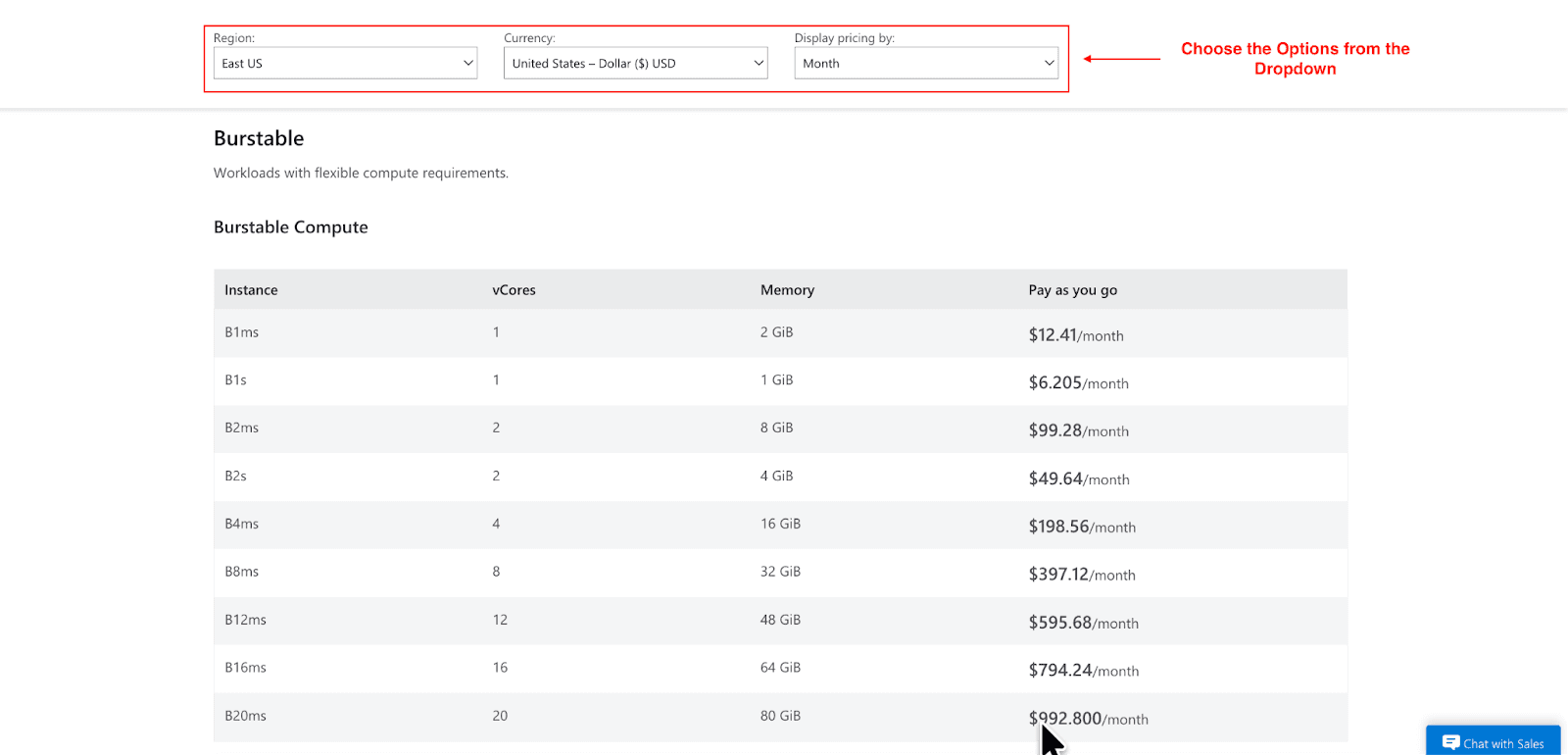
Burstable Tier: Ideal for low-performance workloads that require less than full performance for a sustained period of time to complete any tasks, including development and testing. For example, the price of the B1ms instance that costs $12.41/month on a pay-as-you-go plan and consists of one vCore and 2 GiB of memory serves as a great model for the low-tier expenses. See the image above and the full listing for pricing in US East for additional tailored options..
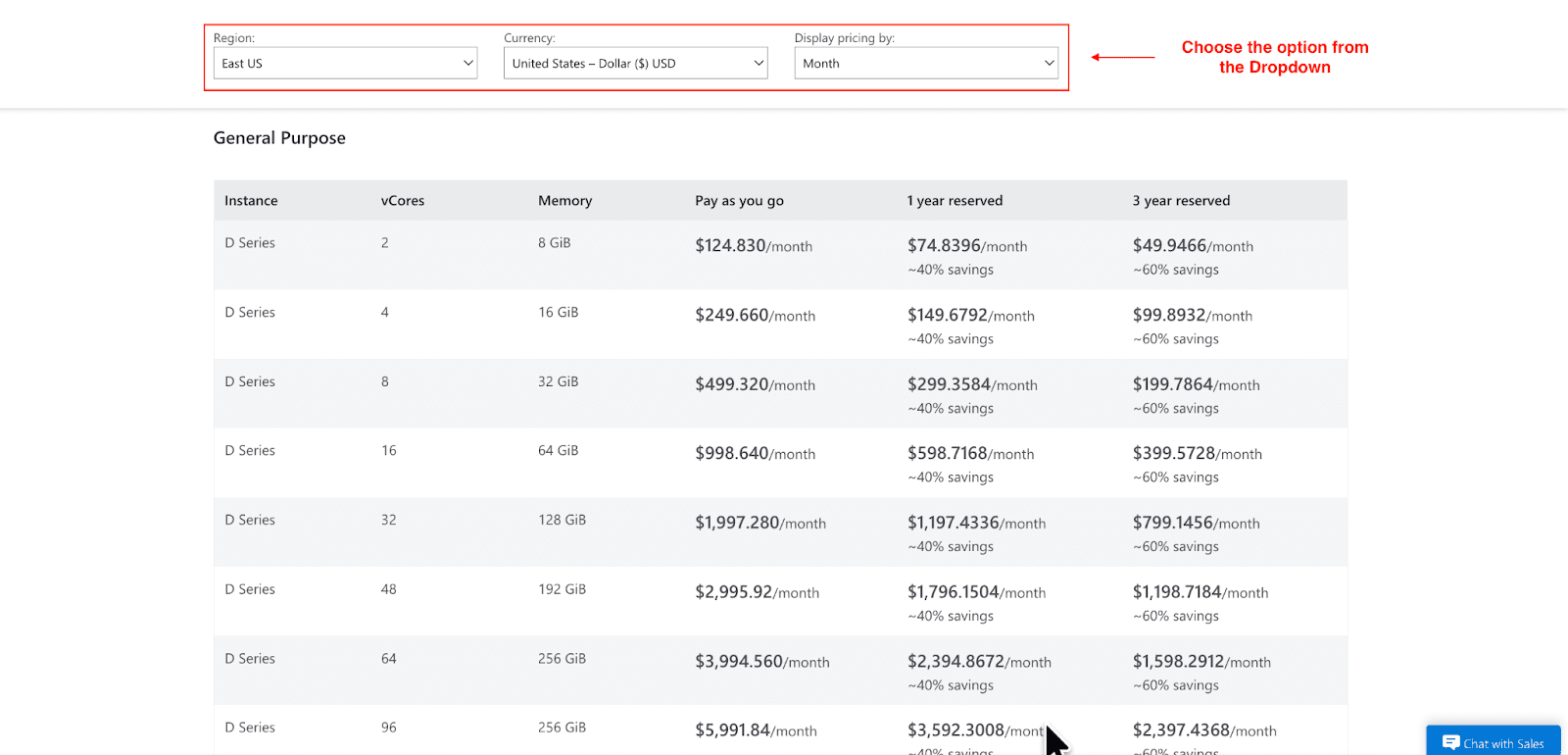
General Purpose Tier: Set these compute-intensive and memory-demanding workloads such that they can be completed with predictive performance. For example, the D2ds_v5 instance comes with 2 vCores and 8 GiBs of memory and costs $124.83 a month. See the image above and the full listing for pricing in US East for additional tailored options.
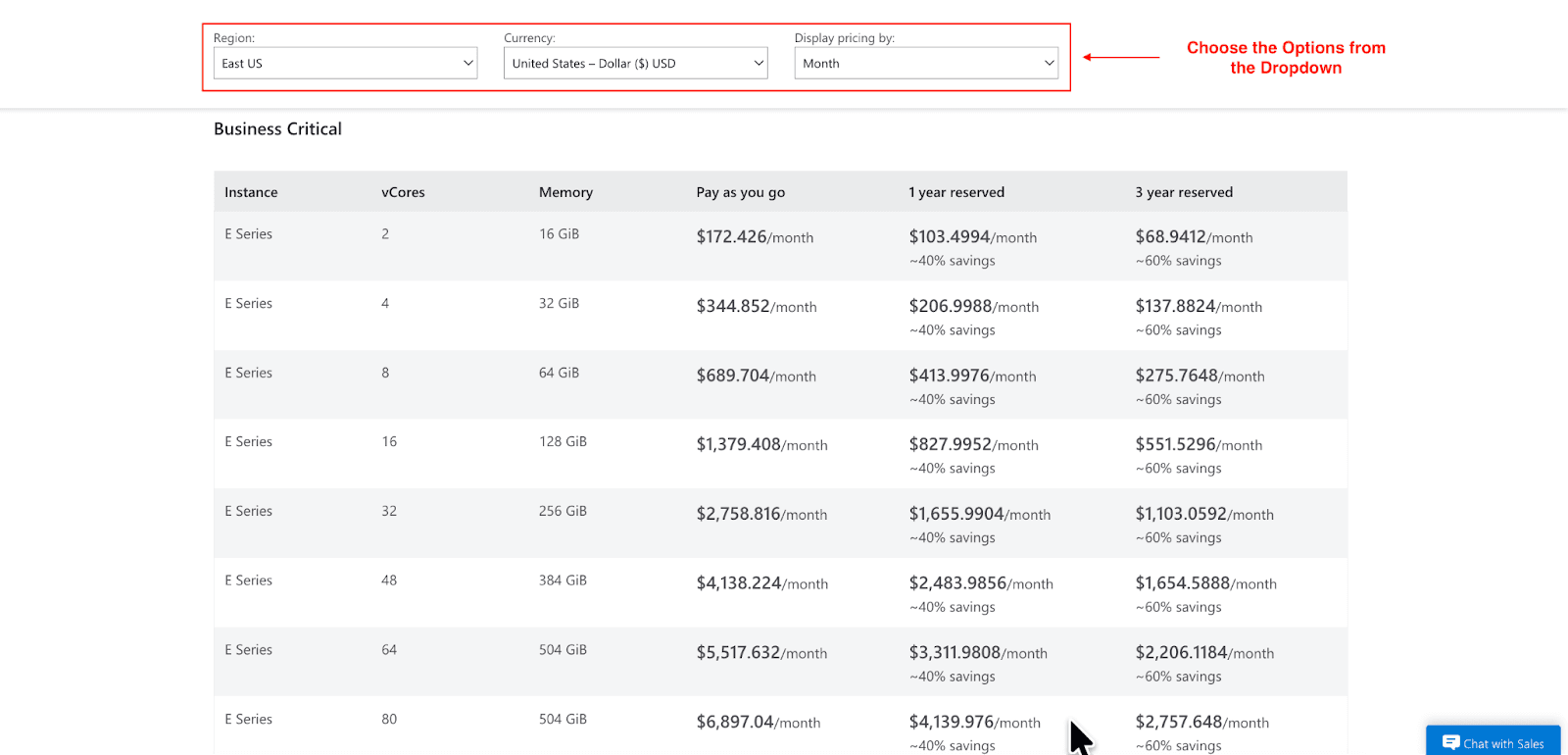
Business Critical Tier: Designed for high performance, and hence, requires low latency with extremely high concurrency. The E series, priced at $172.43 a month, comes with 2 vCPUs and 16 GiBs of RAM. See the image above and the full listing for pricing in US East for additional tailored options.
To reduce the costs for Azure MySQL, reserved instances can be used for predictable instance workloads, which come at a significant discount. Flexible servers have a stop-and-start functionality, which can switch the server off and on to help decrease the compute costs for periods of low database activity.
Pro Tip: Use the Azure Pricing Calculator to estimate your monthly costs with greater accuracy.
Azure Database for MySQL vs. Alternatives
When choosing a managed MySQL service, it's helpful to compare Azure with other major cloud providers like AWS and Google Cloud.
Feature | Azure Database for MySQL | AWS RDS for MySQL | GCP Cloud SQL for MySQL |
SLA | Up to 99.99% | Up to 99.95% | Up to 99.95% |
Deployment Options | Flexible Server, Hyperscale | Standard, Multi-AZ | Standard, High Availability |
Pricing | Pay-as-you-go, Reserved | Pay-as-you-go, Reserved | Pay-as-you-go, Sustained-use |
Ecosystem Integration | Strong Azure Ecosystem | Strong AWS Ecosystem | Strong GCP Ecosystem |
Setup Time | <10 minutes | ~15 minutes | ~15 minutes |
Azure stands out for its developer-friendly experience, particularly if you already use other Azure services. The Flexible Server offers zone-redundant high availability at no additional cost, an advantage competitors often charge for.
Top Benefits of Using Azure Database for MySQL
The Azure managed MySQL service will bring specific benefits to your company:
Reduced Operational Overhead: Maintenance, patching, and backups of the MySQL server will all be the responsibility of Microsoft, allowing your development and operations teams to focus on business strategies.
Increased Developer Productivity: With direct integration to Azure App Service and Azure Kubernetes Service, the development lifecycle is much smoother and allows for faster shipping of applications.
Cost-Efficiency: Microsoft’s cost optimization features guarantee you a pay-as-you-go model, thus reducing the total cost of ownership compared to on-premises servers.
How to Get Started with Azure Database for MySQL
Creating your first MySQL server on Azure is simple. Here are the basic steps:
Go to the Azure Portal, search for Azure Database for MySQL, and select the Flexible Server option.
Choose your subscription, resource group, server name, region, and compute/storage size.
Configure your network settings, including firewall rules to allow access from specific IP addresses or virtual networks.
Once the server is deployed, you can connect your applications or use Azure's migration tools to import data from an existing database.
Pro Tip: Make sure to use Azure Monitor and use Query Performance Insight to track the activities and search for possible optimization.
Conclusion
With Azure Database for MySQL, your team can focus on innovation while enjoying the benefits of high performance, scalability, and security through an entirely managed service. It simplifies the complexities of database administration to provide the safeguarding your applications need. Whether you are a new company or an established enterprise, this service has all the necessary resources to help you thrive within the cloud.
We have talked about the features, the pricing, and saving tips, and we hope this has given you some clarity on what Azure Database for MySQL has to offer. If you wish to continue your exploration, you can sign up for a free trial or check the Azure Pricing Calculator to suggest a suitable plan.
Join Pump for Free
If you are an early-stage startup that wants to save on cloud costs, use this opportunity. If you are a start-up business owner who wants to cut down the cost of using the cloud, then this is your chance. Pump helps you save up to 60% in cloud costs, and the best thing about it is that it is absolutely free!
Pump provides personalized solutions that allow you to effectively manage and optimize your Azure, GCP and AWS spending. Take complete control over your cloud expenses and ensure that you get the most from what you have invested. Who would pay more when we can save better?
Are you ready to take control of your cloud expenses?



