
We know how much you appreciate third-party data, as do we. AI models need third-party data to train. Analytics teams need it for market intelligence. SaaS platforms need it for many use cases. The positive side is that there is a lot of available data. The negative side is obtaining it. This means multiple vendor contracts, custom data extraction pipelines, and multiple bills to pay.
AWS Data Exchange simplifies acquiring third-party data. You can now use third-party data as you would other AWS resources. This means less manual work and more simplicity. If you use external data for your forecasts and machine learning models, you need to know the ins and outs of AWS Data Exchange.
In this article, I will walk you through what AWS Data Exchange is, how it works, the five types of datasets, and the pricing you should be aware of.
What Is AWS Data Exchange?
AWS Data Exchange is a fully managed data marketplace. It enables businesses to find, subscribe to, and use third-party datasets on AWS.
Subscribing to a data product means AWS will handle the entitlement and delivery. Data is available through AWS’s native methods. These methods include exports to Amazon S3, Amazon Redshift data shares, and managed API endpoints. No custom scripts. No FTP downloads. No vendor-specific integrations.
AWS Data Exchange acts as a middle ground between data providers and data consumers. Providers publish data sets as products. Consumers subscribe and browse data to access it in their AWS environment.
This service also works with almost all of AWS analytics tools, including Amazon Athena, AWS Glue, Amazon EMR, and SageMaker, and all tools can use the power of external data in their workflows immediately.
How AWS Data Exchange Works
AWS Data Exchange organizes data into three building blocks:
Assets: These are the actual data files, APIs, or Redshift data shares you will be working with.
Revisions: Think of these as versioned snapshots. Each revision captures the dataset at a particular moment, so you always know what you're getting.
Data Sets: This is the top-level container that groups all the revisions a provider publishes.
When you subscribe to a data product, the provider determines how the data will be delivered. Products that are based on files are delivered through revisions. This means you will have to export the version you want to your S3 bucket. Products that are based on APIs provide managed endpoints that allow you to return data through a request. Redshift data shares allow you to have direct access to the data through queries without having to make a copy of the data.
From the provider’s perspective, they are the ones who set the dates at which the updates are made available, and from the consumer’s perspective, they are the ones who set the time at which they want to pull down new revisions to be a part of their analytics pipeline or models. This version control/snapshot approach allows for the prevention of rapid changes that can create problems in workflows. This is a big thing when it is in production.
Here's the typical flow:
You will use the catalog to browse data products by industry, provider, or pricing model.
Subscribe to a product by accepting the provider’s data subscription agreement.
Once data is in your S3 bucket, you can use the API or run a query on Redshift to access your data.
Integrate data and analytics into the ML workflow or into applications.
Why AWS Data Exchange Matters
When production systems repeatedly use third-party data, AWS Data Exchange becomes highly relevant. For example, ad-hoc integration doesn’t make sense, but AWS Data Exchange offers ways to integrate external data when there is external data analytics, pricing, fraud detection, or demand forecasting.
External data feeding production features
Data feeds production systems where financial institutions rely on market prices, interest rates, and economic indicators, and retailers depend on data from weather forecasts and demographics. These datasets are ever-changing, and downstream systems anticipate expected and timely updates. AWS Data Exchange handles those updates in a timely and predictable manner.
Replacing brittle ingestion pipelines
Many teams start relying on vendor data ingestion using a combination of scripting, scheduled downloads, or custom-built APIs. Over time, however, these integration approaches fail. AWS Data Exchange standardizes the entry of data into AWS, which removes operational friction from this process.
Keeping data next to compute
Analytical workloads need the operational data stored internally along with the external reference datasets, and AWS provides that data. The external data located outside AWS causes delays and increases data. With AWS Data Exchange, the external data is located internally in AWS, and that makes queries simpler and decreases data transfer costs.
5 Types Of Data Available On AWS Data Exchange
AWS Data Exchange organizes datasets by delivery method. Each type maps to a different consumption pattern.
1. File-Based Datasets
Most providers publish data in this format. Data is published and stored as objects in Amazon S3. You'll then have the option to export these files to your own S3 bucket, allowing for seamless integration into your existing data lakes and into your analytics workflows.
Data Exchange does not function as an analytical resource; instead, it focuses on third-party data integration into your AWS ecosystem. From there, you can leverage other AWS services such as:
Amazon Athena for querying,
AWS Glue for processing or
ML models for analytics.
Data formats supported include CSV, JSON, Parquet, and any other S3-compatible data formats.
2. API-Based Datasets
Real-time or frequently updated data. Providers publish managed API endpoints supported by Amazon API Gateway. You can subscribe to the API and obtain data at your convenience by simply calling the API rather than downloading files.
API-based datasets are commonplace in financial data, real-time weather updates, and risk scoring services. AWS Data Exchange also offers OpenAPI specifications for programmatic access.
3. Amazon Redshift Datasets
Direct warehouse-to-warehouse sharing. Providers grant read-only access to Amazon Redshift tables, views, schemas, and functions. You do not have to copy or extract the data; you can query the data directly from Redshift.
This model is great for reducing storage costs and keeping your data up to date. You access the data where the provider maintains the source dataset.
4. S3 Direct Access Datasets
Provider-managed storage. You do not have to export files; rather, you gain direct access to the provider's S3 bucket through an S3 access point. You can use Amazon Athena, Amazon EMR, or SageMaker to analyze the data in place without duplication.
This method reduces transfer costs and provides access to large datasets.
5. AWS Lake Formation Datasets
Permission-based sharing. Providers tag and then grant access to databases, tables, or columns in AWS Lake Formation to users via AWS Data Exchange. You query the data from your Lake Formation environment that you have access to.
This format is tailored to structured data sharing in enterprise data lake ecosystems.
AWS Data Exchange Pricing Explained
AWS Data Exchange does not charge a flat platform fee. Instead, it will charge users depending on their role, as well as how the data is consumed.
For Data Consumers
Dataset subscription cost: Set by the data provider. Some datasets are free. Others have subscriptions or charge on a usage-based basis.
AWS infrastructure costs: You pay standard AWS usage fees for the services consumed on the dataset, and these include:
Amazon S3 (if you export files).
Amazon Athena or AWS Glue (for querying and transformation).
Amazon Redshift (for data shares).
API Gateway (for API-based products).
Data transfer fees: You will incur costs if the data has not been moved across AWS Regions or if the data has been moved to the internet. In-place access models like Redshift data shares or S3 direct access may reduce your cost.
AWS Data Exchange itself has no browsing fee, but there will be costs incurred through subscriptions and usage downstream in AWS.
For Data Providers
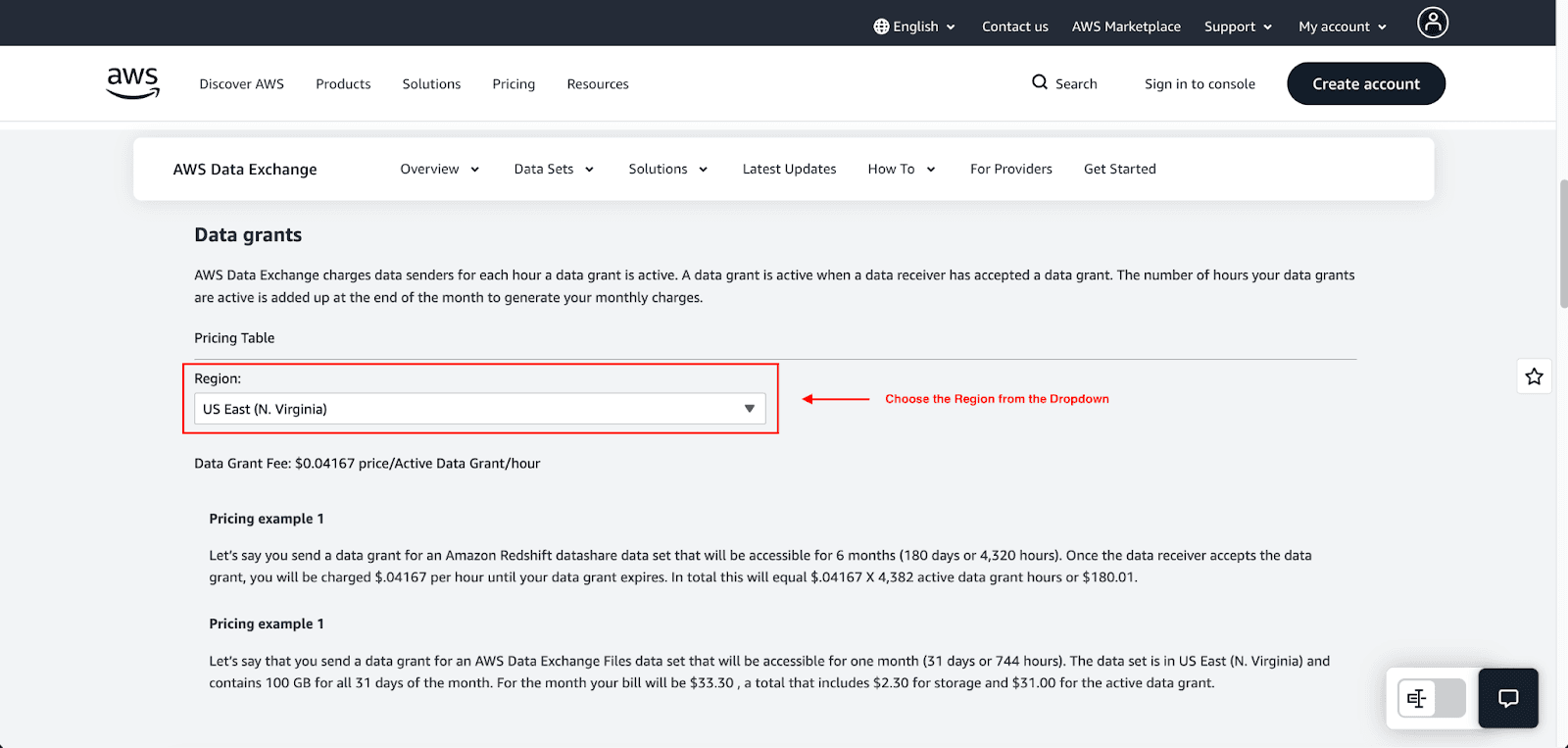
Data grant fees (hourly): AWS charges $0.04167 per active data grant per hour in US East (N. Virginia) with regional variations. Grants are billable when the receiver accepts them. Example: 10 active grants running continuously for one month will cost approximately $300.
Storage fees for file-based datasets: If you upload a file for a dataset, you will incur storage costs. AWS Data Exchange processes storage costs as a function of time and will charge you at the end of the month. For example, in a sample calculation, one of the 100 GB datasets in the US East (N. Virginia) region will cost you $2.30 in storage.
Tiered fulfillment fees: Once AWS Marketplace receives payment for a new subscription, it will charge a fulfillment fee. Their standard listing fee for public offers is about 3% of revenue. Even though AWS has decreased some Marketplace fees, the 3% fee for public AWS Data Exchange listings is still the minimum for offers of less than $1M total contract value.
Example Pricing Scenario
For a data provider: You send a data grant for a Redshift datashare for 6 months (180 days or 4,320 hours). Once the receiver accepts, you will be charged $0.04167 an hour until the grant expires. Total cost will be $180.01.
For a data consumer: You subscribe to a financial dataset for $500/month. You send an export of the data to S3 (100 GB dataset, $2.30/month storage) and then run an Athena query ($5/TB scanned). Your total monthly cost will be $500 (subscription) + $2.30 (S3) + the cost of Athena queries.
Limitations Of AWS Data Exchange
AWS Data Exchange is designed specifically for AWS. It's not designed for multi-cloud or non-AWS data delivery. Additional limitations include:
Limited customization: Data products follow standardized packaging. Providers cannot customize the license or delivery behavior to their liking.
Provider dependence: You have little to no control over the data (quality, frequency of updates, and data continuity) provided. This can lead to upstream changes without notice.
Service-specific constraints: Some types of datasets (e.g., data shares in Redshift) have limitations based on region and configuration.
Complex cost visibility: Data spending is easily obscured because costs are distributed across subscriptions, API calls, and AWS services downstream of the data.
Who Should Use AWS Data Exchange?
Ideal for:
AI/ML teams need third-party training datasets.
Financial analytics teams that need data on markets and economies.
SaaS platforms that need to add external sources to their internal data.
Data vendors monetizing proprietary datasets.
Not ideal for:
Multi-cloud SaaS platforms.
Companies that require custom licensing workflows.
One-off data downloads.
Conclusion
AWS Data Exchange streamlines the process of accessing and monetizing third-party data. It takes care of licensing, data ingestion, and billing so you can integrate external datasets with your analytics tools in a shorter amount of time. AWS Data Exchange is the most useful in an AWS environment, and the usage-based pricing is very good for companies that are scaling their AI and data-centric services.
Hopefully, this guide has given you a clear understanding of everything you need to know about AWS Data Exchange.
Join Pump for Free
If you are an early-stage startup that wants to save on cloud costs, use this opportunity. If you are a start-up business owner who wants to cut down the cost of using the cloud, then this is your chance. Pump helps you save up to 60% in cloud costs, and the best thing about it is that it is absolutely free!
Pump provides personalized solutions that allow you to effectively manage and optimize your Azure, GCP, and AWS spending. Take complete control over your cloud expenses and ensure that you get the most from what you have invested. Who would pay more when we can save better?
Are you ready to take control of your cloud expenses?



