

Managing APIs is like managing traffic on a busy road. With the growth of your application, so too is the growth of requests, which all need to be properly managed, all while keeping the expenses balanced. Amazon API Gateway fixes this as your traffic management, allowing you to build, deploy, and manage as many APIs as you like. It's important for serverless architectures and their requirements, but like anything serverless, it can get expensive if not paid attention to.
In this article, I will break down Amazon API Gateway's pricing details. We will explore the features within the pay-as-you-go model, find the hidden charges, and provide a guide to strategic cost reduction. With this guide, your API Gateway will work optimally, and the costs will not cross a certain limit.
What is Amazon API Gateway?
Amazon API Gateway is a fully managed AWS product that enables developers to build, secure, publish, and monitor APIs. Consider Amazon API Gateway as the entry for your applications, which takes care of all the requests and then sends them to the respective backend service, AWS Lambda function, S3, EC2 server, or all of them.
Key Features
API Gateway has three main types of APIs, tailored to different scenarios:
HTTP APIs: These APIs are good for serverless workloads and for proxying requests to things like AWS Lambda. These APIs are cheaper and have lower latency than REST APIs.
REST APIs: These APIs are more complex and feature-rich, and provide more features, such as advanced controls, request validation, and API keys.
WebSocket APIs: These APIs provide real-time, two-way communication for things like chat, live dashboards, and streaming data.
Amazon API Gateway Pricing Overview
API Gateway uses a pay-as-you-go pricing model, covering all aspects of usage with no baseline charges and no long-term contracts. This means that all costs are incurred on an as-needed basis. While such flexibility is desirable, having inadequate knowledge could lead to unpleasant and unforeseen additional costs.
Your API Gateway cost will depend on these major components:
API Requests
Data Transfer
Caching
Monitoring
WebSocket APIs
When compared to Azure API Management or Google's Apigee API, AWS API Gateway is noted for its integration with other AWS tools, as well as its detailed, usage-based pricing.
Detailed Cost Breakdown: How Pricing Works
Consider the rest of the elements in the pricing breakdown for the Gateway API. Remember that prices vary by region in AWS, so the figures below are for us-east-1 (N. Virginia) regions.
Request-Based Pricing
AWS gives the first 12 months of use a free tier on API Gateway.
You can use 1 million REST API calls per month.
You can use 1 million HTTP API calls per month.
You can use 1 million WebSocket messages and 750,000 connection minutes per month.
Once you go above what is allocated in the free tier, you go into a tiered, on-demand pricing structure.
HTTP APIs
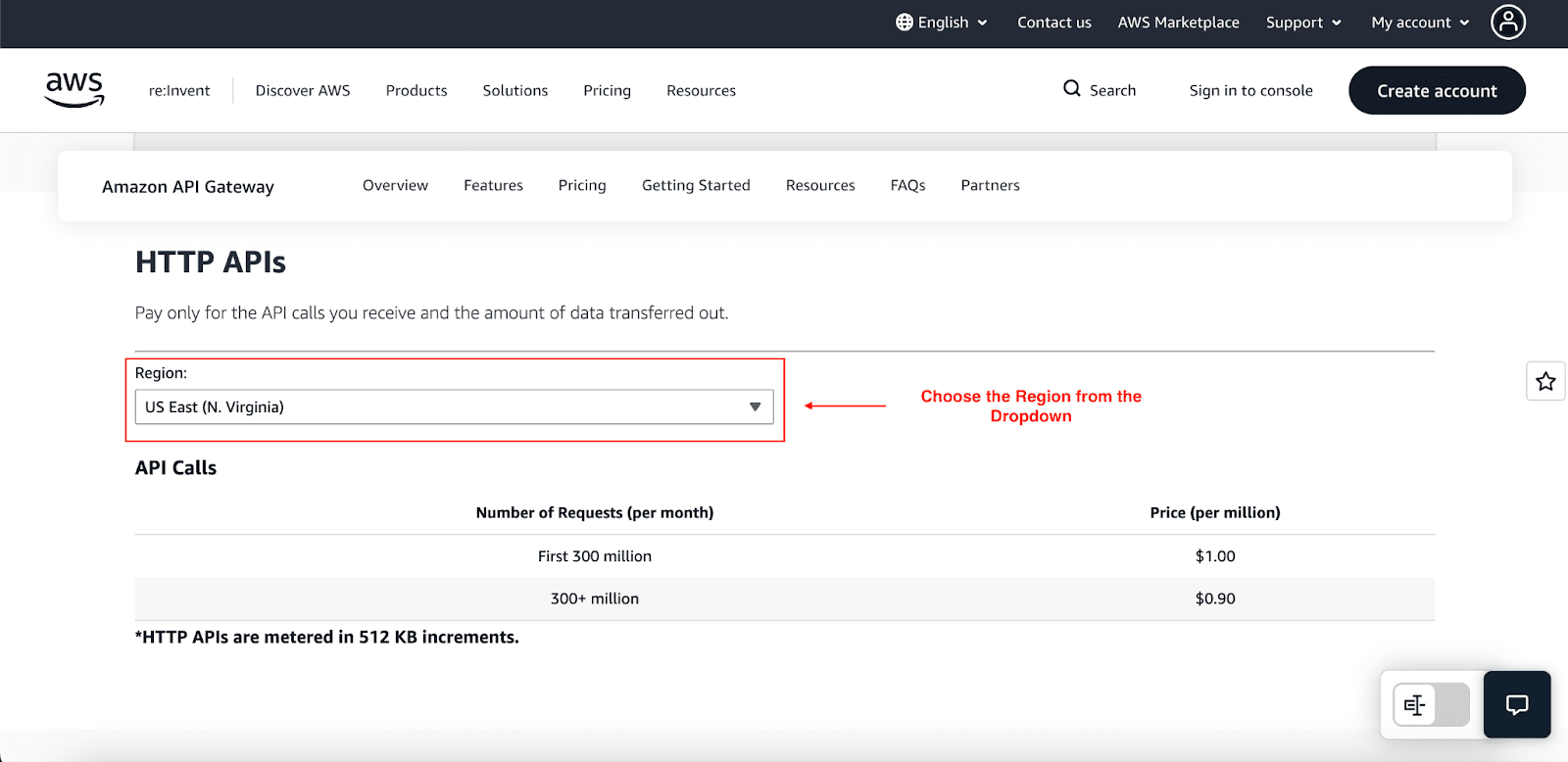
First 300 million requests/month: $1.00 per million.
Over 300 million requests/month: $0.90 per million.
REST APIs
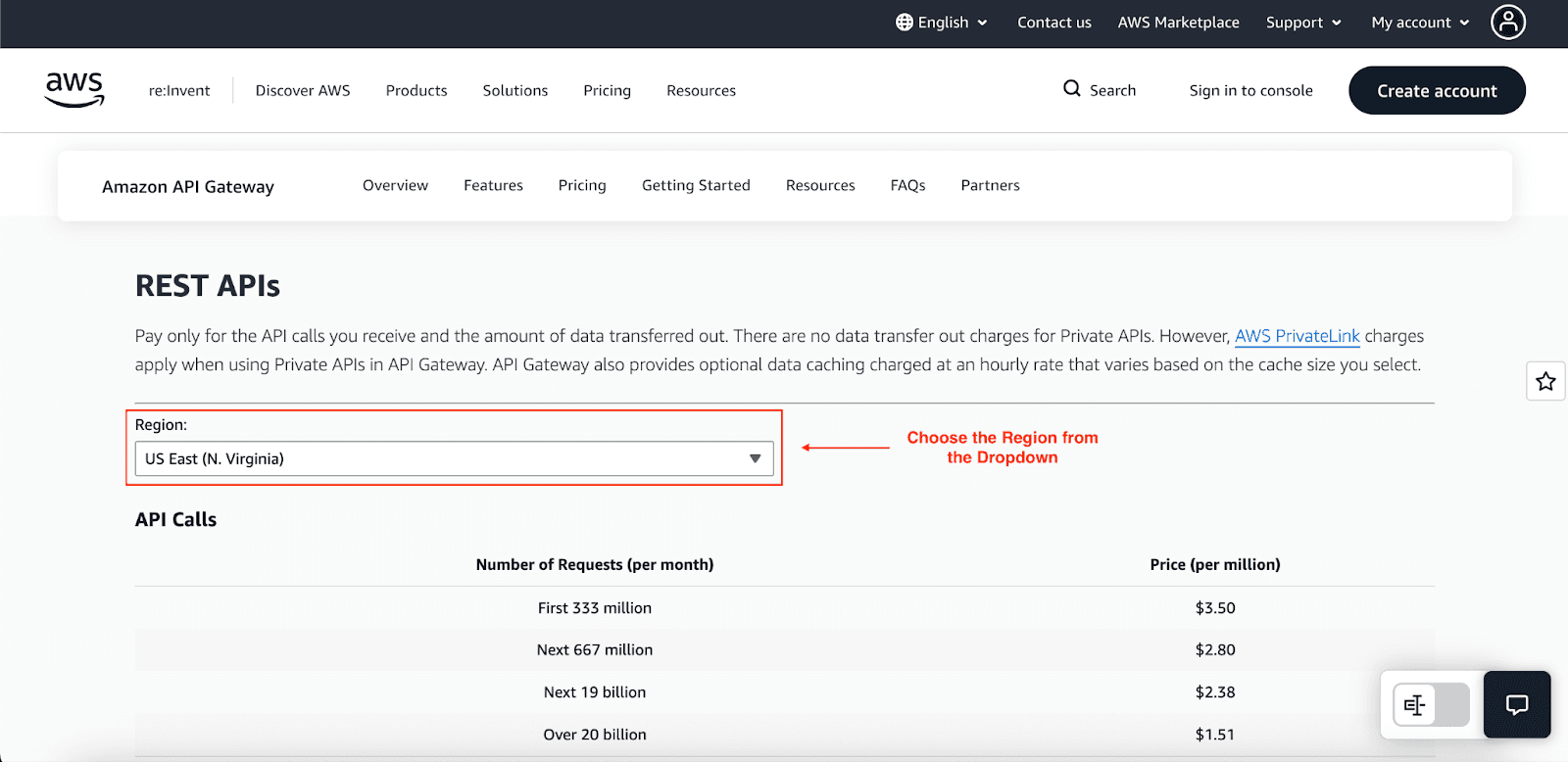
First 333 million requests/month: $3.50 per million.
Over 20 billion requests/month: $1.51 per million.
As you can see, HTTP APIs are much cheaper, making them the default choice for cost-conscious, high-volume workloads.
Data Transfer Charges
Charges for transferring data out from the API Gateway to the Internet are another important charge. Data inbound is free, but you're paying for data outbound. These charges follow the basic EC2 data transfer pricing, which starts, on average, at $0.09/ GB for the first 10 terabytes.
Regardless, transferring data to other AWS assets within the same AWS Region (and S3 buckets or Lambda functions) is typically free. Using Private APIs that do not have access outside of your Amazon VPC also removes DTO charges.
Caching Costs
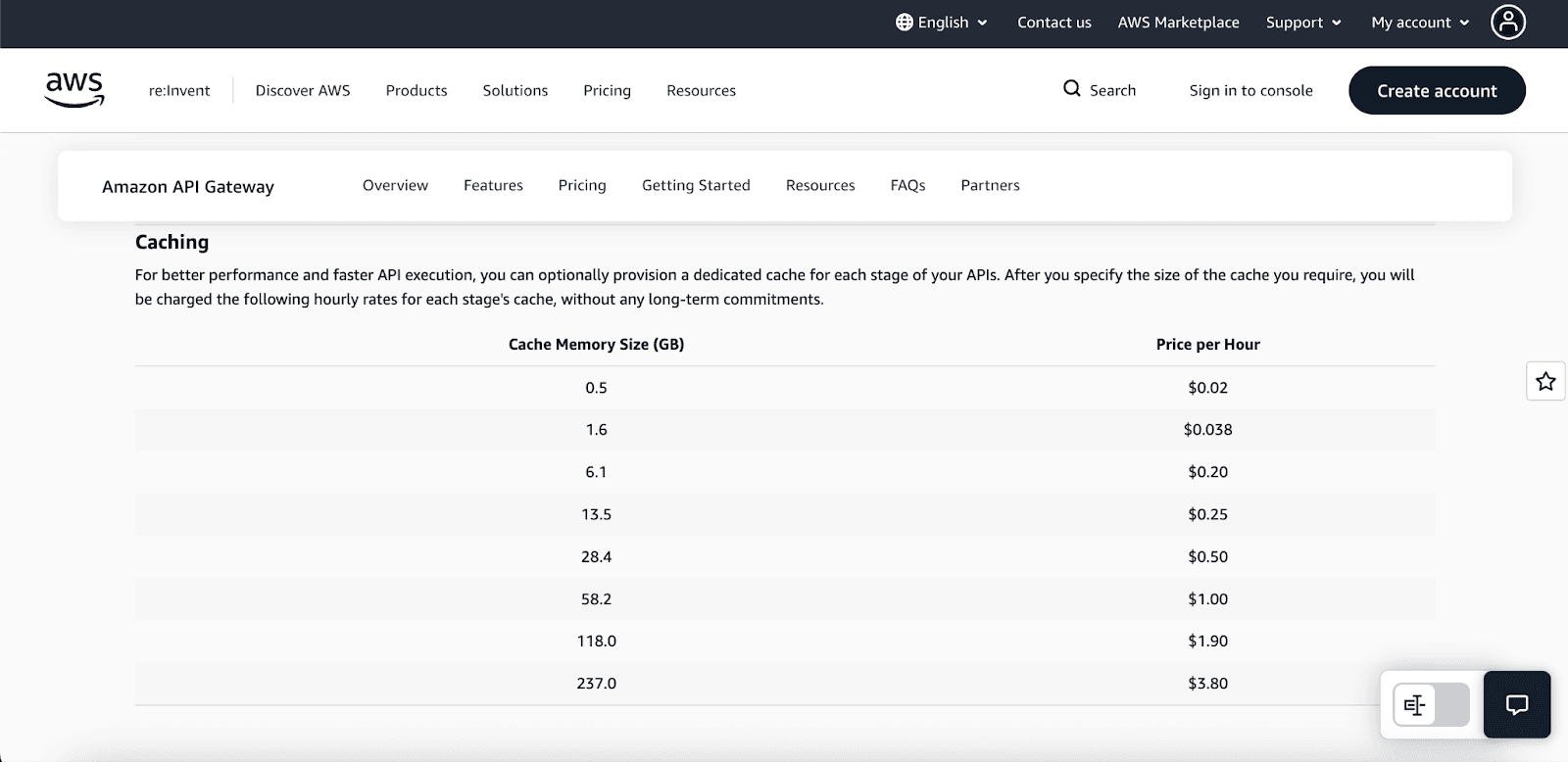
For REST APIs, you reduce the number of calls to the backend for computing and the latency or lag time to which the backend can respond by providing it with the ability to store prior requests and responses from the backend to cache. Thus, the cached data can then be used for responses, which also comes at a fee. Caching is charged at a set rate for every hour, depending on the memory range you set for it:
Cache Pricing:
0.5 GB: $0.02 per hour
1.6 GB: $0.038 per hour
13.5 GB: $0.25 per hour
237.0 GB: $3.80 per hour
Effective caching is a cheap way of storing data, lowering your total costs by considerable amounts from the backend compute costs (such as Lambda calls based on backend computing). Something that is commonly done is over-specialized cache memory, which can lead to over-expenditures.
Pro Tip: APIs, such as product catalog APIs, will benefit from front caching if heavy repeated queries are made, as the read traffic is high. APIs with dynamic content that changes frequently will gain little to no benefit from caching and will increase operational costs.
Monitoring and Logging Costs
API Gateway logs, integrated with AWS CloudWatch, provide request/response metrics of vital importance. Latency, the count of requests, and error rates are also provided. Their costs, however, are not negligible. CloudWatch can get expensive, especially if full request/response logging is activated for troubleshooting and set to full retention. About $0.30/GB for logs stored and $0.10/GB for logs recalled is the standard. Setting to sample logging or trimming the retention for logs not accessed frequently are good options to manage costs.
Hidden Costs to Watch Out For
There are various hidden costs under the pay-as-you-go pricing model. These costs are detailed as follows:
Cross-Region Data Transfer: If you have an API gateway in one region interacting with a backend service in another region, you will incur cross-region data transfer costs, which are much more expensive than intra-region transfers.
Lambda and API Gateway Combined Costs: API calls to a Lambda function with an API Gateway also get billed because you will have to pay for the API Gateway request cost and the Lambda compute duration and request cost.
NLB Costs for Private Integrations: When using a private integration with REST or WebSocket APIs to link with resources in your VPC, a Network Load Balancer is frequently needed. The NLB is billed on an hourly basis and can accumulate costs for API calls, which are less frequent. In these scenarios, a Lambda function is a more economical solution.
Cut Your Amazon API Gateway Costs
Now for the most exciting part, savings. If you put some thought into it, you can bring the API Gateway costs to the lowest level possible:
1. Choose the Right API Type
The most effective way to reduce costs is to use HTTP APIs instead of REST APIs whenever it is reasonable. In the case of most serverless applications, HTTP APIs provide all the requisite functionality at close to one-third of the cost. REST APIs should only be used when you need some particular features, such as usage plans, API keys, or otherwise advanced request validation.
2. Optimize Caching
If you are using REST APIs, use caching wisely. Analyze the use patterns of your users to spot commonly used endpoints that provide the same answer. Use the right time to live setting to improve the cache hit ratio, which in turn reduces the number of calls to your backend, which essentially lowers compute expenses.
3. Use Regional and Private Endpoints
For web applications with a narrower audience, use regional endpoints. As you know, regional endpoints will save you 65-70% more than edge-optimized APIs, which is a favorable option unless you need CDN-level performance globally. This approach will decrease latency and save significantly on data transfer costs. For web applications, use Private APIs to save on data transfer costs by keeping all traffic within the AWS network.
5. Combine with AWS Lambda Optimization
Since the majority of API Gateway calls invoke Lambda functions, the cost of running Lambda functions heavily influences your overall cost:
Use the lowest possible memory settings.
Avoid cold starts by Provisioning Concurrency only where necessary.
Merge Lambda functions to decrease the number of executions needed.
5. Reduce Unnecessary API Calls and Data Payloads
Make your API application efficient:
Reduce the number of API calls made.
Optimize response payloads by only sending necessary data.
Place a CDN like Amazon CloudFront on your API Gateway. Transfers within AWS (including API Gateway and Cloudfront) are complimentary, meaning you will save a significant amount on your data transfer bill.
Conclusion
Let us finish up here. Understanding pricing for Amazon API Gateway does not relate to just saving costs. It also determines the framework of your structure. This framework must be efficient and scalable and not have surprise costs.
Think of it like this: You will not drive a car without a fuel meter, will you? The same goes for your API Gateway. By:
Choosing the right API type for your needs.
Ensuring your data transfers are efficient.
And continuously monitoring your consumption.
You maximize API Gateway without overspending on AWS. If your company is targeting enterprise-level AWS savings and goes beyond manual optimizations, consider Pump Cost Optimization. We help startups in realizing maximum savings with minimum technical burden, simplifying intricate cost management.
Join Pump for Free
If you are an early-stage startup that wants to save on cloud costs, use this opportunity. If you are a start-up business owner who wants to cut down the cost of using the cloud, then this is your chance. Pump helps you save up to 60% in cloud costs, and the best thing about it is that it is absolutely free!
Pump provides personalized solutions that allow you to effectively manage and optimize your Azure, GCP and AWS spending. Take complete control over your cloud expenses and ensure that you get the most from what you have invested. Who would pay more when we can save better?
Are you ready to take control of your cloud expenses?



