

Handling enormous datasets is a common hurdle I’ve watched countless companies face, and I can personally vouch for the difference the right tools make when every minute counts for data-driven choices. Amazon Athena is the answer I recommend most often: a serverless, interactive service that runs against data stored in Amazon S3 and uses standard SQL. The simplicity of pointing Athena at a data lake, writing a familiar SQL query, and getting results in seconds turns the chore of analytics into a direct conversation with the numbers.
In this article, we’ll explore AWS Athena from the ground up. I’ll break down how it functions, highlight the must-know features, and examine the advantages it brings to the table. You’ll also find practical details on how pricing is structured, concrete strategies for managing costs, and a side-by-side comparison with other AWS analytics options. When we’re done, you’ll know whether Athena fits the data strategy of your organization. Let’s dive in!
What is AWS Athena?
AWS Athena is an interactive query service designed for analyzing data in Amazon S3. What sets it apart is the ability to work with standard SQL to access data without moving it. You run queries against files in S3 just as they are, CSV, JSON, Parquet, or any other format, so you skip the chore of loading data into a separate store, and you avoid the headaches of building and maintaining lengthy ETL pipelines.
How Does Amazon Athena Work?
Amazon Athena makes analyzing data almost effortless. You point it to data kept in an Amazon S3 bucket, provide the schema, typically through the AWS Glue Data Catalog, and start writing SQL queries right away.
Because it’s a serverless analytics service, Athena takes care of the underlying infrastructure. It automatically provisions, scales, and manages the compute power needed to run your SQL statements. Athena is built on proven open-source technologies such as Trino, Presto, and Apache Spark, giving you speedy, parallel processing without the overhead.
Key Features:
Seamless S3 Integration: Query data stored in S3 without copying or transforming it.
Pay-As-You-Go Pricing: You pay based solely on the bytes scanned by your queries.
Standard SQL Support: Write SQL queries in a familiar dialect with little ramp-up time.
Automatic Scaling: Instantly scales resources to service files of any size.
Federated Queries: Combine data from S3 with datasets stored in on-premises databases, other AWS data lakes, and third-party systems in a single query.
Where Does Amazon Athena Fit in AWS Analytics?
Amazon Athena is just one part of a broad AWS analytics ecosystem. Each service, Amazon Redshift, AWS Glue, AWS Data Pipeline, and others, has a role tailored to different use cases, from batch processing to interactive querying. To select the best option, evaluate your particular workload, team expertise, and cost preferences alongside service capabilities and ecosystem interoperability.
Feature / Service | Amazon Athena | Amazon Redshift | Microsoft SQL Server | AWS Glue |
Architecture | Serverless, queries S3 | Managed cluster-based | Managed/on-premises | Serverless ETL |
Data Storage | S3 data lake | Dedicated Redshift DB | SQL databases | S3 (for transformed data) |
Data Types | Structured, semi-, & unstructured | Structured & semi-structured | Structured | Structured, semi-structured |
Query Engine | Presto/Trino/SQL | PostgreSQL-based, MPP | T-SQL engine | n/a (ETL, transformations) |
Performance | Fast ad-hoc, scales automatically | High, optimized for large/complex queries | High, with tuning | n/a (for ETL, not querying) |
Data Prep | Schema-on-read | Schema-on-write | Schema-on-write | Data transformations |
Cost Model | Pay-per-query ($/TB) | Reserved/On-Demand ($/node/hr) | Per-core/per-hour | Per-DPU-hour ($/sec) |
Scalability | Automatic | Manual (cluster resize/auto) | Manual (depends on SKU/infra) | Automatic |
BI & Reporting | QuickSight, Tableau | Tableau, Power BI, QuickSight | Power BI, SSRS | Used in pipeline (not direct) |
Security/Compliance | IAM/S3/Athena policies | VPC, encryption, IAM | Windows Auth, encryption | IAM, encryption, audit logs |
Benefits and Use Cases
Companies turn to AWS Athena for three key reasons: it keeps costs low, delivers results fast, and fits well within diverse workflows.
Benefits
Cost-Efficiency: The Athena pay-per-query model is a major advantage. You are charged only for the data your queries read, starting at $5 per terabyte. No compute nodes stay powered, so there are zero idle hours to fund. This structure is ideal for teams that run exploratory queries occasionally and don’t want to fund a full data warehouse.
Speed and Ease of Use: Athena manages all the infrastructure for you. You simply write a query, and in seconds, you’re looking at the results. Because it uses standard SQL, any data analyst familiar with the language can get started with no extra training.
Support for Multiple Data Formats: When your data lives in a lake, it comes in many shapes. Athena speaks all the major formats: CSV, JSON, ORC, Avro, and Parquet. When data is in the right format, you don’t have to transform it into a tool’s native type before running queries.
Use Cases
Log Analytics: Sweep through terabytes of application and server logs already parked in S3 to diagnose performance issues, study user journeys, or surface security incidents. No need to load the data into a separate log analysis tool; just query it in place.
Ad-Hoc Data Exploration: Data scientists and analysts can spin up instant SQL queries to validate hunches, chart distribution curves, or get training sets ready for the latest ML frameworks. No long-lived cluster required.
Business Intelligence: Connect Athena to BI tools such as Amazon QuickSight to design front-and-center dashboards that refresh in real time, tapping directly into the S3 data lake without any intermediate storage layer.
ETL Operations: Although AWS Glue leads the ETL landscape on AWS, Athena plays a complementary role for straightforward data cleaning and transformation tasks. Its CREATE TABLE AS SELECT syntax lets users define new, tidy datasets stored back into S3 with a single, declarative SQL statement.
AWS Athena Pricing Guide
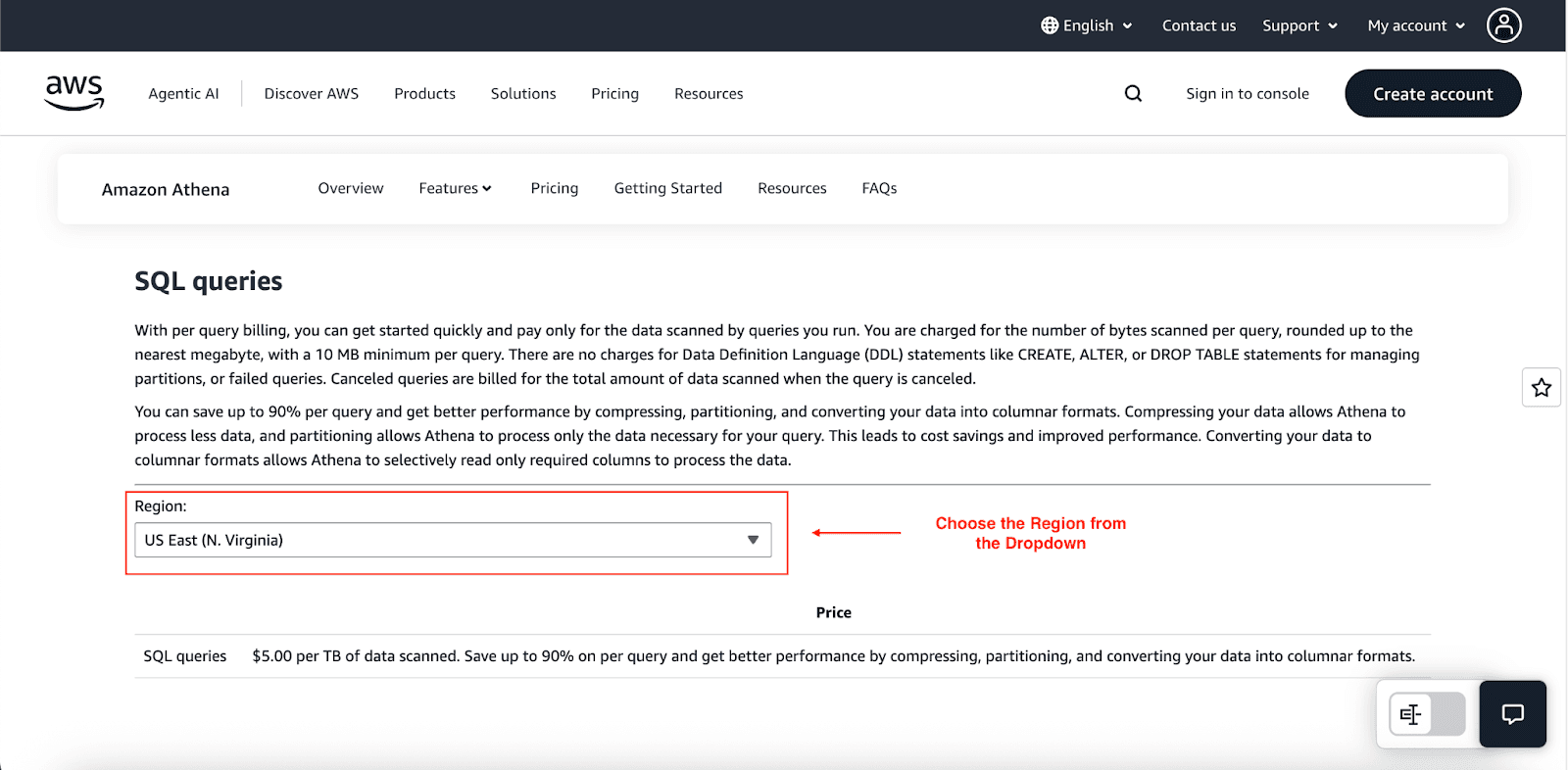
Understanding Athena pricing is essential for predictable cloud costs. Although the pricing model is straightforward, there are layers worth examining:
Pay-Per-Query (SQL): By default, you’re billed $5.00 for every TB of data scanned. The cost rounds to the nearest megabyte, but queries incur a 10MB baseline charge even if they scan less.
Provisioned Capacity: For consistent, heavy workloads, consider a reserved compute model that charges by Data Processing Units. Instead of paying by data scanned, the hourly rate per DPU starts at $0.30 and guarantees that capacity is always available.
Apache Spark Pricing: Athena can execute Apache Spark workloads, and in that case, the charge is based on the DPUs consumed by your Spark application, beginning at $0.35 per DPU-hour.
Additional Costs: On top of the above, you’ll incur the usual charges for Amazon S3 storage, data egress, and any AWS Glue Data Catalog you use.
Cost Optimization Strategies
To minimize your Athena cost, implement these strategies:
Partition data: This is the single most effective move. For queries that filter by partition key, the scanned volume can shrink by as much as 99% because only relevant segments of data are read.
Use Parquet: Transcoding a 3 TB plain text file into Parquet often shrinks the data read for a query on a single column to a few hundred gigabytes, driving costs down dramatically.
Monitor Your Queries: Keep an eye on your workloads using Amazon CloudWatch together with the query logs. This pairing will help surface the costly queries, those that traverse huge datasets, and give you the insights needed to fine-tune their logic and execution plans.
Is AWS Athena Right for Your Company?
Athena offers a compelling mix of power, simplicity, and cost-effectiveness. It's an excellent choice if:
Your data primarily resides in an Amazon S3 data lake.
You need to run ad-hoc, exploratory queries.
Your team is proficient in SQL.
You want to avoid managing servers and infrastructure.
Cost control for intermittent analytical workloads is a priority.
However, if you require a full-fledged data warehouse with consistent, high-speed performance for complex, concurrent BI reporting, Amazon Redshift might be a better fit.
Cut Your AWS Cloud Costs with Pump
You are in the right place! While AWS's own tools provide a decent overview of cloud spend, third-party services often reveal deeper, actionable savings. Pump automatically cuts AWS costs by tapping advanced AI and pooled buying, shaving between 10% and 60% off cloud spend.
How Pump optimizes AWS resources:
AI-driven usage analysis and forecasting.
Automated purchases of reserved instance discounts
Group buying for volume discounts.
Risk-free 30-day money-back guarantee.
Conclusion
Although AWS Athena delivers a strong and low-friction option for querying S3 storage, understanding the touchpoints is key. Refine your data layout, manage partitioning and compression, and enforce security best practices to unlock Athena’s full capacity and derive meaningful value from your data lake.



