

Customers expect instant, clear answers, regardless of the time of day. Conversational AI is rapidly increasing in 2026 due to these changes. Companies must develop innovative ways to communicate with users to avoid overburdening their support teams. This is where Amazon Lex is useful.
This guide will be really helpful for developers, product managers, and business executives who wish to understand the boundless possibilities an Amazon Lex chatbot can bring to their customer engagements. We are going to cover all the salient details regarding this powerful AWS conversational AI tool.
In this article, I will cover Amazon Lex’s pricing in detail and the advantages and challenges of working with Amazon Lex. A real example will provide more relevant and practical context. Lastly, an in-depth comparison with competing tools will give you all the justification you need to support your company with this exceptional tool.
What is Amazon Lex?

Amazon Lex is a fully managed artificial intelligence service built by AWS. AWS provides fully managed conversational interfaces that can seamlessly integrate into applications. It uses similar deep learning technologies that power Amazon Alexa.
AWS conversational AI tools aim to create highly engaging user experiences using Automated speech recognition (ASR) and Natural language understanding (NLU). Traditional chatbots rely on rule-based scripts that can become stuck and break. Amazon Lex goes beyond scripts by understanding user inputs through both speech and text, providing a seamless experience.
How Amazon Lex Works
To understand how Amazon Lex processes information, let's use an everyday scenario. Think of a conversation you have with a barista at a coffee shop.
When you walk up to the counter and say, "I want a coffee," your goal is clear. In Amazon Lex, this purpose is known as an intent. Amazon Lex applies natural language understanding to interpret cognitive user inputs via target user goals. Different users might have various cognitive goals, such as:
"I'd like a coffee."
"Can I get a latte?"
"Give me a cappuccino."
Amazon Lex maps each of these distinct requests to the same intent.
Slot filling
When you have placed your order, the barista will ask you, “What size do you want the coffee?" and “What type of milk do you want?” Amazon Lex refers to the information you provide here and the gaps left after your order as "slots."
Consider filling slots as a necessary step to complete your order. Lex will ask you questions to fill the gaps until you provide all the info.
For the sake of the coffee example, the slots could look like:
Size: Small, medium, or large
Milk type: Oat, soy, or dairy
Sugar: Yes or no
Each of these slots helps Lex collect the necessary information to make the order.
Lambda integrations
Amazon Lex must complete the order in a manner similar to how a barista takes your order, charges your card, and makes the drink. Amazon Lex completes the order through Customer Engagement and invokes AWS Lambda functions, which can also do the following:
Query databases
Process transactions
Retrieve account information
Trigger workflows
Call external APIs
All of the above allow Amazon Lex to perform real business functions.
Response Generation
After completing the order, Amazon Lex sends a response as a real barista would by saying, "Your medium latte with oat milk will be ready in 5 minutes."
Apart from order confirmation, Amazon Lex can also:
Confirm actions: "Just to be sure, you wanted a medium latte, right?"
Ask follow-up questions: "Would you like to add a pastry to your order?"
Handle errors gracefully: "I'm sorry; I didn't catch that. Could you repeat your order?"
Maintain context: If you say, "Actually, make it large,” Lex understands that you are still referring to the latte.
This skill enables the model to carry out real-time, multi-turn conversations, similar to the ones you would have with a human being.
Key Features of Amazon Lex
Understanding Natural Language
Amazon Lex understands the meaning of the user's text or voice input through advanced machine learning. Even though it may seem daunting, there’s no need to have deep learning knowledge to utilize it. Amazon Lex creates a language model automatically based on a few provided example phrases.
Voice and Text Support
You can launch a single bot that can manage both voice and text interactions. The system can seamlessly respond to voice input through speech-to-text conversion, process the request, and respond using text-to-speech technology that generates human-like responses.
AWS Integration
Amazon Lex has the advantage of being in the AWS ecosystem, meaning it integrates automatically with Amazon CloudWatch, Amazon DynamoDB, and Amazon Connect, making it a very powerful and easy-to-use contact center solution.
Multi-Language Support
Amazon Lex can provide support for a wide range of global languages and locales. Plus, with the customization of vocab support, Amazon Lex will provide accurate support to consumers across the globe, especially for the added languages of Chinese, Japanese, Korean, and Portuguese.
Built-In Security and Compliance
Data security remains a very important requirement of Lex. Amazon Lex uses encryption to secure both at rest and in transit to protect sensitive industry data and also complies with regulatory standards like HIPAA and GDPR.
Visual Bot Builder
Mapping out conversation flows is incredibly easy, thanks to the drag-and-drop interface, where you can connect different conversational nodes, making bot design easy for developers and business analysts alike.
Amazon Lex Benefits
Automate Customer Conversations: Use Amazon Lex to automate frequently asked questions. This gives more time for human agents to resolve more sophisticated queries.
Improve Customer Experience: Since Amazon Lex chatbots give instant and 24/7 responses, users do not have to stay on hold to answer their questions. This gives users a chance to respond quickly to their questions and also increases satisfaction rates.
Reduce Operational Costs: Live agents are expensive. An automatic bot can deflect common questions and will significantly decrease the support cost of the company.
Scalable Infrastructure: As your user base increases, Amazon Lex automatically scales to the demand. The company can handle thousands of customer engagements at the same time without having to worry about the bottleneck of the infrastructure.
Enterprise-Grade Security: AWS IAM gives your customers more control over accessing the bot and associated data, and the organization will stay safe and compliant.
Amazon Lex Use Cases
Customer Support Chatbots: Build a bot for basic software troubleshooting without human involvement, order tracking, and answering FAQs.
Contact Center Automation: Integrate Amazon Lex with Amazon Connect so that customers can be greeted, their needs identified, and directed to the right department. The bot can resolve the whole call on its own.
HR and Internal Helpdesk: Create a chatbot to help employees with support requests such as password resets, vacation balance inquiries, and company policy requests.
Sales and Lead Qualification: Add a chatbot to your website to interact with users, ask qualifying questions, capture user info, and book calls with your sales team.
Appointment Scheduling: Allow customers to book, cancel, or reschedule appointments at medical clinics, hair salons, and other service-based businesses through voice or text.
E-commerce Customer Support: Use an automated shopping assistant for customer support to help with product search, inventory queries, and return processing.
Amazon Lex Pricing
Amazon Lex has a simple pay-as-you-go pricing model. You pay only for what your chatbot or voice assistant actually uses. There are no upfront costs, long-term contracts, or minimums. commitments. This is flexible because you can start small and then scale as you use it more. Pricing for Amazon Lex is mostly based on the following:
Text interactions
Voice interactions
Number of conversation turns
This means that each time a user sends a message, it is counted as one request.
Text and Speech Request Pricing
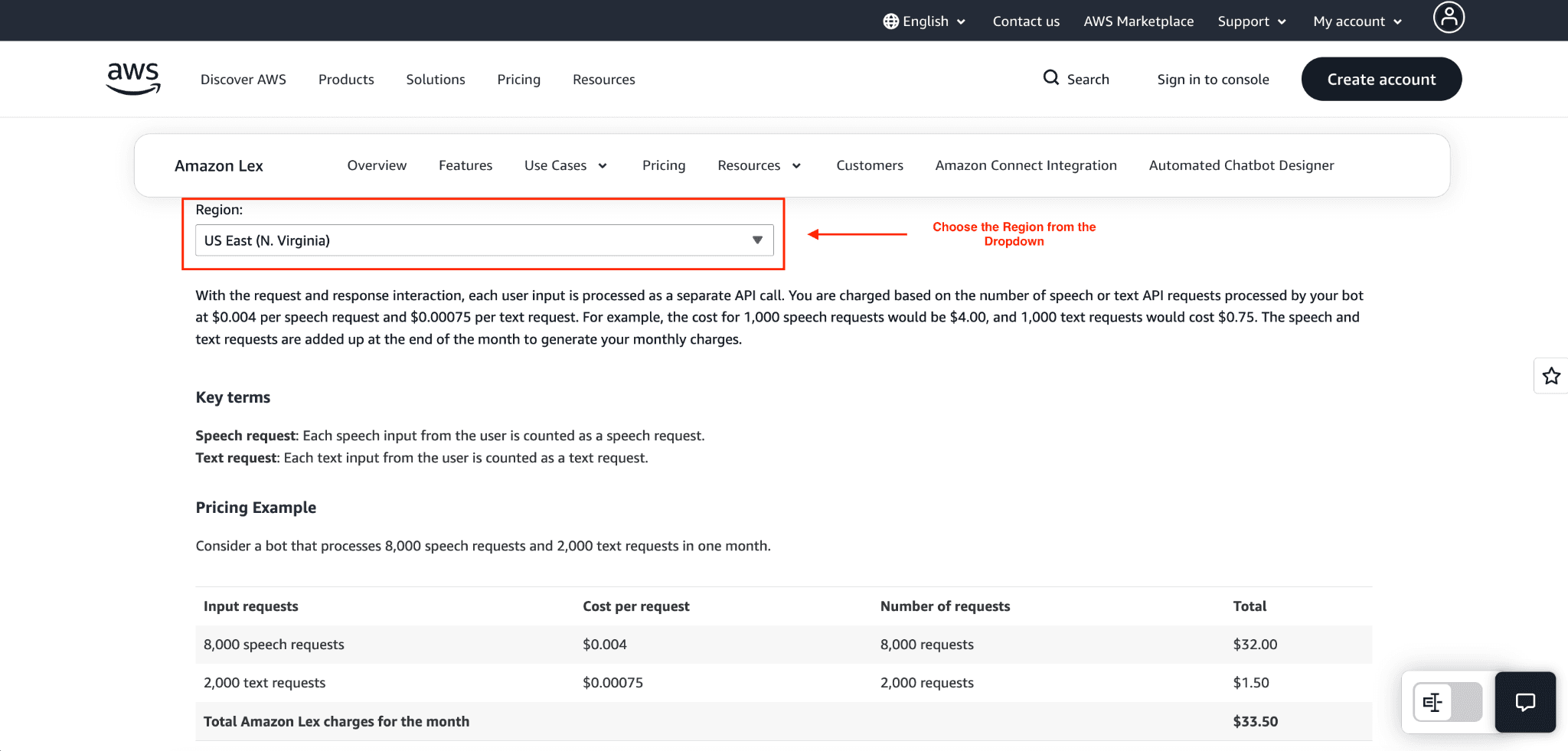
For each interaction, Amazon Lex charges $0.00075 per text request for standard text request-and-response interactions. If your bot manages 10,000 text messages per month, it costs $7.50.
Speech requests end up costing more because they require extra processing power for transcription. The service costs $0.004 per speech request. Managing 10,000 spoken inputs would cost about $40.00.
How Amazon Lex Charges Are Calculated
Let’s assume a user talked to your chatbot:
User: Where is my order?
Bot: Can you please give me your order number?
User: 12345
Bot: Your order is scheduled to arrive tomorrow.
In this conversion, the user sent two messages to the bot. Amazon Lex counts this as two text requests and calculates its charges based on this number.
Real Pricing Example
Example 1: Small Business Chatbot
Consider the following small business scenario:
300 customers per day
Each customer sends 3 messages
Monthly calculation:
300 × 3 × 30 days = 27,000 requests per month
Now calculate cost:
27,000 × $0.00075 = $20.25 per month
Therefore, using an automated chatbot will cost a small business somewhere around $20 per month.
Example 2: Small Business Voicebot
Voice bots are usually more costly compared to chat bots because they need to include speech processing.
Example:
2,000 calls per month
Each call has 3 voice inputs
Calculation:
2,000 × 3 = 6,000 voice requests
Cost:
6,000 × $0.004 = $24 per month
Free Tier: AWS allows you to start your experiment without incurring any cost for the first year. As part of the Free Tier program, AWS offers 10,000 free text requests and 5,000 free speech requests each month for the first 12 months.
Pro-tips: To keep costs down, you can try to track your conversation. Avoid creating bots that will ask a lot of clarifying questions. Text requests are much cheaper than voice requests, so opt for text rather than voice as much as you can.
Pros and Cons of Amazon Lex
Pros
Fully Managed: You don’t have to maintain any infrastructure since the solution is fully managed.
Scalable: It automatically scales to handle your traffic, so you're always prepared for growth.
Voice and Text Support: You have the option to build your conversational AI and deploy on other platforms that provide voice and text support.
AWS Ecosystem Integration: Lex integrates seamlessly with other AWS services like AWS Lambda, Amazon Connect, and AWS CloudWatch, which gives you more power in your current setup.
Cons
AWS dependency: Amazon Lex works best with the AWS ecosystem.
Pricing at scale: Conversational design that isn’t well thought out may create a high cost.
Learning curve: Requires technical knowledge of AWS services like AWS IAM and Lambda.
Who Should Use Amazon Lex?
Enterprises: Large companies can leverage Amazon Lex to securely standardize communications, internal and external.
SaaS Companies: Software platforms can use Lex to provide in-app support, thus lowering the number of support tickets they have.
Customer Support Teams: Support leaders can use bots to answer frequently asked questions, thus reducing average handle times and increasing the morale of agents.
Developers: Engineers have access to a lot of APIs, SDKs, and native Lambda to quickly build complex workflows.
How to Get Started with Amazon Lex
Getting your first bot running is a straightforward process.
To do this:
Go to the AWS Management Console.
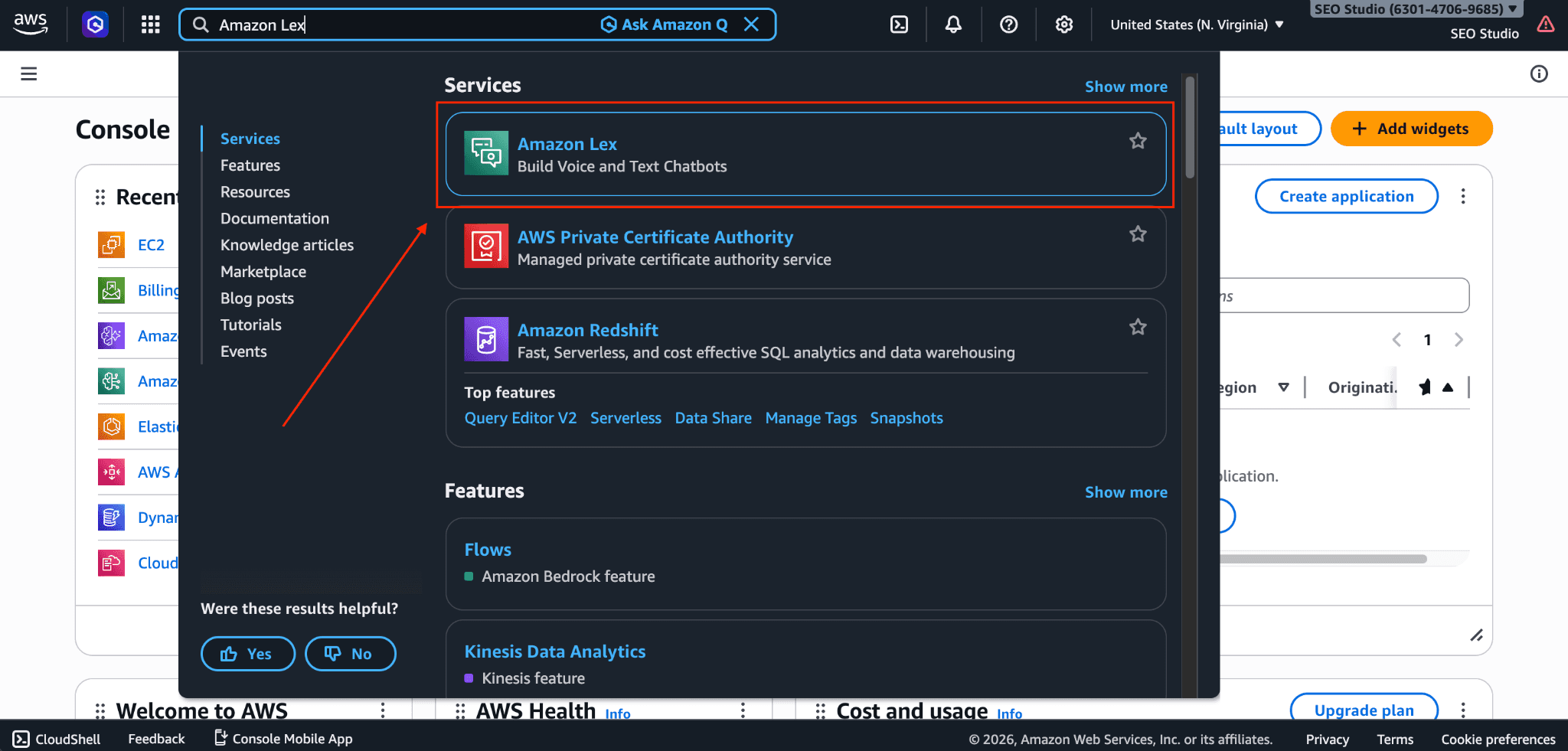
Search for Amazon Lex and go to the service dashboard.
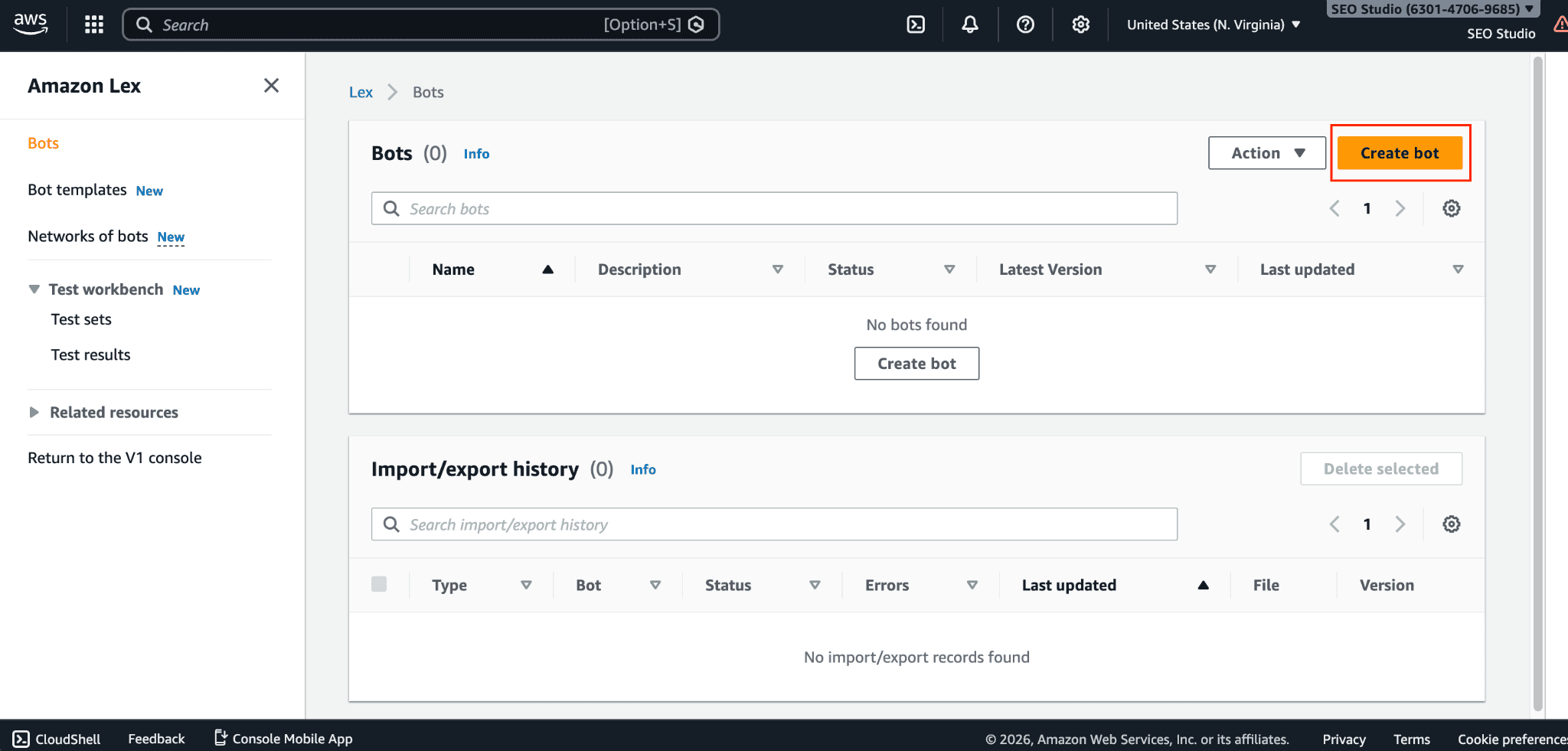
Click "Create bot."
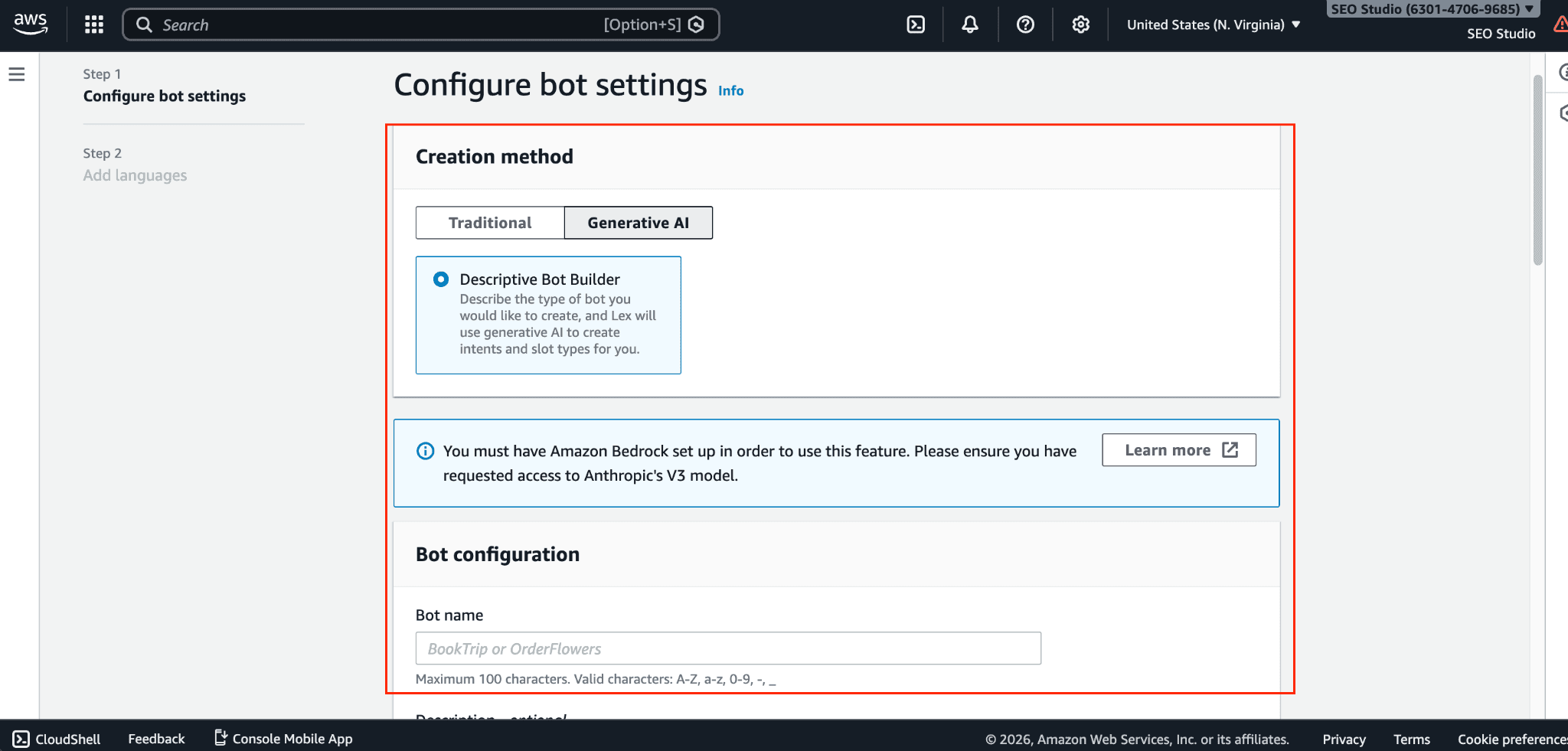
Set up the bot settings like choosing the bot method, bot configuration, permissions, and more.
Choose your preferred language.
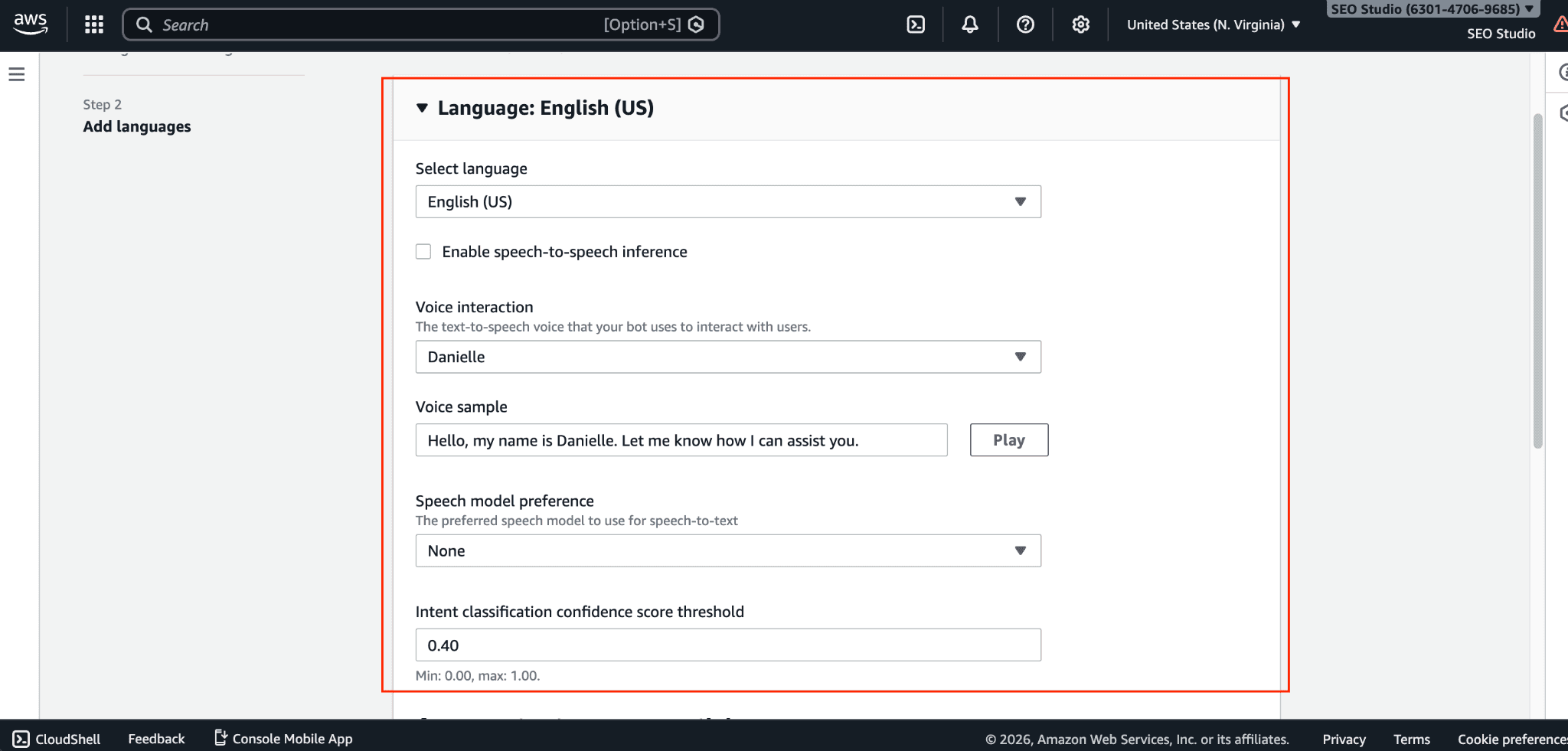
Add sample phrases (utterances) and define the information you need to collect (slots).
Use the built-in testing window to type or speak to your bot and refine its responses.
Publish a version of your bot and connect it to channels like Slack, Facebook Messenger, or your website.
Amazon Lex Best Practices
Conversation design: Make the prompts friendly and clear. Smooth the flow of conversation by providing hints on what the user should say.
Intent structuring: Try to eliminate overlapping intents. Ensure that the sample phrases for each intent are disparate.
Cost optimization: Conversational turns should be limited. To avoid asking the user the same question, consider using session attributes to store the user's information.
Security: Always remember to apply the least privilege principle. Your Amazon Lex bots and Lambda functions should have the minimum required access to the specific AWS services.
Common Challenges When Using Amazon Lex
Handling conversation complexity: Users don't always follow the script. It's vital to plan for unexpected inputs so your bot can respond gracefully without getting stuck.
Integrating with other services: Connecting your bot to external databases or APIs requires writing custom Lambda functions, which can be time-consuming to test and debug.
Ongoing testing and optimization: A chatbot is never truly "finished." You'll need to regularly review conversation logs to see where users get stuck or drop off, then retrain your bot to handle those scenarios better.
Conclusion
Today, we have made significant progress. The core definitions, the features we discussed, and the beneficial pricing components of Amazon Lex provide us with a clear understanding of how this tool functions.
In AWS, Amazon Lex is the top player for building scalable, secure, and smart chatbots. With a good structuring of the conversational flows, combined with good metric tracking, the user experience is capable of being greatly improved at a really low operational cost.
Tools such as Lex are making building smart applications much more accessible, and the future for conversational AI is undoubtedly a bright one.
I hope you have learned everything you need to know about Amazon Lex.
Join Pump for Free
If you are an early-stage startup that wants to save on cloud costs, use this opportunity. If you are a start-up business owner who wants to cut down the cost of using the cloud, then this is your chance. Pump helps you save up to 60% in cloud costs, and the best thing about it is that it is absolutely free!
Pump provides personalized solutions that allow you to effectively manage and optimize your Azure, GCP, and AWS spending. Take complete control over your cloud expenses and ensure that you get the most from what you have invested. Who would pay more when we can save better?
Are you ready to take control of your cloud expenses?



