

Are you considering alternatives for a new contact center? Perhaps you are planning to improve the contact center systems you already have. Either way, you are likely to have met some emperors of technology like Amazon Connect. However, what is it, and is it worth using? Traditional contact center solutions are costly and inflexible. There is no room to adjust resources and costs. Definitely, the growing market for CCaaS is booming.
In this article, I will provide an overview of Amazon Connect. This includes what it is, what it can do, a pricing analysis, and a competitor analysis of some of the major players. By the end of this article, it will be of interest to you to choose whether it fits your company’s needs.
What Is Amazon Connect?
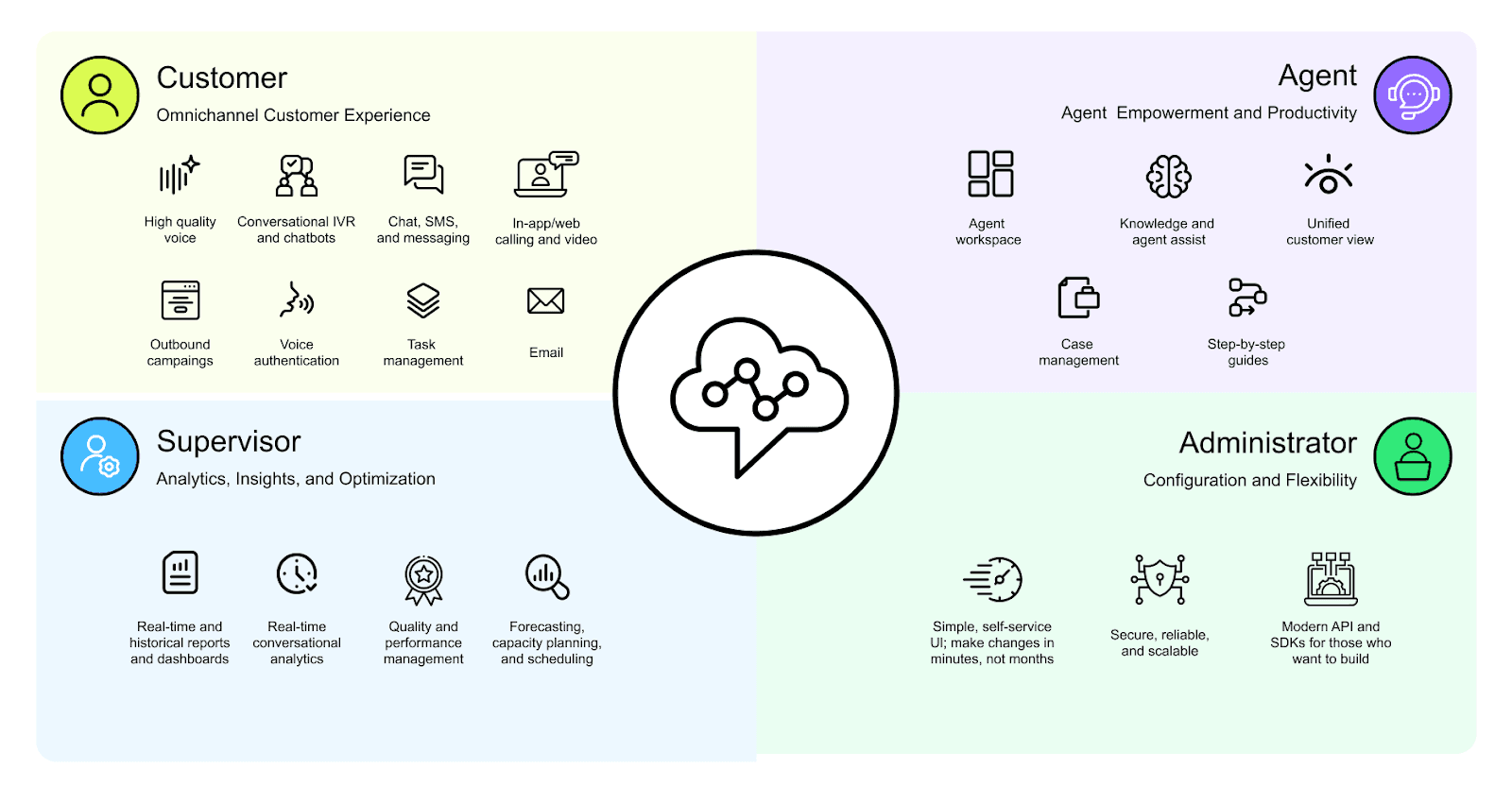
Amazon Connect is offered by Amazon Web Services. You can consider it a fully operational contact center that is running on the cloud and can be customized in a matter of minutes using the available user-friendly interface. You can use and receive calls, chat, exchange emails, and send SMS or WhatsApp messages.
Using the same infrastructure that supports Amazon's global customer service, the service is designed for any business, from small startups to large corporations. Some of the main advantages include its flexibility, powerful AI automation, pay-as-you-go pricing, scalability, and little initial setup.
Why Businesses Are Switching to Cloud Contact Centers
Unlike cloud-based contact centers, traditional contact centers require significant initial outlay, utilize a complex array of telephony hardware, and require the maintenance of telephony support lines, all contribute to high ongoing maintenance costs, inefficient call distribution, and difficulties in the flexibility of support personnel scaling.
Cloud contact centers like Amazon Connect solve these problems. They offer:
Flexibility: Agents can work from any location with an internet connection.
Lower Costs: No need to buy expensive hardware or pay for per-agent licenses.
Advanced Analytics: Use AI to provide deep insights into customer interactions and agent performance.
Key Features of Amazon Connect
Amazon Connect offers powerful features that provide the opportunity to enhance the efficiency of your customer service operation.
AI-Powered Routing & Automation
Rather than the basic call queuing systems used by other services, Amazon Connect uses artificial intelligence to help streamline the customer contact process by routing calls in real time according to the appropriate agent’s skill level and customer profile, and in some cases even customer sentiment, language, or an agent’s specific skill. In addition, generic queries are routed to AI-powered chatbots. This enables human customer service representatives to be engaged in addressing more complex queries.
Omnichannel Experience
Amazon Connect has a seamless flow across all communication channels. Agents obtain all the context and the necessary information about a customer's history and can transition to a multi-channel engagement, where a customer can make voice calls after chatting. They can support all the following channels:
Voice (inbound and outbound)
Chat (web and in-app)
Messaging (SMS, WhatsApp, Apple Messages for Business)
Video support and screen sharing
Email
Real-Time Analytics & Reporting
With Contact Lens for Amazon Connect, you receive sentiment real-time and compliance issue detection, and conversational categorization. Supervisors can view performance dashboards in real-time with the critical KPI metrics, enabling them to view the performance of individual agents and the call center in real-time.
Workforce Management & Forecasting
Amazon Connect has tools that allow seamless workforce optimization. You can build agent schedules, forecast contact volumes by skill, and monitor agent adherence. It also automates customer callbacks, cutting down on wait time and improving customer satisfaction.
Integrations & CRM Connectivity
Amazon Connect integrates easily with most CRM solutions such as Salesforce, Zendesk, and ServiceNow. You can build custom business logic with AWS Lambda functions to pull customer data, create tickets in the CRM, validate payments and subscriptions, and automate workflows with your database.
Pay-As-You-Go Flexibility
One of the most significant features is the pricing model. There are no per-agent license fees and no long-term commitments. You pay for what you use, which makes it an incredibly flexible solution for companies with fluctuating demand.
Amazon Connect Pricing Explained

Amazon Connect's pricing can seem complicated at first glance because there are several small parts. However, it is similar to utilities in that you only pay for what you use.
What You Pay For
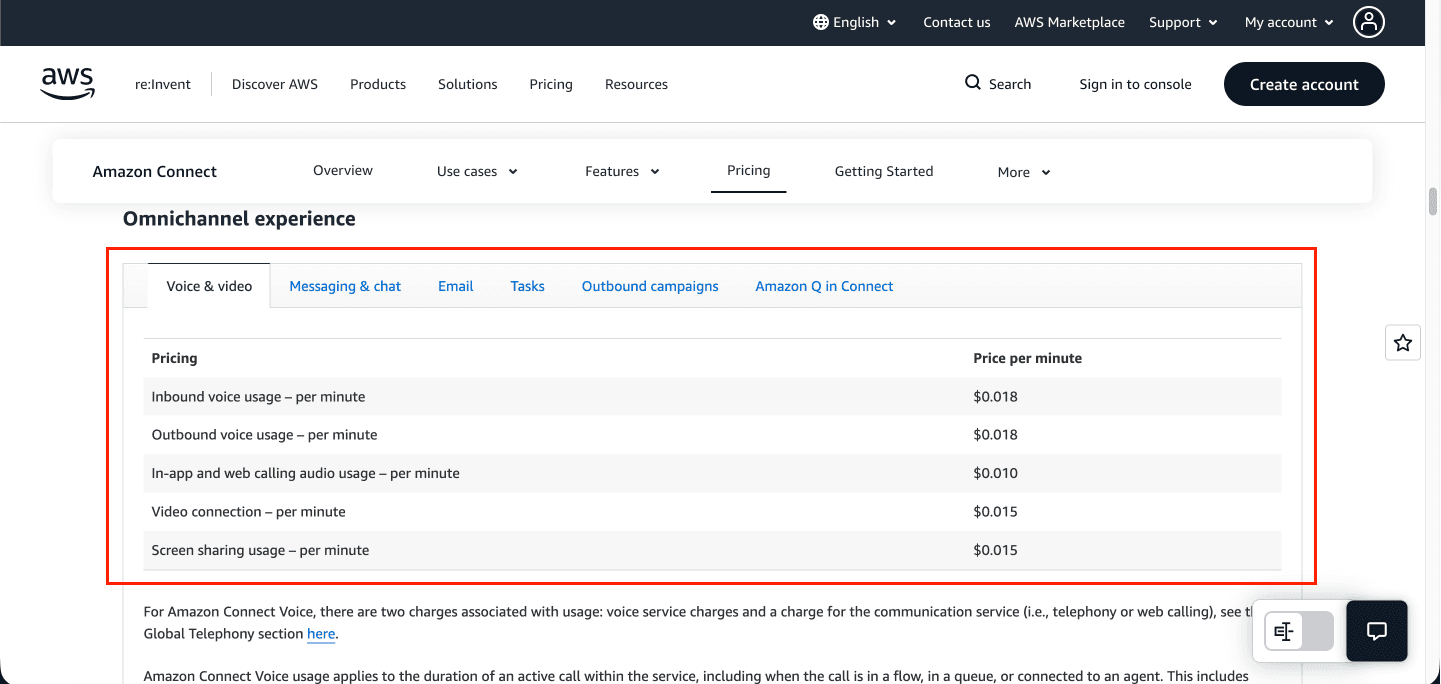
Your total monthly bill is made up of several charges that are only incurred once you use the service:
Service Usage: You get charged for incoming voice calls based on a per-minute rate, for chats and messages, a per-message rate.
Phone Numbers: You get charged a small daily fee for any phone number you have in a location, for example, a US DIDs (local or toll-free) number will be charged $0.03 a day.
Global Telephony: You get charged per minute for calls, and it's more expensive based on what country you're calling and what country you're receiving calls from. For example, incoming calls to a US DID number will be $0.0022 a minute when receiving calls, and economically, for each outgoing US call, you will be charged $0.0048 per minute. The total will combine all Connect service usage, number rentals, and telephony.
AI Features: Usage costs for integrations like Contact Lens, Voice ID, and Amazon Q are chargeable additionally.
Other Services: You get charged for data storage (call recordings), data transfer, and workforce management modules.
Does Amazon Connect Offer Savings Plans?
No, Amazon Connect does not offer Savings Plans or Reserved Instances like some other AWS services do. Rather, pricing works on a pay-as-you-go basis. In other words, you incur charges based on actual communications incurred, such as the number of call minutes and messages sent, as opposed to the compute resources you pre-commit to in a contract. Given the pricing model, discounts are unavailable since the pricing model is based on usage.
Cost Example by Business Size
Here’s a rough estimate of what you might pay, though actual costs depend heavily on usage patterns.
Business Type | Agents | Monthly Minutes | Estimated Monthly Cost |
Startup SaaS | 10 | 40,000 min | $720 |
Mid-Market | 100 | 500,000 min | $9,000 |
Enterprise | 1,000 | 5,000,000 min | $90,000 |
Note: These calculations are based on the standard US East (N. Virginia) rate for Voice & video Omnichannel of $0.018 per min and do not include other potential charges.
Calculation: Monthly Minutes × $0.018 / minute
Startup SaaS: 40,000 minutes × $0.018/minute = $720/month
Mid-Market: 500,000 minutes × $0.018/minute = $9,000/month
Enterprise: 5,000,000 minutes × $0.018/minute = $90,000/month
For a precise estimate, it's best to use the AWS Pricing Calculator for a quote.
Pros and Cons of Amazon Connect Pricing
Pros | Cons |
No license fees | The pricing model can be complex to understand |
Pay only for usage | Telephony rates add another layer of cost |
No long-term contracts | AI & recordings add extra cost |
Scale up/down instantly | Budgeting requires monitoring |
Is Amazon Connect Right for Your Company?
Amazon Connect works best for companies that meet the following criteria:
Need to scale their customer service operations quickly.
Want to leverage powerful AI and automation features.
Support a remote or geographically dispersed workforce.
They are already invested in the AWS ecosystem.
However, if all you need is a small and local PBX system and you will not be supporting any channels other than voice or leveraging AI or advanced omnichannel capabilities, it is probably not the best fit for you.
Amazon Connect vs. Other Cloud Contact Centers
How does Amazon Connect stack up against competitors like Genesys Cloud, Five9, and Talkdesk?
Feature | Amazon Connect | Genesys | Five9 | Talkdesk |
AI Built-In | Yes | Paid add-ons | Paid add-ons | Partial |
Pay-as-you-go | Yes | No | No | No |
Requires Software License | No | Yes | Yes | Yes |
Deployment Speed | Fast | Moderate | Moderate | Fast |
CRM Integrations | Strong | Strong | Good | Good |
Global Telephony | Excellent | Strong | Strong | Moderate |
Some of the best advantages of Amazon Connect include its flexible pricing, powerful AI features that are very cost-effective, and the ability to integrate seamlessly with other AWS products that are in the ecosystem.
How to Get Started with Amazon Connect
Starting with Amazon Connect is simple. All you have to do is the following checklist:
Define Channels & Flows: Choose which channels (i.e., voice and/or chat) to deploy, then use the customer flow editor to design interactions.
Configure Routing & Bots: Set up some skill-based routing rules and configure some Amazon Lex bots for self-service automation.
Integrate Systems: Use the API or a pre-built connector to integrate with your CRM and other business systems.
Train Agents & Set KPIs: Get your agents onboarded to the new workspace and decide what key performance indicators you want to track for success.
The AWS Free Tier allows you to explore their offerings at no cost for a limited amount of time and for a limited amount of time for the first 12 months.
Conclusion
Amazon Connect is a game-changer in how companies think of customer service. It frees companies from the high cost and complexities associated with traditional systems, allowing more advanced and AI-driven contact center systems to become available to all! With Amazon Connect’s pay-as-you-go model, you can future-proof your operations, allowing you to adjust to evolving customer demands without the burden of expensive contracts. Amazon Connect is a very strong competitor for all companies willing to move forward with the automation and data-driven customer service model.
Hopefully, this helps you in understanding Amazon Connect!
Join Pump for Free
If you are an early-stage startup that wants to save on cloud costs, use this opportunity. If you are a start-up business owner who wants to cut down the cost of using the cloud, then this is your chance. Pump helps you save up to 60% in cloud costs, and the best thing about it is that it is absolutely free!
Pump provides personalized solutions that allow you to effectively manage and optimize your Azure, GCP, and AWS spending. Take complete control over your cloud expenses and ensure that you get the most from what you have invested. Who would pay more when we can save better?
Are you ready to take control of your cloud expenses?



