
Cloud storage has evolved beyond mere file storage, and it now facilitates enterprise workloads at peak performance and at a lower cost. For companies hosting critical applications on Azure, Azure NetApp Files has become a potent solution to the longstanding dilemma of traditional enterprise storage and contemporary cloud infrastructure.
Whether you're migrating SAP HANA databases, deploying virtual desktop infrastructure, or executing high-performance computing workloads, it is vital to understand Azure NetApp Files to map out a cloud storage strategy.
In this article, we will explore the key features, pricing models, and company benefits of Azure NetApp Files, helping you determine if it's the right fit for your company.
What is Azure NetApp Files?
Azure NetApp Files is a cloud-based, high-performance file storage service, with the demanding workloads fully hosted on Microsoft Azure NetApp Files’ first enterprise-grade file storage service. The service, developed with Microsoft and NetApp working in collaboration, merges NetApp’s decades of expertise in storage and Azure’s cloud-native scalability.
In contrast with other general-purpose storage options, Azure NetApp Files is purpose-built for applications requiring:
Sub-millisecond latency for database and analytics workloads.
Support for multiple protocols like NFSv3, NFSv4.1, and SMB.
Enterprise-grade reliability with high-availability SLAs.
Snapshots and replication are advanced data management features.
Key Features of Azure NetApp Files
Azure components, Azure NetApp Files, have enterprise-grade components aimed at achieving security, flexibility, and performance. Below are some of its key features:
Multiple Performance Tiers
You can maintain a balance between cost and workload performance requirements by choosing from different pricing plans: Standard, Premium, and Ultra. This means that the Azure NetApp Files subscription does not charge extra for unused performance, and it is also possible to change pricing plans dynamically, depending on requirements.
Broad Protocol Support
Azure NetApp Files offers NFS (v3 and v4.1) and SMB protocols, the latter of which includes dual-protocol access. This makes it convenient to move existing enterprise applications to Azure, as there would be little or no need to reconstruct the code or change the methods of access.
Instant Snapshot and Restore
The service allows for efficient data protection via block-level snapshots that can be established in seconds, incurring very little performance cost. In the case of a malfunction, the service allows for rapid restoration of total or selected volumes, which translates to reduced downtime.
Robust Data Encryption
At rest, data is encrypted using AES-256 encryption, while transit encryption uses TLS for data commuting between your applications and our storage service. This helps you address and comply with strict security protocols and regulatory requirements such as HIPAA and GDPR.
Automated Scaling
Dynamic scaling helps reduce the complexity involved in managing storage capacity. You can adjust volumes between 50 GiB and 100 TiB with zero downtime, enabling you to respond to real-time business requirements and improve your overall Azure storage expenditure.
Seamless Integration
Azure NetApp Files integrates with:
Azure Kubernetes Service.
Azure Virtual Machines.
Azure Backup and Site Recovery.
How Azure NetApp Files Works
Understanding the architecture of Azure NetApp Files helps in planning and managing your storage environment effectively. The setup follows a logical hierarchy within your Azure subscription:
Azure Subscription: This is the starting point, and it is always within the Azure account you currently have.
NetApp Account: Within each Azure region, you can create a NetApp account, which is the container for the capacity pools you have.
Capacity Pools: These pools of allocated storage capacity have sets which can be chosen: performance tier as Standard, Premium, or Ultra, and the size.
Volumes: Each capacity pool is populated with one or more volumes. These are the shares your apps (on Azure VMS, Azure Kubernetes service, etc.) mount and use.
Azure NetApp Files Pricing Explained
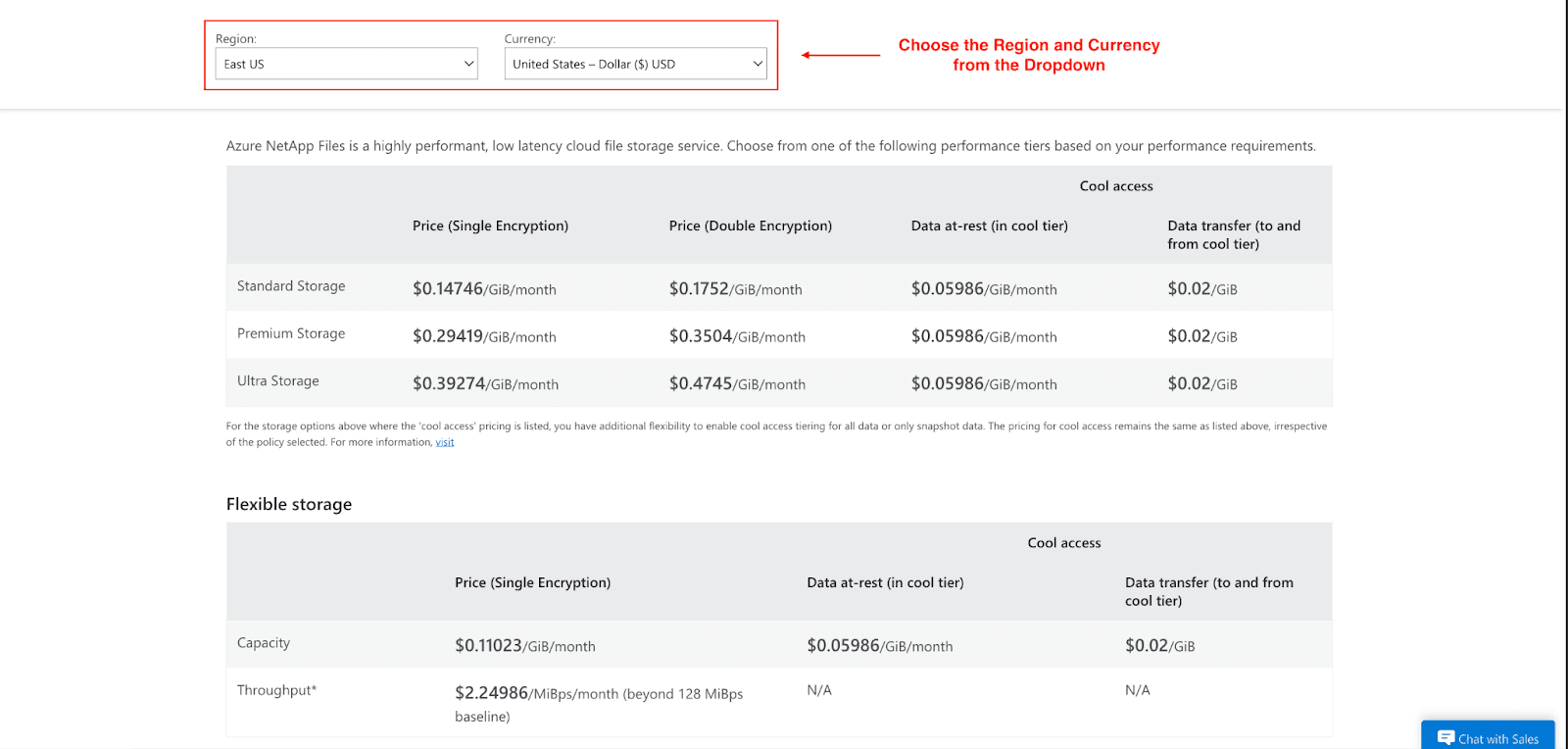
When it comes to Azure NetApp Files pricing, it is determined by the provisioned set capacity, the provisioned performance tier, and any other augmentations such as snapshots or data replication. Cost is determined on a per GiB basis per month.
Service Level Pricing
Service Level Pricing in the US East Region is breakdown below. Pricing may vary by region:
Tier | Single Encryption | Double Encryption |
Standard Tier | $0.14746/GiB/month | $0.1752/GiB/month |
Premium Tier | $0.29419/GiB/month | $0.3504/GiB/month |
Ultra Tier | $0.39274/GiB/month | $0.4745/GiB/month |
Flexible Storage
For workloads with changing performance requirements, Azure offers a flexible pricing model:
Capacity: $0.11023/GiB/month for single encryption.
Throughput: $2.24986/MiBps/month for performance exceeding the 128 MiBps baseline.
Cool Access Pricing
NetApp files allow for infrequent access to cool access tiers.
Data at-rest in cool tier: $0.05986/GiB/month
Data transfer (to and from cool tier): $0.02/GiB
This tiered approach is excellent for data that is infrequently accessed and downloaded. It greatly reduces the performance and retrieval costs associated with high-access data.
Reserved Capacity Discounts
Advanced planning is important for storage to be cheaper for a company. Reserved capacity discounts give the most savings when paired with predictable workloads. Most savings in the reserved capacity plan are in the 3-year term for performance-intensive tiers like premium and ultra.
Performance Tier | Term | Reserved Capacity (TiB/month) | Price |
Standard Tier | 1-Year | 100 TiB/month | $12,381.92 |
Standard Tier | 3-Year | 100 TiB/month | $12,381.92 |
Premium Tier | 1-Year | 100 TiB/month | $24,702.59 |
Premium Tier | 3-Year | 100 TiB/month | $21,087.53 |
Ultra Tier | 1-Year | 100 TiB/month | $32,977.59 |
Ultra Tier | 3-Year | 100 TiB/month | $28,151.62 |
Additional Costs
Consider these additional pricing factors:
Cross-Region Replication
Every 10 minutes: $0.14/GiB
Every 1 hour: $0.12/GiB
Once daily: $0.11/GiB
Backup Storage
Total space consumed: $0.05/GiB/month
Restore operations: $0.02/GiB
Optimizing Your Azure Storage Costs
Despite Azure NetApp Files being a high-end offering, there are ways to manage costs for it, too:
Dynamic Resizing: Change the volume and capacity pool sizes to match your needs and to avert overprovisioning.
Auto-Tiering: Use features like “cool access” to move data that is accessed infrequently to a lower-cost storage tier automatically.
Cut Azure NetApp Files Costs with Pump
Even with the already competitive pricing of Azure NetApp Files, Pump can help to save even more on your Azure costs. With no engineering or monetary risk, Pump’s group buying and AI-driven optimization reduce Azure NetApp Files costs from $100 to $82 (18% savings).
Here's how Pump works:
Group buying: Unlocking enterprise-level discounts from the collective spending of hundreds of companies.
AI optimization: Analyzing your usage patterns to purchase the right mix of reserved capacity.
Waterfall coverage: Reallocating unused commitments from global customers to maximize utilization.
The best part? Pump is completely free to use and integrates seamlessly with your existing Azure setup.
Benefits of Using Azure NetApp Files
Why do enterprises select this Azure file storage solution? The facts speak for themselves:
Unmatched Performance: Built for the most demanding mission-critical workloads, it delivers high IOPS with sub-millisecond latency.
Operational Simplicity: Managed as a native service on Azure, there is no management or setup complexity. It is configured easily with your Azure environment.
Hybrid Flexibility: Azure NetApp Files allows seamless moving of data between your local environment and cloud, and supports hybrid and multi-cloud architectures.
Lower Total Cost of Ownership: Features like dynamic tiering and auto-scaling functionality keep the TCO lower than managing your own high-performance storage system. This is achieved by efficient cost management.
When to Choose Azure NetApp Files
With several Azure storage services available, it's important to know when Azure NetApp Files is the right choice. Consider it over options like Azure Files or Azure Blob Storage in these scenarios:
You are running enterprise workloads that demand high IOPS and low latency (e.g., databases, HPC).
Your applications require NFS or SMB file protocols with performance that rivals on-premises systems.
You need hybrid deployment support to bridge your on-premises NetApp environment with Azure.
You operate in regulated industries like finance or healthcare that require certified compliance.
Your budget allows for a premium storage solution to guarantee performance and availability.
Conclusion
I hope you’ve learned everything you need to know about Azure NetApp Files and how it can benefit your company. Remember, Azure NetApp Files effectively bridges the gap between the high performance of on-premises storage and the flexibility of the Azure cloud. By understanding its robust features, clear benefits, and smart optimization strategies, you can significantly improve performance and achieve substantial cost savings.
Ready to leverage high-performance storage for your business-critical applications? Explore Azure NetApp Files today and use the Azure pricing calculator to estimate your costs.



