

Azure Metrics Advisor delivers an enterprise-ready, AI-enhanced anomaly detection and monitoring framework that permits enterprises to operationalize intelligent anomaly detection devoid of advanced data scientist intervention. Embedded within Azure’s AI services suite, it re-engineers enterprise time-series data surveillance and operational observability at scale.
Leveraging the underlying capabilities of the Azure AI Anomaly Detector, Metrics Advisor autonomously identifies and classifies anomalies at the speed of operations, calibrating itself against the unique constraints, data volume, and alerting semantics of the enterprise.
What Is Azure Metrics Advisor?
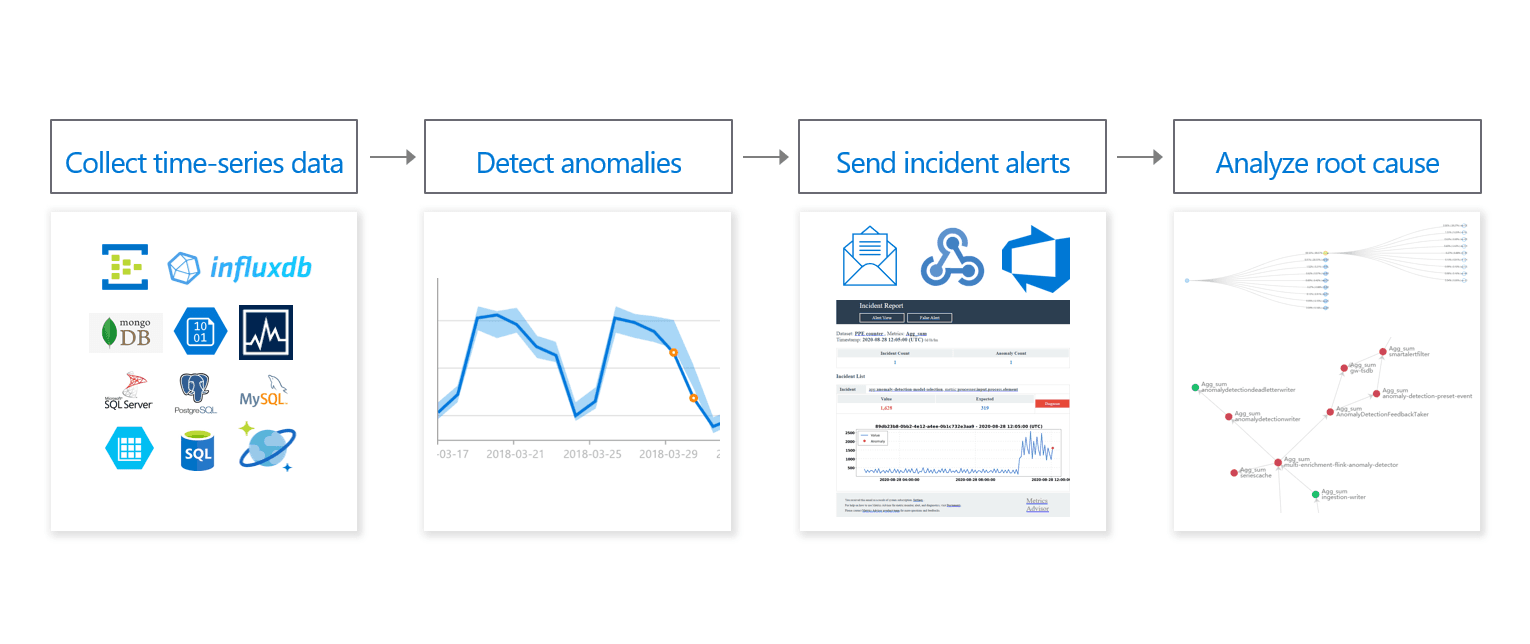
(Image Souce: Azure Metrics)
Azure Metrics Advisor is an AI-intelligent, cloud-based service that discovers anomalous patterns within multi-dimensional time-series measurements. By delivering fully managed, algorithmic anomaly detection, it obviates the traditional weighting stage of bespoke machine-learning pipelines, automatically calibrating the most suitable detection heuristics to the incoming telemetry profile.
Seamless integration with the Azure Cognitive Services framework permits Metrics Advisor to extend contextually aware monitoring from enterprise KPIs through to operational telemetry. This permits enterprises to track and diagnose explanatory signals spanning revenue dynamics, production telemetry, infrastructure health metrics, and the evolving engagement of digital customers, all from a single orchestrated observability plane.
Key Features of Azure Metrics Advisor
Automated Anomaly Detection
The principal capability of Azure Metrics Advisor resides in its adaptive anomaly detection algorithms that autonomously scrutinize temporal data sequences. By benchmarking historical points, the system creates performance baselines against which statistically significant deviations are detected, thereby illuminating both potential risks and emerging opportunities.
The framework accommodates diverse detection paradigms, including adaptive kernel-based smart detection, fixed hard-threshold triggers, and dynamic change-point identification. This flexibility enables the platform to realign its sensitivity according to the specific cadence and semantic requirements of varying operational contexts.
Advanced Analytics & Data Visualization
Metrics Advisor supplies a robust suite of visualization tools within interactive dashboards that render time-series curves, trend overlays, and anomaly indicators simultaneously. Users traverse multi-dimensional datasets through drag-and-drop mapping panels that support hierarchically nested drill-downs and cross-metric correlation.
Complementing the visual interface, the system employs causal inference algorithms to generate root cause analyses, tracing detected anomalies back to specific metric fluctuations or contextual dimensions. Additionally, diagnostic trees graphically depict interdependencies between metrics, illustrating how perturbations in one variable propagate through the data ecosystem.
Real-time Monitoring and Customizable Alerts
Azure Metrics Advisor operates a 24/7 monitoring loop that ingests real-time telemetry and issues prompt, context-rich alerts upon the identification of anomalies. Alert delivery channels encompass email, programmable webhooks, Microsoft Teams messages, and Azure DevOps ticketing, allowing operational teams to triage incidents within their existing workflows. Customizable severity thresholds and suppression rules further tailor notifications to organizational escalation protocols.
You may tailor alert settings by stipulating precise threshold values, configuring sensitivity gradients, and designing notification schemes that align with strategic business goals and operational imperatives.
Comprehensive Integrations
The framework accommodates an array of data repositories, among them SQL Server, MongoDB, Azure Blob Storage, and a diverse spectrum of relational and NoSQL systems. Such breadth facilitates holistic surveillance of disparate data silos from a consolidated management interface.
Integration pathways also encompass leading collaboration suites and DevOps ecosystems, thereby harmonizing operational orchestration and expediting coordinated remedial actions.
Who Should Use Azure Metrics Advisor?
Azure Metrics Advisor serves a spectrum of stakeholders:
Business Decision Makers: Empowered to monitor KPIs alongside operational metrics, they can track revenue fluctuations, shifts in customer engagement, and emerging trends, thereby enabling early issue recognition.
IT and DevOps Teams: Continuous, real-time alerts flag infrastructure and application anomalies, helping these teams maintain operational continuity and preempt service interruptions.
Data Scientists: Armed with state-of-the-art anomaly-detection algorithms, they can fine-tune monitoring models to address bespoke requirements and performance scenarios.
Various Industries: Its architecture accommodates use cases in predictive maintenance, cloud resource optimization, and comprehensive IT operations oversight.
How Does Azure Metrics Advisor Work?
Data Ingestion Process
The Azure Metrics Advisor ingestion pipeline initiates by linking data sources via standardized connectors and defining data feeds that govern the retrieval and processing of metrics. The platform accommodates diverse data schemas and executes preprocessing operations that include cleaning, aggregation, and filling for missing values.
Ingested data must a time-indexed format that includes timestamps, dimensions, and scalar measures. At configuration, users establish the collection frequency, daily, hourly, or at custom intervals, along with the specific metrics to track.
Dashboard and User Interface
The Metrics Advisor dashboard consolidates the entire monitoring landscape, displaying tracked metrics, identified anomalies, and supporting diagnostics. Users can toggle between metric exploration, incident review, and alert configuration to conduct in-depth investigations or revise monitoring strategies.
The platform accommodates multi-dimensional interrogation, empowering analysts to penetrate granular data layers and to interrogate interdependencies among diverse metrics and attributes.
Alert Configuration and Root Cause Diagnostics
Customers establish alerts by calibrating detection templates for individual metrics, assigning sensitivity thresholds, and selecting communication endpoints. The architecture supports regimented automated rules as well as ad-hoc, user-defined criteria aligned with organizational objectives.
Root cause interrogation deploys probabilistic and statistical methods to isolate causal drivers of the observed outliers, yielding prescriptive information that enables expedient corrective measures.
Setting Up Azure Metrics Advisor
Step 1: Create a Metrics Advisor Resource
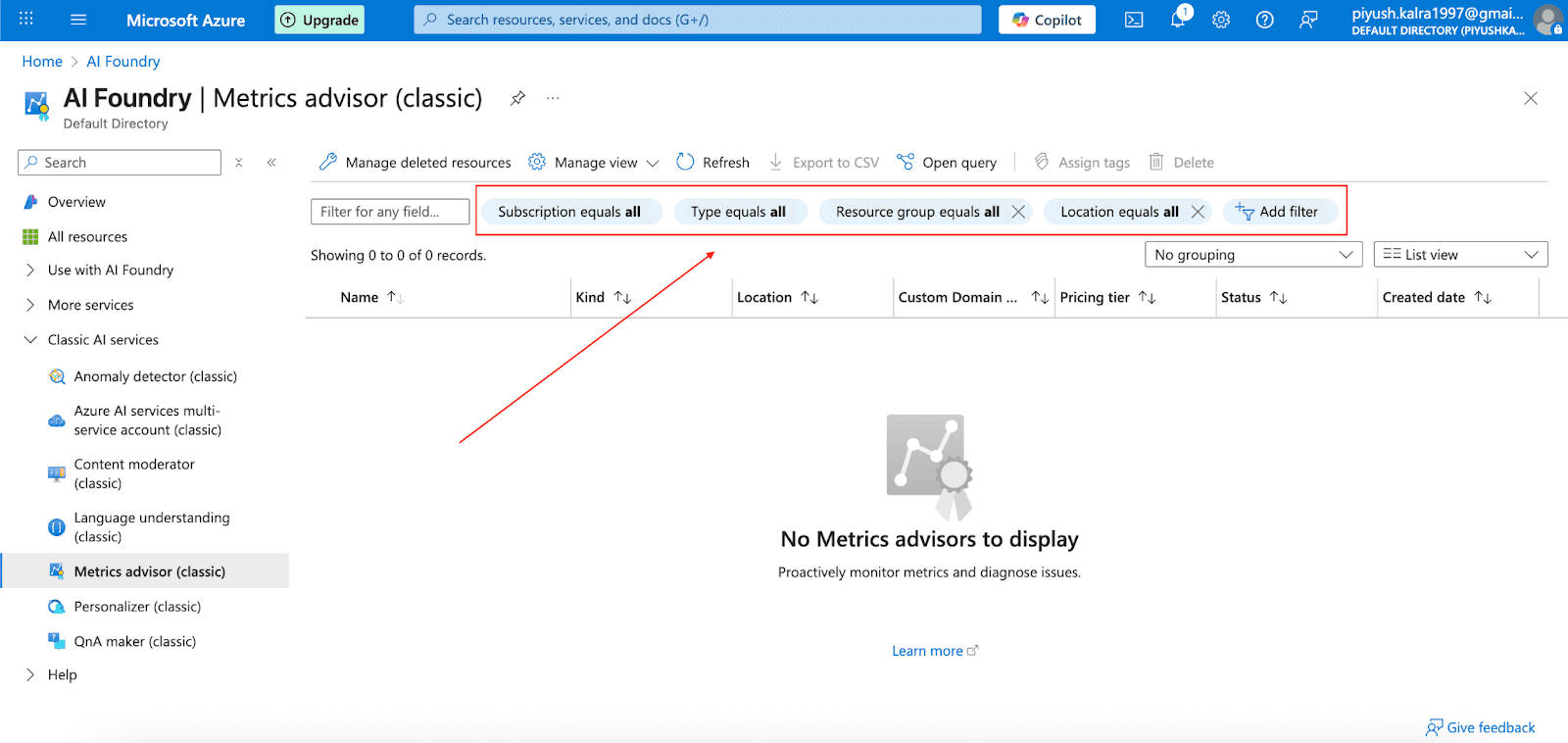
Log in to the Azure portal and create a new resource. Search for Metrics Advisor, then specify the subscription, resource group, Azure region, and select the required pricing tier. Upon instantiation, navigate to the Metrics Advisor workspace to complete configurations for Azure Active Directory authentication and specify any subscription parameters.
Step 2: Configure Data Feeds
Link your data originating from Azure SQL Database, Azure Blob Storage, or custom sources via the time series REST API. Follow the iterative configuration wizard to characterize the data schema, input connection strings, and establish data refresh intervals. This accommodates both batch uploads and streaming updates for consistent monitoring
Step 3: Set Alert Rules
Articulate the conditions that constitute anomalous behavior by establishing statistical thresholds. Further refine the rules by incorporating dimensional segmentation, such as region or product line, to ensure that the alerts resonate with operational priorities.
Step 4: Configure Notification Channels
Configure delivery pathways for alert notifications. Specify SMTP parameters for email alerts, input outbound webhook URIs for external systems, or integrate with Microsoft Teams channels to ensure that stakeholders receive timely notifications when thresholds are surpassed.
Step 5: Dashboard and Monitoring
Utilize the Metrics Advisor interface to conduct continuous, real-time surveillance of your metrics landscape. Access temporal series of past anomaly indications, maintain observational cadence on critical metrics, and engage the built-in root cause investigation tools to dissect anomalies. This approach enables the identification of emerging issues prior to operational impact.
Best Practices and Troubleshooting Tips
To maximize the effectiveness of Azure Metrics Advisor, adhere to data quality benchmarks, maintain uniform data ingestion intervals, and conduct periodic assessments of detection policy settings. Continuously analyze service health indicators and fine-tune sensitivity parameters in proportion to patterns of false positive detections and overall detection fidelity.
Frequent troubleshooting situations encompass ingestion interruptions, misconfiguration, and notification delivery failures. Systematic resolution typically leverages the built-in diagnostic utilities and the subscription’s event and metric monitoring dashboards.
Integrations and Extensibility
Connecting with Other Azure Services
Azure Metrics Advisor natively collaborates with Azure Monitor, Azure Log Analytics, and Azure Application Insights, furnishing end-to-end observability for cloud infrastructure, application layers, and evolving business KPIs.
Embedding Metrics Advisor within DevOps toolchains empowers fully automated remediation loops and cultivates real-time observability aligned with continuous integration and continuous delivery lifecycles.
Security Features and Compliance
Azure Metrics Advisor employs multilayer security, including Azure AD role-based access, TLS and AES encryption of metric streams and stored data, and adherence to ISO, SOC, and GDPR benchmarks.
Data-in-transit and data-at-rest encryption safeguards proprietary business telemetry, while RBAC mechanisms grant co-governance of metric visibility and analytic permissions across federated teams.
Pricing, Tiers, and Commercial Considerations
Azure Metrics Advisor Pricing Structure
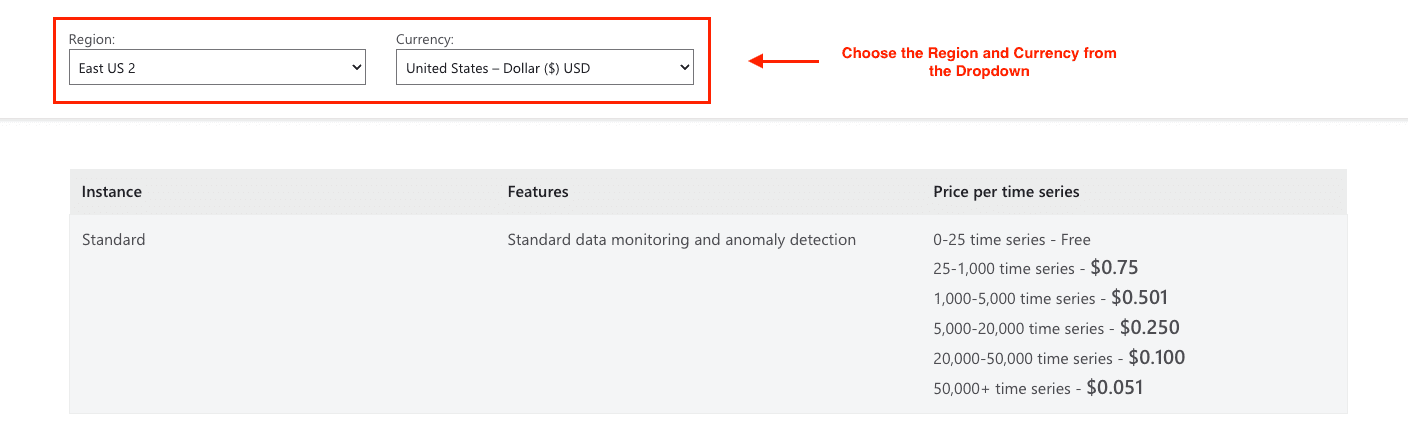
Azure Metrics Advisor leverages a usage-driven pricing framework organized around the count of monitored time series. Each monthly billing cycle allocates 25 time series at no charge, while additional usage can be purchased through progressively scaled pricing tiers designed to align with varying monitoring demands.
In benchmarking against bespoke anomaly detection pipelines or commercially available monitoring suites, Azure Metrics Advisor consistently presents a more economical and streamlined alternative.
Here are the standard pricing details for the US East 2 region:
Cost-Benefit Evaluation
Prior to deployment, companies should compute the comprehensive total cost of ownership, encompassing initial onboarding, configuration, continuous maintenance, and operational execution. Azure Metrics Advisor, when fully leveraged, usually produces a favorable return on investment through diminished manual surveillance demand, expedited anomaly discovery, and enhanced overall operational throughput.
The platform’s inherent scalability guarantees that expenditures scale congruently with expanding monitoring needs, while the tiered pricing structure accommodates diverse organizational scales and variable usage trajectories.
Conclusion
Azure Metrics Advisor is a sophisticated AI-powered monitoring platform that enables enterprises to automate anomaly detection and derive actionable data insights at scale. Its suite of features, including real-time notifications, comprehensive root-cause diagnostics, and tight integration with the wider Azure toolset, renders it indispensable for IT operations, data science, and executive decision-making.
Companies that fully leverage their functionality can bolster operational resilience, reduce service interruptions, and pursue data-driven strategies with confidence and agility.
Adopt Azure Metrics Advisor now to transform your monitoring practices through intelligent, automated anomaly detection.
Join Pump for Free
If you are an early-stage startup that wants to save on cloud costs, use this opportunity. If you are a start-up business owner who wants to cut down the cost of using the cloud, then this is your chance. Pump helps you save up to 60% in cloud costs, and the best thing about it is that it is absolutely free!
Pump provides personalized solutions that allow you to effectively manage and optimize your Azure, GCP and AWS spending. Take complete control over your cloud expenses and ensure that you get the most from what you have invested. Who would pay more when we can save better?
Are you ready to take control of your cloud expenses?



