All blogs
11 mins
Azure IoT Hub: Features, Pricing & Use Cases for Scale
Stuart-Lundberg


Handling a small number of connected devices is simple, but coordinating thousands or even millions of devices is an entirely different challenge. Unexpected device outages can occur, firmware updates are essential, routing telemetry data is crucial, and security should always be a top priority. Things can get brittle without the proper infrastructure, and the costs of maintaining the system to monitor and correct issues may soar.
This is where Azure IoT Hub steps in. This managed service from Microsoft offers a distributed service to connect, monitor, and manage IoT devices in a wide variety of deployments. Be it a smart factory, an integrated healthcare system, or a network of sensors over an entire city, IoT Hub will handle the backend, enabling your team to focus on the application.
In this article, I'll cover everything you need to know: what Azure IoT Hub is, its key features, how pricing works, security capabilities, real-world use cases, and best practices to get the most out of your deployment.
What Is Azure IoT Hub
Azure IoT Hub is a service fully managed by Microsoft that creates central messages between IoT devices and cloud apps. This allows you to achieve a high volume of secure and reliable communication, spanning devices connected in seconds and countless actions, both upwards and downwards, per interval.
At its core, IoT Hub provides:
Device-to-cloud telemetry: Enables devices to send data to the cloud.
Cloud-to-device commands: Allows commands and messages to be sent and received from the cloud to connected devices.
Secure device identity: This service provides each connected device with a password-protected, unique identity.
Message routing: Forwards device telemetry to other Azure services for analysis and processing.
Device management: Provides tools to provision, monitor, and track the health and connection status of devices.
Before a device can be connected, it must first be registered in the IoT Hub identity registry. Upon registration, the device can authenticate via SAS token-based authentication (using symmetric keys) or via X.509 certificate authentication through a TLS session. All devices that communicate with the IoT Hub must use the TLS protocol, and TLS version 1.2 is the recommended version.
Key Features of Azure IoT Hub
1. Bidirectional Communication
IoT Hub focuses on live two-way communication. Being able to talk to each other allows devices to share telemetry with the cloud, and the cloud can share commands. For example, a fridge truck that tells the cloud what temperature it is every 5 minutes could be given commands to change the temperature.
2. Device Twins
Device Twins are JSON documents that represent the states of the devices. They are a part of the management and configuration of each IoT device. The applications on the device and the cloud can create and reflect updates. This allows configuration to be set on the device even if it is turned off.
Triple reads and queries are charged at 4 KB on every paid tier and 0.5 KB on the free tier. This feature is only available on the standard tier.
3. Direct Methods
These cloud-based methods provide access to devices and enable commands to be sent to them. This could initiate the rebooting of a device sensor or the resetting of a device-web connection. All within the active online device. The operation works like the HTTP request and is available in only the standard tier.
4. Message Routing & Event Grid Integration
Based on message properties or content, IoT Hub can guide device telemetry to several downstream services. These endpoints include:
Azure Storage containers
Azure Event Hubs
Azure Service Bus queues and topics
Azure Cosmos DB
Additionally, IoT Hub has a native integration with Azure Event Grid, which allows for the creation of event-driven architectures. In this situation, several subscribers can respond to the same device event. Message routing is offered in the Basic and Standard tiers, and Event Grid integration is only offered in the Standard tier.
5. Large-Scale Device Connectivity
Depending on the tier and unit configuration, a single IoT Hub can register up to 1,000,000 device identities. This can include 1,000,000 registered devices and supports a combination of the HTTP, AMQP, and MQTT protocols. This means a variety of device types can be used in the system, such as low-powered sensors and industrial machinery.
6. Azure Service Integrations
IoT Hub offers connectivity to the rest of the Azure ecosystem for complete end-to-end solutions:
Azure Stream Analytics: Real-time analysis of streaming telemetry.
Azure Machine Learning: Delivers AI-powered predictions based on device data.
Azure Logic Apps: Triggers automated business processes.
Azure Event Grid: Distributes events reactively across services.
How Azure IoT Hub Works
The workflow follows five clear steps:
Device Registration: Each individual device is issued a unique identity within the IoT Hub Identity Registry.
Secure Authentication: Devices authenticate using symmetric keys or X.509 certificates over a TLS connection.
Telemetry Collection: Devices submit data to a built-in endpoint, where it is stored for a period of time ranging from 1 to 7 days, depending on the service tier.
Data Processing: Message routing automatically directs processed data to appropriate analytics and storage services.
Command and Control: Direct methods or cloud-to-device messaging are used by cloud applications to send commands back to devices.
Azure IoT Hub Pricing Explained
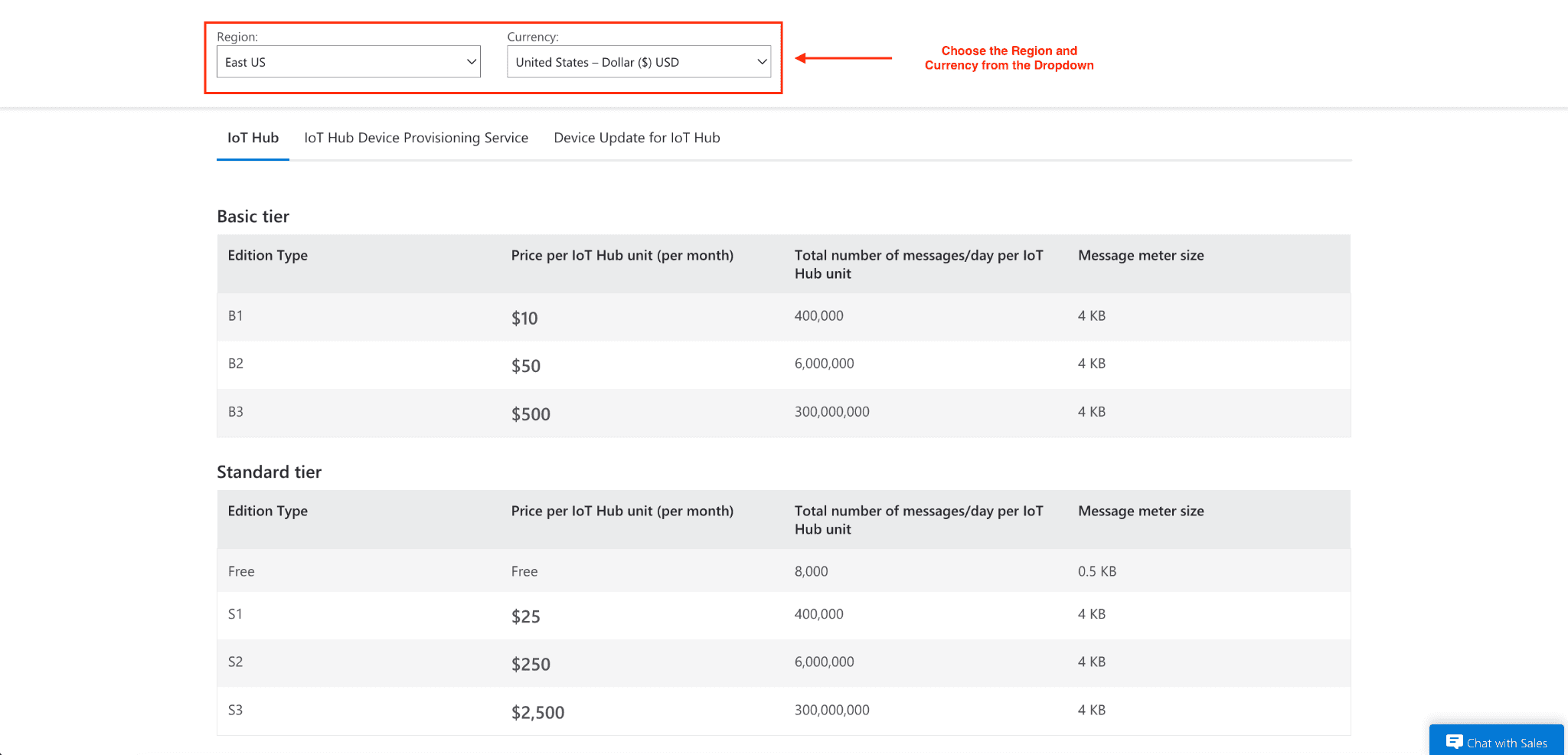
IoT Hub uses a message-based pricing model. You pay for each unit of service by tier and by month, with each unit having a maximum daily message quota.
Pricing Tiers at a Glance
Tier | Price/Unit/Month | Messages/Day/Unit | Meter Size |
Free | Free | 8,000 | 0.5 KB |
B1 (Basic) | $10 | 400,000 | 4 KB |
B3 (Basic) | $500 | 300,000,000 | 4 KB |
S1 (Standard) | $25 | 400,000 | 4 KB |
S3 (Standard) | $2,500 | 300,000,000 | 4 KB |
Key billing facts to know:
The free tier is meant for proof-of-concept testing and allows up to 500 device identities. Free hubs also cannot be upgraded to paid tiers.
Message metering operates on blocks: for a paid tier, a message of 16 KB will be counted as 4 messages and be billed as 4 KB. For the free tier, a message of 16 KB will be counted as 32 messages and be billed as 0.5 KB.
Messages sent from a device to the cloud have a maximum size of 256 KB, while messages sent from the cloud to devices have a maximum size of 64 KB.
Features related to the management of devices (device twins, direct methods, and cloud-to-device messaging) are only available on the Standard tier.
Your monthly bill runs daily, and your usage can be adjusted to a higher or lower tier at any point.
Cost Optimization Tips
Try to batch messages. Instead of individual messages, a device can send 40 x 100-byte sensor reads as one 4 KB message and only consume one message.
Large telemetry payloads can be compressed, which will help to conserve your quota.
To prevent unexpected throttling, daily usage can be checked through the Azure Portal (if IoT Hub limits are exceeded, it will return a 429 throttling exception).
Security Features in Azure IoT Hub
There are various layers of security in IoT Hub.
For device authentication, there are two methods available:
SAS tokens: Best for devices that can hold a key securely. It is an easier implementation.
X.509 certificates: Recommended for production. Authentication of devices is done during a TLS connection. A root or intermediate CA certificate can be registered once to authenticate multiple devices in the chain of trust.
Another feature of X.509 CA authentication is that it is very beneficial, particularly for scaling. You can register one CA certificate in IoT Hub that can authenticate all downstream devices. Instead of uploading certificates individually for each device, it sets a chain of trust cryptographically. It also helps to improve device management.
For the best security, SAS authentication can be entirely disabled. This would mean that only X.509 is allowed.
Access Control: Role-based access control and shared access signatures regulate what services and users can do within the IoT Hub. You can set up 16 shared access policies per hub.
Monitoring & Diagnostics: All tiers have Azure built-in monitoring tools that allow you to monitor device connectivity, failures, and message throughput.
Real-World Use Cases
Smart Manufacturing
By deploying sensors to production lines, data on performance can be sent to an IoT Hub. This data can be analyzed on Azure Stream Analytics to detect anomalies. An automated, direct, and methodical approach uses wearable machines to alert users before a failure occurs.
Connected Healthcare
Medical devices and wearables can send real-time patient vitals to an IoT hub. Regardless of a patient’s location, healthcare teams are sent alerts for vitals that are critical and concerning.
Smart Cities & Energy Management
City managers are able to improve the flow of traffic and control the distribution of energy due to the real-time data that is provided by traffic sensors and smart meters coming from the IoT Hub on analytics platforms.
Logistics & Fleet Management
Asset trackers and fleet vehicles also provide real-time data, displaying the current location and condition of the tracked asset or vehicle. Cloud applications are also able to provide real-time data and telemetry and are able to provide updates or alerts on the routing of the vehicle.
Best Practices for Managing IoT Deployments
Design for scale from day one: Consider the message volume and the tiers that will be required before the deployment. While tier upgrades are easy to do, downgrading from Standard to Basic means you have to recreate the hub.
Use certificate-based authentication in production: Operational overhead will decrease, and security will be better when 509 CA certificates are used instead of individual symmetric keys.
Batch telemetry where latency allows: In situations involving high-frequency sensors, this one adjustment can cut message consumption by as much as 40 times.
Monitor throttling limits actively: To reduce latency, provision your IoT hub in the Azure region that is closest to your devices and set up alerts for 429 throttling exception errors.
For large-scale zero-touch provisioning, use the Device Provisioning Service. Without manual intervention, DPS will automatically register devices and assign them to the appropriate IoT hub.
Conclusion
Any size IoT solution starts with a strong, scalable, secure, and reliable foundation. With Azure IoT Hub, complex infrastructure for connected devices is no longer needed, whether for a proof of concept in the free tier or for managing devices at scale, in the multiple millions, across global locations.
The best place to start is with experience. Set up a free Azure account, start an IoT hub, and connect a device. The telemetry will start processing in minutes.
Join Pump for Free
If you are an early-stage startup that wants to save on cloud costs, use this opportunity. If you are a start-up business owner who wants to cut down the cost of using the cloud, then this is your chance. Pump helps you save up to 60% in cloud costs, and the best thing about it is that it is absolutely free!
Pump provides personalized solutions that allow you to effectively manage and optimize your Azure, GCP, and AWS spending. Take complete control over your cloud expenses and ensure that you get the most from what you have invested. Who would pay more when we can save better?
Are you ready to take control of your cloud expenses?