All blogs
9 min
Azure Functions Pricing - Cost Breakdown & Savings Guide
Piyush-Kalra


For a company to remain competitive, it must take advantage of serverless technologies. However, the pricing for such services may, at times, tend to be as intricate as the technology. Azure Functions, Microsoft’s service for serverless computing, comes with lots of flexibility and scalability, but knowing the pricing metrics and costs is important so that its value is maximized without going overboard.
Whether you’re confused with the terms “Flex Consumption Plan”, “Consumption Plan”, “Premium Plan” or how GBs impact your billing, you’re in the right place. This blog will demystify Azure Functions' pricing and provide you with guides on specific cost determinants and effective tips for optimization.
What is Azure Functions?
Microsoft Azure provides a serverless computing platform called Azure Functions that enables the entrepreneurial execution of event-driven code without needing to manage the infrastructure. This allows companies to address real-life challenges with the rich capabilities while Azure handles the scaling, monitoring, and maintenance.
Key Benefits:
Scalability: Automatically scales up or down based on demand.
Flexibility: Compatible with multiple programming languages, such as C#, Python, and JavaScript.
Seamless Integration: Simple connection with other services, ie. Azure Blob Storage, Event Grid.
Cost-Effectiveness: You do not incur expenses from unused computing resources since the payment is only for the execution time of the function.
Use Cases for Azure Functions
These are some of the areas where Azure Functions are particularly useful:
Real-Time Data Processing: Real-time processing of data streams from IoT devices or social media is possible.
API Development: Use Functions to quickly build lightweight APIs.
Event-Driven Applications: Activities initiated by certain actions, like a database changing, can also be managed.
Task Automation: Automation of routine tasks within a system, including file processing and backup scheduling.
How Does Azure Functions Work?
Serverless Architecture Explained
With Azure Functions, you pay for the serverless computing model “per execution.” The term “serverless” refers to how the computing resources are abstracted away. The functions respond to events, scaling resources autonomously based on need, and can be optimally allocated “up” or “down.” In comparison to traditional cloud models where you rent servers, serverless platforms are much simpler. Functions are only charged for the time of execution.
Key Features of Azure Functions
Automatic Scaling: Guarantees infrastructure efficiency and application performance under different loads.
Triggers and Bindings: Call upon preset triggers that react to data and a wide range of interactions, such as HTTP calls, timers and enable seamless and effortless data interaction with active platform interfaces.
Language Support: Choose from multiple languages, including .NET, Python, and Node.js, offering flexibility for developers.
End-to-End Development Support: Apart from building and monitoring with Azure Monitor, seamless deployment through DevOps tools is supported by the rest of the suite.
Deep Dive into Azure Functions Pricing Structure
Azure Functions Works with three main pricing schemes, based on different use cases, which are:
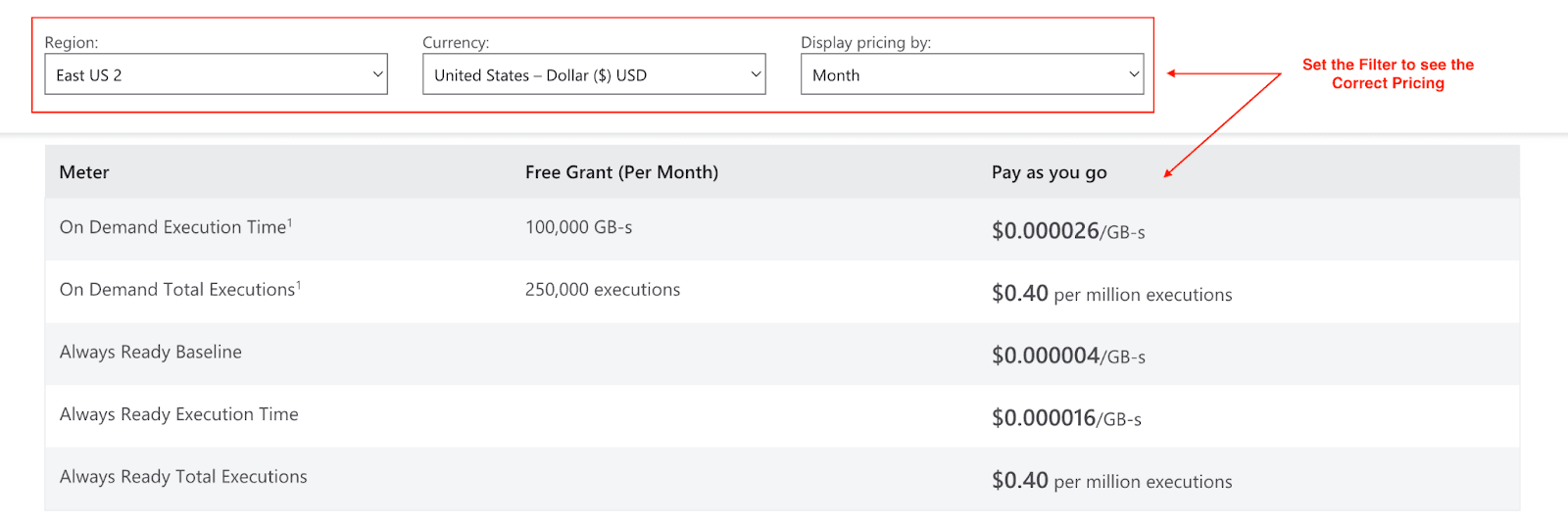
Flex Consumption: You can select the sizes of memory instance, and are charged in two ways:
On Demand: Event-driven instances scale out based on concurrency. You pay per function execution without a minimum instance count with money being charged for memory provisioned during execution, and total execution.
- Free Grant per Month: 100,000 GB-s and 250,000 executions.
- Pricing after Free Grant: $0.000026/GB-s for execution time and $0.40 per million executions.
Always Ready: Enable configurable baseline instances so you can build/idle memory, execution memory, and executions. You incur charges when there are exhausted resources.
- Pricing: $0.000004/GB-s for idle baseline, $0.000016/GB-s for execution time, and $0.40 per million executions.
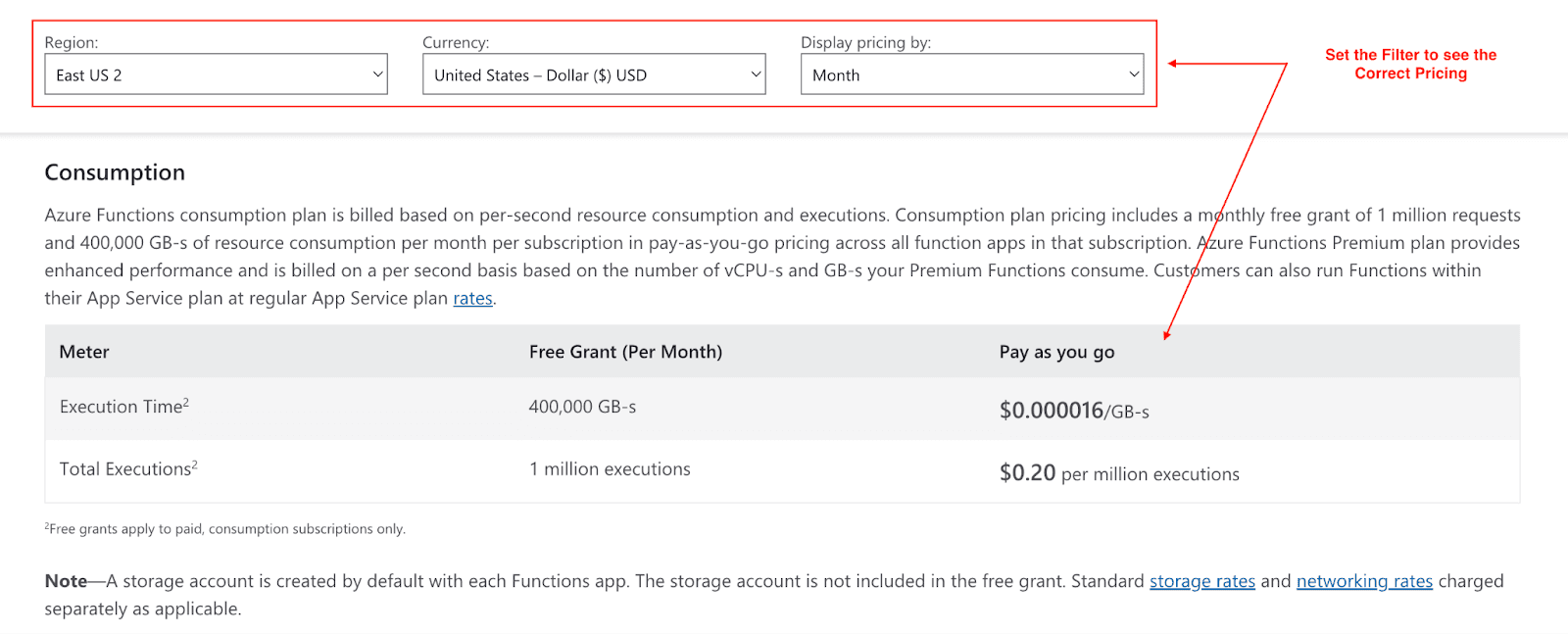
Consumption Plan: Price is set by resource use every second and execution count. grant is set at 1 million free unit grants executions subject and 400,000 GB-s of resource consumption per suscription. Incremental designed for blends of lower and higher usage clause add for uninhibited execution level of $0.20 per million execution units and $0.000016 per GB-s invoked.
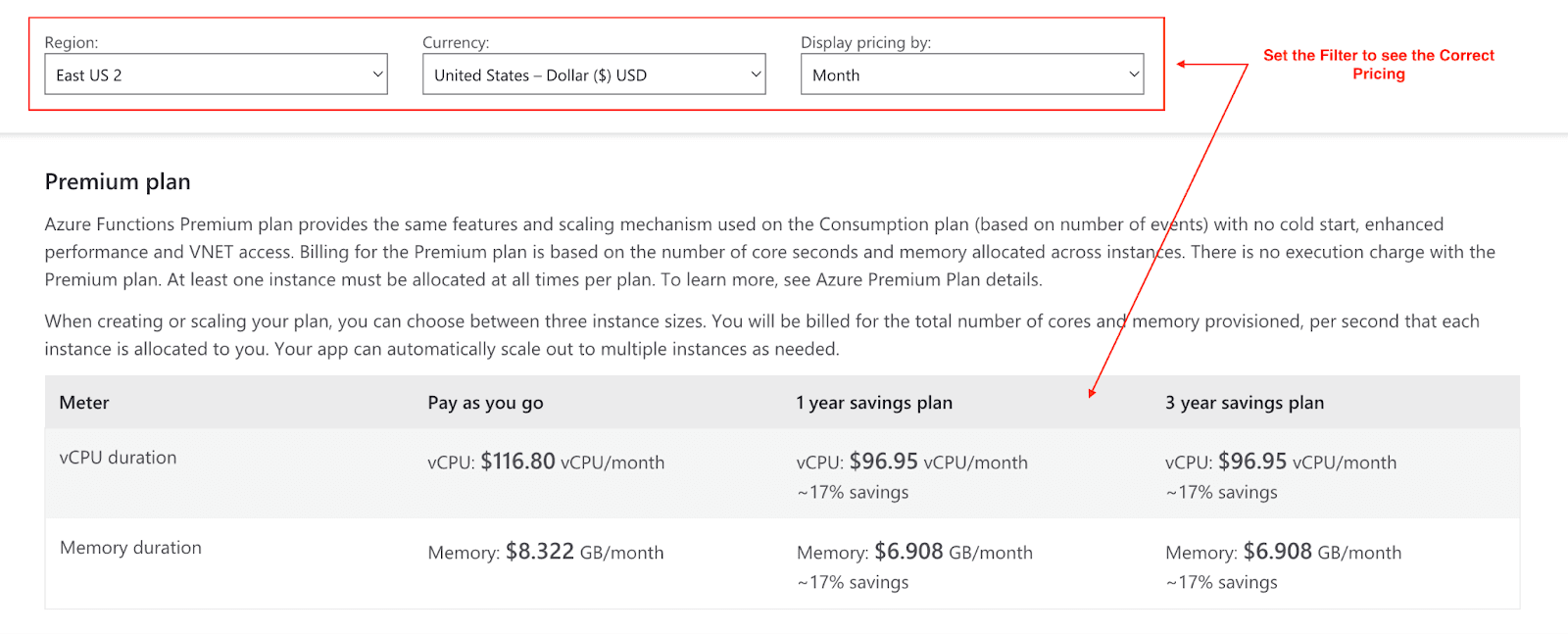
Premium Plan: Suited for workloads that have high-performance requirements, always-on capabilities, or need integration with a virtual network. Billing is done on a per core second plus memory allocated across instances, with ‘no execution charge’, which means the customer only pays for the resources they use. Pricing under the pay-as-you-go model starts at $116.80 per vCPU/month and $8.322 per GB/month for memory. However, there is potential savings of ~17% with 1-year or 3-year savings plans. There is always at least one instance that must be always allocated per plan.
Key Factors Affecting Costs
To adequately track the costs related to the Azure Functions, one must consider the following:
Execution Time: Costs increase with the time your function runs. The charges are based on the time it takes to complete the intended function.
Memory Usage: Costs increase based on the memory set aside for a particular function. A rise of 128 MB of memory for a specific function will change the chargeable basis, rounded to the increment.
Number of Executions: Every incident that a function is ‘executed’ counts as one execution unit. The aggregate iterations are used to determine the charges.
Outbound Data Transfers: Additional charges will apply if your function sends data outside of Azure services, such as to external networks.
Region: Pricing depends on which region the Azure services are used in, as costs vary from region to region.
Pricing Tiers and Plans
Plan | Use Case | Key Features |
Consumption Plan | Ideal for intermittent workloads | Free tier, pay-as-you-go pricing |
Premium Plan | High-performance applications | Always-on availability, virtual network (VNet) integration |
Flex Consumption | Dynamic scaling with optional "Always Ready" instances | Designed for applications with irregular loads |
Additional Pricing Considerations
Free Tier and Discounts
Azure Functions offer generous free usage grants:
1 million free executions per month.
400,000 GB-s of execution time per month.
Additionally, companies coming into long-term commitments may obtain discounts through Microsoft agreements or the Azure Savings Plan for Compute.
Cost Estimation Tools
Estimate and track expenses using tools like:
Azure Pricing Calculator: Calculate the estimated costs of different setups before launch.
Azure Monitor: Use Azure Monitor to assess consumption metrics and improve performance.
Cost Example
Let’s break down the cost of running a function with 512 MBs of memory and 2 million executions under the Consumption Plan. This is how it is computed step by step:
Resource Consumption Cost:
Memory: 512 MB = 0.5 GB
Total runtime: 2M executions * 1 second = 2M seconds
Resource usage: 0.5 GB * 2M seconds = 1M GB-s
Free grant: 400K GB-s
Billable GB-s: 1M - 400K = 600K GB-s
Cost: 600K GB-s * $0.000016 = $9.60
Execution Cost:
Total executions: 2M
Free grant: 1M executions
Billable executions: 2M - 1M = 1M
Cost: 1M * $0.20 = $0.20
Total Monthly Cost:
$9.60 (resource) + $0.20 (execution) = $9.80
Hence, if you have 2 million executions of a function with 512 MB memory that runs for a second per execution, your total expenditure is $9.80 a month after the free tier.
Case Study: Mars Science & Diagnostics Transforms Pet Care with Azure
Mars Petcare created the RapidRead to solve slow pet diagnosis turn-around issues created by a lack of veterinary radiologists leveraging Microsoft Azure’s AI tools. Azure AI’s model catalog and Machine Learning tools (including Mistral) are used to build an AI solution that enhances workflow and accuracy while enabling faster diagnosis for veterinarians.
Results:
Diagnoses now given within minutes as opposed to hours or even days.
An increase of 38% in average precision and 96.9% precision on test data.
Hundreds of pets’ lives potentially saved over the past year.
Pets can get the care faster, allowing them to go home healthier and happier.
Tips and Tools to Manage Azure Functions Costs
Improve Execution Time: Increase performance and improve execution time of your code by removing redundant functions and preemptively loading infrequently changing data, such as user profiles.
Optimize Memory Usage: To accomplish better cost control, eliminate excess memory allocation while providing ample workload support.
Track Performance Metrics: Use Azure Monitor to track system vitals such as execution time, memory consumption, and overall system health.
Enable Smart Scaling: Use Azure’s scaling functionalities to better manage peak workload periods, resource-wise.
Implementing Cost-Effective Strategies
Choosing the Right Pricing Plans
Consumption Plan: Ideal if your workload is irregular or demand fluctuates unpredictably. This plan allows you to pay only for what you use, making it a cost-effective option for applications with inconsistent activity or lower usage.
Premium Plan: Designed for applications that need consistent, high performance, low latency, and access to dedicated resources. This is the best choice for mission-critical systems or workloads that require reliable, top-tier performance.
Advanced Optimization Strategies
Use pre-provisioned Kubernetes clusters with Azure Kubernetes Service for containerized applications.
Enable Durable Functions for workflows, reducing the need for frequent function executions.
Alleviate costs through reserved instances for predictable workloads.
Conclusion
While Azure Functions adds great value to your cloud toolbox, managing its pricing architecture is crucial so that there are no surprise charges. Ensuring that the workload and plan are matched correctly while utilizing autoscaling and budgeting features helps optimize expense and performance.
Use the Azure Pricing Calculator to begin exploring Azure Functions and start your journey today.
Join Pump for Free
If you are an early-stage startup that wants to save on cloud costs, use this opportunity. If you are a start-up business owner who wants to cut down the cost of using the cloud, then this is your chance. Pump helps you save up to 60% in cloud costs, and the best thing about it is that it is absolutely free!
Pump provides personalized solutions that allow you to effectively manage and optimize your Azure, GCP and AWS spending. Take complete control over your cloud expenses and ensure that you get the most from what you have invested. Who would pay more when we can save better?
Are you ready to take control of your cloud expenses?