All blogs
9 mins
AWS MemoryDB Pricing & Cost Savings Guide 2026
Piyush-Kalra


Real-time applications increasingly rely on in-memory databases to meet the demands of modern users. Amazon MemoryDB delivers Redis-compatible performance with the durability of a primary database, making it an excellent choice for these workloads. However, AWS MemoryDB pricing can become complex quickly.
Costs often rise much faster than anticipated due to node sizing, Multi-AZ replication, and write-heavy workloads. Many engineering and finance teams underestimate the operational and commitment-related costs associated with running a highly available database.
In this article, I will explain exactly how pricing works for this service. You will learn what drives your monthly bill, how to estimate your spend, and which strategies you can use to reduce your overall in-memory database costs.
What Is AWS MemoryDB?

Amazon MemoryDB is a fully managed, durable in-memory database. With MemoryDB you can use Redis OSS and Valkey APIs. This means developers can take advantage of the data structures and APIs they already use. Unlike traditional memory caches, MemoryDB is built to function as a durable primary database. It does this by using a Multi-AZ transactional log to make sure your data is safe and recoverable in multiple Availability Zones.
Key Features of AWS MemoryDB
Redis and Valkey Compatibility: Stores flexible data structures that come from Redis OSS and Valkey, making application migration to AWS possible with very minimal edits to the code.
Durable Multi-AZ Architecture: Uses a distributed transactional log to make recovery and restart much faster, ensuring that data is stored durably across multiple Availability Zones.
Ultra-Low Latency Performance: Provides microsecond read latency and single-digit millisecond write latency because it caches all data to memory.
Automatic Failover and Replication: Ensures minimal downtime by automatically detecting when a primary node is no longer available and promoting a replica to primary.
Fully Managed Infrastructure: AWS takes care of the buying and maintenance of the infrastructure, allowing development teams to focus on creating.
Scalability for Real-Time Applications: Horizontal scaling is achieved via the addition and removal of shards, while vertical scaling is achieved via changing node types.
Deep Dive into AWS MemoryDB Pricing
To truly understand Amazon MemoryDB pricing, one has to dissect multiple elements. In distinction to databases that charge primarily on a per-request basis, managed Redis pricing primarily revolves around provisioned capacity.
How AWS MemoryDB Pricing Works
Your monthly billing statement consists of several categories in the pricing spectrum. You pay based on node instance hours, the amount of data written to the transactional log, the backup storage, and the data that is transferred across the availability zones, and lastly, the snapshot export. The MemoryDB clusters run perpetually. Because of this, your node costs essentially stay fixed and remain the same, regardless of the load.
MemoryDB Node Pricing
AWS charges for each node in a cluster on an hourly basis. The pricing is dependent on the instance family and on the AWS Region. The memory-optimized instances are r6g and r7g and are the most commonly selected options. General-purpose nodes (t4g) are sometimes used for smaller workloads.
Node Type | Memory | Typical Use Case | Approx Cost Characteristics |
t4g.small | 1.37 GiB | Dev/Test | Lowest cost, baseline performance |
r6g.large | 13.07 GiB | Small Production | Moderate cost, good memory/vCPU ratio |
r7g.4xlarge | 105.81 GiB | Large-Scale App | High cost, massive memory capacity |
Data Write Charges
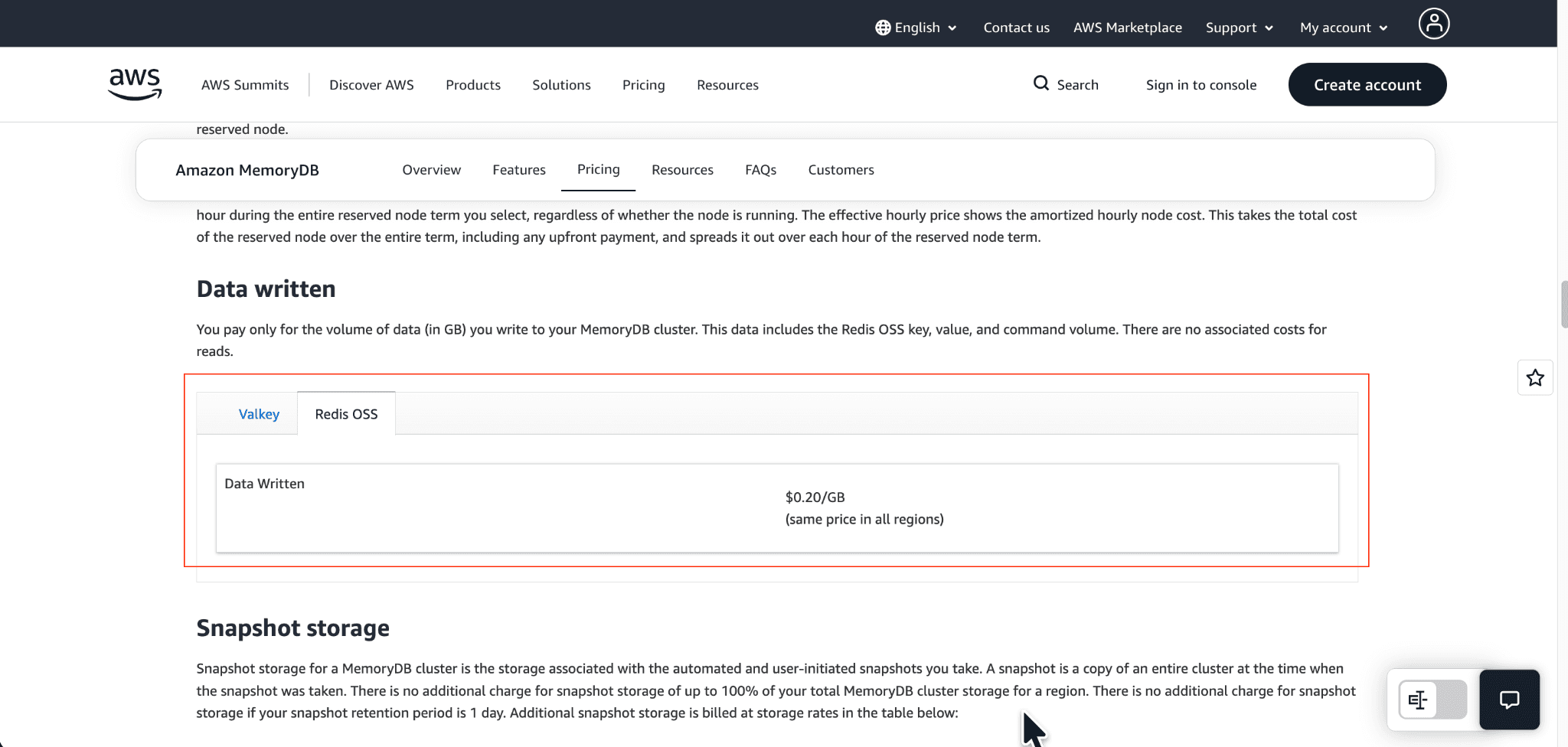
Data write charges are a critical billing component that many teams neglect. You are charged for the amount of data written to the transactional log. In Redis OSS, the cost to write data is approximately $0.20 per GB. For Valkey, the first 10 TB written per month is free, and a small charge per GB applies beyond that. Due to the phenomenon of write amplification, write-heavy workloads can cause your bill to also increase dramatically, so be sure to calculate what your write throughput will be.
Backup and Snapshot Costs
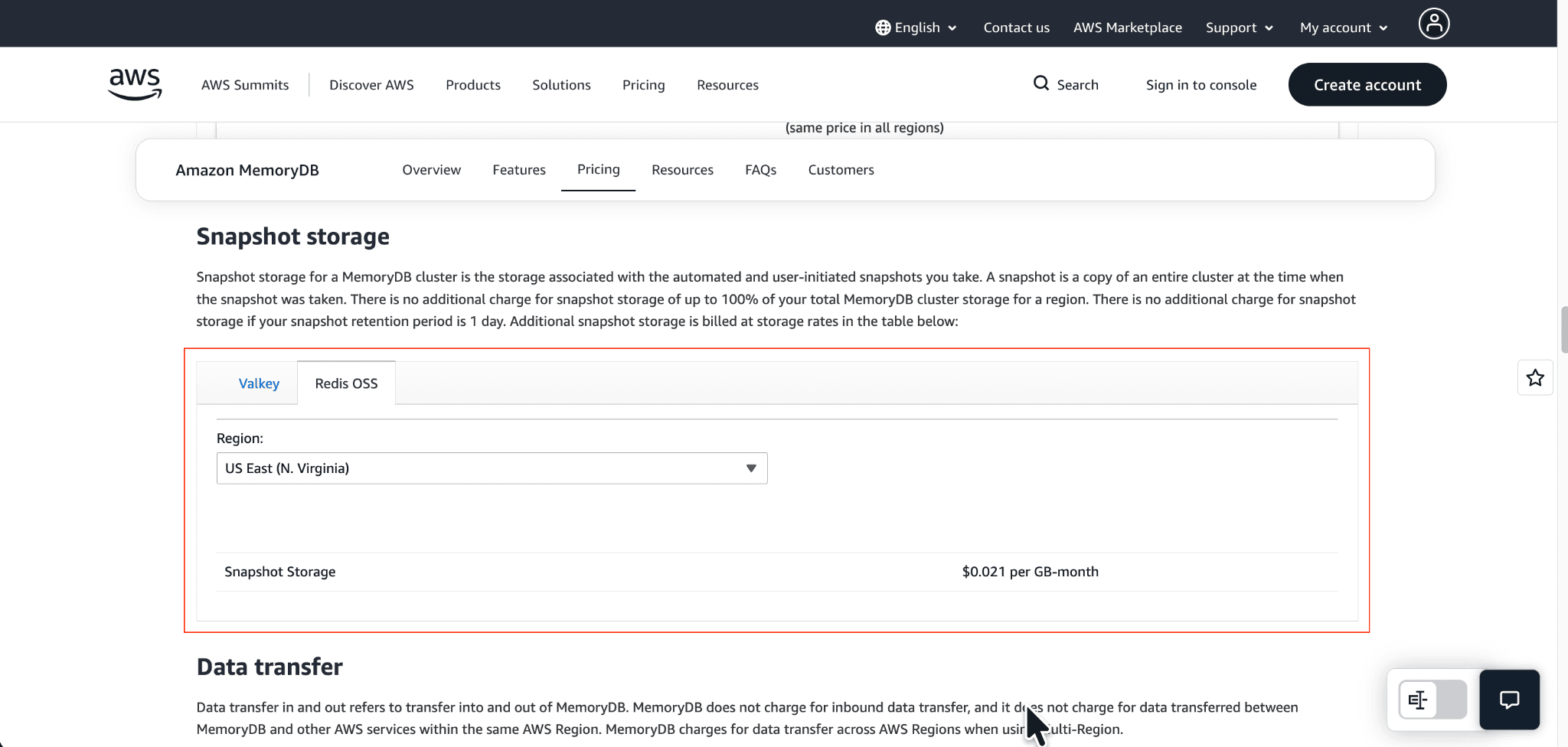
Amazon MemoryDB covers snapshot storage for the first 24 hours at no cost, and that storage equals 100% of your total cluster storage. When you keep snapshots for longer than one day, you incur charges for snapshot storage at the rate of $0.021 per snapshot GB-month.
Data Transfer Costs

MemoryDB does not bill for inbound data transfers, and it does not bill for data transfers that occur within the same AWS Region. But it does bill for Multi-AZ replication and inter-region data transfer. If you replicate your MemoryDB data to other AWS Regions for disaster recovery, you pay for the standard AWS cross-region data transfer.
Reserved Nodes vs On-Demand Pricing
If you want to lower your compute costs, you can purchase Reserved Nodes. AWS offers a commitment for 1 year and 3 years.
Pricing Model | Flexibility | Potential Savings |
On-Demand | High | Lowest |
Reserved 1-Year | Medium | Moderate (Up to 30%+) |
Reserved 3-Year | Low | Highest (Up to 50%+) |
AWS MemoryDB Pricing Example
Small Startup Deployment Example
Let's assume a startup has a development workload that runs on a 2-node cluster (one primary and one replica) using t4g.medium instances. They have only a small amount of write traffic, and their snapshots are retained for a maximum of one day.
Nodes: 2 nodes x $0.0679/hr x 730 hours = ~$99/month.
Writes & Storage: Negligible.
Total: ~$100/month.
Production SaaS Deployment Example
As a production application, this workload uses two shards (4 nodes overall) of r6g.xlarge nodes, each with one replica per shard. This application has a high workload of 10,000 write transactions per second (100 bytes in size) that leads to approximately 3.6 GB of data being written in an hour.
Nodes: 4 nodes x $0.617/hr x 730 hours = ~$1,801/month.
Writes (Redis OSS): 3.6 GB/hr x 730 hours x $0.20/GB = ~$525/month.
Total: ~$2,326/month plus backup retention costs.
AI/Real-Time Analytics Workload Example
AI analytics workloads typically have bursty traffic but can have relatively high concurrency. For this workload, the team uses large r7g.8xlarge nodes. Even with reserved pricing, the infrastructure costs of scaling to handle spikes in traffic are quite large. Using an AWS cost calculator is essential for estimating costs before deploying large workloads.
Biggest Factors That Increase MemoryDB Costs
Overprovisioned Nodes: Selecting instances with more memory or vCPU than needed is a primary source of wasted spend.
Excessive Replicas: Each replication increases your node count. Though cost increases will be offset by improved read and availability, costs will increase.
High Write Throughput: Costs will increase if your application inefficiently writes large updates because all of the payload will be erased from the transaction log.
Inefficient Data Retention: If you retain backups for more than 30 days instead of 7, you incur recurring hidden costs for storage.
Underutilized Reserved Capacity: Using Reserved Nodes before your usage pattern is stabilized drives costs to reserve capacity that is not utilized.
Cross-Region Architectures: Spreading your databases across various AWS Regions creates an expensive data transfer cost.
How to Estimate and Reduce AWS MemoryDB Costs
Rightsize MemoryDB Nodes
You need to analyze your workload to select the correct node family. Reduce the sized nodes in your development and staging environments.
Monitor Memory Utilization
You can use Amazon CloudWatch to track memory, and if your clusters have less than 40% of memory used, you should assess smaller nodes to potentially save costs.
Reduce Unnecessary Replication
For read replicas, only create what your application needs to maintain availability and serve read operations.
Optimize Write Patterns
Reduce the size of the data you write to the database and write it in a more compact or smaller format. This will also lower the size of your transactional logs.
Use Reserved Nodes Strategically
Purchase Reserved Nodes to manage production workloads and system reliability. Keep development and fluctuating workloads on demand.
Automate Cost Visibility
Use AWS Cost Explorer to closely examine your MemoryDB costs. Set a billing alarm to catch the right charge surges and a surge in deploying nodes.
Continuously Monitor Usage Trends
Cloud infrastructure is dynamic. Schedule regular reviews of your database architecture to ensure your provisioning matches your current application demand.
How Pump Helps Optimize AWS MemoryDB Costs
Pump uses smart technology and the power of group buying to automate and reduce AWS costs with minimal manual effort.
Smarter Savings: Pump's AI purchases the needed Reserved Instances to cover your workloads, ensuring you start to save immediately and your usage continues to be optimized. If your workloads change, so does Pump's strategy.
Group Discounts: All of our customers enjoy the benefits of our consolidated purchasing agreements. This allows you to leverage significant AWS volume discounts you normally wouldn't qualify for.
Less Manual Work: Say goodbye to the tedious hours spent managing commitments and usage. Cost optimization is now one less thing for your engineering and FinOps teams to worry about.
Clear Cost Tracking: Our dashboards communicate your AWS spending clearly and provide the ability to track spending to pinpoint savings and view savings realized over time.
Conclusion
Amazon MemoryDB provides durability and performance for real-time databases. But costs can become complicated with hourly node rates, write charges, and Multi-AZ replication. Continuous smart capacity and load charge optimization become a requirement.
To constrain costs, periodically pull apart your infrastructure and size your nodes optimally to leverage automated commitment optimization to remove unnecessary costs. Evaluate your usage periodically to implement these strategies to create a less costly cloud infrastructure.
FAQs
Is MemoryDB more expensive than ElastiCache?
Yes, generally. MemoryDB includes a durable Multi-AZ transactional log, meaning you pay for the underlying storage and data writes. ElastiCache is primarily an in-memory cache and does not charge for data written in the same way.
Does AWS charge for MemoryDB writes?
Yes. You pay for the volume of data written to the cluster. This includes the key, value, and command volume. Rates differ slightly between Redis OSS and Valkey compatibility modes.
How do reserved nodes work in MemoryDB?
Reserved nodes provide a discount on your hourly compute rate in exchange for a 1-year or 3-year commitment. The discount applies automatically to running nodes that match the reserved instance family and Region.
Can MemoryDB replace Redis?
Yes. MemoryDB is fully compatible with Redis OSS data structures and APIs. It is built to replace traditional architectures that use Redis as a cache alongside a separate relational database, combining both functions into one highly durable service.
Similar Blog Posts
Amazon RDS Multi-AZ: Boosting Database Reliability