All blogs
8 min
Azure SQL Database Pricing: Features, Tiers & Savings
Jake


Azure SQL Database pricing depends on the deployment option, purchasing model, compute tier, service tier, region, storage, and backup usage. For a single database, the first choice is between bundled DTU pricing and vCore pricing; vCore buyers then choose provisioned or, where supported, serverless compute. There is no universal monthly price: use Microsoft’s Azure SQL Database pricing page and the Azure Pricing Calculator for a quote in your selected region. This guide explains the choices, cost components, and ways to evaluate savings.
Why Pricing Clarity is Important
A useful estimate starts with the database’s workload and deployment option. A single database has dedicated resources; an elastic pool shares resources among databases. Compare configurations in the same Azure region, then check compute, storage, backup, and any applicable discounts rather than relying on a headline price.
Here’s what this blog will help you with:
Breaking down Azure SQL Database pricing options so they make sense
Sharing practical tips to save money without cutting corners
Building a regional cost estimate and checking which savings options apply
What is Azure SQL Database?
The Azure SQL database is a PaaS solution backed by Microsoft SQL Server. Like a conventional SQL database, it can easily be integrated with other systems. Because it is fully managed, it automates normal practices like patching, updating, and backups, giving your team more time to focus on innovation.
Key Features Include:
Managed Infrastructure: Reduces the need for human intervention by automating database updates and maintenance.
Flexible Scalability: Dynamically scale resources up or down based on current demand.
High Availability: 99.99% uptime SLA with geo-failover options.
Advanced Security: Complies with global regulations and includes data encryption and threat detection.
Built-In Intelligence: Automatically monitors performance and makes optimization recommendations.
Benefits of Using Azure SQL Database
When you choose Azure SQL Database, you gain a host of benefits tailored for modern organizations:
Scalability: Resources can be down-sized and up-sized at will depending on need.
Cost Efficiency: Choose a pricing model that fits demand; provisioned compute is billed even when a database is idle.
Compatibility: Seamlessly incorporate your current SQL Server workloads with little to no adjustments.
Versatility: Supports hybrid transactional-analytical workloads and diverse types of data (e.g., JSON, spatial data, and graphs).
Integration: with other Azure services such as Power BI and Azure AI makes it more functional.
Azure SQL Database Deployment Models Explained
Azure SQL Database has three deployment models meant to serve different company strategies of scaling, flexibility, and performance handling. Let’s have a look at the differences:
1.Single Database Model
Best For: Independent apps needing their own computing resources.
Fully managed, isolated database as a service.
Serverless and provisioned compute tiers are available.
Best for small applications that are used unpredictably, and for other low usage dev/test environments.
2.Elastic Pool Model
Best For: Single user access to multiple databases, each with shifting workload.
Multiple databases within the same pricing tier draw resources from a shared pool.
Best for cost targeted SaaS applications and other case-based projects.
Cost Efficiency: High, minimizes over-provisioning.
3.Managed Instance
Best For: Migrating on-premises SQL Server to the cloud.
Almost fully compatible with SQL Server, multi-database queries and SQL Agent jobs are supported.
Native virtual network (VNet) integration for better security.
Cost Efficiency: Moderate, ideal for lift-and-shift scenarios.
Azure SQL Database Pricing Models
Azure SQL Database offers flexible pricing models tailored to different business needs and workloads. Two major pricing models are available:
1. vCore-Based Model
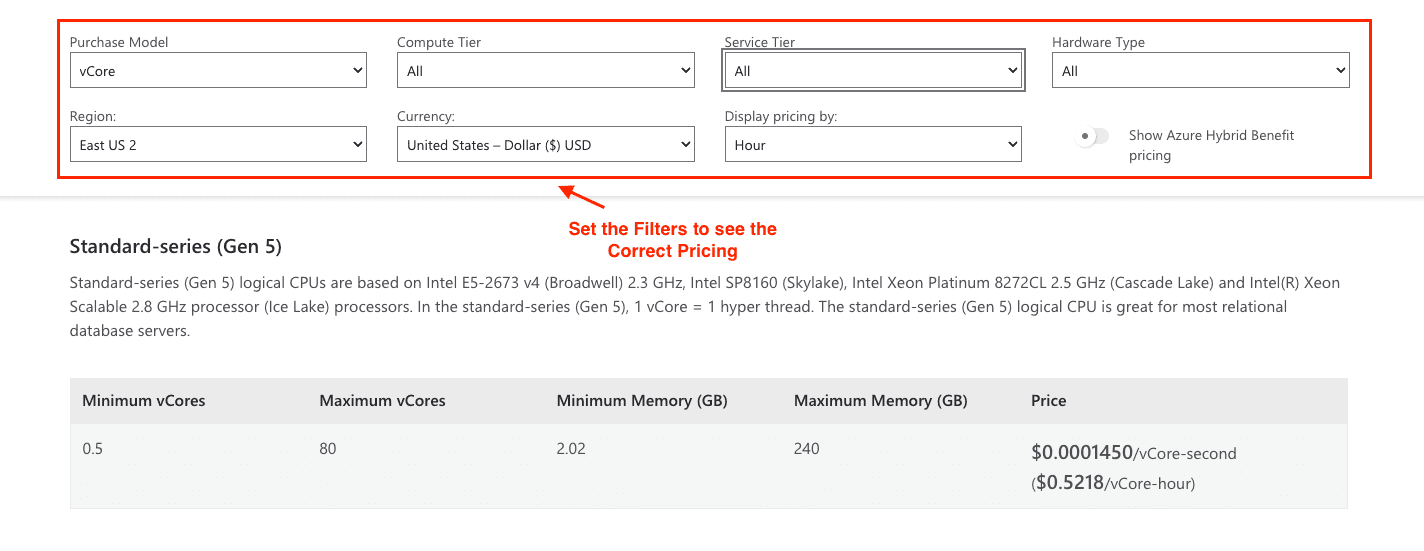
This model allows you to allocate resources like virtual cores (vCores), memory, and storage separately, giving you greater transparency and control over performance.
Key Features:
Service Tiers:
General Purpose Tier: Suitable for most applications, balancing performance and cost.
Business Critical Tier: Designed for low-latency and high-reliability applications.
Hyperscale Tier: Ideal for large datasets and high-speed scaling, offering up to 100 TB of storage.
Compute Tiers:
Provisioned Compute for consistent workloads with steady resource demand.
Serverless Compute for intermittent use cases, where resources and cost are automatically scaled based on activity.
Pricing Snapshot:
General Purpose vCore costs approximately $0.5218/vCore/hour in provisioned mode or less for serverless options.
Business Critical workloads on the M-Series hardware cost approximately $4.92/vCore/hour.
2. DTU-Based Model
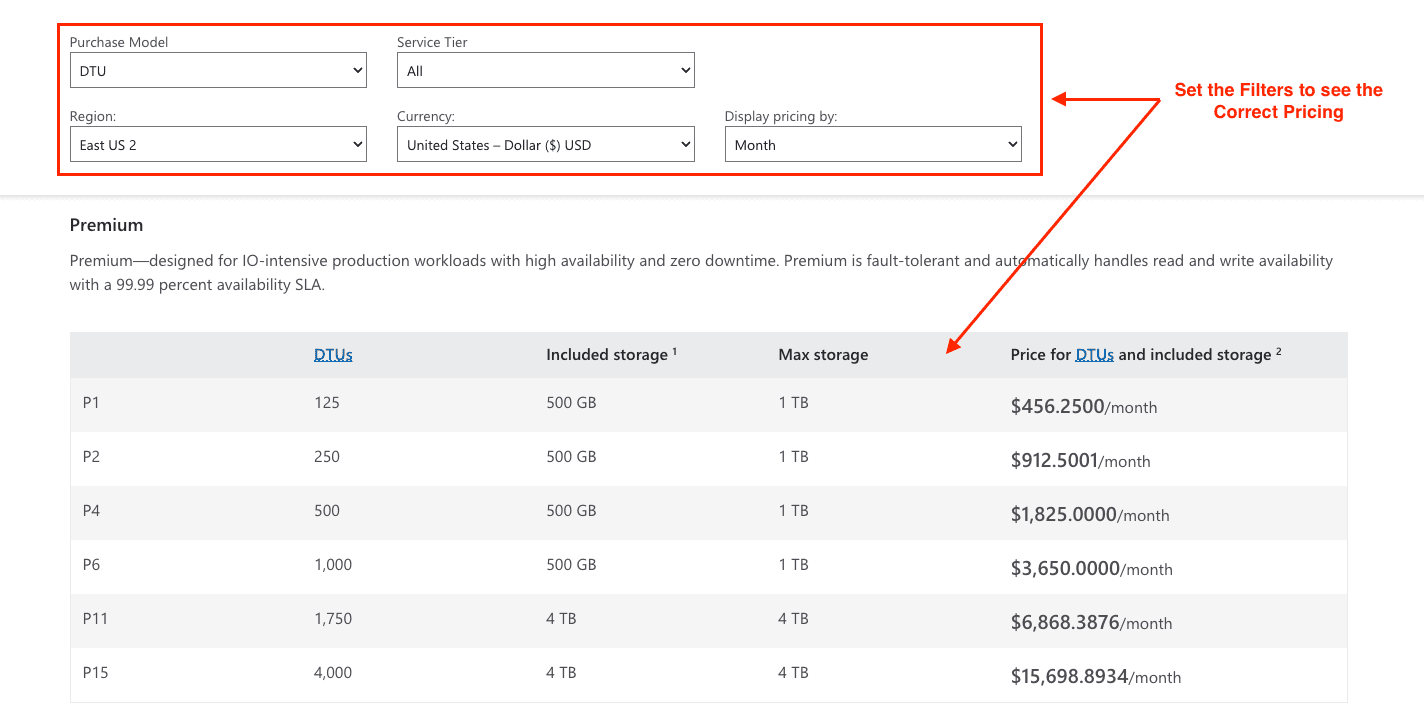
The DTU model bundles compute, memory, and I/O into performance levels. Compare the included resources and regional price of each tier against a vCore configuration:
Basic Tier: Starts at just $4.90/month—perfect for light, low-demand applications.
Standard Tier: From $14.72/month, great for mid-level apps that need a bit more power.
Premium Tier: Starts at $456.25/month and is built for heavy workloads, offering top performance and high availability.
Factors Affecting Azure SQL Database Costs
When it comes to Azure SQL, your monthly bill depends on a few key factors:
Compute and purchasing model: For vCore provisioned compute, estimate allocated vCores over the hours provisioned using the applicable regional rate. Serverless uses its own active-compute billing rules and configured minimum; DTU pricing instead depends on the selected bundled performance level. For vCore databases, compare these compute choices:
Provisioned (pay for a set amount of power, whether you use it or not)
Serverless (pay only for what you use, which is great for variable workloads)
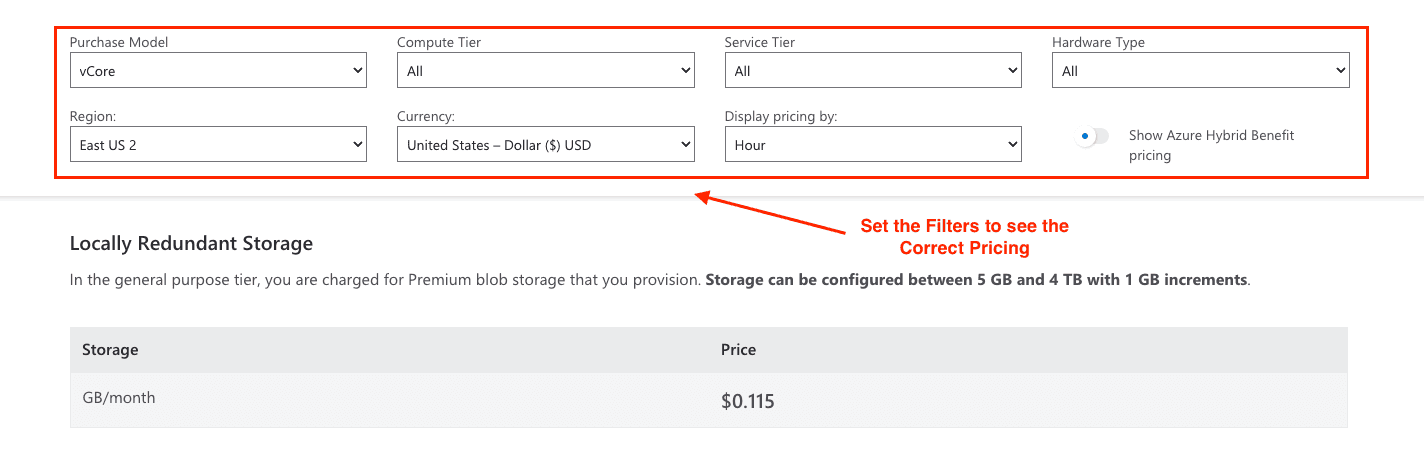
Storage Space: Just like any other item keeps multiplying and you need a box to keep them, your database also needs space. Azure charges you for Premium storage at the rate of $0.115/GB per month, with Hyperscale, your storage is allowed to grow automatically up to 100 TB as per the requirements.
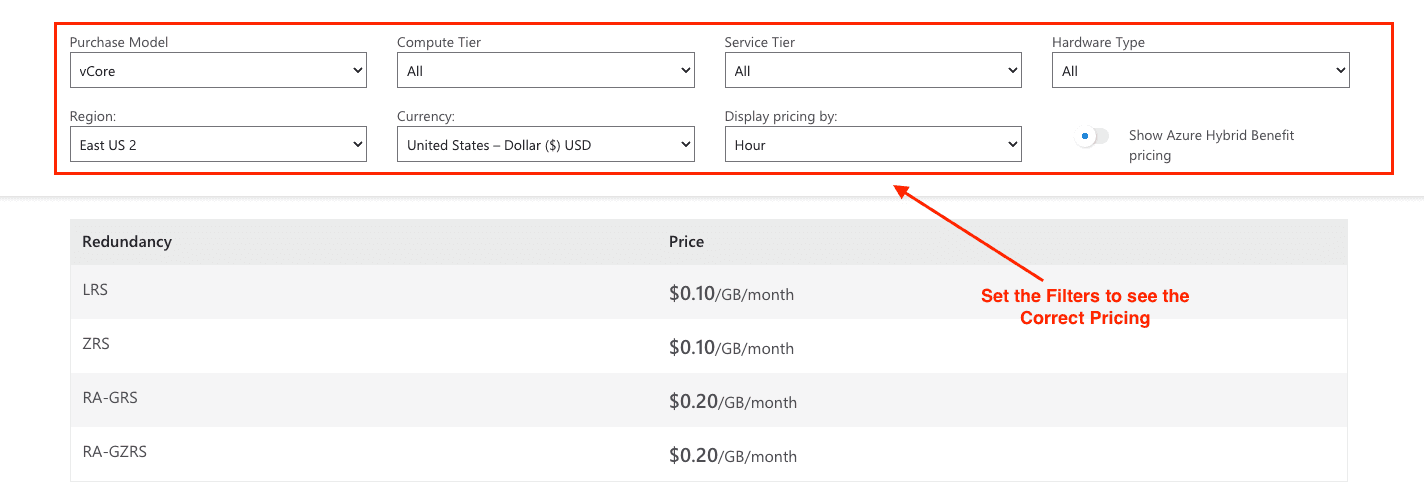
Backups: Azure gives you free backup storage equal to the size of your database (handy for safety!). If you need more backup space, it’ll cost around $0.10–$0.20/GB per month, depending on the level of data protection (redundancy) you choose.
In short, your costs depend on how powerful you want your database to be, how much space you need, and whether you take advantage of discounts. Azure offers flexibility to match your budget and performance needs!
Cost Optimization Strategies for Azure SQL Database
The best way to control costs is to align pricing structures and database configurations with your actual workload demands. Here are some top strategies:
1. Right-Size Your Resources
Observe workload trends and choose the right compute tier and level:
Use serverless compute for workloads with unpredictable patterns, which also experience downtimes
For multi-database applications, shift to elastic pools to reduce resource usage
2. Leverage Reserved Instances
Commit to a 1- or 3-year reserved capacity plan to reduce ongoing costs, especially for steady workloads.
3. Use the Azure Hybrid Benefit
Bring your own SQL Server licenses with active Software Assurance to access discounts of up to 55%.
4. Monitor Usage with Azure Tools
Use Azure Cost Management and Azure Monitor among Azure tools to manage and monitor database expenses.
Worked Azure SQL Database Cost Estimate
DHL realized that their existing on-premises solution was insufficient in scaling with their ever-growing need for parcel tracking. They switched over to the Azure SQL Database Hyperscale and deployed a solution that could manage over 1.8 billion parcel transactions on a yearly basis.
Calculation:
Dramatically reduced operational costs with pay-as-you-go pricing.
Improved performance scalability during peak traffic demands like Christmas season.
Eliminated downtime during software updates, enhancing operational efficiency.
Tools to Estimate Costs
Getting a clear idea of costs is super important when planning. Microsoft offers helpful tools to make this easier:
Azure Pricing Calculator: Want to know how much you’ll spend each month? This tool lets you estimate your bill based on how you set up your database.
Azure Cost Management Dashboards: Keep an eye on your spending in real time so there are no surprises later.
Azure Hybrid Benefit Estimator: Already have some licenses? This tool shows how you can save money by using themwith Azure.
More Than Just Cost: Why Azure SQL Database is a Smart Choice
Cost matters, but there’s so much more to Azure SQL Database that makes it a great fit for your company:
**Compliance:**Avoid breaking the law on GDPR, ISO, or HIPAA. Microsoft Azure SQL boasts one of the industry's largest compliance certification portfoliosso rest assured, you are covered.
**Security:**Microsoft has invested $20 billion into cybersecurity, and with a global team of 8,500 security professionals, your data will be protected through features such as always encrypted, advanced threat protection, and row-level security.
Scalability: Easily grow your company with tools that integrate seamlessly with other Azure services, making it simple to scale securely as your needs evolve.
Conclusion
Apart from incredible scalability, flexibility, and performance, Azure SQL Database is unlike any other. However, having the best experience does come at a cost for those who do not understand how pricing works. Utilizing the various pricing models offered, discounts, and monitored usage can result in increased revenue and improved efficiency across your business.
For a current regional estimate, use the Azure Pricing Calculator and check the assumptions against Microsoft’s single-database pricing page.
Join Pump for Free
If your team needs visibility into Azure spending alongside other cloud costs, Pump View can help analyze, forecast, and monitor spend. Pump advertises its platform as free to use; review its current terms for your organization. Pump View does not resize Azure SQL databases or guarantee a reduction in their bills.
Pump supports Azure, GCP, and AWS cost management. Use Pump’s product overview to explore its tools, and verify any Azure SQL pricing or proposed configuration change in Microsoft’s tools before acting.
Are you ready to take control of your cloud expenses?
Azure SQL Database Pricing FAQs
Is serverless always cheaper than provisioned compute? No. Compare costs using your workload’s active time, configured minimum, storage, and whether auto-pause actually occurs. Microsoft’s serverless overview explains these billing conditions.
Can I use Azure Hybrid Benefit with DTU or serverless? No. Microsoft documents the benefit for eligible vCore provisioned configurations, subject to license requirements.
Is Azure SQL Managed Instance priced like a single database? No. It is a separate deployment option; compare its own pricing page rather than applying single-database rates.