

For years, AWS customers have had a reliable way to save money on compute (EC2, Lambda, Fargate) through Compute Savings Plans. But when it came to databases, you were stuck playing a rigid game of "Reserved Instances" Tetris. You had to predict exactly which database engine, region, and instance size you’d need years in advance.
That changed this year at re:Invent 2025.
Amazon announced AWS Database Savings Plans, finally bringing the flexibility of the Savings Plan model to the database layer. This is the most significant cost-optimization update for data workloads in a decade.
If you are tired of managing hundreds of specific database reservations or afraid to migrate to modern architectures because it might waste your existing commits, this article is for you. Here is everything you need to know about how these plans work, where you can save money, and where you need to be careful.
What Are AWS Database Savings Plans?
Your AWS bill, like a cloud database, is chargeable whenever you use it (mostly during training) on an on-demand basis. AWS previously had what were called “reserved instances.” This is akin to earning a squat rack on a specific date and time for 3 years. You could even have to sit on it for 3 years. You risk not being able to switch to the treadmill.
With AWS Database Savings Plans, the model is different. You do not have to book the equipment, but you have to spend a minimum of $10 an hour for a 1-year term.
For this commitment, AWS gives a discount for every dollar spent up to a specified limit. It does not matter if the $10 spent is for an RDS instance in N. Virginia today or an Aurora cluster in Ireland tomorrow; the discount follows the money, not the equipment.
Key differences
Term: Available only in a 1-year term (no 3-year option yet).
Payment: No upfront payment required (though you can use "advance pay," which does not increase the discount).
Flexibility: High. You can switch engines, regions, and deployment types.
Why AWS Released Database Savings Plans
AWS customers have had to manage compliance risk with respect to cost and flexibility. One cost management solution offered by AWS is Reserved Instances. However, AWS customers may have suffered from Reserved Instances Lock-in, which is when a customer overcommits to an RI that does not have matching configurations, causing them pain points:
Reserved instance Over-committing to mismatched future requirements.
Under-utilizing reserved instances when workloads would change.
Complex management of hundreds of RIs across multiple regions and engines.
Paying high On-Demand prices for variable or growing database workloads.
Database workloads are stateful and are also long-running and thus critically essential to the business for cost predictability. But also for flexibility.
Database Savings Plans are intended to help close that gap. The value of this model is the following rewards:
Predictable savings on your database spend.
Discounts are automatically applied to all without manual intervention.
Flexibility with multiple combinations of. Change engines and instances across regions.
Lower operational overhead for your team.
Which Services Are Covered?
The primary reason why customers have overwhelmingly accepted the new model is the expanded service offering. Each Database Savings Plan covers the use of up to 9 fully managed database services.
Your commitment automatically applies to
Amazon Aurora
Amazon RDS (including MySQL, PostgreSQL, MariaDB, SQL Server, Oracle, and Db2)
Amazon DynamoDB
Amazon ElastiCache (specifically for Valkey caches)
Amazon DocumentDB (with MongoDB compatibility)
Amazon Neptune
Amazon Keyspaces
Amazon Timestream
AWS Database Migration Service (DMS)
The Crucial "Fine Print" on Eligibility
You have to keep the following limitations in mind, as these are the two major exclusions that could lead to billing surprises:
Modern Instances Only – The plan only includes generation 7 instances and above (r7g, m7i, r8g). If you are using m5 or r5 instances, older ones are not covered by the discounts in this plan.
No Redis or Memcached – For ElastiCache, the plan only includes the new Valkey engine. If you use standard Redis or Memcached nodes, you will still have to use standard reserved nodes.
How It Works: Pricing, Discounts, and Tiers
This pricing model is quite simple, as it only requires a commitment to a certain hourly spend, and AWS will then apply discounts based on what tier you fall under and what workloads you are running.
Generally, you can expect a discount of around 35% on your base hourly spend, although it is very dependent on the type of deployments.
Serverless vs. Provisioned Savings
AWS is clearly using pricing to nudge customers toward modern, serverless architectures.
Serverless Workloads: receive the highest discounts of 20–35%. This applies to Aurora Serverless v2, Neptune Serverless, and DocumentDB Serverless.
Provisioned Instances: receive a moderate discount of 20%.
DynamoDB: receives varied discounts depending on the mode. On-demand throughput gets 18%, whereas provisioned capacity gets 12%.
How the discount is applied
AWS has a smart engine that automatically applies your committed dollars to your usage, which offers the highest savings first.
For example, suppose you have both an Aurora Serverless cluster (35% potential savings) and a standard RDS instance (20% potential savings); AWS will apply your Savings Plan to the Aurora Serverless first to maximize your ROI.
Benefits & Use Cases
Why is it a worthy investment to switch to this model rather than sticking with one of the traditional Reserved Instances?
1. Cost Predictability with Flexibility
Architectural freedom is the main advantage. Under the old model, engineering teams would rarely modernize a database or change regions because they were locked into a 3-year Reserved Instance. Now, you can switch workloads from RDS for Oracle to Aurora PostgreSQL or go from US-East-1 to EU-West-1, and the savings will continue to accompany you.
2. The First "Real" Discount for Serverless
Before this announcement, running serverless databases like Aurora Serverless v2 meant paying the full on-demand price for everything, and there were no reserved instances for serverless. These workloads can now benefit from the database savings plans, which, for serverless, are significant savings of up to 35%.
3. Ideal for Dynamic Workloads
If you use DynamoDB in On-Demand mode because of your spike traffic, you previously couldn’t get a discount. Now, Database Savings Plans cover DynamoDB On-Demand throughput, making it cheaper to operate variable workloads.
When Not to Use It
The flexibility of Database Savings Plans is great, but they are not always the mathematical winner.
Lower Top-End Savings
Balance has a price. Discounted prices of around 60% are offered for Traditional Reserved Instances, specifically 3-year, all-upfront RIs. However, with a 35% discounted price, Database Savings Plans cap out. If a large, static production database is known not to change over the course of 3 years, a standard RI without restrictions could save more.
Stacking Limitations
You cannot double-dip. An instance of database savings plans cannot be utilized for a workload that is already engaged with a reserved instance.
But there is some combinatory flexibility possible. For example, you may use a reserved instance (for optimal savings) to cover a steady-state production database while utilizing the position of database savings plans (for optimal flexibility) to cover varying dev/test environments.
How to Buy AWS Database Savings Plans (Step by Step)
Here are the steps to complete the process.
Go to the Billing and Cost Management in the AWS console.
Then go to the Savings Plans section in the sidebar.
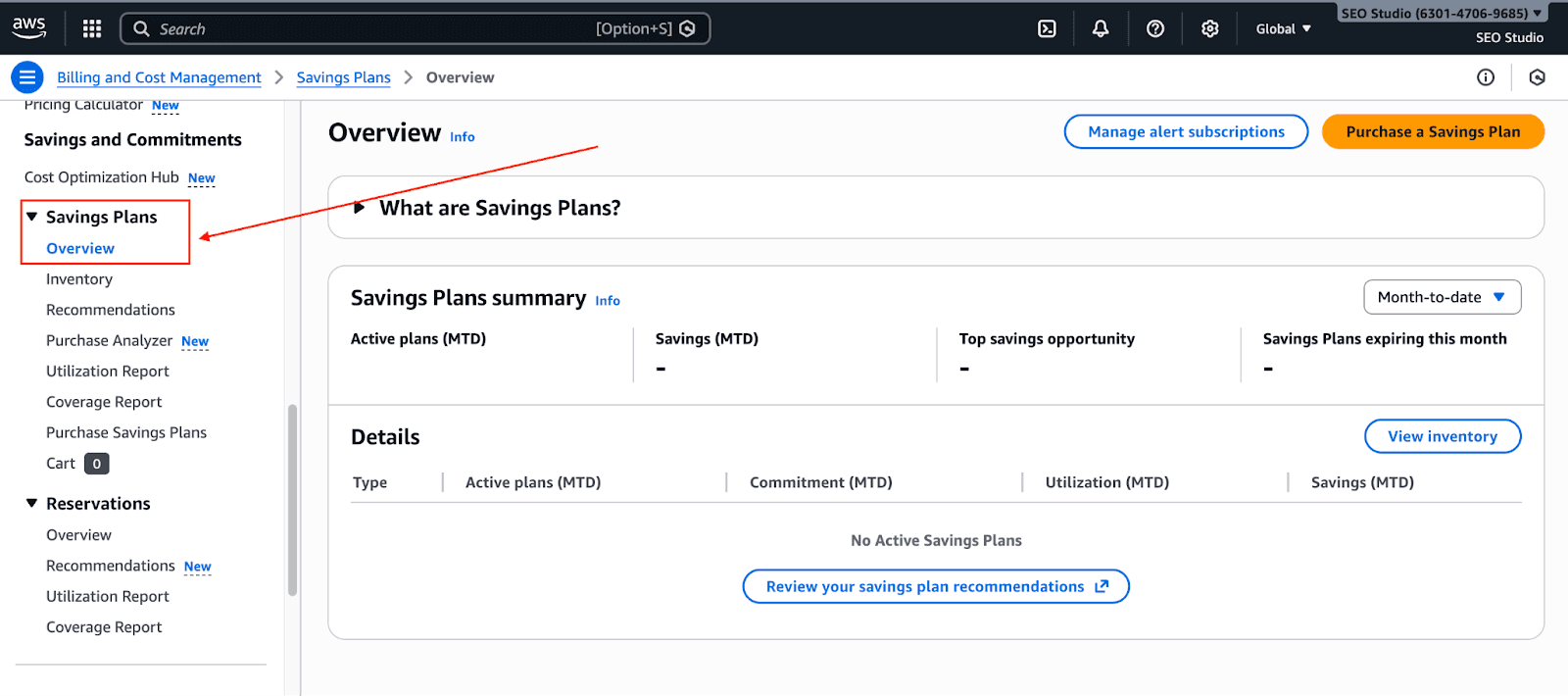
Check Recommendations: AWS provides a recommendation engine that reviews your past usage (7, 30, 60 days or custom) and recommends a value for your hourly commitment. Keep in mind that it is better to slightly under-commit and reach a 100% utilization rather than over-committing and wasting money.
Use the Purchase Analyzer: The Savings Plans Purchase Analyzer gives a more detailed overview and allows for purchase simulations. You can ask something like, "If I commit to $5/hour, how much could I have saved in the previous month?"
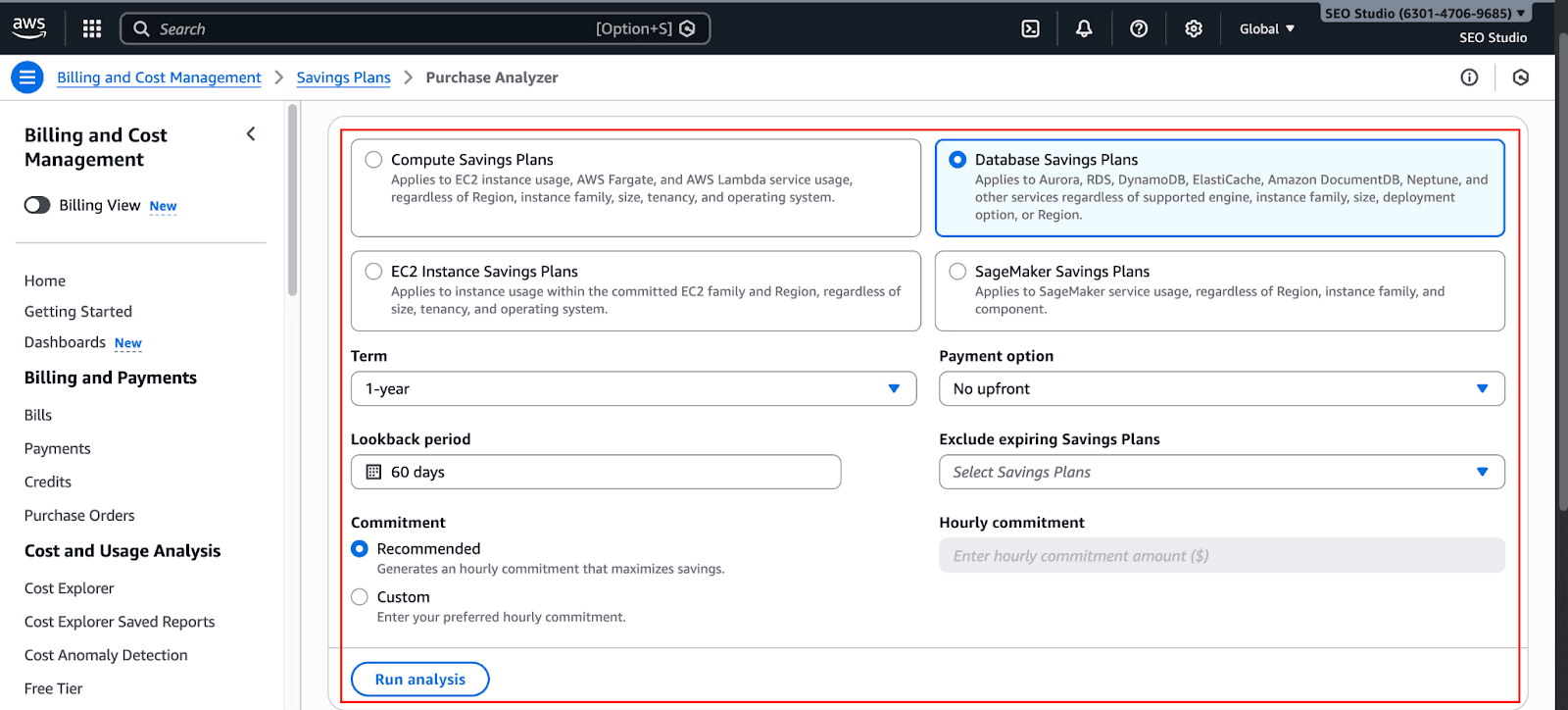
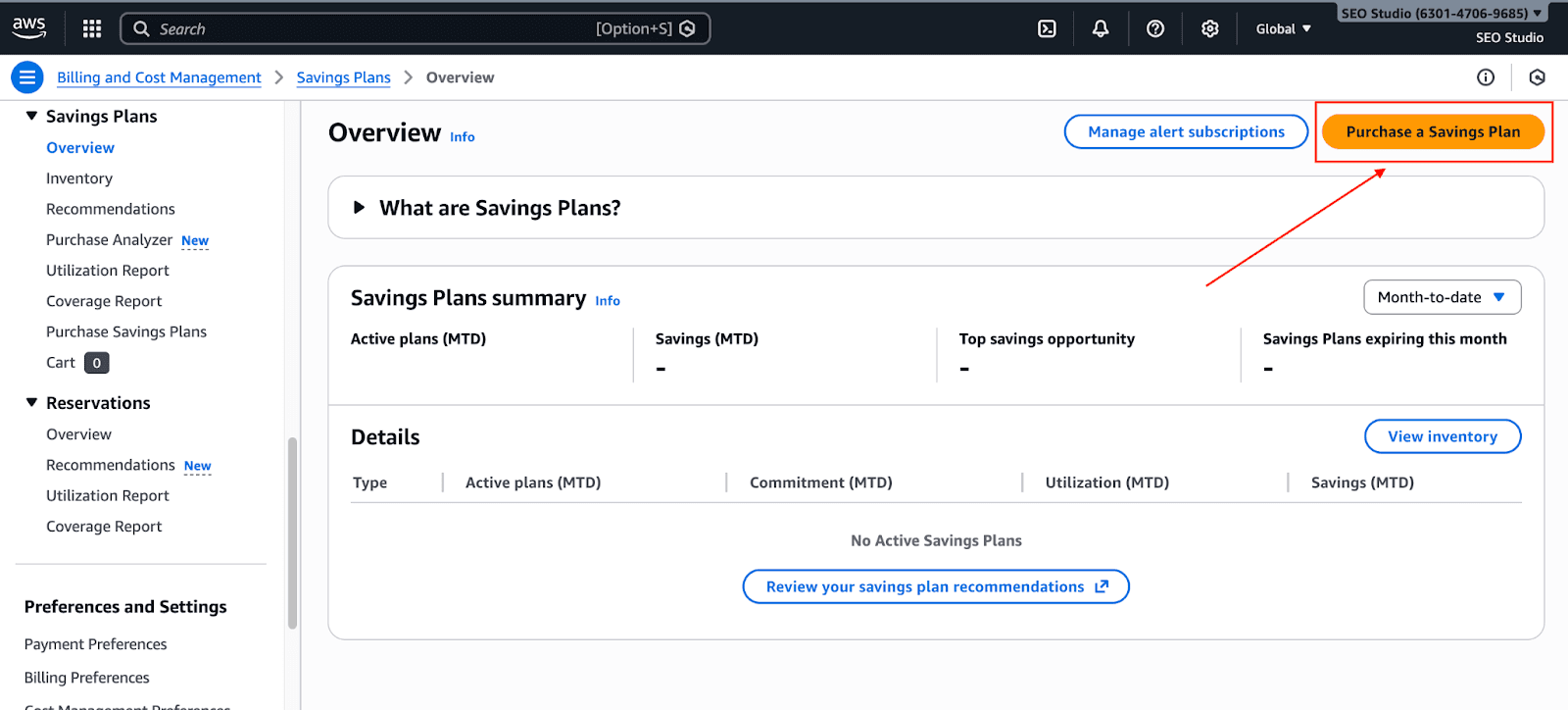
Purchase: You can select "Database Savings Plans," choose your 1-year term, and enter your hourly commitment.
Best Practices for AWS Cost Optimization
To get the most out of this new model, treat it as part of a broader strategy, rather than treating it as a quick fix.
The "Laddering" Strategy: Rather than purchasing a single, large plan that aims to cover 100% of your usage, consider purchasing smaller pieces that build on top of one another over time. For example, cover 50% of your usage at this time. In three months, evaluate your usage and purchase another piece that covers the gap. This helps avoid overcommitting.
Monitor Utilization: Your goal is 100% utilization (meaning every dollar you've committed to is being used). If utilization is below 100%, you are paying for capacity that you are not using. Make sure to check your Savings Plans Utilization Report within Cost Explorer on a monthly basis.
Modernize First (or Soon): Because the plans only cover generation 7+ instances, you are encouraged to use this as a business case to modernize your infrastructure. With the newer hardware, you will gain better performance per dollar and also become eligible for the discount.
Automated AWS Cost Optimization with Pump
AWS Database Savings Plans can save you money; however, they require constant attention. Your usage can shift, new databases can be added, and traffic can spike. What once was an efficient commitment can quickly turn into an inefficient money sink. This is where many teams fall short with Savings Plans.
Without any added manual work, we solve this problem by operationalizing your cost optimization strategy. Our intelligent model monitors your cloud usage across supported services and manages, on autopilot, your Savings Plans and Reserved Instances.
Pump ensures your active commitments match your real-time usage by:
Analyzing your spend across all supported services on a regular basis.
Detecting under- or over-commitment to Savings Plans.
Adjusting your Savings Plan commitments as your workloads shift to a more steady state.
Reducing the need for constant forecasting, dashboards, and manual reviews.
Best of all, you can use it completely free. See how much you can save and try it out.
Conclusion
The introduction of AWS Database Savings Plans is a win for agility. While they may not offer the deepest discounts compared to 3-year Reserved Instances, they solve the biggest headache in cloud cost management: fear of commitment.
By removing the penalty for changing engines or regions, AWS has made it easier to modernize your stack. You can now move to Aurora Serverless or migrate to a new region without seeing your reservations go to waste.
I hope this helped you understand everything you wanted to learn about Database Savings Plans!



