

Managing APIs at scale goes beyond just understanding the technology within the APIs; it also requires skilled management at an economical level. Despite the fact that Google Apigee is one of the most dominant API management systems in the market, trying to understand its price structure is like trying to figure out a puzzle. Whether you are a startup trying to figure out a couple of APIs or an enterprise with billions of calls a month, it is critical to understand what you will pay for and how to minimize the possible expenses.
In this article, I will break down everything you need to know about Apigee pricing. We'll explore the different pricing tiers, compare costs with competitors, and share actionable strategies to reduce your API management expenses. By the end, you will understand your investment and the cost-benefit relation, and whether Apigee aligns with your company's budget.
What is Google Apigee?

Google Apigee is an advanced platform for API management within the Google Cloud service. It allows companies to create, secure, deploy, and manage APIs with enterprise-grade capabilities. Apigee allows companies to manage an API gateway by controlling all API microservices traffic at a single point, while also providing advanced analytics access, developer portals, and API monetization.
The platform provides three main deployment options:
Cloud: A complete service under the management of Google Cloud.
Hybrid: API retro engines are under the user's control, while the management module is in the Cloud.
On-Premises: The user has complete control of the entire infrastructure, the legacy model.
Apigee has tailored different editions with business needs in sight - an Evaluation edition with a free trial, followed by Standard, Enterprise, Enterprise Plus, and a flexible subscription plan with pay-as-you-go options.
Why Companies Choose Apigee
Companies choose Apigee to get a powerful API management system that is flexible to their needs. The platform specializes in API management, offering proficient and secure API management with flexible deployment in hybrid and multicloud architectures.
Key advantages include:
Built-in security: Apigee managed OAuth, API key, and Threat protection JWT systems all in an advanced engineering effort, complex internal builds.
Scalability without infrastructure headaches: The platform scales automatically when traffic increases, removing the need to manually set up and maintain gateway nodes.
Advanced analytics: Analyze API performance, discover bottlenecks, and track usage patterns with extensive monitoring and reporting functionality.
Compared to open-source alternatives like Kong, Tyk, or NGINX, Apigee gives a more complete, out-of-the-box solution. Open source tools are flexible, but they need a lot of initial customization and ongoing maintenance. Operationally, Apigee provides enterprise-grade features with none of the added complexity.
Apigee Pricing Overview
Apigee offers two models for payment: Pay-as-you-go and Subscription. Each one depends on API requests, the booked environments, and the features turned on.
Core Cost Drivers
Knowing what influences your Apigee costs might help you plan your budget more accurately:
API request volumes: Each API proxy receives calls, some of which might be session-establishing.
Environment types: Base, Intermediate, and Comprehensive environments have different price points and opportunities.
Proxy type: Standard API proxies are significantly cheaper than Extensible API proxies.
Regional deployments: Each region of your deployments adds to the monthly costs.
Add-ons: Advanced API Security and API Analytics are examples of add-on features that increase the costs.
Apigee Pricing Editions
Edition | Best For | Key Features | Pricing Model |
Evaluation | Testing and proof-of-concept | Full platform access for 60 days | Free |
Pay-as-you-go | Startups and variable workloads | Flexible scaling, no commitment | Usage-based |
Standard | Growing API programs | Up to 1.25B calls, 3 environments | Subscription |
Enterprise | High-volume operations | Up to 7.5B calls, 6 environments | Subscription |
Enterprise Plus | API-first businesses | Up to 75B calls, 12 environments | Subscription |
Detailed Cost Breakdown
Let's examine the specific costs you'll encounter with Apigee's pay-as-you-go model.
API Call Pricing
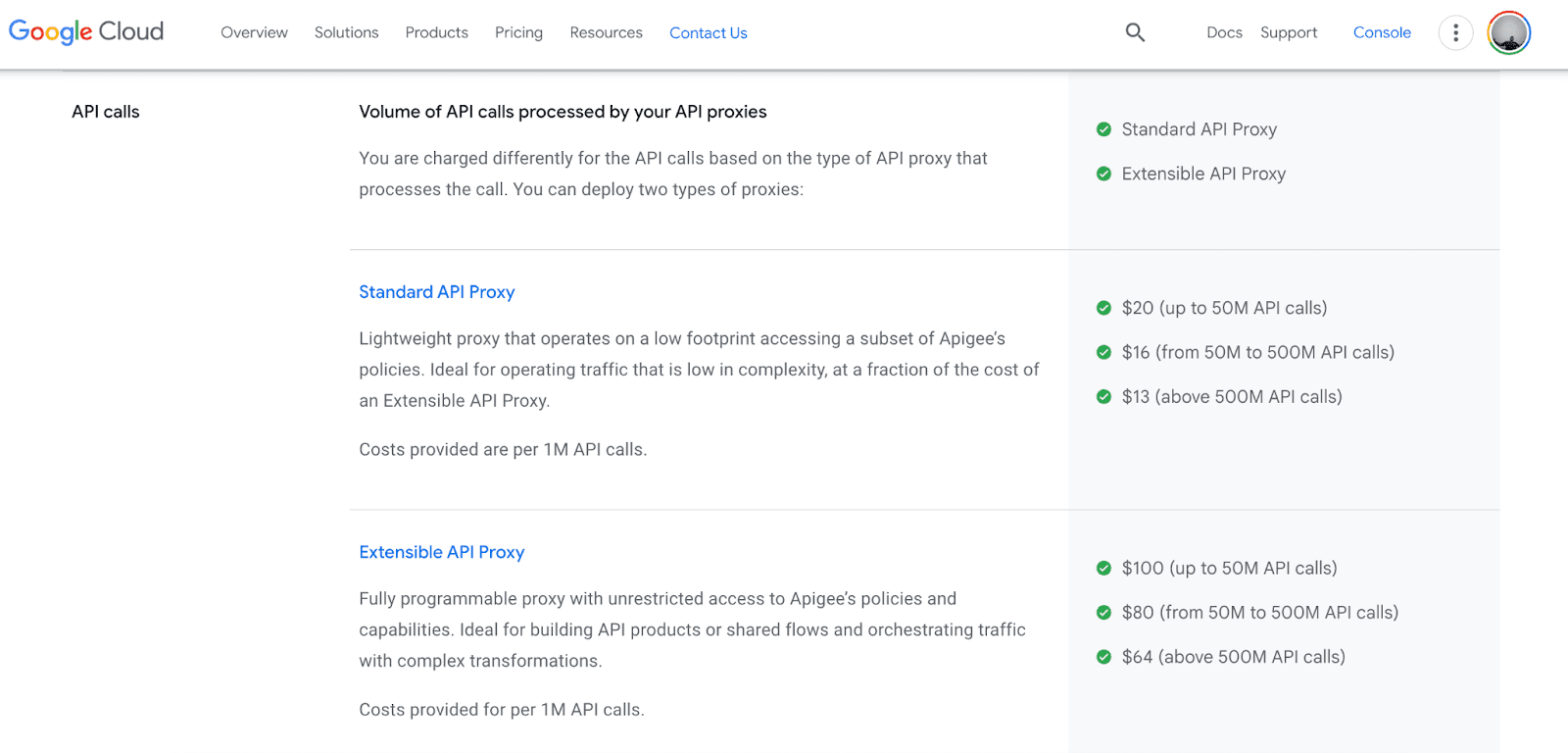
Standard API Proxy:
Up to 50M calls: $20 per million calls
50M to 500M calls: $16 per million calls
Above 500M calls: $13 per million calls
Extensible API Proxy:
Up to 50M calls: $100 per million calls
50M to 500M calls: $80 per million calls
Above 500M calls: $64 per million calls
Environment Costs (Per Month, Per Region)
Base Environment ($365/month):
Up to 50 queries per second
99% SLA
Deploy up to 5 environments per project
20 API proxy deployments included
Standard proxies only
Intermediate Environment ($1,460/month):
Up to 100 queries per second
99% SLA
Deploy up to 5 environments per project
50 proxy deployments included
Standard or Extensible proxies
Comprehensive Environment ($3,431/month):
Autoscaled QPS
99.9% SLA (single region) or 99.99% (multi-region)
Up to 85 environments per project
100 proxy deployments included
Additional deployments: $0.04/hour/region
Example Cost Calculation
Let's say you're processing 10 million Standard API calls per month with one Intermediate environment deployed in a single region:
Environment cost: $1,460
API calls: 10M × $0.00002 = $200
Network and payload: ~$50 (estimated)
Total monthly cost: ~$1,710
For 100 million calls using a Comprehensive environment with API Analytics:
Environment cost: $3,431
Standard API calls (25M): 25M × $0.00002 = $500
Extensible API calls (75M): (50M × $0.0001) + (25M × $0.00008) = $7,000
API Analytics add-on: 100M × $0.00002 = $2,000
Network traffic: ~$216
Total monthly cost: ~$13,147
Apigee Pricing Comparison
How does Apigee stack up against other API management platforms?
Platform | Starting Price | Pricing Model | Best For |
Apigee | $365/month (Base) | Environment + API calls | Enterprise scale, hybrid deployment |
AWS API Gateway | $3.50 per million requests | Per request | AWS-native applications |
Azure API Management | $0.04/hour (Developer tier) | Tier-based | Microsoft ecosystem integration |
Kong Enterprise | Custom pricing | Subscription | Self-hosted, plugin ecosystem |
AWS API Gateway is functional for companies that use the whole AWS ecosystem. Although it charges $3.50 for every million requests, it lacks the advanced capabilities Apigee offers, such as a developer portal and analytics.
Amazing Azure API Management from $50 per month for the developer tiers, which is very competitive; however, Azure capabilities are limited for multicloud and hybrid opportunities, which Apigee excels at.
Kong Enterprise’s edge lies in flexibility and open-source foundations, but Kong Enterprise still needs more focused management on infrastructure than the fully managed service offered by Apigee.
Cost Optimization & Savings Tips
Cutting your Apigee costs doesn’t mean losing functionality. Here’s how you can optimize your expenses:
Set Maximum Gateway Node Values: Always keep limits on nodes so that possible increases in costs during surges in traffic do not catch you by surprise. This small fix is great for your budget while also saving performance.
Right-Size Your Minimum Nodes: Over-provisioning minimum nodes wastes your money. Keep an eye on your actual usage with Cloud Monitoring and adjust your minimum node settings to match your real traffic needs.
Automate Node Scaling: Avoid setting nodes yourself before traffic increases. Use Apigee's management API to set nodes to adjust on your schedule. Make sure your system is not over-provisioned during non-peak hours.
Secure at the Edge: Block incoming traffic on Apigee at the source. Use the Web Application and API Protection solution by Google Cloud together with Cloud Armor and ReCAPTCHA to catch these threats early to avoid incurring costs.
Distribute Across Regions: If you are maintaining more than four minimum nodes, distribute these regionally rather than concentrating in a single area. This helps you maintain system uptime and saves costs. Just remember - each region has to have at least two nodes.
Choose the Right Proxy Type: Did you know Standard API proxies are five times cheaper than Extensible ones? Start with Standard proxies and migrate to Extensible only if advanced customization is necessary.
Use Google Cloud Discounts: Google Cloud’s committed use discounts are available for long-term, consistent usage. Subscription pricing would save you a considerable amount compared to pay-as-you-go.
Conclusion
The flexibility in wrapper pricing comes from the enterprise-grade features it boasts of. Apart from the restless pricing models, which accommodate all types of companies, it also boasts a pay-as-you-go feature, which comes in handy for the smaller companies. It boasts impeccable security, reduced engineering workloads, and all-around better performance for businesses with 50 million API calls a month, which makes it worth the investment.
Use the Google Cloud Pricing Calculator to start estimating pricing, then use the 60-day evaluation of Apigee to see if the use cases you have tested fit the platform. During this period, it is necessary to analyze the platform’s usage to see which is more budget-friendly and which aligns with the predicted growth.
I also hope that this pricing guide has made pricing for wrappers easier to understand. Ready to see how it fits your budget? Sign up for the free trial today and experience enterprise API management in action!
Join Pump for Free
If you are an early-stage startup that wants to save on cloud costs, use this opportunity. If you are a start-up business owner who wants to cut down the cost of using the cloud, then this is your chance. Pump helps you save up to 60% in cloud costs, and the best thing about it is that it is absolutely free!
Pump provides personalized solutions that allow you to effectively manage and optimize your Azure, GCP and AWS spending. Take complete control over your cloud expenses and ensure that you get the most from what you have invested. Who would pay more when we can save better?
Are you ready to take control of your cloud expenses?



