

Many developers and small companies pass on cloud hosting because of the costly learning curve and varying monthly expenses. Most people need uncomplicated and affordable options rather than trying to manage a complex sea of cloud infrastructure.
If you want something as dependable as AWS but without the full-on cloud hosting headaches, you are in luck. Amazon Lightsail serves as a more simplified version of AWS cloud hosting, giving you a more seamless experience to launch and manage web applications. Amazon Lightsail puts together the necessary materials to get you started for a single, flat-rate monthly bill.
In this article, I will explain Amazon Lightsail pricing, features, and use cases to help you decide if this streamlined service is the right fit for your next project.
What is Amazon Lightsail?
Amazon Lightsail is a cloud service that is user-friendly, offering low, predictable monthly pricing on services like virtual private servers, containers, databases, and networking. It acts as a simplified entry point before diving into more complex services within AWS.
For example, you can consider Amazon EC2 to be a hardware store where you can buy separate components to build a house from the ground up. In contrast, Amazon Lightsail is more like a rented furnished apartment. You get compute power, memory, SSD storage, a data transfer allowance, and everything else you need, all bundled together. You can move in and get started immediately.
Amazon Lightsail is best for:
Developers need a quick sandbox environment.
Small-to-medium businesses launching corporate websites.
Startups deploying Minimum Viable Products (MVPs).
Bloggers and creators who want dependable WordPress hosting.
How Amazon Lightsail Works
Lightsail removes the heavy lifting from cloud computing. Instead of spending time configuring intricate VPCs or refining security policies at the packet level, you deal with an uncomplicated control panel designed to get your project online as quickly as possible.
However, AWS global infrastructure provides the same level of security and reliability as the largest enterprise applications. You choose the resources you want, and AWS manages your infrastructure.
Lightsail has preconfigured environments, which make your setup even more simple. Instead of installing an OS and configuring your software, you can launch a preconfigured server.
Here is the typical workflow to get your application running:
Launch an instance: Choose the operating system and software blueprint you want.
Configure your app: Secure your server, and configure your app to your custom domain.
Deploy: Push your code or publish your website content.
Scale: As your audience grows, it becomes necessary to revise your plan. You can attach a database or scale to a larger plan.
Key Features of Amazon Lightsail
Lightsail packs a serious punch despite its simplicity. It offers a comprehensive suite of tools to support your application from launch to scale.
Compute (Instances)
Lightsail serves up reliable virtual private servers with your choice of Linux/Unix or Windows operating systems. With click-to-launch blueprints, you can deploy stacks (like LAMP, Node.js, or MEAN) and apps (like WordPress, Magento, or GitLab) in an instant.
Managed Databases
Managing backups and updates to databases, which can keep you from writing code, is no longer a hassle. Lightsail has you covered with managed databases for MySQL and PostgreSQL. With that service, patching, backups, and security are automatically handled, leaving you to focus on your app
Containers
If you are using Docker to create modern apps, the Lightsail Container Service is just what you need. It allows you to deploy and run containerized apps securely over the internet in a few clicks, removing the need to deal with complicated container management.
Networking
Lightsail simplifies network management. You can assign a static IP address to your server, meaning its identity never changes. It also comes with free DNS management and an easily configurable load balancer (at just $18/month) to distribute traffic to different servers when your app grows.
Storage
Each instance comes with SSD storage that is highly available for you. You can attach Block Storage if you need additional storage, with prices starting at $0.10 per GB. For static assets, such as images and videos, Lightsail Object Storage is an inexpensive option to store and access files globally.
Content Delivery Network
Lightsail has a built-in CDN distribution to provide your website with instantaneous load times, regardless of where your users are located. This feature is supported by Amazon CloudFront and caches static content to proxy servers globally, which significantly decreases latency.
Amazon Lightsail Pricing Explained
When evaluating cloud hosting, cost predictability is an important consideration. Lightsail pricing remains highly transparent, using a flat monthly model where compute, storage, and data transfer are bundled into a single plan. This reduces exposure to unexpected cost variability compared to usage-based cloud services.
Instance Pricing
Here is a look at the entry-level Linux/Unix plans featuring public IPv4 addresses. (Note: IPv6-only plans are even cheaper, starting at just $3.50 per month).
Plan | Memory | vCPUs | SSD Storage | Data Transfer | Monthly Cost |
Basic | 512 MB | 2 | 20 GB | 1 TB | $5.00 |
Standard | 1 GB | 2 | 40 GB | 2 TB | $7.00 |
Medium | 2 GB | 2 | 60 GB | 3 TB | $12.00 |
Windows-based plans start at approximately $9.50 per month due to licensing costs.
Managed Database Pricing
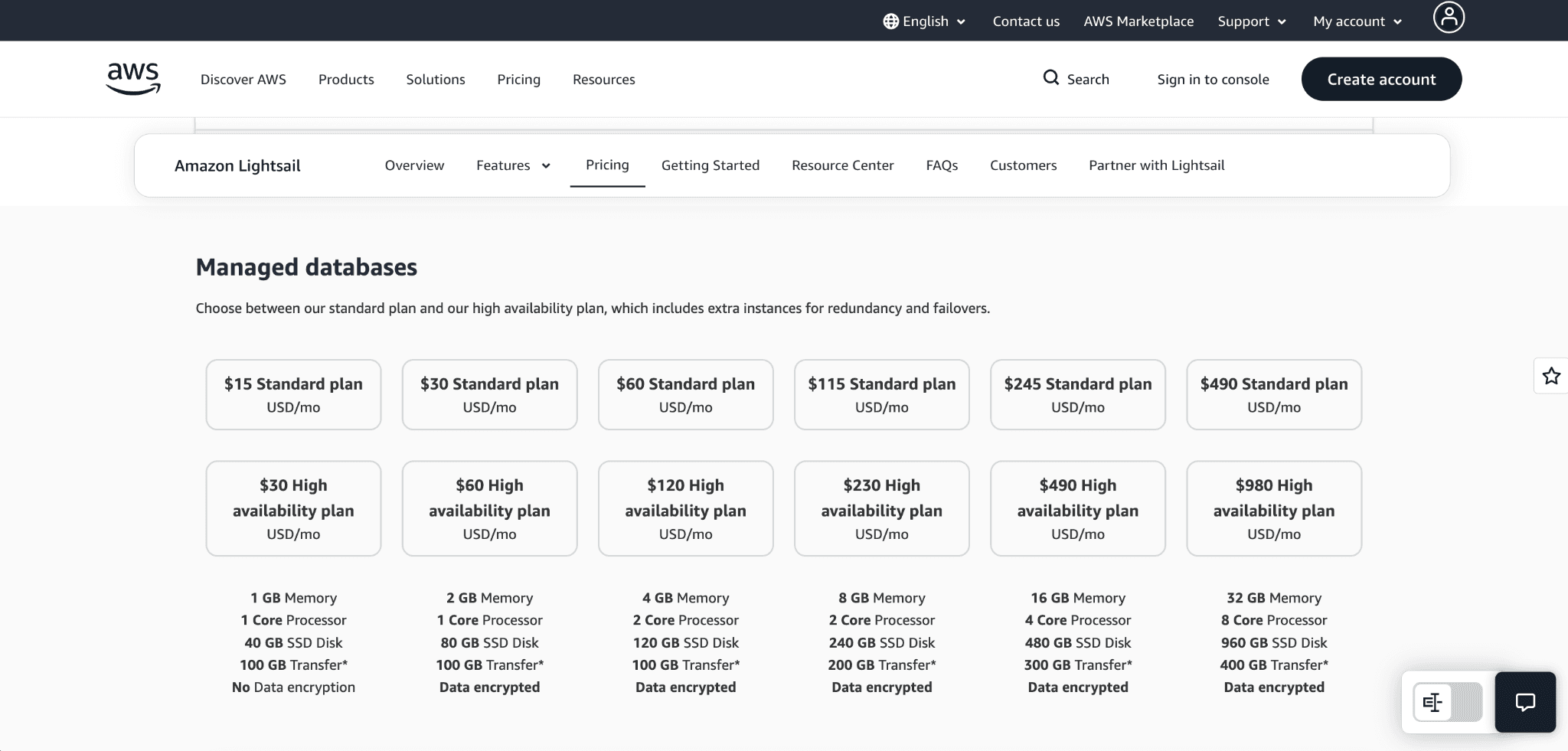
You can choose between a Standard plan for typical workloads or a High Availability (HA) plan that creates a standby database in a separate Availability Zone for redundancy.
Standard Plan (1 GB RAM, 40 GB Storage): $15.00/month
High Availability Plan (1 GB RAM, 40 GB Storage): $30.00/month
Additional Costs
While your core server cost is fixed, you might eventually need extra resources:
Load Balancers: $18.00/month (includes free SSL/TLS certificate management).
Block Storage: $0.10 per allocated GB per month.
CDN Distributions: Free for the first year (up to 50 GB/month), then usage-based pricing starting around $2.50/month
AWS Free Tier Offerings
AWS provides a limited free tier for Lightsail:
3 months free on select instance plans
3 months free on managed databases
3 months free on container services
1 year free CDN usage (up to limits)
5 GB object storage free for one year
Lightsail Pricing vs EC2
With AWS EC2, you pay granular, usage-based rates for compute time, storage volumes, and outbound data transfer. This often leads to unpredictable bills if traffic spikes. Lightsail bundles these costs together. You only pay overage fees for data transfer if you exceed your generous monthly allowance (which starts at a massive 1 TB).
Best Use Cases for Amazon Lightsail
Understanding where this platform excels will help you make an informed infrastructure choice.
Strong Use Cases
WordPress Hosting: With the one-click WordPress blueprint, you can quickly launch a production-ready business website or blog without the need to manage underlying infrastructure.
SaaS MVPs: Founders can implement applications (e.g., Node.js, Django) with little to no DevOps, making Lightsail ideal for early-stage developments.
Developer Testing Environments: Lightsail allows developers to establish cost-effective isolated spaces for testing, carry out experiments, and dispose of these spaces when no longer required.
Small Business Websites: Lightsail is a no-fuss, simple solution for businesses to create and host functional, reliable websites that won’t break the budget and do not require much to monitor.
APIs & Backend Services: For small to medium-sized workloads, Lightsail supports backend APIs and services.
When NOT to Use Lightsail
High-Scale Distributed Systems: You will need EC2 if you are looking for hundreds of servers that need to dynamically auto-scale due to a set of traffic that is changing minute by minute.
Compliance-Heavy Workloads: For workloads that need strict rules and control over networks, you will need to use AWS VPC, IAM, and EC2 services together with other AWS services to create detailed network divisions and custom routes.
Advanced DevOps Setups: Lightsail’s container and deployment capabilities are limited, which will make it less conducive to those working with Kubernetes, sophisticated CI/CD pipelines, or infrastructure-as-code at scale.
Is Lightsail Right for You?
Lightsail may be a suitable choice if:
You like flat, clear monthly pricing.
You want a more streamlined management experience.
You are launching just one app or a simple multi-tier setup.
Your workload has no sophisticated scaling or customized infrastructure needs.
Pros and Cons of Amazon Lightsail
Let's take a look at both ends of the spectrum of what the platform does well and what the platform does not do well.
Pros
Simple Setup: Get a server running just minutes after you create an account.
Predictable Pricing: Because you have bundled resources for each account, you have a clear idea of the expected cost of resources.
Fast Deployment: Preconfigured blueprints take the place of the installation of any other software you need.
AWS Integration: You can easily connect your Lightsail server to other AWS services like S3 via VPC peering.
Cons
Limited Scalability: Scaling is not straightforward. To scale up, you have to take a snapshot of the server and run a larger one.
Less Flexibility vs. EC2: You have less choice of instances (no instances for specialized GPU or heavy compute).
Fewer Enterprise Features: You have less control over the traditional structures of AWS.
Getting Started with Amazon Lightsail
Ready to launch your first project? The setup process is remarkably fluid.
Create an AWS account.
Go to Lightsail. Just search for "Lightsail" in the AWS services menu to open it.
Click the "Create instance" button.
Choose a Blueprint: Select your platform (Linux or Windows) and choose an app (like WordPress) or a base OS (like Ubuntu).
Select Your Plan: Pick the pricing tier that matches your resource needs.
Click create.
Time to deploy: less than 10 minutes. Your new server will boot up, and you can connect directly through the browser-based SSH terminal to begin working.
Conclusion
Amazon Lightsail takes the guesswork out of cloud hosting because it has a clean interface and many pre-installed blueprints. Lightsail has a simple flat pricing model and allows you to focus on your product instead of your infrastructure. Lightsail is great for small and medium workloads.
Here's the best part: you'll never be completely locked in. With the development of your application and the changes to your technical needs, there is a built-in migration path for AWS Lightsail instances directly to Amazon EC2.
Go ahead and sign up for an AWS account now, use the free tier, and see for yourself how easy cloud hosting really is!
Join Pump for Free
If you are an early-stage startup that wants to save on cloud costs, use this opportunity. If you are a start-up business owner who wants to cut down the cost of using the cloud, then this is your chance. Pump helps you save up to 60% in cloud costs, and the best thing about it is that it is absolutely free!
Pump provides personalized solutions that allow you to effectively manage and optimize your Azure, GCP, and AWS spending. Take complete control over your cloud expenses and ensure that you get the most from what you have invested. Who would pay more when we can save better?
Are you ready to take control of your cloud expenses?



