

AI agents are rapidly becoming the driving force behind modern business automation. They are more than simple chatbots; AI agents can autonomously reason, use multiple digital tools, and perform complex workflows. Companies trying to harness the power of AI agents for automation face the challenge of building, deploying, and managing AI agents at scale.
Amazon Bedrock AgentCore, a new framework from AWS, addresses this challenge. AgentCore provides managed services for simplifying the end-to-end lifecycle of agents. If you are a developer or business leader interested in the potential of agentic AI, you have most likely heard of AgentCore. But what exactly is it, and how does it fit into your AI strategy?
In this article, I'll walk you through everything you need to know about Amazon Bedrock AgentCore. We will cover the key features of the service, explain how it is priced, discuss the service architecture, and provide a step-by-step guide to the creation of AI agents.
What Is Amazon Bedrock AgentCore?
Amazon Bedrock AgentCore provides fully managed, scalable, and operational AI agents using digital tools. Bedrock AgentCore provides the core infrastructure, and you can focus on the agent’s purpose and logic, while Bedrock takes care of orchestration, security, and other aspects of automation.
Located in the larger Amazon Bedrock framework, which allows for the use of foundational models, knowledge repositories, and other AI resources, AgentCore integrates systems so that developers, product teams, and businesses can build advanced, secure, multi-system-interfacing agents.
AgentCore is particularly relevant because it allows the development of highly capable AI agents without the necessity of complete in-house construction, and, in a world where agentic AI is ubiquitous, it is pertinent, particularly for companies.
Core Features of Amazon Bedrock AgentCore
The core of this module describes how the agent is built to support enterprise-grade functionality. The following is an overview of AgentCore's most important features:
Managed Agent Orchestration: Consider an agent to be a manager of a project. Once an agent gets a request, the first step is to decompose it into smaller and simpler units. Then, the agent decides in the sequence to perform and execute the units of work. AgentCore, without supervision, solves this reasoning problem and takes over the entire complex workflow.
Multi-Model & Multi-Agent Support: You aren't locked into a single AI model. AgentCore lets you mix and match various foundational models, such as Claude (Anthropic), Llama (Meta), or Titan (Amazon), all within the same agent. This is beneficial in using the most appropriate model to perform a task, for instance, one model for creative text and another for analysis of the data.
Secure Tool and API Integration: One of the most important features for an agent to be effective is their ability to communicate with other systems. AgentCore enables agents to connect with external APIs, AWS Lambda Functions, and internal databases, creating a safe conduit for agents to leverage existing services as tools.
Memory and Knowledge Integration: With no context, an agent would be ineffective. AgentCore integrates with Amazon Knowledge Bases and allows your agent to access your company's information. This is done through Retrieval-Augmented Generation. It also has short-term memory to remember the details of the conversation and functions long-term to draw knowledge from past conversations.
Guardrails, Safety, and Governance: Control is very much needed in an enterprise environment. AgentCore has strong governance capabilities and allows for creating rules on what an agent can and cannot do. You can set these rules using free text and make sure your agents work within their safe boundaries and task compliance.
Observability and Monitoring: Once your agent is live, it is essential to understand how it is performing. AgentCore contains performance and issue debugging logs, traces, and metrics. It also has systems for quality assurance of your agent based on various parameters, such as correctness, helpfulness, and safety, to name a few.
How Amazon Bedrock AgentCore Works
Understanding AgentCore systems and processes works best when looking at the workflow of a specific task. The workflow consists of reasoning and action. It is a recursive process.
Agent Workflow Lifecycle
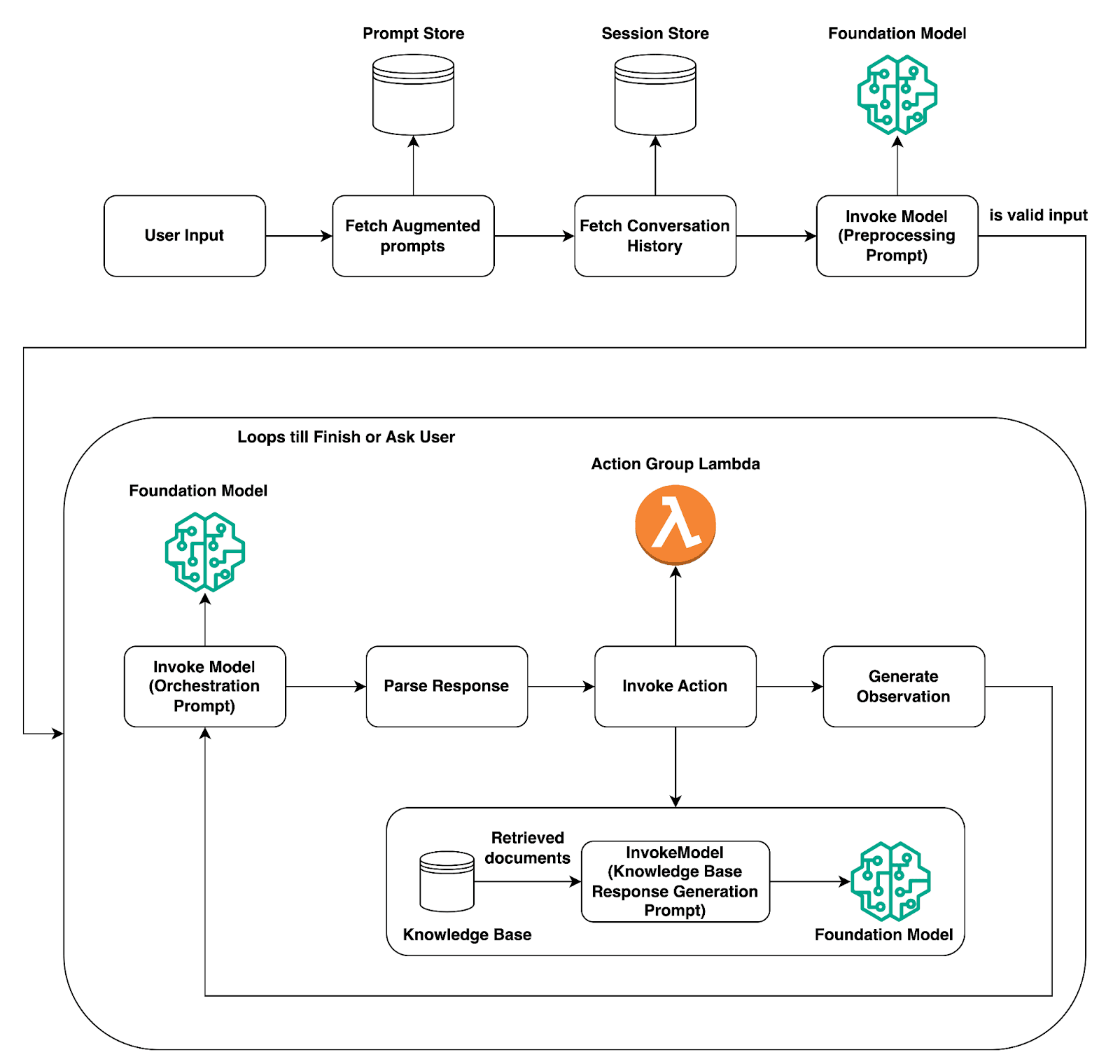
Image Source: AWS
When an agent is assigned a user request, the agent moves through a series of steps coordinated by Bedrock:
Input & Pre-processing: The agent first receives user input in the form of data and contextualises it.
Orchestration (Planning & Reasoning): With the help of a foundation model, the agent devises a plan and constructs a rationale to address the various tasks step by step.
Tool Use or Knowledge Query: The agent then decides, based on the plan, whether to invoke a tool (like an API) or use a knowledge base for more information.
Observation & Output Generation: The agent action receives an observation or output from the system and determines the next action by integrating the observation data. The loop repeats until the agent fulfils the objectives of the task and builds the final output for a user.
Post-processing: The agent receives the final output, formats it, and sends it to the user.
For example, customer support bots are often asked to "check the status of my recent order, then send me the tracking link." They would first plan to use one tool to search for the order, then use a different tool to access the tracking information, and then finish with the response. AgentCore auto-orchestrates the entire sequence.
Deep Dive: Amazon Bedrock AgentCore Pricing Structure
One of the most frequently asked questions among developers and enterprises is “How much does it actually cost?” Amazon Bedrock AgentCore pricing operates on a modular consumption basis, whereby a customer pays based on usage. We provide the most precise and complete description of the components of pricing below.
Billing Components
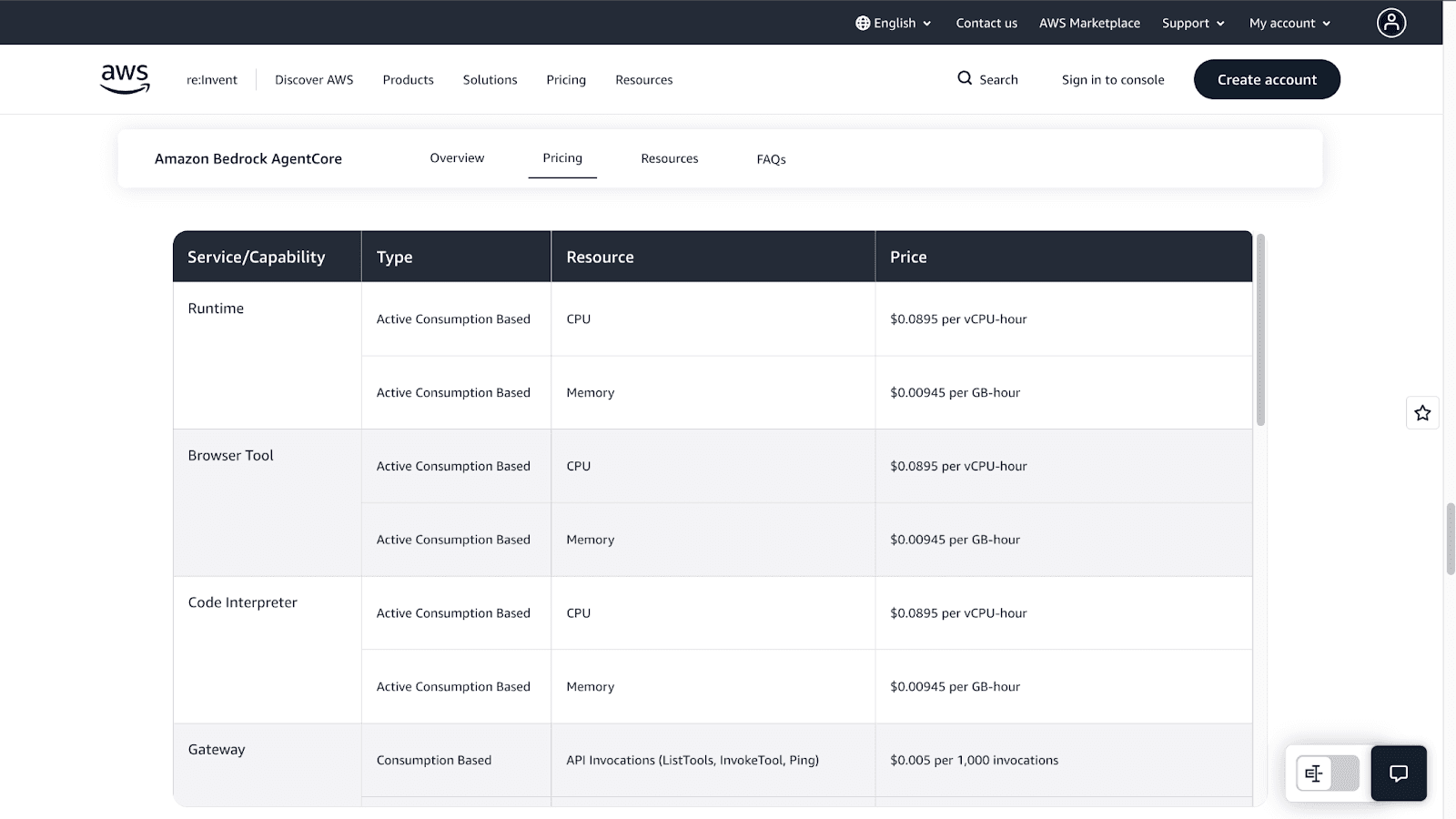
Total cost is an aggregate of several systems, depending on which module you engage with. Let's break it down:
Model Inference Costs: You will incur costs from Bedrock based on the foundation models consumed, which are determined by the input and output tokens.
AgentCore Runtime: The pricing is based exclusively on consumed resources. The costs that accrue from CPU usage occur only when the agent is processing and are not billed during idle periods that occur when waiting for an API response, a model response, and the like.
- CPU: $0.0895 per vCPU-hour (only billed for actual usage)
- Memory: $0.00945 per GB-hour (minimum 128 MB)
AgentCore Gateway: This is priced per 1,000 API calls.
- API Invocation: $0.005 per 1,000 calls
- Search API: $0.025 per 1,000 calls
- Tool Indexing: $0.02 per 100 tools indexed per month
AgentCore Memory: You are billed for the costs incurred from creating and retrieving memory records.
- Short-Term Memory: $0.25 per 1,000 events
- Long-Term Memory Storage: $0.75 per 1,000 events per month
- Memory Retrieval: $0.50 per 1,000 retrievals
Knowledge Retrieval Costs: If your agent has an integration with a knowledge base, Amazon Bedrock RAG retrieval costs apply.
Tool-Related Charges: Costs related to the tools your agent uses, such as AWS Lambda execution, third-party APIs, and others, are charged separately.
Example Pricing Calculation
Consider that you are managing a small project wherein the agent serves 10,000 requests for the month. Each request takes a small amount of time, uses a small number of tools, and uses a cost-effective base model. Here’s how the pricing breaks down:
A. Model Inference Costs
Each interaction uses 300 input tokens and 200 output tokens.
Total tokens per month:
- Input: 3,000,000 tokens ($0.000035 per 1,000 tokens = $0.105)
- Output: 2,000,000 tokens ($0.00014 per 1,000 tokens = $0.28)
Model Inference Total: $0.39/month (extremely affordable for this scale).
B. AgentCore Runtime Costs
Each session uses 0.03 vCPU-hours and 0.02 GB-hours of memory.
Cost for 10,000 sessions:
- CPU: 300 vCPU-hours × $0.0895 = $26.85
- Memory: 200 GB-hours × $0.00945 = $1.89
Runtime Total: $28.74/month.
C. Gateway/API Tool Invocation Costs
With 1 API call per session (10,000 calls total):
Cost: 10,000 × $0.005 per 1,000 calls = $0.05/month.
D. Memory Costs
For memory events:
- 20,000 memory events ($0.25 per 1,000 events = $5.00).
- 2,000 occasional retrievals ($0.50 per 1,000 = $1.00).
Memory Total: $6.00/month.
Grand Total: $35.18.
This represents a realistic cost for a lightweight workload typical of a prototype, internal assistant, or early-stage app. While at this scale, model inference is quite inexpensive, the cost is primarily incurred because of the runtime and memory usage. For larger projects or high-tier models, model inference costs can become the most significant factor.
Ways to Optimize Pricing
Model Selection: Use cheaper models like Amazon Titan and the smaller Llama models for basic tasks.
Prompt Engineering: Optimize prompts to avoid issuing excessive tokens to reduce costs. System prompts, memory summarization, and token-efficient formatting can improve the efficiency of your interactions.
Caching: Use caching to reduce repeated queries of the API and knowledge base for frequently accessed data. This can improve numerous applications’ Bedrock retrieval/query costs by about 30-60%.
AgentCore Architecture
AgentCore solutions utilize a multi-layered architecture to allow separation of concerns for greater scalability:
Agent Layer: This layer contains the core logic of your agent, which is running on AgentCore Runtime.
Reasoning Engine: The foundation model communicating the agent’s decision-making abilities.
Tool & Model Routers: These components choose which tool to apply or which model to call for a particular step.
Knowledge & Memory Store: The RAG knowledge base and the agent’s short-term and long-term memory.
Integrations: The AgentCore Gateway’s secure AWS services and external API connections.
Pros and Cons of Using AgentCore
Pros | Cons |
Enterprise-Grade Reliability | Costs Can Scale Quickly |
Deep AWS Integrations | Tied to the AWS Ecosystem |
Built-in Security & Governance | Requires Some AWS Knowledge |
Scalability & Monitoring | Advanced Customization Can Be Complex |
No Need to Build Orchestration |
How to Build an Agent With AgentCore: A Step-by-Step Guide
Are you ready for a challenge? Here is a quick guide on how to build your first agent:
Go to the Bedrock AgentCore and make sure you have the necessary permissions to access Amazon Bedrock and its related services.
In the AWS Bedrock, choose a foundation model that fits with what you want your agent to accomplish. For more general tasks, Claude 3 Sonnet is a reasonable benchmark model.
Now, you will need to provide instructions for the agent in a clear and natural manner. You will want to describe the agent’s purpose, what actions it should take, and provide a brief description of its personality.
Identify a collection of tools that your agent will have access to. This consists of defining an action group, supplying an OpenAPI schema in accordance with your API, and associating a Lambda function that will carry out the reasoning.
If your agent needs to answer questions using specific documents, integrate them with an Amazon Bedrock Knowledge Base.
Use the Bedrock console to test your agent with different prompts. Turn on tracing to observe its reasoning process and determine where errors might be occurring.
Once you're satisfied, you can release your agent using AgentCore Runtime and observe how your agent performs using AgentCore Observability.
Best Practices for Using AgentCore
Start Simple: Implement a small, specific case and work with a small set of tools.
Design Effective Prompts: Your instructions are critical. Be specific and provide examples to guide the agent's behaviour.
Use IAM Roles for Safe Tool Invocation: Grant your agent's Lambda function only the permissions it absolutely needs.
Monitor Token Usage: Make sure to monitor your tokens so that you can keep your spending managed.
Build a Human-in-the-Loop: For more sensitive issues, implement a process that a human should check and authorize the agent's behaviours.
Conclusion
Amazon Bedrock AgentCore is one of the more influential systems that makes the process of constructing and deploying top-tier AI agents easier. It provides the ability to focus on the real benefits, instead of getting overwhelmed with the characteristics of orchestration, security, and scalability.
The AgentCore is one of the more reliable systems for intelligent AI services, be it customer service automation or operational streamlining. The modular construction complements the design to be appealing to corporations that prioritize the use of agentic AI.
The best way to start is to build a small prototype. Choose a basic workflow, integrate a tool, and evaluate what you can build. The realm of agentic AI is now more obtainable than ever with AgentCore.
Join Pump for Free
If you are an early-stage startup that wants to save on cloud costs, use this opportunity. If you are a start-up business owner who wants to cut down the cost of using the cloud, then this is your chance. Pump helps you save up to 60% in cloud costs, and the best thing about it is that it is absolutely free!
Pump provides personalized solutions that allow you to effectively manage and optimize your Azure, GCP, and AWS spending. Take complete control over your cloud expenses and ensure that you get the most from what you have invested. Who would pay more when we can save better?
Are you ready to take control of your cloud expenses?



