
Artificial intelligence is growing rapidly. Models are getting larger, and the need for faster and more efficient computation is more important than ever. Companies need customized hardware, and TPUs are specialized and the right choice.
Traditionally, GPUs have been the primary choice for AI. TPUs, however, are more specialized. Designed specifically for the demands of large-scale machine learning, TPUs are custom-built accelerators made by Google.
In this article, I am going to tell you everything about Google Cloud TPUs: how they differentiate from GPUs, and when you should use them. Pricing, performance benchmarks, and case studies will be discussed to help you assess the value of TPUs for the AI strategy of your company.
What Are Google Cloud TPUs?
Tensor Processing Units are Application-Specific Integrated Circuits (ASICs) that Google designed to be purpose-built for AI workload acceleration. These processors are highly specialized and fine-tuned for the floating-point operations that have mathematical operations, which are the foundation of the neural networks.
Contrary to general-purpose GPUs, TPUs are designed for tasks in deep learning, especially for matrix multiplications. They can perform the intensive calculations needed to train and run large language models and other advanced AI systems quickly and effectively.
Google recently announced developments regarding TPUs, optimized for different stages in the AI lifecycle:
Training: More recent models like TPU v5p and Trillium focus on training large-scale models.
Inference: Upcoming Ironwood (v7) focuses on high-volume, economically efficient inference, the prediction step of working with a trained model.
Why TPUs Matter for Modern AI
The expansion of large language models, including Google's Gemini, Anthropic's Claude, and OpenAI's GPT, has been extremely rapid, and with this growth has come an extreme demand for computational power. Training these models requires immense datasets to be processed for weeks or months across thousands of chips. This is worsened by the costs of serving these models to millions of users once they are trained.
Google addresses these scaling challenges with TPUs. Their architecture is built with the intent for distributed computing, empowering thousands of chips to execute the function of one massive supercomputer. This promotes near-linear scaling in performance, allowing training times to be reduced from years to weeks.
This leads to why more and more companies have started to use TPUs. For example, Anthropic uses Google's TPU infrastructure to train Claude models, while Google itself is able to use TPUs to power systems from the Search engine to YouTube recommendations. TPUs give companies building generative AI products an efficient and powerful means to scale.
TPU vs. GPU: Performance Comparison
The decision to use a TPU instead of a GPU (or vice versa) is technically and logically made on the performance of the workload - each has its distinct strengths, efficiencies, and speed to complete tasks.
Consider, when comparing a race car to an all-terrain SUV, both have their own pros and cons. A race car TPU does best on a smooth road, but is not designed to go off-roading, while the all-terrain SUV GPU can handle all kinds of road conditions, but is going to be slower than the race car.
Feature | TPUs (v5p, Trillium, Ironwood) | GPUs (NVIDIA H100, GB200) |
Primary Purpose | Optimized for deep learning (matrix math) | General-purpose parallel computing |
Best For | Large-scale LLM training & high-volume inference | Mixed workloads, research, and smaller models |
Efficiency | Higher efficiency for large matrix operations and scaling | More flexible for diverse computational tasks |
Ideal Users | Enterprises building AI products at scale | Researchers, startups, teams with varied workloads |
It is beyond doubt that the performance BP of TPUs exceeds that of others for a narrower range of deep learning tasks.
For example, in the case of the model training BERT, and more generally, in the case of some of the Transformers, it can achieve really great speed. Thus, it was possible to show a TPU v3 that performed the task in 1.7 ms, while the quite powerful v100 GPU completed it in 3.8 ms. In training, it is even possible to show a case where, in the case of the model ResNet-50, the TPU v3 performed the task in 2.5 times less time than the NVIDIA Tesla v100 GPU.
Google Cloud TPU Pricing Breakdown
Google Cloud TPU is highly priced but flexible and offers various adjusted payment plans to satisfy differing customer needs and budgets. Pricing is flexible for each type of cloud TPU based on variable factors affecting each individual chip-hour.
You can think of the pricing options like booking a hotel. You can pay a higher "on-demand" rate for a single night, or you can get a significant discount by committing to a one- or three-year stay.
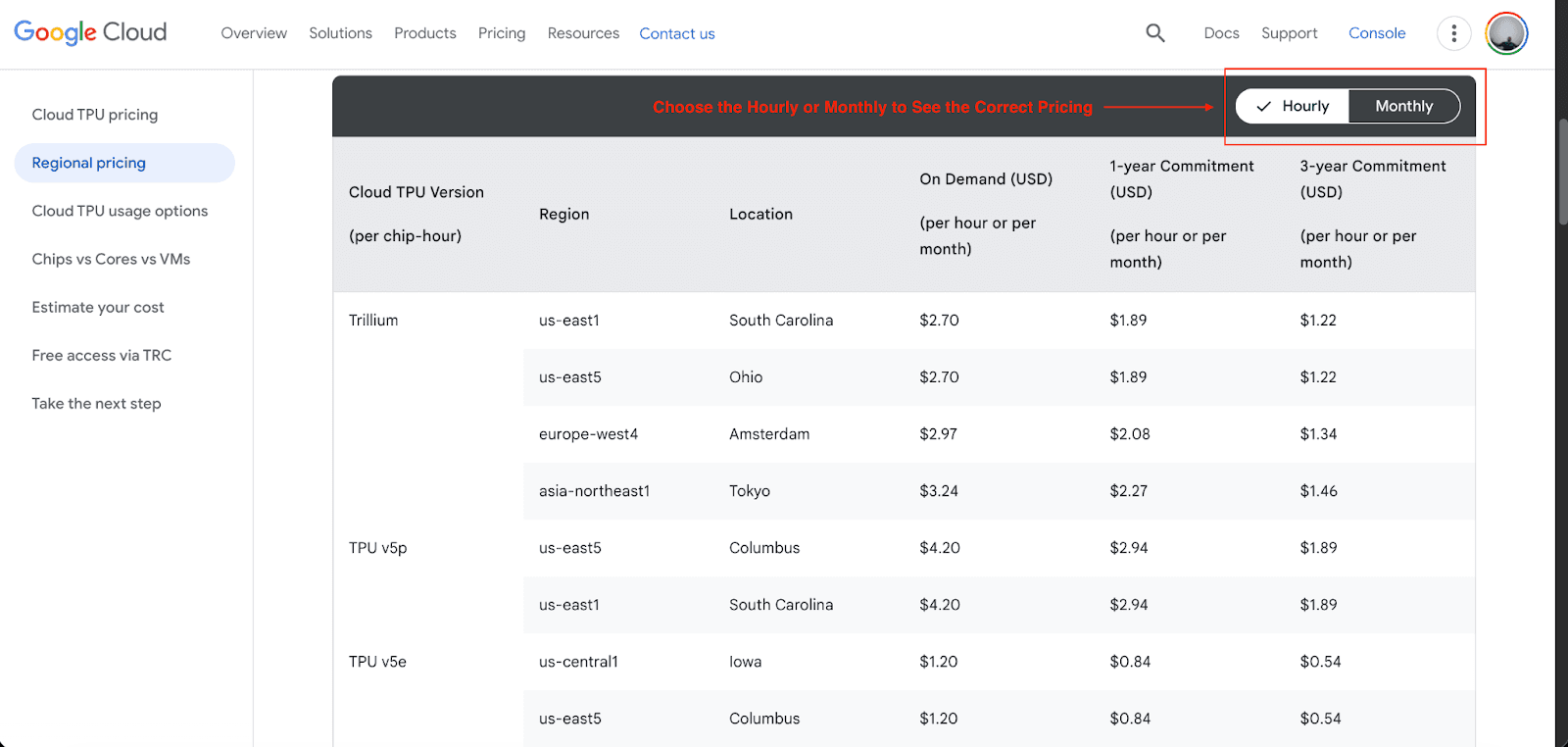
Below is the most recent pricing for each cloud TPU:
TPU v5e: The cheapest of the five. Best suited for sensitive to cost advanced training and inference. The on-demand pricing starts at $1.20 per chip hour with a one-year commitment discount of $0.84 and $0.54 cheaper with a three-year commitment.
TPU v5p: Under this, you get to train large, complex enterprise LLM models at high performance. The on-demand price starts at $4.20 per chip hour with a one-year commitment discount of $2.94 and $1.89 cheaper with a three-year commitment.
Trillium (TPU v6): This model offers a balance of high performance and improved energy efficiency for both training and inference. The on-demand price starts at $2.70 per chip hour, and revision on a one-year commitment is $1.89, with $3.89 in a three-year commitment.
Ironwood (TPU v7): Predicted to be the most scalable TPU for large-scale inference serving. As for the pricing for this upcoming model, there hasn’t been a full release.
Committed Use Discounts can reduce costs by over 60% for a three-year term compared to on-demand pricing. If you are new to Google, then you will also get a generous $300 free credit to experiment with TPUs.
For example, suppose you're training a large language model that will have to use the more expensive v5p cluster during the training phase for cost-justified speed purposes. However, for inference and serving the model to a large number of users, v5e or Trillium are more efficient, especially at high hourly usage; the savings can be significant. If you expect to use a large number of chip-hours and do it over several months. A three-year commitment can be the most advantageous economically.
TPU Use Cases: When Should You Use Them?
TPUs are not a one-size-fits-all solution. They are most appropriate for cases where their specific construction can provide a major benefit.
Ideal for TPUs:
Training Large Language Models (LLMs): Some models contain billions or even trillions of parameters (e.g., GPT, Llama, Gemini), and here TPUs are most appropriate.
Scaling Inference to Millions of Users: For high-volume applications, the newly provided Ironwood TPU will be able to serve such models in a cost-effective manner.
Enterprise-Scale Computer Vision: Tasks such as medical image analysis or inventory tracking in retail are those where high throughput of TPUs covers major gaps.
Large-Scale Recommender Systems: Platforms like YouTube use TPUs to operate their high-level recommendation systems.
Not Ideal for TPUs:
Small Models and Experimentation: For smaller projects or early-stage work, the convenience of flexibility of GPUS is generally better.
Mixed Compute Workloads: If your applications involve other tasks besides deep learning, like heavy pre-processing of data, rendering of graphics, then a GPU is a better fit.
To help you decide, consider this simple decision flow:
Is your primary workload large-scale deep learning training or inference?
Yes: Proceed to step 2.
No: A GPU is likely a better fit.
Are you using a framework with strong TPU support (TensorFlow, JAX, PyTorch/XLA)?
Yes: A TPU is a strong candidate.
No: Evaluate the effort required to migrate. A GPU might be easier.
Is your model large enough to benefit from distributed training across many chips?
Yes: TPUs are designed for this. Choose a TPU.
No: A single GPU or a small multi-GPU setup might be sufficient.
Real-World TPU Case Studies
The theoretical benefits of TPUs are compelling, but their real-world impact is what truly matters:
Visio.ai: This retail tech startup provides an AI co-pilot for store operators. They switched from GPUs to Google Cloud TPUs and reduced their inference costs by half and improved their performance by an order of magnitude. This has helped Visio scale to more than three times its previous customer volume and develop a profitable and sustainable business.
Kakao Brain: The AI research department of the South Korean large tech business Kakao constructed KoGPT, the Korean equivalent of GPT-3. They employed Cloud TPUs to speed up a severely parallelizable computation task that normally would have taken a week on 32 TPUs to only one day on 512. This massive speedup inversion allowed their researchers to focus on advancing their models rather than waiting for computations.
Anthropic: A prominent AI safety and research company has access to Google AI Hypercomputer, a massive AI infrastructure built on thousands of TPUs, to train each of the Claude models. This scale of infrastructure is necessary to continue innovating with extremely large foundational models.
Conclusion
I hope this article has given you everything you need to know about Google Cloud TPUs. TPUs are a powerful, purpose-built, fully developed technology for this large-scale AI epoch, and they excel at training and serving the deep learning models that are disrupting multiple industries. While GPUs are still a valuable and important part of AI hardware, enterprises developing next-generation AI models should prioritize TPUs.
By understanding how they are structured, their pricing, and their use-case scenarios, you can make a decision that supports your AI development, lowers your expenses, and gives you a significant edge.
Join Pump for Free
If you are an early-stage startup that wants to save on cloud costs, use this opportunity. If you are a start-up business owner who wants to cut down the cost of using the cloud, then this is your chance. Pump helps you save up to 60% in cloud costs, and the best thing about it is that it is absolutely free!
Pump provides personalized solutions that allow you to effectively manage and optimize your Azure, GCP, and AWS spending. Take complete control over your cloud expenses and ensure that you get the most from what you have invested. Who would pay more when we can save better?
Are you ready to take control of your cloud expenses?