
Another element critical to modern software development, apart from coding, is the ability to ship software quickly. If you've ever endured the pain of “it runs on my machine” or have waited hours for the completion of a deployment pipeline, you can understand why CI/CD is a must-have.
Google Cloud Build is a part of the Google Cloud Platform. Because of that, Cloud Build has quickly become a go-to instrument for DevOps teams to automate the process of building, testing, and deploying without the manual labor that comes with managing servers. Whether you are a startup with your first container or an enterprise with microservices, Cloud Build is an important part of modern cloud development.
In this article, I'll explain precisely why GCP Cloud Build is important and how you can use it to enhance your software delivery.
What Is Google Cloud Build?
Google Cloud Build is a fully managed, serverless CI/CD system. With it, you're able to quickly and easily build software in any programming language, a couple of them being Java, Go, Node.js, and many more.
Consider Cloud Build as the factory floor of your software. To one side, you supply raw materials (source code); on the other, you have a finished product such as Docker containers. In the factory, you have processors (Cloud Build triggers and steps) that operate on the source materials and produce the finished product.
Key Features of GCP Cloud Build
Cloud Build is more than just executing scripts; it is a specialized, flexible building block tailored to industry needs. Below are what set it apart.
1. Fully Managed CI/CD Service
Being “serverless” is a major factor in productivity. There is no need to manually provision servers or think about logistical capacity. Cloud Build automatically increases capacity for being available and goes to zero when nothing is being built. Under this serverless engagement style, your teams spend time working on code, not maintenance.
2. Native Integration with GCP Services
Cloud Build integrates seamlessly with the Google Cloud ecosystem:
Artifact Registry: Store Docker images and packages.
Cloud Run & App Engine: Deploy serverless applications.
Google Kubernetes Engine: Build and deploy containerized microservices.
IAM: Enable fine-grained access control.
Secret Manager: For the safe management of tokens and other credentials.
3. Build Triggers & Automation
Automation is the foundation of CI/CD. Cloud Build lets you create build triggers, so you can start your pipelines automatically based on events. It integrates with GitHub, Bitbucket, and GitLab, so your workflow is always uninterrupted, no matter where your code is hosted. You can create building triggers when:
Commit to a branch of interest (e.g., main).
New tags have been created from your Git repository.
Pull requests (useful for testing before merging).
Webhooks from other systems.
4. Custom Build Steps & YAML Configuration
Cloud Build uses a configuration file, usually called cloudbuild.yaml, to describe your pipeline. This configuration file is very flexible since every build step is a Docker container.
If you want to run npm install, there's a step for that.
If you want to run a specific security scan with a certain tool, just pull its Docker image and run it as a step.
This container-based methodology means you can build reusable, modular pipelines and keep consistency across different environments.
5. Security & Compliance
Security is usually put on the back burner when it comes to building pipelines, but not this time. Cloud Build achieved SLSA (Supply-chain Levels for Software Artifacts) Level 3. Features such as private pools (builds running inside your private network), IAM-based access control, and audit logging ensure your supply chain is secure from code commit to production deployment.
GCP Cloud Build Pricing Explained
The pricing is simple to understand, which is great. Google Cloud Build is pay-as-you-go and consumption-based, so you pay only for what you actually use.
Free Tier
Google's free tier is very beneficial. Every billing account gets 2,500 free build minutes a month, meaning that for many individual developers or small startups, the service is free.
Pay-as-You-Go Pricing Model
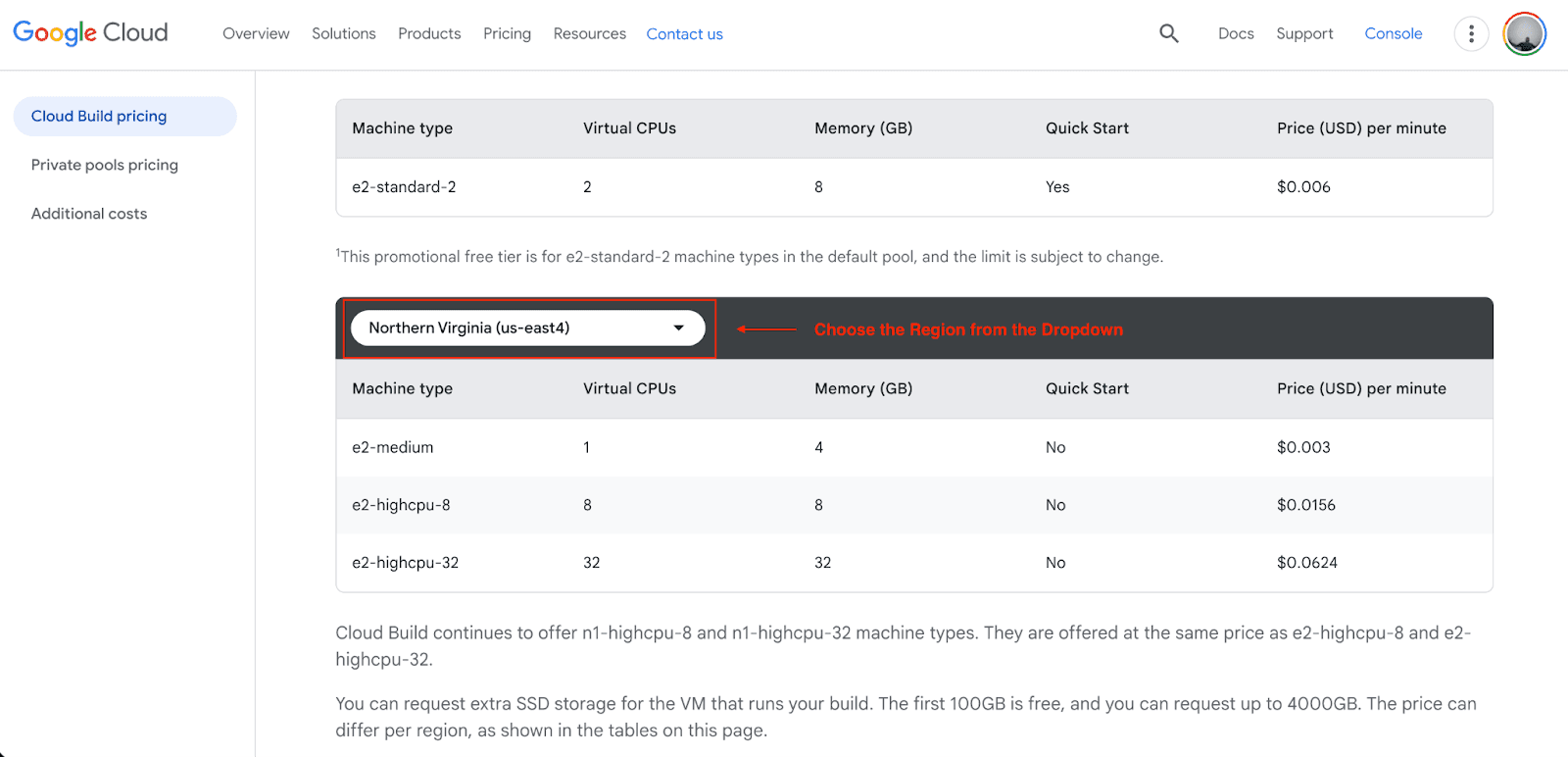
Once you exceed the free tier, Cloud Build is charged based on the type of machine used for every build. The pricing is also done based on a per-minute rate that is prorated to the second for each build. The pricing below is an example of the most used pricing options.
Build Type | Cost (USD / minute) |
Standard Builds | From $0.003/min |
High-CPU Builds | Up to $0.062/min |
High-Memory Builds | Up to $0.070/min |
Note: Northern Virginia (US East 4) is one of the regions used for this baseline pricing reference. Pricing is, on average, higher or lower than baseline price estimates for other regions.
Additional Costs to Consider
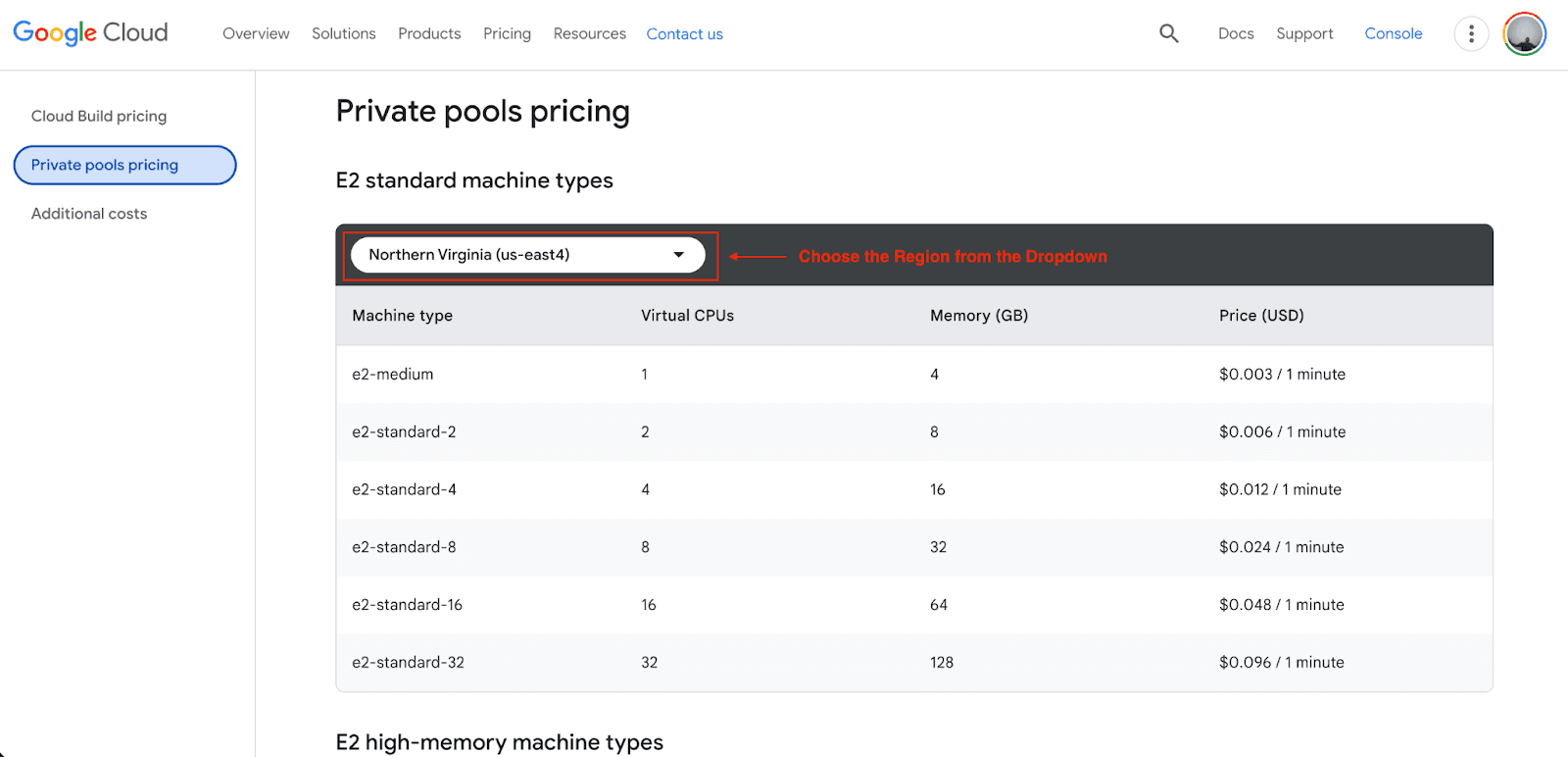
Build minutes are the main cost factor, and for each additional service offered, there are also additional costs to consider. These include:
Artifact Registry: You pay for storing container images and build artifacts, which are usually charged by GB and month.
Cloud Logging: Build logs get recorded in Cloud Logging. Small amounts are often free, but large logs or logs that are ingested for long periods of time incur retention and storage fees.
Private Pools: If your builds need access to private networking or to the VPC, private pools charge at a higher rate than the standard shared pool because they are using their own dedicated compute resources that are more expensive.
My Thoughts on Pricing
In my experience, most teams seem to stick to the standard shared builds, and a lot of them don’t even hit the 2,500 free build minutes a month. The high-CPU, high-memory machines and private pools are only there for your use if you want to get builds done faster, need more RAM, or need more stringent security. I think the simplicity and transparency of their marginal pricing is a huge reason for the popularity of GCP Cloud Build among growing cloud-native teams.
Common GCP Cloud Build Use Cases
Who is actually using this service, and for what? Here are the most common use cases:
CI/CD for Microservices
If you have microservices running on GKE, this is perfect. You can set it up to watch for changes to a particular service folder, build only that container, push it to the registry, and update the Kubernetes manifest automatically.
Serverless App Deployment
For Cloud Run or App Engine, Cloud Build makes it easier to complete the source-to-deploy cycle. You can set up a build that deploys a new revision of your serverless app and automatically migrates traffic when a simple commit triggers it.
Multi-Environment Deployments
You can design complex workflows that automatically deploy to a Dev environment on a pull request, then a Staging environment on merge to main, and Production on manual approval or a certain tagged release.
Security-Focused CI/CD
Enterprises use Cloud Build to implement supply chain security. With Binary Authorization, you can make sure that only container images built and signed from a trusted Cloud Build pipeline can run on your production cluster.
Pros & Cons of GCP Cloud Build
Is it perfect? No tool is. Here is a balanced look.
Pros
Scalability: You will never have to worry about queue times during busy hours.
Security: Default integration with GCP IAM and secret management is top-tier.
Speed: Internal networks have high speed when pushing and pulling GCP images.
Cons
YAML Learning Curve: Beginners can find it a challenge to debug sophisticated cloudbuild.yaml documents.
GCP Centric: It can run deployments globally, but when deploying to Google Cloud resources, it performs best, whereas if you are with AWS, you may find other tools more suited to your needs.
When Should You Choose GCP Cloud Build?
You should choose Cloud Build if:
You host workloads on GCP: The benefits of seamless integration are undeniable.
You want to stop managing build servers: You are tired of patching Jenkins agents.
You need high concurrency: Agile build workloads that need immediate scaling.
If you are a small squad deploying a static site to Vercel and Netlify, Cloud Build might be pointless. It is the default choice for backend services and containerized apps on GCP.
Getting Started with GCP Cloud Build
Ready to dive in? Here is the high-level path to your first pipeline:
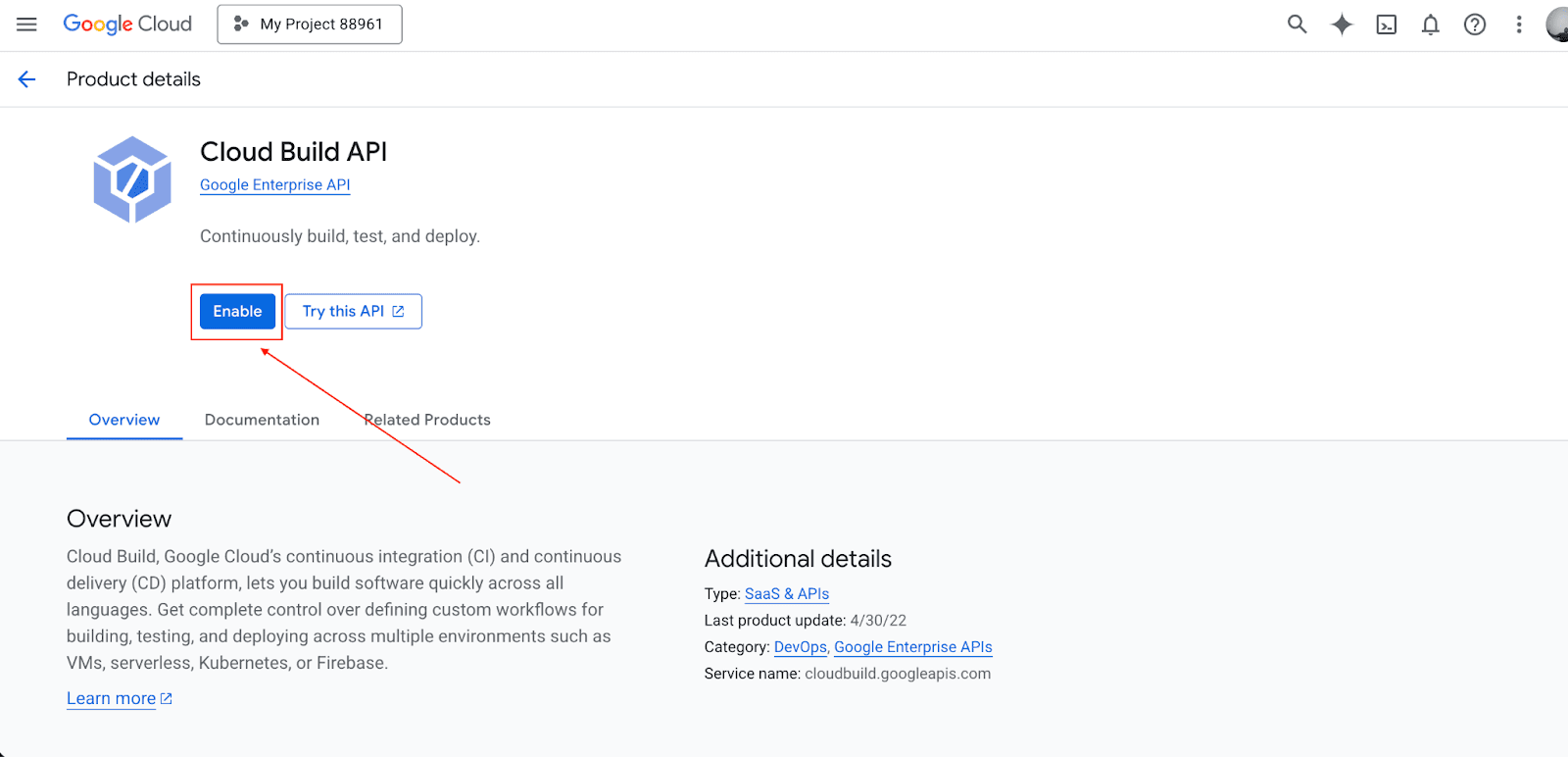
Go to the Google Cloud Console and enable the "Cloud Build API."
Go to Cloud Build, and in the Triggers section, connect your repository from GitHub or Bitbucket.
Create a file called cloudbuild.yaml and place it in your root directory.
steps:
- name: 'gcr.io/cloud-builders/npm'
args: ['install']
- name: 'gcr.io/cloud-builders/npm'
args: ['test']
Once your code is committed. Watch the trigger fire in the Cloud Build dashboard logs.
Best Practices for Optimizing Cloud Build Pipelines
To ensure your spending and building efficiency, stick to these recommendations:
Cache aggressively: Use caching for (node_module) dependencies to eliminate the need for re-downloading them with each build.
Use lighter base images: If your script can run on a slim 50MB Alpine image, there is no need to use a 1GB Ubuntu image.
Fail fast: When arranging your pipeline steps, ensure fast syntax checks work before running lengthy integration tests. If a step is going to fail, ensure it does in a minute, rather than 20 minutes.
Conclusion
Moving away from servers that require extensive maintenance, Google Cloud Build is the new CI/CD paradigm of efficient automation that is flexible, scalable, and secure. Whether you're a solo developer on the free tier or an enterprise concerned with the security of your software supply chain, Cloud Build makes it possible to enhance your code deployment speed.
If the Google Cloud hosts your infrastructure, Cloud Build is not just a good idea; it is a strategic necessity. I hope you learned everything about Google Cloud Build.
FAQs
Is GCP Cloud Build free?
Yes, there is a free tier available for use that provides 2,500 minutes per month. Beyond that, it is paid.
Is Cloud Build better than Jenkins?
For containerized workloads that are GCP-native, the answer is usually yes. Jenkins is the more favorable option for highly customized, legacy on-premise workflows, while Cloud Build requires much less maintenance.
Does Cloud Build support Docker?
Yes, native Docker support is a core feature. You can build, push, and deploy Docker images easily.
Join Pump for Free
If you are an early-stage startup that wants to save on cloud costs, use this opportunity. If you are a start-up business owner who wants to cut down the cost of using the cloud, then this is your chance. Pump helps you save up to 60% in cloud costs, and the best thing about it is that it is absolutely free!
Pump provides personalized solutions that allow you to effectively manage and optimize your Azure, GCP, and AWS spending. Take complete control over your cloud expenses and ensure that you get the most from what you have invested. Who would pay more when we can save better?
Are you ready to take control of your cloud expenses?



