

If you want to deploy and scale applications without worrying about management, consider GCP App Engine, which seems to offer a managed environment. I’ve seen many developers lose their focus on the product and focus their attention on the infrastructure, which, as I know, is a waste of time. This is where the Google Cloud Platform as a Service offering excels.
Server provisioning, load balancing, and scaling decisions are all problems that Google App Engine has solved. All you need to do is write the code, deploy the application, and Google will do the rest. Launching the first web application of a startup or scaling an enterprise API receiving millions of requests, App Engine can do it all.
In this article, I will walk you through everything you need to know about GCP App Engine, from its core features and pricing models. By the end of this, you will know if the App Engine suits the objectives and the available funding for your project.
What Is GCP App Engine?
Google Cloud App Engine is a platform-as-a-service product that allows software developers to build and host web applications on its fully managed platform. A proper analogy would be to think of App Engine as a personal team in charge of infrastructure work that never sleeps. While App Engine takes care of all the complex backend infrastructure work, you only care about the code that you need to write.
App Engine works seamlessly if you want to build custom applications to be hosted on the Google Cloud, since it provides a proper middle ground. It is much easier to use than the Compute Engine, where you, as a user, need to manage virtual machines, or entirely serverless options like Cloud Functions, for when you need to perform tasks that are triggered by events.
App Engine Environments: Standard vs Flexible
App Engine splits its functionality into two environments, each configured to serve different applications:
Standard Environment
Runs applications within a protected, sandboxed environment.
Uses set containers with a predetermined runtime for the ecosystem.
Includes rapid scaling and can reduce to zero instances in use.
Most suitable for applications that experience sudden influxes of traffic.
Free tier available.
Flexible Environment
Runs applications in Docker containers on Compute Engine VMs
Custom runtimes and Docker images are supported.
Provides increased access to the underlying architecture.
More suitable for applications with persistent traffic.
No free tier available.
The choice between these environments depends on the users’ preferences, needs, and application. For example, there is a lack of custom configuration, and the web app is volatile and expensive; the standard environment is a perfect match. On the other hand, if there are increased custom control and configuration needs, the flexible environment is suitable.
How GCP App Engine Works
GCP App Engine works on a very simple basis, and allows the developer to focus on the app without worrying about infrastructure:
Developer >> Code >> Deploy >> Auto Scaling >> Monitoring
Here’s a breakdown of what each step entails:
You write your application in any of the supported languages, such as Python, Node.js, Go, Java, PHP, Ruby, or .NET
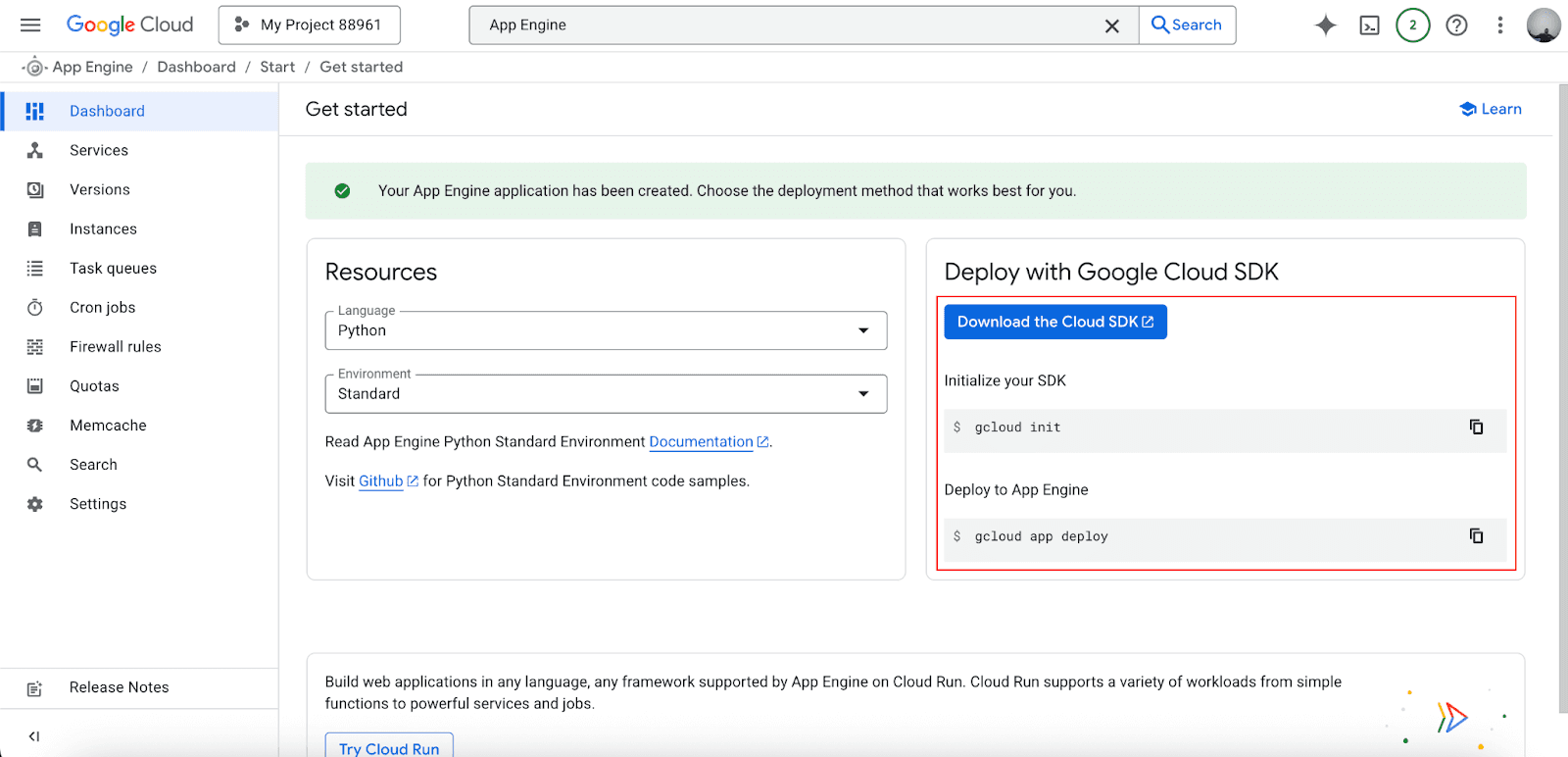
Deploy your app and use the very simple gcloud app deploy command.
App Engine provisions the appropriate resources on its own.
Traffic gets distributed through built-in load balancing.
The platform increases or decreases the number of instances based on the application traffic.
Integrated monitoring tracks your application's performance.
Because of the simplicity of the processes, many companies have experienced a cut in deployment time from hours to minutes. Another astounding factor is the fact that the application is able to automatically scale in the case of traffic surges, with no intervention from the engineers.
Key Features of GCP App Engine
The app engine has dozens of features that simplify developer workloads and their ownership:
Fully Managed Environment: Google will take care of the server maintenance, security updates, and infrastructure, so you will never wake up to get server downtime alerts.
Automatic Scaling: The system keeps track of the app's traffic and adjusts the number of instances. During low traffic periods, the system can even shut down all instances and save money.
Integrated Monitoring and Logging: Built-in Cloud Monitoring and Cloud Logging provide real-time reports on the app's performance, errors, and resource consumption.
Traffic Splitting and Versioning: Deploy new versions alongside existing ones and gradually shift traffic between them. This enables safe A/B testing, blue-green deployments, and canary releases.
Built-in Security: The App Engine comes with the Identity Aware Proxy and closed integration with Cloud IAM for stringent access control. The SSL certificates remain fully managed.
Seamless GCP Integration: Native integration with Cloud SQL, Firestore, Cloud Storage, and other Google Cloud services means you can build comprehensive applications without complex configurations.
GCP App Engine Pricing Explained
App Engine follows a pay-as-you-go pricing model, but the specifics vary significantly between environments.
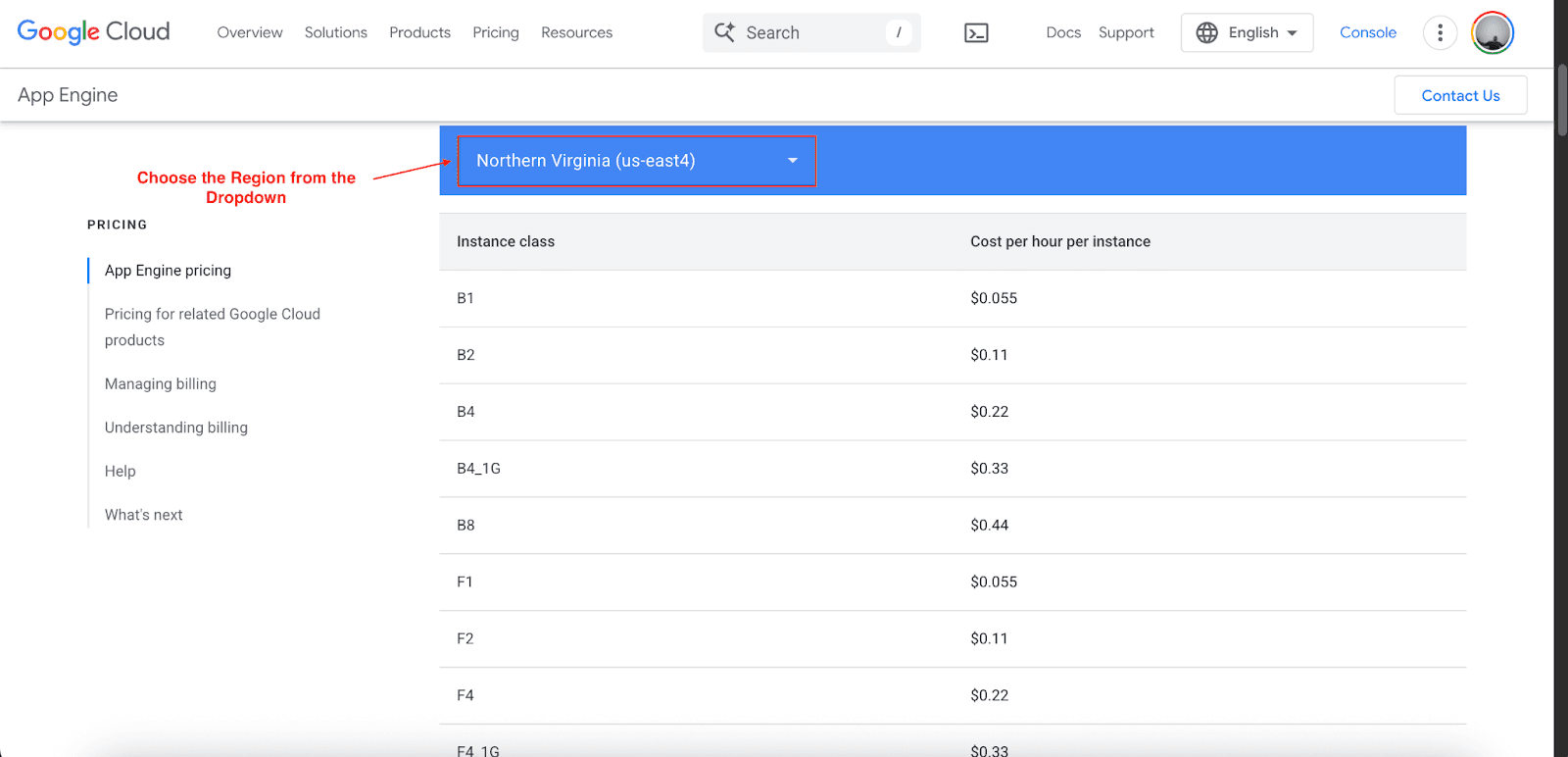
Google App Engine Pricing: Standard Environment
The standard environment includes a generous free tier that covers:
28 instance hours per day
1 GB of outbound traffic per day
1 GB of stored data
Beyond the free tier, pricing is based on instance classes:
Instance Class | Cost per Hour | Memory | CPU |
B1 | $0.055 | 256 MB | 600 MHz |
B2 | $0.11 | 512 MB | 1.2 GHz |
B4 | $0.22 | 1024 MB | 2.4 GHz |
B8 | $0.44 | 2048 MB | 4.8 GHz |
Additional charges apply for:
Outgoing network traffic: $0.12 per GB
Dedicated memcache: $0.06 per GB per hour
Search API usage and other specialized services
Google App Engine Pricing: Flexible Environment
The flexible environment doesn't offer a free tier and uses a different pricing model:
Resource | Unit Cost |
vCPU | $0.056 per core hour |
Memory | $0.008 per GB hour |
Persistent Disk | Compute Engine pricing applies |
Network Traffic | Outbound is charged per Compute Engine rates |
This environment bills on a per-second basis with a 1-minute minimum, providing more granular cost control for consistent workloads.
Cost Management and Budgeting
Tools offered by Google for App Engine Expense Management include:
Set daily limits to avoid unpleasant surprises.
Analyze trends to catch budget thresholds.
Use the GCP pricing calculator to predict your expenses beforehand.
App Engine vs Cloud Run vs Compute Engine
Choosing the right Google Cloud service can be difficult. Here's a comparison to help you decide:
Service | Type | Best For | Pricing Model | Scaling | Management |
App Engine | PaaS | Web apps, APIs | Pay-per-instance/resource | Automatic | Fully Managed |
Cloud Run | Serverless | Containerized apps | Pay-per-request | Automatic | Fully Managed |
Compute Engine | IaaS | Custom VMs | Pay-per-instance | Manual/Auto | User Managed |
When to Choose App Engine:
When you are developing traditional web applications.
You want integrated development environments.
You require automatic scaling without having to deploy containers.
You prefer language-specific runtimes.
When to Choose Cloud Run:
You are dealing with containerized applications.
You prefer true serverless (pay-as-you-go).
You are building a microservices architecture.
You need to scale the fastest.
When to Choose Compute Engine:
You want to have full control over the Operating System.
You are running specialized software.
You have specific performance benchmarks you want to attain.
You are managing persistent workloads.
Advantages and Limitations
Advantages
Simplified Development Lifecycle: Deploy your application with a single command. No need to configure load balancers, set up monitoring, or manage server patches.
Zero Infrastructure Management: Focus entirely on your application logic while Google handles the underlying infrastructure, security, and maintenance.
Reliable and Scalable: Built on Google's robust infrastructure with automatic scaling that can handle traffic spikes from zero to millions of requests.
Cost-Effective for Variable Workloads: The pay-as-you-go model and ability to scale to zero make it economical for applications with unpredictable traffic patterns.
Limitations
Limited Flexibility for Complex Configurations: The managed nature means you have less control over the underlying environment compared to virtual machines.
Potential Cost Concerns for Heavy Workloads: High-traffic applications with consistent load might find dedicated servers more cost-effective than the flexible environment.
Runtime Restrictions: The standard environment limits certain operations and has specific runtime constraints that might not suit all applications.
Vendor Lock-in Considerations: Migrating away from App Engine requires more effort than containerized solutions due to its specific APIs and services.
How to Get Started with GCP App Engine
To start, App Engine is simple to use. Here are the steps to follow:
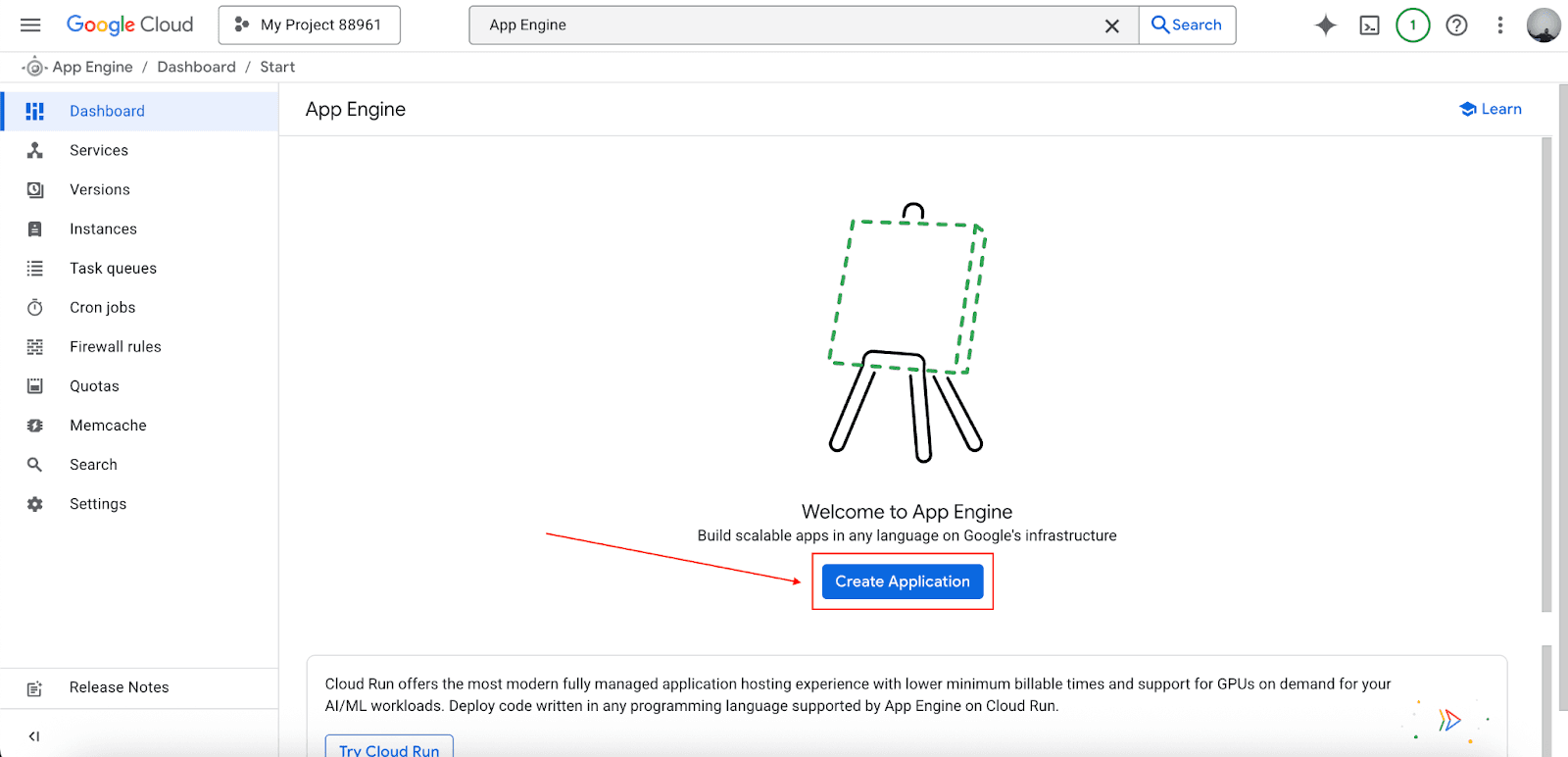
Go to the App Engine section in the Google Cloud Console and click on Create Application.
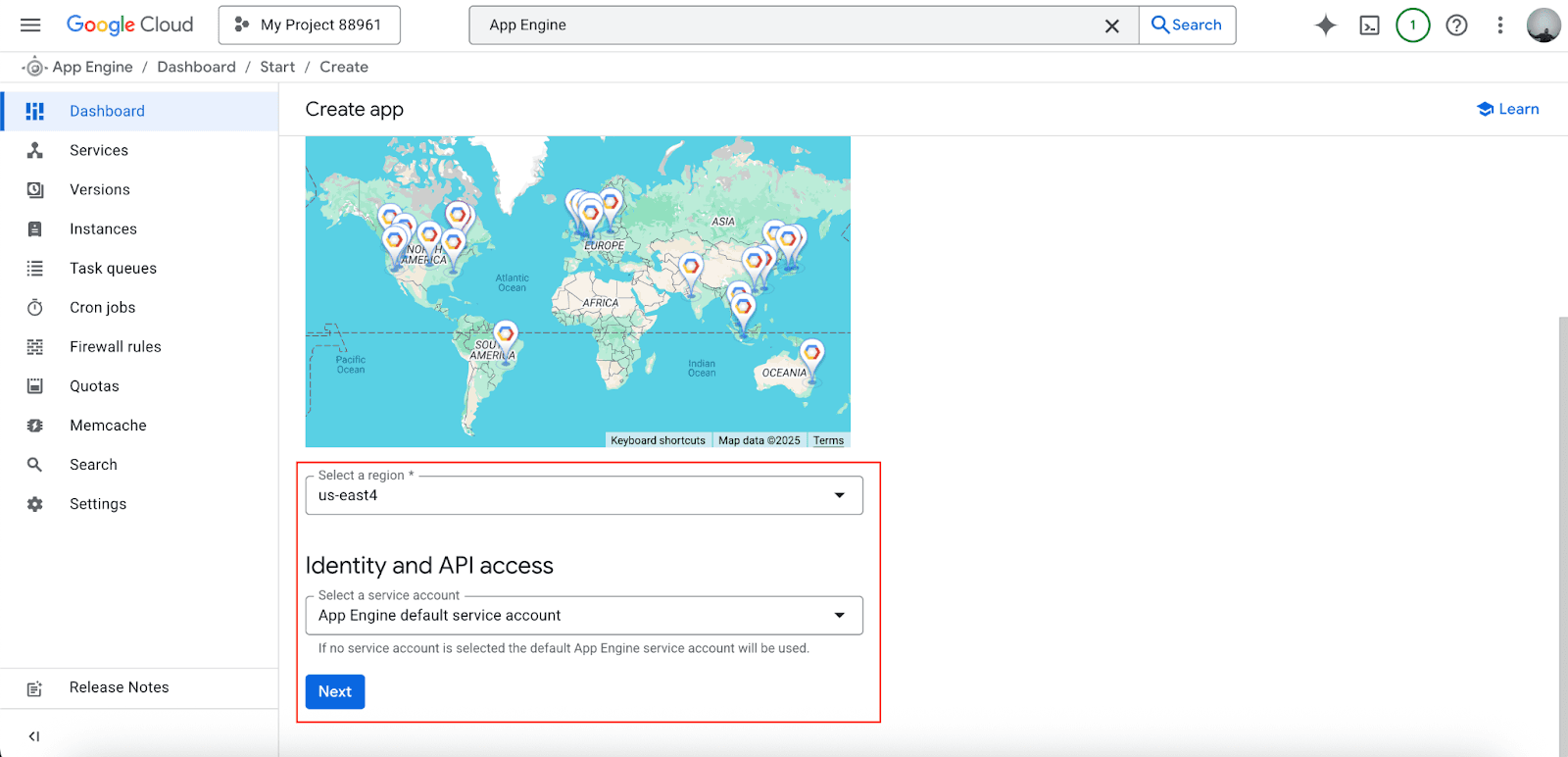
Choose the region for your application, identify an API access (you can set it to default), and click on Next.
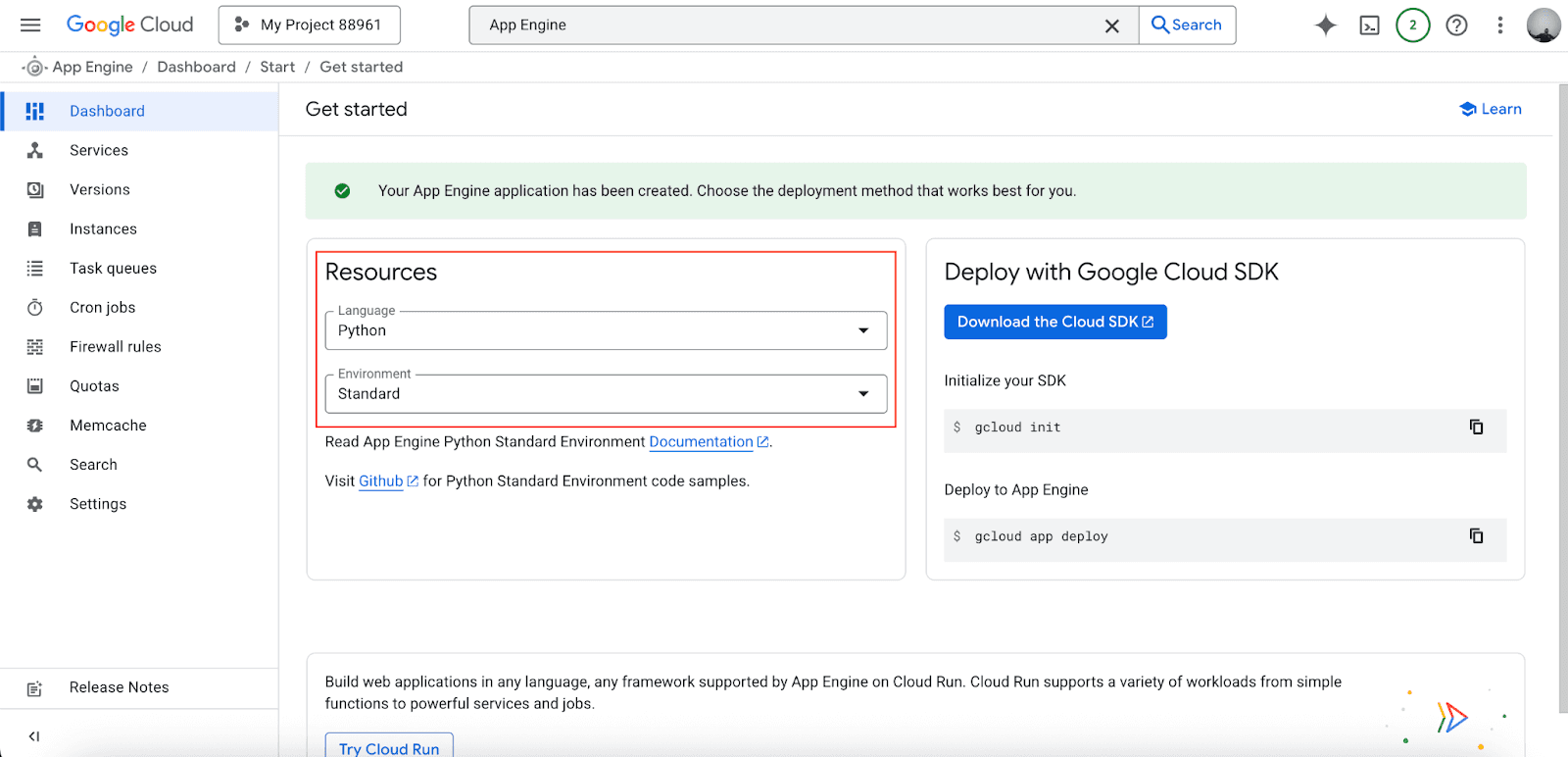
Choose the Language and decide between the standard and flexible environment based on your application requirements and the comparison we covered earlier.
Download and install the Google Cloud SDK, which includes the gcloud command-line tool necessary for deploying applications.
Use Cloud Monitoring and Cloud Logging to track performance, errors, and cost.
Even simple applications take less than 30 minutes to deploy, which, in comparison to other similar tools, makes App Engine one of the fastest methods of hosting a web application on the cloud.
Conclusion
Google Cloud App Engine is revolutionary in the way web applications are deployed. This is because cloud computing is still relatively new, and by eliminating the complex infrastructure, you can set your team to work on what really matters, which is building the proper functionality of the software.
Startups and established enterprises alike benefit from App Engines' powerful offer with automatic scaling, integrated monitoring, and seamless growth through pay-per-use models. With this guide, you can gain the insights necessary to determine the right environment for you, cost estimates, and deploy your first application with confidence.
Want to start eliminating those pesky infrastructure headaches? Then you can start your App Engine journey today with Google Cloud's free tier.
Join Pump for Free
If you are an early-stage startup that wants to save on cloud costs, use this opportunity. If you are a start-up business owner who wants to cut down the cost of using the cloud, then this is your chance. Pump helps you save up to 60% in cloud costs, and the best thing about it is that it is absolutely free!
Pump provides personalized solutions that allow you to effectively manage and optimize your Azure, GCP and AWS spending. Take complete control over your cloud expenses and ensure that you get the most from what you have invested. Who would pay more when we can save better?
Are you ready to take control of your cloud expenses?



