

Cloud costs are expected to soar higher than ever before. New challenges arise with AI workloads, growth in storage, and multi-project sprawl. Managing your Google Cloud Platform bill is becoming increasingly complicated.
It’s a familiar story: you launch a few instances, experiment with some new AI models, and boom, your monthly invoice is twice what you expected. In fact, many teams fail to fully utilize the tools provided by GCP, resulting in lost revenue.
If you want to stop the bleeding and start optimizing, you need to know what’s in your toolkit. In this article, I will cover the 7 most important Google Cloud billing tools you should be using right now, plus the one game-changing platform that takes optimization to the next level.
What is Google Cloud Cost Management?
Google Cloud Cost Management is the set of processes, tools, and practices that are available to you to manage and control your cloud spending by monitoring, maintaining, and forecasting spending across your organization’s projects and services.
Why do we care about this? This is because a new cloud landscape needs to be analyzed. It is not just poor VM hosting we are dealing with; it is also:
AI Workloads: High-performance computing that increases variable costs.
Serverless Unpredictability: Scaling that is great for performance but bad for your budget.
Compliance: Your FinOps accountability is no longer optional; it’s a requirement.
The fundamental aims here are to gain visibility into your cloud spending, control your cloud spending, and optimize your cloud spending.
7 Native Google Cloud Billing & Cost Management Tools
1. Cloud Billing Reports
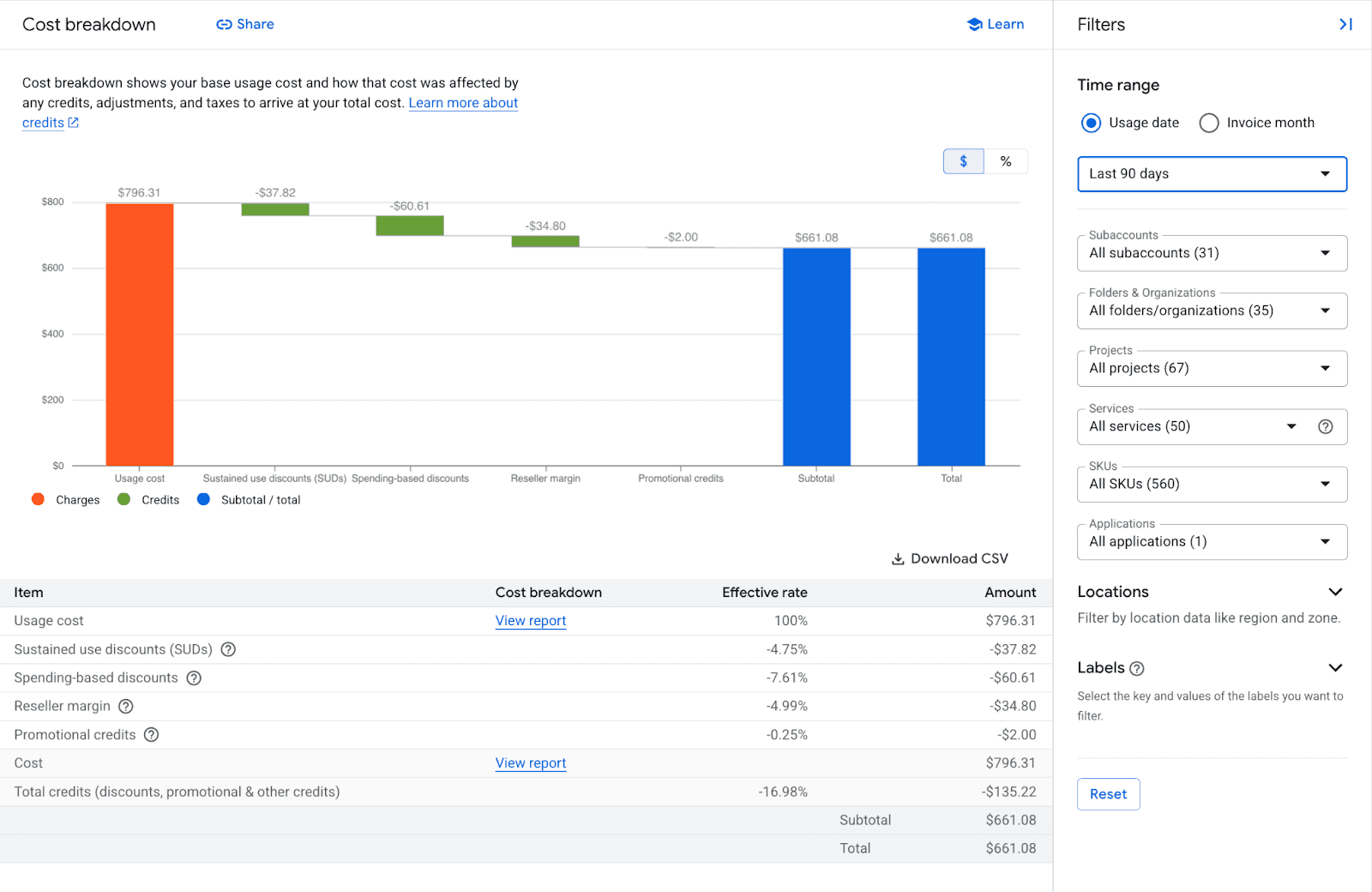
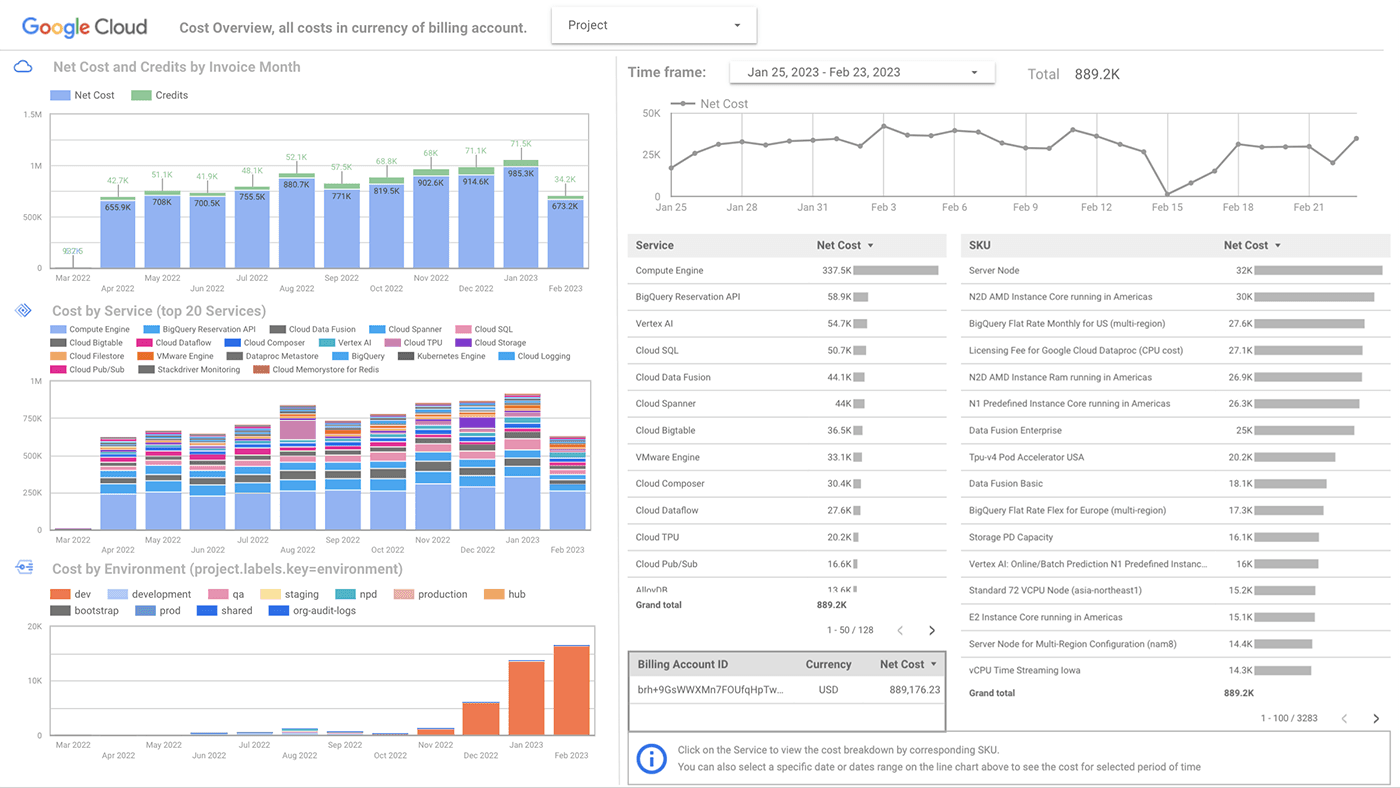
Cloud Billing Reports should be your first try. It's the interactive report dashboard built directly into the GCP Console. It shows your spending over time and lets you break down the data by project, service, SKU, or label.
What It Does: Provides a visual breakdown so you get an idea of where the spending is. You can compare your spending on BigQuery and Compute Engine, see this month's trend vs the same month last year, and assess the impact of credits and Committed Use Discounts.
Best For: Quick, high-level snapshots of costs for the executives, leadership, and even spotting immediate cost anomalies.
Limitation: Although the product is great for visibility and forecasting at a high level, it falls short of providing deep SKU-level automation and sophisticated chargeback modeling.
Pro Tip: To find costs by label, filter for “Label.” If you resource label by team (ex. team: marketing), you can quickly identify which department is driving up the bill.
2. Budgets & Alerts
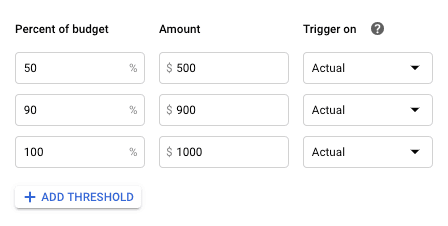
If billing reports are your speedometer, then budgets & alerts are your guardrails. They help you define how much you are willing to spend and start screaming (figuratively, of course) once you are getting too close to that amount.
What It Does: You can set spending thresholds (e.g,. $5,000/month) and then configure the system to send you email alerts once you reach 50%, 90%, and 100% of that budget.
Best For: Shock from overspending. Every company needs a budget alert to catch runaway processes before they become costly invoices.
Common Setup: Set a budget for the entire company, and then set more specific budgets for individual "sandbox" projects where developers might be experimenting with costly resources.
3. BigQuery Billing Export
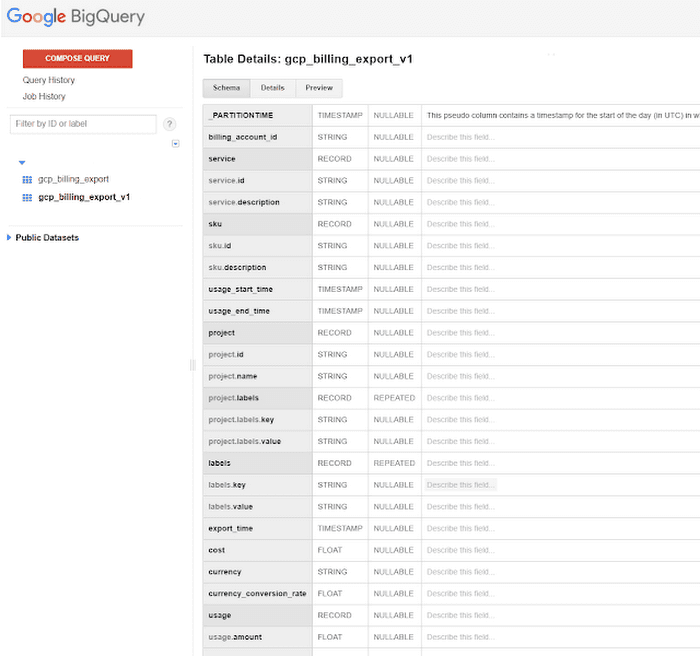
For advanced teams who are putting serious effort into FinOps processes, the standard reports won’t cut it. BigQuery Billing Export is built for this purpose. This is a streaming tool that takes your raw billing data and inserts it into a BigQuery dataset.
What It Does: You can export detailed billing data line items (supporting documents, adjustments, and resource identifiers) to be further analyzed via SQL queries.
Why It’s Powerful: It allows for enhanced data analysis. You can analyze the dataset to answer specific questions (e.g., what is the total cost of running a specific query in BigQuery?). How can I determine custom chargeback models for specific resources to better understand each variable of cost in your data?
Best For: This tool is for data-driven teams and FinOps engineers who want to create custom dashboards (like Looker Studio) or do detailed breakdown analyses.
Note: Since the billing export data refreshes several times a day, it is not real-time. You may also encounter some minor delays due to processing.
4. Cloud Billing APIs
Source: Google Cloud
When your infrastructure expands, it becomes very redundant to click through the console. The Cloud Billing APIs allow you to manage your billing data programmatically.
What It Does: It provides you with programmatic access to billing account management, budget control, and retrieval of cost data, without the need for a GUI.
Best For: DevOps teams and automation. With these APIs, you can automatically create a budget when a new project is created using Terraform, ensuring that governance is included from day one.
2026 Trend: We are seeing that large enterprises are experiencing a significant movement towards automation of API-based FinOps to minimize manual effort.
5. FinOps Hub
Source: Google Cloud
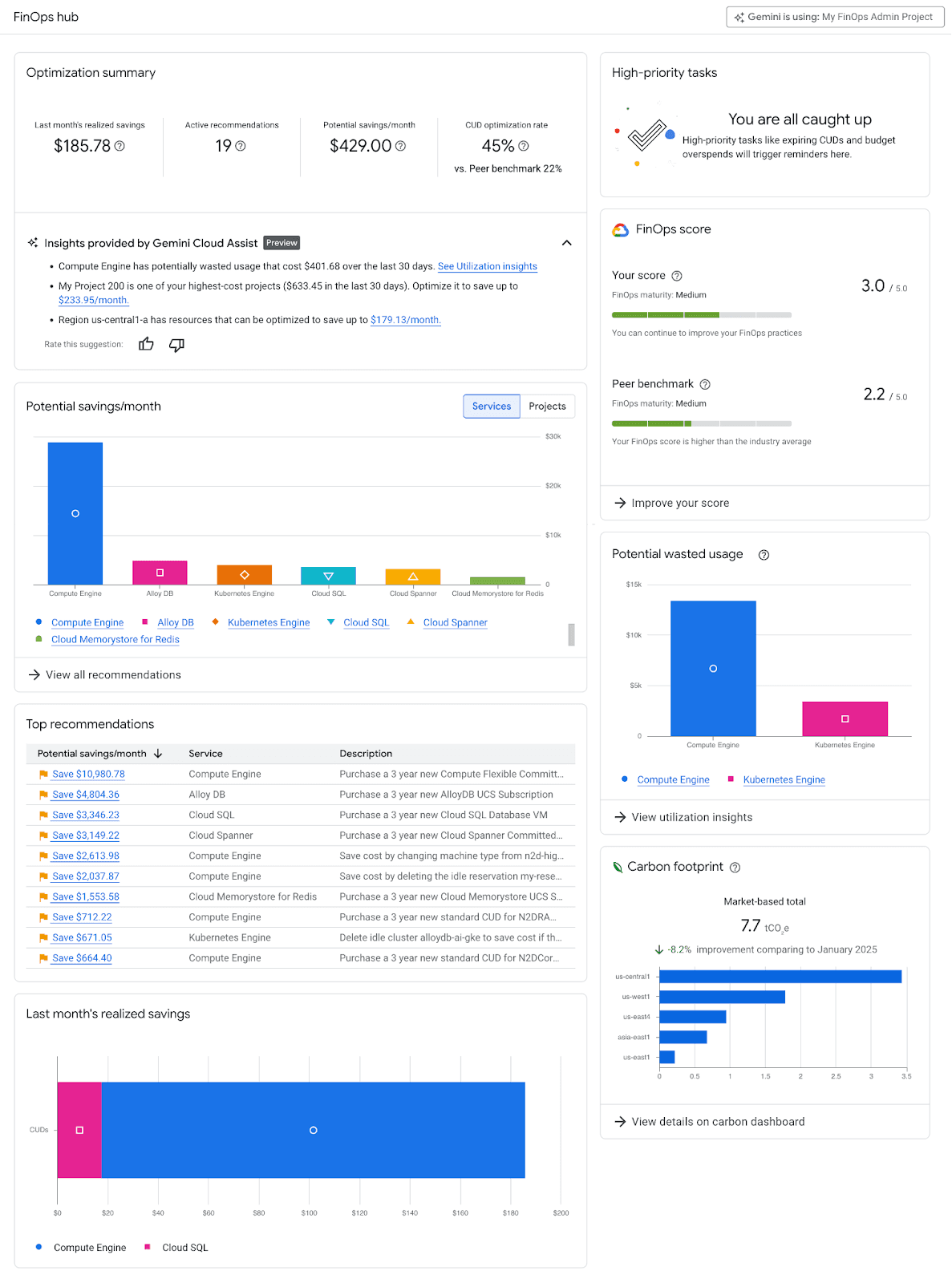
FinOps Hub is the centralized Google Cloud optimization dashboard. It combines cost-saving suggestions into one Google hub to assist teams in locating efficiency modules and enhancing efficiency.
What It Does: Identifies recommendations like dead resources (zombie VMs), and opportunities for downsizing (rightsizing) by recommending the downsizing of overscaled instances, as well as identifying your gaps of CUD coverage.
Best For: Spotting and identifying saving opportunities without overanalyzing extensive logs and RAM from your machine.
Why It Matters: It is different for someone to use FinOps Hub, as it is not the usual way of reporting; it is a basic savings tool. It turns saving costs into a game, as it makes engineering choices become clear to save and act with estimated savings and impact from an engineering decision, which saves the company costs.
6. Google Cloud Pricing Calculator
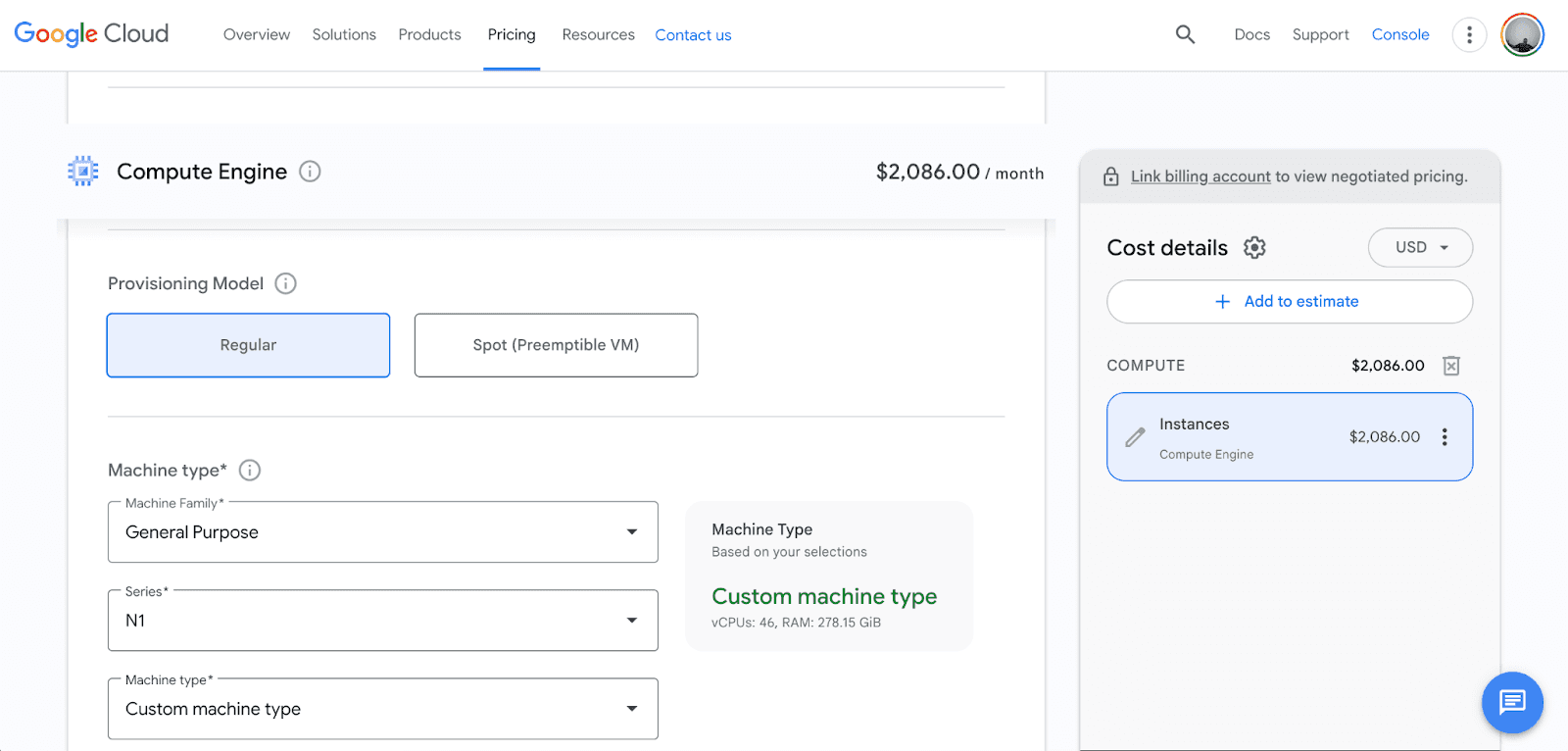
The first step of optimization is done even before a resource is launched. You can start estimating costs with the Google Cloud Pricing Calculator.
What It Does: You can input parameters like “10 n1-standard-4 instances in us-central1 running 24/7,” and then it will show you the cost. You can also toggle your SUDs to see how much you can save.
Best For: Planning and purchasing before the deployment. It is also a best practice to use the cost calculator before releasing a new workload to get a budget for it.
Note: The calculator provides estimates based on expected usage. Your real costs may vary due to autoscaling, sustained use discounts, changes in traffic, or alterations to workloads.
7. Cloud Billing Access Control
Source: Google Cloud
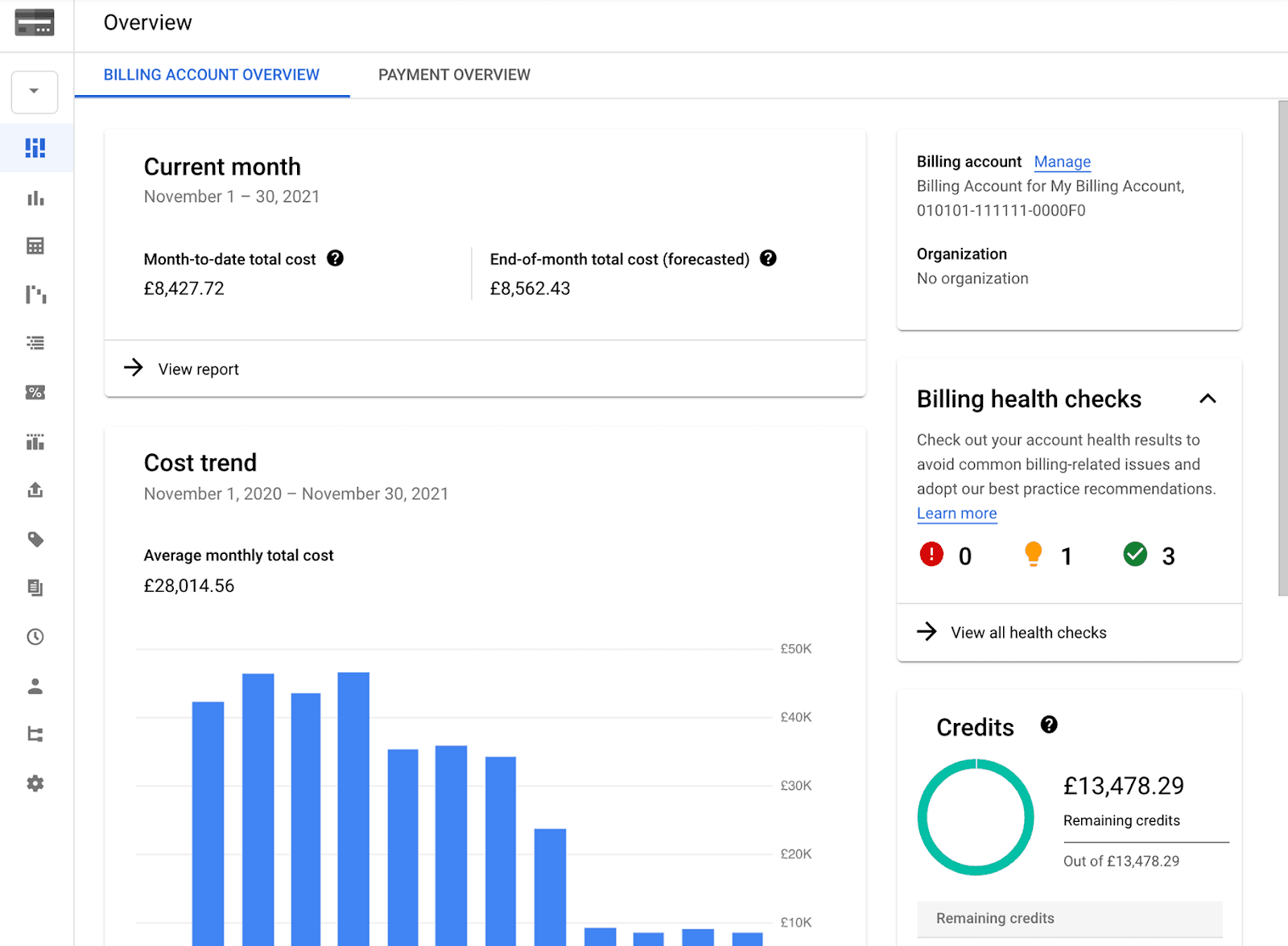
Cost management needs governance. If everyone has Billing Admin access, you are asking for trouble. Cloud Billing Access Control applies IAM control to keep certain costs and actions locked.
What It Does: Uses roles like read-only, full control, and Project Billing Manager to segregate duties.
Best For: With solid IAM policies, developers can implement financially sensitive policies, such as limiting who can change the payment card on file or link payment accounts to projects, keep costs from being accidentally exposed, and preserve financial accountability.
Taking It Further: Pump Advanced Cloud Cost Optimization
Google's native tools certainly offer savings and visibility, but they require quite a bit more hands-on dedication and manual optimization (especially around managing commitments).
We are the Ideal solution for companies that want to maximize savings without the engineering burden or financial risk.
Pump is an intelligent cloud cost optimization tool that sits on top of your Google Cloud, solving the most complicated piece of cloud billing, Committed Use Discounts.
Automated CUD Management: Pump analyzes the best CUDs for your company based on your usage and purchases them automatically.
Derisked Commitments: This is the magic. Traditionally, if you buy a 3-year commitment and your usage drops, you are stuck paying for it. The pump provides a safety net. We intelligently manage the lifecycle of these commitments so you are not stuck with a high-spend commitment if your architecture undergoes a major shift.
Always-On Optimization: Pump optimizes your resources from Compute Engine, Cloud SQL, BigQuery, and so on to give you the best maximum savings.
Unified Savings Dashboard: See exactly how much you are saving month-over-month with clear breakdowns of flexible vs. regional savings.
When to Consider Pump
You should look at Pump if:
You want free savings (for the majority of customers, Pump is free to use).
Your workload is highly variable, making traditional 1-year or 3-year commitments more risky.
You have little internal FinOps capacity and don’t want to deal with expiration date spreadsheet management.
You want to see immediate savings (often 20-40%) with zero engineering effort.
Comparison: Native Tools vs. Pump
Tool | Visibility | Automation | Optimization | Best For |
Billing Reports | High | Low | Low | Quick insights |
Budgets & Alerts | Medium | Medium | Low | Cost control |
BigQuery Export | Very High | High | Medium | FinOps teams |
FinOps Hub | Medium | Medium | High | Manual optimization |
Pump | Very High | Very High | Very High | Automated Enterprise Savings |
Common Mistakes to Avoid
Despite the use of these tools, teams can still trip up. Here are five mistakes to watch out for:
Only Using Billing Reports: Stopping at the dashboard means missing the details that help you understand your unit economics. Turn on BigQuery Export right away.
No Labeling Strategy: If you do not label your resources, you cannot allocate costs. Your motto should be, "No Label, No Deploy."
Buying Commitments Blindly: Never buy CUDs from your gut. Bet on data, best on tools like Pump to do it without the risks.
Ignoring IAM Controls: With IAM, keeping control can be a real struggle. Go through your billing permissions on a regular basis to keep the Clean Up Control.
Manual Budgeting: Your budget should not be a set-it-and-forget-it job. Do it once, and it's a recipe for disaster. You should use the API to automate your budget creation to keep things from being overlooked.
Conclusion
Google Cloud provides a set of native tools to help you manage costs. From the Cloud Billing Reports to BigQuery Export, there is analytics in the data that resolves the issues.
But data is still only half of the overall battle. The real value is in the actions.
Early-stage startups should make sure to set up Budgets & Alerts first. As you grow, turn on BigQuery Export and revisit the FinOps Hub.
If you want to truly transform your cost optimization without any risk and without any engineering effort, go with Pump. We take care of the commitments so you can concentrate on what matters the most: expanding your company.
FAQs
How do I reduce Google Cloud costs?
You can reduce costs by setting budgets, analyzing data via BigQuery exports to find waste, applying rightsizing recommendations from the FinOps Hub, and leveraging Committed Use Discounts via Pump.
Is FinOps Hub free?
Yes, the FinOps Hub is available within the Google Cloud console to surface optimization insights and recommendations.
When should I use third-party tools like Pump?
You should use Pump when you want to automate savings through Committed Use Discounts without taking on the financial risk of long-term lock-in or when you want to free up your engineering team from manual cost tasks.