
Imagine you’re hosting a massive party. You want your friends to enjoy themselves, but you also want to be able to prevent and manage uninvited guests from ruining the mood, and you certainly want to avoid a scenario where there is an overly rowdy large group at the entrance blocking the way for everyone. Digital traffic, such as malicious DDoS attacks and botnets, is the uninvited guests that ruin the fun of your application.
This explains why digital network security is so important. Difficult to override digital network security is vital as cyber attacks become more sophisticated. For example, previously considered low-threat attackers have become complex automated attackers.
This is where we want to introduce Google Cloud Armor. Cloud Armor is a network security application that bounces every malicious traffic at the edge of the network before the application traffic is processed. But is Google Cloud Armor the best solution for you?
In this article, I will break down exactly what Google Cloud Armor is, how its architecture protects your data, and what you can expect to pay for that peace of mind.
What Is Google Cloud Armor?
Google Cloud Armor is a network security service that offers a Web Application Firewall and enterprise-level Distributed Denial of Service mitigation.
No other company's infrastructure retains the same edge with the same level of security as Google Search, Gmail, and YouTube. This allows the services to filter incoming requests and discard malicious ones before they reach your VMs and load balancers.
Google Cloud Armor is best tailored to the needs of DevOps engineers, Site Reliability Engineers, and security professionals who are focused on protecting workloads deployed on GCP. It is part of the Google Cloud Load Balancing stack and is therefore a cloud-native, secure application for businesses looking to implement security without the need for costly hardware.
How Google Cloud Armor Works
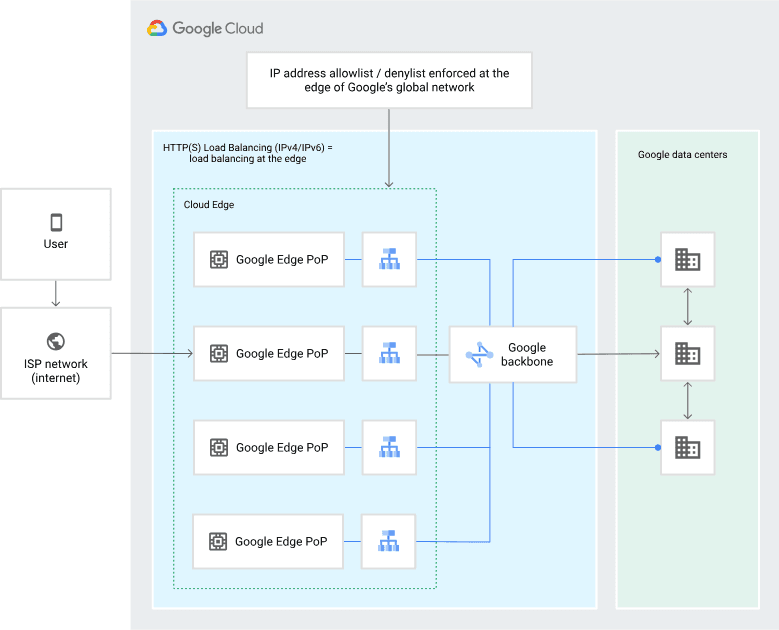
Image Source: Google Cloud Armor
Considering all that Cloud Armor does, learning how it functions contributes to understanding its value. Rather than simply restricting specific IP addresses, it uses advanced technology to analyze all incoming traffic.
Edge Enforcement Model
One of Cloud Armor's greatest benefits is edge enforcement. Rather than allowing traffic to traverse all the way to headquarters data centers or backend servers, Cloud Armor analyzes traffic at the Google Global Edge. If a request is judged to be harmful, it is dropped at the edge, protecting your backend from unnecessary overhead incurred by negative traffic while increasing the speed of response for good traffic.
Security Policies and Rules
The system functions on the basis of Security Policies. It helps to think of a policy as a guide to operations for a given application. Each policy allows you to structure a tiered system of rules like so:
Preconfigured Managed Rules: These are rule sets provided by Google that are tailored against specific industry-standard (e.g., OWASP Top 10) attacks like SQL injection or XSS (Cross-Site Scripting).
Custom Rules: You can write your own logic using the Common Expression Language (CEL). For example, you could create a rule that says, "Block all traffic from Region X unless it has a specific API header."
Adaptive Protection
Static rules are great, but there are some issues that they are incapable of addressing. That is the reason Adaptive Protection exists. Cloud Armor detects and learns what “normal” traffic patterns are for your application. If it detects something unusual, such as a sudden increase in traffic from a particular user agent, it will notify you and recommend a rule to block that attack signature.
Key Features of Google Cloud Armor
Google Cloud Armor is packed with features designed to handle modern web threats. Here are the relevant features to optimize performance and services.
DDoS Protection (L3–L7)
Cloud Armor defends against volumetric DDoS attacks in its entirety. Detected Layer 3 and Layer 4 (network level) attacks are dealt with automatically. For trickier Layer 7 (application level) attacks, Cloud Armor employs rate limiting and WAF rules, differentiating between a flash crowd and a bot attack.
Bot Management
Growing in sophistication and mimicking human activity, attack bots are becoming harder to differentiate from normal users. However, with the native integration with reCAPTCHA Enterprise, Cloud Armor can handle challenges to suspicious traffic. If a request looks suspiciously bot-like, Cloud Armor can deploy a CAPTCHA challenge or redirect that request entirely, thus stopping fraud and credential stuffing.
Geo-Based Access Control
In some cases, the protection needed is geographic. Cloud Armor lets you filter incoming traffic based on the origin of the requests. For example, if your e-commerce store only ships to North America, you can set up a policy that automatically denies traffic from other continents, thus reducing your attack surface.
Rate Limiting
In order to defend against both brute force and low and slow DOS attacks, it is possible to configure rate limits. This limits the number of requests that a single IP can send in a given period of time, making it possible to defend against scrapers taking your content and attackers doing password guessing.
Deep GCP Integration
Because it is a native tool, which means that it integrates directly into GCP. It is designed to work in conjunction with Cloud Load Balancing, Cloud CDN, and Google Kubernetes Engine. In addition, the complete logging can be exported to Cloud Logging and BigQuery for a deeper analysis in forensics.
Google Cloud Armor Pricing Explained
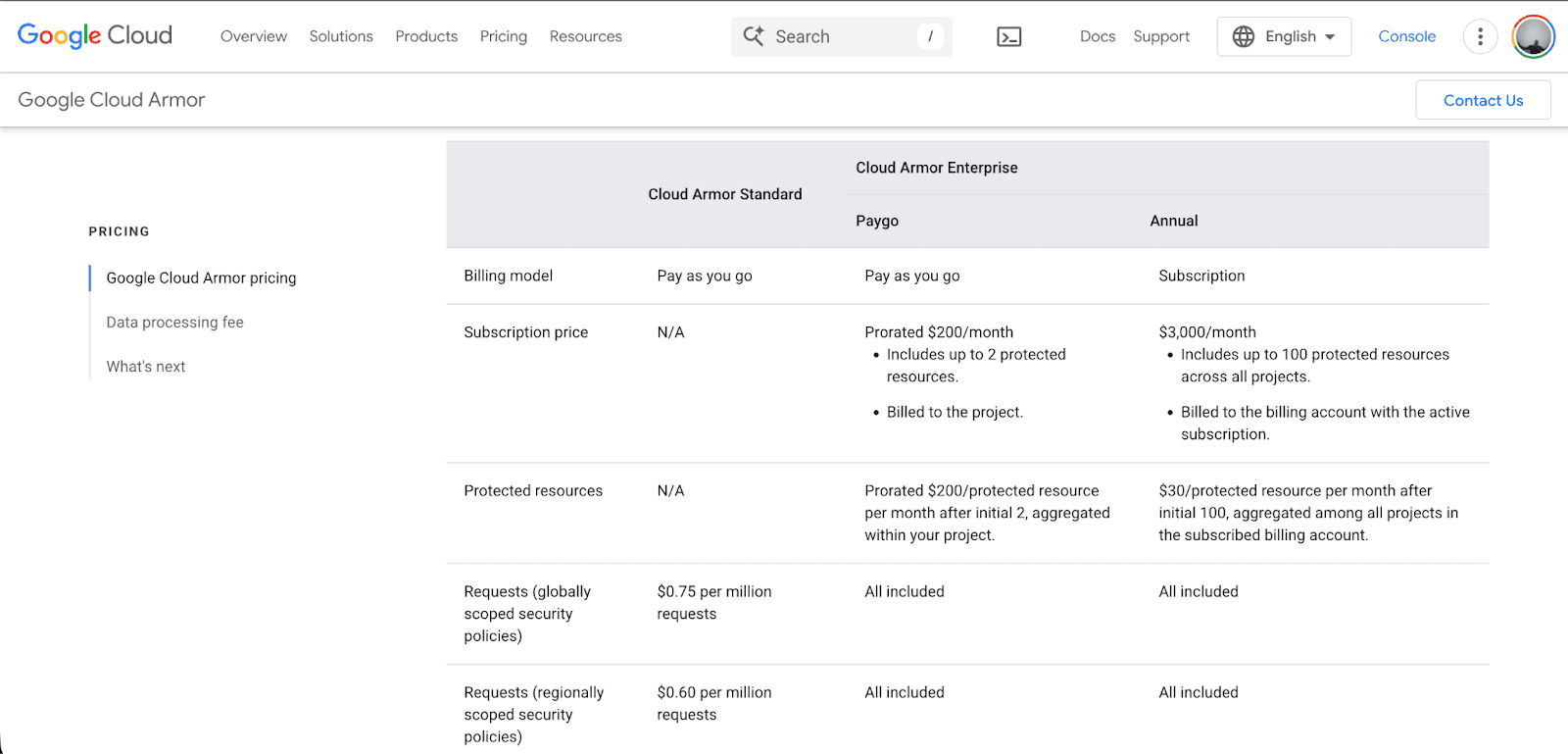
Although the pricing models of cloud security providers are always going to be complicated, Google Cloud Armor offers two pricing models based on the size of your business operation - Standard and Enterprise.
Cloud Armor Standard (Pay-as-you-go)
This model is ideal for smaller deployments or startups. You pay only for what you use.
Security Policies: $5 per policy per month.
Rules: $1 per rule per month.
Requests: $0.75 per million requests (globally scoped policies).
Requests: $0.60 per million requests (regionally scoped policies).
This tier offers basic WAF capabilities and protection against standard DDoS attacks but lacks the additional management and support that the other tier offers.
Cloud Armor Enterprise
Designed for larger organizations, this tier offers predictable billing and advanced features like Adaptive Protection.
Enterprise Paygo: A prorated monthly fee of around $200 a month for coverage on a maximum of 2 protected resources.
Enterprise Annual: A subscription model costs around $3,000 a month, which covers a maximum of 100 resources for all projects.
Data Processing Fee: Both enterprise options include data processing fees based on the volume of data transferred to the internet.
Best For: Companies that need large-scale cost certainty, advanced machine learning capabilities, and unlimited rules.
Is There a Free Option?
While there is no long-term free tier of Cloud Armor, new users of Google Cloud receive $300 in complimentary credits that can be used to gain some initial hands-on experience with Cloud Armor at no cost to the user.
Common Use Cases: When Do You Need It?
Not all projects require enterprise-grade security; however, specific scenarios require Cloud Armor:
Protecting APIs: Cloud Armor can rate-limit requests to APIs, which public APIs are prime targets for abuse and scraping.
E-commerce Peak Events: Events such as Black Friday and specific product launches typically result in significantly high website traffic. Cloud Armor's capability to differentiate between bona fide customers and malicious inventory hoarder bots is extremely useful.
Hardening GKE Clusters: For microservices deployed on Kubernetes, Cloud Armor functions as an ingress controller. It adds a protective layer in front of your pods before any traffic can reach them.
Compliance: If, due to sanctioned countries or regions, your company is required to block specific traffic, Cloud Armor's geo-blocking functionality makes compliance easy.
Pros & Cons
Is Google Cloud Armor perfect for your security needs? Let’s weigh the pros and cons.
Pros
Google-Scale Defense: You receive the same protection and support from their defense systems as Google services.
Native Integration: No need to set up any third-party tools, as Google Armor integrates seamlessly with existing GCP load balancers.
Smart Automation: The Adaptive Protection feature decreases the threat of having to manually search for security threats.
Cons
Platform Specific: It is exclusively designed to integrate with Google Cloud. If you have multi-cloud strategies that involve AWS or Azure, you may need to find a vendor-agnostic instrument for more unified management.
Pricing Complexity: Although the Standard tier is quite affordable, the processing fees of the data often become quite complicated and can be seen as overwhelming with the Enterprise tier.
Learning Curve: Writing custom rules in Common Expression Language can be quite challenging for teams used to GUI-based firewalls.
Who Should Use Google Cloud Armor?
If your workloads are on the public Google Cloud Platform and your application is internet-facing, you will most likely benefit from at least the Standard tier of Google Cloud Armor.
It is particularly vital for SaaS vendors, fintech companies, and retailers who cannot tolerate downtime; it is crucial. Letting yourself be affected by DDoS and the risk of going offline, in addition to a breach, compromising user data, is much more expensive than the monthly fee of the service.
Conclusion & Recommendation
Google Cloud Armor constitutes a scalable and intelligent solution to security challenges. If you are a GCP-native shop, the benefits of its seamless integration and performance (edge enforcement) make it the best solution.
Our Recommendation:
Start Small: Apply Cloud Armor Standard to your primary load balancer.
Use Managed Rules: Don’t try to write everything from scratch. Instead, activate the preconfigured rules from the OWASP set in 'Preview' mode to assess the potential blocks before any traffic is actually dropped.
Monitor: Use Cloud Logging to help you understand your traffic before you progress to more restrictive enforcement.
Security cannot be added in at the end of a project; It is a foundational element. Cloud Armor is built on one of the most robust infrastructures in the world, and so that security foundation will be equally as strong.
FAQs
Is Google Cloud Armor a WAF?
Yes, it is a Web Application Firewall that protects from DDoS attacks and common web exploits, including SQL injection and XSS.
Does Cloud Armor protect against DDoS?
Certainly, Cloud Armor provides comprehensive DDoS protection for Layer 3 and Layer 4 attacks, as well as advanced protection for Layer 7 application attacks, with no downtime on detection and mitigation.
Can I use Cloud Armor with GKE?
Yes, Cloud Armor integrates with the Google Kubernetes Engine Ingress controller, helping you apply security on the edge of your policies before traffic enters your cluster.
What is the difference between managed rules and custom rules?
Managed rules are pre-curated by Google, often based on OWASP standards, to block common threats; custom rules, however, are logic you write to handle particular needs, e.g., blocking a particular IP range, or requiring a specific header.
Join Pump for Free
If you are an early-stage startup that wants to save on cloud costs, use this opportunity. If you are a start-up business owner who wants to cut down the cost of using the cloud, then this is your chance. Pump helps you save up to 60% in cloud costs, and the best thing about it is that it is absolutely free!
Pump provides personalized solutions that allow you to effectively manage and optimize your Azure, GCP, and AWS spending. Take complete control over your cloud expenses and ensure that you get the most from what you have invested. Who would pay more when we can save better?
Are you ready to take control of your cloud expenses?