All blogs
10 mins
AWS Outposts: Features, Pricing & Hybrid Cloud Use Cases
Piyush-Kalra


I've watched countless companies struggle to balance the agility of the cloud with the strict demands of physical infrastructure. Hybrid cloud is becoming the default choice for modern business, not the exception. Yet, many enterprises still fight with high latency, strict data residency laws, and stubborn legacy systems that refuse to move.
If you prize the speed of the cloud but need to keep your hardware close, AWS Outposts offers a practical solution. It bridges the gap between your physical data center and the public cloud, giving you reliable on-prem AWS infrastructure.
With AWS Outposts explained clearly, you can make better decisions for your infrastructure. In this article, you will learn exactly what AWS Outposts is and how it works under the hood. I will break down the pricing structure so you understand the costs involved, and we will look at real-world scenarios to help you decide if this hybrid cloud AWS solution fits your needs.
What Is AWS Outposts?

AWS Outposts is a fully managed service that extends AWS infrastructure apps, services, APIs, and tools with the additional benefit of being able to use them in an on-premises setup with hybrid cloud workloads.
Instead of having to rely on a remote rent-the-space-in-an-Amazon-data-center approach, AWS ships the physical hardware straight to your location. Large data centers can order a full 42U rack, and smaller branch offices can order 1U and 2U compact servers.
Once you physically deploy the infrastructure, the hardware serves as a supplement to an AWS Region. Use of all the same AWS services, tools, and APIs means a hands-on approach to hybrid processing and workloads with local computing requirements.
How AWS Outposts Works
(Image Source: AWS Outposts)
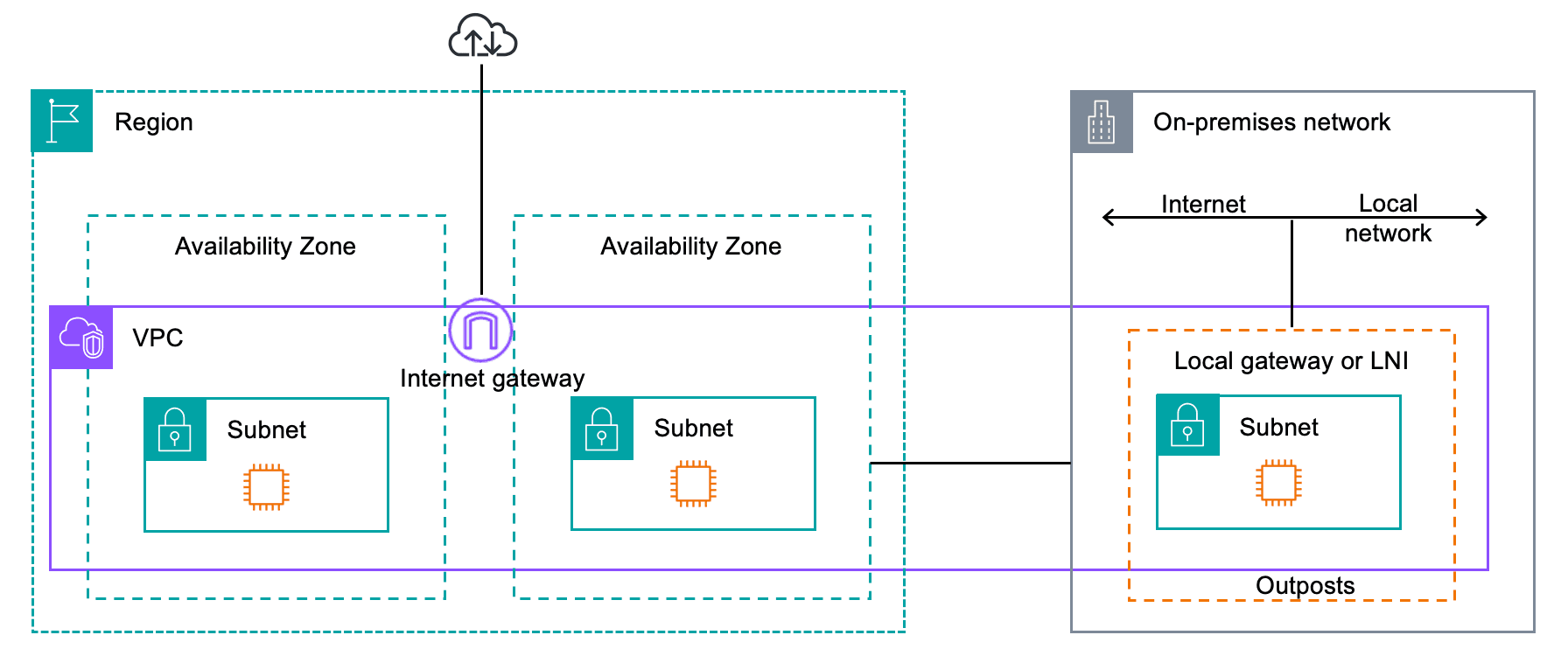
Understanding how AWS Outpost works goes back to the cloud model. Your data center's physical deployment directly depends on a parent AWS Region that houses the control plane.
Given this architecture of AWS Outposts, you get to run familiar services in a local way. You can run EC2 instances, attach EBS volumes, and use local variants of S3 directly on the rack. As a completely managed service, AWS takes care of patching, updating, and monitoring.
This kicks off the process to engage AWS Outposts:
Outpost configuration is placed via the AWS console, in which you specify the compute and storage capacity needs.
AWS installs the physical hardware in your data center by integrating it into your electrical and networking configuration.
You create a secure service link to the AWS Region of your choice.
The deployment of workloads occurs by the standard mid-cloud AWS processes.
Key Features of AWS Outposts
The benefits of AWS Outposts become obvious when you look at how it blends local hardware with cloud management. Here are the core AWS Outposts features you should know:
Fully Managed Infrastructure: AWS takes care of maintenance, firmware updates, and hardware swaps. You focus on your applications.
Consistent AWS Experience: You use the same APIs, CLI, and management console that you use for public cloud workloads.
Low Latency Processing: You can process data on the edge, which is especially useful for real-time requirements that cannot afford the round trip to the public cloud.
Local Data Processing: You can address data residency and compliance concerns by keeping sensitive data physically inside your premises.
Hybrid Cloud Flexibility: You obtain genuine hybrid cloud infrastructure with seamless integration to local AWS services.
Tight integration with your Amazon VPC is an advanced capability, enabling local traffic routing. Additionally, container workloads can be executed using AWS EKS or AWS ECS directly on Outposts hardware.
AWS Outposts vs Traditional On-Prem vs Cloud
Choosing the right environment often comes down to comparing control, cost, and maintenance. Here is how AWS Outposts compares to traditional on-premises setups and the public AWS Cloud.
Feature | AWS Outposts | Traditional On-Prem | AWS Cloud |
Management | AWS-managed | Self-managed | AWS-managed |
Latency | Low | Low | Higher (region-based) |
Scalability | Moderate | Limited | High |
Control | High | Very High | Moderate |
Compliance | Strong | Strong | Depends |
Compared to traditional on-prem solutions, AWS Outposts is able to provide the best of both options. The solution integrates low latency with the physical control components of a traditional data center, without the hassle of the hands-on maintenance of the hardware. While it is a powerful solution, it is not a complete cloud replacement. It essentially is designed to work with either a hybrid cloud or a cloud solution to extend and enhance compute capabilities for specific workloads with proximity concerns.
AWS Outposts Pricing
Pricing for hybrid infrastructure can be confusing for even the best-trained cloud architects. An Outposts pricing breakdown is contract-based and operates differently than standard, pay-as-you-go cloud services. The following are the primary components of AWS Outposts pricing:
Infrastructure Pricing: The cost of the physical rack or server is charged based off of a 1-year or 3-year provision. This cost includes the hardware, delivery, setup, and upkeep of maintenance.
Compute Capacity (EC2): You are charged for the EC2 capacity you reserve on the Outpost, which is determined by the instance types you chose during configuration.
Storage Charges: You pay per gigabyte for EBS storage. If you use S3 on Outposts, pricing differs from standard regional S3, and availability is limited by your physical hardware.
Service & Data Transfer Charges: Data transfer from your Outpost back to the parent AWS Region is usually free, but data moving from the Region to your Outpost incurs standard regional data transfer fees.
One of the most important points to consider is that Outposts requires a minimum capacity commitment. Since Outposts is more expensive than traditional cloud options, it is most beneficial for long-term projects for which the hardware needs can be accurately estimated.
AWS Outposts Use Cases
Before investing in on-premises hardware, I value the reasoning tied to the specific business case. The industry has a significant impact on the applicability of Outposts. The Outpost use cases include:
Low-Latency Applications: Gaming platforms, real-time analytics, and high-frequency trading systems demand sub-millisecond latency.
Data Residency & Compliance: Governments, and even the financial and healthcare industries, may legally mandate the location or even the physical boundaries in which data can reside.
Edge Computing: Large amounts of data that IoT environments, telecommunications hubs, and manufacturing floors generate require local and immediate processing.
Hybrid Cloud Migration: Outposts help large enterprises bridge the gap when migrating to the cloud in a phased approach, avoiding the risk of a big bang rewrite of the entire application stack.
Limited Connectivity Environments: AWS Outposts can sustain localized operations in a remote location with unstable internet connectivity until an internet connection to an AWS Region can be established.
When Should You Use AWS Outposts?
Making the final call requires a clear look at your workload requirements.
Choose AWS Outposts if:
You need sub-millisecond latency for local equipment.
You must keep data locally stored to satisfy compliance regulations.
You want a consistent AWS management experience across your on-prem and cloud environments.
Avoid AWS Outposts if:
You need highly elastic scalability to handle sudden, massive traffic spikes.
Your workloads are already fully cloud-native and do not depend on local legacy systems.
Budget constraints strongly favor the pay-as-you-go model of the pure public cloud.
Quick Decision Framework:
Latency-sensitive? = Yes - Consider Outposts.
Compliance-heavy? = Yes - Consider Outposts.
Highly scalable and unpredictable? = No - Stick to the AWS Cloud.
Conclusion
AWS Outposts enables a true hybrid cloud solution and brings the full power of Amazon’s infrastructure to your location. The service is most applicable in situations where there are workloads with high regulatory, latency, and physical proximity service requirements. Workloads are best analyzed and evaluated before determination of services and infrastructure commitments.
The first step users should take is assessing their hybrid cloud readiness. Determine and outline your requirements around latency, compliance, and your budget. Implement AWS Outposts along with its competitors, such as Azure Stack or Google Distributed Cloud, to understand which fits your services and team capabilities the best. You are well on your way to hybrid cloud architecture if you take into account your cost vs. performance trade-offs.
FAQ
What is AWS Outposts used for?
AWS Outposts is used for running AWS infrastructure and services on-premises for hybrid cloud workloads requiring low latency or data residency.
Is AWS Outposts expensive?
It can involve higher upfront costs due to hardware commitments but may provide value for predictable workloads and compliance-driven use cases.
How is AWS Outposts different from the AWS cloud?
AWS Outposts runs locally in your data center, while the AWS cloud runs in regional data centers. Both use the same APIs and tools.
Join Pump for Free
If you are an early-stage startup that wants to save on cloud costs, use this opportunity. If you are a start-up business owner who wants to cut down the cost of using the cloud, then this is your chance. Pump helps you save up to 60% in cloud costs, and the best thing about it is that it is absolutely free!
Pump provides personalized solutions that allow you to effectively manage and optimize your Azure, GCP, and AWS spending. Take complete control over your cloud expenses and ensure that you get the most from what you have invested. Who would pay more when we can save better?
Are you ready to take control of your cloud expenses?