
While using Amazon Nova is not likely to rack up bills like most OpenAI or Anthropic users, that doesn't mean using Nova will be devoid of cloud bill worries either. With many cloud providers, massive monthly cloud bills are an unfortunate reality for many. Using Nova raises questions like, "How much will using Amazon Nova cost me? Is Nova going to be cheaper than my current solution?"
If you are using Nova, you obviously have cloud costs in mind. AI cost is only one component of cloud spend. Using AI burns purchases in both of the cloud's billing dimensions, time and tokens, then there's the geography added variable.
In this article, I will explain the transparency of Amazon Nova pricing A to Z. I will explain how the logic of billing works, how to tackle the costs, and how to reduce your AWS spending.
What Is Amazon Nova?

Amazon Nova is a new generation of foundation models available exclusively on Amazon Bedrock. Unlike third-party models hosted on AWS (like Claude or Llama), Nova models are built by Amazon itself. They are designed to offer industry-leading intelligence across text, image, and video processing at a lower price point than many competitors. The tiers within the Nova family assist in matching the right tool to the right job.
The Nova family model splits its offerings into tiers in order to help you match the right tool to the job:
Nova 2 Lite: The most basic model for everyday reasoning tasks, making it the quickest and most cost-effective option.
Nova 2 Pro (Preview): This tier provides more advanced models for more powerful and complex problem-solving.
Nova 2 Omni (Preview): This model is highly adaptable and can comprehend text, images, audio, and video.
Nova 2 Sonic: This model is specialized for natural, speech-to-speech interaction.
Nova Multimodal Embedding: This tier of models is designed to produce integrated embeddings from multiple data modalities.
How Amazon Nova Pricing Works
Understanding AI pricing can feel like deciphering a foreign language. Let’s simplify it.
Consider the example of someone sending a telegram. They pay to send a message as well as to receive a reply. In the world of large language models, the words in these messages are translated to “tokens.” AWS charges for both input and output. One thousand tokens is equivalent to approximately 750 words.
For example, if a prompt and response stream together total 500 tokens, you are utilizing 0.5 units of the per 1,000 tokens metric.
Here is the basic formula for your bill:
Total Cost = (Input Tokens × Input Rate) + (Output Tokens × Output Rate)
The Two Pricing Modes
AWS has two primary ways to pay for Nova, and both are very similar to how you would pay for a hotel room:
On-Demand (Standard): You pay for what you use, when you use it. This is the most flexible option, but it comes with a standard rate.
Batch Inference: You prepare a large dataset of prompts (like a file with 10,000 customer reviews to summarize) and upload it to AWS, where it will be processed within 24 hours. Because you are not asking for an instant response, AWS provides you with a 50% discount.
Amazon Nova Pricing Breakdown
AI model pricing changes based on the region and any updates to AWS. Nevertheless, pricing is based on the standard US East (N. Virginia) rates is as follows.
Standard On-Demand Model Rates (Per 1,000 Tokens)
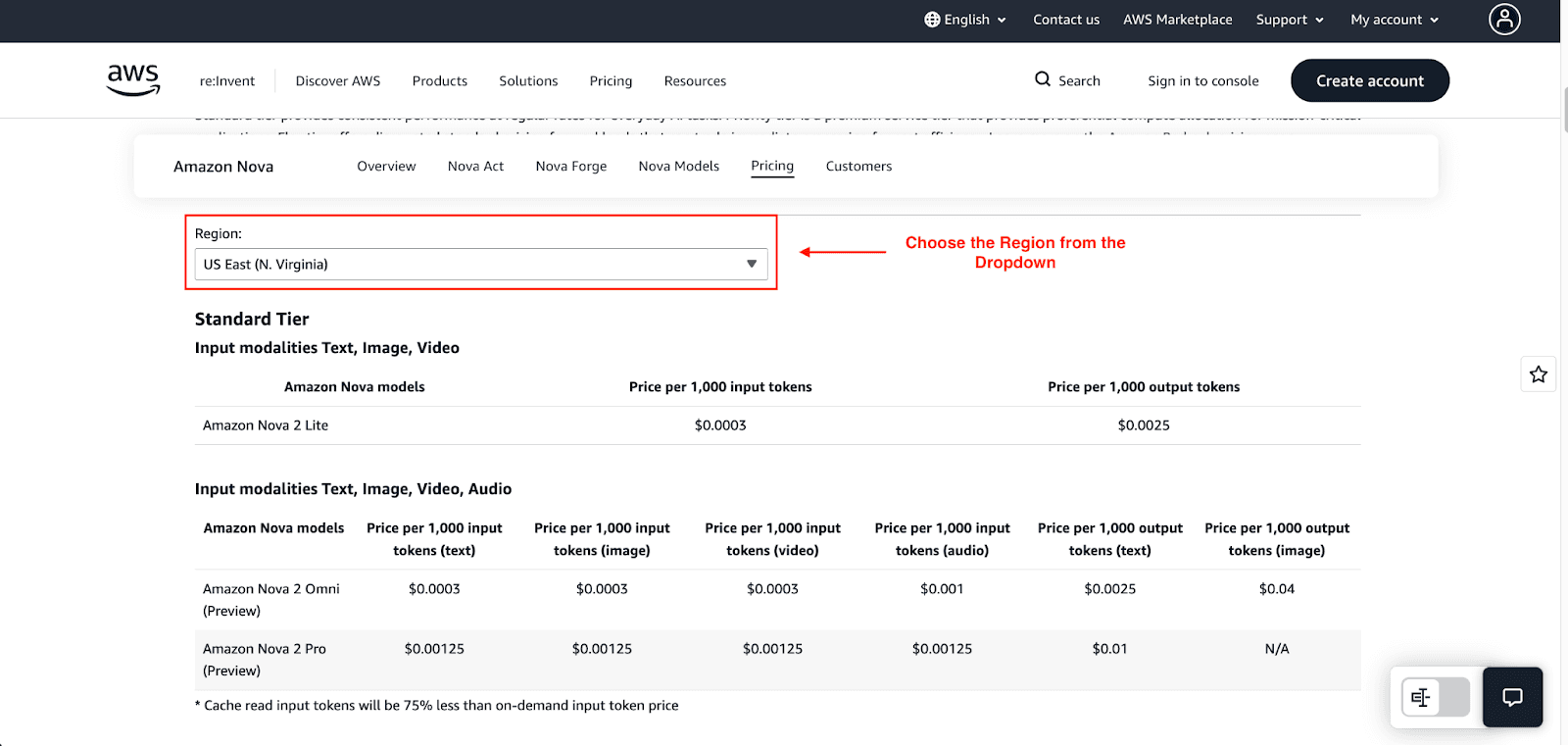
The most popular Nova model in AWS Bedrock is Nova 2 Lite, which is the default for most real-time implementations. Given the official pricing, this model is the most feasible option:
Input: $0.0003 per 1,000 tokens
Output: $0.0025 per 1,000 tokens
Let's see that in action.
Example: Daily Chatbot Cost with Nova 2 Lite
Let's say your app supports 1,000 chat interactions daily. For each interaction, there are;
350 input tokens (user message + context)
250 output tokens (bot response)
Step 1 - Daily Token Calculation & Cost
Input: 1,000 interactions × 350 tokens = 350,000 tokens → 350 × $0.00030 = $0.105
Output: 1,000 interactions × 250 tokens = 250,000 tokens → 250 × $0.00250 = $0.625
Step 2 - Total Cost
Daily Cost: $0.105 + $0.625 = $0.73
Monthly Cost: $0.73 × 30 days = $21.90
Batch Inference Rates
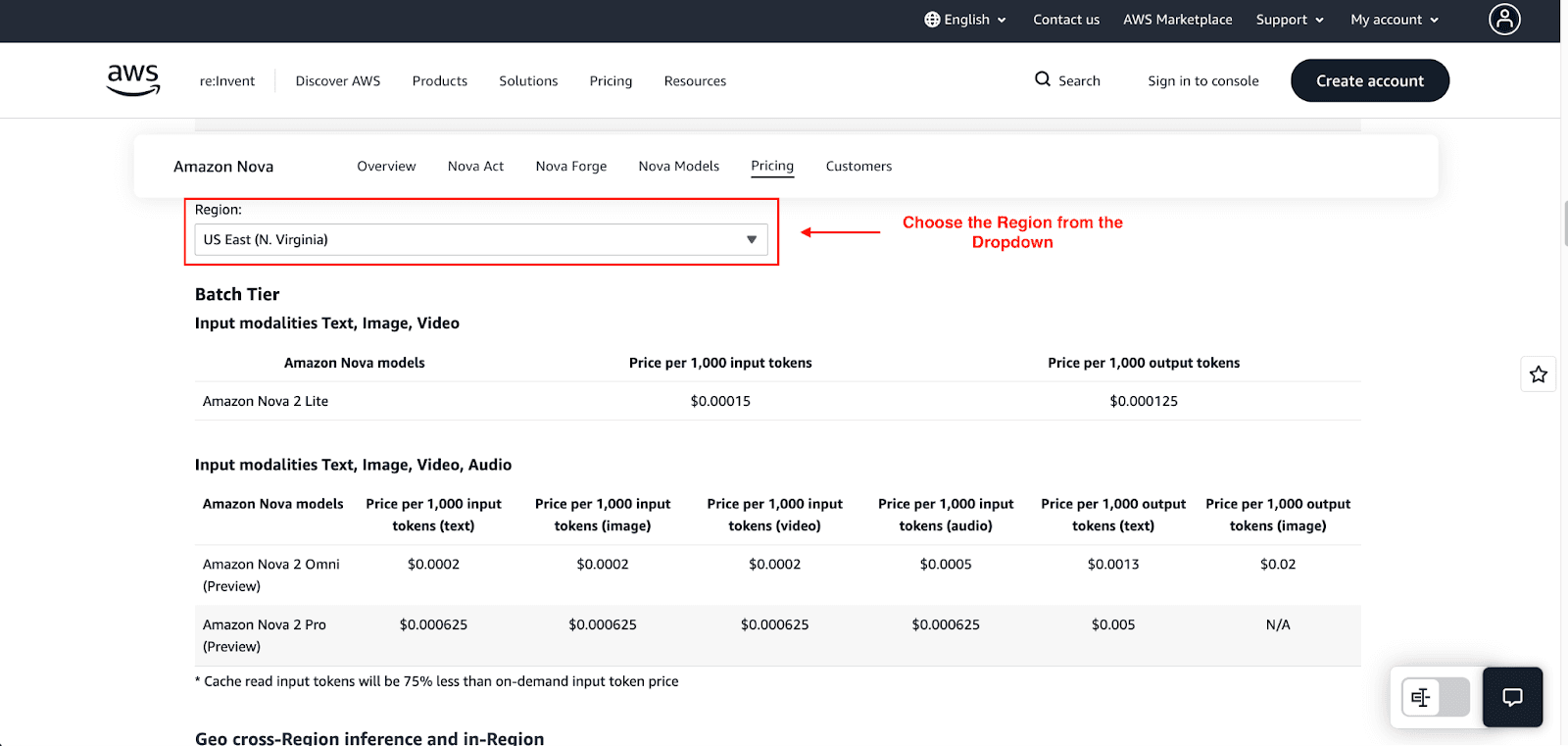
If your job can live without an immediate response, say the task is to summarize a big batch of documents, you can switch to Batch Inference to save costs. AWS usually applies a 50% discount for these tasks.
The batch rate for Nova 2 Lite is approximately
Input: $0.00015 per 1,000 tokens
Output: $0.000125 per 1,000 tokens
Creative & Generative Models
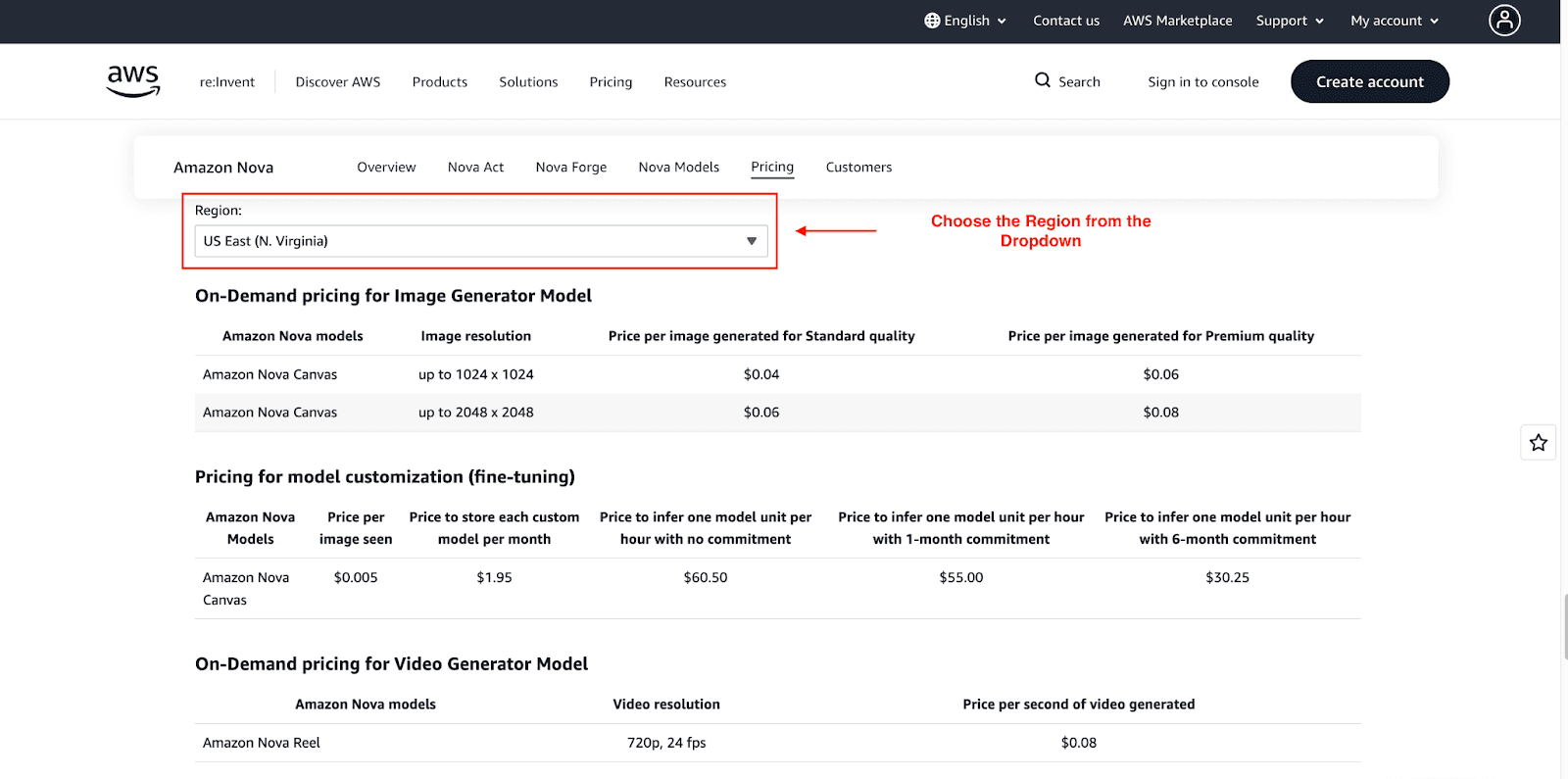
For some models, pricing is not based on the number of tokens but rather on the per-unit generated.
Nova Canvas (Image Generation): Pricing is based on the image's quality. Community estimates suggest it costs around $0.04 - $0.08 to generate an image.
Nova Reel (Video Generation): The Standard fee is commonly applied per second at $0.08.
Pro tip: Don't guess your costs. Use the official AWS Pricing Calculator for the most accurate pricing.
Amazon Nova Cost Real Examples
To help you budget, let's look at three different scenarios.
Scenario 1: Internal Knowledge Chatbot (Using Nova 2 Lite)
Use Case: An internal knowledge chatbots are used to provide employees with answers to questions about company policies, HR, and IT.
Monthly Volume: 10,000 queries.
Average Tokens per Query:
Input (Prompt + Context): 300 tokens
Output (Answer): 200 tokens
Total: 500 tokens per request
Cost Breakdown:
Input Cost: (10,000 queries × 300 tokens) / 1,000 × $0.00030 = $0.90
Output Cost: (10,000 queries × 200 tokens) / 1,000 × $0.00250 = $5.00
Estimated Monthly Cost: $5.90
Tip: Running a simple internal chatbot is incredibly inexpensive. i.e., chatbots can often be run for less than $10 a month.
Scenario 2: Customer Support Assistant (Multimodal + Text)
Use Case: A support tool where customer service representatives provide a support ticket, and the AI generates a reply. This requires image and text processing.
Monthly Volume: 50,000 support tickets.
Average Tokens & Data per Ticket:
Input Text/Context: 600 tokens
Output Response: 350 tokens
Images: 1 image per ticket
Cost Breakdown (Text Processing with Nova 2 Lite):
Input Text Cost: (50,000 tickets × 600 tokens) / 1,000 × $0.00030 = $9.00
Output Text Cost: (50,000 tickets × 350 tokens) / 1,000 × $0.00250 = $43.75
Image Processing Cost (Example Estimate):
Assuming an average cost of $0.04 per image:
Image Cost: 50,000 images × $0.04 = $2,000
Estimated Monthly Cost: $2,053
Tip: Cost remains reasonable even with multimodal activities. However, image processing, rather than text generation, remains the key cost driver.
Scenario 3: Batch Document Summarization
Use Case: A nightly scheduled process with automation capability for summarization of bulk documents, logs, or articles, where instantaneous feedback is not a requirement.
Workload:
20 million input tokens per month
10 million output tokens per month
Method: Uses batch inference, which turns out to be significantly less expensive than on-demand processing.
Cost Breakdown:
Batch Input Rate: $0.00003 per 1,000 tokens
Batch Output Rate: $0.00012 per 1,000 tokens
Input Cost: (200,000,000 tokens / 1,000) × $0.00003 = $6.00
Output Cost: (10,000,000 tokens / 1,000) × $0.00012 = $1.20
Estimated Monthly Cost: $7.20
Tip: For tasks that can be performed asynchronously, batch mode is an excellent option from a cost perspective.
What Makes Amazon Nova Expensive (Hidden Cost Drivers)
Even with low rates, bills can skyrocket if you aren't careful. Here are the hidden cost drivers:
Unoptimized Context Windows: If you resend the entire chat history (5,000 tokens) with every new user question, you are paying for those 5,000 tokens again and again.
Agent Looping: If using Nova Act, make sure your agents don’t get stuck in a loop. Since you pay per hour, an agent wasting time on a loop will empty your wallet.
Multimodal "Heavy" Inputs: Analyzing uploaded high-res videos or multiple images is significantly more costly than analyzing plain text.
Cross-Region Inference: There are additional costs for data transfer when moving data between AWS regions for certain models.
How to Reduce Amazon Nova Costs
Reducing your cloud bill requires strategy. Here are four ways to cut Amazon Nova spend:
1. Choose the Right Model for the Job
One of the best ways to reduce costs associated with Amazon Nova is to model the service to the task. Simple tasks such as classifying emails, tagging support tickets, summarizing, or text editing can all be handled with the less expensive Nova 2 Lite as opposed to a more expensive model. Other models, such as Nova 2 Pro, should only be used when necessary. More advanced models should be reserved for complex reasoning and understanding.
As a rule of thumb, it is best to use less expensive models until there is a clear benefit in model augmentation to reduce costs.
2. Leverage Batch Inference for Non-Urgent Tasks
For tasks that do not require real-time processing, cheaper batched workloads are great for savings. For example, if you want to run sentiment analysis on call logs for a given day, you can schedule the call logs to run in a batch. AWS gives you a 50% discount on batched workloads, making this a great solution for immediate cost savings.
3. Optimize Your Prompts
Prompt engineering practices can reduce costs in addition to increasing the quality of the model’s output.
Remove necessary examples from your prompt.
Use concise instructions.
Tell the model to "be brief" in its output to save on output tokens.
4. Use Caching for Repeated Queries
When there are repetitive questions or tasks, like “What is the return policy?”, instead of generating a new answer every time, you can cache one answer. Providing a cached answer is almost free, while executing the same inference multiple times is not.
How to Estimate Your Amazon Nova Monthly Spend
Before you start to calculate your potential costs, we suggest you use this simple estimation method to avoid sticker shock.
Estimate Average Tokens (e.g., 500 input / 200 output).
Forecast Volume: How many requests do you expect per month? (e.g., 100,000).
Apply the Rate:
Input Cost: (Input Tokens/1000) × Volume × Model Rate
Output Cost: (Output Tokens/1000) × Volume × Model Rate
Pro Tip: Always budget a 20% buffer for testing, failed retries, and unexpected spikes in usage.
Conclusion
Amazon Nova offers great potential when it comes to enterprise AI. Convenience is taken to another level to include various methods of payment. With a combination of options such as price based on usage, batch inference, and tiered services, enterprises can add layers when it comes to the scalability of AI while maintaining cost control.
The key is simple:
Choose the smallest capable model that can do the job.
Optimize your prompts in order to save on tokens.
Use batch inference when real-time speed isn’t required.
Monitor usage continuously.
FAQs
Is Amazon Nova cheaper than GPT-4?
Not always. For routine tasks, lower-tier Nova models (such as Nova 2 Lite) might be cheaper, particularly with tuned prompts. However, more advanced Nova models could cost as much as GPT-4.
Does Nova pricing vary by region?
Yes. AWS pricing differs by region (e.g., US East vs. EU West) due to the varying cost of infrastructure. Always check the specific rates for the region where you plan to deploy your models.
Can I set spending limits on Nova?
Absolutely. Since Nova is built on Amazon Bedrock, you can implement AWS Budgets, which allow you to set spending limits and alerts. You can even configure your spending cap to forecast and email you when your AI costs approach a specified dollar amount.
Join Pump for Free
If you are an early-stage startup that wants to save on cloud costs, use this opportunity. If you are a start-up business owner who wants to cut down the cost of using the cloud, then this is your chance. Pump helps you save up to 60% in cloud costs, and the best thing about it is that it is absolutely free!
Pump provides personalized solutions that allow you to effectively manage and optimize your Azure, GCP, and AWS spending. Take complete control over your cloud expenses and ensure that you get the most from what you have invested. Who would pay more when we can save better?
Are you ready to take control of your cloud expenses?



