
In order to function properly, recently developed cloud applications need dependable and expandable transmission systems. These systems function as the communication center, allowing different segments of an application to cooperate without being too intertwined. Within the AWS ecosystem, the two primary messaging systems being utilized are the Simple Notification Service (SNS) and the Simple Queue Service (SQS).
Choosing between SNS and SQS is often an extremely difficult decision for many teams constructing a project. The reasoning is that although both systems are capable of sending and receiving messages, they serve different functions. Picking the wrong option is a risk as it may result in insufficient architecture, increased expenses, and problems with scalability.
This article describes the primary differences between Amazon’s Simple Notification Service and Simple Queue Service, showcases the correct scenarios for their application, and gives a simple guideline that addresses the decision of which service or services to use.
What is Amazon SNS?
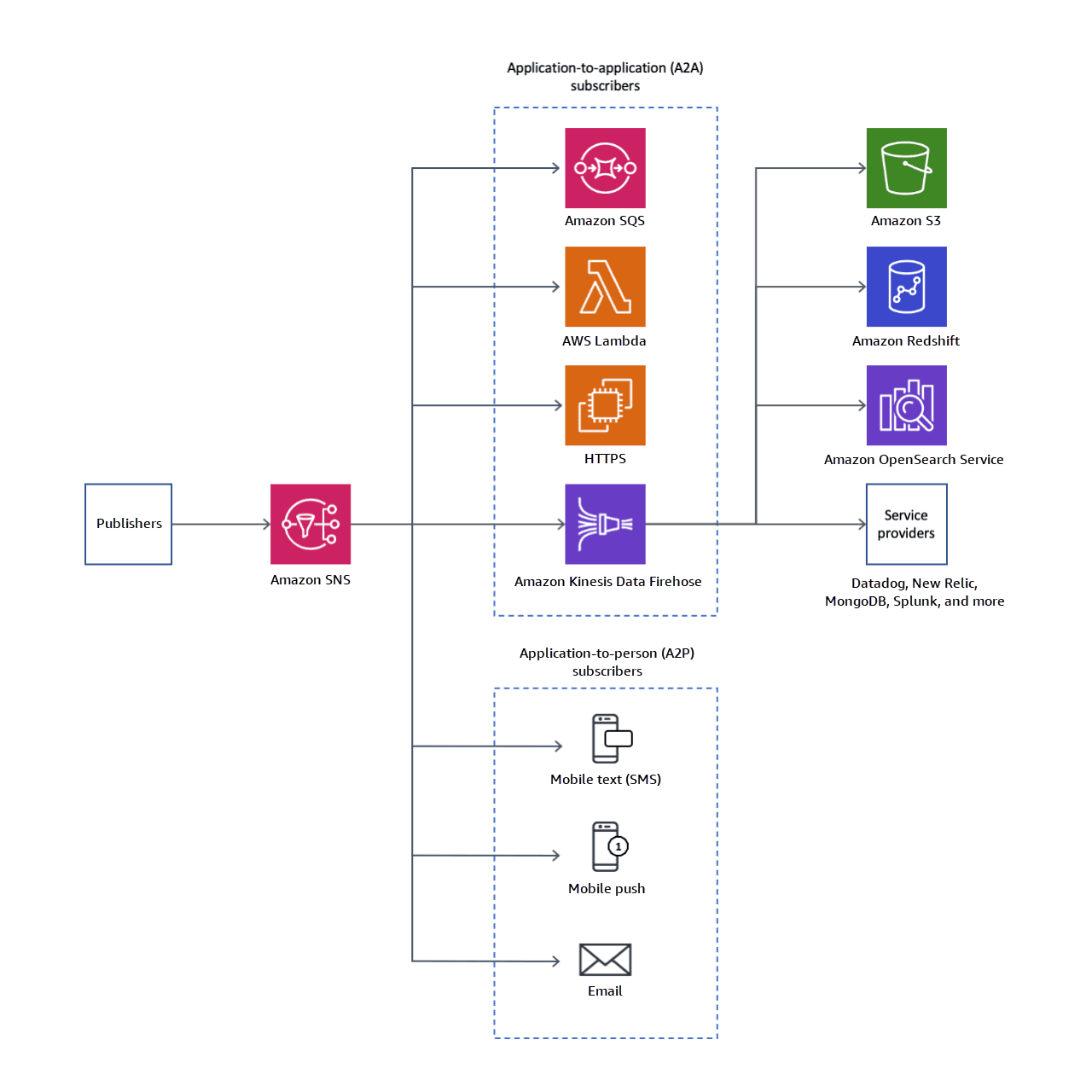
(Image Source: AWS)
Amazon Simple Notification Service is an example of a fully managed publish/subscribe messaging service. In a pub/sub model, a ‘publisher’ sends a message to a ‘topic’ and SNS instantly ‘pushes’ that message out to all ‘subscribers’ of that topic. This is an example of ‘fan-out’ architecture, where a single message is sent to multiple endpoints at the same time.
Key Features of AWS SNS:
Push-Based Delivery: Subscribers do not need to check their messages. SNS delivers messages directly to subscribers.
Topic-Based Messaging: Publishers send messages to a central topic to disconnect themselves from subscribers.
Multiple Subscriber Types: Subscribers to SNS range from AWS Lambda functions to SQS queues, HTTP/S endpoints, emails, and mobile push notifications.
FIFO Topics: For applications that need messages to be in strict order and delivered exactly once, SNS can send messages to SQS queues with the FIFO (First-In, First-Out) topic.
The primary strength of SNS is its ability to send messages instantly across multiple channels. For example, a fintech app can use SNS to send fraud alerts via SMS, email, and push notifications to users in real-time. Think of SNS as a megaphone: announce once, and everyone listening gets the message.
What is Amazon SQS?
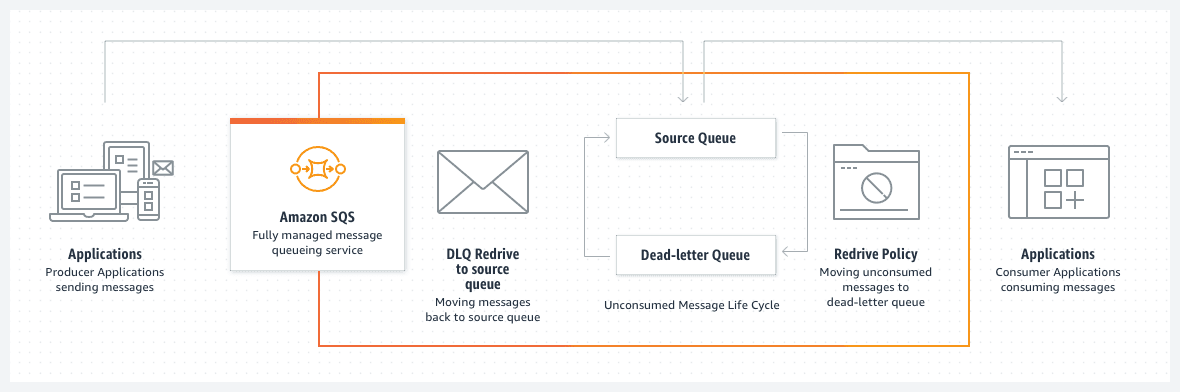
Amazon Simple Queue Service is a cloud-based service for queuing messages, which is simple to set up and use. The service enables two components to send and receive messages asynchronously without needing to be directly connected. Each message is kept in a queue until a “consumer” application retrieves the message for processing. This architecture allows applications to be far more elastic and therefore more resilient.
Key Features of AWS SQS:
Pull-Based Delivery: The SQS queue allows the consumer to actively manage the rate and the order in which messages are processed.
Message Durability: SQS enables a consumer to set a message retention policy, which ranges between 1 minute and 14 days, to avoid the message being lost.
Decoupled Architecture: SQS serves as a buffer between two or more application components, which enables each to function without being directly connected.
FIFO and Standard Queues: SQS features Standard queues, which allow a maximum throughput with at-least-once delivery, and FIFO queues, which offer exactly-once processing with preserved message order.
Dead-Letter Queues: Messages that have been marked as failed can be automatically transferred to a DLQ for troubleshooting purposes. This avoids the unnecessary clogging of the main queue.
SQS is ideal for decoupling microservices and processing background tasks. For example, an e-commerce platform can use an AWS SQS queue to manage its order processing pipeline. When a customer places an order, a message is sent to the queue, and downstream services for payment, inventory, and shipping process it asynchronously.
SNS vs SQS: Key Differences
While both are AWS messaging tools, their operational models are distinct. The choice between them often comes down to your specific architectural needs.
Feature | Amazon SNS | Amazon SQS |
Architecture | Publish/Subscribe (Pub/Sub) | Queue-based (Point-to-Point) |
Delivery Model | Push-based: Pushes messages to subscribers. | Pull-based: Consumers pull messages from the queue. |
Message Pattern | One-to-many (fan-out) | One-to-one (one message per consumer) |
Persistence | No message persistence by default; immediate delivery. | Messages are stored for up to 14 days. |
Best For | Real-time notifications, event broadcasting. | Asynchronous task processing, decoupling microservices. |
Integration | Subscribers can be Lambda, SQS, HTTP/S, email, SMS. | Consumers poll the queue via the SQS API. |
Retry Handling | Retries are handled differently; DLQ for Lambda only. | Native support for DLQs and fine-grained retry policies. |
When to Use Amazon SNS
Amazon SNS is ideal for scenarios that require quick, one-to-many message distribution:
Real-Time Event Alerts: Send notifications and alerts instantly. For example, a fintech app can use SNS to notify users of potential fraud via SMS and push notifications while triggering a Lambda function to lock the account.
Mobile Notifications: Seamlessly send push notifications to large user bases on iOS and Android devices.
IoT Message Routing: Deliver messages from IoT devices to backend services for processing and analysis.
Serverless Workflow Triggers: Publish a single event to an SNS topic to trigger multiple AWS Lambda functions in parallel.
When to Use Amazon SQS
Amazon SQS is ideal for decoupling application components and managing background tasks efficiently:
Background Task Processing: Offload time-intensive tasks like video transcoding, image processing, or report generation.
Decoupling Applications: SQS serves as a reliable buffer between microservices, ensuring they can scale or fail independently.
Managing Traffic Spikes: In e-commerce, sudden order surges during sales can be queued in SQS, allowing backend systems to process them steadily.
Ensuring Message Reliability: SQS ensures all messages are stored until successfully processed and deleted by a consumer.
Using SNS and SQS Together
You don't always have to choose between SNS and SQS. In fact, combining them creates a highly reliable and flexible "fan-out with persistence" pattern, which is considered a best practice for building resilient, event-driven systems.
This architecture works best for each specific use case:
SNS for Fan-Out: SNS excels at broadcasting messages to multiple subscribers in real-time.
SQS for Durability: SQS is great for keeping messages safe until a consumer goes on to process them.
In this architecture, an SNS topic fans out messages to one or more SQS queues, delivering the best of both systems. This means that a single message published to the SNS topic can spawn multiple independent workflows, and each subscribed SQS queue ensures the message copy is safely stored and processed regardless of the availability of the consuming service.
How It Works:
Imagine an e-commerce platform where a customer places an order:
Event Publishing: The application publishes an "OrderCreated" event to an SNS topic.
Fan-Out: The SNS topic pushes this message to multiple subscribed SQS queues, such as:
PaymentQueue: For processing the payment.
ShippingQueue: For initiating the shipping workflow.
AnalyticsQueue: For logging the event for business intelligence.
Independent Processing: Each backend service (Payments, Shipping, Analytics) independently and slowly consumes the messages from its respective queues. When the shipping service is on a temporary break, this doesn’t affect the payment and analytics services. The shipping service during this time is allowed to process the backlog of messages in its queue.
Cost Comparison: SNS vs SQS
As much as both services are alike, they serve different purposes, hence the difference in the pricing models.
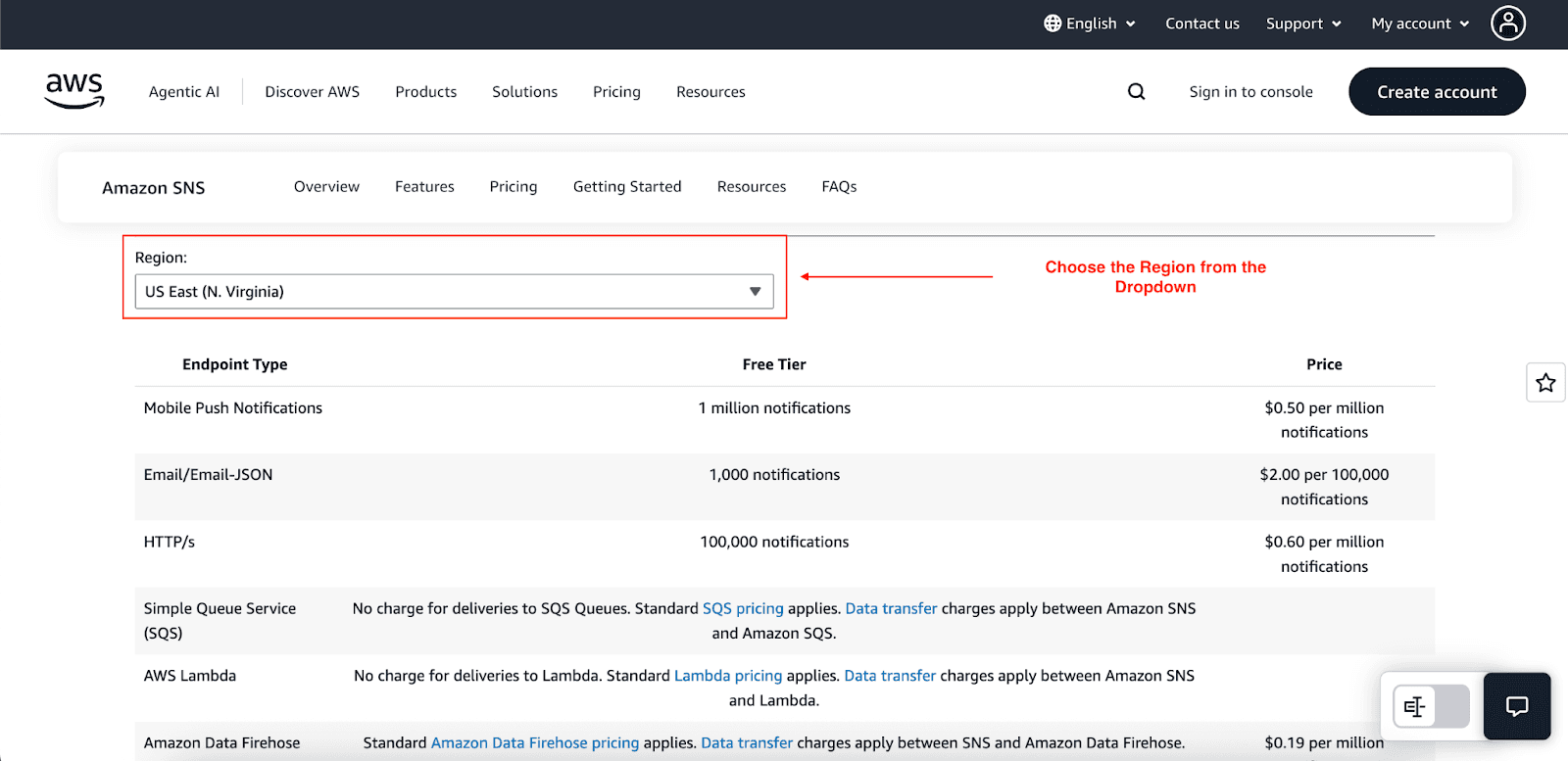
AWS SNS Pricing: Charges are applied on publish requests and message deliveries; the delivery cost differs greatly depending on the type of endpoint:
Publish Requests: You are charged approximately $0.50 per million publish requests after the free tier.
Delivery Charges by Endpoint Type:
- To SQS or Lambda: These are usually the least expensive ways and almost always incur no charge over and above the charge for the publish request.
- To Mobile Push: For mobile notifications, costs are about $0.50 per additional million deliveries for every tier after the free tier.
- To Email/JSON: Sending emails or delivering as a raw JSON payload costs about $2.00 for every 100,000 deliveries after an initial 1,000 free deliveries.
- To SMS: SMS deliveries are the most costly, and the price varies greatly depending on the country and network. This option requires strict cost control.
Data Transfer: If the deliveries are made outside of the AWS regions or over the internet, the standard AWS outbound data transfer costs also apply.
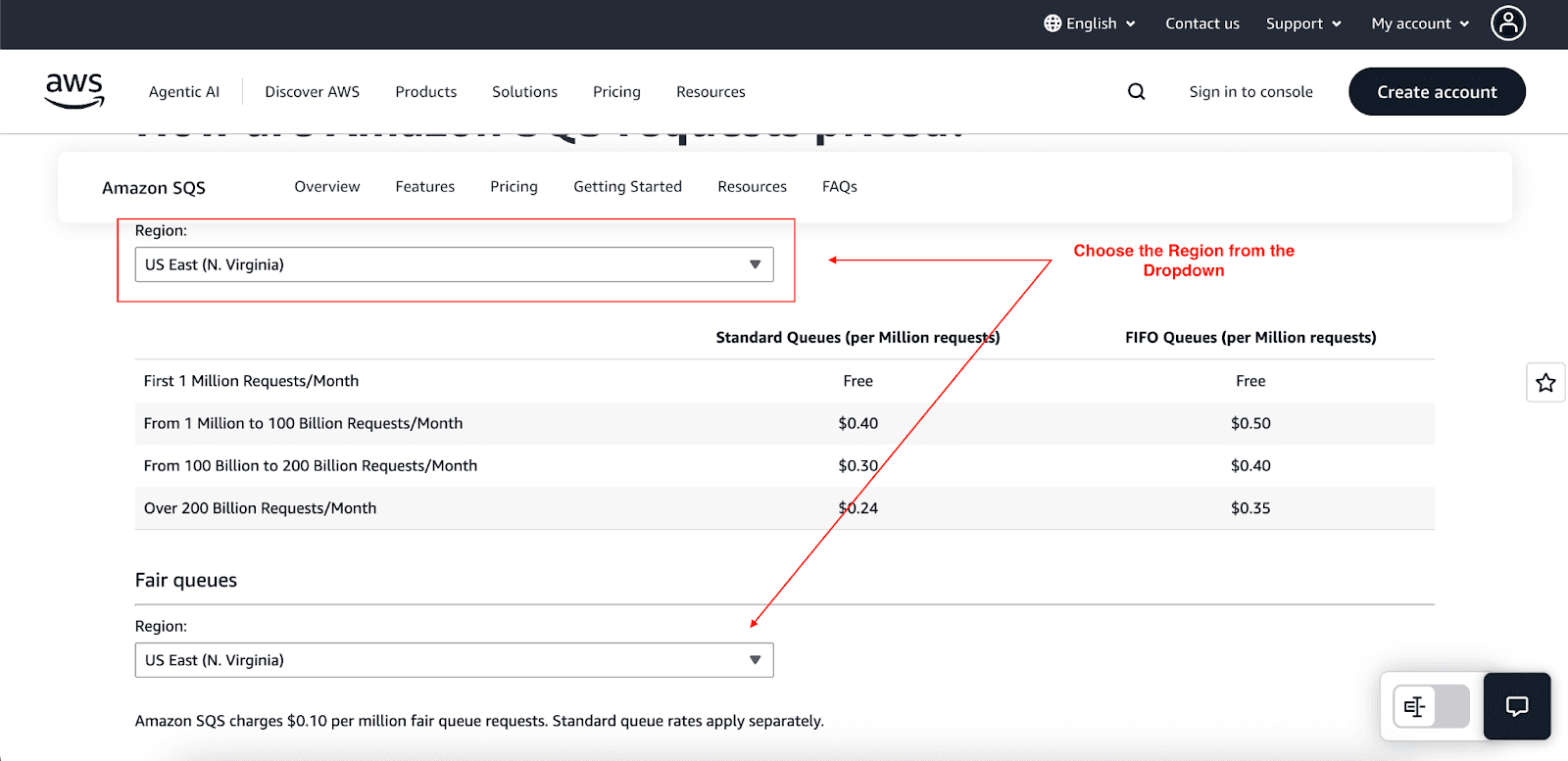
AWS SQS Pricing: Charges are incurred based on each request for sending, receiving, and deleting messages:
Free Tier: The first 1 million requests per month are free, providing ample opportunity for initial development and testing.
Standard Queues: After the free tier, standard queues are offered at an average rate of $0.40 per million requests. These queues are high throughput and have at least one delivery.
FIFO Queues: While the Standard queues are cheaper, FIFO (First-In, First-Out) queues are more expensive and provide stringently ordered messages and exactly-once processing, which is critical for certain applications.
Data Transfer: Transfer rates within the same AWS region are usually free. However, there will be fees associated with the transfer of data across regions and the internet.
Choosing the most appropriate service is vital to minimizing the costs. An SNS system for a task-processing workload can be costly due to high delivery notification counts. On the other hand, using SQS for simple fan-out notifications is also a waste of resources.
Your Decision Framework: How to Choose
Making the right choice is straightforward if you focus on your primary goal.
Need to deliver messages to multiple subscribers? - Go with SNS.
Need to decouple services and process tasks asynchronously with durability? - Go with SQS.
Need to deliver messages reliably to multiple, independent processing workflows? - Combine SNS and SQS.
Use this quick checklist to guide your decision:
What is your communication pattern? - For five or more participants, SNS works well. For individual communication, SQS is the better option.
Is message durability critical? - If messages are important, and a consumer is offline, SQS is the more reliable option.
Do you need to control the processing rate? - SQS provides consumers with more control, which makes it better for managing workloads.
Conclusion
The basic differences between SNS and SQS are essential for building scalable, robust, and inexpensive applications on AWS. SNS is the broadcaster sending the notifications and alerts, while SQS is the workhorse responsible for decoupling the systems and processing the tasks in the background.
Use AWS SNS for notification purposes, AWS SQS for workflows, and use both when needing fan-out and durable, asynchronous processing. Combining these powerful AWS messaging services will optimize your applications.
Join Pump for Free
If you are an early-stage startup that wants to save on cloud costs, use this opportunity. If you are a start-up business owner who wants to cut down the cost of using the cloud, then this is your chance. Pump helps you save up to 60% in cloud costs, and the best thing about it is that it is absolutely free!
Pump provides personalized solutions that allow you to effectively manage and optimize your Azure, GCP and AWS spending. Take complete control over your cloud expenses and ensure that you get the most from what you have invested. Who would pay more when we can save better?
Are you ready to take control of your cloud expenses?



