All blogs
10 mins
Google Cloud GPU Pricing: Complete Cost Guide
Piyush-Kalra


I've watched countless companies launch exciting AI projects, only to watch their cloud bills explode a few months later. It's a lesson I wish I'd learned faster, rather than watching budgets drain due to idle infrastructure. GPU spend is now one of the biggest cloud cost drivers for modern engineering teams.
Running a cluster of NVIDIA H100 or A100 GPUs can cost thousands of dollars per day. Many teams completely underestimate how much money they waste on idle GPUs that sit running overnight. Google Cloud pricing only adds to this confusion. Costs vary wildly depending on the specific GPU type, the region you select, the VM family, your commitment levels, Spot pricing availability, and the nature of your workload.
In this article, I will break down how Google Cloud GPU pricing works, what different AI workloads actually cost, and how teams can reduce unnecessary GPU spend.
What Are Google Cloud GPUs?
Processing large and complex datasets in a timely manner is only possible with high-performance hardware, and Google Cloud GPUs can be that hardware for you. Teams process work related to AI training and inference, video transcoding, 3D rendering, and scientific computing in a timely manner by utilizing GPUs for parallel execution of operations.
Types of GPUs Available on GCP
Google Cloud makes GPU instance types available to meet different levels of performance for your workload. The choices are:
NVIDIA T4
NVIDIA L4
NVIDIA V100
NVIDIA A100
NVIDIA H100
NVIDIA H200 (gradually being published in more regions)
Difference Between GPUs and TPUs
You may be debating whether to go for GPUs or Google's custom-made Tensor Processing Units (TPUs).
GPUs: Provide an immense variety of tools and frameworks. They are versatile and can support virtually all ML tools and frameworks.
TPUs: Provide Google-native optimizations. They are custom for TensorFlow and may optimize some ML tasks extremely fast.
Common AI Workloads Running on GCP GPUs
AI workloads can be of different computational intensities. At GCP, it is common to find GPUs performing LLM training, Retrieval-Augmented Generation (RAG) workflows, executing Stable Diffusion, creating AI agents, performing vector embedding, and running high-request inference APIs.
How Google Cloud GPU Pricing Actually Works
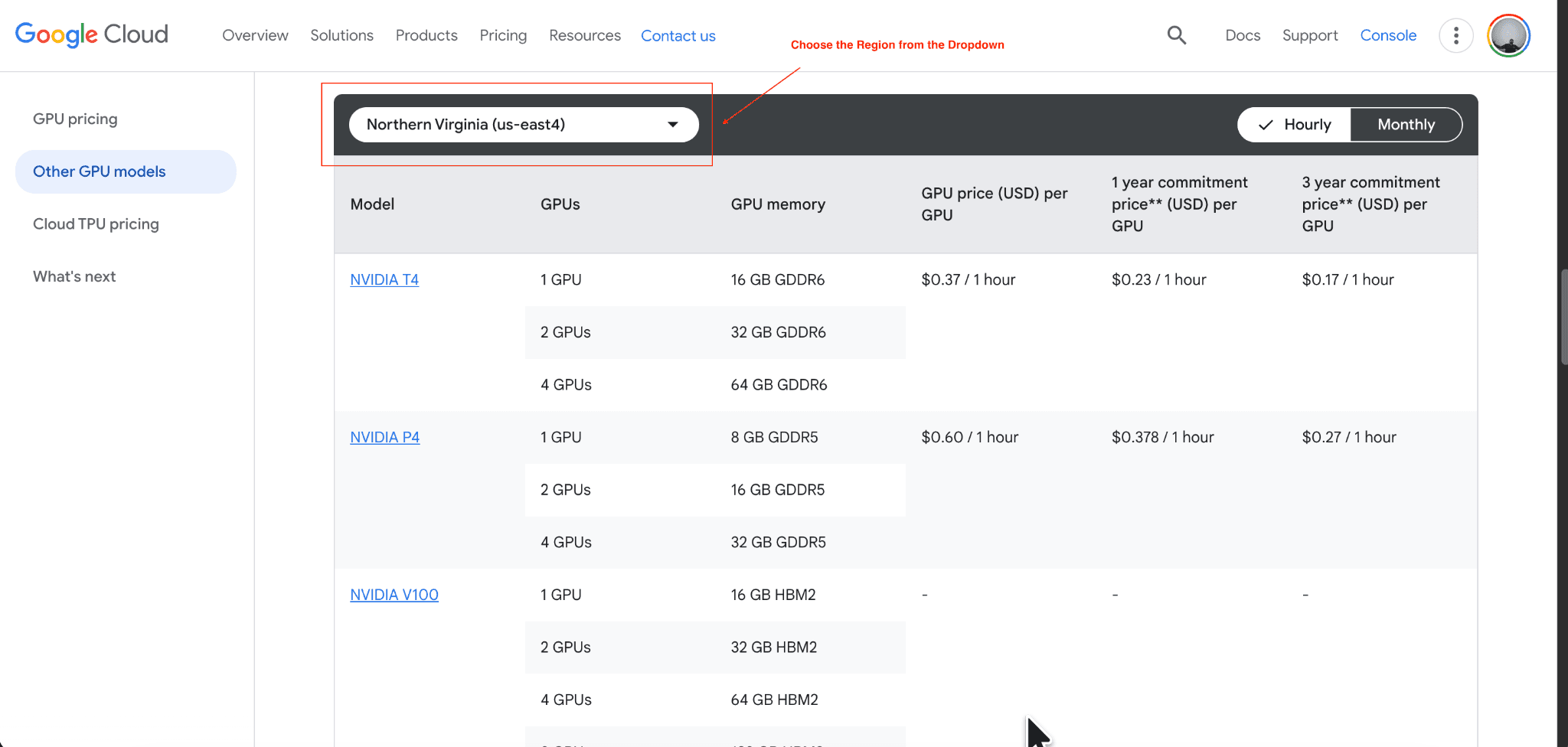
On-Demand GPU Pricing
On-demand pricing means you pay by the hour (or second) for the exact compute time you consume. This gives you maximum flexibility to start and stop workloads at any time. The tradeoff is that on-demand rates are the most expensive way to rent GPUs.
Spot VM Pricing
Spot VMs use spare Google Cloud capacity. They offer massive discounts of 60% to 91% off the standard on-demand rate. The catch is the interruption risk. Google can preempt your instance at any time if it needs the capacity back, making Spot pricing best for fault-tolerant workloads.
Committed Use Discounts (CUDs)
You can commit to a baseline of usage for a 1-year or 3-year term. Google rewards this commitment with discounts of 20% to 70%. Flexible CUDs apply across different instance families, while regional CUDs lock you into specific locations. Commitments reduce your hourly cost, but overcommitting becomes risky if your usage drops unexpectedly.
Regional Pricing Differences
GPU pricing is not flat across the globe. GPU availability varies by data center, and the exact same H100 instance will cost more in certain regions compared to others. Always check the regional pricing table before deploying your architecture.
Additional Costs Beyond GPUs
You cannot just calculate the GPU hourly rate. Your final bill will include costs for data storage, networking and egress fees, underlying CPU and memory usage, and idle infrastructure. Scaling your inference instances to handle traffic spikes will also multiply these hidden costs.
Google Cloud GPU Pricing by GPU Type
Here is a general comparison of popular GPU options available on Google Cloud and their typical AI workload use cases.
GPU | Best For | Estimated Hourly Cost |
NVIDIA T4 | Lightweight inference | ~$0.35/hr |
NVIDIA L4 | Production AI inference | ~$0.64-$1.00/hr |
NVIDIA V100 | Legacy ML training | ~$2.48/hr |
NVIDIA A100 | Fine-tuning & AI training | ~$3.67-$5.00/hr |
NVIDIA H100 | Large-scale LLM training | ~$9.00-$13.00/hr |
Important Note: Pricing varies based on region, VM configuration, availability, commitment model, and Google Cloud pricing updates.
NVIDIA T4 Pricing
The T4 is the cheapest entry GPU available. It works perfectly for lightweight inference tasks, basic machine learning models, and video transcoding.
NVIDIA L4 Pricing
The L4 offers the best inference economics right now. It provides excellent performance per dollar, making it the ideal choice for serving GenAI applications and running mid-sized models.
NVIDIA A100 Pricing
The A100 remains incredibly popular for fine-tuning. It provides the heavy compute power necessary for enterprise AI workloads without the premium price tag of the newest generation.
NVIDIA H100 Pricing
The H100 is built for frontier AI models. It delivers the highest performance available for massive LLM training, but it also carries the highest hourly cost.
Estimated AI Workload Costs on Google Cloud
Cost to Run an AI Chatbot
Inference workloads drive the bulk of chatbot costs. You have to calculate your token serving economics. A popular service handling thousands of requests a day on L4 GPUs might cost a few hundred dollars a month, but heavy traffic requiring A100s can quickly push that into the thousands.
Cost to Fine-Tune an LLM
Fine-tuning a model using methods like LoRA or QLoRA requires serious hardware. A standard fine-tuning job on a single A100 might take 10 hours and cost you less than $40. Using an H100 will speed up the process, but the hourly rate doubles.
Cost to Train a Large Language Model
Training a foundational model from scratch requires multi-node GPU clusters. Distributed training across 64 H100 GPUs can easily cost over $15,000 per day.
Cost of Always-On GPU Inference
Hidden monthly inference costs destroy budgets. Leaving a single A100 instance running 24/7 for a month will cost roughly $2,600. If your app only gets traffic during business hours, that idle GPU impact is pure waste.
Example Monthly GPU Cost Scenarios
Startup: Running two L4 instances for development and light inference might cost around $1,200 per month.
Mid-market AI SaaS: Utilizing a cluster of A100s for fine-tuning and inference can easily run between $10,000 and $25,000 monthly.
Enterprise AI platform: Large-scale training and global inference across hundreds of H100s will push monthly bills well into the hundreds of thousands.
Best Practices to Reduce Google Cloud GPU Costs
Use Spot GPUs for non-critical workloads: Spot VMs are ideal for development and batch processing jobs. You may incur an interruption, but you will earn a discount.
Right-size your GPU infrastructure: Don't use an A100 for any use case an L4 will satisfy. Use the right tier GPU.
Use autoscaling for inference: Set your instance groups to scale down to zero when there's no traffic, and this way, you will only incur costs when your models have queries.
Shut down idle GPU instances: Turn off machines that aren't running jobs. Use scripts to terminate instances automatically after training is complete.
Optimize and quantize models: Use model quantization to deploy models to lower-tier GPUs.
Use Committed Use Discounts (CUDs) carefully. Some workloads need flexible pricing and long-term savings from locking in a CUD to baseline usage for other workloads.
Separate training and inference infrastructure: This means keeping the inference separate from the training that uses the large cluster.
Monitor GPU utilization: If your GPU utilization is consistently low, you are paying for capacity you don't need.
Why AI Teams Struggle to Control GPU Costs
Constant hardware evolution: Yesterday's optimal hardware is today's overpriced legacy system, making long-term planning difficult.
Unpredictable usage: It is impossible to predict traffic for novel AI features. High-level traffic spikes are going to lead to heightened costs.
Risky manual commitments: Estimates for GPU needs for 1- to 3-year terms on the part of the teams result in overprovisioning and waste.
Massive waste from idle GPUs: Engineers create test instances and forget to terminate them, burning the budget.
Reduced visibility from multi-team usage: It becomes very difficult to monitor expenses when multiple divisions use their own AI resources.
Immature FinOps for AI: General cloud cost systems do not track fine-grain AI metrics, making spend impossible to correlate to business results.
How Pump Helps Reduce Google Cloud GPU Costs
As AI infrastructure becomes more expensive, many organizations are looking for ways to reduce cloud waste without introducing additional operational complexity. Pump helps automate Google Cloud cost optimization by continuously analyzing infrastructure usage patterns and intelligently managing commitments.
Automated CUD Optimization: Pump conducts intelligent analysis on your GCP usage, making the commitment decision for you and adapting to your workloads.
Reduced Commitment Risk: Pump's group buying model absorbs the complexity of the commitment, and if you reduce your commitments, savings are made without the risk of commitment.
Improved AI Infrastructure Visibility: Pump provides the ability to easily track spend and uses through its dashboards.
Continuous AI Cost Optimization: Your AI workloads evolve, and so does Pump. It automatically adapts to reduce the costs associated with dynamic infrastructure usage, without the need for your team to intervene.
Cost-Efficient AI Growth: Build and grow your AI offerings with confidence. Pump’s ability to minimize the day-to-day hassles of cloud cost management lets your team invest their time in developing quality software.
Conclusion
GPU pricing is currently one of the biggest AI cost drivers in the industry. High-end H100 and A100 infrastructure becomes expensive quickly, and idle GPU waste remains a major issue for teams of all sizes. You must remember that inference optimization matters just as much as training efficiency if you want to protect your margins. Fortunately, automated commitment optimization can help reduce these costs effortlessly.
Pump helps teams reduce GCP infrastructure costs by automating commitment optimization and continuously adapting to changing cloud usage patterns.
Similar Blog Posts
Google Cloud TPU: Pricing, Performance & Use Cases