
Whenever I need scalable, super-reliable block storage alongside Compute Engine VMs or Kubernetes clusters, GCP’s Persistent Disk is always first on my list. Still, I won’t sugar-coat it: the pricing can look like a mind-numbing puzzle. Between multiple disk types, regional pricing quirks, and a few hidden charges, it’s easy to get lost. Luckily, I learned my way around by trial and error, and I’m ready to share the shortcuts I discovered.
In this article, I’ll walk you through the pricing nuggets I’ve hit, topped off with the cost-optimizing tricks that run in my daily sync. Grab a spare cup of coffee and let’s go.
What is GCP Persistent Disk?
GCP Persistent Disk is Google Cloud's durable block storage, purpose-built for VMs and containers. Unlike ephemeral disks, data survives instance shutdowns thanks to synchronous replication and background snapshots. Pricing is separate for storage, reads, writes, and snapshot requests, so an app’s I/O patterns directly shape the bill.
Four core Persistent Disk types let you pick the best fit for workload needs:
Standard Persistent Disk: HDD-based, the best value for sequential reads, large media libraries, or analytics scratch space.
SSD Persistent Disk: Flash storage built for low, steady latency. Databases and latency-sensitive apps need this. Pricey but worth it if your app can’t tolerate even minor hiccups.
Balanced Persistent Disk: A middle tier, balancing throughput, latency, and cost, often the starting point for development and staging.
Extreme Persistent Disk: Ultra-high performance with adjustable IOPS. It’s designed for demanding databases that need both speed and predictability.
How GCP Persistent Disk Works?
GCP’s Persistent Disk provides scalable, high-performance, block storage that can be attached or detached to your Compute Engine VMs or GKE clusters with no disruption. This network-attached disk behaves like a traditional local drive, yet you can connect the volume to different servers, making it ideal for microservices and disaster recovery.
Attachment and Performance Features
Dynamic Attachment: Disks can be connected to running instances without downtime, enabling multi-read scenarios and shared storage setups.
Snapshots: Create incremental, point-in-time backups to reduce storage costs and minimize network transfer times.
Regional Replication: Automatically replicate data across multiple zones within a region to improve availability and disaster recovery.
Encryption: All data is encrypted at rest and in transit, with support for customer-managed encryption keys (CMEK) and customer-supplied encryption keys (CSEK).
Deep Dive into GCP Persistent Disk Pricing Structure
Understanding GCP's Persistent Disk pricing model is crucial for effective cost management. The platform uses a pay-as-you-go model with several pricing components that directly impact your monthly cloud costs.
Pricing Model Components
Pay-as-you-go Billing: Charges are based on provisioned disk space hourly, regardless of usage. For example, reserving a 200 GB disk incurs charges for the full 200 GB, whether you use it all or not.
Disk Type Pricing Tiers (Northern Virginia - us-east4):
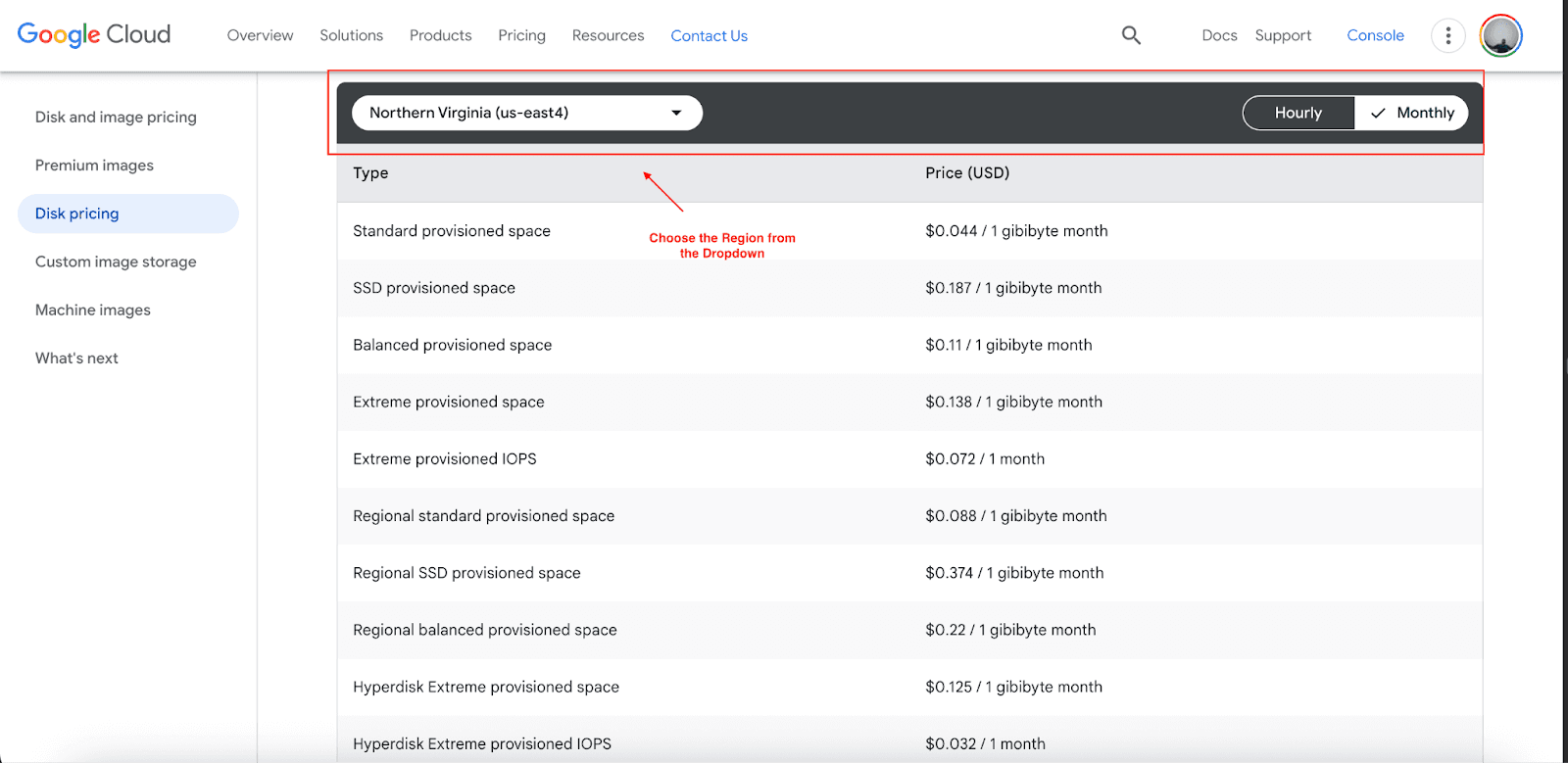
Standard Persistent Disk: $0.044/GB/month
Balanced Persistent Disk: $0.11/GB/month
SSD Persistent Disk: $0.187/GB/month
Extreme Persistent Disk: $0.138/GB/month + $0.32/IOPS/month (customizable high performance).
Regional vs Zonal Pricing: Regional persistent disks, which replicate data across multiple zones for increased reliability, cost roughly twice as much as zonal disks.
Additional Cost Factors:
Snapshot Storage:
- Standard snapshots: $0.050/GB/month
- Archive snapshots: $0.019/GB/month (90-day minimum billing). Snapshots are charged for actual stored data, which can be less than the disk’s size due to compression and incremental changes.
Network Egress: Most egress fees for transfers between GCP and other clouds have been removed. However, cross-region snapshot creation and restoration within GCP still incur charges of $0.14/GB, depending on region pairs.
IOPS and Throughput: Extreme Persistent Disk and Hyperdisk volumes incur extra costs for provisioned IOPS and throughput beyond baseline levels.
Minimum Disk Size: Disks range from 10 GB to 64 TB per disk and can be resized dynamically as needed.
Pricing Example
For a startup using a 500 GB Balanced Persistent Disk in us-east4 for database storage:
Monthly disk cost: 500 GB × $0.11 = $55.00
Weekly snapshots (50 GB compressed): 4 × 50 GB × $0.05 = $10.00
Total monthly cost: $65.00
Additional Pricing Benefits
Google Cloud offers multiple ways to reduce Persistent Disk costs:
Free Tier: Take advantage of the GCP Always Free tier, which includes limited persistent disk usage within the quota. New users also get $300 in free credits for initial cost relief.
Sustained Use Discounts: Automatically save on long-running disk resources with discounts of up to 30%.
Committed Use Discounts: Save up to 57% by committing to 1-3 years of consistent disk resource usage.
Regional Selection: Picking a cost-efficient zone such as Iowa (us-central1) vs a premium zone can deliver measurable budget relief across the board.
Archive Snapshots: Switch critical archive backups to less frequently accessed storage, and you could save storage costs by as much as 62% over extended periods.
Case Study: New Aim's GCP Persistent Disk Cost Optimization Journey
New Aim, a growing e-commerce platform dedicated to empowering small and medium businesses, needed to rein in the escalating costs of GCP Persistent Disks. As they scaled from a few hundred to a few thousand merchants, the monthly storage bill soared. Their original architecture featured oversized SSD Persistent Disks in multiple regions, provisions designed for peak performance but ultimately yielding little additional value.
Optimization Strategy:
Right-Sizing Volumes: Evaluated disk usage metrics and trimmed sizes by 40% for the majority of production and staging disks.
Switching Disk Types: Identified workloads with predictable read and write patterns and migrated them to Balanced Persistent Disks, realizing a 41% reduction in storage fees.
Committed Use Discounts: Secured 25% savings by committing to one-year discounts specifically on the database nodes that host the transactional workloads..
Efficient Snapshot Management: Deployed a lifecycle policy that automatically transitioned snapshots older than 30 days to lower-cost storage, slashing monthly snapshot-related costs by 60%.
Results:
System availability improved, rising from 97% to 99%.
Monthly storage costs fell by 35% despite a 50% overall increase in data volume.
Incident response time decreased from several hours to a consistent 15 minutes.
Tools and Tips for Reducing GCP Persistent Disk Costs
Persistent Disk costs can strain budgets unless you combine the right tools with strategic discipline for continuous monitoring and fine-tuning:
Cloud Billing Dashboard: Use the Cost Breakdown view to slice spending trends by disk type, region, and even daily usage. Bookmark the views to compare different projects every week.
Regular Disk Audits: Every month, download disk inventory and filter for volumes that haven’t been attached for 30 days, plus those that are larger than their usage warrants.
Automated Resizing: Create workflows that alert you whenever a disk stays under 50% for a month, triggering a scripted resize operation.
Snapshot Management: Label snapshots with retention tags and have scheduled functions archive or delete them automatically after 30-90 days.
IOPS Tracking: Monitor actual IOPS metrics against provisioned capacity to identify over-reserved Extreme Persistent Disks.
Region Comparison: Analyze costs across GCP regions to identify opportunities for migrating workloads to lower-cost zones.
Performance vs Cost Balance
Balanced Disk Strategy: Launch new workloads with Balanced Persistent Disks. Shift to SSD only upon unmistakable performance evidence. Savings, realized sooner.
Tiered Storage Architecture: Use different disk types within the same workload, jury-rig storage by tier, SSDs for transactions, Balanced for reporting, and Standard for all-but-deleted logs.
Block Storage Optimization: Apply tailored block sizes and a disciplined I/O pattern to illuminate the value and avoid unlocking and paying for needless capacity at the outset.
Cut GCP Cloud Costs with Pump
While Google’s own tools provide a decent overview of cloud spend, third-party services often reveal deeper, actionable savings. Pump automatically cuts GCP costs by tapping advanced AI and pooled buying, shaving between 10% and 60% off cloud spend.
How Pump optimizes GCP storage:
AI-driven usage analysis and forecasting.
Automated committed use discount purchases.
Group buying for volume discounts.
Risk-free 30-day money-back guarantee.
Conclusion
Optimizing GCP Persistent Disk costs is a key lever for tighter budgets and steady operations. Picking the right disk type, stacking savings, and leaning on smart tools locks in value. Kick off by taking a running list of current usage, eyeing the catalog of available deals, and opening the GCP pricing calculator for the next specific steps.



