All blogs
12 mins
What Is BigQuery BI Engine? Features, Pricing, and Benefits
Piyush-Kalra


Creating business analytics dashboards on top of large data sets often leads to huge frustration. Traditional analytical queries become extremely slow. Modern teams need analytics in real-time for business-critical decisions. If your team is waiting for minutes for a chart to load, you are losing the analytics race.
Unfortunately, you can only do so much to improve dashboard performance without increasing costs on your cloud data warehouse. The more you try to improve the performance of the dashboard, the more you have to pay. Recently, trends have started to show that most companies expect sub-second dashboard performance without the need to manage the data in different, more costly, dedicated warehouses.
In this article, I will provide an understanding of what BigQuery BI Engine offers, how it works, the pricing, and the benefits and limitations it has, while helping you maximize your cloud costs.
What is BigQuery BI Engine?
Imagine that using standard BigQuery is like visiting a giant library without a catalog. If you need a book, a librarian has to search through the stacks to find it. Now, there is a dedicated librarian that keeps the most requested books at the front desk.
BigQuery BI Engine is an extension of this idea. BI Engine is an in-memory analytics service that boosts the processing speed of SQL queries from business intelligence dashboards. BI Engine creates a smart cache and keeps the most frequently queried data in memory, resulting in even quicker dashboard loads. Because it is part of the BigQuery environment, you do not need to move a copy of your data.
BigQuery BI Engine is great for use cases that require fast BI reports and dashboards, such as:
Real-time executive dashboards.
Financial reports that require quick analysis.
Live product and user engagement analytics.
Marketing dashboards for campaign monitoring.
Customer behavior analysis.
Operational KPIs in fast-paced environments.
How does BigQuery BI Engine actually work?
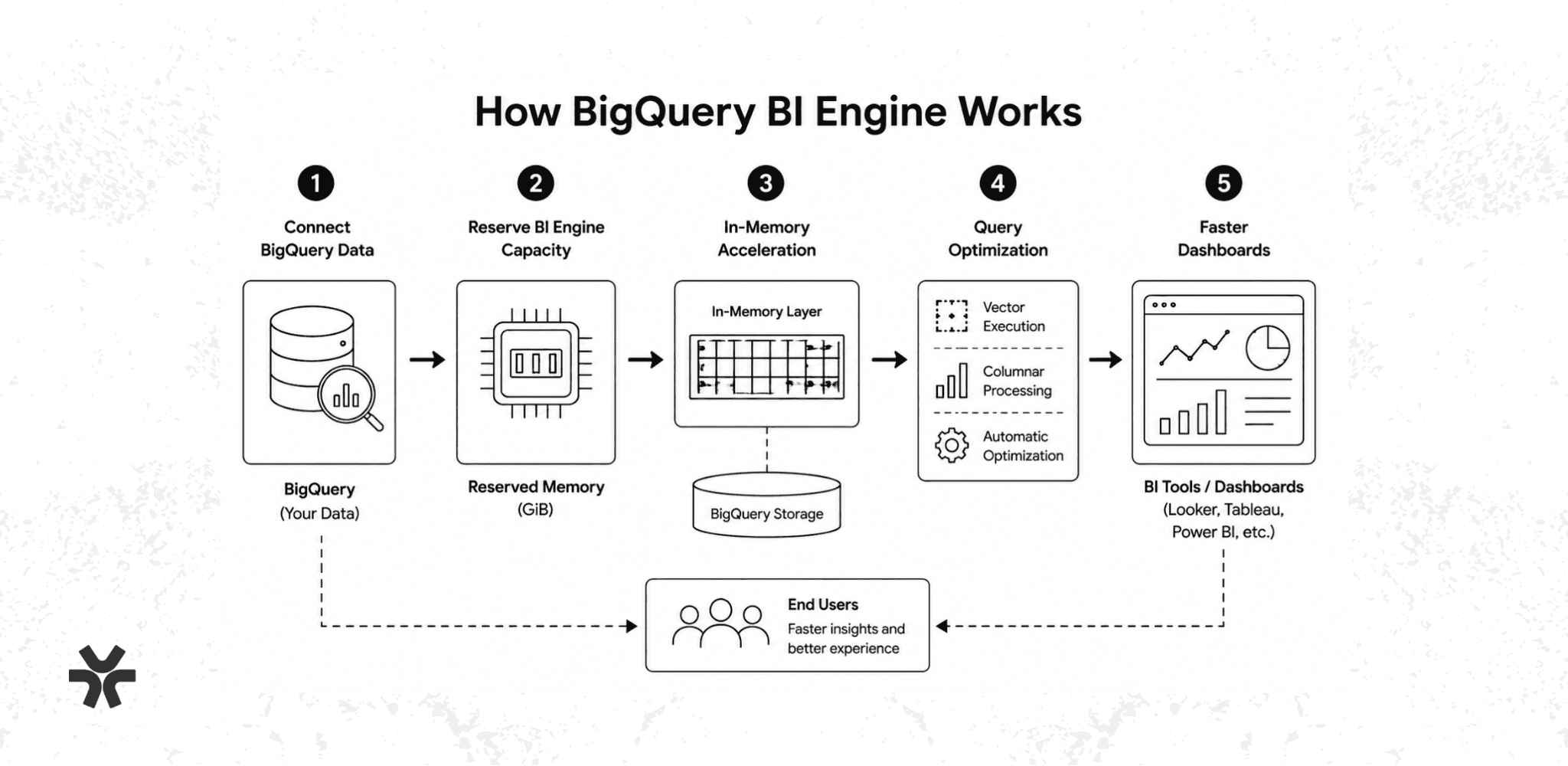
The BigQuery BI Engine uses a straightforward method for query acceleration.
Step 1: Connect your BigQuery data
Your data remains secure in BigQuery. There is no need to extract, copy, or move your datasets to a new database.
Step 2: Reserve your BI Engine capacity
You buy a memory block specifically for your project. This reserved capacity determines how much data can be stored in this high-performance memory block.
Step 3: Activate intelligent in-memory caching
BigQuery BI Engine uses a clever in-memory caching layer to expedite queries. Rather than caching the results, it evaluates the queries and retrieves the relevant data in advance. Thus, future queries can be served from the in-memory layer, skipping the slower disk storage altogether.
Step 4: Implement query optimization
BigQuery BI Engine applies several sophisticated methodologies, such as vector execution and columnar processing. Thus, it can process data in blocks and read only the necessary columns, thereby optimizing the process on its own, without heavy reliance on manual configuration.
Step 5: Accelerate dashboard rendering
If you implement all the described improvements, the BI tools and dashboards will display the query results in a much shorter time. The overall user experience is better, as end users see their query results and related visualizations with shorter wait times.
Key Features of BigQuery BI Engine
BI Engine includes many features that appeal to companies performing large analytics workloads.
In-memory analytics acceleration
The primary capability is intelligent in-memory caching. BI Engine stores frequently queried data in memory for rapid retrieval. This caching capability avoids full scans of datasets, therefore increasing the speed of the analytics.
SQL query acceleration
BI Engine accelerates SQL queries automatically. Developers do not have to write a new version of the query to take advantage of this acceleration, reducing the burden of implementation and increasing productivity.
Columnar processing
To eliminate unnecessary reads of datasets, the BI Engine uses a columnar, rather than a traditional row-based, method of processing. This method of processing increases the efficiency of the system and results in queries that run faster.
Automatic optimization
Google takes care of the infrastructure and optimization, so it removes the burden of managing servers and tuning performance from the customer. This allows businesses to focus on getting the data rather than the operations.
Native BigQuery integration
Since BI Engine seamlessly integrates BigQuery, there is no need for another database. BI Engine directly addresses BigQuery’s data, so you don’t have to manage any data movement.
Flexible scalability
BI Engine allows customers to adjust their reserved capacity based on their specific needs. This results in a more efficient use of resources and cost.
Security integration
BI Engine uses the security settings of BigQuery. This includes IAM settings, access policies, and governance. This allows businesses to keep their security and compliance as they were without additional work.
Which BI Tools Work With BigQuery BI Engine?
BigQuery BI Engine works best with visualization platforms that support native BigQuery connectors.
BI Tool | Integration Support | Best For |
Looker | Native | Enterprise analytics and data governance |
Looker Studio | Native | Free, self-service dashboard creation |
Tableau | Supported | Complex, interactive reporting |
Power BI | Supported | Organizations deeply invested in Microsoft |
Qlik | Supported | Exploratory data discovery |
SAP Analytics Cloud | Supported | Enterprise resource planning |
BigQuery BI Engine Pricing Explained
Standard BigQuery pricing charges you based on the volume of data processed, while BigQuery BI Engine pricing means you pay for reserved memory capacity.
In this case, you are charged for reserved memory that BI Engine consumes to speed up dashboard queries.
How does BigQuery BI Engine pricing work?
The pricing for BI Engine is simple. You reserve a certain amount of memory (in GiBs) in a particular Google Cloud region, and you get charged an hourly rate for that reserved memory.
Your costs are determined by:
The amount of memory reserved (GiBs)
The Google Cloud region
How long the reservation is maintained
For example, Google lists the price of BI Engine memory reservations in Northern Virginia (us-east4) as $0.0416 per GiB per hour. Because pricing can change over time, check Google’s pricing page to see what the current prices are before planning.
BigQuery BI Engine pricing example
Suppose that your company has a 24/7 BI Engine reservation of 20 GiBs. The following number provides a rough estimate.
Resource | Cost |
Memory reservation | 20 GiB |
Hourly rate | $0.0416 per GiB/hour |
Estimated hourly cost | $0.83 |
Monthly runtime | 730 hours |
Estimated monthly cost | ~$607 |
This pricing is in addition to your existing BigQuery storage and query costs; it doesn’t replace them.
For small teams managing a few dashboards, BI Engine costs may be acceptable. For enterprises supporting dozens or hundreds of users, along with multiple dashboards, costs can begin to skyrocket.
Benefits of using BigQuery BI Engine
Faster dashboard performance
By caching data in memory, BigQuery BI Engine guarantees sub-second responses. This eliminates loading screens and provides a vastly superior user experience.
Reduced query processing
Because data is cached, BigQuery executes fewer repeated disk scans. This improves the overall efficiency of your data warehouse.
Better user adoption
Users trust dashboards that load quickly. When data is instantly available, team members are far more likely to integrate those dashboards into their daily routines.
Native Google ecosystem integration
BigQuery BI Engine works seamlessly with Google's native tools, meaning you can connect BigQuery, Looker, and Looker Studio without managing third-party connectors.
Simplified infrastructure management
The service is fully managed by Google Cloud. There are no servers to maintain, provision, or patch.
BigQuery BI Engine Limitations to Know
While BigQuery BI Engine is quite powerful, it’s still somewhat like a high-speed train. It is not useful when you are transporting cargo across an ocean. Similarly, there are limits for BigQuery BI Engine.
Additional infrastructure costs: BigQuery BI Engine requires you to reserve memory at a fixed hourly cost, adding to your overall costs. If your dashboards see infrequent use, the cost may outweigh the benefits.
Not ideal for ad-hoc analytics: This service will be more effective for the routine dashboard queries rather than the unpredictable one-time queries of a data scientist.
Dataset size constraints: There is a limit to how much memory you can reserve. An example is if memory is reserved for 250 GiB; that is the upper limit for the datasets.
Feature compatibility limitations: Complex SQL is not supported, and queries such as those with wildcard tables and larger multi-table joins will run the regular BigQuery query instead of running through BI Engine.
Requires proper capacity planning: You have to pay for memory that is set aside. If 100 GiB of memory is reserved and the dashboards require only 10 GiB, that is overpaid. Planning capacity is vital.
Best Practices to Optimize BigQuery BI Engine Costs
Here are six best practices to help you manage your BigQuery BI Engine costs:
Right-size your reservations: Start with low BigQuery BI Engine memory reservations and monitor how much memory is actually needed using Google Cloud Monitoring. Adjust limits higher based on demand.
Target memory where needed: Memory reservations do not need to be made for every dashboard. Focus on what is important. The “preferred tables” feature allows caching of only those tables that are necessary to support important business reports for BI Engine.
Reduce unnecessary data scans: Data does not need to land in BI Engine to be optimized. BigQuery offers several features, including table partitioning, BigQuery table clustering, and BigQuery materialized views. BI Engine will cache data that is optimized and, thereby, process less data.
Monitor your utilization metrics: Keep track of your BI Engine usage patterns. Monitor memory usage, the most-used dashboards, and the queries being run. This will allow you to identify the biggest problems first.
Review underused reservations monthly: Make it a habit to review them. Time should be set aside to check and eliminate unused reserved capacity in the prior month.
Use a cloud cost optimization platform: Managing expenses without a dedicated optimization platform for cost spikes becomes increasingly daunting with greater BigQuery usage. Pump monitors your Google Cloud expenses, offering your team transparency. Pump locates resources with little usage, alerts on cost irregularities, and optimizes cloud usage and cost without increasing your engineering team's workload. Combining a cost optimization platform with workload optimization is a great way to boost your cloud service ROI.
What is the difference between BigQuery BI Engine and standard BigQuery?
Category | Standard BigQuery | BigQuery BI Engine |
Purpose | Primary data warehouse | Query acceleration layer |
Storage | Yes (stores all data) | No (only caches data) |
Data processing | Yes | No |
Dashboard optimization | Limited | Yes |
Memory caching | No | Yes |
Best for | Deep data analysis | Fast BI dashboards |
Conclusion
BigQuery BI Engine offers a high-performance layer that enables companies to create rapid dashboards without the need to move data to a different system. Although BigQuery BI Engine does not replace BigQuery, as an example.
BigQuery BI Engine improves the end-user experience for teams that create critical business dashboards. When using BigQuery BI Engine, you should consider overspending. Combining strategic query optimization, tuned architectural performance, and visibility of the cloud costs are the most effective ways to maximize analytics.
Frequently Asked Questions
Is BigQuery BI Engine free to use?
No. BigQuery BI Engine is a paid service that charges based on the amount of reserved memory capacity you provision, billed by the GiB per hour.
Does BigQuery BI Engine replace standard BigQuery?
No. BigQuery BI Engine is an acceleration layer that sits on top of standard BigQuery and, therefore, relies on BigQuery for data storage and processing.
Which visualization tools support BigQuery BI Engine?
Looker, Looker Studio, Tableau, Power BI, Qlik, and SAP Analytics Cloud all successfully support and integrate with BigQuery BI Engine.
Is BigQuery BI Engine suitable for all data workloads?
No. BigQuery BI Engine is designed for repetitive dashboard workloads that require low latency and not for large ad-hoc queries that are less predictable.
Similar Blog Posts
BigQuery Time-Partitioning: A Hidden Cost Revealed
How to Save 90% on BigQuery Storage Costs