

Azure Virtual Network has redefined how I architect and manage cloud connectivity, delivering secure and scalable networking without the usual headaches. As the underlying layer of almost every cloud environment I’ve built, it demonstrably reduces costs while boosting daily operational efficiency.
Azure Virtual Network lets you carve out private, merged networks from the fabric of Microsoft’s global cloud. I rely on its sharp security posture, effortless scalability, and tight integration with other Azure products to lower complexity and keep expenditures predictable. Whether you’re orchestrating workloads of a grappling startup or a global enterprise, it’s a service you should evaluate.
What Is Azure Virtual Network?
Azure Virtual Network is essentially your own secure, private network built into the Azure cloud, and it seamlessly connects your Azure resources to the internet and to your on-premises sites. Acting as the backbone for cloud applications, it preserves the familiar networking principles that you’ve used for years in traditional data centers, reshaped for the cloud.
Key Features:
Subnets slice your VNet into smaller logical blocks, granting you the ability to tightly control where resources live and what security policies apply. Each subnet automatically inherits a portion of your VNet’s address space, simplifying overall resource organization.
IP Address Management hands you full authority over private IP address space, encouraging the use of well-defined RFC 1918 ranges. Azure assigns private IPs on deployment using the address blocks you’ve established, ensuring consistency.
Network Security Groups act as distributed firewalls at the subnet and interface level. They filter incoming and outgoing packets using user-defined security rules that specify source, destination, port, and protocol, reducing management overhead while enhancing security.
Route Tables permit you to override Azure’s built-in routing to enforce your own paths. By defining custom routes, you can steer traffic through appliances for security inspection, optimize performance, or accommodate hybrid connectivity, thus gaining full control over data flows across the network.
Why Use Azure Virtual Network?
Azure Virtual Network meets vital networking demands and outperforms legacy on-premises systems in several key ways:
Stronger Security and Isolation: Azure VNet erects tight boundaries around your resources so that your network traffic stays isolated from anyone else in the cloud. You control who sees what through Network Security Groups that let you refine port and protocol access. For extra protection against volumetric threats, Azure DDoS Protection automatically activates and absorbs large-scale attacks while preserving your service uptime.
Seamless Hybrid Connectivity: Connect your on-premises infrastructure through multiple options: site-to-site VPN, the lightweight point-to-site VPN for remote users, or ExpressRoute, which gives you a physical connection straight to Azure. This wide range allows you to gradually extend on-premises workloads into the cloud while keeping the day-to-day workloads running smoothly.
Scalable Resource Communication: Virtual machines and services within a VNet speak to one another using private IPs, avoiding the complexity and expenses of public IP governance for internal traffic. You lower per-instance public IP outlays and reduce your overall attack surface at the same time.
Core Benefits of Azure Virtual Network
Secure Resource Segmentation
In Azure Virtual Network, logical workload separation is accomplished via subnet-based isolation. You can assign each application tier its own subnet, enforced by tailored security policies and finely grained access controls. This architecture narrows potential exposure points while still allowing effective resource sharing.
High Availability and Performance
Azure Virtual Network is designed to extend across every availability zone within the same region, giving your network the same high availability that your applications require. At the same time, Azure’s expansive global backbone delivers low-latency, region-to-region connections, making wide-area, distributed architectures operate with peak consistency.
Flexible IP Address Management
Defining custom IP address ranges lets you allocate address spaces that reinforce your organization’s standards. This eliminates potential overlaps during hybrid setups and easily accommodates sophisticated networking models, giving you operational freedom without the worry of hidden address issues.
How to Set Up an Azure Virtual Network
Prerequisites:
Ensure you have an active Azure subscription with permissions to create resources.
Decide on the region, address space (e.g., 10.0.0.0/16), and subnet structure (e.g., 10.0.0.0/24) for your network.
Steps via Azure Portal:
a. Create the Virtual Network:
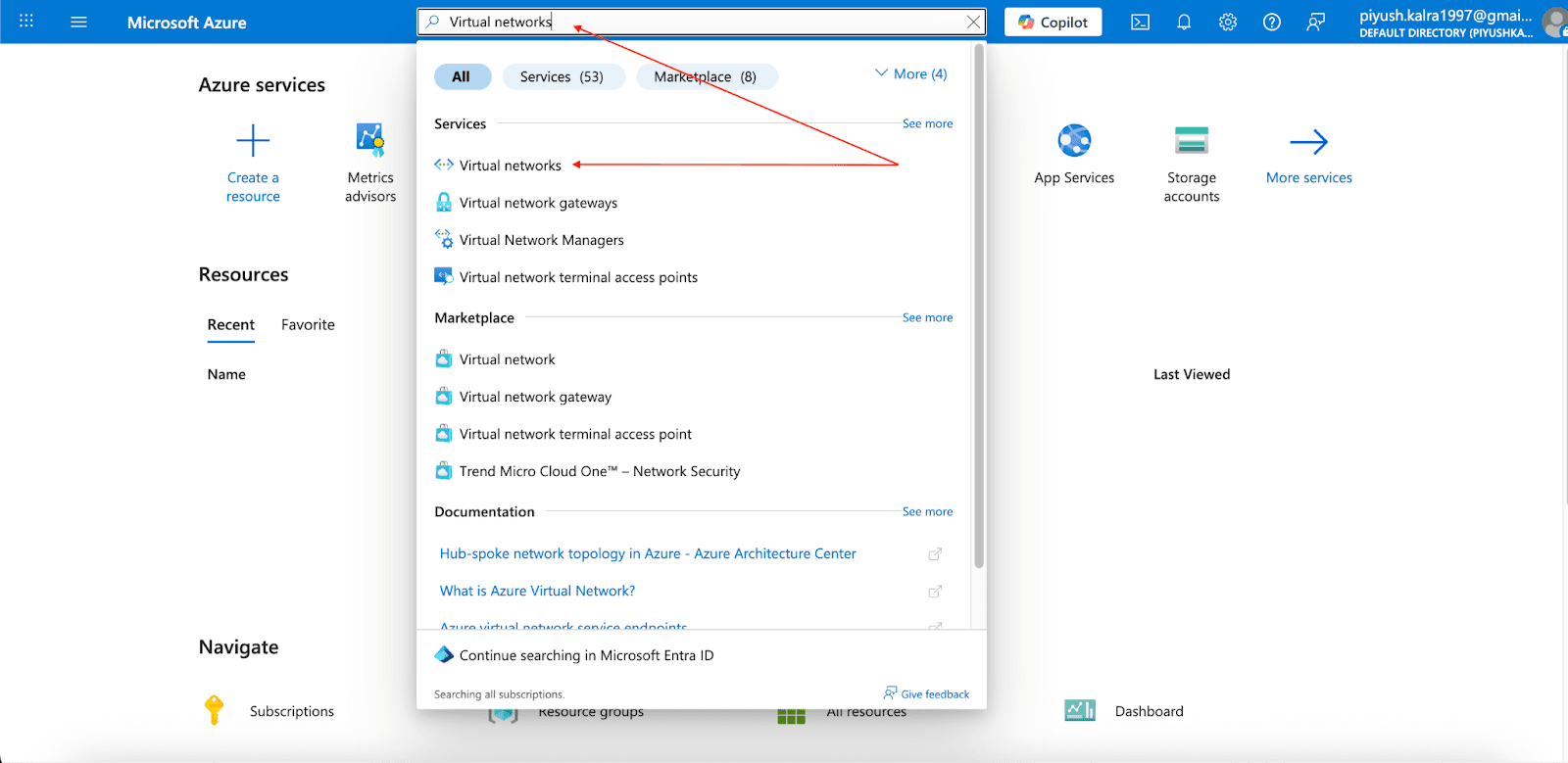
Open the Azure Portal and search for Virtual Networks.
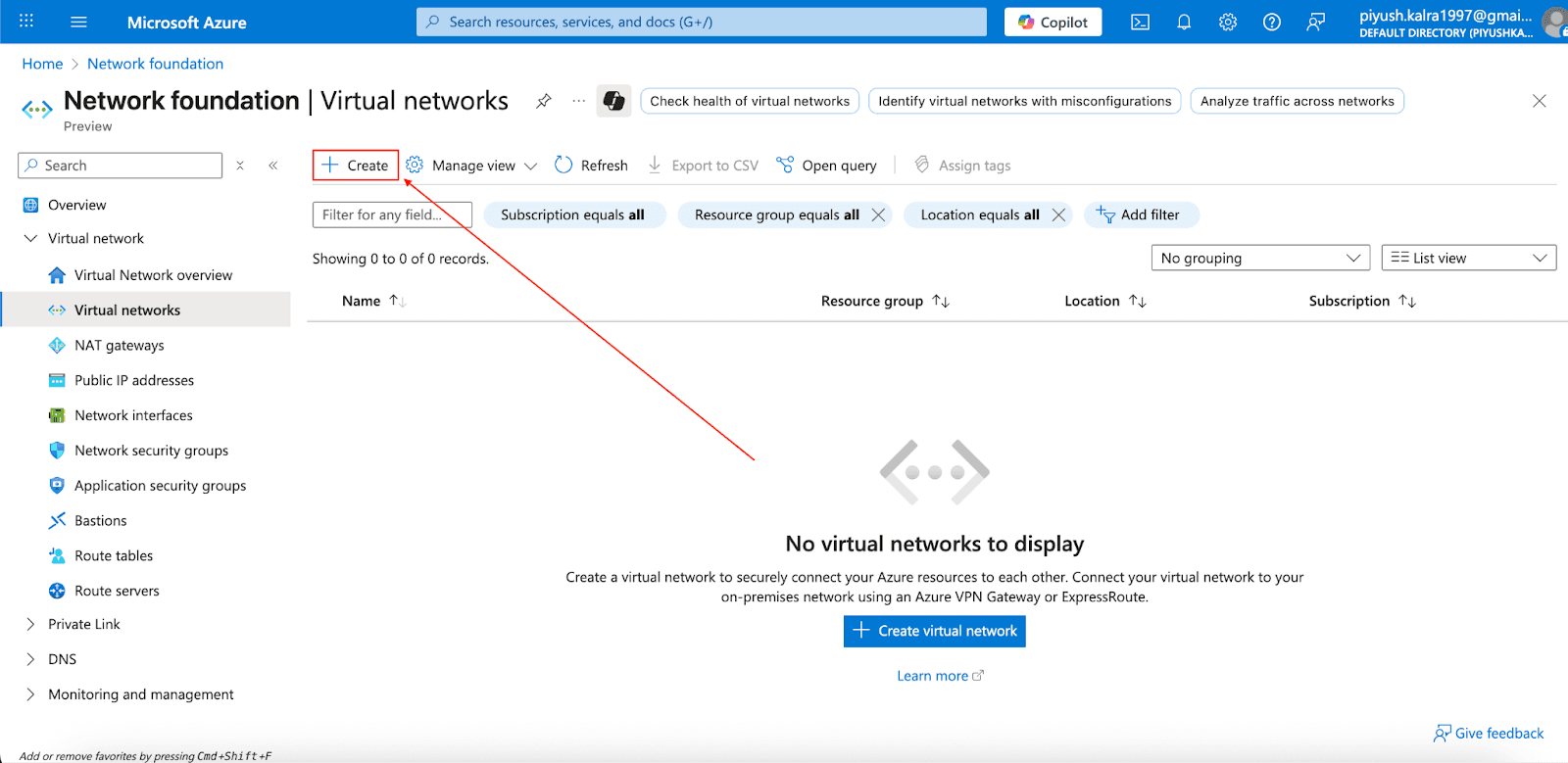
Click + Create.
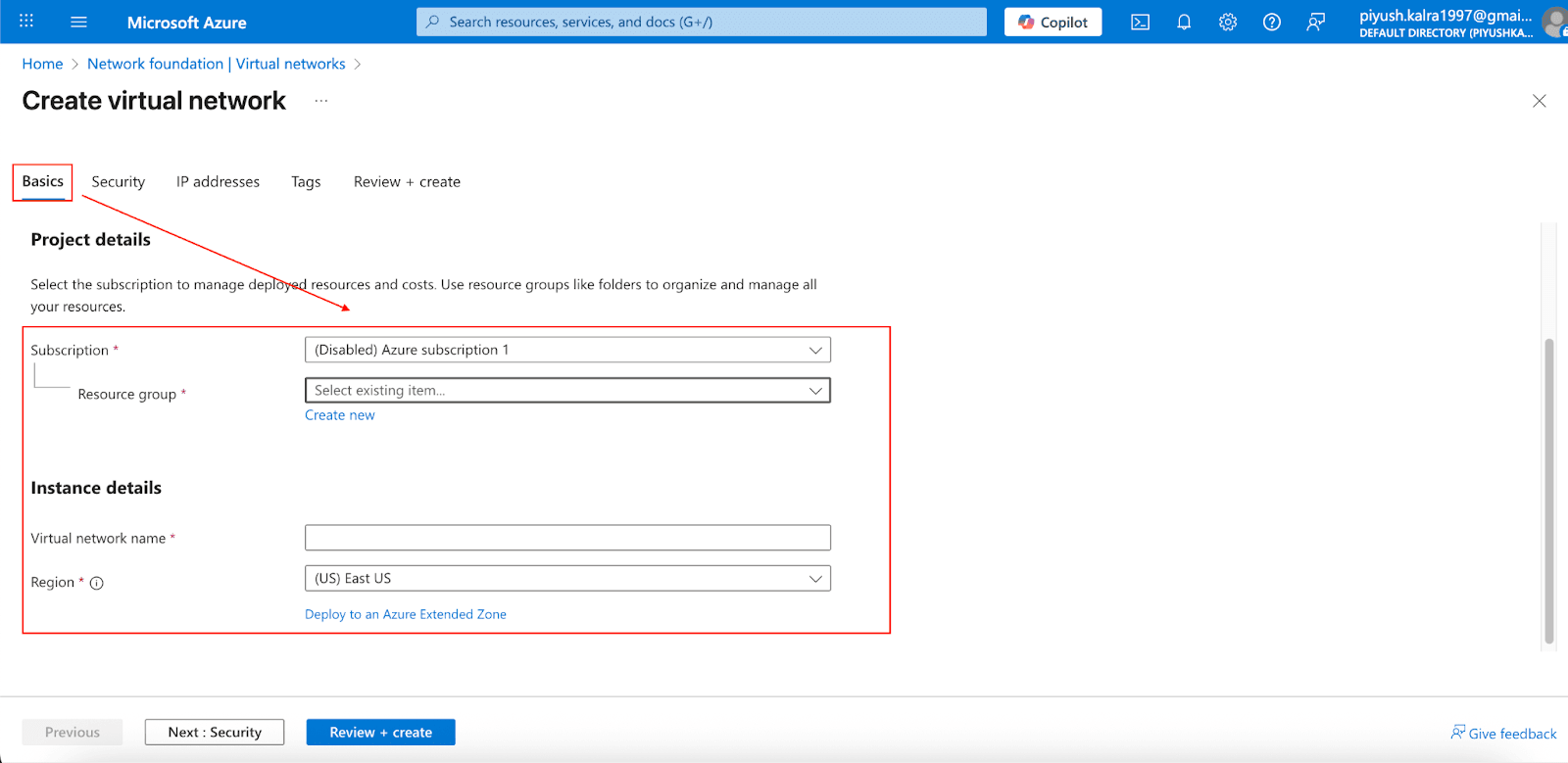
Under the Basics tab:
Select your subscription.
Choose or create a resource group.
Name your VNet (e.g., vnet-1).
Choose a region.
b. Configure Address Space and Subnets:
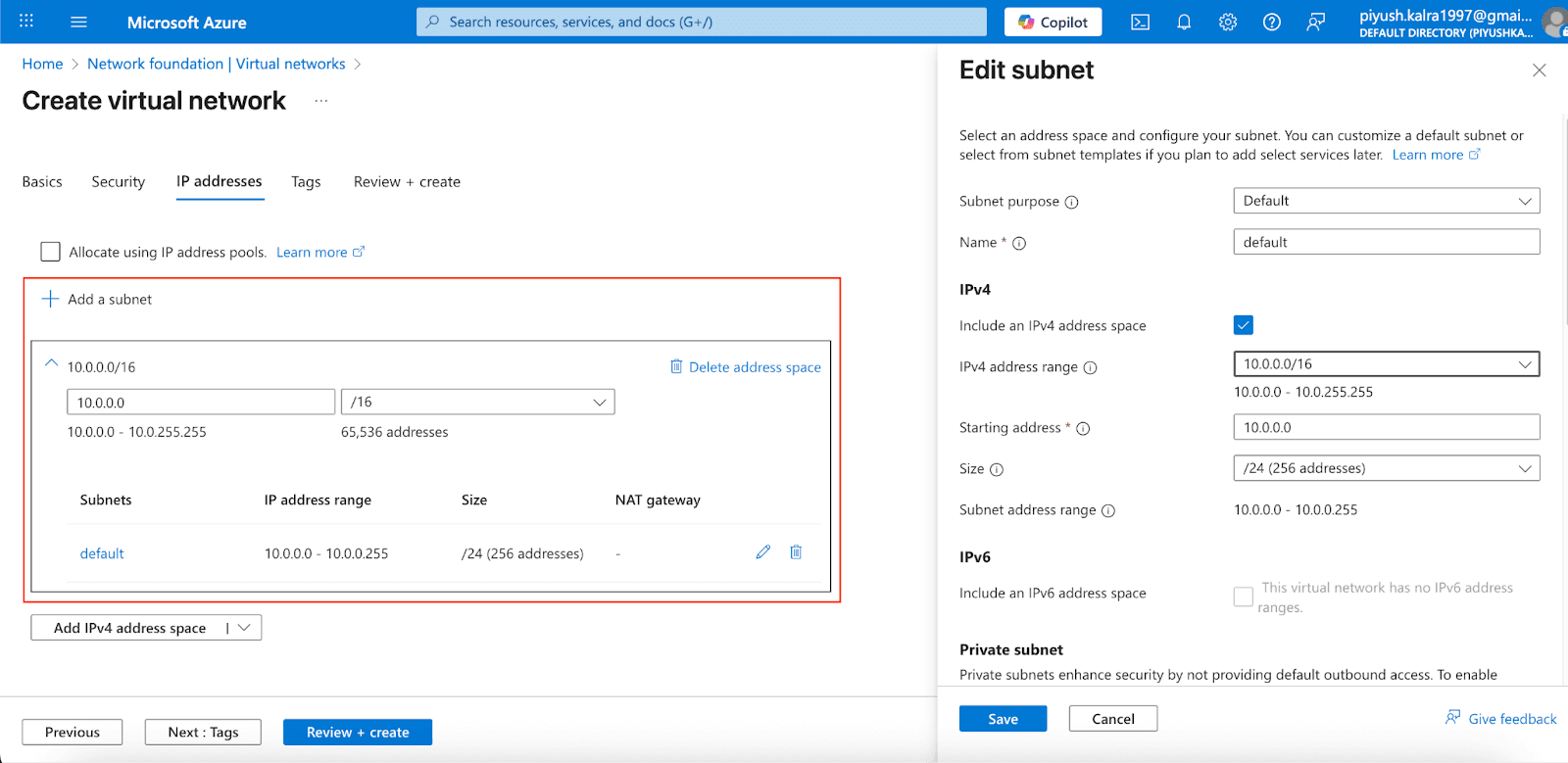
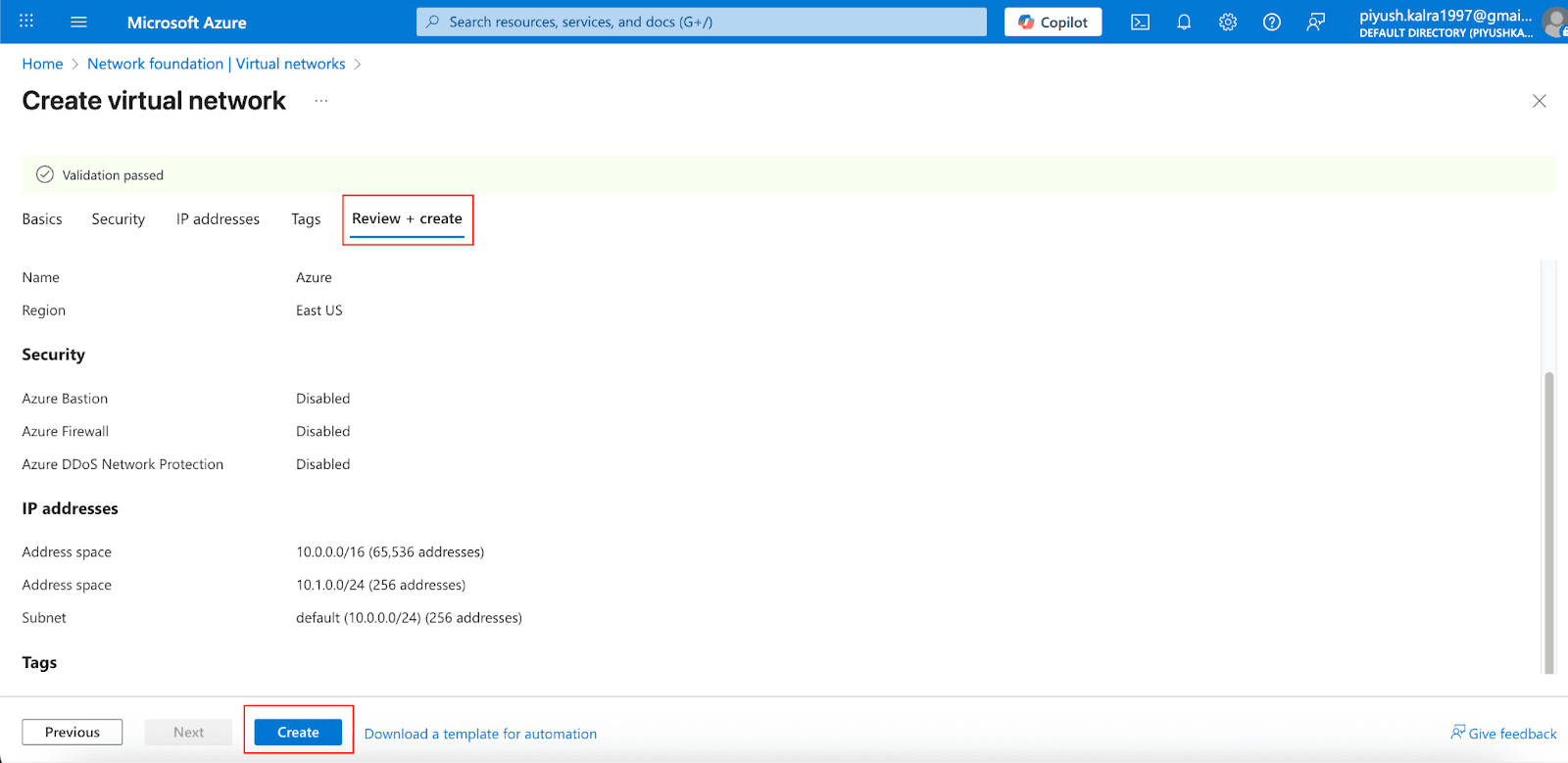
Set the address space (e.g., 10.0.0.0/16).
Add subnets (e.g., subnet-1 with 10.0.0.0/24).
Optionally, configure Network Security Groups for additional subnet security.
c. Review and Create: Click Review + create and then Create to finalize setup.
Deploying Resources to the VNet:
Once the Virtual Network is set up, provision workloads like VMs directly into the appropriate subnets. Whether you need public connectivity or refined security, remember to either attach public IP addresses at deployment or to configure Network Security Groups for each VM's network interface right away.
Best Practices for VNet Deployment
Carefully Plan Address Spaces: Pick non-overlapping IP ranges that leave room for growth, and avoid waste by balancing projected usage with actual assignments.
Develop a Subnet Strategy: Divide the VNet into clear, logically defined subnets for application tiers, management, and gateway roles. This keeps the environment tidy and improves routing efficiency.
Configure Security Groups: Set network security group rules at the subnet scope; this promotes policy consistency and simplifies management by reducing redundant per-instance configurations
Azure Virtual Network Pricing Models
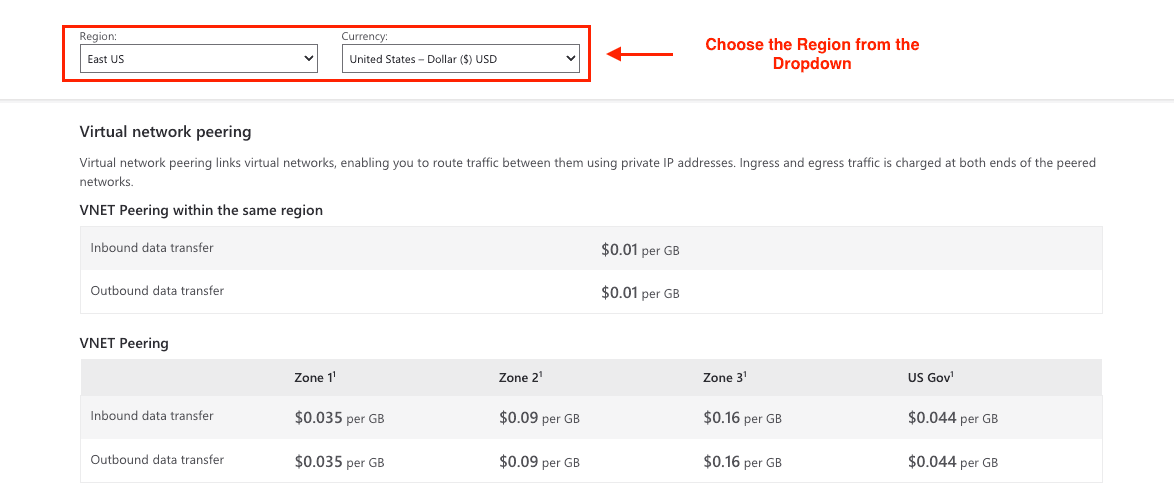
Creating and running an Azure Virtual Network is free, and you can set up as many as 1,000 per subscription without incurring any charges. This makes VNets an economical way to segment and secure your Azure environments. Bear in mind, though, that some connected capabilities do have associated costs:
VNet Peering Costs
Intra-region Peering: $0.01 per GB for inbound and outbound data transfer between VNets in the same region.
Global VNet Peering:
Zone 1 (US, Europe): $0.035 per GB
Zone 2 (Asia, Australia): $0.09 per GB
Zone 3 (South America, Africa): $0.16 per GB
US Gov: $0.044 per GB
Charges apply for both inbound and outbound transfers between peered VNets.
Gateway and Appliance Pricing
VPN Gateway: Costs vary by SKU and bandwidth. For example, the VpnGw1 SKU starts at approximately $138.70/month for 650 Mbps, with additional fees for higher usage.
Application Gateway: Includes fixed hourly charges (region-specific) and variable data charges. A medium tier in China North 2, for example, costs around $0.126/hour, with additional data transfer costs.
ExpressRoute: Involves monthly port charges and data transfer costs, with pricing based on the selected port and region.
Accelerated Connections
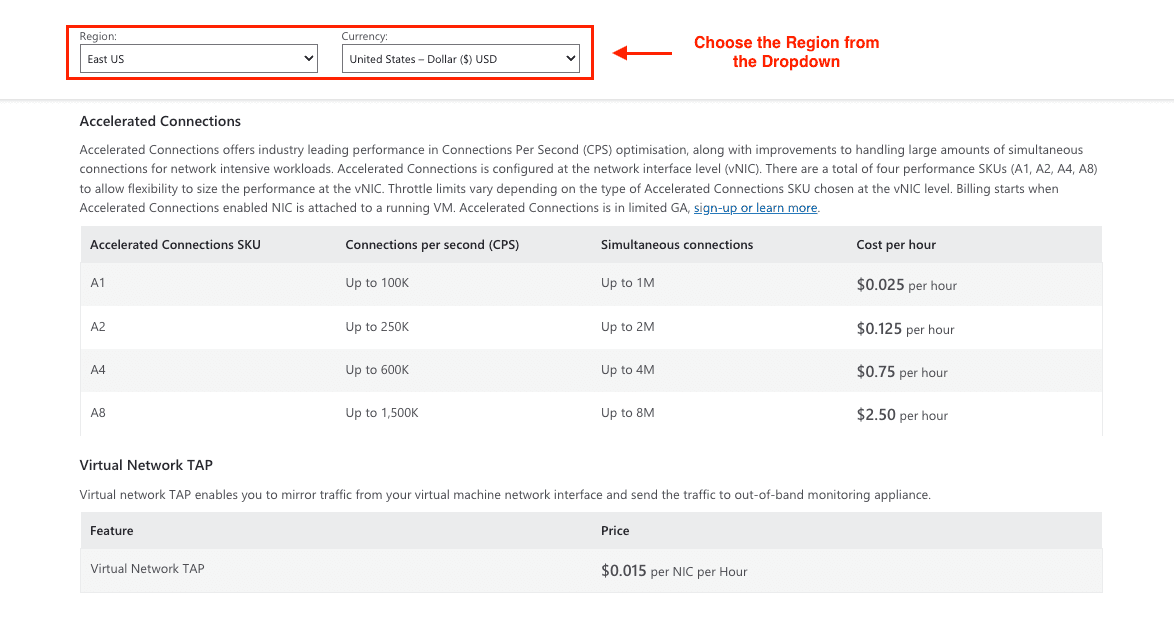
Azure has raised the bar for premium networking with features such as Accelerated Networking and differentiated Gateway SKUs. Costs for these enhancements are linked to the specific resources provisioned and the scale you choose, rather than to a simple hourly SKU. For the most accurate and up-to-date estimates for performance-optimized connections, always use the Azure Pricing Calculator.
Secure & Optimize Your Network
Security Features Implementing
Azure Firewall: Bring all your network security under one roof with Azure Firewall. By using application and network-level filtering, you set exact rules for traffic moving between virtual subnets and the outside world, giving you overhead-grade control.
Network Security Groups: Go even deeper with NSGs, which let you apply allow/deny rules straight to each resource. Tailor filtering based on source IP, destination ports, and protocol to keep unwanted traffic at bay.
DDoS Protection: Shield your apps from denial-of-service waves using Azure’s built-in DDoS services. The Basic edition offers solid coverage; the Advanced tier, meanwhile, enhances protection and provides rich analytics to investigate incidents.
Cost-Saving Strategies
Streamline Data Transfer: Group virtual machines and services in the same Azure region to stop cross-region egress costs from piling up. Consider using Azure CDN to cache publicly popular files, offloading your origin servers and serving users faster.
Use Reserved Capacity: For workloads you can foresee, lock in reserved capacity for virtual machines and SQL on your virtual networks. The discount can be significant, turning predictable computing dreams into savings.
Track and Optimize Network Usage: Use Azure Cost Management to examine bandwidth breakdowns.
Conclusion
When it’s time to enhance your networking capabilities, creating your Azure Virtual Network is just a few clicks away. Launch the Azure portal, start with the free tier to test drive the features, and confirm that it fits your plans. Use the Azure pricing calculator to project how your specific requirements translate into savings. Begin your journey toward a network that is secure, flexible, and budget-friendly, and deploy your first Azure Virtual Network.
Join Pump for Free
If you are an early-stage startup that wants to save on cloud costs, use this opportunity. If you are a start-up business owner who wants to cut down the cost of using the cloud, then this is your chance. Pump helps you save up to 60% in cloud costs, and the best thing about it is that it is absolutely free!
Pump provides personalized solutions that allow you to effectively manage and optimize your Azure, GCP and AWS spending. Take complete control over your cloud expenses and ensure that you get the most from what you have invested. Who would pay more when we can save better?
Are you ready to take control of your cloud expenses?



