

Many companies have shifted or are in the process of shifting to cloud-enabled systems, yet for the everyday functioning of the company, a lot still rely on on-premise infrastructure. This raises the question: how do you bridge the gap between traditional storage systems and scalable cloud solutions?
AWS Storage Gateway is a compelling answer. This cloud hybrid storage service directly connects your on-premise setup with AWS cloud storage, enabling you to take advantage of the on-premise speed coupled with the AWS cloud storage flexibility.
If you are an IT manager troubleshooting storage systems, a startup trying to keep costs low, or an enterprise trying to hasten cloud migration, each of these use cases draws advantages from properly utilizing AWS Storage Gateway. This article covers everything from basic concepts to pricing details, helping you determine if this solution fits your needs.
What is AWS Storage Gateway?
AWS Storage Gateway serves as an intermediary between your on-premises IT systems and AWS cloud storage systems. Almost like a metaphorical translator, AWS Storage Gateway lets your systems and applications interact with Amazon S3 and S3 Glacier, as well as additional AWS storage services, with little to no disruption to your current technology configuration.
This service is available through a virtual appliance or through an appliance that is physically deployed in a data center and connects to AWS through an encrypted internet connection. The hybrid cloud storage model combines on-premise speed and low-latency performance with a highly scalable cloud storage solution.
The three main types of Storage Gateway include:
File Gateway: This tier captures your file shares and turns them into Amazon S3 objects using NFS and SMB protocols. Perfect for file workloads, it retrieves and automatically stores files as S3 objects, subsequently enabling integration with other AWS systems.
Volume Gateway: Supplying block storage via the iSCSI protocol, which connects to Amazon EBS, this gateway offers two modes: Stored Volumes, which store primary data locally and backups in S3, and Cached Volumes, which cache S3 data sets locally.
Tape Gateway: With this gateway, tapes are now virtualized and saved on S3 Glacier and S3 Glacier Deep Archive. It forms a part of other backup software, saving users the hassle of tape management.
Why Businesses Use AWS Storage Gateway
Tools and systems used for on-premise storage are inefficient for backups and disaster recovery. They are also expensive and difficult to scale. AWS Storage Gateway addresses these issues by providing:
Cost-efficiency: Hardware does not need to be purchased to use the service because it is pay-as-you-go.
Scalability: Storage can be expanded and created without physical constraints.
Disaster recovery: Critical data can be replicated to AWS and retrieved easily.
Flexibility: Choose the gateway type that fits your workload.
Cloud integration: Built-in support for AWS services like CloudWatch, Backup, and KMS.
Key Features of AWS Storage Gateway
AWS Storage Gateway is a powerful storage solution because of these particular features:
Hybrid Connectivity: This feature provides a persistent connection to AWS and keeps the on-premises part of the storage experience local for applications.
Local Caching: Moves data that is frequently used to local high-speed storage and improves the speed at which applications are accessed.
Enterprise Grade Security: Guarantees complete protection of your data as it moves from one location to another using HTTPS encryption, and is stored/at rest using the AWS KMS. Access is limited and monitored through the use of AWS IAM.
Unlimited Scalability: Helps you eliminate storage boundaries by scaling with your demands and eliminating hardware purchases and complex migrations. The AWS storage gateway provides automatic scaling.
Disaster Recovery Support: Assists in simplifying the continuity of business operations. Volume Gateway creates point-in-time snapshots on Amazon S3, and Tape Gateway has longitudinal archival capabilities that surpass those of traditional tape systems.
AWS Ecosystem Integration: Works seamlessly with CloudWatch for monitoring, AWS Backup for centralized management, and various other AWS services for robust data workflows.
Pro Tip: Consider using File Gateway when you need to store application data in S3, and Tape Gateway when you want to replace old tape libraries.
AWS Storage Gateway Pricing Explained
AWS Storage Gateway follows a pay-as-you-go pricing model with no upfront costs or minimum commitments. Prices depend on the type of gateway and have a broad range of features.
File Gateway Pricing
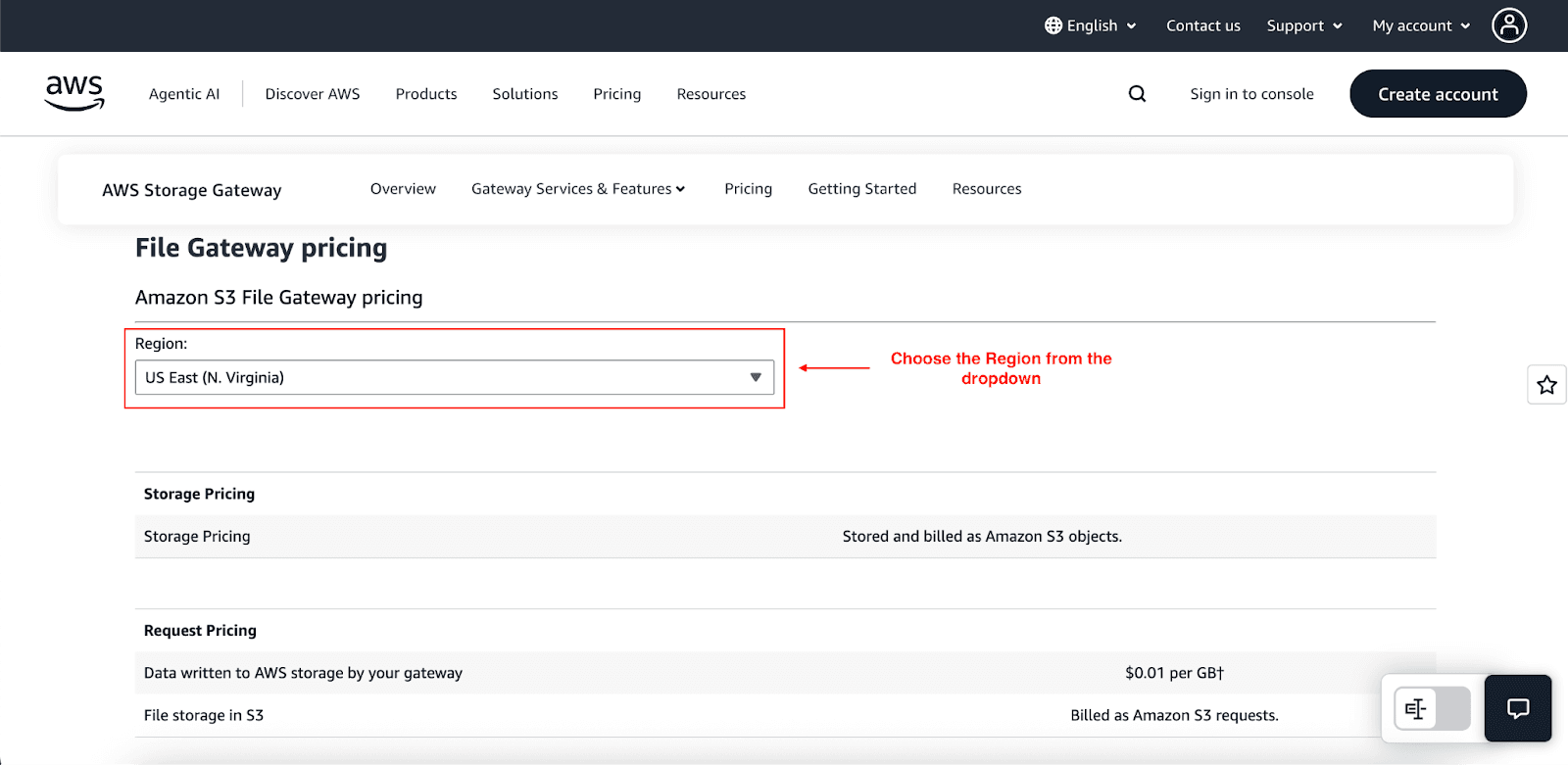
You will be charged the standard Amazon S3 rates for data stored, plus a small request-based charge for data stored and sent via request.
Example: Storing 1 TB of data in S3 costs about $23/month (S3 standard storage), and request charges are about $0.01/GB written per month via the gateway.
You are also charged for S3 requests (GET, PUT, etc).
Volume Gateway Pricing
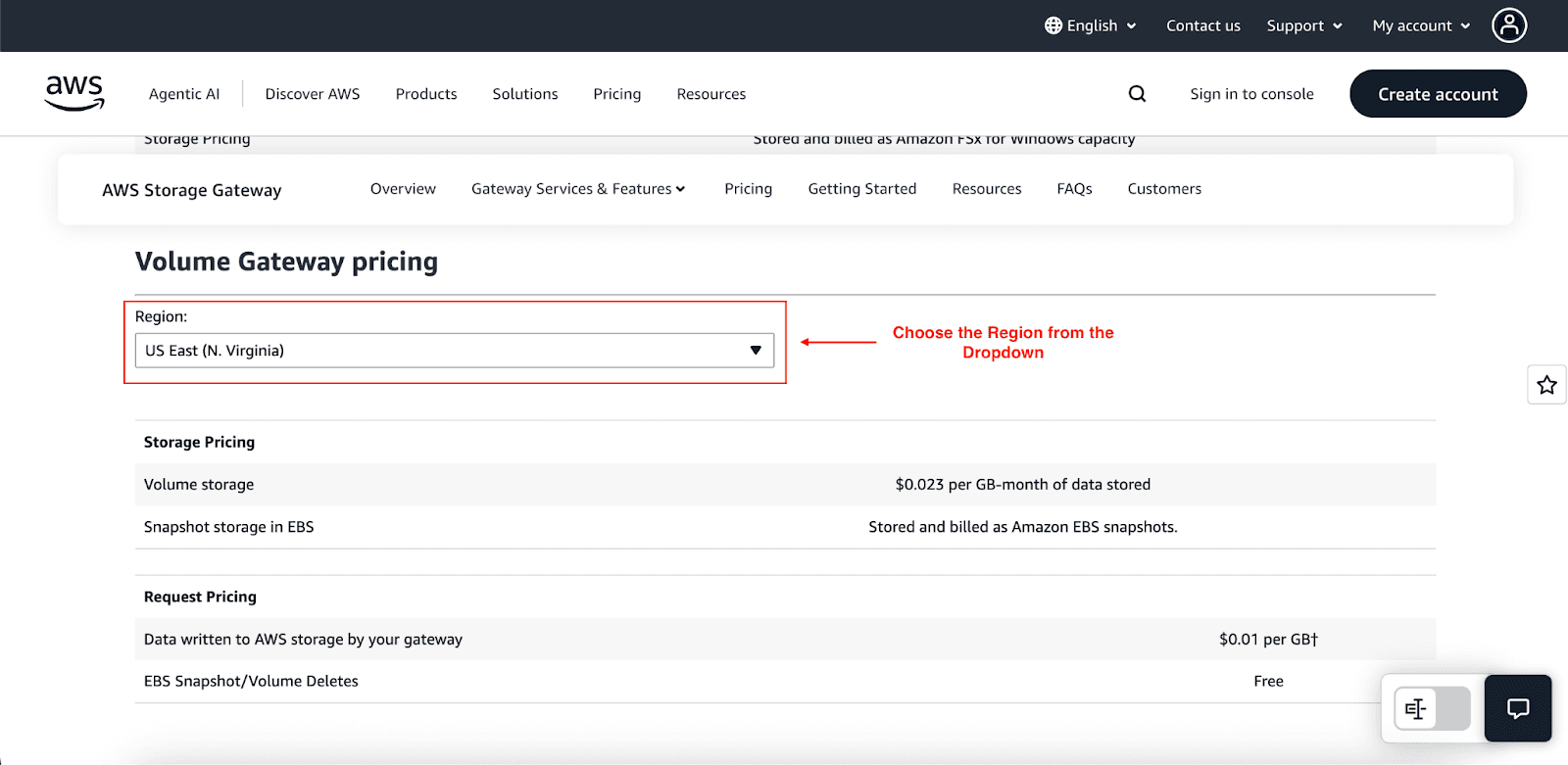
Volume Gateway has two modes: Stored Volumes and Cached Volumes.
Stored Volumes: Charged per GB of provisioned local storage at about $0.023/GB-month. Data is backed up to AWS via snapshots, with snapshot storage billed at Amazon EBS snapshot rates.
Cached Volumes: Charged based on data stored in S3 (same as File Gateway storage rates), plus snapshot costs. Only changed blocks are stored during snapshots (incremental), reducing costs.
You will also be charged an additional fee for data written to AWS at a “data written to AWS” rate, but this is capped at $125/month per gateway. This data is also compressed during transmission.
Note: Pricing varies based on local provisioned capacity within the volume or region snapshot prices in the stored volumes.
Tape Gateway Pricing
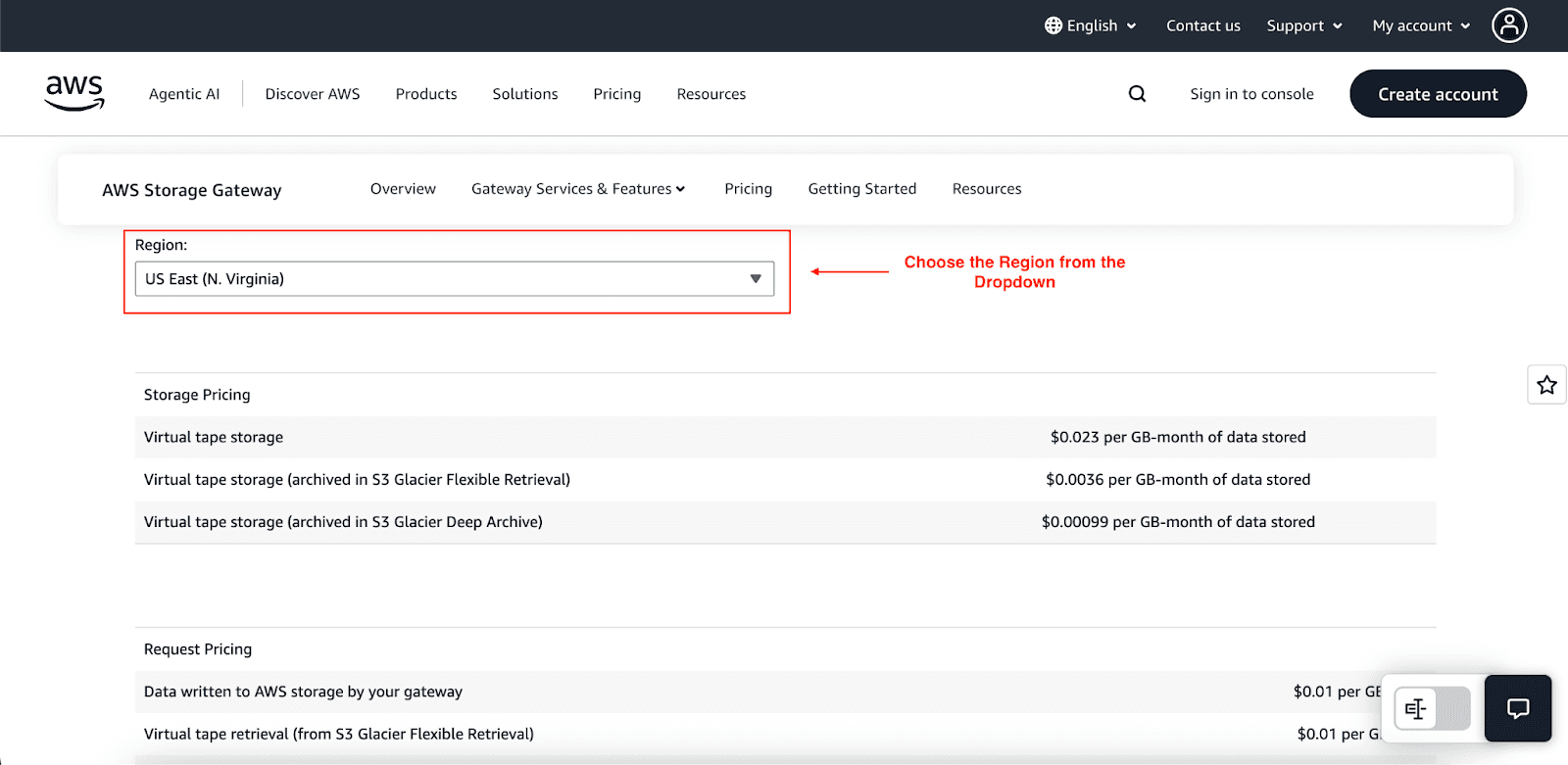
Charges are based on virtual tape storage:
Virtual tapes stored on S3 Standard: about $0.023/GB-month.
On S3 Glacier Flexible Retrieval: about $0.004/GB-month.
On S3 Glacier Deep Archive: about $0.00099/GB-month for long-term archival.
For all the tiers above, additional retrieval and request fees are applicable for moving tapes and restoring from Glacier.
When Should You Use AWS Storage Gateway?
AWS Storage Gateway provides clear benefits when hybrid cloud connectivity is needed:
Backup and Archival Solutions is the most common and easiest to understand. Companies can extend existing backup solutions and leverage cloud economics without changing workflows, rather than paying to replace costly tape infrastructure.
Migration Projects take full advantage of the ease of migration provided by the gradual transition capabilities of the Storage Gateway. Begin moving data to AWS while the applications are in use, which lowers the risk of migration and downtime.
Hybrid Workloads are highly useful in hybrid workloads that require local performance and cloud scalability. Use cases of these applications are those that require fast access to recent data and archiving of other data.
Storage Gateway is not the best tool for every situation. Fully cloud-native applications tend to achieve better results using cloud-native AWS storage services such as S3 or EFS. Workloads that are of high performance and have strict latency requirements tend to have an unwarranted hybrid model complication.
How to Get Started with AWS Storage Gateway
Setting up AWS Storage Gateway needs the following steps:
Choose a gateway type: File, Volume, or Tape.
Deploy the appliance: Select a VM, hardware appliance, or Amazon EC2 instance.
Activate the gateway: Go to the AWS Console and open the Storage Gateway service
Configure storage: Set up the device with File shares, iSCSI volumes, or virtual tapes.
Monitor Performance: Use Amazon CloudWatch to monitor the performance of the gateway’s health, throughput, and cache efficiency. Using performance metrics reported by AWS, you are able to diagnose and troubleshoot issues.
Conclusion
AWS Storage Gateway simplifies hybrid cloud adoption and averts traditional infrastructure cloud storage jumping into the deep end. By maintaining local performance, cloud scalability, and seamless AWS integration with Storage Gateway, utilizing local cloud and AWS systems to eliminate common storage problems, and eliminating investment with pay-as-you-go pricing.
Whether you are optimizing multi-cloud workloads, backup solutions, or cloud migration, Storage Gateway improves simplistic models and reduces cost.
Join Pump for Free
If you are an early-stage startup that wants to save on cloud costs, use this opportunity. If you are a start-up business owner who wants to cut down the cost of using the cloud, then this is your chance. Pump helps you save up to 60% in cloud costs, and the best thing about it is that it is absolutely free!
Pump provides personalized solutions that allow you to effectively manage and optimize your Azure, GCP and AWS spending. Take complete control over your cloud expenses and ensure that you get the most from what you have invested. Who would pay more when we can save better?
Are you ready to take control of your cloud expenses?



