

I have seen that lots of startups and large companies are faced with the challenge of supporting thousands of simultaneous connections, performing instantaneous scaling, and providing high availability 24/7, while also minimizing the strain placed upon the underlying database. However, the issue with adding database connections in a reasonable manner is a perennial conundrum.
Hence, AWS RDS Proxy comes into play: a managed database proxy that sits between your application and Amazon RDS to streamline applications, rework scalability, and cut down costs.
In this article, we’ll explain what AWS RDS Proxy is, how it works, its benefits, pricing structure, and when to use it. By the end, you will know everything about RDS Proxy to make well-informed suggestions in your architecture.
What is AWS RDS Proxy?
AWS RDS Proxy is a database proxy for Amazon RDS and Aurora that is fully managed and highly available. It sits between your applications and databases. RDS proxy manages efficient connection handling so your databases are not overwhelmed.
RDS Proxy works with the following relational databases:
Amazon Aurora MySQL-Compatible Edition.
Amazon Aurora PostgreSQL-Compatible Edition.
Amazon RDS for MySQL.
Amazon RDS for PostgreSQL.
Amazon RDS for MariaDB.
Amazon RDS for SQL Server.
Let's quickly understand: Consider a scenario wherein AWS Lambda functions continuously invoke an RDS database. In the absence of a proxy, every invocation of a Lambda function establishes a fresh database connection, which, within a short period of time, can breach the connection limits of the associated database. In such an instance, the RDS Proxy optimizes performance by balancing the workloads of databases, and thus, the associated connections are pooled and reused. This eliminates additional strain on the database.
Why Use a Database Proxy in the First Place?
Before covering the features of RDS Proxy, we need to learn what problem it has come to solve.
Every traditional database has a maximum limit of simultaneous connections it can handle. In cases where applications are opened and closed at a high rate, common with serverless architectures like AWS Lambda, several problems are encountered:
Connection churn: Opening a new database connection for every request can be exhaustive in terms of resources. The application and database consume a lot of CPU and memory.
Cold starts: Function servers often encounter cold starts where, connection to the database can induce unnecessary lag.
Scaling limitations: Your applications find it very difficult to manage a situation where a lot of traffic is uploaded, with hundreds of simultaneous connections easily obtainable, and servers are flooding.
Slow failovers: When a database instance goes down, applications must wait for minutes to be able to detect and reconnect to a standby instance.
These challenges are especially painful for:
API services handling unpredictable traffic spikes
Serverless applications using AWS Lambda
Microservice structures have many services on a single database.
SaaS platforms supporting multiple tenants
These issues can be resolved easily with the aid of database proxies, which is why AWS RDS Proxy is here, which lowers down connection time, and provides a connection easily for failovers.
Key Features of AWS RDS Proxy
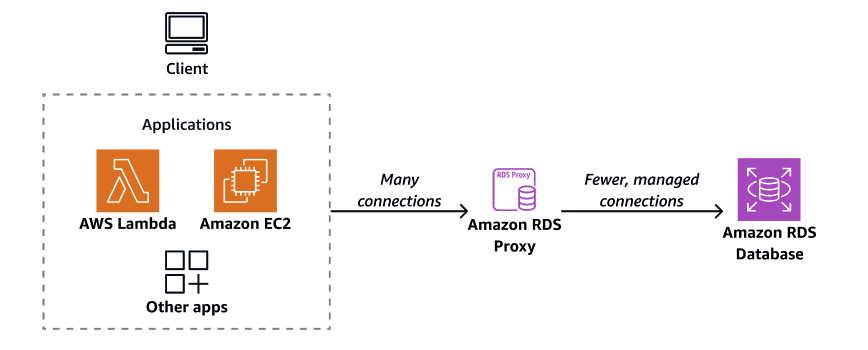
Image Source: AWS
When it comes to AWS RDS Proxy, there are several built-in features to support its proxying performance and ease in managing connections:
Connection Pooling: The proxy keeps a pool of database connections ready for reuse. When your application makes a connection request, it is greeted with a connection instantaneously, and does not have to wait for a new connection to be created.
Improved Availability: When a database fails, the proxy automatically directs connections to a new database endpoint. This functionality was used to lower downtime, which was 30+ seconds, to a mere few seconds.
Security with IAM and Secrets Manager: The application remains oblivious to the presence of hardcoded passwords and other sensitive information, as AWS RDS Proxy uses AWS IAM for authentication and AWS Secrets Manager for managing access control.
High Availability: Guaranteed uninterrupted access to the database even during failures, through ensured redundancy via deployment in multiple Availability Zones.
Compatibility: RDS Proxy can be enabled for use with existing databases with minimal modifications, no app rewrites necessary.
Benefits of Using AWS RDS Proxy
Now that we have discussed the features, let's explore the benefits:
Performance: RDS Proxy diminishes the delay caused by opening new database connections by reusing existing connections, which is particularly beneficial for serverless applications, as connections may take hundreds of milliseconds to respond.
Scalability: RDS proxy manages application connections by efficiently enabling or throttling connections queuing in your database. This action protects your database from being overwhelmed during periods of high traffic.
Cost Efficiency: Reducing the load on your database allows you to run smaller, less expensive RDS instances. With improved connection efficiency, application resources for managing connections are also minimized.
Resilience: RDS Proxy's automatic failover handling minimizes application disruption during database outages. It can reconnect in seconds, as opposed to the several minutes it might otherwise take, to the database.
AWS RDS Proxy Pricing Explained
Pricing RDS Proxy starts to make sense once you understand the fundamentals:
Cost Breakdown
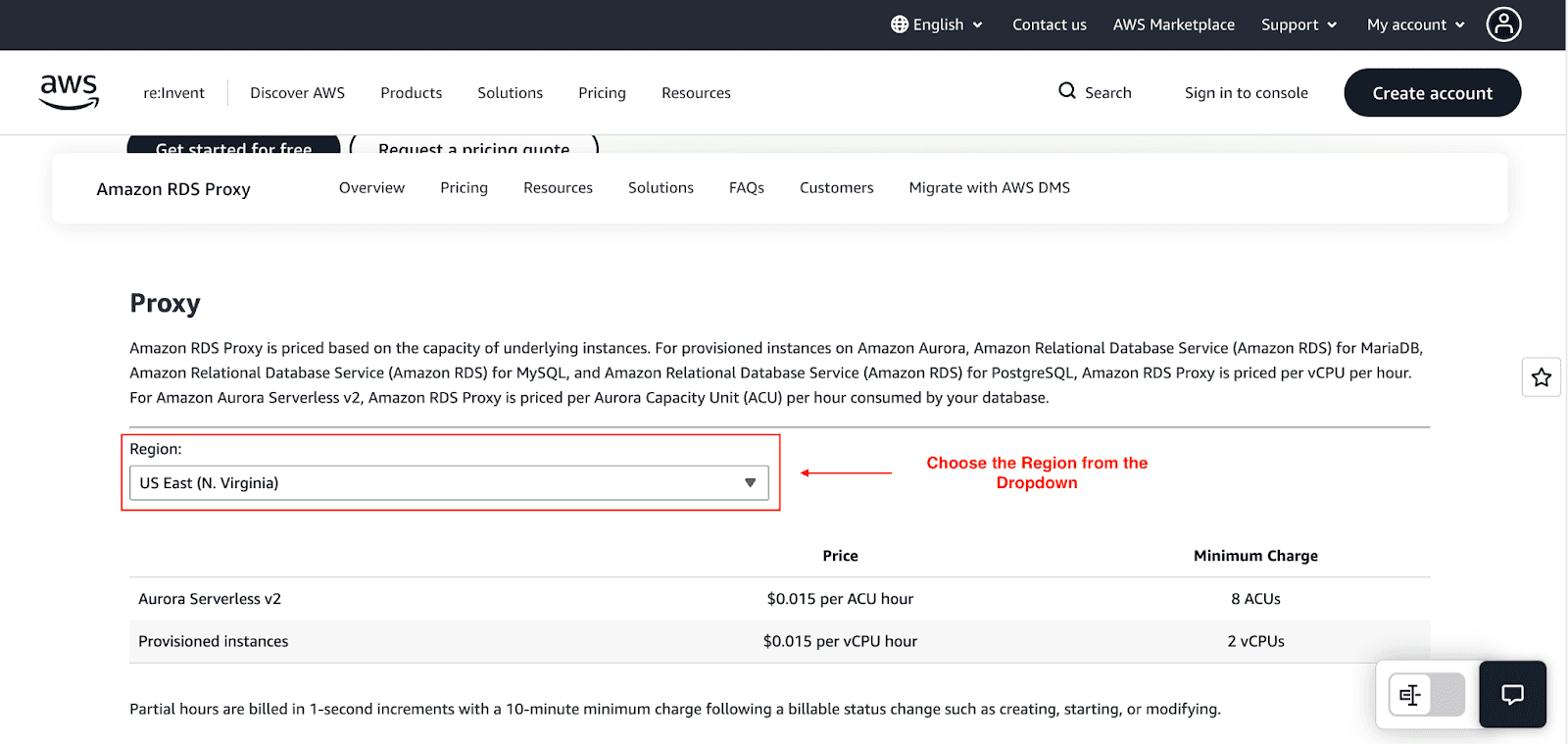
For provisioned RDS instances (Aurora, RDS for MySQL, RDS for PostgreSQL, RDS for MariaDB), RDS Proxy charges are on a per vCPU, per hour basis, depending on the type of the underlying database instance, with a minimum charge of $0.015 for each vCPU hour with 2 vCPUs.
For Aurora Serverless v2, RDS Proxy charges are $0.015 for each Aurora Capacity Unit per hour, with a minimum charge for 8 ACUs.
Partial hours are billed in one-second increments with a 10-minute minimum charge following a billable status change, like creating, starting, or modifying the proxy.
For Example, assume you are running some RDS MySQL instance with 4 vCPUs in the US East (N. Virginia) region, where the RDS Proxy charge is $0.015 per vCPU per hour, then the monthly cost calculation is shown below.
4 vCPUs × $0.015 per vCPU per hour × 730 hours (average month) = $43.80 per month
Keep in mind that pricing varies by region, so make sure to check the pricing correctly using the AWS pricing calculator.
Additional Costs
RDS Proxy allows you to create one endpoint, which is free of charge. However, creating other read-only and read-write endpoints will incur charges for AWS PrivateLink interface endpoints.
You only pay for the duration the proxy is active. Additionally, there is no cost for data transfer from the proxy to the database, provided both are in the same region. As a reminder, pricing is not uniform across AWS regions, so it’s best to refer to the official pricing page for the region you are interested in order to get the most accurate details.
Comparison: With and Without RDS Proxy
Let's compare how your application behaves with and without RDS Proxy.
Feature | Without RDS Proxy | With RDS Proxy |
Connection Handling | New connection for every request | Connection pooling & reuse |
Failover Time | 30–60 seconds | 2–10 seconds |
Security | App stores credentials | Managed via IAM & Secrets Manager |
Serverless Compatibility | Risk of connection exhaustion | Fully supported |
Cost Efficiency | Higher DB load, higher cost | Optimized for lower cost |
According to the AWS doc, RDS Proxy can reduce failover times by up to 66% and significantly improve application scalability.
When Should You Use AWS RDS Proxy?
RDS Proxy shines in specific scenarios. Here's when it makes sense to use it.
Ideal Use Cases:
Serverless applications (AWS Lambda, Fargate), where many, many new connections are created. Each invocation would otherwise open an expensive new connection.
Microservice architectures that use the same RDS. RDS Proxy saves the architecture from connection overload.
APIs under heavy load require connections to be handled efficiently. Shield your RDS from connection overloads and ensure optimal performance.
Applications requiring high availability and having the need for failovers. RDS Proxy keeps the system from going down; therefore, your systems remain available.
When You Might Not Need It:
Applications that perform low-demand workloads where the connection charges are lower. Recession and weak demand have a greater impact on the low.
Applications with stable, long-lived connections that automatically scale. If your application is connection efficient (e.g., PgBouncer), RDS Proxy may be more effective with less efficient application architectures.
How to Optimize AWS RDS Proxy Costs
The following insights should help with minimizing RDS Proxy costs:
Right-Size Your RDS Instances
The more vCPUs your RDS database instance has, the higher the RDS Proxy cost. Thanks to RDS Proxy’s intelligent connection pooling, you may find that your current database instance is needlessly oversized, and that downsizing will greatly reduce expenses without negatively impacting output.
Monitor vCPU Usage
Track your RDS Proxy’s vCPU activity using CloudWatch. If the activity is too low, that is a sign that you should reduce the size of the instance. Paying for idle capacity when a cheaper server is available is not a wise cost-saving approach.
Disable Idle Proxies
Stop paying for services that you do not want. For development, testing, or any other situations with planned inactivity, remove RDS Proxy access during non-pick times to save. Each hour a proxy is active is an hour that has to be paid for – cut that expense!
Use Autoscaling Wisely
Go further than making manual changes. For RDS Proxies servicing Aurora clusters, the workload is dynamic and can be adjusted in real-time. RDS Proxy can be configured to automatically scale and monitor real-time demands to help reduce costs.
Use AWS Cost Explorer
Don’t estimate your costs based on guesswork. AWS pricing calculator lets you estimate monthly RDS Proxy costs while sizing down the costs to your RDS database instance and other scaling strategies. Then you can estimate cloud spending on other services with the AWS billing dashboards. Use Cost Explorer to set alarms on spending and systematically monitor each cost center so you can save within your budget.
Conclusion
I hope this guide has taught you everything you need to know about AWS RDS Proxy.
Through pooled connection sharing, your database becomes much more secure and easier to manage, while application traffic can be unpredictable, failover much faster, and application management credentials simpler. The cost is minimal, so the advantages often cover the cost.
Ready to scale your database architecture? Try AWS RDS Proxy today and experience the difference it can make.
Join Pump for Free
If you are an early-stage startup that wants to save on cloud costs, use this opportunity. If you are a start-up business owner who wants to cut down the cost of using the cloud, then this is your chance. Pump helps you save up to 60% in cloud costs, and the best thing about it is that it is absolutely free!
Pump provides personalized solutions that allow you to effectively manage and optimize your Azure, GCP and AWS spending. Take complete control over your cloud expenses and ensure that you get the most from what you have invested. Who would pay more when we can save better?
Are you ready to take control of your cloud expenses?



