All blogs
10 min
Improve SEO & Page Load with AWS CloudFront + S3 CDN
Piyush-Kalra


Speed is often the silent killer of SEO efforts. While businesses invest heavily in content and keywords, they can neglect the foundational element of user experience: how quickly a page loads. According to Lumar, B2C pages with a load time of under one second convert 2.5 times more than those with a five-second load time. Every additional second your site takes to load drastically reduces engagement and harms your search engine rankings.
Fortunately, there's a powerful and cost-effective solution that combines robust storage with a global content delivery network: Amazon CloudFront and Amazon S3. This combination is not just a tool for developers; it's a strategic advantage for marketers and SEO specialists aiming to climb the search rankings.
In this article, we will explore both the technical and marketing benefits of using AWS CloudFront and S3. You will learn why page speed is essential for modern SEO, how this AWS duo works, and how to configure them for optimal performance.
Why Page Speed is Essential for SEO
When it comes to ranking for the top position on SERPs relevant to your business, speed is crucial. Google prioritizes user experience, and to Google, the most important aspect of user experience is the speed at which the page loads.
Understanding Google's Core Web Vitals
Google Core Web Vitals is a set of user-centric metrics to assess webpage performance in the real world. Web Vitals looks at load speed, interactivity, and the visual stability of a webpage. As Amazon suggests, CloudFront helps improve these vitals by lowering load times and enhancing server response times. The three most important metrics are:
Largest Contentful Paint: Measures how long it takes for the largest content element (image, text block) on the page to render and be visible to the user. A positive LCP score is 2.5 seconds or lower.
First Input Delay: Measures the time that lapses from when a user first engages your page (e.g., clicking a link or button), to when the page can respond to that input. A positive user experience is having FID at 100 milliseconds or lower.
Cumulative Layout Shift: Measures the visual stability of a page, looking for unexpected shifts in layout as content loads. A good CLS score is 0.1 or lower.
Slow-loading sites perform poorly on these metrics, which can lead to lower search rankings.
The Impact of Load Time on Rankings and Bounce Rates
Slow websites frustrate users. This frustration leads directly to higher bounce rates, the percentage of visitors who leave your site after viewing only one page. A high bounce rate signals to search engines that your site isn't providing a good user experience, which can negatively impact your rankings.
Conversely, even small speed improvements can yield significant results. For example, some studies have shown that a one-second improvement in load time can increase conversions by several percentage points. Faster pages keep users engaged, encourage them to explore more of your site, and ultimately improve your SEO performance.
What Are AWS S3 and CloudFront?
Before you learn how to improve the loading speed of your website, you must understand the components you need to do so. CloudFront and S3 are two different yet complementary AWS services that will help you deliver your content quickly and efficiently.
Amazon CloudFront: CloudFront is Amazon’s worldwide content delivery network. As a network of geographically dispersed servers, a CDN has points of presence, called edge locations. When CloudFront caches copies of your static content stored on S3, it saves those copies to edge locations. When a customer asks for a file, the server closest to the customer edge location, CloudFront, saves it on CloudFront and delivers the file. This reduces file latency.
Amazon S3: S3 is Amazon’s highly scalable and secure object storage service, and a massive, deadbeat hard storage disk is a good analogy for S3, which in the Cloud delivers static assets, like images, videos, CSS stylesheets, and JavaScript files.
CloudFront for delivery and S3 for storage offer a secure, cheap, and fast solution for a website’s static assets.
A Powerful Alliance: The Benefits of CloudFront + S3
Combining AWS CloudFront with S3 creates a powerful infrastructure and boosts your performance and SEO greatly.
Reduced Latency and Faster Crawl Rates
CloudFront uses edge caches located around the globe and caches your content, minimizing the distance your users’ data must travel. This results in lower latency and faster load times, thus improving access times for users located anywhere in the world. The faster loading of content also results in quicker page crawl rates for search engines. Google's crawlers access your pages faster, leading to quicker content indexing and search result updates.
Improved Core Web Vitals and User Experience
With faster sites, you will have improved Core Web Vitals metrics. As your LCP score improves, thanks to content being delivered to your users from the nearby edge caches of CloudFront, you will have a better website. A well-configured CDN improves bounce, dwell, and overall site quality signals to Google, improving your search rank.
Scalability and Reliability
CloudFront servers are optimally designed to manage unattainable traffic spikes. Your site will remain responsive to user requests during traffic spikes from news site features and during viral marketing campaigns. This improves user experience, a vital aspect for SEO.
Built-in Security with HTTPS
All CloudFront distributions provide free SSL/TLS certificates from AWS Certificate Manager, so you can distribute content over HTTPS. Having HTTPS is a minor ranking signal on Google. More importantly, HTTPS secures a user's connection to your website, providing protection and trust.
How AWS Setup Compares to Alternatives
Criterion | AWS CloudFront + S3 | Cloudflare / Other CDNs |
Integration with storage | Native pairing with S3 | Works, but requires sync or origin configuration |
Global reach & edge network | Broad AWS edge coverage | Often denser CDN networks in some locales |
Cost structure | Pay-as-you-go, efficient egress with caching | Often includes many features, possibly at a higher cost |
Flexibility / control | Granular cache policies, Lambda@Edge, custom logic | Strong features too; easier UI in many cases |
SEO / performance support | Strong, optimized edge delivery, TLS, and caching | Also good, but might need more tuning |
When AWS shines:
You’re already in the AWS ecosystem (EC2, RDS, etc.).
You expect spikes in traffic or need to scale internationally.
You want fine-grained control and integration (Lambda@Edge, IAM, etc.).
You want cost predictability via caching.
Step-by-Step Guide: Setting Up S3 and CloudFront
Configuring S3 and CloudFront is a straightforward process. Here’s a simplified guide to get you started.
1. Create an S3 Bucket:
Go to the S3 Console and click Create bucket.
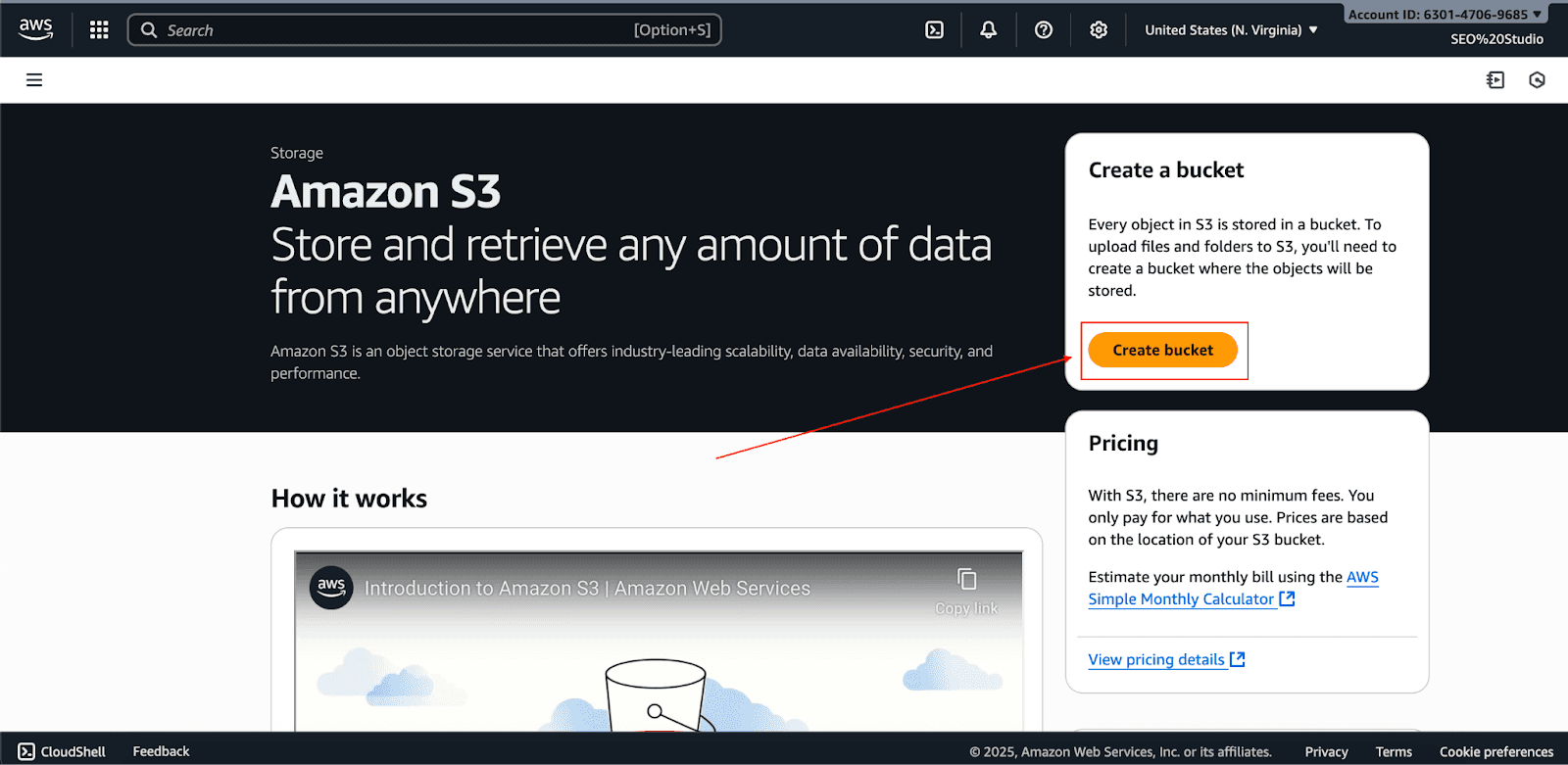
For advanced security, we recommend keeping the bucket fully private. Access will be allowed solely through CloudFront.
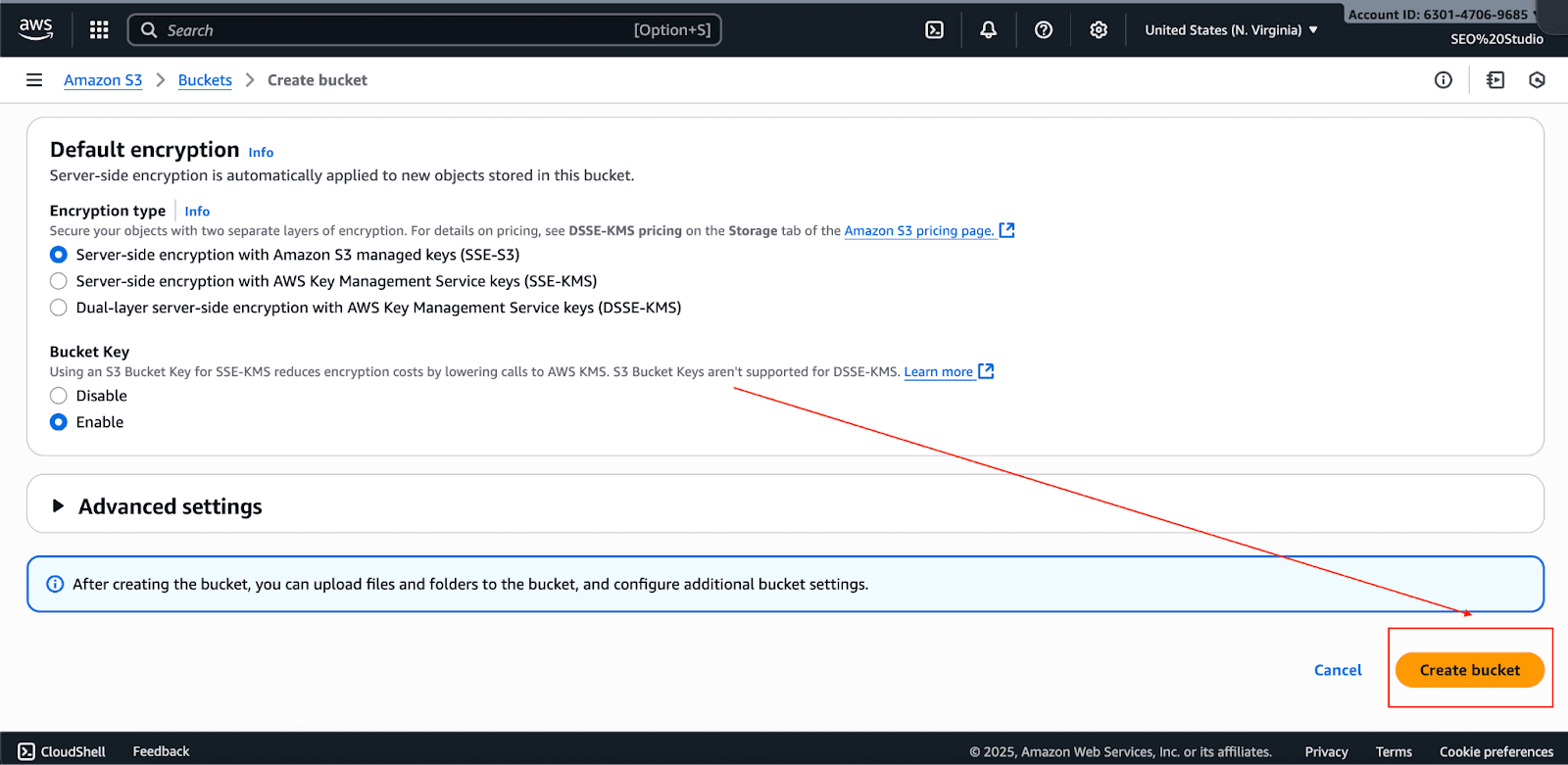
Leave all the settings at their default and click Create Bucket.
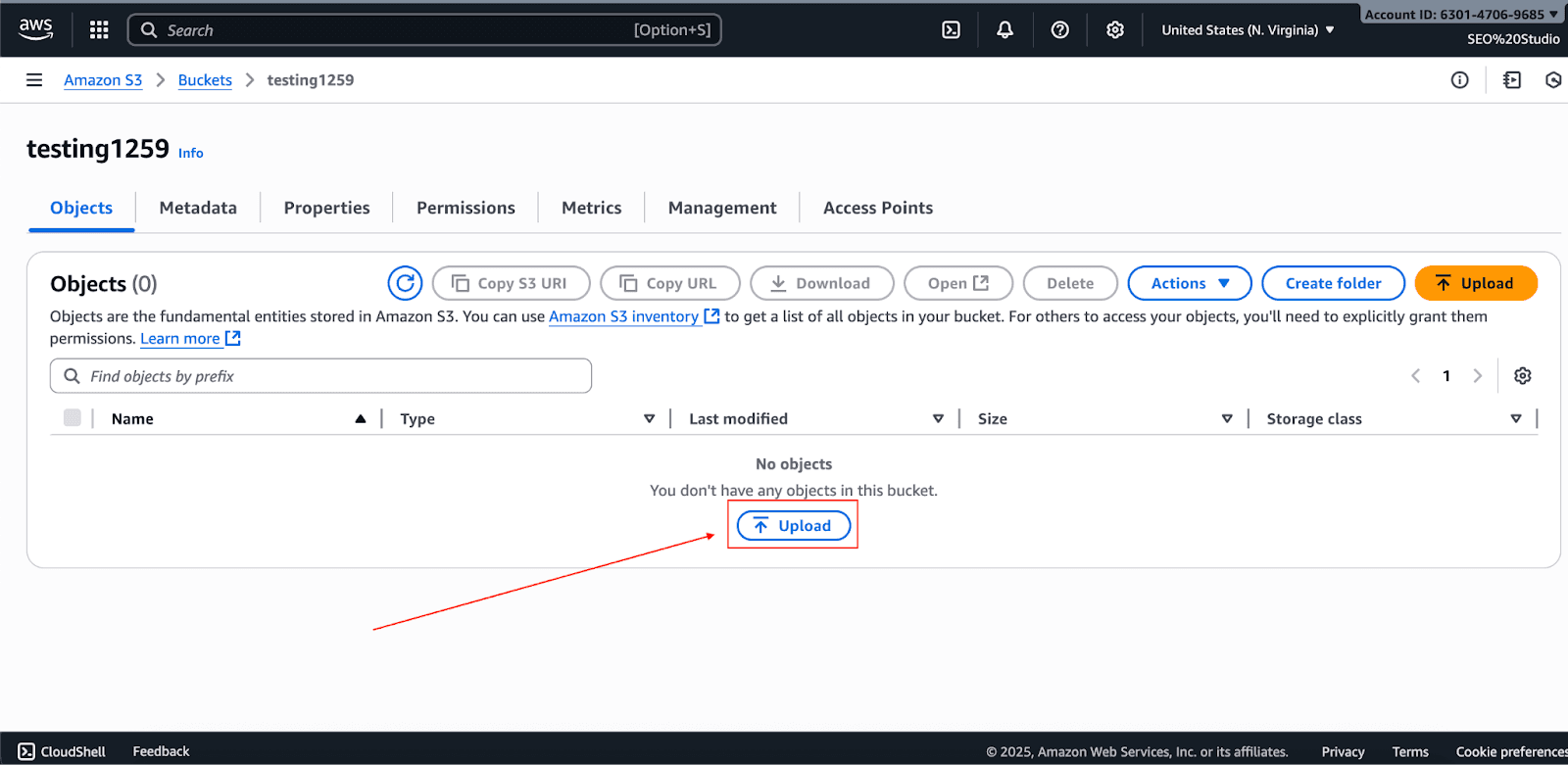
In the general-purpose buckets, choose the name of the bucket and click Upload.
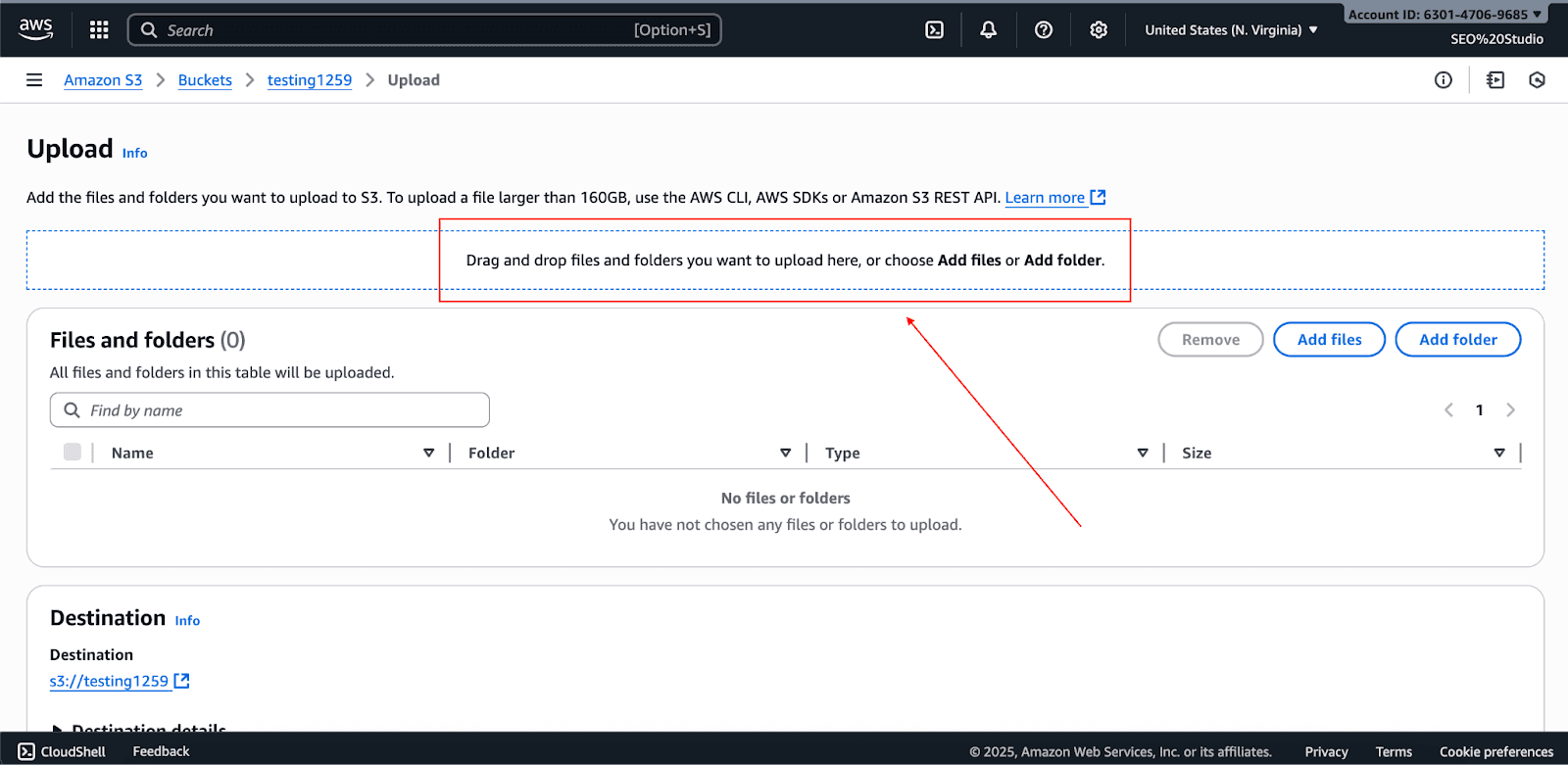
Upload static assets, images, CSS, and JavaScript files to the newly created bucket.
Set cache headers:
- For versioned assets (e.g., style.v2.css): set Cache-Control: max-age=31536000, public. This allows 1-year caching.
- For non-versioned assets such as HTML: use shorter TTL (e.g., Cache-Control: max-age=300, must-revalidate).
2. Create a CloudFront Distribution:
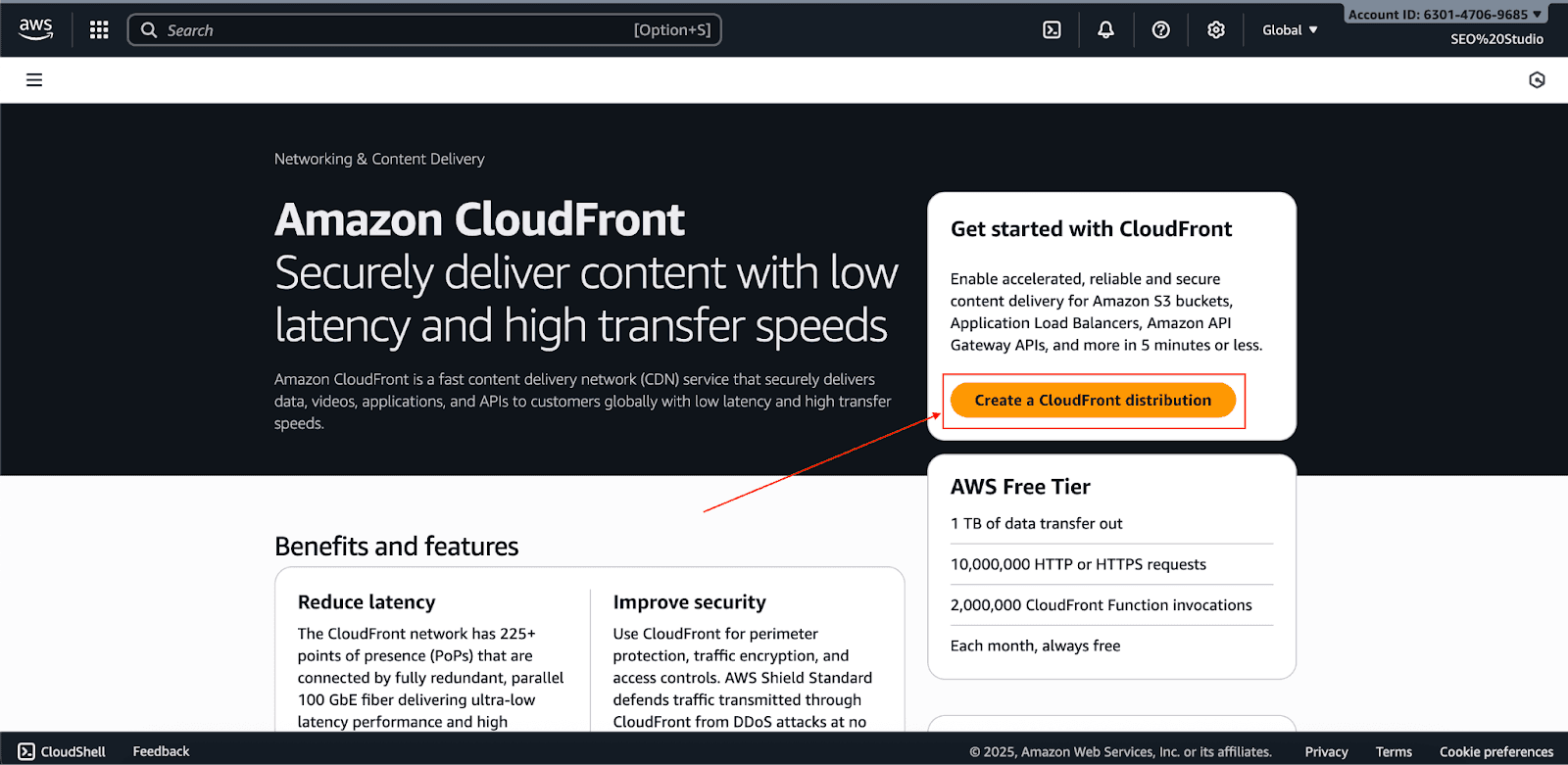
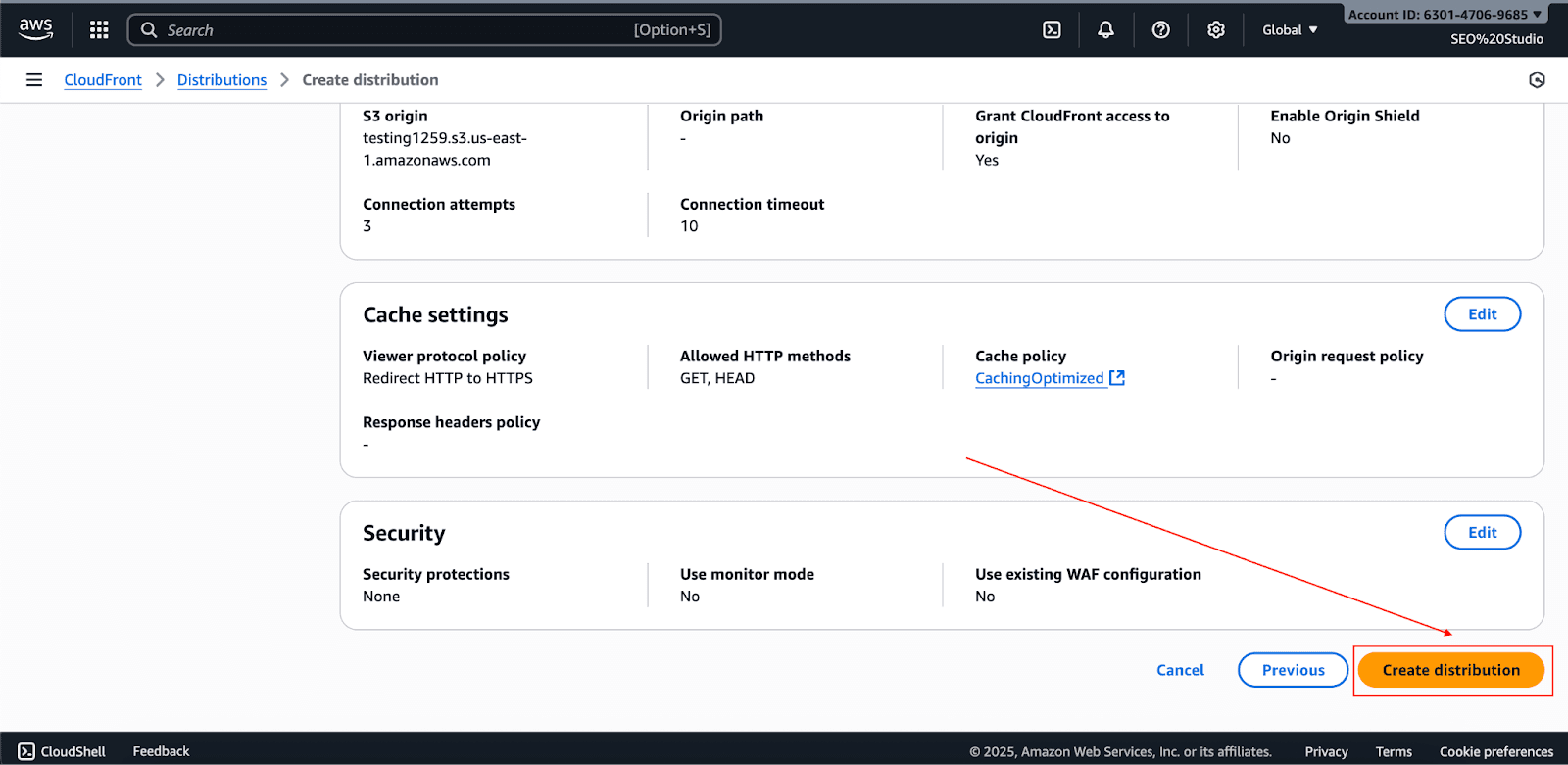
Go to the CloudFront console and click Create Distribution.
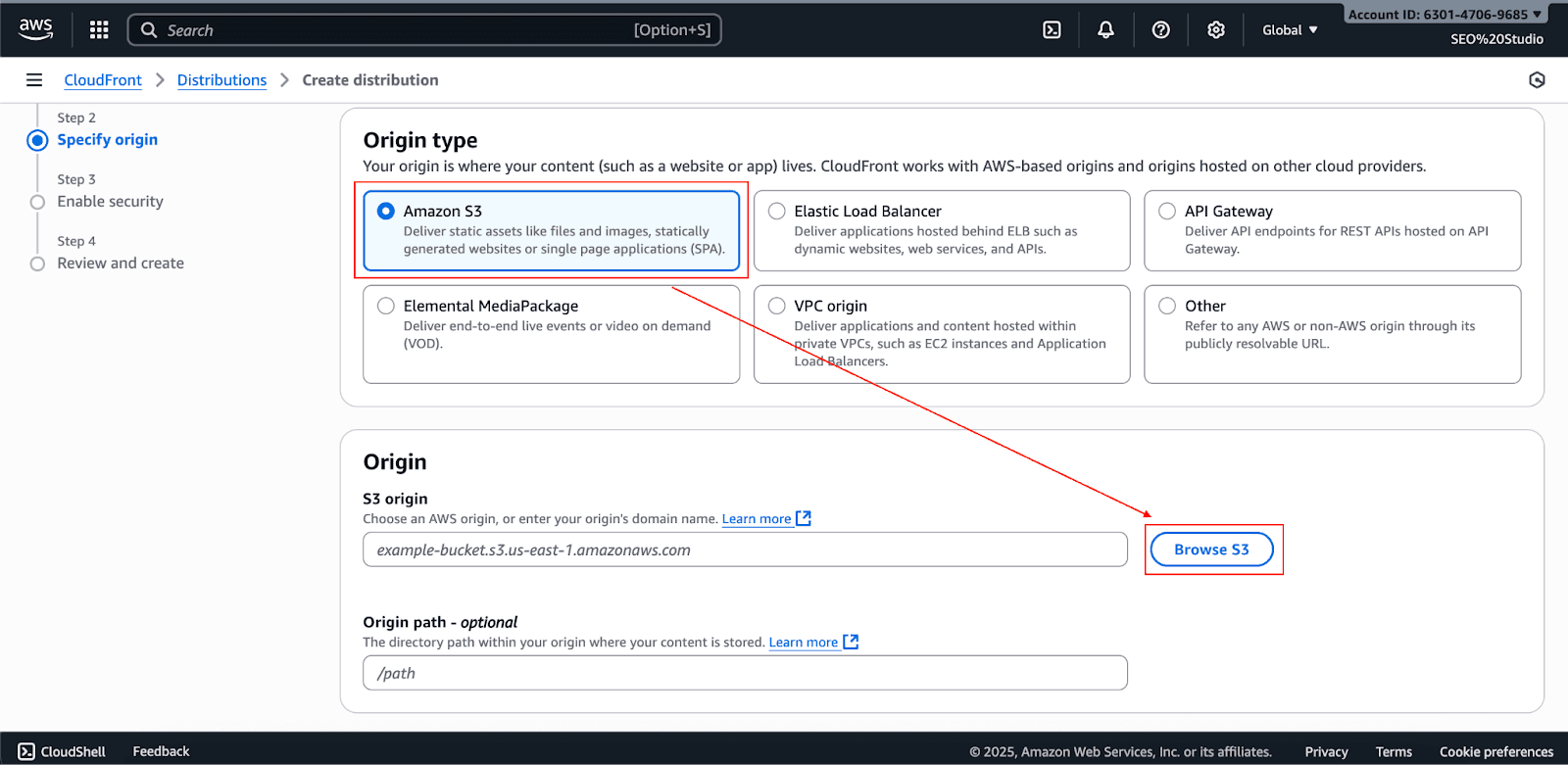
Choose your S3 bucket as the Origin Domain.
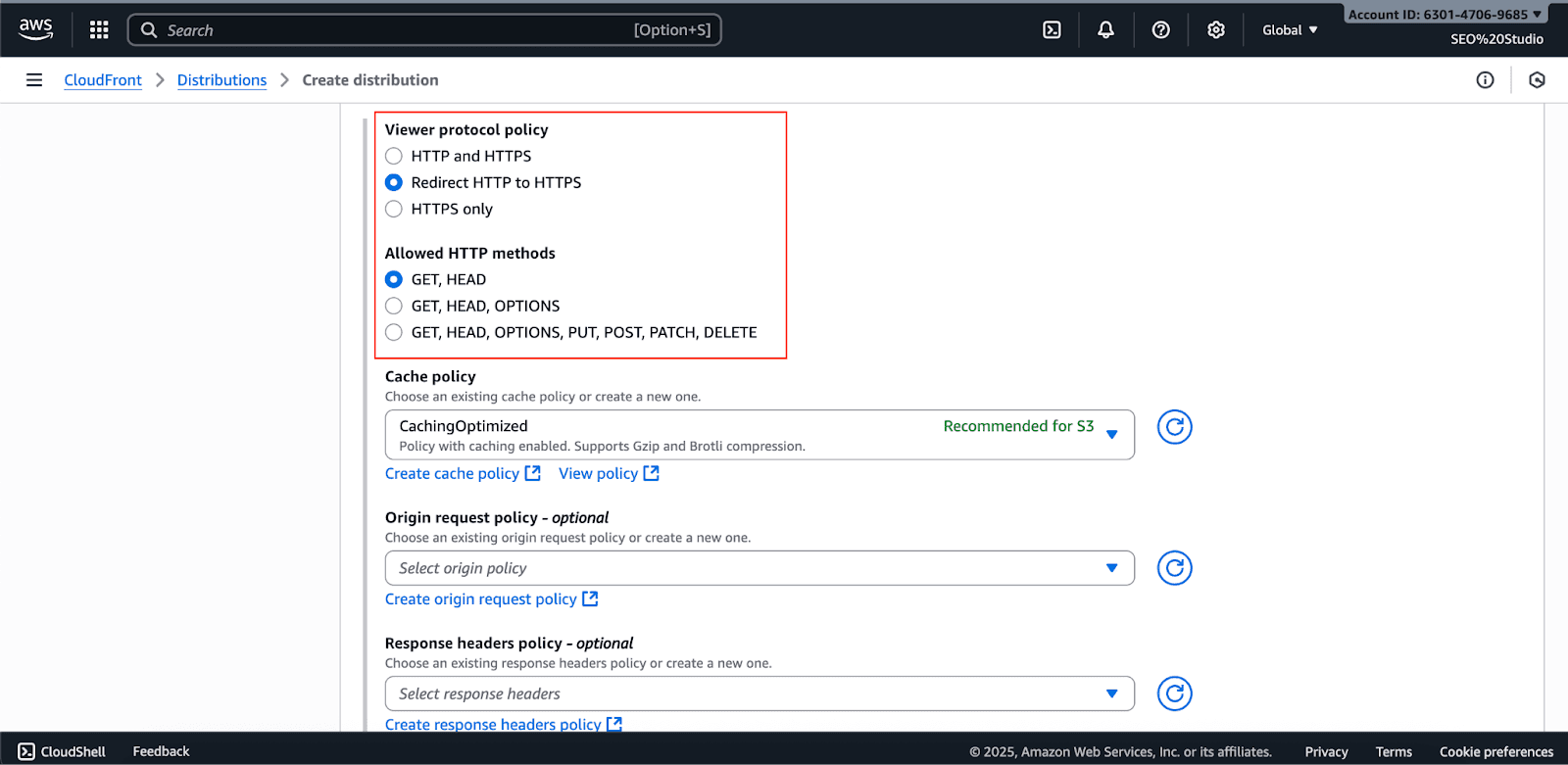
Set the Viewer Protocol Policy to Redirect HTTP to HTTPS.
Choose a Cache policy (Cachingoptimized) to allow for gzip/Brotli compression, which improves loading speeds.
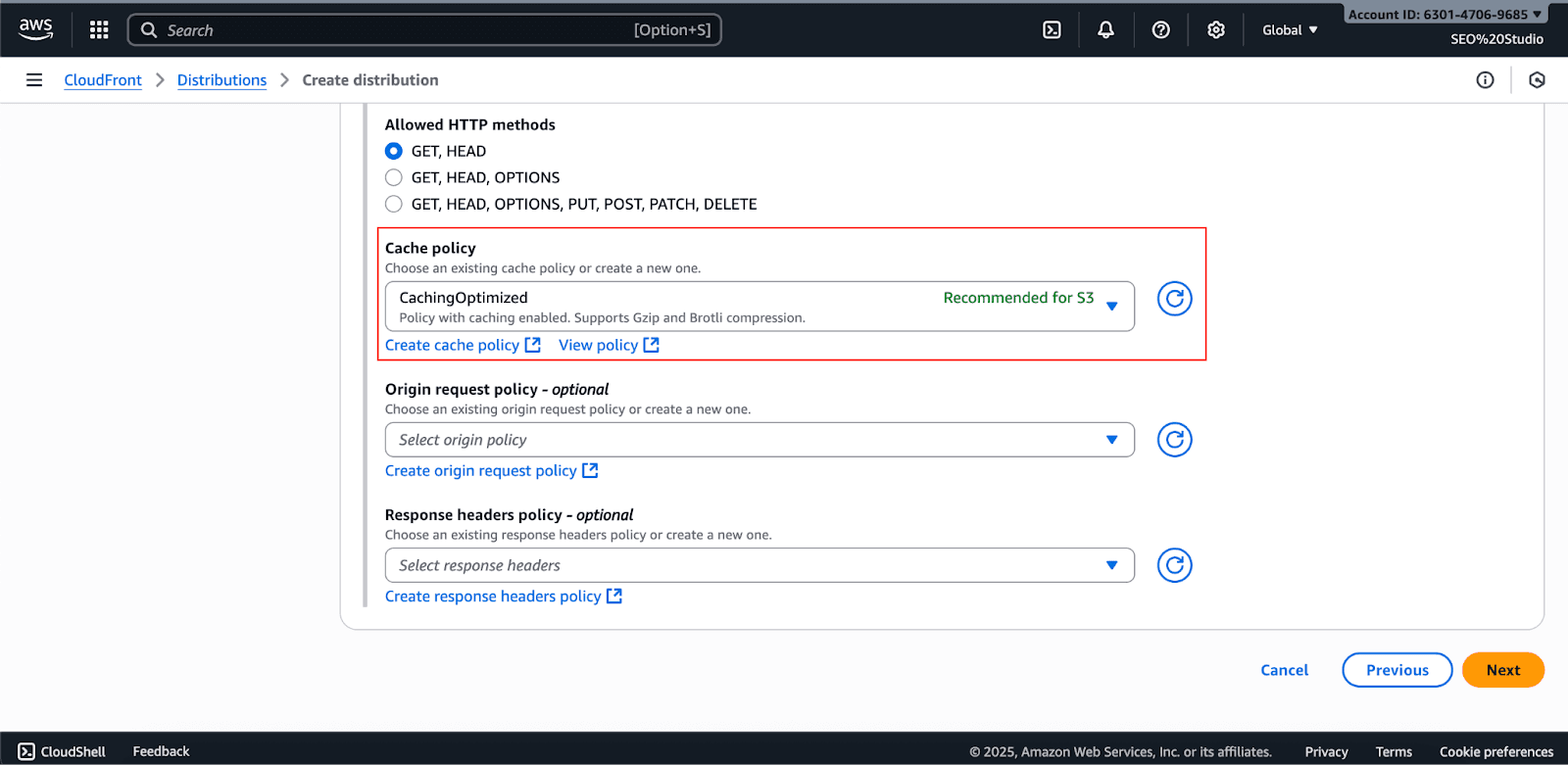
Click Create Distribution and wait for the distribution to deploy. This takes about 15 to 30 minutes.
3. Add Your Custom Domain and HTTPS:
In the distribution settings, add your domain name (e.g., www.example.com) as an Alternate Domain Name (CNAME).
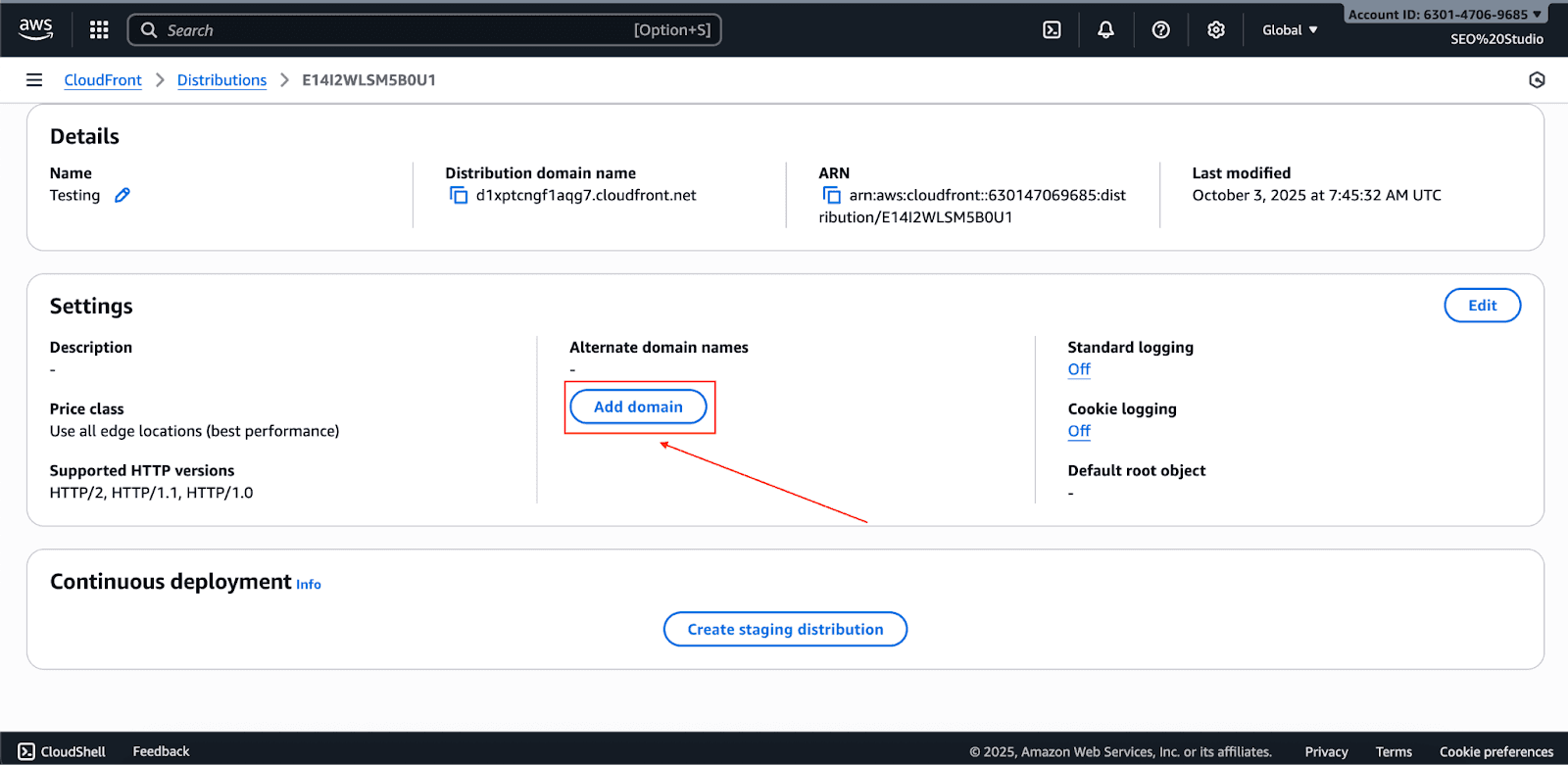
To activate HTTPS, start by requesting a public SSL certificate for your domain in AWS Certificate Manager. After validation, you can attach it to your CloudFront distribution.
With either Route 53 or your external DNS provider, create an ALIAS or CNAME record to direct your domain (e.g., www.example.com) to your CloudFront distribution's domain name (e.g., d111111abcdef8.cloudfront.net).
Remember that DNS propagation can take anywhere from a few minutes to 48 hours to complete.
4. Configure Cache Behavior:
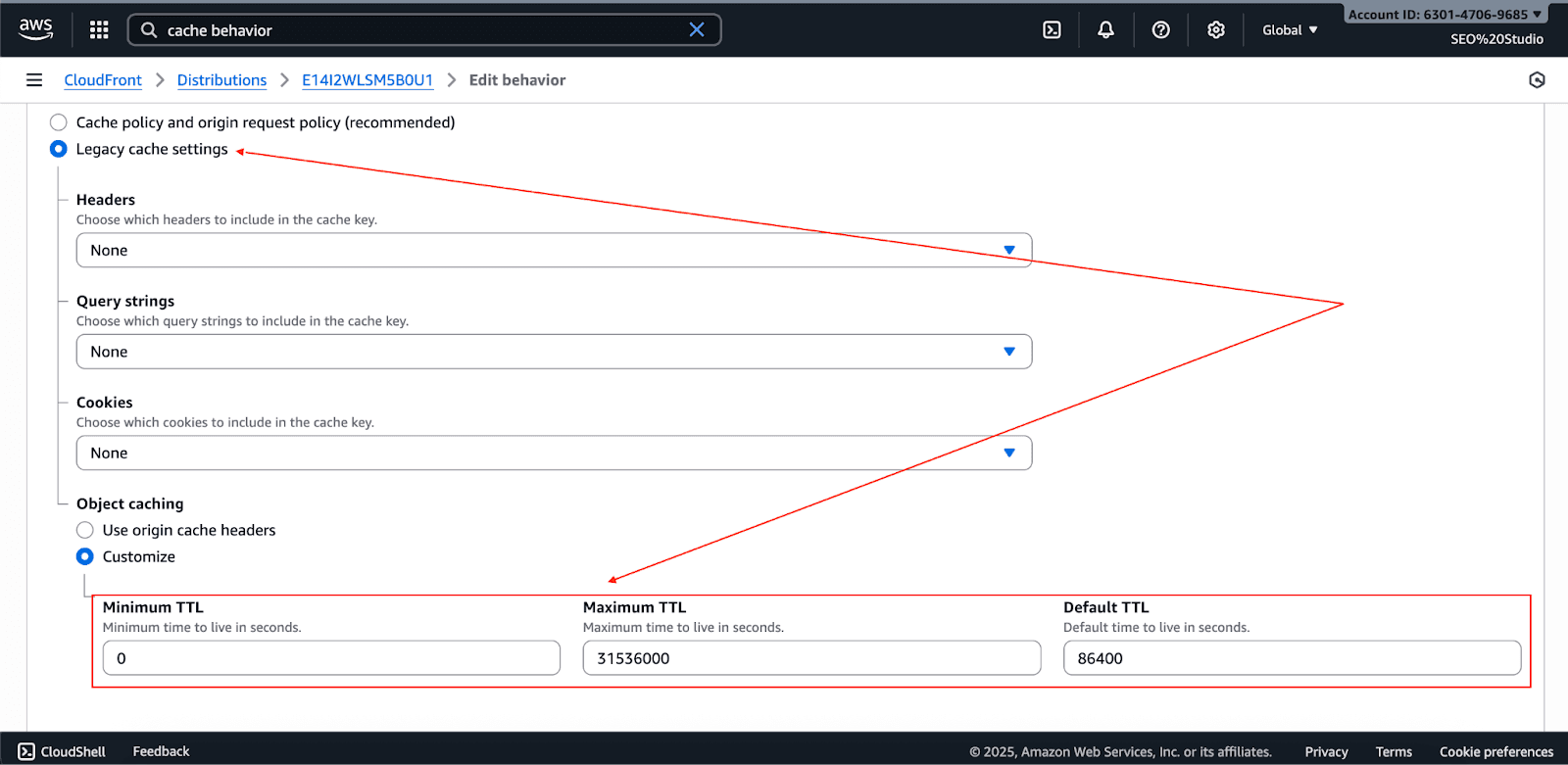
In Cache Behavior Settings:
- Static assets (CSS, JS, images): Use long TTLs (days/months) since they rarely change.
- HTML or dynamic content: Use short TTLs (seconds/minutes).
Achieve Maximum Speed and Savings
You’ve now configured AWS CloudFront and S3 for peak performance and best-in-class SEO. This configuration surely gives you a cost-effective and scalable base for your web presence. However, the more you use the cloud, the more complicated it becomes to monitor and control your spending.
This is where Pump becomes crucial. Pump uses AI for cost optimization and group purchasing for cloud services to save companies between 10 to 60% on their cloud bills. Pump analyzes your spending patterns and automatically buys long-term plans like Reserved Instances and Savings Plans, thus netting savings that only large companies can access.
Better still, Pump is totally free for you. Cloud providers absorb all the costs for Pump, thus allowing you to concentrate on business expansion while we concentrate on cost reduction. There is a manual mode and an autopilot mode, allowing you to take full control of the optimization or allowing our AI to do it all.
Interested in taking your AWS performance to new heights while spending a fraction of the costs? Check out Pump and discover your possible savings today.