

If you've ever tried managing cloud costs, you will understand how complex the process can be. One of the most unexpected and frequent costs for companies is data protection. At this point, you likely understand the importance of backup. However, costs can escape your budget. With no strong understanding of backup pricing, costs can spiral out of control. AWS Backup offers a powerful, centralized, and more than reasonable solution for a backup service. However, the costs are consumptive and can lead to surprises on your bill.
In this article, we will break down the most helpful and useful methods to understand how AWS Backup Pricing works, understand your costs, and develop methods to control your AWS Backup Pricing costs. This should allow you to develop an effective and proper data protection strategy with no surprises on your bill. This is the primary focus of the following sections.
What is AWS Backup?
AWS Backup is a fully managed service that automates and centralizes the management of data backups across AWS Services. Rather than managing disparate backup solutions across Amazon EBS, RDS, EFS, S3, and DynamoDB, you can handle all of them from the same console. This greatly simplifies backup management, allowing you to transition from complex customized scripts and tedious manual snapshots to a fully automated, policy-based approach for managing backups. The service ensures that your resources remain compliant with your defined retention policies, thus meeting a critical need for both data protection and disaster recovery.
The Pay-As-You-Go Model
Like many AWS services, AWS Backup uses a pay-as-you-go pricing model. This means there are no initial upfront fees, minimum commitments, or setup charges. You only pay for the resources consumed, which include the following:
The amount of backup storage you use (warm or cold tier).
The data you restore or recover.
Data transferred across different AWS Regions.
This price model favors new companies and allows you to budget easily. But if companies experience data growth or if backup policies are poorly implemented, expenses can grow very quickly.
Why Backup Costs Can Surprise You
The flexibility of the pay-as-you-go model comes with a need for vigilance. Many aspects might be causing you to unknowingly overspend on AWS backups. Some of the most critical expenses are: the entirety of your stored data, the duration of your data retention, the frequency of data change increments, and the costs of cross-region data transfers for backup recovery.
Some of the most common oversights resulting in increased costs include:
Over-retention: Keeping backups longer than required, especially when stored in a higher cost tier.
Ignoring storage tiers: Not using lifecycle policies to automatically move older backup data to more cost-effective cold storage solutions.
Unmonitored cross-region copies: Transferring backup copies to other disaster recovery regions without monitoring the associated data transfer charges.
Forgetting restore costs: Failing to account for the charges associated with data retrieval from backups, especially from cold storage.
A Deep Dive into AWS Backup Pricing Components
AWS Backup costs can be estimated accurately only if you need to understand each part of the cost. Let's break down the main pricing components.
1. Backup Storage

This is often the largest fraction in the bill. Backup storage is charged on a per GB-month basis, not per snapshot. Even incremental backups count towards your stored backup total. AWS has two primary storage tiers:
Warm Storage: This is the default tier for backups requiring frequent and quick access. It allows instantaneous access for restores, but comes at a higher price. For many services, EBS and EFS included, pricing typically starts at about $0.05 per GB-month, but can be different depending on the resource and the region.
Cold Storage: This offers a cheap solution for the long-term archival of backup data, and is typically more than 70% cheaper than warm storage, at about $0.01 per GB-month. However, it comes with slower restore times. It is also not available for all services; for example, cold tier is not supported in RDS snapshots.
2. Restore/Recovery Costs

Recovering data stored in backups incurs additional charges, as AWS applies a restore cost based on the volume of data restored in GB:
Warm storage is the cheapest to restore from, approximately $0.02/GB.
Cold storage is the second cheapest at $0.03/GB because it’s, and remains, more expensive to restore from due to higher storage costs.
Restoring from Item-Level Restore is usually more and more expensive per GB than a full restore, but can be cheaper overall if you only need a small amount of data. For example, an EFS file backup can cost $0.50 per request.
3. Cross-Region Data Transfer
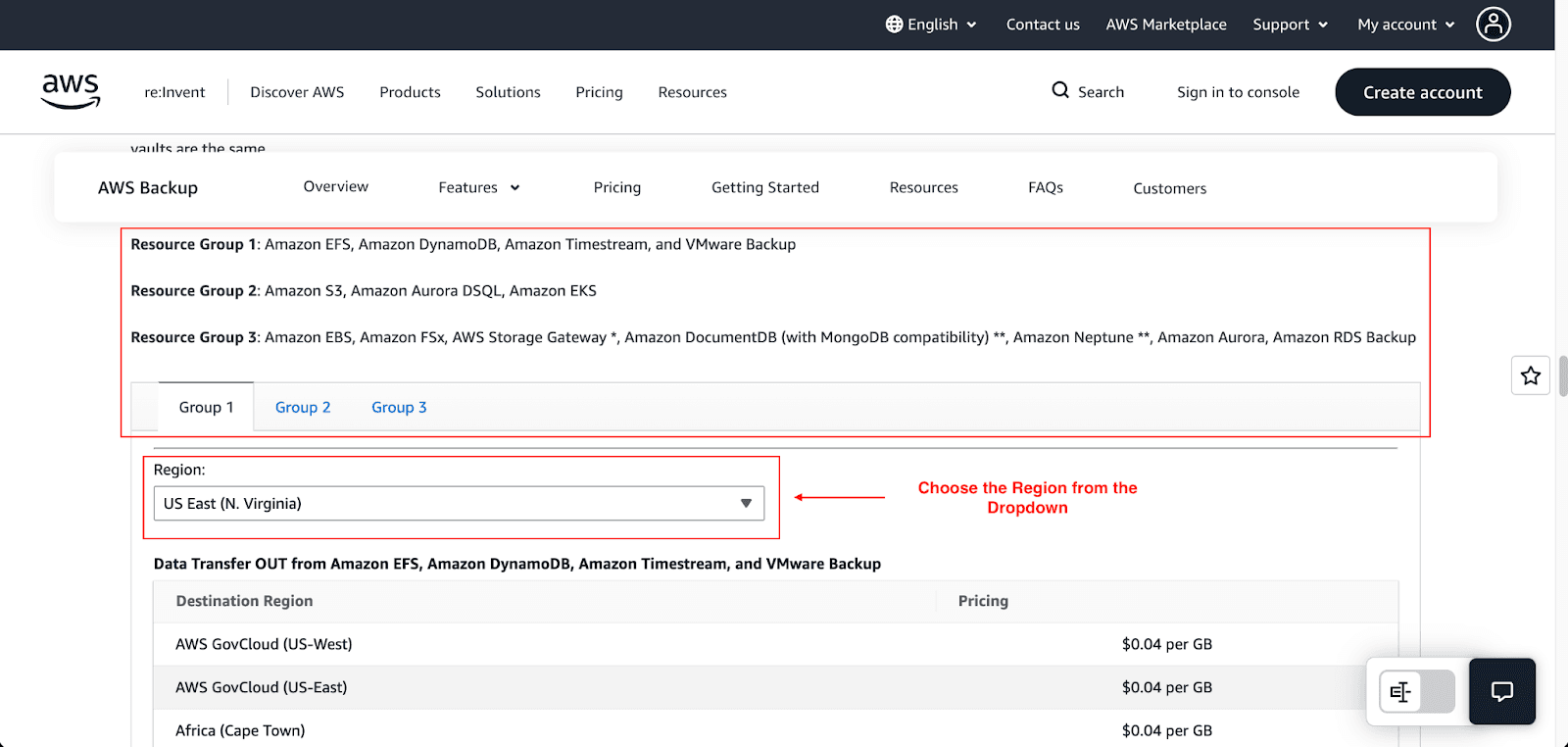
To ensure disaster recovery, it is feasible to duplicate certain backups to other AWS Regions. However, you will incur a data transfer charge. Charges are assigned when data exists in a specific region. An example would be transferring data from US East (N. Virginia) to another region, such as US West (California), which would cost an estimated $0.04/GB. Data transfers within a single region are entirely free.
4. Backup Evaluations (AWS Backup Audit Manager)
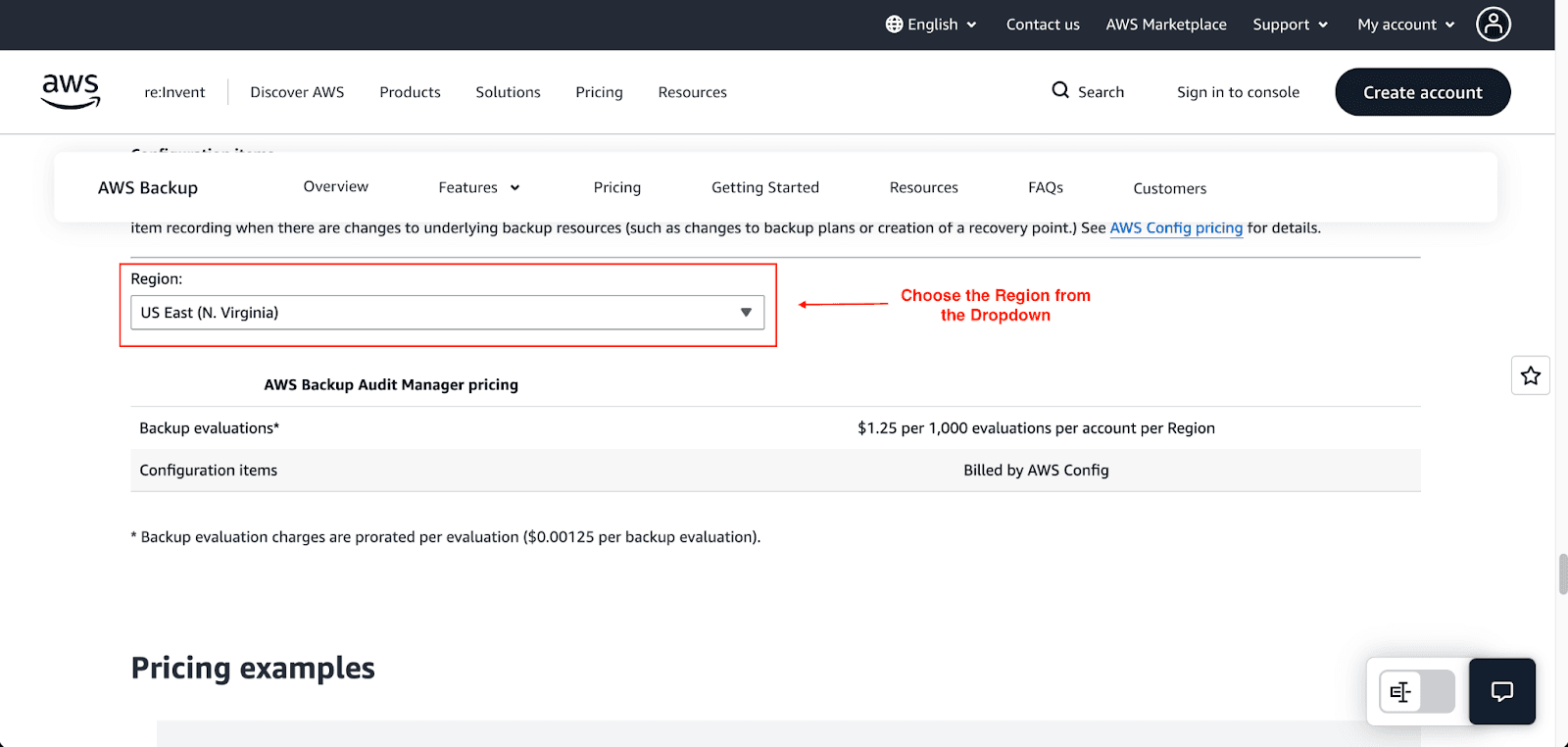
AWS Backup Audit Manager for Windows is a compliance and auditing option that will incur a cost for each backup evaluation you perform to be audited. This is a fairly insignificant cost, which is estimated to be $0.00125 for each 1000 evaluations performed within a region, which can be expensive if you are performing multiple audits across a large number of resources.
Service-Specific Pricing Nuances
The different AWS services each have culturally unique pricing and characteristics within AWS Backup:
Amazon RDS: This service grants you free backup storage, which is equal to 100% of your total regional storage size for your databases. Backup storage will only start to incur charges when you accumulate excess amounts, and storage costs around $0.095 per GB-month within many of the AWS Regions.
Amazon S3: Backing up S3 buckets involves paying standard storage costs. There’s also an additional cost incurred for API requests (e.g, GET and LIST) that AWS Backup employs to index your objects.
Amazon EBS & EFS: Given their ability to support tiered cold storage, these products are well-suited to implement and take advantage of life-cycle policies to realize some cost savings.
How to Estimate Your Costs
While the AWS Pricing Calculator will give the most accurate estimate, simplicity dictates that we walk through a couple of hypothetical scenarios:
Scenario 1: Small-Scale Backup
Resource: One 100 GB EBS volume.
Backup Plan: Daily incremental snapshots back up and retain for 30 days in warm storage.
Assumption: 2% daily data change (2 GB).
The first time, the backup is a full 100 GB snapshot, after which the backups are incremental. The full storage is approximately the original 100 GB, and for 30 days, 2 GB is added with 60 GB, so about 160 GB in total.
- Estimated Monthly Storage Cost: 160 GB * $0.05/GB-month = $8.00
Scenario 2: Medium-Scale with Disaster Recovery
Resource: 1 TB of EFS data.
Backup Plan: Daily backups for 90 days retention and sent to another region for disaster recovery.
Assumption: 5% daily change rate (50 GB).
Here, you will incur costs in two regions and data transfer charges:
Primary Region Storage Cost: 1000 + 4500 = 5500 GB. 5500 GB × $0.05 = $275/month
Cross-Region Transfer Cost: 1,500 GB/month × $0.04/GB = $60/month.
DR Region Storage Cost: Similar to the primary region, adding another $275/month.
Strategies for Backup Cost Optimization
Having come to terms with the costs involved, it is time to think about how to cut your costs. Backup management is only one piece of the data protection puzzle, and it must be done with cost in mind.
1. Master Your Retention Policies
The easiest way to save money is to stop paying for backups that you will never use:
Define Retention Periods: Set realistic retention periods based on business and compliance requirements. Retention timeframes should not and cannot default to forever.
Use Lifecycle Rules: This is one of the most important features. Set up rules in your AWS Backup plans for auto-transitioning older backups from warm to cold, and eventually, to delete them altogether. As an example, you might want to keep daily backups in warm storage for the first 30 days, after which the backups should be transferred to cold storage to be retained for an additional 60 days.
2. Use the Right Storage Tier
Tiering helps you with long-term storage solutions:
Warm Storage: This is recommended for operational backups required for quick restores (Example: backups from the last 7 days-30 days).
Cold Storage: This is useful for backups that must be retained either for compliance and/or archival purposes, and that are rarely accessed. Substantial savings will be achieved. Restores, however, will be slower and at a higher cost.
3. Be Smart with Cross-Region Copies
Disaster recovery is important, but that doesn't have to come with a tremendous cost:
Be Selective: Only extend cross-region copies to your application and data backups of the highest importance. Not every server is required to have a cross-region copy.
Check Frequencies: Assess the backup copies for non-essential systems; perhaps skipping a week to a month would meet the needed frequency.
4. Monitor and Tag Everything
You can't optimize what you can't see:
Cost Allocation Tags: Adding tags to your backup resources gives you the ability to see which departments, projects, or applications are costing the most in backups when you use AWS Cost Explorer and the Cost and Usage Reports.
Set Budgets and Alerts: Use AWS Budgets has the ability to set alerts to inform you when backup costs are exceeding set amounts, allowing you to preemptively mitigate unexpected spend spikes/hindrances before escalation.
5. Align Your Backup Architecture with Your Needs
Make sure your backup strategy is in alignment with your business goals:
RTO/RPO: Determine the Recovery Time Objective and Recovery Point Objective. Some application use cases do not demand instantaneous recovery. Less critical ecosystems can have longer recovery time windows to utilize cheaper backup alternatives.
Full vs. Incremental: AWS Backup automatically uses incremental backups, after the first full snapshot, on an ongoing basis. This is efficient since backups are only sustained for the changing data. Educate yourself on the process to avoid unnecessary full backups.
Conclusion
I hope this article helped you understand everything about AWS Backup and its pricing model. Gaining insight into the pricing structure of AWS Backup is crucial to enhancing the economic efficiency of your data protection strategy. Protecting data is not the primary goal; it is implementing sound strategies and protection measures. You can save a lot of money on data protection by understanding the pricing structure, predicting your volume, and utilizing optimization strategies.
Now it’s time for you to execute your plan. Use the strategies outlined in this article to review your existing configuration against the baseline. Make an estimation of your expected backup costs for the forthcoming quarter and analyze them against your existing costs. This method of cost control is an iterative exercise: you will continue to control costs by Monitoring, Analyzing, and optimizing.
Join Pump for Free
If you are an early-stage startup that wants to save on cloud costs, use this opportunity. If you are a start-up business owner who wants to cut down the cost of using the cloud, then this is your chance. Pump helps you save up to 60% in cloud costs, and the best thing about it is that it is absolutely free!
Pump provides personalized solutions that allow you to effectively manage and optimize your Azure, GCP, and AWS spending. Take complete control over your cloud expenses and ensure that you get the most from what you have invested. Who would pay more when we can save better?
Are you ready to take control of your cloud expenses?